



<?xml version="1.0" encoding="UTF-8"?><rss version="2.0"
	xmlns:content="http://purl.org/rss/1.0/modules/content/"
	xmlns:wfw="http://wellformedweb.org/CommentAPI/"
	xmlns:dc="http://purl.org/dc/elements/1.1/"
	xmlns:atom="http://www.w3.org/2005/Atom"
	xmlns:sy="http://purl.org/rss/1.0/modules/syndication/"
	xmlns:slash="http://purl.org/rss/1.0/modules/slash/"
	>

<channel>
	<title>editable | Ildefonso Segura</title>
	<atom:link href="https://ildefonsosegura.es/tag/editable-2/feed/" rel="self" type="application/rss+xml" />
	<link>https://ildefonsosegura.es</link>
	<description>Tutoriales de diseño y animación</description>
	<lastBuildDate>Sat, 19 Jul 2025 14:33:01 +0000</lastBuildDate>
	<language>es</language>
	<sy:updatePeriod>
	hourly	</sy:updatePeriod>
	<sy:updateFrequency>
	1	</sy:updateFrequency>
	<generator>https://wordpress.org/?v=6.9.4</generator>

<image>
	<url>https://ildefonsosegura.es/wp-content/uploads/cropped-Favicon-new-logo-website-32x32.png</url>
	<title>editable | Ildefonso Segura</title>
	<link>https://ildefonsosegura.es</link>
	<width>32</width>
	<height>32</height>
</image> 
	<item>
		<title>Regalo de editable en Photoshop // Efecto rayos de luz</title>
		<link>https://ildefonsosegura.es/regalo-de-editable-en-photoshop-efecto-rayos-de-luz/</link>
					<comments>https://ildefonsosegura.es/regalo-de-editable-en-photoshop-efecto-rayos-de-luz/#respond</comments>
		
		<dc:creator><![CDATA[Ildefonso Segura]]></dc:creator>
		<pubDate>Sat, 13 Aug 2022 11:44:37 +0000</pubDate>
				<category><![CDATA[Editable]]></category>
		<category><![CDATA[Efectos]]></category>
		<category><![CDATA[Fotocomposición]]></category>
		<category><![CDATA[Photoshop]]></category>
		<category><![CDATA[Recursos]]></category>
		<category><![CDATA[Tecnicas]]></category>
		<category><![CDATA[Textura]]></category>
		<category><![CDATA[Video]]></category>
		<category><![CDATA[Wallpaper]]></category>
		<category><![CDATA[adobe]]></category>
		<category><![CDATA[creatividad]]></category>
		<category><![CDATA[diseño]]></category>
		<category><![CDATA[editable]]></category>
		<category><![CDATA[efecto]]></category>
		<category><![CDATA[estilo]]></category>
		<category><![CDATA[ildefonsosegura]]></category>
		<category><![CDATA[lightrays]]></category>
		<category><![CDATA[photoshop]]></category>
		<category><![CDATA[plantilla]]></category>
		<category><![CDATA[ps]]></category>
		<category><![CDATA[rayos de luz]]></category>
		<category><![CDATA[regalo]]></category>
		<category><![CDATA[tecnicas]]></category>
		<category><![CDATA[wallpaper]]></category>
		<category><![CDATA[youtube]]></category>
		<guid isPermaLink="false">https://ildefonsosegura.es/?p=136313</guid>

					<description><![CDATA[<p>En este post os voy a compartir un editable para crear rayos de luz muy realistas. El editable se ha basado en el tutorial que podéis encontrar en el canal de TEXTURELABS (Ver Vídeo). En su web encontrareis también, además de muchos tutoriales de edición de imagen y animación, recursos para poder usar totalmente gratis (sobre [&#8230;]</p>
La entrada <a href="https://ildefonsosegura.es/regalo-de-editable-en-photoshop-efecto-rayos-de-luz/">Regalo de editable en Photoshop // Efecto rayos de luz</a> apareció primero en <a href="https://ildefonsosegura.es">Ildefonso Segura</a>.]]></description>
										<content:encoded><![CDATA[<div data-elementor-type="wp-post" data-elementor-id="136313" class="elementor elementor-136313">
						<section class="elementor-section elementor-top-section elementor-element elementor-element-b7471a2 elementor-section-boxed elementor-section-height-default elementor-section-height-default" data-id="b7471a2" data-element_type="section" data-e-type="section">
						<div class="elementor-container elementor-column-gap-default">
					<div class="elementor-column elementor-col-100 elementor-top-column elementor-element elementor-element-5e938f2" data-id="5e938f2" data-element_type="column" data-e-type="column">
			<div class="elementor-widget-wrap elementor-element-populated">
						<div class="elementor-element elementor-element-7cf2e12 elementor-widget elementor-widget-text-editor" data-id="7cf2e12" data-element_type="widget" data-e-type="widget" data-widget_type="text-editor.default">
				<div class="elementor-widget-container">
									<p align="justify">En este post os voy a compartir un editable para crear rayos de luz muy realistas. El editable se ha basado en el tutorial que podéis encontrar en el canal de <a href="https://texturelabs.org/" target="_blank" rel="noopener"><span style="color: #800000;"><strong>TEXTURELABS</strong></span></a> (<a title="Crear rayos de luz by TextureLabs" href="https://youtu.be/3jSWWLIDZzM" target="_blank" rel="noopener">Ver Vídeo</a>). En su web encontrareis también, además de muchos tutoriales de edición de imagen y animación, recursos para poder usar totalmente gratis (sobre todo texturas).</p>								</div>
				</div>
					</div>
		</div>
					</div>
		</section>
				<section class="elementor-section elementor-top-section elementor-element elementor-element-ed44dd8 elementor-section-boxed elementor-section-height-default elementor-section-height-default" data-id="ed44dd8" data-element_type="section" data-e-type="section">
						<div class="elementor-container elementor-column-gap-default">
					<div class="elementor-column elementor-col-100 elementor-top-column elementor-element elementor-element-34f336b" data-id="34f336b" data-element_type="column" data-e-type="column">
			<div class="elementor-widget-wrap elementor-element-populated">
						<div class="elementor-element elementor-element-61dc780 elementor-widget elementor-widget-text-editor" data-id="61dc780" data-element_type="widget" data-e-type="widget" data-widget_type="text-editor.default">
				<div class="elementor-widget-container">
									<p align="justify">Necesitarás instalar una ACCIÓN en tu Photoshop, que recoge más de 100 pasos. Esto hace más rápida la edición y así no se hace tan cansado volver a repetir los pasos en otro objeto sobre el que quieras aplicar el efecto.</p><p align="justify">La ACCIÓN está incluida en el pack de regalo que te dejo en mi sección de <a href="https://ildefonsosegura.es/regalos/" target="_blank" rel="noopener"><span style="color: #800000;"><strong>REGALOS de ILDEFONSOSEGURA</strong></span></a></p><p align="justify">Aquí puedes ver unos ejemplos de composiciones que te pueden inspirar:</p>								</div>
				</div>
					</div>
		</div>
					</div>
		</section>
				<section class="elementor-section elementor-top-section elementor-element elementor-element-835a414 elementor-section-boxed elementor-section-height-default elementor-section-height-default" data-id="835a414" data-element_type="section" data-e-type="section">
						<div class="elementor-container elementor-column-gap-default">
					<div class="elementor-column elementor-col-100 elementor-top-column elementor-element elementor-element-4e89305" data-id="4e89305" data-element_type="column" data-e-type="column">
			<div class="elementor-widget-wrap elementor-element-populated">
						<div class="elementor-element elementor-element-fc9e4be elementor-widget elementor-widget-shortcode" data-id="fc9e4be" data-element_type="widget" data-e-type="widget" data-widget_type="shortcode.default">
				<div class="elementor-widget-container">
							<div class="elementor-shortcode">[slide-anything id='136325']</div>
						</div>
				</div>
					</div>
		</div>
					</div>
		</section>
				<section class="elementor-section elementor-top-section elementor-element elementor-element-57c9851 elementor-section-boxed elementor-section-height-default elementor-section-height-default" data-id="57c9851" data-element_type="section" data-e-type="section">
						<div class="elementor-container elementor-column-gap-default">
					<div class="elementor-column elementor-col-100 elementor-top-column elementor-element elementor-element-cd7f749" data-id="cd7f749" data-element_type="column" data-e-type="column">
			<div class="elementor-widget-wrap elementor-element-populated">
						<div class="elementor-element elementor-element-1fffd78 elementor-widget-divider--view-line_icon elementor-view-default elementor-widget-divider--element-align-center elementor-widget elementor-widget-divider" data-id="1fffd78" data-element_type="widget" data-e-type="widget" data-widget_type="divider.default">
				<div class="elementor-widget-container">
							<div class="elementor-divider">
			<span class="elementor-divider-separator">
							<div class="elementor-icon elementor-divider__element">
					<i aria-hidden="true" class="fas fa-star"></i></div>
						</span>
		</div>
						</div>
				</div>
					</div>
		</div>
					</div>
		</section>
				<section class="elementor-section elementor-top-section elementor-element elementor-element-232a0e5 elementor-section-boxed elementor-section-height-default elementor-section-height-default" data-id="232a0e5" data-element_type="section" data-e-type="section">
						<div class="elementor-container elementor-column-gap-default">
					<div class="elementor-column elementor-col-100 elementor-top-column elementor-element elementor-element-ad1dfeb" data-id="ad1dfeb" data-element_type="column" data-e-type="column">
			<div class="elementor-widget-wrap elementor-element-populated">
						<div class="elementor-element elementor-element-d2af230 elementor-widget elementor-widget-text-editor" data-id="d2af230" data-element_type="widget" data-e-type="widget" data-widget_type="text-editor.default">
				<div class="elementor-widget-container">
									<p>A continuación te muestro el antes y el después del efecto sobre un texto con imágenes incluidas:</p>								</div>
				</div>
					</div>
		</div>
					</div>
		</section>
				<section class="elementor-section elementor-top-section elementor-element elementor-element-ebe95e6 elementor-section-boxed elementor-section-height-default elementor-section-height-default" data-id="ebe95e6" data-element_type="section" data-e-type="section">
						<div class="elementor-container elementor-column-gap-default">
					<div class="elementor-column elementor-col-50 elementor-top-column elementor-element elementor-element-7547dcb" data-id="7547dcb" data-element_type="column" data-e-type="column">
			<div class="elementor-widget-wrap">
							</div>
		</div>
				<div class="elementor-column elementor-col-50 elementor-top-column elementor-element elementor-element-db42ebf" data-id="db42ebf" data-element_type="column" data-e-type="column">
			<div class="elementor-widget-wrap">
							</div>
		</div>
					</div>
		</section>
				<section class="elementor-section elementor-top-section elementor-element elementor-element-0eb73bb elementor-section-boxed elementor-section-height-default elementor-section-height-default" data-id="0eb73bb" data-element_type="section" data-e-type="section">
						<div class="elementor-container elementor-column-gap-default">
					<div class="elementor-column elementor-col-100 elementor-top-column elementor-element elementor-element-74eee93" data-id="74eee93" data-element_type="column" data-e-type="column">
			<div class="elementor-widget-wrap elementor-element-populated">
						<div class="elementor-element elementor-element-0de0d8d elementor-widget-divider--view-line_icon elementor-view-default elementor-widget-divider--element-align-center elementor-widget elementor-widget-divider" data-id="0de0d8d" data-element_type="widget" data-e-type="widget" data-widget_type="divider.default">
				<div class="elementor-widget-container">
							<div class="elementor-divider">
			<span class="elementor-divider-separator">
							<div class="elementor-icon elementor-divider__element">
					<i aria-hidden="true" class="fas fa-star"></i></div>
						</span>
		</div>
						</div>
				</div>
					</div>
		</div>
					</div>
		</section>
				<section class="elementor-section elementor-top-section elementor-element elementor-element-acfc913 elementor-section-boxed elementor-section-height-default elementor-section-height-default" data-id="acfc913" data-element_type="section" data-e-type="section">
						<div class="elementor-container elementor-column-gap-default">
					<div class="elementor-column elementor-col-100 elementor-top-column elementor-element elementor-element-03b0344" data-id="03b0344" data-element_type="column" data-e-type="column">
			<div class="elementor-widget-wrap elementor-element-populated">
						<div class="elementor-element elementor-element-af4e04c elementor-widget elementor-widget-text-editor" data-id="af4e04c" data-element_type="widget" data-e-type="widget" data-widget_type="text-editor.default">
				<div class="elementor-widget-container">
									<p align="justify">Te dejo mi referencia en Instagram para que chequees este post y otros que te pueden interesar <a href="http://instagram.com/ildefonsosegura" target="_blank" rel="noopener"><span style="color: #800000;"><strong>INSTAGRAM DE @IldefonsoSegura</strong></span></a></p>								</div>
				</div>
					</div>
		</div>
					</div>
		</section>
				<section class="elementor-section elementor-top-section elementor-element elementor-element-504128b elementor-section-boxed elementor-section-height-default elementor-section-height-default" data-id="504128b" data-element_type="section" data-e-type="section">
						<div class="elementor-container elementor-column-gap-default">
					<div class="elementor-column elementor-col-100 elementor-top-column elementor-element elementor-element-8ba1edf" data-id="8ba1edf" data-element_type="column" data-e-type="column">
			<div class="elementor-widget-wrap elementor-element-populated">
						<div class="elementor-element elementor-element-74fd0c6 elementor-widget elementor-widget-heading" data-id="74fd0c6" data-element_type="widget" data-e-type="widget" data-widget_type="heading.default">
				<div class="elementor-widget-container">
					<h2 class="elementor-heading-title elementor-size-default">VIDEO DE USO DEL EDITABLE</h2>				</div>
				</div>
					</div>
		</div>
					</div>
		</section>
				<section class="elementor-section elementor-top-section elementor-element elementor-element-3640240 elementor-section-boxed elementor-section-height-default elementor-section-height-default" data-id="3640240" data-element_type="section" data-e-type="section">
						<div class="elementor-container elementor-column-gap-default">
					<div class="elementor-column elementor-col-100 elementor-top-column elementor-element elementor-element-58d5606" data-id="58d5606" data-element_type="column" data-e-type="column">
			<div class="elementor-widget-wrap elementor-element-populated">
						<div class="elementor-element elementor-element-94845a0 elementor-widget elementor-widget-video" data-id="94845a0" data-element_type="widget" data-e-type="widget" data-settings="{&quot;youtube_url&quot;:&quot;https:\/\/youtu.be\/w9pGPyUtwOc&quot;,&quot;video_type&quot;:&quot;youtube&quot;,&quot;controls&quot;:&quot;yes&quot;}" data-widget_type="video.default">
				<div class="elementor-widget-container">
							<div class="elementor-wrapper elementor-open-inline">
			<div class="elementor-video"></div>		</div>
						</div>
				</div>
					</div>
		</div>
					</div>
		</section>
				<section class="elementor-section elementor-top-section elementor-element elementor-element-aa4111f elementor-section-boxed elementor-section-height-default elementor-section-height-default" data-id="aa4111f" data-element_type="section" data-e-type="section">
						<div class="elementor-container elementor-column-gap-default">
					<div class="elementor-column elementor-col-100 elementor-top-column elementor-element elementor-element-400fe8b" data-id="400fe8b" data-element_type="column" data-e-type="column">
			<div class="elementor-widget-wrap elementor-element-populated">
						<div class="elementor-element elementor-element-2da361b elementor-widget elementor-widget-spacer" data-id="2da361b" data-element_type="widget" data-e-type="widget" data-widget_type="spacer.default">
				<div class="elementor-widget-container">
							<div class="elementor-spacer">
			<div class="elementor-spacer-inner"></div>
		</div>
						</div>
				</div>
					</div>
		</div>
					</div>
		</section>
				<section class="elementor-section elementor-top-section elementor-element elementor-element-69c9a439 elementor-section-full_width elementor-section-height-default elementor-section-height-default" data-id="69c9a439" data-element_type="section" data-e-type="section">
						<div class="elementor-container elementor-column-gap-default">
					<div class="elementor-column elementor-col-50 elementor-top-column elementor-element elementor-element-41420f61" data-id="41420f61" data-element_type="column" data-e-type="column">
			<div class="elementor-widget-wrap elementor-element-populated">
						<div class="elementor-element elementor-element-1794532d elementor-align-right elementor-invisible elementor-widget elementor-widget-button" data-id="1794532d" data-element_type="widget" data-e-type="widget" data-settings="{&quot;_animation&quot;:&quot;shake&quot;}" data-widget_type="button.default">
				<div class="elementor-widget-container">
									<div class="elementor-button-wrapper">
					<a class="elementor-button elementor-button-link elementor-size-sm elementor-animation-grow" href="https://mega.nz/file/xlVmwZSY#eSPNncD_3aupWntmqHhOomgpy-nguOzf-VYUB8ZtaBs" target="_blank">
						<span class="elementor-button-content-wrapper">
									<span class="elementor-button-text">BAJATE EL EDITABLE</span>
					</span>
					</a>
				</div>
								</div>
				</div>
					</div>
		</div>
				<div class="elementor-column elementor-col-50 elementor-top-column elementor-element elementor-element-63917f71" data-id="63917f71" data-element_type="column" data-e-type="column">
			<div class="elementor-widget-wrap elementor-element-populated">
						<div class="elementor-element elementor-element-3ae0269c elementor-widget elementor-widget-html" data-id="3ae0269c" data-element_type="widget" data-e-type="widget" data-settings="{&quot;_animation&quot;:&quot;none&quot;}" data-widget_type="html.default">
				<div class="elementor-widget-container">
					<form action="https://www.paypal.com/cgi-bin/webscr" method="post" target="_blank">
<input type="hidden" name="cmd" value="_donations">
<input type="hidden" name="business" value="ildefonsosegura@gmail.com">
<input type="hidden" name="lc" value="ES">
<input type="hidden" name="item_name" value="MANTENIMIENTO DE LA PAGINA DE ILDEFONSOSEGURA">
<input type="hidden" name="no_note" value="0">
<input type="hidden" name="currency_code" value="EUR">
<input type="hidden" name="bn" value="PP-DonationsBF:paypal1.jpg:NonHostedGuest">
<input type="image" src="http://ildefonsosegura.es/wp-content/uploads/paypal-updated-1.png" border="0" name="submit" alt="PayPal. La forma rápida y segura de pagar en Internet.">
<img decoding="async" alt="" border="0" src="https://www.paypalobjects.com/es_ES/i/scr/pixel.gif" width="1" height="1">
</form>				</div>
				</div>
					</div>
		</div>
					</div>
		</section>
				<section class="elementor-section elementor-top-section elementor-element elementor-element-fa2ff6d elementor-section-boxed elementor-section-height-default elementor-section-height-default" data-id="fa2ff6d" data-element_type="section" data-e-type="section">
						<div class="elementor-container elementor-column-gap-default">
					<div class="elementor-column elementor-col-100 elementor-top-column elementor-element elementor-element-73ea8e0" data-id="73ea8e0" data-element_type="column" data-e-type="column">
			<div class="elementor-widget-wrap elementor-element-populated">
						<div class="elementor-element elementor-element-9524e23 elementor-widget elementor-widget-text-editor" data-id="9524e23" data-element_type="widget" data-e-type="widget" data-widget_type="text-editor.default">
				<div class="elementor-widget-container">
									<p align="justify">Te aconsejo suscribirte al canal de <span style="color: #800000;"><strong>TEXTURELABS</strong></span>. Mi editable está realizado con la inspiración del tutorial en inglés cuyo link te dejo a continuación <a title="Tutorial en inglés TextuerLabs" href="https://youtu.be/3jSWWLIDZzM" target="_blank" rel="noopener"><span style="color: #0000ff;"><strong>HACIENDO CLIC AQUI</strong></span>. </a></p>								</div>
				</div>
					</div>
		</div>
					</div>
		</section>
				<section class="elementor-section elementor-top-section elementor-element elementor-element-b82598e elementor-section-boxed elementor-section-height-default elementor-section-height-default" data-id="b82598e" data-element_type="section" data-e-type="section">
						<div class="elementor-container elementor-column-gap-default">
					<div class="elementor-column elementor-col-100 elementor-top-column elementor-element elementor-element-56153d8" data-id="56153d8" data-element_type="column" data-e-type="column">
			<div class="elementor-widget-wrap elementor-element-populated">
						<div class="elementor-element elementor-element-5927092 elementor-widget elementor-widget-text-editor" data-id="5927092" data-element_type="widget" data-e-type="widget" data-widget_type="text-editor.default">
				<div class="elementor-widget-container">
									<p>Recuerda también que posteo trabajos e información en  <a href="https://www.facebook.com/IldefonsoSeguraPage" target="_blank" rel="noopener"><strong><span style="color: #800000;">Facebook</span> </strong></a></p><p>Igualmente, si quieres ver mis tutoriales de <strong><span style="color: #800000;">wallpapers</span></strong>, puedes verlos haciendo <span style="color: #800000;"><a style="color: #800000;" href="https://ildefonsosegura.es/category/wallpaper/"><strong>CLIC</strong></a></span> pero no olvides comentar este post antes de irte. Gracias</p>								</div>
				</div>
					</div>
		</div>
					</div>
		</section>
				<section class="elementor-section elementor-top-section elementor-element elementor-element-742276ff elementor-section-full_width elementor-section-height-default elementor-section-height-default" data-id="742276ff" data-element_type="section" data-e-type="section">
						<div class="elementor-container elementor-column-gap-default">
					<div class="elementor-column elementor-col-100 elementor-top-column elementor-element elementor-element-261106a3" data-id="261106a3" data-element_type="column" data-e-type="column">
			<div class="elementor-widget-wrap elementor-element-populated">
						<div class="elementor-element elementor-element-37781cfc elementor-widget elementor-widget-text-editor" data-id="37781cfc" data-element_type="widget" data-e-type="widget" data-widget_type="text-editor.default">
				<div class="elementor-widget-container">
									<div><div align="center"><center><strong style="color: #ff0000;">Suscríbete a mi canal de Youtube:</strong></center><div><div><div align="center"><p><script src="https://apis.google.com/js/platform.js"></script></p><div class="g-ytsubscribe" data-channel="ildefonsosegura" data-layout="full" data-count="default"> </div></div></div><p> </p><p style="text-align: center;">No te lo pierdas y comparte tus trabajos en mi página de facebook (<span style="color: #0000ff;"><strong><a style="color: #0000ff;" href="http://www.facebook.com/IldefonsoSeguraPage" target="_blank" rel="noopener noreferrer">IldefonsoSeguraPage</a></strong></span>)<br />Espero que te guste y compartas el vídeo. No dejes de compartir este post.</p><p style="text-align: center;">Así es como me puedes ayudar 🙂 Gracias</p></div></div></div>								</div>
				</div>
					</div>
		</div>
					</div>
		</section>
				</div>La entrada <a href="https://ildefonsosegura.es/regalo-de-editable-en-photoshop-efecto-rayos-de-luz/">Regalo de editable en Photoshop // Efecto rayos de luz</a> apareció primero en <a href="https://ildefonsosegura.es">Ildefonso Segura</a>.]]></content:encoded>
					
					<wfw:commentRss>https://ildefonsosegura.es/regalo-de-editable-en-photoshop-efecto-rayos-de-luz/feed/</wfw:commentRss>
			<slash:comments>0</slash:comments>
		
		
			</item>
		<item>
		<title>Escudo del Capitán América. Regalo modelo 3D</title>
		<link>https://ildefonsosegura.es/escudo-del-capitan-america-regalo-modelo-3d/</link>
					<comments>https://ildefonsosegura.es/escudo-del-capitan-america-regalo-modelo-3d/#respond</comments>
		
		<dc:creator><![CDATA[Ildefonso Segura]]></dc:creator>
		<pubDate>Sat, 31 Jul 2021 19:42:07 +0000</pubDate>
				<category><![CDATA[3D]]></category>
		<category><![CDATA[Cinema4D]]></category>
		<category><![CDATA[Editable]]></category>
		<category><![CDATA[Películas]]></category>
		<category><![CDATA[Recursos]]></category>
		<category><![CDATA[Regalos]]></category>
		<category><![CDATA[america captain]]></category>
		<category><![CDATA[avengers]]></category>
		<category><![CDATA[capitan american]]></category>
		<category><![CDATA[cinema4D]]></category>
		<category><![CDATA[editable]]></category>
		<category><![CDATA[escudo]]></category>
		<category><![CDATA[gratis]]></category>
		<category><![CDATA[ildefonsosegura]]></category>
		<category><![CDATA[modeling]]></category>
		<category><![CDATA[modelo]]></category>
		<category><![CDATA[modelo 3d]]></category>
		<category><![CDATA[pelicula]]></category>
		<category><![CDATA[regalo]]></category>
		<category><![CDATA[s3]]></category>
		<category><![CDATA[shield]]></category>
		<guid isPermaLink="false">https://ildefonsosegura.es/?p=113613</guid>

					<description><![CDATA[<p>¡De nuevo te traigo un regalo! Hoy te traigo otro modelo 3d como regalo. En otros sitios has de pagarlo pero aquí te lo dejo gratis. Este es el tercero de una serie de regalos que he ido posteando durante las últimas semanas. Es por eso que quería recordarte que puedes revisar unas entradas previas [&#8230;]</p>
La entrada <a href="https://ildefonsosegura.es/escudo-del-capitan-america-regalo-modelo-3d/">Escudo del Capitán América. Regalo modelo 3D</a> apareció primero en <a href="https://ildefonsosegura.es">Ildefonso Segura</a>.]]></description>
										<content:encoded><![CDATA[<div data-elementor-type="wp-post" data-elementor-id="113613" class="elementor elementor-113613">
						<section class="elementor-section elementor-top-section elementor-element elementor-element-f87bc29 elementor-section-boxed elementor-section-height-default elementor-section-height-default" data-id="f87bc29" data-element_type="section" data-e-type="section">
						<div class="elementor-container elementor-column-gap-default">
					<div class="elementor-column elementor-col-100 elementor-top-column elementor-element elementor-element-a861b95" data-id="a861b95" data-element_type="column" data-e-type="column">
			<div class="elementor-widget-wrap elementor-element-populated">
						<div class="elementor-element elementor-element-77daca4 elementor-widget elementor-widget-text-editor" data-id="77daca4" data-element_type="widget" data-e-type="widget" data-widget_type="text-editor.default">
				<div class="elementor-widget-container">
									<h1 style="text-align: center;"><span style="color: #800000;">¡De nuevo te traigo un regalo!</span></h1><p align="justify">Hoy te traigo otro modelo 3d como regalo. En otros sitios has de pagarlo pero aquí te lo dejo gratis.</p><p align="justify">Este es el tercero de una serie de regalos que he ido posteando durante las últimas semanas. Es por eso que quería recordarte que puedes revisar unas entradas previas en la que te regalaba un <span style="color: #800000;"><a style="color: #800000;" href="https://ildefonsosegura.es/regalo-modelo-3d-microfono-retro-gratis/">modelo de micrófono retro</a></span> y un <a title="regalo casco mandalorian" href="https://ildefonsosegura.es/modelo-3d-grautito-casco-del-mandalorian/" target="_blank" rel="noopener"><span style="color: #800000;">modelo del casco del Mandalorian</span></a></p><p align="justify">Evidentemente no he de presentar quién es el Capitán América (superhéroe de <span style="color: #800000;"><a style="color: #800000;" title="Sitio oficial de Marvel" href="https://www.marvel.com/" target="_blank" rel="noopener">Marvel</a></span>) y mucho menos con la saga de películas que se han sembrado desde mediados de la primera década del 2000.</p><p align="justify">Como a mi me encanta este personaje, he disfrutado más de lo normal realizando el modelo.</p><p align="justify">Verás que incluye el modelado tanto de la parte anterior como posterior del modelo.. A continuación te muestro unas fotos. Desliza el desplazador para ver la geometría del modelo.</p>								</div>
				</div>
					</div>
		</div>
					</div>
		</section>
				<section class="elementor-section elementor-top-section elementor-element elementor-element-748edd2 elementor-section-boxed elementor-section-height-default elementor-section-height-default" data-id="748edd2" data-element_type="section" data-e-type="section">
						<div class="elementor-container elementor-column-gap-default">
					<div class="elementor-column elementor-col-100 elementor-top-column elementor-element elementor-element-e79ac8e" data-id="e79ac8e" data-element_type="column" data-e-type="column">
			<div class="elementor-widget-wrap elementor-element-populated">
						<div class="elementor-element elementor-element-f6d4745 elementor-widget elementor-widget-shortcode" data-id="f6d4745" data-element_type="widget" data-e-type="widget" data-widget_type="shortcode.default">
				<div class="elementor-widget-container">
							<div class="elementor-shortcode">[twenty20 img1="113618" img2="113619" offset="0.5"]</div>
						</div>
				</div>
					</div>
		</div>
					</div>
		</section>
				<section class="elementor-section elementor-top-section elementor-element elementor-element-728b878 elementor-section-boxed elementor-section-height-default elementor-section-height-default" data-id="728b878" data-element_type="section" data-e-type="section">
						<div class="elementor-container elementor-column-gap-default">
					<div class="elementor-column elementor-col-50 elementor-top-column elementor-element elementor-element-6913c16" data-id="6913c16" data-element_type="column" data-e-type="column">
			<div class="elementor-widget-wrap elementor-element-populated">
						<div class="elementor-element elementor-element-46af3a9 elementor-widget elementor-widget-image" data-id="46af3a9" data-element_type="widget" data-e-type="widget" data-widget_type="image.default">
				<div class="elementor-widget-container">
															<img fetchpriority="high" decoding="async" width="1024" height="576" src="https://ildefonsosegura.es/wp-content/uploads/capitan-america-escudo-back-2-1024x576.png" class="attachment-large size-large wp-image-113621" alt="" srcset="https://ildefonsosegura.es/wp-content/uploads/capitan-america-escudo-back-2-1024x576.png 1024w, https://ildefonsosegura.es/wp-content/uploads/capitan-america-escudo-back-2-300x169.png 300w, https://ildefonsosegura.es/wp-content/uploads/capitan-america-escudo-back-2-768x432.png 768w, https://ildefonsosegura.es/wp-content/uploads/capitan-america-escudo-back-2-1536x864.png 1536w, https://ildefonsosegura.es/wp-content/uploads/capitan-america-escudo-back-2.png 1920w" sizes="(max-width: 1024px) 100vw, 1024px" />															</div>
				</div>
					</div>
		</div>
				<div class="elementor-column elementor-col-50 elementor-top-column elementor-element elementor-element-8ef8084" data-id="8ef8084" data-element_type="column" data-e-type="column">
			<div class="elementor-widget-wrap elementor-element-populated">
						<div class="elementor-element elementor-element-bf9ea81 elementor-widget elementor-widget-image" data-id="bf9ea81" data-element_type="widget" data-e-type="widget" data-widget_type="image.default">
				<div class="elementor-widget-container">
															<img decoding="async" width="1024" height="576" src="https://ildefonsosegura.es/wp-content/uploads/capitan-america-escudo-back-1-1024x576.png" class="attachment-large size-large wp-image-113620" alt="" srcset="https://ildefonsosegura.es/wp-content/uploads/capitan-america-escudo-back-1-1024x576.png 1024w, https://ildefonsosegura.es/wp-content/uploads/capitan-america-escudo-back-1-300x169.png 300w, https://ildefonsosegura.es/wp-content/uploads/capitan-america-escudo-back-1-768x432.png 768w, https://ildefonsosegura.es/wp-content/uploads/capitan-america-escudo-back-1-1536x864.png 1536w, https://ildefonsosegura.es/wp-content/uploads/capitan-america-escudo-back-1.png 1920w" sizes="(max-width: 1024px) 100vw, 1024px" />															</div>
				</div>
					</div>
		</div>
					</div>
		</section>
				<section class="elementor-section elementor-top-section elementor-element elementor-element-55b129e elementor-section-boxed elementor-section-height-default elementor-section-height-default" data-id="55b129e" data-element_type="section" data-e-type="section">
						<div class="elementor-container elementor-column-gap-default">
					<div class="elementor-column elementor-col-100 elementor-top-column elementor-element elementor-element-3e6981d" data-id="3e6981d" data-element_type="column" data-e-type="column">
			<div class="elementor-widget-wrap elementor-element-populated">
						<div class="elementor-element elementor-element-7a8ff02 elementor-widget elementor-widget-text-editor" data-id="7a8ff02" data-element_type="widget" data-e-type="widget" data-widget_type="text-editor.default">
				<div class="elementor-widget-container">
									<p align="justify">Adicionalmente, puedes disfrutar de algunos tutoriales que he realizado en relación con los Avengers y el Capitán América. Es por esto que te dejo los links cliqueando en estas imágenes.</p><h2 style="text-align: center;" align="justify"><strong><span style="color: #800000;">TUTORIALES DE PHOTOSHOP</span></strong></h2>								</div>
				</div>
					</div>
		</div>
					</div>
		</section>
				<section class="elementor-section elementor-top-section elementor-element elementor-element-a0324a2 elementor-section-boxed elementor-section-height-default elementor-section-height-default" data-id="a0324a2" data-element_type="section" data-e-type="section">
						<div class="elementor-container elementor-column-gap-default">
					<div class="elementor-column elementor-col-50 elementor-top-column elementor-element elementor-element-ae9c159" data-id="ae9c159" data-element_type="column" data-e-type="column">
			<div class="elementor-widget-wrap elementor-element-populated">
						<div class="elementor-element elementor-element-a7ac8b8 elementor-widget elementor-widget-image" data-id="a7ac8b8" data-element_type="widget" data-e-type="widget" data-widget_type="image.default">
				<div class="elementor-widget-container">
												<figure class="wp-caption">
											<a href="https://ildefonsosegura.es/efecto-combustion-en-el-escudo-capitan-america-con-photoshop-by-ildefonsosegura/" target="_blank">
							<img loading="lazy" decoding="async" width="960" height="540" src="https://ildefonsosegura.es/wp-content/uploads/CAPTAIN-AMERICA-BURNING-SHIELD.jpg" class="attachment-large size-large wp-image-5358" alt="" srcset="https://ildefonsosegura.es/wp-content/uploads/CAPTAIN-AMERICA-BURNING-SHIELD.jpg 960w, https://ildefonsosegura.es/wp-content/uploads/CAPTAIN-AMERICA-BURNING-SHIELD-300x169.jpg 300w, https://ildefonsosegura.es/wp-content/uploads/CAPTAIN-AMERICA-BURNING-SHIELD-768x432.jpg 768w, https://ildefonsosegura.es/wp-content/uploads/CAPTAIN-AMERICA-BURNING-SHIELD-720x406.jpg 720w" sizes="(max-width: 960px) 100vw, 960px" />								</a>
											<figcaption class="widget-image-caption wp-caption-text">Clic en la imagen para ver Tutorial</figcaption>
										</figure>
									</div>
				</div>
					</div>
		</div>
				<div class="elementor-column elementor-col-50 elementor-top-column elementor-element elementor-element-b7dab77" data-id="b7dab77" data-element_type="column" data-e-type="column">
			<div class="elementor-widget-wrap elementor-element-populated">
						<div class="elementor-element elementor-element-e17f64c elementor-widget elementor-widget-image" data-id="e17f64c" data-element_type="widget" data-e-type="widget" data-widget_type="image.default">
				<div class="elementor-widget-container">
												<figure class="wp-caption">
											<a href="https://ildefonsosegura.es/wallpaper-escudo-del-capitan-america-con-photoshop-captain-america-shield-by-ildefonsosegura/">
							<img loading="lazy" decoding="async" width="630" height="354" src="https://ildefonsosegura.es/wp-content/uploads/Escudo-capitan-america-TUTORIAL-2.jpg" class="attachment-large size-large wp-image-3055" alt="" srcset="https://ildefonsosegura.es/wp-content/uploads/Escudo-capitan-america-TUTORIAL-2.jpg 630w, https://ildefonsosegura.es/wp-content/uploads/Escudo-capitan-america-TUTORIAL-2-300x168.jpg 300w" sizes="(max-width: 630px) 100vw, 630px" />								</a>
											<figcaption class="widget-image-caption wp-caption-text">Clic en la imagen para ver Tutorial</figcaption>
										</figure>
									</div>
				</div>
					</div>
		</div>
					</div>
		</section>
				<section class="elementor-section elementor-top-section elementor-element elementor-element-a204a0b elementor-section-boxed elementor-section-height-default elementor-section-height-default" data-id="a204a0b" data-element_type="section" data-e-type="section">
						<div class="elementor-container elementor-column-gap-default">
					<div class="elementor-column elementor-col-100 elementor-top-column elementor-element elementor-element-a7312f1" data-id="a7312f1" data-element_type="column" data-e-type="column">
			<div class="elementor-widget-wrap elementor-element-populated">
						<div class="elementor-element elementor-element-f8f6aff elementor-widget elementor-widget-text-editor" data-id="f8f6aff" data-element_type="widget" data-e-type="widget" data-widget_type="text-editor.default">
				<div class="elementor-widget-container">
									<p align="justify">Descártate el modelo y si quieres puedes ayudarme con una donación. No es obligatorio pero se agradece para ayudarme a crear más contenido. Gracias.</p>								</div>
				</div>
					</div>
		</div>
					</div>
		</section>
				<section class="elementor-section elementor-top-section elementor-element elementor-element-45a07e94 elementor-section-full_width elementor-section-height-default elementor-section-height-default" data-id="45a07e94" data-element_type="section" data-e-type="section">
						<div class="elementor-container elementor-column-gap-default">
					<div class="elementor-column elementor-col-50 elementor-top-column elementor-element elementor-element-9546e31" data-id="9546e31" data-element_type="column" data-e-type="column">
			<div class="elementor-widget-wrap elementor-element-populated">
						<div class="elementor-element elementor-element-2c85090f elementor-align-right elementor-invisible elementor-widget elementor-widget-button" data-id="2c85090f" data-element_type="widget" data-e-type="widget" data-settings="{&quot;_animation&quot;:&quot;shake&quot;}" data-widget_type="button.default">
				<div class="elementor-widget-container">
									<div class="elementor-button-wrapper">
					<a class="elementor-button elementor-button-link elementor-size-sm elementor-animation-grow" href="https://mega.nz/file/gxsgFDib#TKOsHNCvvriqwRvyn6_doRIRhQMJ_htcsP0bkUMD5x4" target="_blank">
						<span class="elementor-button-content-wrapper">
									<span class="elementor-button-text">BAJATE EL EDITABLE</span>
					</span>
					</a>
				</div>
								</div>
				</div>
					</div>
		</div>
				<div class="elementor-column elementor-col-50 elementor-top-column elementor-element elementor-element-7da9312b" data-id="7da9312b" data-element_type="column" data-e-type="column">
			<div class="elementor-widget-wrap elementor-element-populated">
						<div class="elementor-element elementor-element-1aebb114 elementor-widget elementor-widget-html" data-id="1aebb114" data-element_type="widget" data-e-type="widget" data-settings="{&quot;_animation&quot;:&quot;none&quot;}" data-widget_type="html.default">
				<div class="elementor-widget-container">
					<form action="https://www.paypal.com/cgi-bin/webscr" method="post" target="_blank">
<input type="hidden" name="cmd" value="_donations">
<input type="hidden" name="business" value="ildefonsosegura@gmail.com">
<input type="hidden" name="lc" value="ES">
<input type="hidden" name="item_name" value="MANTENIMIENTO DE LA PAGINA DE ILDEFONSOSEGURA">
<input type="hidden" name="no_note" value="0">
<input type="hidden" name="currency_code" value="EUR">
<input type="hidden" name="bn" value="PP-DonationsBF:paypal1.jpg:NonHostedGuest">
<input type="image" src="http://ildefonsosegura.es/wp-content/uploads/paypal-updated-1.png" border="0" name="submit" alt="PayPal. La forma rápida y segura de pagar en Internet.">
<img decoding="async" alt="" border="0" src="https://www.paypalobjects.com/es_ES/i/scr/pixel.gif" width="1" height="1">
</form>				</div>
				</div>
					</div>
		</div>
					</div>
		</section>
				<section class="elementor-section elementor-top-section elementor-element elementor-element-15c2e9c7 elementor-section-boxed elementor-section-height-default elementor-section-height-default" data-id="15c2e9c7" data-element_type="section" data-e-type="section">
						<div class="elementor-container elementor-column-gap-default">
					<div class="elementor-column elementor-col-100 elementor-top-column elementor-element elementor-element-1a826489" data-id="1a826489" data-element_type="column" data-e-type="column">
			<div class="elementor-widget-wrap elementor-element-populated">
						<div class="elementor-element elementor-element-94a6016 elementor-widget elementor-widget-html" data-id="94a6016" data-element_type="widget" data-e-type="widget" data-widget_type="html.default">
				<div class="elementor-widget-container">
					&nbsp;
<center><span style="color: #333333;"><strong>SUSCRÍBETE A MI CANAL DE YouTube</strong></span></center>&nbsp;
<div>
<div>
<div align="center">


<script src="https://apis.google.com/js/platform.js"></script>

<div class="g-ytsubscribe" data-channel="ildefonsosegura" data-layout="full" data-count="default"></div>
</div>
</div>
&nbsp;<p style="text-align: left;">No te lo pierdas y comparte tus trabajos en mi página de facebook (<span style="color: #ff0000;"><strong><a style="color: #ff0000;" href="http://www.facebook.com/IldefonsoSeguraPage" target="_blank" rel="noopener noreferrer">IldefonsoSeguraPage</a></strong></span>)</p>
Espero que te guste y compartas el vídeo. No dejes de compartir este post.
<p style="text-align: left;">Así es como me puedes ayudar 🙂 Gracias</p>

</div>				</div>
				</div>
					</div>
		</div>
					</div>
		</section>
				</div>La entrada <a href="https://ildefonsosegura.es/escudo-del-capitan-america-regalo-modelo-3d/">Escudo del Capitán América. Regalo modelo 3D</a> apareció primero en <a href="https://ildefonsosegura.es">Ildefonso Segura</a>.]]></content:encoded>
					
					<wfw:commentRss>https://ildefonsosegura.es/escudo-del-capitan-america-regalo-modelo-3d/feed/</wfw:commentRss>
			<slash:comments>0</slash:comments>
		
		
			</item>
		<item>
		<title>Aparición de texto en llamas con After Effects by @ildefonsosegura</title>
		<link>https://ildefonsosegura.es/aparicion-de-texto-en-llamas-con-after-effects-by-ildefonsosegura/</link>
		
		<dc:creator><![CDATA[Ildefonso Segura]]></dc:creator>
		<pubDate>Mon, 09 Dec 2019 15:05:58 +0000</pubDate>
				<category><![CDATA[After Effects]]></category>
		<category><![CDATA[Editable]]></category>
		<category><![CDATA[Efectos]]></category>
		<category><![CDATA[Intro]]></category>
		<category><![CDATA[Tecnicas]]></category>
		<category><![CDATA[Tutoriales]]></category>
		<category><![CDATA[Video]]></category>
		<category><![CDATA[adobe]]></category>
		<category><![CDATA[after]]></category>
		<category><![CDATA[after effects]]></category>
		<category><![CDATA[aparición]]></category>
		<category><![CDATA[cabecera]]></category>
		<category><![CDATA[cc2019]]></category>
		<category><![CDATA[cc2020]]></category>
		<category><![CDATA[corazón]]></category>
		<category><![CDATA[editable]]></category>
		<category><![CDATA[efectos]]></category>
		<category><![CDATA[effects]]></category>
		<category><![CDATA[fire]]></category>
		<category><![CDATA[fire reveal]]></category>
		<category><![CDATA[fuego]]></category>
		<category><![CDATA[ildefonsosegura]]></category>
		<category><![CDATA[intro]]></category>
		<category><![CDATA[latido]]></category>
		<category><![CDATA[opener]]></category>
		<category><![CDATA[opening]]></category>
		<category><![CDATA[presentación]]></category>
		<category><![CDATA[regalo]]></category>
		<category><![CDATA[reveal]]></category>
		<category><![CDATA[text fire reveal]]></category>
		<category><![CDATA[texto]]></category>
		<category><![CDATA[texto de fuego]]></category>
		<category><![CDATA[tuto]]></category>
		<category><![CDATA[tutorial]]></category>
		<category><![CDATA[vfx]]></category>
		<category><![CDATA[vídeo]]></category>
		<category><![CDATA[VIDEOTUTORIAL]]></category>
		<category><![CDATA[youtube]]></category>
		<guid isPermaLink="false">http://ildefonsosegura.es/?p=61216</guid>

					<description><![CDATA[<p>Este tutorial es especial para mi porque cree la intro que muestro intentando poner una cabecera a un vídeo que realicé con Google Earth Studio y After Effects. Publiqué un vídeo promocionando la ciudad de Valencia (España) en el que mostraba vistas aéreas dinámicas de la ciudad usando esta herramienta. El vídeo es este&#8230; &#60;span [&#8230;]</p>
La entrada <a href="https://ildefonsosegura.es/aparicion-de-texto-en-llamas-con-after-effects-by-ildefonsosegura/">Aparición de texto en llamas con After Effects by @ildefonsosegura</a> apareció primero en <a href="https://ildefonsosegura.es">Ildefonso Segura</a>.]]></description>
										<content:encoded><![CDATA[<div data-elementor-type="wp-post" data-elementor-id="61216" class="elementor elementor-61216">
						<section class="elementor-section elementor-top-section elementor-element elementor-element-26346caf elementor-section-boxed elementor-section-height-default elementor-section-height-default" data-id="26346caf" data-element_type="section" data-e-type="section">
						<div class="elementor-container elementor-column-gap-default">
					<div class="elementor-column elementor-col-100 elementor-top-column elementor-element elementor-element-6d276e0e" data-id="6d276e0e" data-element_type="column" data-e-type="column">
			<div class="elementor-widget-wrap elementor-element-populated">
						<div class="elementor-element elementor-element-64234096 elementor-widget elementor-widget-text-editor" data-id="64234096" data-element_type="widget" data-e-type="widget" data-widget_type="text-editor.default">
				<div class="elementor-widget-container">
									<p style="text-align: justify;">Este tutorial es especial para mi porque cree la intro que muestro intentando poner una cabecera a un vídeo que realicé con <strong>Google Earth Studio</strong> y <strong>After Effects</strong>. Publiqué un vídeo promocionando la ciudad de Valencia (España) en el que mostraba vistas aéreas dinámicas de la ciudad usando esta herramienta. El vídeo es este&#8230;</p><center><iframe src="https://www.youtube.com/embed/h60K0FQxcEY" width="640" height="420" frameborder="0" allowfullscreen="allowfullscreen">&lt;span data-mce-type=»bookmark» style=»display: inline-block; width: 0px; overflow: hidden; line-height: 0;» class=»mce_SELRES_start»&gt;&lt;/span&gt;</iframe></center><p style="text-align: justify;">Veréis que la intro del vídeo es justamente el efecto que realizo con el texto apareciendo en llamas. Esta intro u opening que ilustro con un sonido de efectos increíble es este&#8230;</p><center><iframe src="https://www.youtube.com/embed/7S1LZTd5XFQ" width="640" height="420" frameborder="0" allowfullscreen="allowfullscreen">&lt;span data-mce-type=»bookmark» style=»display: inline-block; width: 0px; overflow: hidden; line-height: 0;» class=»mce_SELRES_start»&gt;&lt;/span&gt;</iframe></center><p style="text-align: justify;">En el tutorial te mostraré algunos trucos que te pueden ser útiles:</p><ul><li>Usar mates de seguimiento</li><li>Crear un efecto de aparición de objetos coordinado con la aparición de partículas (en este caso de chispas)</li><li>Crear dinámicas en las simulaciones de humo y llamas</li><li>Crear un efecto de latido de corazón</li></ul><p style="text-align: justify;">En definitiva podrás disfrutar de la creación de una intro/opening fácilmente. Si te es complicado seguir el tuto siempre tienes el <strong>EDITABLE</strong> que facilito (descárgalo desde el botón debajo del tutorial)</p><center><strong><span style="color: #800000;"><span style="color: #800000;">TUTORIAL APARICIÓN DE TEXTO EN LLAMAS</span></span></strong></center><center><iframe src="https://www.youtube.com/embed/j9ZcxthAme0" width="640" height="420" frameborder="0" allowfullscreen="allowfullscreen">&lt;span data-mce-type=»bookmark» style=»display: inline-block; width: 0px; overflow: hidden; line-height: 0;» class=»mce_SELRES_start»&gt;&lt;/span&gt;</iframe></center><div><div><div align="center"><div><p style="text-align: left;"> </p></div></div></div></div>								</div>
				</div>
					</div>
		</div>
					</div>
		</section>
				<section class="elementor-section elementor-top-section elementor-element elementor-element-9b27ea3 elementor-section-boxed elementor-section-height-default elementor-section-height-default" data-id="9b27ea3" data-element_type="section" data-e-type="section">
						<div class="elementor-container elementor-column-gap-default">
					<div class="elementor-column elementor-col-100 elementor-top-column elementor-element elementor-element-e09d58e" data-id="e09d58e" data-element_type="column" data-e-type="column">
			<div class="elementor-widget-wrap elementor-element-populated">
						<div class="elementor-element elementor-element-452d398 elementor-widget-divider--view-line elementor-widget elementor-widget-divider" data-id="452d398" data-element_type="widget" data-e-type="widget" data-widget_type="divider.default">
				<div class="elementor-widget-container">
							<div class="elementor-divider">
			<span class="elementor-divider-separator">
						</span>
		</div>
						</div>
				</div>
					</div>
		</div>
					</div>
		</section>
				<section class="elementor-section elementor-top-section elementor-element elementor-element-4bd76aff elementor-section-full_width elementor-section-height-default elementor-section-height-default" data-id="4bd76aff" data-element_type="section" data-e-type="section">
						<div class="elementor-container elementor-column-gap-default">
					<div class="elementor-column elementor-col-50 elementor-top-column elementor-element elementor-element-7ca1cf72" data-id="7ca1cf72" data-element_type="column" data-e-type="column">
			<div class="elementor-widget-wrap elementor-element-populated">
						<div class="elementor-element elementor-element-66846019 elementor-align-right elementor-invisible elementor-widget elementor-widget-button" data-id="66846019" data-element_type="widget" data-e-type="widget" data-settings="{&quot;_animation&quot;:&quot;shake&quot;}" data-widget_type="button.default">
				<div class="elementor-widget-container">
									<div class="elementor-button-wrapper">
					<a class="elementor-button elementor-button-link elementor-size-sm elementor-animation-grow" href="https://ildefonsosegura.es/regalos/">
						<span class="elementor-button-content-wrapper">
									<span class="elementor-button-text">BAJATE EL EDITABLE</span>
					</span>
					</a>
				</div>
								</div>
				</div>
					</div>
		</div>
				<div class="elementor-column elementor-col-50 elementor-top-column elementor-element elementor-element-30efeefe" data-id="30efeefe" data-element_type="column" data-e-type="column">
			<div class="elementor-widget-wrap elementor-element-populated">
						<div class="elementor-element elementor-element-35cb5ca2 elementor-widget elementor-widget-html" data-id="35cb5ca2" data-element_type="widget" data-e-type="widget" data-settings="{&quot;_animation&quot;:&quot;none&quot;}" data-widget_type="html.default">
				<div class="elementor-widget-container">
					<form action="https://www.paypal.com/cgi-bin/webscr" method="post" target="_blank">
<input type="hidden" name="cmd" value="_donations">
<input type="hidden" name="business" value="ildefonsosegura@gmail.com">
<input type="hidden" name="lc" value="ES">
<input type="hidden" name="item_name" value="MANTENIMIENTO DE LA PAGINA DE ILDEFONSOSEGURA">
<input type="hidden" name="no_note" value="0">
<input type="hidden" name="currency_code" value="EUR">
<input type="hidden" name="bn" value="PP-DonationsBF:paypal1.jpg:NonHostedGuest">
<input type="image" src="http://ildefonsosegura.es/wp-content/uploads/paypal-updated-1.png" border="0" name="submit" alt="PayPal. La forma rápida y segura de pagar en Internet.">
<img decoding="async" alt="" border="0" src="https://www.paypalobjects.com/es_ES/i/scr/pixel.gif" width="1" height="1">
</form>				</div>
				</div>
					</div>
		</div>
					</div>
		</section>
				<section class="elementor-section elementor-top-section elementor-element elementor-element-686755a8 elementor-section-boxed elementor-section-height-default elementor-section-height-default" data-id="686755a8" data-element_type="section" data-e-type="section">
						<div class="elementor-container elementor-column-gap-default">
					<div class="elementor-column elementor-col-100 elementor-top-column elementor-element elementor-element-6bd14659" data-id="6bd14659" data-element_type="column" data-e-type="column">
			<div class="elementor-widget-wrap elementor-element-populated">
						<div class="elementor-element elementor-element-4893e40 elementor-widget-divider--view-line elementor-widget elementor-widget-divider" data-id="4893e40" data-element_type="widget" data-e-type="widget" data-widget_type="divider.default">
				<div class="elementor-widget-container">
							<div class="elementor-divider">
			<span class="elementor-divider-separator">
						</span>
		</div>
						</div>
				</div>
				<div class="elementor-element elementor-element-a13aeb3 elementor-widget elementor-widget-html" data-id="a13aeb3" data-element_type="widget" data-e-type="widget" data-widget_type="html.default">
				<div class="elementor-widget-container">
					&nbsp;
<center><span style="color: #333333;"><strong>SUSCRÍBETE A MI CANAL DE YouTube</strong></span></center>&nbsp;
<div>
<div>
<div align="center">


<script src="https://apis.google.com/js/platform.js"></script>

<div class="g-ytsubscribe" data-channel="ildefonsosegura" data-layout="full" data-count="default"></div>
</div>
</div>
&nbsp;<p style="text-align: left;">No te lo pierdas y comparte tus trabajos en mi página de facebook (<span style="color: #ff0000;"><strong><a style="color: #ff0000;" href="http://www.facebook.com/IldefonsoSeguraPage" target="_blank" rel="noopener noreferrer">IldefonsoSeguraPage</a></strong></span>)</p>
Espero que te guste y compartas el vídeo. No dejes de compartir este post.
<p style="text-align: left;">Así es como me puedes ayudar 🙂 Gracias</p>

</div>				</div>
				</div>
					</div>
		</div>
					</div>
		</section>
				</div>La entrada <a href="https://ildefonsosegura.es/aparicion-de-texto-en-llamas-con-after-effects-by-ildefonsosegura/">Aparición de texto en llamas con After Effects by @ildefonsosegura</a> apareció primero en <a href="https://ildefonsosegura.es">Ildefonso Segura</a>.]]></content:encoded>


			</item>
		<item>
		<title>#Tutorial #Photoshop texto estilo globo, plástico, látex by @ildefonsosegura (incluye editable psd con estilo)</title>
		<link>https://ildefonsosegura.es/tutorial-photoshop-texto-estilo-globo-by-ildefonsosegura-incluye-editable/</link>
					<comments>https://ildefonsosegura.es/tutorial-photoshop-texto-estilo-globo-by-ildefonsosegura-incluye-editable/#respond</comments>
		
		<dc:creator><![CDATA[Ildefonso Segura]]></dc:creator>
		<pubDate>Tue, 30 Jul 2019 10:00:06 +0000</pubDate>
				<category><![CDATA[Editable]]></category>
		<category><![CDATA[Estilos]]></category>
		<category><![CDATA[Photoshop]]></category>
		<category><![CDATA[Tecnicas]]></category>
		<category><![CDATA[Textos]]></category>
		<category><![CDATA[Tutorial Escrito]]></category>
		<category><![CDATA[Tutoriales]]></category>
		<category><![CDATA[capas]]></category>
		<category><![CDATA[descarga]]></category>
		<category><![CDATA[editable]]></category>
		<category><![CDATA[efecto]]></category>
		<category><![CDATA[efectos]]></category>
		<category><![CDATA[estilo]]></category>
		<category><![CDATA[estilos]]></category>
		<category><![CDATA[fondo]]></category>
		<category><![CDATA[fusion]]></category>
		<category><![CDATA[globo]]></category>
		<category><![CDATA[gloriasanis]]></category>
		<category><![CDATA[ildefonso]]></category>
		<category><![CDATA[ildefonsosegura]]></category>
		<category><![CDATA[latex]]></category>
		<category><![CDATA[material]]></category>
		<category><![CDATA[materiales]]></category>
		<category><![CDATA[photoshop]]></category>
		<category><![CDATA[plastico]]></category>
		<category><![CDATA[style]]></category>
		<category><![CDATA[text]]></category>
		<category><![CDATA[texto]]></category>
		<category><![CDATA[textura]]></category>
		<category><![CDATA[tuto]]></category>
		<category><![CDATA[tutorial]]></category>
		<category><![CDATA[youtube]]></category>
		<guid isPermaLink="false">http://ildefonsosegura.es/?p=2945</guid>

					<description><![CDATA[<p>Con este tutorial aprenderemos a usar los estilos de capa para emular un efecto de material de globo, plástico o latex. Si usas variaciones sencillas del ejemplo, puedes conseguir otros efectos que harán que el texto parezca otro material. En cualquier caso, abajo te dejo el editable, estilo y la fuente para que puedas tener [&#8230;]</p>
La entrada <a href="https://ildefonsosegura.es/tutorial-photoshop-texto-estilo-globo-by-ildefonsosegura-incluye-editable/">#Tutorial #Photoshop texto estilo globo, plástico, látex by @ildefonsosegura (incluye editable psd con estilo)</a> apareció primero en <a href="https://ildefonsosegura.es">Ildefonso Segura</a>.]]></description>
										<content:encoded><![CDATA[<div data-elementor-type="wp-post" data-elementor-id="2945" class="elementor elementor-2945">
						<section class="elementor-section elementor-top-section elementor-element elementor-element-70f89c23 elementor-section-boxed elementor-section-height-default elementor-section-height-default" data-id="70f89c23" data-element_type="section" data-e-type="section">
						<div class="elementor-container elementor-column-gap-default">
					<div class="elementor-column elementor-col-100 elementor-top-column elementor-element elementor-element-2387411d" data-id="2387411d" data-element_type="column" data-e-type="column">
			<div class="elementor-widget-wrap elementor-element-populated">
						<div class="elementor-element elementor-element-1905c002 elementor-widget elementor-widget-text-editor" data-id="1905c002" data-element_type="widget" data-e-type="widget" data-widget_type="text-editor.default">
				<div class="elementor-widget-container">
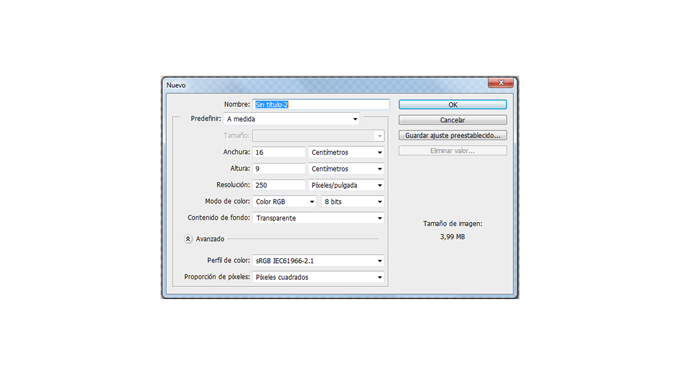
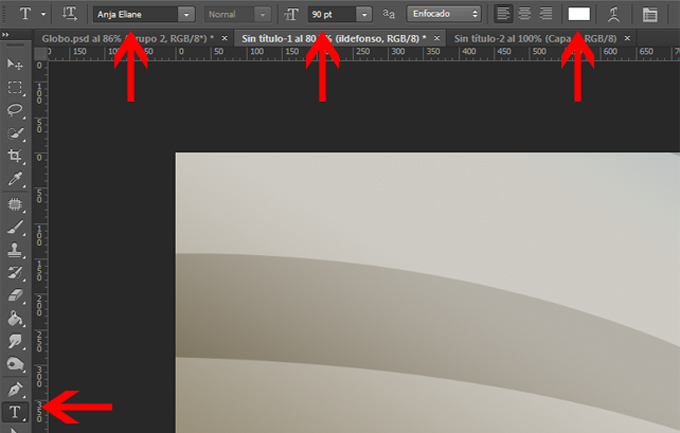
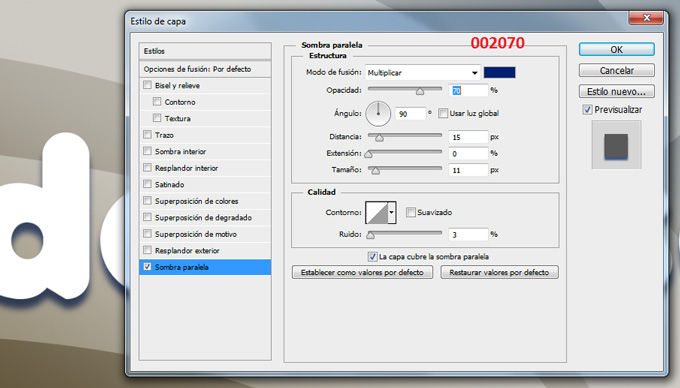
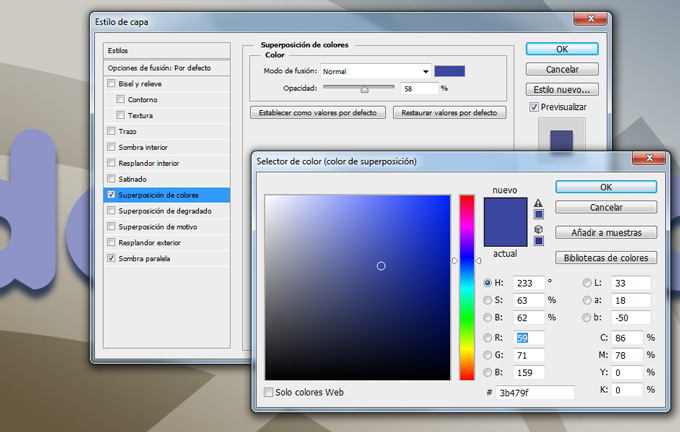
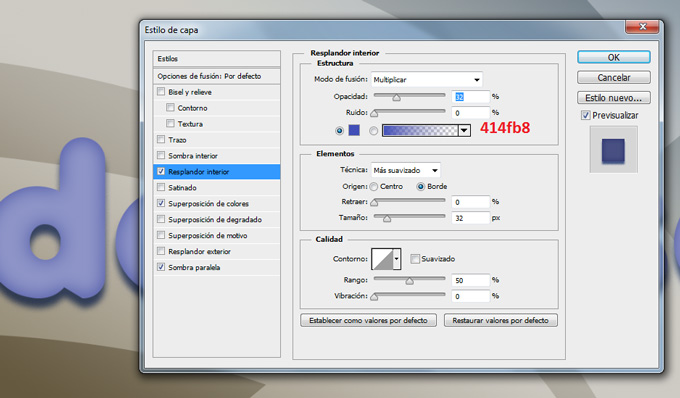
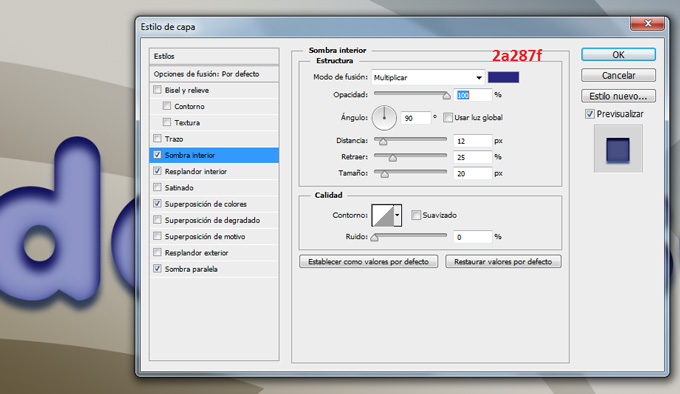
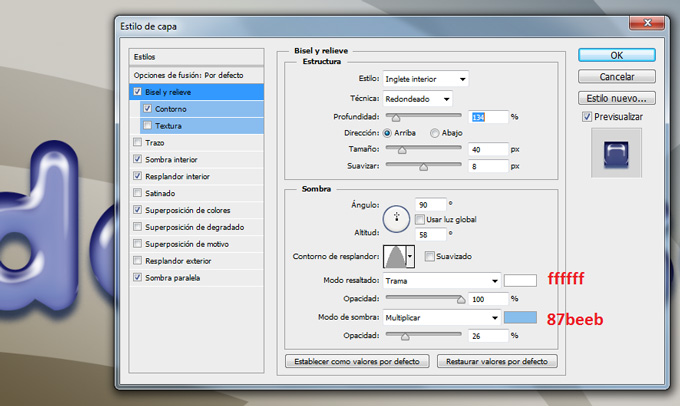
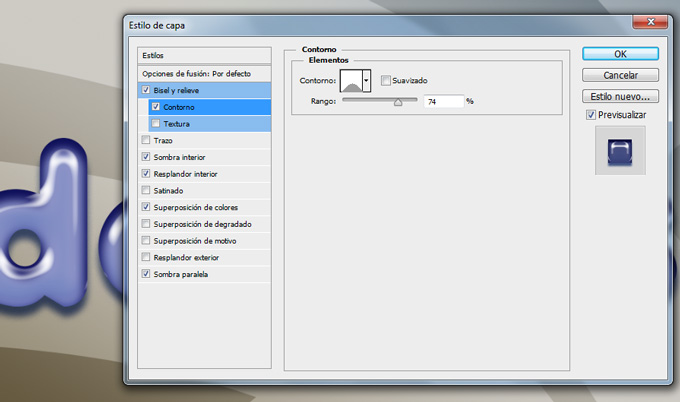
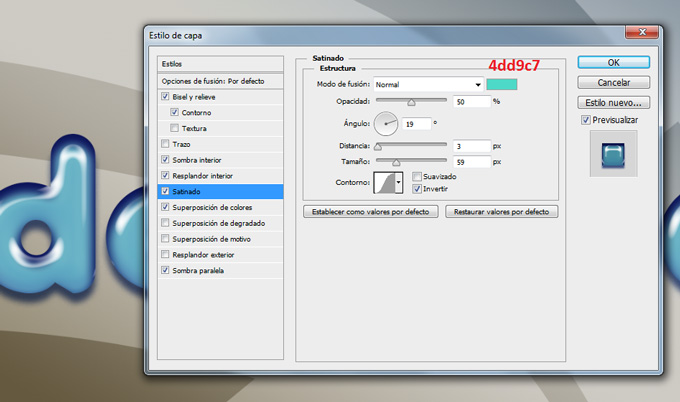
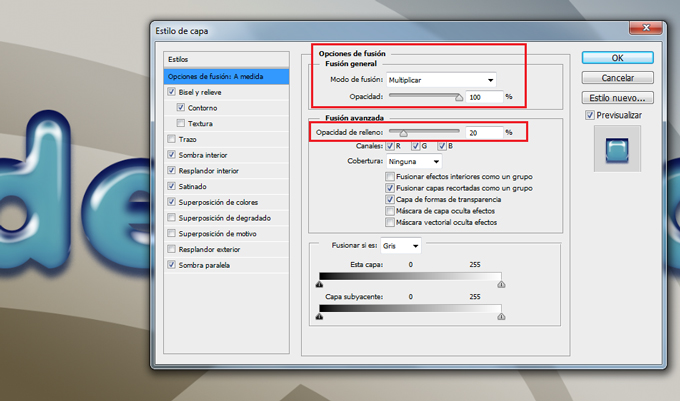
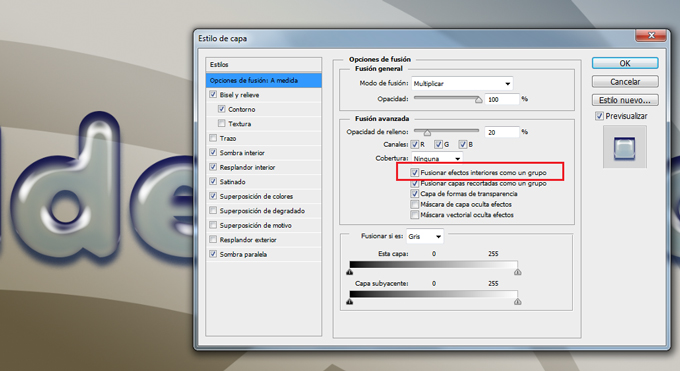
									<p><a href="https://ildefonsosegura.es/tutorial-photoshop-texto-estilo-globo-by-ildefonsosegura-incluye-editable/globo-15/" rel="attachment wp-att-2960"><img loading="lazy" decoding="async" class="aligncenter" src="https://ildefonsosegura.es/wp-content/uploads/globo-15.jpg" alt="globo-15" width="680" height="383" /></a></p><p>Con este tutorial aprenderemos a usar los estilos de capa para emular un efecto de material de globo, plástico o latex. Si usas variaciones sencillas del ejemplo, puedes conseguir otros efectos que harán que el texto parezca otro material. En cualquier caso, abajo te dejo el <strong>editable</strong>, estilo y la fuente para que puedas tener el efecto sin necesidad de crearlo.</p><p> </p><p>1.- Abre un nuevo canvas de trabajo con una resolución de 250 ppp. Yo usé un tamaño en cm de 16:9 (wide screen)</p><p><a href="https://ildefonsosegura.es/tutorial-photoshop-texto-estilo-globo-by-ildefonsosegura-incluye-editable/globo-1/" rel="attachment wp-att-2946"><img loading="lazy" decoding="async" class="size-full wp-image-2946 aligncenter" src="https://ildefonsosegura.es/wp-content/uploads/globo-1.jpg" alt="globo-1" width="680" height="383" srcset="https://ildefonsosegura.es/wp-content/uploads/globo-1.jpg 680w, https://ildefonsosegura.es/wp-content/uploads/globo-1-300x168.jpg 300w" sizes="(max-width: 680px) 100vw, 680px" /></a></p><p> </p><p>2.- Pon un fondo que tu elijas. Yo usé uno creado por mi sencillo</p><p><a href="https://ildefonsosegura.es/tutorial-photoshop-texto-estilo-globo-by-ildefonsosegura-incluye-editable/globo-2/" rel="attachment wp-att-2947"><img loading="lazy" decoding="async" class="size-full wp-image-2947 aligncenter" src="https://ildefonsosegura.es/wp-content/uploads/globo-2.jpg" alt="globo-2" width="680" height="383" srcset="https://ildefonsosegura.es/wp-content/uploads/globo-2.jpg 680w, https://ildefonsosegura.es/wp-content/uploads/globo-2-300x168.jpg 300w" sizes="(max-width: 680px) 100vw, 680px" /></a></p><p>3.- Selecciona la herramienta texto de la barra de herramientas. Usa la fuente Anja con color blanco ffffff y tamaño aproximadamente 90 px</p><p><a href="https://ildefonsosegura.es/tutorial-photoshop-texto-estilo-globo-by-ildefonsosegura-incluye-editable/globo-3/" rel="attachment wp-att-2948"><img loading="lazy" decoding="async" class="size-full wp-image-2948 aligncenter" src="https://ildefonsosegura.es/wp-content/uploads/globo-3.jpg" alt="globo-3" width="680" height="433" srcset="https://ildefonsosegura.es/wp-content/uploads/globo-3.jpg 680w, https://ildefonsosegura.es/wp-content/uploads/globo-3-300x191.jpg 300w" sizes="(max-width: 680px) 100vw, 680px" /></a></p><p>4.- Escribe tu texto</p><p><a href="https://ildefonsosegura.es/tutorial-photoshop-texto-estilo-globo-by-ildefonsosegura-incluye-editable/globo-4/" rel="attachment wp-att-2949"><img loading="lazy" decoding="async" class="size-full wp-image-2949 aligncenter" src="https://ildefonsosegura.es/wp-content/uploads/globo-4.jpg" alt="globo-4" width="680" height="383" srcset="https://ildefonsosegura.es/wp-content/uploads/globo-4.jpg 680w, https://ildefonsosegura.es/wp-content/uploads/globo-4-300x168.jpg 300w" sizes="(max-width: 680px) 100vw, 680px" /></a></p><p>5.- Haz clic derecho en la capa de texto y selecciona OPCIONES DE FUSION. Comienza seleccionando SOMBRA PARALELA</p><p><a href="https://ildefonsosegura.es/tutorial-photoshop-texto-estilo-globo-by-ildefonsosegura-incluye-editable/globo-5/" rel="attachment wp-att-2950"><img loading="lazy" decoding="async" class="size-full wp-image-2950 aligncenter" src="https://ildefonsosegura.es/wp-content/uploads/globo-5.jpg" alt="globo-5" width="680" height="388" srcset="https://ildefonsosegura.es/wp-content/uploads/globo-5.jpg 680w, https://ildefonsosegura.es/wp-content/uploads/globo-5-300x171.jpg 300w" sizes="(max-width: 680px) 100vw, 680px" /></a></p><p>6.- Continuamos con SUPERPOSICION DE COLORES buscando un tono azul</p><p><a href="https://ildefonsosegura.es/tutorial-photoshop-texto-estilo-globo-by-ildefonsosegura-incluye-editable/globo-6/" rel="attachment wp-att-2951"><img loading="lazy" decoding="async" class="size-full wp-image-2951 aligncenter" src="https://ildefonsosegura.es/wp-content/uploads/globo-6.jpg" alt="globo-6" width="680" height="432" srcset="https://ildefonsosegura.es/wp-content/uploads/globo-6.jpg 680w, https://ildefonsosegura.es/wp-content/uploads/globo-6-300x190.jpg 300w" sizes="(max-width: 680px) 100vw, 680px" /></a></p><p>7.- Aplicamos ahora la variable RESPLANDOR INTERIOR</p><p><a href="https://ildefonsosegura.es/tutorial-photoshop-texto-estilo-globo-by-ildefonsosegura-incluye-editable/globo-7/" rel="attachment wp-att-2952"><img loading="lazy" decoding="async" class="size-full wp-image-2952 aligncenter" src="https://ildefonsosegura.es/wp-content/uploads/globo-7.jpg" alt="globo-7" width="680" height="398" srcset="https://ildefonsosegura.es/wp-content/uploads/globo-7.jpg 680w, https://ildefonsosegura.es/wp-content/uploads/globo-7-300x175.jpg 300w" sizes="(max-width: 680px) 100vw, 680px" /></a></p><p>8.- A continuación le damos SOMBRA INTERIOR</p><p><a href="https://ildefonsosegura.es/tutorial-photoshop-texto-estilo-globo-by-ildefonsosegura-incluye-editable/globo-8/" rel="attachment wp-att-2953"><img loading="lazy" decoding="async" class="size-full wp-image-2953 aligncenter" src="https://ildefonsosegura.es/wp-content/uploads/globo-8.jpg" alt="globo-8" width="680" height="394" srcset="https://ildefonsosegura.es/wp-content/uploads/globo-8.jpg 680w, https://ildefonsosegura.es/wp-content/uploads/globo-8-300x173.jpg 300w" sizes="(max-width: 680px) 100vw, 680px" /></a></p><p>9.- Nos situamos en BISEL Y RELIEVE dándole unos valores como sigue:</p><p><a href="https://ildefonsosegura.es/tutorial-photoshop-texto-estilo-globo-by-ildefonsosegura-incluye-editable/globo-9/" rel="attachment wp-att-2954"><img loading="lazy" decoding="async" class="size-full wp-image-2954 aligncenter" src="https://ildefonsosegura.es/wp-content/uploads/globo-9.jpg" alt="globo-9" width="680" height="406" srcset="https://ildefonsosegura.es/wp-content/uploads/globo-9.jpg 680w, https://ildefonsosegura.es/wp-content/uploads/globo-9-300x179.jpg 300w" sizes="(max-width: 680px) 100vw, 680px" /></a></p><p>10.- Dentro de bisel y relieve seleccionamos CONTORNO</p><p><a href="https://ildefonsosegura.es/tutorial-photoshop-texto-estilo-globo-by-ildefonsosegura-incluye-editable/globo-10/" rel="attachment wp-att-2955"><img loading="lazy" decoding="async" class="size-full wp-image-2955 aligncenter" src="https://ildefonsosegura.es/wp-content/uploads/globo-10.jpg" alt="globo-10" width="680" height="402" srcset="https://ildefonsosegura.es/wp-content/uploads/globo-10.jpg 680w, https://ildefonsosegura.es/wp-content/uploads/globo-10-300x177.jpg 300w" sizes="(max-width: 680px) 100vw, 680px" /></a></p><p> </p><p>11.- Casi finalizando aplicamos SATINADO</p><p><a href="https://ildefonsosegura.es/tutorial-photoshop-texto-estilo-globo-by-ildefonsosegura-incluye-editable/globo-11/" rel="attachment wp-att-2956"><img loading="lazy" decoding="async" class="size-full wp-image-2956 aligncenter" src="https://ildefonsosegura.es/wp-content/uploads/globo-11.jpg" alt="globo-11" width="680" height="402" srcset="https://ildefonsosegura.es/wp-content/uploads/globo-11.jpg 680w, https://ildefonsosegura.es/wp-content/uploads/globo-11-300x177.jpg 300w" sizes="(max-width: 680px) 100vw, 680px" /></a></p><p>12.- Hasta aquí ya tendríamos un efecto de texto de globo bastante aceptable.</p><p><a href="https://ildefonsosegura.es/tutorial-photoshop-texto-estilo-globo-by-ildefonsosegura-incluye-editable/globo-12/" rel="attachment wp-att-2957"><img loading="lazy" decoding="async" class="size-full wp-image-2957 aligncenter" src="https://ildefonsosegura.es/wp-content/uploads/globo-12.jpg" alt="globo-12" width="680" height="383" srcset="https://ildefonsosegura.es/wp-content/uploads/globo-12.jpg 680w, https://ildefonsosegura.es/wp-content/uploads/globo-12-300x168.jpg 300w" sizes="(max-width: 680px) 100vw, 680px" /></a></p><p>13.- En las opciones de fusión vamos a cambiar variables tanto de la sección de FUSION GENERAL como de FUSION AVANZADA</p><p>En la fusión general cambiaremos el tipo de fusión de capa a MULIPLICAR. En la fusión avanzada cambiaremos el porcentaje de relleno al 20%</p><p><a href="https://ildefonsosegura.es/tutorial-photoshop-texto-estilo-globo-by-ildefonsosegura-incluye-editable/globo-13/" rel="attachment wp-att-2958"><img loading="lazy" decoding="async" class="size-full wp-image-2958 aligncenter" src="https://ildefonsosegura.es/wp-content/uploads/globo-13.jpg" alt="globo-13" width="680" height="401" srcset="https://ildefonsosegura.es/wp-content/uploads/globo-13.jpg 680w, https://ildefonsosegura.es/wp-content/uploads/globo-13-300x176.jpg 300w" sizes="(max-width: 680px) 100vw, 680px" /></a></p><p> </p><p>14.- Para conseguir mayor transparencia en el texto seleccionaremos una variable dentro de la FUSIÓN AVANZADA que no he visto en ningún tutorial. Esa opción es FUSIONAR EFECTOS INTERIORES COMO UN GRUPO. Con esta opción seleccionada lo que se hace es fusionar los efectos de «resplandor interior», «satinado» y «superposición» con la capa antes de fusionarlos con el documento. Todas las opciones de fusión se fusionan con el documento y en función del contenido de las otras capas el resultado de las variables es diferente. Si tienes esta opción de FUSIONAR EFECTOS INTERIORES COMO UN GRUPO, los efectos interactuan con el contenido de la capa y no con el resto de capas.</p><p><a href="https://ildefonsosegura.es/tutorial-photoshop-texto-estilo-globo-by-ildefonsosegura-incluye-editable/globo-14/" rel="attachment wp-att-2959"><img loading="lazy" decoding="async" class="size-full wp-image-2959 aligncenter" src="https://ildefonsosegura.es/wp-content/uploads/globo-14.jpg" alt="globo-14" width="680" height="371" srcset="https://ildefonsosegura.es/wp-content/uploads/globo-14.jpg 680w, https://ildefonsosegura.es/wp-content/uploads/globo-14-300x163.jpg 300w" sizes="(max-width: 680px) 100vw, 680px" /></a></p><p>15.- Así el resultado es el siguiente que íbamos buscando:</p><p><a href="https://ildefonsosegura.es/tutorial-photoshop-texto-estilo-globo-by-ildefonsosegura-incluye-editable/globo-15/" rel="attachment wp-att-2960"><img loading="lazy" decoding="async" class="size-full wp-image-2960 aligncenter" src="https://ildefonsosegura.es/wp-content/uploads/globo-15.jpg" alt="globo-15" width="680" height="383" srcset="https://ildefonsosegura.es/wp-content/uploads/globo-15.jpg 680w, https://ildefonsosegura.es/wp-content/uploads/globo-15-300x168.jpg 300w" sizes="(max-width: 680px) 100vw, 680px" /></a></p><p> </p><p> </p>								</div>
				</div>
					</div>
		</div>
					</div>
		</section>
				<section class="elementor-section elementor-top-section elementor-element elementor-element-1272db76 elementor-section-full_width elementor-section-height-default elementor-section-height-default" data-id="1272db76" data-element_type="section" data-e-type="section">
						<div class="elementor-container elementor-column-gap-default">
					<div class="elementor-column elementor-col-50 elementor-top-column elementor-element elementor-element-1834e7b8" data-id="1834e7b8" data-element_type="column" data-e-type="column">
			<div class="elementor-widget-wrap elementor-element-populated">
						<div class="elementor-element elementor-element-5393f42d elementor-align-right elementor-invisible elementor-widget elementor-widget-button" data-id="5393f42d" data-element_type="widget" data-e-type="widget" data-settings="{&quot;_animation&quot;:&quot;shake&quot;}" data-widget_type="button.default">
				<div class="elementor-widget-container">
									<div class="elementor-button-wrapper">
					<a class="elementor-button elementor-button-link elementor-size-sm elementor-animation-grow" href="https://drive.google.com/open?id=0B_nJkCGJubucWFU4eTFhMzF1YVU">
						<span class="elementor-button-content-wrapper">
									<span class="elementor-button-text">BAJATE EL EDITABLE</span>
					</span>
					</a>
				</div>
								</div>
				</div>
					</div>
		</div>
				<div class="elementor-column elementor-col-50 elementor-top-column elementor-element elementor-element-726d94ee" data-id="726d94ee" data-element_type="column" data-e-type="column">
			<div class="elementor-widget-wrap elementor-element-populated">
						<div class="elementor-element elementor-element-38a200b6 elementor-widget elementor-widget-html" data-id="38a200b6" data-element_type="widget" data-e-type="widget" data-settings="{&quot;_animation&quot;:&quot;none&quot;}" data-widget_type="html.default">
				<div class="elementor-widget-container">
					<form action="https://www.paypal.com/cgi-bin/webscr" method="post" target="_blank">
<input type="hidden" name="cmd" value="_donations">
<input type="hidden" name="business" value="ildefonsosegura@gmail.com">
<input type="hidden" name="lc" value="ES">
<input type="hidden" name="item_name" value="MANTENIMIENTO DE LA PAGINA DE ILDEFONSOSEGURA">
<input type="hidden" name="no_note" value="0">
<input type="hidden" name="currency_code" value="EUR">
<input type="hidden" name="bn" value="PP-DonationsBF:paypal1.jpg:NonHostedGuest">
<input type="image" src="http://ildefonsosegura.es/wp-content/uploads/paypal-updated-1.png" border="0" name="submit" alt="PayPal. La forma rápida y segura de pagar en Internet.">
<img decoding="async" alt="" border="0" src="https://www.paypalobjects.com/es_ES/i/scr/pixel.gif" width="1" height="1">
</form>				</div>
				</div>
					</div>
		</div>
					</div>
		</section>
				<section class="elementor-section elementor-top-section elementor-element elementor-element-29087141 elementor-section-boxed elementor-section-height-default elementor-section-height-default" data-id="29087141" data-element_type="section" data-e-type="section">
						<div class="elementor-container elementor-column-gap-default">
					<div class="elementor-column elementor-col-100 elementor-top-column elementor-element elementor-element-994285d" data-id="994285d" data-element_type="column" data-e-type="column">
			<div class="elementor-widget-wrap elementor-element-populated">
						<div class="elementor-element elementor-element-2089d69f elementor-widget elementor-widget-html" data-id="2089d69f" data-element_type="widget" data-e-type="widget" data-widget_type="html.default">
				<div class="elementor-widget-container">
					&nbsp;
<center><span style="color: #333333;"><strong>SUSCRÍBETE A MI CANAL DE YouTube</strong></span></center>&nbsp;
<div>
<div>
<div align="center">


<script src="https://apis.google.com/js/platform.js"></script>

<div class="g-ytsubscribe" data-channel="ildefonsosegura" data-layout="full" data-count="default"></div>
</div>
</div>
&nbsp;<p style="text-align: left;">No te lo pierdas y comparte tus trabajos en mi página de facebook (<span style="color: #ff0000;"><strong><a style="color: #ff0000;" href="http://www.facebook.com/IldefonsoSeguraPage" target="_blank" rel="noopener noreferrer">IldefonsoSeguraPage</a></strong></span>)</p>
Espero que te guste y compartas el vídeo. No dejes de compartir este post.
<p style="text-align: left;">Así es como me puedes ayudar 🙂 Gracias</p>

</div>				</div>
				</div>
					</div>
		</div>
					</div>
		</section>
				</div>La entrada <a href="https://ildefonsosegura.es/tutorial-photoshop-texto-estilo-globo-by-ildefonsosegura-incluye-editable/">#Tutorial #Photoshop texto estilo globo, plástico, látex by @ildefonsosegura (incluye editable psd con estilo)</a> apareció primero en <a href="https://ildefonsosegura.es">Ildefonso Segura</a>.]]></content:encoded>
					
					<wfw:commentRss>https://ildefonsosegura.es/tutorial-photoshop-texto-estilo-globo-by-ildefonsosegura-incluye-editable/feed/</wfw:commentRss>
			<slash:comments>0</slash:comments>
		
		
			</item>
		<item>
		<title>Papel roto y doblado en una felicitación Tutorial Photoshop by @ildefonsosegura</title>
		<link>https://ildefonsosegura.es/papel-roto-y-doblado-en-una-felicitacion-tutorial-photoshop-by-ildefonsosegura/</link>
					<comments>https://ildefonsosegura.es/papel-roto-y-doblado-en-una-felicitacion-tutorial-photoshop-by-ildefonsosegura/#comments</comments>
		
		<dc:creator><![CDATA[Ildefonso Segura]]></dc:creator>
		<pubDate>Fri, 04 Jan 2019 19:02:55 +0000</pubDate>
				<category><![CDATA[Editable]]></category>
		<category><![CDATA[Efectos]]></category>
		<category><![CDATA[Fotocomposición]]></category>
		<category><![CDATA[Photoshop]]></category>
		<category><![CDATA[Sin categoria]]></category>
		<category><![CDATA[Tecnicas]]></category>
		<category><![CDATA[Textos]]></category>
		<category><![CDATA[Textura]]></category>
		<category><![CDATA[Tutoriales]]></category>
		<category><![CDATA[Video]]></category>
		<category><![CDATA[Wallpaper]]></category>
		<category><![CDATA[adobe]]></category>
		<category><![CDATA[adobe photoshop]]></category>
		<category><![CDATA[cartel]]></category>
		<category><![CDATA[composición]]></category>
		<category><![CDATA[doblar]]></category>
		<category><![CDATA[editable]]></category>
		<category><![CDATA[felicitación]]></category>
		<category><![CDATA[felicitar]]></category>
		<category><![CDATA[fondo]]></category>
		<category><![CDATA[fotocomposición]]></category>
		<category><![CDATA[fotomontaje]]></category>
		<category><![CDATA[ildefonsosegura]]></category>
		<category><![CDATA[montaje]]></category>
		<category><![CDATA[papel]]></category>
		<category><![CDATA[papel doblado]]></category>
		<category><![CDATA[photomanipulation]]></category>
		<category><![CDATA[photoshop]]></category>
		<category><![CDATA[postal]]></category>
		<category><![CDATA[poster]]></category>
		<category><![CDATA[puerta papel]]></category>
		<category><![CDATA[tarjeta]]></category>
		<category><![CDATA[textura]]></category>
		<category><![CDATA[tuto]]></category>
		<category><![CDATA[tutorial]]></category>
		<category><![CDATA[VIDEOTUTORIAL]]></category>
		<category><![CDATA[wallpaper]]></category>
		<category><![CDATA[youtube]]></category>
		<guid isPermaLink="false">http://ildefonsosegura.es/?p=6426</guid>

					<description><![CDATA[<p>En este tutorial de Photoshop aprenderemos como diseñar una felicitación creando un efecto de papel roto y doblado simulando que es la puerta por donde aparece el motivo de la felicitación. Yo he considerado un bebé pero podríais incorporar las imágenes que considerarais de acuerdo con el motivo de vuestra felicitación. La clave del tutorial [&#8230;]</p>
La entrada <a href="https://ildefonsosegura.es/papel-roto-y-doblado-en-una-felicitacion-tutorial-photoshop-by-ildefonsosegura/">Papel roto y doblado en una felicitación Tutorial Photoshop by @ildefonsosegura</a> apareció primero en <a href="https://ildefonsosegura.es">Ildefonso Segura</a>.]]></description>
										<content:encoded><![CDATA[<div data-elementor-type="wp-post" data-elementor-id="6426" class="elementor elementor-6426">
						<section class="elementor-section elementor-top-section elementor-element elementor-element-1fa6dc87 elementor-section-boxed elementor-section-height-default elementor-section-height-default" data-id="1fa6dc87" data-element_type="section" data-e-type="section">
						<div class="elementor-container elementor-column-gap-default">
					<div class="elementor-column elementor-col-100 elementor-top-column elementor-element elementor-element-321a0fe3" data-id="321a0fe3" data-element_type="column" data-e-type="column">
			<div class="elementor-widget-wrap elementor-element-populated">
						<div class="elementor-element elementor-element-698f9efe elementor-widget elementor-widget-text-editor" data-id="698f9efe" data-element_type="widget" data-e-type="widget" data-widget_type="text-editor.default">
				<div class="elementor-widget-container">
									<p style="text-align: justify;">En este tutorial de Photoshop aprenderemos como diseñar una felicitación creando un efecto de papel roto y doblado simulando que es la puerta por donde aparece el motivo de la felicitación.</p><p style="text-align: justify;">Yo he considerado un bebé pero podríais incorporar las imágenes que considerarais de acuerdo con el motivo de vuestra felicitación. La clave del tutorial es aprender a realizar el efecto de papel roto y doblado con Photoshop. El resto dependerá de tu creatividad.</p><p><img loading="lazy" decoding="async" class="aligncenter size-full wp-image-6427" src="https://ildefonsosegura.es/wp-content/uploads/PAPEL-DOBLADO-1.jpg" alt="" width="1000" height="563" srcset="https://ildefonsosegura.es/wp-content/uploads/PAPEL-DOBLADO-1.jpg 1000w, https://ildefonsosegura.es/wp-content/uploads/PAPEL-DOBLADO-1-300x169.jpg 300w, https://ildefonsosegura.es/wp-content/uploads/PAPEL-DOBLADO-1-768x432.jpg 768w, https://ildefonsosegura.es/wp-content/uploads/PAPEL-DOBLADO-1-720x406.jpg 720w" sizes="(max-width: 1000px) 100vw, 1000px" /></p><p style="text-align: justify;">Aquí te dejo el antes y el después del efecto conseguido</p><p>[twenty20 img1=»6429&#8243; img2=»6427&#8243; offset=»0.5&#8243;]</p><p><span style="color: #000000;">En instagram posteé el </span><strong><span style="color: #800000;">MAKING OF</span></strong></p><p> </p><blockquote class="instagram-media" style="background: #FFF; border: 0; border-radius: 3px; box-shadow: 0 0 1px 0 rgba(0,0,0,0.5),0 1px 10px 0 rgba(0,0,0,0.15); margin: 1px; max-width: 540px; min-width: 326px; padding: 0; width: calc(100% - 2px);" data-instgrm-captioned="" data-instgrm-permalink="https://www.instagram.com/p/BsOTEYeI3rk/?utm_source=ig_embed&amp;utm_medium=loading" data-instgrm-version="12"><div style="padding: 16px;"><p> </p><div style="display: flex; flex-direction: row; align-items: center;"><div style="background-color: #f4f4f4; border-radius: 50%; flex-grow: 0; height: 40px; margin-right: 14px; width: 40px;"> </div><div style="display: flex; flex-direction: column; flex-grow: 1; justify-content: center;"><div style="background-color: #f4f4f4; border-radius: 4px; flex-grow: 0; height: 14px; margin-bottom: 6px; width: 100px;"> </div><div style="background-color: #f4f4f4; border-radius: 4px; flex-grow: 0; height: 14px; width: 60px;"> </div></div></div><div style="padding: 19% 0;"> </div><div style="display: block; height: 50px; margin: 0 auto 12px; width: 50px;"> </div><div style="padding-top: 8px;"><div style="color: #3897f0; font-family: Arial,sans-serif; font-size: 14px; font-style: normal; font-weight: 550; line-height: 18px;">Ver esta publicación en Instagram</div></div><div style="padding: 12.5% 0;"> </div><div style="display: flex; flex-direction: row; margin-bottom: 14px; align-items: center;"><div><div style="background-color: #f4f4f4; border-radius: 50%; height: 12.5px; width: 12.5px; transform: translateX(0px) translateY(7px);"> </div><div style="background-color: #f4f4f4; height: 12.5px; transform: rotate(-45deg) translateX(3px) translateY(1px); width: 12.5px; flex-grow: 0; margin-right: 14px; margin-left: 2px;"> </div><div style="background-color: #f4f4f4; border-radius: 50%; height: 12.5px; width: 12.5px; transform: translateX(9px) translateY(-18px);"> </div></div><div style="margin-left: 8px;"><div style="background-color: #f4f4f4; border-radius: 50%; flex-grow: 0; height: 20px; width: 20px;"> </div><div style="width: 0; height: 0; border-top: 2px solid transparent; border-left: 6px solid #f4f4f4; border-bottom: 2px solid transparent; transform: translateX(16px) translateY(-4px) rotate(30deg);"> </div></div><div style="margin-left: auto;"><div style="width: 0px; border-top: 8px solid #F4F4F4; border-right: 8px solid transparent; transform: translateY(16px);"> </div><div style="background-color: #f4f4f4; flex-grow: 0; height: 12px; width: 16px; transform: translateY(-4px);"> </div><div style="width: 0; height: 0; border-top: 8px solid #F4F4F4; border-left: 8px solid transparent; transform: translateY(-4px) translateX(8px);"> </div></div></div><p> </p><p style="margin: 8px 0 0 0; padding: 0 4px;"><a style="color: #000; font-family: Arial,sans-serif; font-size: 14px; font-style: normal; font-weight: normal; line-height: 17px; text-decoration: none; word-wrap: break-word;" href="https://www.instagram.com/p/BsOTEYeI3rk/?utm_source=ig_embed&amp;utm_medium=loading" target="_blank" rel="noopener">New #photoshop tutorial. Break and Bend your paper texture and create the door where happy things. Link in my bio or web ••••••••••••••••••••••• Visit my website for more free tutorials. Check my Bio ••••••••••••••••••••••• #thegraphicspr0ject#creartmood#visual_creatorz#enter_imagination#LaunchDsigns#edit_grams#moodygrams#VisualMobs#simplycooldesign#CreativeOptic#photoshop #edit_perfection#manipulationclan#creativitychasers #edit_mania__#thecreativers#creative_ace#digitallyart#xceptionaledits#imaginativeuniverse#artist #igworldclub_edits#visualcreative#discoveredit#thehub_edit#bestvisualz#theuniversalart#photomanipulation #greetingcard</a></p><p style="color: #c9c8cd; font-family: Arial,sans-serif; font-size: 14px; line-height: 17px; margin-bottom: 0; margin-top: 8px; overflow: hidden; padding: 8px 0 7px; text-align: center; text-overflow: ellipsis; white-space: nowrap;">Una publicación compartida de <a style="color: #c9c8cd; font-family: Arial,sans-serif; font-size: 14px; font-style: normal; font-weight: normal; line-height: 17px;" href="https://www.instagram.com/ildefonsosegura/?utm_source=ig_embed&amp;utm_medium=loading" target="_blank" rel="noopener"> Ildefonso Segura</a> (@ildefonsosegura) el <time style="font-family: Arial,sans-serif; font-size: 14px; line-height: 17px;" datetime="2019-01-04T18:56:35+00:00">4 Ene, 2019 a las 10:56 PST</time></p></div></blockquote><p><script async="" src="//www.instagram.com/embed.js"></script></p><p> </p><p>Disfruta del tutorial de Photoshop. Yo me lo pasé en grande aunque hay mucho trabajo detrás. Compártelo y así me ayudas.</p><p><strong><span style="color: #800000;">TUTORIAL Fotomontaje Postal felicitación papel doblado</span></strong></p><center><iframe src="https://www.youtube.com/embed/IWWJzIMsmEA" width="640" height="420" frameborder="0" allowfullscreen="allowfullscreen"><span data-mce-type="bookmark" style="display: inline-block; width: 0px; overflow: hidden; line-height: 0;" class="mce_SELRES_start"></span></iframe></center><p style="text-align: center;"><span style="color: #ff0000;"><strong>Aquí debajo te dejo referencia al editable que regalo a cambio de compartir el vídeo en tus redes sociales. El editable tiene los materiales</strong></span></p>								</div>
				</div>
					</div>
		</div>
					</div>
		</section>
				<section class="elementor-section elementor-top-section elementor-element elementor-element-29b65ff4 elementor-section-boxed elementor-section-height-default elementor-section-height-default" data-id="29b65ff4" data-element_type="section" data-e-type="section">
						<div class="elementor-container elementor-column-gap-default">
					<div class="elementor-column elementor-col-100 elementor-top-column elementor-element elementor-element-59a2a969" data-id="59a2a969" data-element_type="column" data-e-type="column">
			<div class="elementor-widget-wrap elementor-element-populated">
						<div class="elementor-element elementor-element-1f05cc5a elementor-widget-divider--view-line elementor-widget elementor-widget-divider" data-id="1f05cc5a" data-element_type="widget" data-e-type="widget" data-widget_type="divider.default">
				<div class="elementor-widget-container">
							<div class="elementor-divider">
			<span class="elementor-divider-separator">
						</span>
		</div>
						</div>
				</div>
					</div>
		</div>
					</div>
		</section>
				<section class="elementor-section elementor-top-section elementor-element elementor-element-4f2d0ab2 elementor-section-full_width elementor-section-height-default elementor-section-height-default" data-id="4f2d0ab2" data-element_type="section" data-e-type="section">
						<div class="elementor-container elementor-column-gap-default">
					<div class="elementor-column elementor-col-50 elementor-top-column elementor-element elementor-element-5f625835" data-id="5f625835" data-element_type="column" data-e-type="column">
			<div class="elementor-widget-wrap elementor-element-populated">
						<div class="elementor-element elementor-element-1bd6517f elementor-align-right elementor-invisible elementor-widget elementor-widget-button" data-id="1bd6517f" data-element_type="widget" data-e-type="widget" data-settings="{&quot;_animation&quot;:&quot;shake&quot;}" data-widget_type="button.default">
				<div class="elementor-widget-container">
									<div class="elementor-button-wrapper">
					<a class="elementor-button elementor-button-link elementor-size-sm elementor-animation-grow" href="https://ildefonsosegura.es/regalos/">
						<span class="elementor-button-content-wrapper">
									<span class="elementor-button-text">BAJATE EL EDITABLE</span>
					</span>
					</a>
				</div>
								</div>
				</div>
					</div>
		</div>
				<div class="elementor-column elementor-col-50 elementor-top-column elementor-element elementor-element-6129366c" data-id="6129366c" data-element_type="column" data-e-type="column">
			<div class="elementor-widget-wrap elementor-element-populated">
						<div class="elementor-element elementor-element-4ef0f858 elementor-widget elementor-widget-html" data-id="4ef0f858" data-element_type="widget" data-e-type="widget" data-settings="{&quot;_animation&quot;:&quot;none&quot;}" data-widget_type="html.default">
				<div class="elementor-widget-container">
					<form action="https://www.paypal.com/cgi-bin/webscr" method="post" target="_blank">
<input type="hidden" name="cmd" value="_donations">
<input type="hidden" name="business" value="ildefonsosegura@gmail.com">
<input type="hidden" name="lc" value="ES">
<input type="hidden" name="item_name" value="MANTENIMIENTO DE LA PAGINA DE ILDEFONSOSEGURA">
<input type="hidden" name="no_note" value="0">
<input type="hidden" name="currency_code" value="EUR">
<input type="hidden" name="bn" value="PP-DonationsBF:paypal1.jpg:NonHostedGuest">
<input type="image" src="http://ildefonsosegura.es/wp-content/uploads/paypal-updated-1.png" border="0" name="submit" alt="PayPal. La forma rápida y segura de pagar en Internet.">
<img decoding="async" alt="" border="0" src="https://www.paypalobjects.com/es_ES/i/scr/pixel.gif" width="1" height="1">
</form>				</div>
				</div>
					</div>
		</div>
					</div>
		</section>
				<section class="elementor-section elementor-top-section elementor-element elementor-element-497e7240 elementor-section-boxed elementor-section-height-default elementor-section-height-default" data-id="497e7240" data-element_type="section" data-e-type="section">
						<div class="elementor-container elementor-column-gap-default">
					<div class="elementor-column elementor-col-100 elementor-top-column elementor-element elementor-element-3d487981" data-id="3d487981" data-element_type="column" data-e-type="column">
			<div class="elementor-widget-wrap elementor-element-populated">
						<div class="elementor-element elementor-element-5b2670ab elementor-widget-divider--view-line elementor-widget elementor-widget-divider" data-id="5b2670ab" data-element_type="widget" data-e-type="widget" data-widget_type="divider.default">
				<div class="elementor-widget-container">
							<div class="elementor-divider">
			<span class="elementor-divider-separator">
						</span>
		</div>
						</div>
				</div>
					</div>
		</div>
					</div>
		</section>
				<section class="elementor-section elementor-top-section elementor-element elementor-element-3c191232 elementor-section-boxed elementor-section-height-default elementor-section-height-default" data-id="3c191232" data-element_type="section" data-e-type="section">
						<div class="elementor-container elementor-column-gap-default">
					<div class="elementor-column elementor-col-100 elementor-top-column elementor-element elementor-element-138d2a87" data-id="138d2a87" data-element_type="column" data-e-type="column">
			<div class="elementor-widget-wrap elementor-element-populated">
						<div class="elementor-element elementor-element-64afc68e elementor-widget elementor-widget-spacer" data-id="64afc68e" data-element_type="widget" data-e-type="widget" data-widget_type="spacer.default">
				<div class="elementor-widget-container">
							<div class="elementor-spacer">
			<div class="elementor-spacer-inner"></div>
		</div>
						</div>
				</div>
					</div>
		</div>
					</div>
		</section>
				<section class="elementor-section elementor-top-section elementor-element elementor-element-7a8dea12 elementor-section-full_width elementor-section-height-default elementor-section-height-default" data-id="7a8dea12" data-element_type="section" data-e-type="section">
						<div class="elementor-container elementor-column-gap-default">
					<div class="elementor-column elementor-col-100 elementor-top-column elementor-element elementor-element-52a8ffc3" data-id="52a8ffc3" data-element_type="column" data-e-type="column">
			<div class="elementor-widget-wrap elementor-element-populated">
						<div class="elementor-element elementor-element-b38733f elementor-widget elementor-widget-text-editor" data-id="b38733f" data-element_type="widget" data-e-type="widget" data-widget_type="text-editor.default">
				<div class="elementor-widget-container">
									<div><div align="center"><center><strong style="color: #ff0000;">Suscríbete a mi canal de Youtube:</strong></center><div><div><div align="center"><p><script src="https://apis.google.com/js/platform.js"></script></p><div class="g-ytsubscribe" data-channel="ildefonsosegura" data-layout="full" data-count="default"> </div></div></div><p> </p><p style="text-align: center;">No te lo pierdas y comparte tus trabajos en mi página de facebook (<span style="color: #0000ff;"><strong><a style="color: #0000ff;" href="http://www.facebook.com/IldefonsoSeguraPage" target="_blank" rel="noopener noreferrer">IldefonsoSeguraPage</a></strong></span>)<br />Espero que te guste y compartas el vídeo. No dejes de compartir este post.</p><p style="text-align: center;">Así es como me puedes ayudar 🙂 Gracias</p></div></div></div>								</div>
				</div>
					</div>
		</div>
					</div>
		</section>
				</div>La entrada <a href="https://ildefonsosegura.es/papel-roto-y-doblado-en-una-felicitacion-tutorial-photoshop-by-ildefonsosegura/">Papel roto y doblado en una felicitación Tutorial Photoshop by @ildefonsosegura</a> apareció primero en <a href="https://ildefonsosegura.es">Ildefonso Segura</a>.]]></content:encoded>
					
					<wfw:commentRss>https://ildefonsosegura.es/papel-roto-y-doblado-en-una-felicitacion-tutorial-photoshop-by-ildefonsosegura/feed/</wfw:commentRss>
			<slash:comments>2</slash:comments>
		
		
			</item>
		<item>
		<title>Regalo y Tutorial #cinema4d de una intro editable al estilo Universal Pictures by @ildefonsosegura</title>
		<link>https://ildefonsosegura.es/regalo-y-tutorial-cinema4d-de-una-intro-editable-al-estilo-universal-pictures-by-ildefonsosegura/</link>
					<comments>https://ildefonsosegura.es/regalo-y-tutorial-cinema4d-de-una-intro-editable-al-estilo-universal-pictures-by-ildefonsosegura/#respond</comments>
		
		<dc:creator><![CDATA[Ildefonso Segura]]></dc:creator>
		<pubDate>Sun, 22 Apr 2018 17:05:58 +0000</pubDate>
				<category><![CDATA[3D]]></category>
		<category><![CDATA[Cinema4D]]></category>
		<category><![CDATA[Editable]]></category>
		<category><![CDATA[Efectos]]></category>
		<category><![CDATA[Intro]]></category>
		<category><![CDATA[Películas]]></category>
		<category><![CDATA[Textos]]></category>
		<category><![CDATA[Tutoriales]]></category>
		<category><![CDATA[cine]]></category>
		<category><![CDATA[cinema4D]]></category>
		<category><![CDATA[editable]]></category>
		<category><![CDATA[fanpage]]></category>
		<category><![CDATA[ildefonsosegura]]></category>
		<category><![CDATA[ildefonsosegura.gloriasanis]]></category>
		<category><![CDATA[intro]]></category>
		<category><![CDATA[intros]]></category>
		<category><![CDATA[regalo]]></category>
		<category><![CDATA[tuto]]></category>
		<category><![CDATA[tutorial]]></category>
		<category><![CDATA[video]]></category>
		<category><![CDATA[VIDEOTUTORIAL]]></category>
		<category><![CDATA[youtube]]></category>
		<guid isPermaLink="false">http://ildefonsosegura.es/?p=2691</guid>

					<description><![CDATA[<p>Por fin os he podido mostrar el tutorial que llevavais tiempo solicitando sobre la intro de Universal Pictures. Se trata de una adaptación que he realizado de la original. Ya hice un borrador de una que se parecía mucho a la original. Vista mi sección de intros para verla A continuación os muestro como queda [&#8230;]</p>

La entrada <a href="https://ildefonsosegura.es/regalo-y-tutorial-cinema4d-de-una-intro-editable-al-estilo-universal-pictures-by-ildefonsosegura/">Regalo y Tutorial #cinema4d de una intro editable al estilo Universal Pictures by @ildefonsosegura</a> apareció primero en <a href="https://ildefonsosegura.es">Ildefonso Segura</a>.]]></description>
										<content:encoded><![CDATA[<div data-elementor-type="wp-post" data-elementor-id="2691" class="elementor elementor-2691">
						<section class="elementor-section elementor-top-section elementor-element elementor-element-6c0a2eb7 elementor-section-boxed elementor-section-height-default elementor-section-height-default" data-id="6c0a2eb7" data-element_type="section" data-e-type="section">
						<div class="elementor-container elementor-column-gap-default">
					<div class="elementor-column elementor-col-100 elementor-top-column elementor-element elementor-element-7c03c491" data-id="7c03c491" data-element_type="column" data-e-type="column">
			<div class="elementor-widget-wrap elementor-element-populated">
						<div class="elementor-element elementor-element-4b50d46a elementor-widget elementor-widget-text-editor" data-id="4b50d46a" data-element_type="widget" data-e-type="widget" data-widget_type="text-editor.default">
				<div class="elementor-widget-container">
									<p>Por fin os he podido mostrar el tutorial que llevavais tiempo solicitando sobre la intro de <a title="universal pictures site" href="http://www.universalpictures.es/" target="_blank" rel="noopener noreferrer">Universal Pictures</a>.</p><p>Se trata de una adaptación que he realizado de la original. Ya hice un borrador de una que se parecía mucho a la original. Vista mi sección de <a title="Galería de Intros" href="https://ildefonsosegura.es/galeria-de-intros/" target="_blank" rel="noopener noreferrer"><strong>intros</strong></a> para verla</p><p><img loading="lazy" decoding="async" class="size-full wp-image-2692 aligncenter" src="https://ildefonsosegura.es/wp-content/uploads/universal-pictures-tuto.jpg" alt="universal-pictures-tuto" width="432" height="243" /></p><p>A continuación os muestro como queda la intro con sonido. Recuerda que te regalo el <strong>EDITABLE</strong> de esta intro en mi <a href="https://drive.google.com/file/d/0B_nJkCGJubucTk1nd3JfSU5IQjA/view?usp=sharing" target="_blank" rel="noopener noreferrer"><strong>área de regalos</strong></a>. Al final del videotutorial explico como conseguirla.</p><p> </p><center></center><center></center><p><span style="color: #800000;"><strong>INTRO ADAPTADA </strong></span></p><center><iframe src="https://www.youtube.com/embed/XA6faQ131mo" width="640" height="420" frameborder="0" allowfullscreen="allowfullscreen"></iframe></center><p> </p><p> Disfrutala, aplicala y enséñame tus resultados en mi <span style="color: #ff0000;"><a style="color: #ff0000;" title="fanpage de ildefonsosegura" href="http://www.facebook.com/ildefonsosegurapage" target="_blank" rel="noopener noreferrer"><strong>fanpage de facebook</strong></a></span></p><p> </p><p> </p><p><span style="color: #800000;"><strong>VIDEOTUTORIAL DE LA INTRO  </strong></span></p><center><iframe src="https://www.youtube.com/embed/YqRBL4yhYkg" width="640" height="420" frameborder="0" allowfullscreen="allowfullscreen"><span data-mce-type="bookmark" style="display: inline-block; width: 0px; overflow: hidden; line-height: 0;" class="mce_SELRES_start">﻿</span></iframe></center><div><p style="text-align: center;"> </p></div>								</div>
				</div>
					</div>
		</div>
					</div>
		</section>
				<section class="elementor-section elementor-top-section elementor-element elementor-element-174b2003 elementor-section-boxed elementor-section-height-default elementor-section-height-default" data-id="174b2003" data-element_type="section" data-e-type="section">
						<div class="elementor-container elementor-column-gap-default">
					<div class="elementor-column elementor-col-100 elementor-top-column elementor-element elementor-element-4be2efc0" data-id="4be2efc0" data-element_type="column" data-e-type="column">
			<div class="elementor-widget-wrap elementor-element-populated">
						<div class="elementor-element elementor-element-294fe75c elementor-widget elementor-widget-spacer" data-id="294fe75c" data-element_type="widget" data-e-type="widget" data-widget_type="spacer.default">
				<div class="elementor-widget-container">
							<div class="elementor-spacer">
			<div class="elementor-spacer-inner"></div>
		</div>
						</div>
				</div>
					</div>
		</div>
					</div>
		</section>
				<section class="elementor-section elementor-top-section elementor-element elementor-element-53e9da3f elementor-section-boxed elementor-section-height-default elementor-section-height-default" data-id="53e9da3f" data-element_type="section" data-e-type="section">
						<div class="elementor-container elementor-column-gap-default">
					<div class="elementor-column elementor-col-100 elementor-top-column elementor-element elementor-element-11737861" data-id="11737861" data-element_type="column" data-e-type="column">
			<div class="elementor-widget-wrap elementor-element-populated">
						<div class="elementor-element elementor-element-2f00a260 elementor-widget-divider--view-line elementor-widget elementor-widget-divider" data-id="2f00a260" data-element_type="widget" data-e-type="widget" data-widget_type="divider.default">
				<div class="elementor-widget-container">
							<div class="elementor-divider">
			<span class="elementor-divider-separator">
						</span>
		</div>
						</div>
				</div>
					</div>
		</div>
					</div>
		</section>
				<section class="elementor-section elementor-top-section elementor-element elementor-element-36a1374b elementor-section-full_width elementor-section-height-default elementor-section-height-default" data-id="36a1374b" data-element_type="section" data-e-type="section">
						<div class="elementor-container elementor-column-gap-default">
					<div class="elementor-column elementor-col-50 elementor-top-column elementor-element elementor-element-6f139941" data-id="6f139941" data-element_type="column" data-e-type="column">
			<div class="elementor-widget-wrap elementor-element-populated">
						<div class="elementor-element elementor-element-27f0b19b elementor-align-right elementor-invisible elementor-widget elementor-widget-button" data-id="27f0b19b" data-element_type="widget" data-e-type="widget" data-settings="{&quot;_animation&quot;:&quot;shake&quot;}" data-widget_type="button.default">
				<div class="elementor-widget-container">
									<div class="elementor-button-wrapper">
					<a class="elementor-button elementor-button-link elementor-size-sm elementor-animation-grow" href="https://drive.google.com/open?id=0B_nJkCGJubucTk1nd3JfSU5IQjA">
						<span class="elementor-button-content-wrapper">
									<span class="elementor-button-text">BAJATE EL EDITABLE</span>
					</span>
					</a>
				</div>
								</div>
				</div>
					</div>
		</div>
				<div class="elementor-column elementor-col-50 elementor-top-column elementor-element elementor-element-48b5279f" data-id="48b5279f" data-element_type="column" data-e-type="column">
			<div class="elementor-widget-wrap elementor-element-populated">
						<div class="elementor-element elementor-element-4d24cb1b elementor-widget elementor-widget-html" data-id="4d24cb1b" data-element_type="widget" data-e-type="widget" data-settings="{&quot;_animation&quot;:&quot;none&quot;}" data-widget_type="html.default">
				<div class="elementor-widget-container">
					<form action="https://www.paypal.com/cgi-bin/webscr" method="post" target="_blank">
<input type="hidden" name="cmd" value="_donations">
<input type="hidden" name="business" value="ildefonsosegura@gmail.com">
<input type="hidden" name="lc" value="ES">
<input type="hidden" name="item_name" value="MANTENIMIENTO DE LA PAGINA DE ILDEFONSOSEGURA">
<input type="hidden" name="no_note" value="0">
<input type="hidden" name="currency_code" value="EUR">
<input type="hidden" name="bn" value="PP-DonationsBF:paypal1.jpg:NonHostedGuest">
<input type="image" src="http://ildefonsosegura.es/wp-content/uploads/paypal-updated-1.png" border="0" name="submit" alt="PayPal. La forma rápida y segura de pagar en Internet.">
<img decoding="async" alt="" border="0" src="https://www.paypalobjects.com/es_ES/i/scr/pixel.gif" width="1" height="1">
</form>				</div>
				</div>
					</div>
		</div>
					</div>
		</section>
				<section class="elementor-section elementor-top-section elementor-element elementor-element-534bb206 elementor-section-boxed elementor-section-height-default elementor-section-height-default" data-id="534bb206" data-element_type="section" data-e-type="section">
						<div class="elementor-container elementor-column-gap-default">
					<div class="elementor-column elementor-col-100 elementor-top-column elementor-element elementor-element-6b454a0b" data-id="6b454a0b" data-element_type="column" data-e-type="column">
			<div class="elementor-widget-wrap elementor-element-populated">
						<div class="elementor-element elementor-element-58e6b296 elementor-widget-divider--view-line elementor-widget elementor-widget-divider" data-id="58e6b296" data-element_type="widget" data-e-type="widget" data-widget_type="divider.default">
				<div class="elementor-widget-container">
							<div class="elementor-divider">
			<span class="elementor-divider-separator">
						</span>
		</div>
						</div>
				</div>
					</div>
		</div>
					</div>
		</section>
				<section class="elementor-section elementor-top-section elementor-element elementor-element-233f50a2 elementor-section-boxed elementor-section-height-default elementor-section-height-default" data-id="233f50a2" data-element_type="section" data-e-type="section">
						<div class="elementor-container elementor-column-gap-default">
					<div class="elementor-column elementor-col-100 elementor-top-column elementor-element elementor-element-73f54026" data-id="73f54026" data-element_type="column" data-e-type="column">
			<div class="elementor-widget-wrap elementor-element-populated">
						<div class="elementor-element elementor-element-7c3ef7b4 elementor-widget elementor-widget-spacer" data-id="7c3ef7b4" data-element_type="widget" data-e-type="widget" data-widget_type="spacer.default">
				<div class="elementor-widget-container">
							<div class="elementor-spacer">
			<div class="elementor-spacer-inner"></div>
		</div>
						</div>
				</div>
					</div>
		</div>
					</div>
		</section>
				<section class="elementor-section elementor-top-section elementor-element elementor-element-11b4b3fa elementor-section-full_width elementor-section-height-default elementor-section-height-default" data-id="11b4b3fa" data-element_type="section" data-e-type="section">
						<div class="elementor-container elementor-column-gap-default">
					<div class="elementor-column elementor-col-100 elementor-top-column elementor-element elementor-element-68c546c6" data-id="68c546c6" data-element_type="column" data-e-type="column">
			<div class="elementor-widget-wrap elementor-element-populated">
						<div class="elementor-element elementor-element-1cb4f5ea elementor-widget elementor-widget-text-editor" data-id="1cb4f5ea" data-element_type="widget" data-e-type="widget" data-widget_type="text-editor.default">
				<div class="elementor-widget-container">
									<div><div align="center"><center><strong style="color: #ff0000;">Suscríbete a mi canal de Youtube:</strong></center><div><div><div align="center"><p><script src="https://apis.google.com/js/platform.js"></script></p><div class="g-ytsubscribe" data-channel="ildefonsosegura" data-layout="full" data-count="default"> </div></div></div><p> </p><p style="text-align: center;">No te lo pierdas y comparte tus trabajos en mi página de facebook (<span style="color: #0000ff;"><strong><a style="color: #0000ff;" href="http://www.facebook.com/IldefonsoSeguraPage" target="_blank" rel="noopener noreferrer">IldefonsoSeguraPage</a></strong></span>)<br />Espero que te guste y compartas el vídeo. No dejes de compartir este post.</p><p style="text-align: center;">Así es como me puedes ayudar 🙂 Gracias</p></div></div></div>								</div>
				</div>
					</div>
		</div>
					</div>
		</section>
				</div>La entrada <a href="https://ildefonsosegura.es/regalo-y-tutorial-cinema4d-de-una-intro-editable-al-estilo-universal-pictures-by-ildefonsosegura/">Regalo y Tutorial #cinema4d de una intro editable al estilo Universal Pictures by @ildefonsosegura</a> apareció primero en <a href="https://ildefonsosegura.es">Ildefonso Segura</a>.]]></content:encoded>
					
					<wfw:commentRss>https://ildefonsosegura.es/regalo-y-tutorial-cinema4d-de-una-intro-editable-al-estilo-universal-pictures-by-ildefonsosegura/feed/</wfw:commentRss>
			<slash:comments>0</slash:comments>
		
		
			</item>
		<item>
		<title>Intro formación de planeta #cinema4D by @ildefonsosegura</title>
		<link>https://ildefonsosegura.es/intro-formacion-de-planeta-con-cinema4d-by-ildefonsosegura/</link>
					<comments>https://ildefonsosegura.es/intro-formacion-de-planeta-con-cinema4d-by-ildefonsosegura/#respond</comments>
		
		<dc:creator><![CDATA[Ildefonso Segura]]></dc:creator>
		<pubDate>Sun, 22 Apr 2018 13:35:11 +0000</pubDate>
				<category><![CDATA[3D]]></category>
		<category><![CDATA[Cinema4D]]></category>
		<category><![CDATA[Conectatutoriales]]></category>
		<category><![CDATA[Editable]]></category>
		<category><![CDATA[Intro]]></category>
		<category><![CDATA[Tutoriales]]></category>
		<category><![CDATA[cinema4D]]></category>
		<category><![CDATA[conectatutoriales]]></category>
		<category><![CDATA[descarga]]></category>
		<category><![CDATA[earth]]></category>
		<category><![CDATA[editable]]></category>
		<category><![CDATA[explosion]]></category>
		<category><![CDATA[gloriasanis]]></category>
		<category><![CDATA[ildefonso]]></category>
		<category><![CDATA[ildefonsosegura]]></category>
		<category><![CDATA[intro]]></category>
		<category><![CDATA[lentes]]></category>
		<category><![CDATA[material]]></category>
		<category><![CDATA[materiales]]></category>
		<category><![CDATA[mograph]]></category>
		<category><![CDATA[planeta]]></category>
		<category><![CDATA[polifx]]></category>
		<category><![CDATA[tuto]]></category>
		<category><![CDATA[tutorial]]></category>
		<category><![CDATA[VIDEOTUTORIAL]]></category>
		<category><![CDATA[youtube]]></category>
		<guid isPermaLink="false">http://ildefonsosegura.es/?p=2661</guid>

					<description><![CDATA[<p>El 18 de marzo de 2013 publicamos un tutorial en CONECTATUTORIALES.COM un tutorial en el que hablábamos del atributo alfa en los materiales que nos ayudan a conseguir zonas invisibles de forma parcial en los materiales de cinema4d. Ver videotutorial atributo alfa en materiales Fruto de las peticiones realizadas en ese tutorial, he publicado otro [&#8230;]</p>

La entrada <a href="https://ildefonsosegura.es/intro-formacion-de-planeta-con-cinema4d-by-ildefonsosegura/">Intro formación de planeta #cinema4D by @ildefonsosegura</a> apareció primero en <a href="https://ildefonsosegura.es">Ildefonso Segura</a>.]]></description>
										<content:encoded><![CDATA[<div data-elementor-type="wp-post" data-elementor-id="2661" class="elementor elementor-2661">
						<section class="elementor-section elementor-top-section elementor-element elementor-element-3379a48c elementor-section-boxed elementor-section-height-default elementor-section-height-default" data-id="3379a48c" data-element_type="section" data-e-type="section">
						<div class="elementor-container elementor-column-gap-default">
					<div class="elementor-column elementor-col-100 elementor-top-column elementor-element elementor-element-62c36430" data-id="62c36430" data-element_type="column" data-e-type="column">
			<div class="elementor-widget-wrap elementor-element-populated">
						<div class="elementor-element elementor-element-1bebb4b2 elementor-widget elementor-widget-text-editor" data-id="1bebb4b2" data-element_type="widget" data-e-type="widget" data-widget_type="text-editor.default">
				<div class="elementor-widget-container">
									<p>El 18 de marzo de 2013 publicamos un tutorial en <a title="comunidad oficial de adobe" href="http://www.youtube.com/user/conectatutoriales" target="_blank" rel="noopener noreferrer">CONECTATUTORIALES.COM</a> un tutorial en el que hablábamos del atributo alfa en los materiales que nos ayudan a conseguir zonas invisibles de forma parcial en los materiales de cinema4d.</p><p style="text-align: center;">Ver videotutorial atributo alfa en materiales</p><p style="text-align: center;"><a href="https://ildefonsosegura.es/consigue-transparencias-parciales-con-el-atributo-alfa-en-los-materiales-de-cinema4d-by-ildefonsosegura/" rel="attachment wp-att-2687"><img loading="lazy" decoding="async" class=" wp-image-2687 aligncenter" src="https://ildefonsosegura.es/wp-content/uploads/formacion-planeta1.jpg" alt="formacion-planeta" width="504" height="283" /></a></p><p>Fruto de las peticiones realizadas en ese tutorial, he publicado otro donde explico de forma sencilla cómo hacer la intro que aparece allí y que puedes visualizar mejorada en el siguiente video y cuya <strong>EDITABLE</strong> tienes a tu disposición</p><p><span style="color: #800000;"><strong>INTRO DE LA FORMACION DEL PLANETA </strong></span></p><center><iframe src="https://www.youtube.com/embed/vvtE0NKoi0k" width="640" height="420" frameborder="0" allowfullscreen="allowfullscreen"></iframe></center><center></center><p> </p><p>A continuación y un ratito te explico la forma tan fácil de hacer este animación. Aplicaremos efectos como:</p><ol><li>Deformador explosión</li><li>Mograph efecto polifx</li><li>Mograph efecto aleatorio</li><li>Movimiento de cámaras</li><li>Uso de materiales con atributo alfa activo</li><li>Animiación de luz con efecto de lente</li></ol><p>Disfrutala, aplicala y enséñame tus resultados en mi <a title="fanpage de ildefonsosegura" href="http://www.facebook.com/ildefonsosegurapage" target="_blank" rel="noopener noreferrer"><strong>fanpage de facebook</strong></a></p><p><span style="color: #800000;"><strong>VIDEOTUTORIAL DE LA NTRO DE LA FORMACION DEL PLANETA </strong></span></p><center><iframe src="https://www.youtube.com/embed/XiJdn0YU53U" width="640" height="420" frameborder="0" allowfullscreen="allowfullscreen"></iframe></center><div><div> </div><p style="text-align: left;"> </p></div>								</div>
				</div>
					</div>
		</div>
					</div>
		</section>
				<section class="elementor-section elementor-top-section elementor-element elementor-element-3ce263ef elementor-section-boxed elementor-section-height-default elementor-section-height-default" data-id="3ce263ef" data-element_type="section" data-e-type="section">
						<div class="elementor-container elementor-column-gap-default">
					<div class="elementor-column elementor-col-100 elementor-top-column elementor-element elementor-element-4204fe3c" data-id="4204fe3c" data-element_type="column" data-e-type="column">
			<div class="elementor-widget-wrap elementor-element-populated">
						<div class="elementor-element elementor-element-a4d7390 elementor-widget elementor-widget-spacer" data-id="a4d7390" data-element_type="widget" data-e-type="widget" data-widget_type="spacer.default">
				<div class="elementor-widget-container">
							<div class="elementor-spacer">
			<div class="elementor-spacer-inner"></div>
		</div>
						</div>
				</div>
					</div>
		</div>
					</div>
		</section>
				<section class="elementor-section elementor-top-section elementor-element elementor-element-2fd989d5 elementor-section-boxed elementor-section-height-default elementor-section-height-default" data-id="2fd989d5" data-element_type="section" data-e-type="section">
						<div class="elementor-container elementor-column-gap-default">
					<div class="elementor-column elementor-col-100 elementor-top-column elementor-element elementor-element-e90588a" data-id="e90588a" data-element_type="column" data-e-type="column">
			<div class="elementor-widget-wrap elementor-element-populated">
						<div class="elementor-element elementor-element-5933146d elementor-widget-divider--view-line elementor-widget elementor-widget-divider" data-id="5933146d" data-element_type="widget" data-e-type="widget" data-widget_type="divider.default">
				<div class="elementor-widget-container">
							<div class="elementor-divider">
			<span class="elementor-divider-separator">
						</span>
		</div>
						</div>
				</div>
					</div>
		</div>
					</div>
		</section>
				<section class="elementor-section elementor-top-section elementor-element elementor-element-4fd913db elementor-section-full_width elementor-section-height-default elementor-section-height-default" data-id="4fd913db" data-element_type="section" data-e-type="section">
						<div class="elementor-container elementor-column-gap-default">
					<div class="elementor-column elementor-col-50 elementor-top-column elementor-element elementor-element-388c767f" data-id="388c767f" data-element_type="column" data-e-type="column">
			<div class="elementor-widget-wrap elementor-element-populated">
						<div class="elementor-element elementor-element-594cef4 elementor-align-right elementor-invisible elementor-widget elementor-widget-button" data-id="594cef4" data-element_type="widget" data-e-type="widget" data-settings="{&quot;_animation&quot;:&quot;shake&quot;}" data-widget_type="button.default">
				<div class="elementor-widget-container">
									<div class="elementor-button-wrapper">
					<a class="elementor-button elementor-button-link elementor-size-sm elementor-animation-grow" href="https://drive.google.com/open?id=0B_nJkCGJubucWUM2X0FIWlpRZWc">
						<span class="elementor-button-content-wrapper">
									<span class="elementor-button-text">BAJATE EL EDITABLE</span>
					</span>
					</a>
				</div>
								</div>
				</div>
					</div>
		</div>
				<div class="elementor-column elementor-col-50 elementor-top-column elementor-element elementor-element-6800c546" data-id="6800c546" data-element_type="column" data-e-type="column">
			<div class="elementor-widget-wrap elementor-element-populated">
						<div class="elementor-element elementor-element-5a62fa9e elementor-widget elementor-widget-html" data-id="5a62fa9e" data-element_type="widget" data-e-type="widget" data-settings="{&quot;_animation&quot;:&quot;none&quot;}" data-widget_type="html.default">
				<div class="elementor-widget-container">
					<form action="https://www.paypal.com/cgi-bin/webscr" method="post" target="_blank">
<input type="hidden" name="cmd" value="_donations">
<input type="hidden" name="business" value="ildefonsosegura@gmail.com">
<input type="hidden" name="lc" value="ES">
<input type="hidden" name="item_name" value="MANTENIMIENTO DE LA PAGINA DE ILDEFONSOSEGURA">
<input type="hidden" name="no_note" value="0">
<input type="hidden" name="currency_code" value="EUR">
<input type="hidden" name="bn" value="PP-DonationsBF:paypal1.jpg:NonHostedGuest">
<input type="image" src="http://ildefonsosegura.es/wp-content/uploads/paypal-updated-1.png" border="0" name="submit" alt="PayPal. La forma rápida y segura de pagar en Internet.">
<img decoding="async" alt="" border="0" src="https://www.paypalobjects.com/es_ES/i/scr/pixel.gif" width="1" height="1">
</form>				</div>
				</div>
					</div>
		</div>
					</div>
		</section>
				<section class="elementor-section elementor-top-section elementor-element elementor-element-3e682425 elementor-section-boxed elementor-section-height-default elementor-section-height-default" data-id="3e682425" data-element_type="section" data-e-type="section">
						<div class="elementor-container elementor-column-gap-default">
					<div class="elementor-column elementor-col-100 elementor-top-column elementor-element elementor-element-155aef9" data-id="155aef9" data-element_type="column" data-e-type="column">
			<div class="elementor-widget-wrap elementor-element-populated">
						<div class="elementor-element elementor-element-6ab38ab4 elementor-widget-divider--view-line elementor-widget elementor-widget-divider" data-id="6ab38ab4" data-element_type="widget" data-e-type="widget" data-widget_type="divider.default">
				<div class="elementor-widget-container">
							<div class="elementor-divider">
			<span class="elementor-divider-separator">
						</span>
		</div>
						</div>
				</div>
					</div>
		</div>
					</div>
		</section>
				<section class="elementor-section elementor-top-section elementor-element elementor-element-605a14a6 elementor-section-boxed elementor-section-height-default elementor-section-height-default" data-id="605a14a6" data-element_type="section" data-e-type="section">
						<div class="elementor-container elementor-column-gap-default">
					<div class="elementor-column elementor-col-100 elementor-top-column elementor-element elementor-element-3e8b483" data-id="3e8b483" data-element_type="column" data-e-type="column">
			<div class="elementor-widget-wrap elementor-element-populated">
						<div class="elementor-element elementor-element-2f422e09 elementor-widget elementor-widget-spacer" data-id="2f422e09" data-element_type="widget" data-e-type="widget" data-widget_type="spacer.default">
				<div class="elementor-widget-container">
							<div class="elementor-spacer">
			<div class="elementor-spacer-inner"></div>
		</div>
						</div>
				</div>
					</div>
		</div>
					</div>
		</section>
				<section class="elementor-section elementor-top-section elementor-element elementor-element-5149b85c elementor-section-full_width elementor-section-height-default elementor-section-height-default" data-id="5149b85c" data-element_type="section" data-e-type="section">
						<div class="elementor-container elementor-column-gap-default">
					<div class="elementor-column elementor-col-100 elementor-top-column elementor-element elementor-element-7aad4d7d" data-id="7aad4d7d" data-element_type="column" data-e-type="column">
			<div class="elementor-widget-wrap elementor-element-populated">
						<div class="elementor-element elementor-element-616a2c58 elementor-widget elementor-widget-text-editor" data-id="616a2c58" data-element_type="widget" data-e-type="widget" data-widget_type="text-editor.default">
				<div class="elementor-widget-container">
									<div><div align="center"><center><strong style="color: #ff0000;">Suscríbete a mi canal de Youtube:</strong></center><div><div><div align="center"><p><script src="https://apis.google.com/js/platform.js"></script></p><div class="g-ytsubscribe" data-channel="ildefonsosegura" data-layout="full" data-count="default"> </div></div></div><p> </p><p style="text-align: center;">No te lo pierdas y comparte tus trabajos en mi página de facebook (<span style="color: #0000ff;"><strong><a style="color: #0000ff;" href="http://www.facebook.com/IldefonsoSeguraPage" target="_blank" rel="noopener noreferrer">IldefonsoSeguraPage</a></strong></span>)<br />Espero que te guste y compartas el vídeo. No dejes de compartir este post.</p><p style="text-align: center;">Así es como me puedes ayudar 🙂 Gracias</p></div></div></div>								</div>
				</div>
					</div>
		</div>
					</div>
		</section>
				</div>La entrada <a href="https://ildefonsosegura.es/intro-formacion-de-planeta-con-cinema4d-by-ildefonsosegura/">Intro formación de planeta #cinema4D by @ildefonsosegura</a> apareció primero en <a href="https://ildefonsosegura.es">Ildefonso Segura</a>.]]></content:encoded>
					
					<wfw:commentRss>https://ildefonsosegura.es/intro-formacion-de-planeta-con-cinema4d-by-ildefonsosegura/feed/</wfw:commentRss>
			<slash:comments>0</slash:comments>
		
		
			</item>
		<item>
		<title>Creamos una intro elegante con iconos de tus redes sociales con Cinema4D</title>
		<link>https://ildefonsosegura.es/creamos-una-intro-elegante-con-iconos-de-tus-redes-sociales-con-cinema4d/</link>
					<comments>https://ildefonsosegura.es/creamos-una-intro-elegante-con-iconos-de-tus-redes-sociales-con-cinema4d/#respond</comments>
		
		<dc:creator><![CDATA[Ildefonso Segura]]></dc:creator>
		<pubDate>Thu, 29 Mar 2018 09:35:43 +0000</pubDate>
				<category><![CDATA[3D]]></category>
		<category><![CDATA[Cinema4D]]></category>
		<category><![CDATA[Editable]]></category>
		<category><![CDATA[Efectos]]></category>
		<category><![CDATA[Intro]]></category>
		<category><![CDATA[Tutoriales]]></category>
		<category><![CDATA[cinema4D]]></category>
		<category><![CDATA[editable]]></category>
		<category><![CDATA[efecto]]></category>
		<category><![CDATA[efectos]]></category>
		<category><![CDATA[elegante]]></category>
		<category><![CDATA[face]]></category>
		<category><![CDATA[facebook]]></category>
		<category><![CDATA[gloriasanis]]></category>
		<category><![CDATA[iconos]]></category>
		<category><![CDATA[ildefonso]]></category>
		<category><![CDATA[ildefonsosegura]]></category>
		<category><![CDATA[intro]]></category>
		<category><![CDATA[intros]]></category>
		<category><![CDATA[modelar]]></category>
		<category><![CDATA[mograph]]></category>
		<category><![CDATA[movimiento]]></category>
		<category><![CDATA[plano]]></category>
		<category><![CDATA[premium]]></category>
		<category><![CDATA[r12]]></category>
		<category><![CDATA[regalo]]></category>
		<category><![CDATA[retardo]]></category>
		<category><![CDATA[social]]></category>
		<category><![CDATA[tuto]]></category>
		<category><![CDATA[VIDEOTUTORIAL]]></category>
		<category><![CDATA[wall]]></category>
		<category><![CDATA[wallpapers]]></category>
		<category><![CDATA[youtube]]></category>
		<guid isPermaLink="false">http://ildefonsosegura.es/?p=2289</guid>

					<description><![CDATA[<p>Fruto de la petición de muchos de vosotros tras ver el regalo de la intro editable con cinema4D que publiqué recientemente en mi área de intros (VER GALERIA DE INTROS), he realizado este tutorial en el que te enseñaré: Modelar un icono de una red social (ejemplo con facebook y twitter) Efectos de Mograph PLANO [&#8230;]</p>
La entrada <a href="https://ildefonsosegura.es/creamos-una-intro-elegante-con-iconos-de-tus-redes-sociales-con-cinema4d/">Creamos una intro elegante con iconos de tus redes sociales con Cinema4D</a> apareció primero en <a href="https://ildefonsosegura.es">Ildefonso Segura</a>.]]></description>
										<content:encoded><![CDATA[<div data-elementor-type="wp-post" data-elementor-id="2289" class="elementor elementor-2289">
						<section class="elementor-section elementor-top-section elementor-element elementor-element-40661341 elementor-section-boxed elementor-section-height-default elementor-section-height-default" data-id="40661341" data-element_type="section" data-e-type="section">
						<div class="elementor-container elementor-column-gap-default">
					<div class="elementor-column elementor-col-100 elementor-top-column elementor-element elementor-element-4c0e8cf5" data-id="4c0e8cf5" data-element_type="column" data-e-type="column">
			<div class="elementor-widget-wrap elementor-element-populated">
						<div class="elementor-element elementor-element-4a85c408 elementor-widget elementor-widget-text-editor" data-id="4a85c408" data-element_type="widget" data-e-type="widget" data-widget_type="text-editor.default">
				<div class="elementor-widget-container">
									<p>Fruto de la petición de muchos de vosotros tras ver el regalo de la<strong> intro editable con cinema4D</strong> que publiqué recientemente en mi área de intros (<a title="Regalo de una intro editable en Cinema4D R12" href="https://ildefonsosegura.es/galeria-de-intros/" target="_blank" rel="noopener"><strong>VER GALERIA DE INTROS</strong></a>), he realizado este tutorial en el que te enseñaré:</p><ol><li>Modelar un icono de una red social (ejemplo con facebook y twitter)</li><li>Efectos de Mograph PLANO y RETARDO (ya publiqué unos tutoriales en Febrero de 2012 donde explicaba los efectos de una forma más genérica &#8211; <strong><a title="Efectos Mograph para intros con Cinema4D (Plano, coffee y retardo)" href="https://ildefonsosegura.es/efectos-mograph-para-intros-con-cinema4d-plano-coffee-y-retardo/" target="_blank" rel="noopener">VER TUTORIALES CINEMA4D</a></strong>)</li><li>Movimiento de cámara con efectos profesionales</li></ol><p>Además, si ves el video completo tendrás la posibilidad de disfrutar de un <strong>pack de iconos sociales en cinema4D</strong> para que los uses en tus wallpapers, animaciones, banners, etc&#8230;. En alguna parte del video te digo como conseguir este fantástico pack de iconos gratis.</p><p style="text-align: center;"><img loading="lazy" decoding="async" class="size-full wp-image-2290 aligncenter" src="https://ildefonsosegura.es/wp-content/uploads/Tutorial-intro-iconos-sociales.jpg" alt="Tutorial-intro-iconos-sociales" width="500" height="281" srcset="https://ildefonsosegura.es/wp-content/uploads/Tutorial-intro-iconos-sociales.jpg 500w, https://ildefonsosegura.es/wp-content/uploads/Tutorial-intro-iconos-sociales-300x168.jpg 300w" sizes="(max-width: 500px) 100vw, 500px" /></p><p>Te agradecería que postearas el vídeo en alguna red social tuya y así me ayudas a difundir el vídeo. Gracias</p>								</div>
				</div>
					</div>
		</div>
					</div>
		</section>
				<section class="elementor-section elementor-top-section elementor-element elementor-element-89cbcdc elementor-section-boxed elementor-section-height-default elementor-section-height-default" data-id="89cbcdc" data-element_type="section" data-e-type="section">
						<div class="elementor-container elementor-column-gap-default">
					<div class="elementor-column elementor-col-100 elementor-top-column elementor-element elementor-element-d087ad3" data-id="d087ad3" data-element_type="column" data-e-type="column">
			<div class="elementor-widget-wrap elementor-element-populated">
						<div class="elementor-element elementor-element-c4400ce elementor-widget elementor-widget-heading" data-id="c4400ce" data-element_type="widget" data-e-type="widget" data-widget_type="heading.default">
				<div class="elementor-widget-container">
					<h2 class="elementor-heading-title elementor-size-default">VIDEOTUTORIAL</h2>				</div>
				</div>
					</div>
		</div>
					</div>
		</section>
				<section class="elementor-section elementor-top-section elementor-element elementor-element-f8b6b90 elementor-section-boxed elementor-section-height-default elementor-section-height-default" data-id="f8b6b90" data-element_type="section" data-e-type="section">
						<div class="elementor-container elementor-column-gap-default">
					<div class="elementor-column elementor-col-100 elementor-top-column elementor-element elementor-element-9dfdeb5" data-id="9dfdeb5" data-element_type="column" data-e-type="column">
			<div class="elementor-widget-wrap elementor-element-populated">
						<div class="elementor-element elementor-element-c7fa161 elementor-widget elementor-widget-video" data-id="c7fa161" data-element_type="widget" data-e-type="widget" data-settings="{&quot;youtube_url&quot;:&quot;https:\/\/youtu.be\/RywhK8QA2ow&quot;,&quot;video_type&quot;:&quot;youtube&quot;,&quot;controls&quot;:&quot;yes&quot;}" data-widget_type="video.default">
				<div class="elementor-widget-container">
							<div class="elementor-wrapper elementor-open-inline">
			<div class="elementor-video"></div>		</div>
						</div>
				</div>
					</div>
		</div>
					</div>
		</section>
				<section class="elementor-section elementor-top-section elementor-element elementor-element-18019ad elementor-section-boxed elementor-section-height-default elementor-section-height-default" data-id="18019ad" data-element_type="section" data-e-type="section">
						<div class="elementor-container elementor-column-gap-default">
					<div class="elementor-column elementor-col-100 elementor-top-column elementor-element elementor-element-a79ae91" data-id="a79ae91" data-element_type="column" data-e-type="column">
			<div class="elementor-widget-wrap elementor-element-populated">
						<div class="elementor-element elementor-element-bec6b58 elementor-widget elementor-widget-text-editor" data-id="bec6b58" data-element_type="widget" data-e-type="widget" data-widget_type="text-editor.default">
				<div class="elementor-widget-container">
									<p>Al descargar el pack te pedirá una contraseña. Contraseña del archivo : <span style="color: #ff0000;"><strong>iconosilde2013</strong></span></p>								</div>
				</div>
					</div>
		</div>
					</div>
		</section>
				<section class="elementor-section elementor-top-section elementor-element elementor-element-5931f770 elementor-section-full_width elementor-section-height-default elementor-section-height-default" data-id="5931f770" data-element_type="section" data-e-type="section">
						<div class="elementor-container elementor-column-gap-default">
					<div class="elementor-column elementor-col-50 elementor-top-column elementor-element elementor-element-35c2b79a" data-id="35c2b79a" data-element_type="column" data-e-type="column">
			<div class="elementor-widget-wrap elementor-element-populated">
						<div class="elementor-element elementor-element-709b2cf3 elementor-align-right elementor-invisible elementor-widget elementor-widget-button" data-id="709b2cf3" data-element_type="widget" data-e-type="widget" data-settings="{&quot;_animation&quot;:&quot;shake&quot;}" data-widget_type="button.default">
				<div class="elementor-widget-container">
									<div class="elementor-button-wrapper">
					<a class="elementor-button elementor-button-link elementor-size-sm elementor-animation-grow" href="https://mega.nz/#!plNUWL4A!dzxGz8C6e0kauDaAu2oWo0HkFVh9PbwaQYf5s29sv44">
						<span class="elementor-button-content-wrapper">
									<span class="elementor-button-text">BAJATE EL EDITABLE</span>
					</span>
					</a>
				</div>
								</div>
				</div>
					</div>
		</div>
				<div class="elementor-column elementor-col-50 elementor-top-column elementor-element elementor-element-6e33198d" data-id="6e33198d" data-element_type="column" data-e-type="column">
			<div class="elementor-widget-wrap elementor-element-populated">
						<div class="elementor-element elementor-element-7f3e70b5 elementor-widget elementor-widget-html" data-id="7f3e70b5" data-element_type="widget" data-e-type="widget" data-settings="{&quot;_animation&quot;:&quot;none&quot;}" data-widget_type="html.default">
				<div class="elementor-widget-container">
					<form action="https://www.paypal.com/cgi-bin/webscr" method="post" target="_blank">
<input type="hidden" name="cmd" value="_donations">
<input type="hidden" name="business" value="ildefonsosegura@gmail.com">
<input type="hidden" name="lc" value="ES">
<input type="hidden" name="item_name" value="MANTENIMIENTO DE LA PAGINA DE ILDEFONSOSEGURA">
<input type="hidden" name="no_note" value="0">
<input type="hidden" name="currency_code" value="EUR">
<input type="hidden" name="bn" value="PP-DonationsBF:paypal1.jpg:NonHostedGuest">
<input type="image" src="http://ildefonsosegura.es/wp-content/uploads/paypal-updated-1.png" border="0" name="submit" alt="PayPal. La forma rápida y segura de pagar en Internet.">
<img decoding="async" alt="" border="0" src="https://www.paypalobjects.com/es_ES/i/scr/pixel.gif" width="1" height="1">
</form>				</div>
				</div>
					</div>
		</div>
					</div>
		</section>
				<section class="elementor-section elementor-top-section elementor-element elementor-element-008ad80 elementor-section-boxed elementor-section-height-default elementor-section-height-default" data-id="008ad80" data-element_type="section" data-e-type="section">
						<div class="elementor-container elementor-column-gap-default">
					<div class="elementor-column elementor-col-100 elementor-top-column elementor-element elementor-element-cdb836d" data-id="cdb836d" data-element_type="column" data-e-type="column">
			<div class="elementor-widget-wrap elementor-element-populated">
						<div class="elementor-element elementor-element-b457a8f elementor-widget elementor-widget-text-editor" data-id="b457a8f" data-element_type="widget" data-e-type="widget" data-widget_type="text-editor.default">
				<div class="elementor-widget-container">
									<p>Puedes ver más <span style="color: #ff0000;"><strong><a style="color: #ff0000;" href="https://ildefonsosegura.es/galeria-de-intros/" target="_blank" rel="noopener">intros haciendo clic aquí</a></strong></span></p>								</div>
				</div>
					</div>
		</div>
					</div>
		</section>
				<section class="elementor-section elementor-top-section elementor-element elementor-element-736dbb82 elementor-section-boxed elementor-section-height-default elementor-section-height-default" data-id="736dbb82" data-element_type="section" data-e-type="section">
						<div class="elementor-container elementor-column-gap-default">
					<div class="elementor-column elementor-col-100 elementor-top-column elementor-element elementor-element-226bf216" data-id="226bf216" data-element_type="column" data-e-type="column">
			<div class="elementor-widget-wrap">
							</div>
		</div>
					</div>
		</section>
				<section class="elementor-section elementor-top-section elementor-element elementor-element-7e8950e6 elementor-section-full_width elementor-section-height-default elementor-section-height-default" data-id="7e8950e6" data-element_type="section" data-e-type="section">
						<div class="elementor-container elementor-column-gap-default">
					<div class="elementor-column elementor-col-100 elementor-top-column elementor-element elementor-element-5e69bffc" data-id="5e69bffc" data-element_type="column" data-e-type="column">
			<div class="elementor-widget-wrap elementor-element-populated">
						<div class="elementor-element elementor-element-3e407640 elementor-widget elementor-widget-text-editor" data-id="3e407640" data-element_type="widget" data-e-type="widget" data-widget_type="text-editor.default">
				<div class="elementor-widget-container">
									<div><div align="center"><center><strong style="color: #ff0000;">Suscríbete a mi canal de Youtube:</strong></center><div><div><div align="center"><p><script src="https://apis.google.com/js/platform.js"></script></p><div class="g-ytsubscribe" data-channel="ildefonsosegura" data-layout="full" data-count="default"> </div></div></div><p> </p><p style="text-align: center;">No te lo pierdas y comparte tus trabajos en mi página de facebook (<span style="color: #0000ff;"><strong><a style="color: #0000ff;" href="http://www.facebook.com/IldefonsoSeguraPage" target="_blank" rel="noopener noreferrer">IldefonsoSeguraPage</a></strong></span>)<br />Espero que te guste y compartas el vídeo. No dejes de compartir este post.</p><p style="text-align: center;">Así es como me puedes ayudar 🙂 Gracias</p></div></div></div>								</div>
				</div>
					</div>
		</div>
					</div>
		</section>
				</div>La entrada <a href="https://ildefonsosegura.es/creamos-una-intro-elegante-con-iconos-de-tus-redes-sociales-con-cinema4d/">Creamos una intro elegante con iconos de tus redes sociales con Cinema4D</a> apareció primero en <a href="https://ildefonsosegura.es">Ildefonso Segura</a>.]]></content:encoded>
					
					<wfw:commentRss>https://ildefonsosegura.es/creamos-una-intro-elegante-con-iconos-de-tus-redes-sociales-con-cinema4d/feed/</wfw:commentRss>
			<slash:comments>0</slash:comments>
		
		
			</item>
		<item>
		<title>Tutorial Photoshop // Nuevo método Foto a dibujo</title>
		<link>https://ildefonsosegura.es/tutorial-photoshop-convierte-tus-fotos-en-dibujos-con-un-metodo-alternativo-by-ildefonsosegura/</link>
					<comments>https://ildefonsosegura.es/tutorial-photoshop-convierte-tus-fotos-en-dibujos-con-un-metodo-alternativo-by-ildefonsosegura/#respond</comments>
		
		<dc:creator><![CDATA[Ildefonso Segura]]></dc:creator>
		<pubDate>Mon, 26 Feb 2018 20:50:33 +0000</pubDate>
				<category><![CDATA[Editable]]></category>
		<category><![CDATA[Efectos]]></category>
		<category><![CDATA[Photoshop]]></category>
		<category><![CDATA[Tecnicas]]></category>
		<category><![CDATA[Tutoriales]]></category>
		<category><![CDATA[Wallpaper]]></category>
		<category><![CDATA[adobe]]></category>
		<category><![CDATA[convertir]]></category>
		<category><![CDATA[convertir foto a dibujo]]></category>
		<category><![CDATA[dibujo]]></category>
		<category><![CDATA[editable]]></category>
		<category><![CDATA[efecto]]></category>
		<category><![CDATA[efectos]]></category>
		<category><![CDATA[effects]]></category>
		<category><![CDATA[foto]]></category>
		<category><![CDATA[ildefonsosegura]]></category>
		<category><![CDATA[imagen]]></category>
		<category><![CDATA[photoshop]]></category>
		<category><![CDATA[poster]]></category>
		<category><![CDATA[tuto]]></category>
		<category><![CDATA[tutorial]]></category>
		<category><![CDATA[video]]></category>
		<category><![CDATA[VIDEOTUTORIAL]]></category>
		<category><![CDATA[youtube]]></category>
		<guid isPermaLink="false">http://ildefonsosegura.es/?p=5871</guid>

					<description><![CDATA[<p>En este tutorial de photoshop aprenderás un nuevo método para convertir una foto en dibujo. Haremos un editable para que puedas ajustar fácilmente las variables de los filtros a las características de la foto a convertir. Se personalizará la edición con objetos inteligentes de tal forma que cuando reemplaces la capa base, todos los filtros [&#8230;]</p>
La entrada <a href="https://ildefonsosegura.es/tutorial-photoshop-convierte-tus-fotos-en-dibujos-con-un-metodo-alternativo-by-ildefonsosegura/">Tutorial Photoshop // Nuevo método Foto a dibujo</a> apareció primero en <a href="https://ildefonsosegura.es">Ildefonso Segura</a>.]]></description>
										<content:encoded><![CDATA[<div data-elementor-type="wp-post" data-elementor-id="5871" class="elementor elementor-5871">
						<section class="elementor-section elementor-top-section elementor-element elementor-element-cf189b3 elementor-section-boxed elementor-section-height-default elementor-section-height-default" data-id="cf189b3" data-element_type="section" data-e-type="section">
						<div class="elementor-container elementor-column-gap-default">
					<div class="elementor-column elementor-col-100 elementor-top-column elementor-element elementor-element-3d081b57" data-id="3d081b57" data-element_type="column" data-e-type="column">
			<div class="elementor-widget-wrap elementor-element-populated">
						<div class="elementor-element elementor-element-fbed63d elementor-widget elementor-widget-text-editor" data-id="fbed63d" data-element_type="widget" data-e-type="widget" data-widget_type="text-editor.default">
				<div class="elementor-widget-container">
									<p>En este tutorial de photoshop aprenderás un nuevo método para convertir una foto en dibujo. Haremos un editable para que puedas ajustar fácilmente las variables de los filtros a las características de la foto a convertir. Se personalizará la edición con objetos inteligentes de tal forma que cuando reemplaces la capa base, todos los filtros se aplicarán automáticamente en el resto de capas copiadas.</p><p>Los filtros inteligentes te ofrecen la posibilidad de, una vez reemplazada la imagen/capa base, cambiar los valores para conseguir un mejor resultado en función de las características de la nueva imagen que quieres convertir a dibujo.</p><p>Te muestro unos ejemplos que he conseguido yo:</p><p><img loading="lazy" decoding="async" class="aligncenter size-full wp-image-5872" src="https://ildefonsosegura.es/wp-content/uploads/foto-dibujo-1.jpg" alt="" width="1200" height="675" srcset="https://ildefonsosegura.es/wp-content/uploads/foto-dibujo-1.jpg 1200w, https://ildefonsosegura.es/wp-content/uploads/foto-dibujo-1-300x169.jpg 300w, https://ildefonsosegura.es/wp-content/uploads/foto-dibujo-1-768x432.jpg 768w, https://ildefonsosegura.es/wp-content/uploads/foto-dibujo-1-1024x576.jpg 1024w, https://ildefonsosegura.es/wp-content/uploads/foto-dibujo-1-720x406.jpg 720w" sizes="(max-width: 1200px) 100vw, 1200px" /></p><p> </p><p><img loading="lazy" decoding="async" class="aligncenter size-full wp-image-5873" src="https://ildefonsosegura.es/wp-content/uploads/foto-dibujo-2.jpg" alt="" width="1200" height="675" srcset="https://ildefonsosegura.es/wp-content/uploads/foto-dibujo-2.jpg 1200w, https://ildefonsosegura.es/wp-content/uploads/foto-dibujo-2-300x169.jpg 300w, https://ildefonsosegura.es/wp-content/uploads/foto-dibujo-2-768x432.jpg 768w, https://ildefonsosegura.es/wp-content/uploads/foto-dibujo-2-1024x576.jpg 1024w, https://ildefonsosegura.es/wp-content/uploads/foto-dibujo-2-720x406.jpg 720w" sizes="(max-width: 1200px) 100vw, 1200px" /></p><p>Para hacértelo más fácil te facilito un EDITABLE para que te descargues el archivo y tú solo tengas que sustituir la imagen a reemplazar. Posteriormente tú serás el creativo para ajustar los valores de los filtros inteligentes. Debajo del vídeo tienes el link para descargarlo.</p><p>Si quieres ver cómo usar el EDITABLE, debajo del tutorial tienes el vídeo con las instrucciones</p><p style="text-align: left;"><strong>TUTORIAL CONVERTIR FOTO A DIBUJO CON EDITABLE</strong></p><p style="text-align: left;"><iframe src="https://www.youtube.com/embed/lLE-hdH71AU?rel=0" width="640" height="420" frameborder="0" allowfullscreen="allowfullscreen"></iframe></p><p> </p><p> </p><p style="text-align: left;"><strong>TUTORIAL COMO USAR EL EDITABLE</strong></p><p style="text-align: left;"><iframe src="https://www.youtube.com/embed/qwtQX6wscvM?rel=0" width="640" height="420" frameborder="0" allowfullscreen="allowfullscreen"><span data-mce-type="bookmark" style="display: inline-block; width: 0px; overflow: hidden; line-height: 0;" class="mce_SELRES_start">﻿</span></iframe></p><div> </div><p> </p><p> </p>								</div>
				</div>
					</div>
		</div>
					</div>
		</section>
				<section class="elementor-section elementor-top-section elementor-element elementor-element-aa79c98 elementor-section-boxed elementor-section-height-default elementor-section-height-default" data-id="aa79c98" data-element_type="section" data-e-type="section">
						<div class="elementor-container elementor-column-gap-default">
					<div class="elementor-column elementor-col-100 elementor-top-column elementor-element elementor-element-36a7918f" data-id="36a7918f" data-element_type="column" data-e-type="column">
			<div class="elementor-widget-wrap elementor-element-populated">
						<div class="elementor-element elementor-element-1ab50eea elementor-widget elementor-widget-spacer" data-id="1ab50eea" data-element_type="widget" data-e-type="widget" data-widget_type="spacer.default">
				<div class="elementor-widget-container">
							<div class="elementor-spacer">
			<div class="elementor-spacer-inner"></div>
		</div>
						</div>
				</div>
					</div>
		</div>
					</div>
		</section>
				<section class="elementor-section elementor-top-section elementor-element elementor-element-330b1da3 elementor-section-boxed elementor-section-height-default elementor-section-height-default" data-id="330b1da3" data-element_type="section" data-e-type="section">
						<div class="elementor-container elementor-column-gap-default">
					<div class="elementor-column elementor-col-100 elementor-top-column elementor-element elementor-element-5cc24e32" data-id="5cc24e32" data-element_type="column" data-e-type="column">
			<div class="elementor-widget-wrap elementor-element-populated">
						<div class="elementor-element elementor-element-36dbf151 elementor-widget-divider--view-line elementor-widget elementor-widget-divider" data-id="36dbf151" data-element_type="widget" data-e-type="widget" data-widget_type="divider.default">
				<div class="elementor-widget-container">
							<div class="elementor-divider">
			<span class="elementor-divider-separator">
						</span>
		</div>
						</div>
				</div>
					</div>
		</div>
					</div>
		</section>
				<section class="elementor-section elementor-top-section elementor-element elementor-element-29880098 elementor-section-full_width elementor-section-height-default elementor-section-height-default" data-id="29880098" data-element_type="section" data-e-type="section">
						<div class="elementor-container elementor-column-gap-default">
					<div class="elementor-column elementor-col-50 elementor-top-column elementor-element elementor-element-158f8696" data-id="158f8696" data-element_type="column" data-e-type="column">
			<div class="elementor-widget-wrap elementor-element-populated">
						<div class="elementor-element elementor-element-6c27bc44 elementor-align-right elementor-invisible elementor-widget elementor-widget-button" data-id="6c27bc44" data-element_type="widget" data-e-type="widget" data-settings="{&quot;_animation&quot;:&quot;shake&quot;}" data-widget_type="button.default">
				<div class="elementor-widget-container">
									<div class="elementor-button-wrapper">
					<a class="elementor-button elementor-button-link elementor-size-sm elementor-animation-grow" href="https://mega.nz/#!J51UHKaY!G-R9lZ64A05pUqDP7oVlJcVL-CppSYIzcYy8TXRAbI0">
						<span class="elementor-button-content-wrapper">
									<span class="elementor-button-text">BAJATE EL EDITABLE</span>
					</span>
					</a>
				</div>
								</div>
				</div>
					</div>
		</div>
				<div class="elementor-column elementor-col-50 elementor-top-column elementor-element elementor-element-1af4d3a5" data-id="1af4d3a5" data-element_type="column" data-e-type="column">
			<div class="elementor-widget-wrap elementor-element-populated">
						<div class="elementor-element elementor-element-642f7cb9 elementor-widget elementor-widget-html" data-id="642f7cb9" data-element_type="widget" data-e-type="widget" data-settings="{&quot;_animation&quot;:&quot;none&quot;}" data-widget_type="html.default">
				<div class="elementor-widget-container">
					<form action="https://www.paypal.com/cgi-bin/webscr" method="post" target="_blank">
<input type="hidden" name="cmd" value="_donations">
<input type="hidden" name="business" value="ildefonsosegura@gmail.com">
<input type="hidden" name="lc" value="ES">
<input type="hidden" name="item_name" value="MANTENIMIENTO DE LA PAGINA DE ILDEFONSOSEGURA">
<input type="hidden" name="no_note" value="0">
<input type="hidden" name="currency_code" value="EUR">
<input type="hidden" name="bn" value="PP-DonationsBF:paypal1.jpg:NonHostedGuest">
<input type="image" src="http://ildefonsosegura.es/wp-content/uploads/paypal-updated-1.png" border="0" name="submit" alt="PayPal. La forma rápida y segura de pagar en Internet.">
<img decoding="async" alt="" border="0" src="https://www.paypalobjects.com/es_ES/i/scr/pixel.gif" width="1" height="1">
</form>				</div>
				</div>
					</div>
		</div>
					</div>
		</section>
				<section class="elementor-section elementor-top-section elementor-element elementor-element-12dda577 elementor-section-boxed elementor-section-height-default elementor-section-height-default" data-id="12dda577" data-element_type="section" data-e-type="section">
						<div class="elementor-container elementor-column-gap-default">
					<div class="elementor-column elementor-col-100 elementor-top-column elementor-element elementor-element-5360cd14" data-id="5360cd14" data-element_type="column" data-e-type="column">
			<div class="elementor-widget-wrap elementor-element-populated">
						<div class="elementor-element elementor-element-41a7557e elementor-widget-divider--view-line elementor-widget elementor-widget-divider" data-id="41a7557e" data-element_type="widget" data-e-type="widget" data-widget_type="divider.default">
				<div class="elementor-widget-container">
							<div class="elementor-divider">
			<span class="elementor-divider-separator">
						</span>
		</div>
						</div>
				</div>
					</div>
		</div>
					</div>
		</section>
				<section class="elementor-section elementor-top-section elementor-element elementor-element-152de1b elementor-section-boxed elementor-section-height-default elementor-section-height-default" data-id="152de1b" data-element_type="section" data-e-type="section">
						<div class="elementor-container elementor-column-gap-default">
					<div class="elementor-column elementor-col-100 elementor-top-column elementor-element elementor-element-7b41de7e" data-id="7b41de7e" data-element_type="column" data-e-type="column">
			<div class="elementor-widget-wrap elementor-element-populated">
						<div class="elementor-element elementor-element-1b90b00 elementor-widget elementor-widget-spacer" data-id="1b90b00" data-element_type="widget" data-e-type="widget" data-widget_type="spacer.default">
				<div class="elementor-widget-container">
							<div class="elementor-spacer">
			<div class="elementor-spacer-inner"></div>
		</div>
						</div>
				</div>
					</div>
		</div>
					</div>
		</section>
				<section class="elementor-section elementor-top-section elementor-element elementor-element-2465e544 elementor-section-full_width elementor-section-height-default elementor-section-height-default" data-id="2465e544" data-element_type="section" data-e-type="section">
						<div class="elementor-container elementor-column-gap-default">
					<div class="elementor-column elementor-col-100 elementor-top-column elementor-element elementor-element-37b248fa" data-id="37b248fa" data-element_type="column" data-e-type="column">
			<div class="elementor-widget-wrap elementor-element-populated">
						<div class="elementor-element elementor-element-5e3f0a4 elementor-widget elementor-widget-text-editor" data-id="5e3f0a4" data-element_type="widget" data-e-type="widget" data-widget_type="text-editor.default">
				<div class="elementor-widget-container">
									<div><div align="center"><center><strong style="color: #ff0000;">Suscríbete a mi canal de Youtube:</strong></center><div><div><div align="center"><p><script src="https://apis.google.com/js/platform.js"></script></p><div class="g-ytsubscribe" data-channel="ildefonsosegura" data-layout="full" data-count="default"> </div></div></div><p> </p><p style="text-align: center;">No te lo pierdas y comparte tus trabajos en mi página de facebook (<span style="color: #0000ff;"><strong><a style="color: #0000ff;" href="http://www.facebook.com/IldefonsoSeguraPage" target="_blank" rel="noopener noreferrer">IldefonsoSeguraPage</a></strong></span>)<br />Espero que te guste y compartas el vídeo. No dejes de compartir este post.</p><p style="text-align: center;">Así es como me puedes ayudar 🙂 Gracias</p></div></div></div>								</div>
				</div>
					</div>
		</div>
					</div>
		</section>
				</div>La entrada <a href="https://ildefonsosegura.es/tutorial-photoshop-convierte-tus-fotos-en-dibujos-con-un-metodo-alternativo-by-ildefonsosegura/">Tutorial Photoshop // Nuevo método Foto a dibujo</a> apareció primero en <a href="https://ildefonsosegura.es">Ildefonso Segura</a>.]]></content:encoded>
					
					<wfw:commentRss>https://ildefonsosegura.es/tutorial-photoshop-convierte-tus-fotos-en-dibujos-con-un-metodo-alternativo-by-ildefonsosegura/feed/</wfw:commentRss>
			<slash:comments>0</slash:comments>
		
		
			</item>
		<item>
		<title>Tutorial y Editable After Effects Thor opening titles by @ildefonsosegura</title>
		<link>https://ildefonsosegura.es/6125-2/</link>
					<comments>https://ildefonsosegura.es/6125-2/#respond</comments>
		
		<dc:creator><![CDATA[Ildefonso Segura]]></dc:creator>
		<pubDate>Thu, 02 Nov 2017 09:27:40 +0000</pubDate>
				<category><![CDATA[After Effects]]></category>
		<category><![CDATA[Editable]]></category>
		<category><![CDATA[Efectos]]></category>
		<category><![CDATA[Intro]]></category>
		<category><![CDATA[Películas]]></category>
		<category><![CDATA[Tecnicas]]></category>
		<category><![CDATA[Textos]]></category>
		<category><![CDATA[Tutoriales]]></category>
		<category><![CDATA[Video]]></category>
		<category><![CDATA[adobe cc]]></category>
		<category><![CDATA[after effects]]></category>
		<category><![CDATA[aftereffects]]></category>
		<category><![CDATA[animar trazo logo]]></category>
		<category><![CDATA[cc2015]]></category>
		<category><![CDATA[cc2017]]></category>
		<category><![CDATA[cc2018]]></category>
		<category><![CDATA[editable]]></category>
		<category><![CDATA[editable After Effects]]></category>
		<category><![CDATA[efectos]]></category>
		<category><![CDATA[ildefonsosegura]]></category>
		<category><![CDATA[intro]]></category>
		<category><![CDATA[introducción]]></category>
		<category><![CDATA[logo trazado]]></category>
		<category><![CDATA[opener]]></category>
		<category><![CDATA[perfil]]></category>
		<category><![CDATA[plantilla]]></category>
		<category><![CDATA[ragnarok]]></category>
		<category><![CDATA[template]]></category>
		<category><![CDATA[thor]]></category>
		<category><![CDATA[thor 3]]></category>
		<category><![CDATA[thor movie]]></category>
		<category><![CDATA[thor ragnarok]]></category>
		<category><![CDATA[titles]]></category>
		<category><![CDATA[títulos]]></category>
		<category><![CDATA[trazo]]></category>
		<category><![CDATA[tutorial]]></category>
		<category><![CDATA[VIDEOTUTORIAL]]></category>
		<category><![CDATA[youtube]]></category>
		<guid isPermaLink="false">http://ildefonsosegura.es/?p=6125</guid>

					<description><![CDATA[<p>En este tutorial de After Effects veremos como hacer una intro inspirada en la película de Thor Ragnarok (thor opening titles). Paso a paso haremos una dinámica donde un logo pasará a ser trazado creando un efecto de iluminación del mismo mientras se mueve. Aquí vemos tanto el footage original que pretendemos simular como las [&#8230;]</p>
La entrada <a href="https://ildefonsosegura.es/6125-2/">Tutorial y Editable After Effects Thor opening titles by @ildefonsosegura</a> apareció primero en <a href="https://ildefonsosegura.es">Ildefonso Segura</a>.]]></description>
										<content:encoded><![CDATA[<div data-elementor-type="wp-post" data-elementor-id="6125" class="elementor elementor-6125">
						<section class="elementor-section elementor-top-section elementor-element elementor-element-531529dc elementor-section-boxed elementor-section-height-default elementor-section-height-default" data-id="531529dc" data-element_type="section" data-e-type="section">
						<div class="elementor-container elementor-column-gap-default">
					<div class="elementor-column elementor-col-100 elementor-top-column elementor-element elementor-element-44e1c9cf" data-id="44e1c9cf" data-element_type="column" data-e-type="column">
			<div class="elementor-widget-wrap elementor-element-populated">
						<div class="elementor-element elementor-element-391c1814 elementor-widget elementor-widget-text-editor" data-id="391c1814" data-element_type="widget" data-e-type="widget" data-widget_type="text-editor.default">
				<div class="elementor-widget-container">
									<p>En este tutorial de After Effects veremos como hacer una intro inspirada en la película de Thor Ragnarok (thor opening titles). Paso a paso haremos una dinámica donde un logo pasará a ser trazado creando un efecto de iluminación del mismo mientras se mueve.</p><p>Aquí vemos tanto el footage original que pretendemos simular como las adaptaciones que he hecho con After Effects y con el texto MARVEL STUDIOS e ILDEFONSO SEGURA:</p><blockquote class="instagram-media" style="background: #FFF; border: 0; border-radius: 3px; box-shadow: 0 0 1px 0 rgba(0,0,0,0.5),0 1px 10px 0 rgba(0,0,0,0.15); margin: 1px; max-width: 658px; padding: 0; width: calc(100% - 2px);" data-instgrm-captioned="" data-instgrm-version="7"><div style="padding: 8px;"><div style="background: #F8F8F8; line-height: 0; margin-top: 40px; padding: 28.125% 0; text-align: center; width: 100%;"> </div><p style="margin: 8px 0 0 0; padding: 0 4px;"><a style="color: #000; font-family: Arial,sans-serif; font-size: 14px; font-style: normal; font-weight: normal; line-height: 17px; text-decoration: none; word-wrap: break-word;" href="https://www.instagram.com/p/BZYrIicH6My/" target="_blank" rel="noopener">Pronto veremos el estreno de #thor #thorragnarok Yo voy preparando la intro con #aftereffects.</a></p><p style="color: #c9c8cd; font-family: Arial,sans-serif; font-size: 14px; line-height: 17px; margin-bottom: 0; margin-top: 8px; overflow: hidden; padding: 8px 0 7px; text-align: center; text-overflow: ellipsis; white-space: nowrap;">Una publicación compartida de Ildefonso Segura (@ildefonsosegura) el <time style="font-family: Arial,sans-serif; font-size: 14px; line-height: 17px;" datetime="2017-09-23T13:39:47+00:00">23 de Sep de 2017 a la(s) 6:39 PDT</time></p></div></blockquote><p><script async defer src="//platform.instagram.com/en_US/embeds.js"></script></p>								</div>
				</div>
					</div>
		</div>
					</div>
		</section>
				<section class="elementor-section elementor-top-section elementor-element elementor-element-43b9e44 elementor-section-boxed elementor-section-height-default elementor-section-height-default" data-id="43b9e44" data-element_type="section" data-e-type="section">
						<div class="elementor-container elementor-column-gap-default">
					<div class="elementor-column elementor-col-50 elementor-top-column elementor-element elementor-element-a050a26" data-id="a050a26" data-element_type="column" data-e-type="column">
			<div class="elementor-widget-wrap elementor-element-populated">
						<div class="elementor-element elementor-element-2d8b179 elementor-widget elementor-widget-text-editor" data-id="2d8b179" data-element_type="widget" data-e-type="widget" data-widget_type="text-editor.default">
				<div class="elementor-widget-container">
									<p>Puedes ver serie de tutoriales que puedes ver haciendo clic en este enlace <a href="https://ildefonsosegura.es/modelado-y-texturizado-del-martillo-de-thor-con-cinema4d-photoshop-shadermap-by-ildefonsosegura/" target="_blank" rel="noopener">martillo de Thor</a> (Mjǫlnir). Te dejo la primera parte de 3 . El resultado es alucinante:</p>								</div>
				</div>
					</div>
		</div>
				<div class="elementor-column elementor-col-50 elementor-top-column elementor-element elementor-element-91a05ab" data-id="91a05ab" data-element_type="column" data-e-type="column">
			<div class="elementor-widget-wrap elementor-element-populated">
						<div class="elementor-element elementor-element-ad68a69 elementor-widget elementor-widget-image" data-id="ad68a69" data-element_type="widget" data-e-type="widget" data-widget_type="image.default">
				<div class="elementor-widget-container">
															<img loading="lazy" decoding="async" width="680" height="383" src="https://ildefonsosegura.es/wp-content/uploads/Thor-hammer.jpg" class="attachment-large size-large wp-image-3576" alt="" srcset="https://ildefonsosegura.es/wp-content/uploads/Thor-hammer.jpg 680w, https://ildefonsosegura.es/wp-content/uploads/Thor-hammer-300x168.jpg 300w" sizes="(max-width: 680px) 100vw, 680px" />															</div>
				</div>
					</div>
		</div>
					</div>
		</section>
				<section class="elementor-section elementor-top-section elementor-element elementor-element-39a3158 elementor-section-boxed elementor-section-height-default elementor-section-height-default" data-id="39a3158" data-element_type="section" data-e-type="section">
						<div class="elementor-container elementor-column-gap-default">
					<div class="elementor-column elementor-col-100 elementor-top-column elementor-element elementor-element-e090531" data-id="e090531" data-element_type="column" data-e-type="column">
			<div class="elementor-widget-wrap elementor-element-populated">
						<div class="elementor-element elementor-element-64d3837 elementor-widget elementor-widget-video" data-id="64d3837" data-element_type="widget" data-e-type="widget" data-settings="{&quot;youtube_url&quot;:&quot;https:\/\/youtu.be\/10Ms_0guvp4&quot;,&quot;video_type&quot;:&quot;youtube&quot;,&quot;controls&quot;:&quot;yes&quot;}" data-widget_type="video.default">
				<div class="elementor-widget-container">
							<div class="elementor-wrapper elementor-open-inline">
			<div class="elementor-video"></div>		</div>
						</div>
				</div>
					</div>
		</div>
					</div>
		</section>
				<section class="elementor-section elementor-top-section elementor-element elementor-element-a78efeb elementor-section-boxed elementor-section-height-default elementor-section-height-default" data-id="a78efeb" data-element_type="section" data-e-type="section">
						<div class="elementor-container elementor-column-gap-default">
					<div class="elementor-column elementor-col-100 elementor-top-column elementor-element elementor-element-da8c411" data-id="da8c411" data-element_type="column" data-e-type="column">
			<div class="elementor-widget-wrap elementor-element-populated">
						<div class="elementor-element elementor-element-52c06e5 elementor-widget elementor-widget-text-editor" data-id="52c06e5" data-element_type="widget" data-e-type="widget" data-widget_type="text-editor.default">
				<div class="elementor-widget-container">
									<p>Será necesario el plugin Trapcode Shine que puedes adquirir en <a href="https://www.redgiant.com/products/trapcode-shine/" target="_blank" rel="noopener">https://www.redgiant.com/products/trapcode-shine/</a></p>								</div>
				</div>
					</div>
		</div>
					</div>
		</section>
				<section class="elementor-section elementor-top-section elementor-element elementor-element-577e449 elementor-section-boxed elementor-section-height-default elementor-section-height-default" data-id="577e449" data-element_type="section" data-e-type="section">
						<div class="elementor-container elementor-column-gap-default">
					<div class="elementor-column elementor-col-100 elementor-top-column elementor-element elementor-element-ffc1881" data-id="ffc1881" data-element_type="column" data-e-type="column">
			<div class="elementor-widget-wrap elementor-element-populated">
						<div class="elementor-element elementor-element-0b29284 elementor-widget elementor-widget-heading" data-id="0b29284" data-element_type="widget" data-e-type="widget" data-widget_type="heading.default">
				<div class="elementor-widget-container">
					<h2 class="elementor-heading-title elementor-size-default">TUTORIAL THOR OPENING TITLES</h2>				</div>
				</div>
					</div>
		</div>
					</div>
		</section>
				<section class="elementor-section elementor-top-section elementor-element elementor-element-b2dd401 elementor-section-boxed elementor-section-height-default elementor-section-height-default" data-id="b2dd401" data-element_type="section" data-e-type="section">
						<div class="elementor-container elementor-column-gap-default">
					<div class="elementor-column elementor-col-100 elementor-top-column elementor-element elementor-element-be8d30c" data-id="be8d30c" data-element_type="column" data-e-type="column">
			<div class="elementor-widget-wrap elementor-element-populated">
						<div class="elementor-element elementor-element-a2bb7d5 elementor-widget elementor-widget-video" data-id="a2bb7d5" data-element_type="widget" data-e-type="widget" data-settings="{&quot;youtube_url&quot;:&quot;https:\/\/youtu.be\/yx45dKIsHWQ&quot;,&quot;video_type&quot;:&quot;youtube&quot;,&quot;controls&quot;:&quot;yes&quot;}" data-widget_type="video.default">
				<div class="elementor-widget-container">
							<div class="elementor-wrapper elementor-open-inline">
			<div class="elementor-video"></div>		</div>
						</div>
				</div>
					</div>
		</div>
					</div>
		</section>
				<section class="elementor-section elementor-top-section elementor-element elementor-element-bcc71ec elementor-section-boxed elementor-section-height-default elementor-section-height-default" data-id="bcc71ec" data-element_type="section" data-e-type="section">
						<div class="elementor-container elementor-column-gap-default">
					<div class="elementor-column elementor-col-100 elementor-top-column elementor-element elementor-element-be4269a" data-id="be4269a" data-element_type="column" data-e-type="column">
			<div class="elementor-widget-wrap elementor-element-populated">
						<div class="elementor-element elementor-element-64efe0c elementor-align-center elementor-widget elementor-widget-button" data-id="64efe0c" data-element_type="widget" data-e-type="widget" data-widget_type="button.default">
				<div class="elementor-widget-container">
									<div class="elementor-button-wrapper">
					<a class="elementor-button elementor-button-link elementor-size-md elementor-animation-grow" href="https://mega.nz/#!89EnCCgI!pvfcdaUVhlPE9d-nsizWdM2zSNuajiLkDUEU4Kk-Vsw">
						<span class="elementor-button-content-wrapper">
									<span class="elementor-button-text">DESCARGA MATERIALES</span>
					</span>
					</a>
				</div>
								</div>
				</div>
					</div>
		</div>
					</div>
		</section>
				<section class="elementor-section elementor-top-section elementor-element elementor-element-c2bbfe8 elementor-section-full_width elementor-section-height-default elementor-section-height-default" data-id="c2bbfe8" data-element_type="section" data-e-type="section">
						<div class="elementor-container elementor-column-gap-default">
					<div class="elementor-column elementor-col-100 elementor-top-column elementor-element elementor-element-7597acb1" data-id="7597acb1" data-element_type="column" data-e-type="column">
			<div class="elementor-widget-wrap elementor-element-populated">
						<div class="elementor-element elementor-element-34a74818 elementor-widget elementor-widget-text-editor" data-id="34a74818" data-element_type="widget" data-e-type="widget" data-widget_type="text-editor.default">
				<div class="elementor-widget-container">
									<div><div align="center"><center><strong style="color: #ff0000;">Suscríbete a mi canal de Youtube:</strong></center><div><div><div align="center"><p><script src="https://apis.google.com/js/platform.js"></script></p><div class="g-ytsubscribe" data-channel="ildefonsosegura" data-layout="full" data-count="default"> </div></div></div><p> </p><p style="text-align: center;">No te lo pierdas y comparte tus trabajos en mi página de facebook (<span style="color: #0000ff;"><strong><a style="color: #0000ff;" href="http://www.facebook.com/IldefonsoSeguraPage" target="_blank" rel="noopener noreferrer">IldefonsoSeguraPage</a></strong></span>)<br />Espero que te guste y compartas el vídeo. No dejes de compartir este post.</p><p style="text-align: center;">Así es como me puedes ayudar 🙂 Gracias</p></div></div></div>								</div>
				</div>
					</div>
		</div>
					</div>
		</section>
				</div>La entrada <a href="https://ildefonsosegura.es/6125-2/">Tutorial y Editable After Effects Thor opening titles by @ildefonsosegura</a> apareció primero en <a href="https://ildefonsosegura.es">Ildefonso Segura</a>.]]></content:encoded>
					
					<wfw:commentRss>https://ildefonsosegura.es/6125-2/feed/</wfw:commentRss>
			<slash:comments>0</slash:comments>
		
		
			</item>
	</channel>
</rss>

<!--
Performance optimized by W3 Total Cache. Learn more: https://www.boldgrid.com/w3-total-cache/?utm_source=w3tc&utm_medium=footer_comment&utm_campaign=free_plugin

Caché de objetos 0/57 objetos usando Redis
Caché de base de datos usando Redis

Served from: ildefonsosegura.es @ 2026-05-13 10:59:55 by W3 Total Cache
--><br />
<b>Fatal error</b>:  Uncaught TypeError: mysqli_num_fields(): Argument #1 ($result) must be of type mysqli_result, true given in /var/www/vhosts/ildefonsosegura.es/httpdocs/wp-includes/class-wpdb.php:3876
Stack trace:
#0 /var/www/vhosts/ildefonsosegura.es/httpdocs/wp-includes/class-wpdb.php(3876): mysqli_num_fields()
#1 /var/www/vhosts/ildefonsosegura.es/httpdocs/wp-includes/class-wpdb.php(785): wpdb-&gt;load_col_info()
#2 /var/www/vhosts/ildefonsosegura.es/httpdocs/wp-content/plugins/w3-total-cache/DbCache_WpdbInjection_QueryCaching.php(230): wpdb-&gt;__get()
#3 /var/www/vhosts/ildefonsosegura.es/httpdocs/wp-content/plugins/w3-total-cache/DbCache_WpdbNew.php(216): W3TC\DbCache_WpdbInjection_QueryCaching-&gt;query()
#4 /var/www/vhosts/ildefonsosegura.es/httpdocs/wp-content/plugins/aaa-option-optimizer/src/class-database.php(199): W3TC\DbCache_WpdbNew-&gt;query()
#5 /var/www/vhosts/ildefonsosegura.es/httpdocs/wp-content/plugins/aaa-option-optimizer/src/class-plugin.php(182): Progress_Planner\OptionOptimizer\Database::batch_insert()
#6 /var/www/vhosts/ildefonsosegura.es/httpdocs/wp-includes/class-wp-hook.php(341): Progress_Planner\OptionOptimizer\Plugin-&gt;update_tracked_options()
#7 /var/www/vhosts/ildefonsosegura.es/httpdocs/wp-includes/class-wp-hook.php(365): WP_Hook-&gt;apply_filters()
#8 /var/www/vhosts/ildefonsosegura.es/httpdocs/wp-includes/plugin.php(522): WP_Hook-&gt;do_action()
#9 /var/www/vhosts/ildefonsosegura.es/httpdocs/wp-includes/load.php(1308): do_action()
#10 [internal function]: shutdown_action_hook()
#11 {main}
  thrown in <b>/var/www/vhosts/ildefonsosegura.es/httpdocs/wp-includes/class-wpdb.php</b> on line <b>3876</b><br />