<?xml version="1.0" encoding="UTF-8"?><rss version="2.0"
	xmlns:content="http://purl.org/rss/1.0/modules/content/"
	xmlns:wfw="http://wellformedweb.org/CommentAPI/"
	xmlns:dc="http://purl.org/dc/elements/1.1/"
	xmlns:atom="http://www.w3.org/2005/Atom"
	xmlns:sy="http://purl.org/rss/1.0/modules/syndication/"
	xmlns:slash="http://purl.org/rss/1.0/modules/slash/"
	>

<channel>
	<title>cc2015 | Ildefonso Segura</title>
	<atom:link href="https://ildefonsosegura.es/tag/cc2015/feed/" rel="self" type="application/rss+xml" />
	<link>https://ildefonsosegura.es</link>
	<description>Tutoriales de diseño y animación</description>
	<lastBuildDate>Sun, 30 Oct 2022 17:49:56 +0000</lastBuildDate>
	<language>es</language>
	<sy:updatePeriod>
	hourly	</sy:updatePeriod>
	<sy:updateFrequency>
	1	</sy:updateFrequency>
	<generator>https://wordpress.org/?v=6.9.4</generator>

<image>
	<url>https://ildefonsosegura.es/wp-content/uploads/cropped-Favicon-new-logo-website-32x32.png</url>
	<title>cc2015 | Ildefonso Segura</title>
	<link>https://ildefonsosegura.es</link>
	<width>32</width>
	<height>32</height>
</image> 
	<item>
		<title>Crea el texto de la película Animales Fantásticos con Photoshop by @ildefonsosegura (Incluye editable)</title>
		<link>https://ildefonsosegura.es/crea-el-texto-de-la-pelicula-animales-fantasticos-con-photoshop-by-ildefonsosegura/</link>
					<comments>https://ildefonsosegura.es/crea-el-texto-de-la-pelicula-animales-fantasticos-con-photoshop-by-ildefonsosegura/#respond</comments>
		
		<dc:creator><![CDATA[Ildefonso Segura]]></dc:creator>
		<pubDate>Mon, 03 Dec 2018 16:15:46 +0000</pubDate>
				<category><![CDATA[Editable]]></category>
		<category><![CDATA[Efectos]]></category>
		<category><![CDATA[Estilos]]></category>
		<category><![CDATA[Fotocomposición]]></category>
		<category><![CDATA[Películas]]></category>
		<category><![CDATA[Photoshop]]></category>
		<category><![CDATA[Tecnicas]]></category>
		<category><![CDATA[Textos]]></category>
		<category><![CDATA[Tutoriales]]></category>
		<category><![CDATA[Video]]></category>
		<category><![CDATA[Wallpaper]]></category>
		<category><![CDATA[adobe]]></category>
		<category><![CDATA[banner]]></category>
		<category><![CDATA[brillo]]></category>
		<category><![CDATA[cartel]]></category>
		<category><![CDATA[cc2015]]></category>
		<category><![CDATA[cc2017]]></category>
		<category><![CDATA[cc2018]]></category>
		<category><![CDATA[composición]]></category>
		<category><![CDATA[diseño]]></category>
		<category><![CDATA[efecto]]></category>
		<category><![CDATA[estilo texto]]></category>
		<category><![CDATA[fantastic beasts]]></category>
		<category><![CDATA[harry]]></category>
		<category><![CDATA[ildefonsosegura]]></category>
		<category><![CDATA[imagen]]></category>
		<category><![CDATA[magia]]></category>
		<category><![CDATA[movie]]></category>
		<category><![CDATA[oro]]></category>
		<category><![CDATA[pelicula]]></category>
		<category><![CDATA[photoshop]]></category>
		<category><![CDATA[poster]]></category>
		<category><![CDATA[potter]]></category>
		<category><![CDATA[text]]></category>
		<category><![CDATA[text style]]></category>
		<category><![CDATA[texto oro]]></category>
		<category><![CDATA[tuto]]></category>
		<category><![CDATA[tutorial]]></category>
		<category><![CDATA[video]]></category>
		<category><![CDATA[VIDEOTUTORIAL]]></category>
		<category><![CDATA[wallpaper]]></category>
		<category><![CDATA[youtube]]></category>
		<guid isPermaLink="false">http://ildefonsosegura.es/?p=6303</guid>

					<description><![CDATA[<p>Me ha encantado hacer este tutorial por el resultado tan agradecido que tiene. Hemos conseguido un texto con una textura y brillos muy llamativo. Intenté emular el titulo de la película «Fantastic Beasts» y conseguí la siguiente composición que está inspirada en la película de la que mi hija es fan absoluta (de toda la [&#8230;]</p>
La entrada <a href="https://ildefonsosegura.es/crea-el-texto-de-la-pelicula-animales-fantasticos-con-photoshop-by-ildefonsosegura/">Crea el texto de la película Animales Fantásticos con Photoshop by @ildefonsosegura (Incluye editable)</a> apareció primero en <a href="https://ildefonsosegura.es">Ildefonso Segura</a>.]]></description>
										<content:encoded><![CDATA[<div data-elementor-type="wp-post" data-elementor-id="6303" class="elementor elementor-6303">
						<section class="elementor-section elementor-top-section elementor-element elementor-element-3d5872ff elementor-section-boxed elementor-section-height-default elementor-section-height-default" data-id="3d5872ff" data-element_type="section" data-e-type="section">
						<div class="elementor-container elementor-column-gap-default">
					<div class="elementor-column elementor-col-100 elementor-top-column elementor-element elementor-element-3098d52a" data-id="3098d52a" data-element_type="column" data-e-type="column">
			<div class="elementor-widget-wrap elementor-element-populated">
						<div class="elementor-element elementor-element-6fa03ca0 elementor-widget elementor-widget-text-editor" data-id="6fa03ca0" data-element_type="widget" data-e-type="widget" data-widget_type="text-editor.default">
				<div class="elementor-widget-container">
									<p style="text-align: justify;">Me ha encantado hacer este tutorial por el resultado tan agradecido que tiene.</p><p style="text-align: justify;">Hemos conseguido un texto con una textura y brillos muy llamativo. Intenté emular el titulo de la película «Fantastic Beasts» y conseguí la siguiente composición que está inspirada en la película de la que mi hija es fan absoluta (de toda la saga de J.K. Rowling)</p><p><img fetchpriority="high" decoding="async" class="aligncenter wp-image-6304 size-full" src="https://ildefonsosegura.es/wp-content/uploads/fantastic-beasts-1.jpg" alt="" width="1000" height="1250" srcset="https://ildefonsosegura.es/wp-content/uploads/fantastic-beasts-1.jpg 1000w, https://ildefonsosegura.es/wp-content/uploads/fantastic-beasts-1-240x300.jpg 240w, https://ildefonsosegura.es/wp-content/uploads/fantastic-beasts-1-768x960.jpg 768w, https://ildefonsosegura.es/wp-content/uploads/fantastic-beasts-1-819x1024.jpg 819w" sizes="(max-width: 1000px) 100vw, 1000px" /></p><p style="text-align: justify;">La idea inicial vino de la mano de un mago que me solicitó ayuda para crear un wallpaper con este estilo <a href="https://www.facebook.com/arcanomagic" target="_blank" rel="noopener">LA MAGIA DE ARCANO</a> . Comencé a investigar como conseguir un resultado inspirado en el texto original pero que tuviera algo de mi estilo. Probando diferentes técnicas y añadiendo efectos al propio texto, llegué a determinar ciertos valores en los estilos del mismo que me sirvieron para hacer el tutorial.</p><p>Aquí te dejo el antes y el después del efecto conseguido</p><p>[twenty20 img1=»6307&#8243; img2=»6305&#8243; offset=»0.5&#8243;]</p><p>Disfruta del tutorial. Yo me lo pasé en grande aunque hay mucho trabajo detrás. Si quieres el editable, puedes seguir leyendo hacia abajo y tendrás un vídeo guía y un botón que te llevará al regalo (sección de REGALOS  de mi web)</p><p><strong><span style="color: #800000;">TUTORIAL</span> </strong></p><center><iframe src="https://www.youtube.com/embed/Yp0HGERWwzc" width="640" height="420" frameborder="0" allowfullscreen="allowfullscreen"><span data-mce-type="bookmark" style="display: inline-block; width: 0px; overflow: hidden; line-height: 0;" class="mce_SELRES_start">﻿</span></iframe></center><p style="text-align: center;"><span style="color: #ff0000;"><strong>Aquí debajo te dejo referencia a las imágenes que he usado</strong></span></p>								</div>
				</div>
					</div>
		</div>
					</div>
		</section>
				<section class="elementor-section elementor-top-section elementor-element elementor-element-330cd307 elementor-section-boxed elementor-section-height-default elementor-section-height-default" data-id="330cd307" data-element_type="section" data-e-type="section">
						<div class="elementor-container elementor-column-gap-default">
					<div class="elementor-column elementor-col-100 elementor-top-column elementor-element elementor-element-61012f7d" data-id="61012f7d" data-element_type="column" data-e-type="column">
			<div class="elementor-widget-wrap elementor-element-populated">
						<div class="elementor-element elementor-element-963efc0 elementor-widget-divider--view-line elementor-widget elementor-widget-divider" data-id="963efc0" data-element_type="widget" data-e-type="widget" data-widget_type="divider.default">
				<div class="elementor-widget-container">
							<div class="elementor-divider">
			<span class="elementor-divider-separator">
						</span>
		</div>
						</div>
				</div>
					</div>
		</div>
					</div>
		</section>
				<section class="elementor-section elementor-top-section elementor-element elementor-element-2de0c41f elementor-section-full_width elementor-section-height-default elementor-section-height-default" data-id="2de0c41f" data-element_type="section" data-e-type="section">
						<div class="elementor-container elementor-column-gap-default">
					<div class="elementor-column elementor-col-50 elementor-top-column elementor-element elementor-element-62406e6a" data-id="62406e6a" data-element_type="column" data-e-type="column">
			<div class="elementor-widget-wrap elementor-element-populated">
						<div class="elementor-element elementor-element-1bdd237c elementor-align-right elementor-invisible elementor-widget elementor-widget-button" data-id="1bdd237c" data-element_type="widget" data-e-type="widget" data-settings="{&quot;_animation&quot;:&quot;shake&quot;}" data-widget_type="button.default">
				<div class="elementor-widget-container">
									<div class="elementor-button-wrapper">
					<a class="elementor-button elementor-button-link elementor-size-sm elementor-animation-grow" href="https://drive.google.com/file/d/1SJ4l5y4qTpFr1DvBKBtce67aY7CDODd3/view?usp=sharing">
						<span class="elementor-button-content-wrapper">
									<span class="elementor-button-text">DESCARGA EL MATERIAL</span>
					</span>
					</a>
				</div>
								</div>
				</div>
					</div>
		</div>
				<div class="elementor-column elementor-col-50 elementor-top-column elementor-element elementor-element-36d8a753" data-id="36d8a753" data-element_type="column" data-e-type="column">
			<div class="elementor-widget-wrap elementor-element-populated">
						<div class="elementor-element elementor-element-2c47df50 elementor-widget elementor-widget-html" data-id="2c47df50" data-element_type="widget" data-e-type="widget" data-settings="{&quot;_animation&quot;:&quot;none&quot;}" data-widget_type="html.default">
				<div class="elementor-widget-container">
					<form action="https://www.paypal.com/cgi-bin/webscr" method="post" target="_blank">
<input type="hidden" name="cmd" value="_donations">
<input type="hidden" name="business" value="ildefonsosegura@gmail.com">
<input type="hidden" name="lc" value="ES">
<input type="hidden" name="item_name" value="MANTENIMIENTO DE LA PAGINA DE ILDEFONSOSEGURA">
<input type="hidden" name="no_note" value="0">
<input type="hidden" name="currency_code" value="EUR">
<input type="hidden" name="bn" value="PP-DonationsBF:paypal1.jpg:NonHostedGuest">
<input type="image" src="http://ildefonsosegura.es/wp-content/uploads/paypal-updated-1.png" border="0" name="submit" alt="PayPal. La forma rápida y segura de pagar en Internet.">
<img decoding="async" alt="" border="0" src="https://www.paypalobjects.com/es_ES/i/scr/pixel.gif" width="1" height="1">
</form>				</div>
				</div>
					</div>
		</div>
					</div>
		</section>
				<section class="elementor-section elementor-top-section elementor-element elementor-element-70590309 elementor-section-boxed elementor-section-height-default elementor-section-height-default" data-id="70590309" data-element_type="section" data-e-type="section">
						<div class="elementor-container elementor-column-gap-default">
					<div class="elementor-column elementor-col-100 elementor-top-column elementor-element elementor-element-1ac099f8" data-id="1ac099f8" data-element_type="column" data-e-type="column">
			<div class="elementor-widget-wrap elementor-element-populated">
						<div class="elementor-element elementor-element-66755563 elementor-widget-divider--view-line elementor-widget elementor-widget-divider" data-id="66755563" data-element_type="widget" data-e-type="widget" data-widget_type="divider.default">
				<div class="elementor-widget-container">
							<div class="elementor-divider">
			<span class="elementor-divider-separator">
						</span>
		</div>
						</div>
				</div>
					</div>
		</div>
					</div>
		</section>
				<section class="elementor-section elementor-top-section elementor-element elementor-element-b60a148 elementor-section-boxed elementor-section-height-default elementor-section-height-default" data-id="b60a148" data-element_type="section" data-e-type="section">
						<div class="elementor-container elementor-column-gap-default">
					<div class="elementor-column elementor-col-100 elementor-top-column elementor-element elementor-element-233a6f9" data-id="233a6f9" data-element_type="column" data-e-type="column">
			<div class="elementor-widget-wrap elementor-element-populated">
						<div class="elementor-element elementor-element-d514857 elementor-widget elementor-widget-heading" data-id="d514857" data-element_type="widget" data-e-type="widget" data-widget_type="heading.default">
				<div class="elementor-widget-container">
					<h2 class="elementor-heading-title elementor-size-default">EDITABLE</h2>				</div>
				</div>
					</div>
		</div>
					</div>
		</section>
				<section class="elementor-section elementor-top-section elementor-element elementor-element-911babd elementor-section-boxed elementor-section-height-default elementor-section-height-default" data-id="911babd" data-element_type="section" data-e-type="section">
						<div class="elementor-container elementor-column-gap-default">
					<div class="elementor-column elementor-col-100 elementor-top-column elementor-element elementor-element-9df6ff7" data-id="9df6ff7" data-element_type="column" data-e-type="column">
			<div class="elementor-widget-wrap elementor-element-populated">
						<div class="elementor-element elementor-element-5c382c8 elementor-widget elementor-widget-video" data-id="5c382c8" data-element_type="widget" data-e-type="widget" data-settings="{&quot;youtube_url&quot;:&quot;https:\/\/youtu.be\/vPn2DVB6c7Q&quot;,&quot;video_type&quot;:&quot;youtube&quot;,&quot;controls&quot;:&quot;yes&quot;}" data-widget_type="video.default">
				<div class="elementor-widget-container">
							<div class="elementor-wrapper elementor-open-inline">
			<div class="elementor-video"></div>		</div>
						</div>
				</div>
					</div>
		</div>
					</div>
		</section>
				<section class="elementor-section elementor-top-section elementor-element elementor-element-41f87d1e elementor-section-boxed elementor-section-height-default elementor-section-height-default" data-id="41f87d1e" data-element_type="section" data-e-type="section">
						<div class="elementor-container elementor-column-gap-default">
					<div class="elementor-column elementor-col-100 elementor-top-column elementor-element elementor-element-360af7fb" data-id="360af7fb" data-element_type="column" data-e-type="column">
			<div class="elementor-widget-wrap elementor-element-populated">
						<div class="elementor-element elementor-element-7bb358d5 elementor-widget-divider--view-line elementor-widget elementor-widget-divider" data-id="7bb358d5" data-element_type="widget" data-e-type="widget" data-widget_type="divider.default">
				<div class="elementor-widget-container">
							<div class="elementor-divider">
			<span class="elementor-divider-separator">
						</span>
		</div>
						</div>
				</div>
					</div>
		</div>
					</div>
		</section>
				<section class="elementor-section elementor-top-section elementor-element elementor-element-3bdfa71d elementor-section-full_width elementor-section-height-default elementor-section-height-default" data-id="3bdfa71d" data-element_type="section" data-e-type="section">
						<div class="elementor-container elementor-column-gap-default">
					<div class="elementor-column elementor-col-50 elementor-top-column elementor-element elementor-element-16882531" data-id="16882531" data-element_type="column" data-e-type="column">
			<div class="elementor-widget-wrap elementor-element-populated">
						<div class="elementor-element elementor-element-133637ea elementor-align-right elementor-invisible elementor-widget elementor-widget-button" data-id="133637ea" data-element_type="widget" data-e-type="widget" data-settings="{&quot;_animation&quot;:&quot;shake&quot;}" data-widget_type="button.default">
				<div class="elementor-widget-container">
									<div class="elementor-button-wrapper">
					<a class="elementor-button elementor-button-link elementor-size-sm elementor-animation-grow" href="https://ildefonsosegura.es/regalos/" target="_blank">
						<span class="elementor-button-content-wrapper">
									<span class="elementor-button-text">BAJATE EL EDITABLE</span>
					</span>
					</a>
				</div>
								</div>
				</div>
					</div>
		</div>
				<div class="elementor-column elementor-col-50 elementor-top-column elementor-element elementor-element-4fa8124f" data-id="4fa8124f" data-element_type="column" data-e-type="column">
			<div class="elementor-widget-wrap elementor-element-populated">
						<div class="elementor-element elementor-element-4eaa1349 elementor-widget elementor-widget-html" data-id="4eaa1349" data-element_type="widget" data-e-type="widget" data-settings="{&quot;_animation&quot;:&quot;none&quot;}" data-widget_type="html.default">
				<div class="elementor-widget-container">
					<form action="https://www.paypal.com/cgi-bin/webscr" method="post" target="_blank">
<input type="hidden" name="cmd" value="_donations">
<input type="hidden" name="business" value="ildefonsosegura@gmail.com">
<input type="hidden" name="lc" value="ES">
<input type="hidden" name="item_name" value="MANTENIMIENTO DE LA PAGINA DE ILDEFONSOSEGURA">
<input type="hidden" name="no_note" value="0">
<input type="hidden" name="currency_code" value="EUR">
<input type="hidden" name="bn" value="PP-DonationsBF:paypal1.jpg:NonHostedGuest">
<input type="image" src="http://ildefonsosegura.es/wp-content/uploads/paypal-updated-1.png" border="0" name="submit" alt="PayPal. La forma rápida y segura de pagar en Internet.">
<img decoding="async" alt="" border="0" src="https://www.paypalobjects.com/es_ES/i/scr/pixel.gif" width="1" height="1">
</form>				</div>
				</div>
					</div>
		</div>
					</div>
		</section>
				<section class="elementor-section elementor-top-section elementor-element elementor-element-eae42ec elementor-section-boxed elementor-section-height-default elementor-section-height-default" data-id="eae42ec" data-element_type="section" data-e-type="section">
						<div class="elementor-container elementor-column-gap-default">
					<div class="elementor-column elementor-col-100 elementor-top-column elementor-element elementor-element-165173b9" data-id="165173b9" data-element_type="column" data-e-type="column">
			<div class="elementor-widget-wrap elementor-element-populated">
						<div class="elementor-element elementor-element-6c7e2781 elementor-widget-divider--view-line elementor-widget elementor-widget-divider" data-id="6c7e2781" data-element_type="widget" data-e-type="widget" data-widget_type="divider.default">
				<div class="elementor-widget-container">
							<div class="elementor-divider">
			<span class="elementor-divider-separator">
						</span>
		</div>
						</div>
				</div>
					</div>
		</div>
					</div>
		</section>
				<section class="elementor-section elementor-top-section elementor-element elementor-element-5e9ed095 elementor-section-full_width elementor-section-height-default elementor-section-height-default" data-id="5e9ed095" data-element_type="section" data-e-type="section">
						<div class="elementor-container elementor-column-gap-default">
					<div class="elementor-column elementor-col-100 elementor-top-column elementor-element elementor-element-f5edb11" data-id="f5edb11" data-element_type="column" data-e-type="column">
			<div class="elementor-widget-wrap elementor-element-populated">
						<div class="elementor-element elementor-element-5f3acab9 elementor-widget elementor-widget-text-editor" data-id="5f3acab9" data-element_type="widget" data-e-type="widget" data-widget_type="text-editor.default">
				<div class="elementor-widget-container">
									<div><div align="center"><center><strong style="color: #ff0000;">Suscríbete a mi canal de Youtube:</strong></center><div><div><div align="center"><p><script src="https://apis.google.com/js/platform.js"></script></p><div class="g-ytsubscribe" data-channel="ildefonsosegura" data-layout="full" data-count="default"> </div></div></div><p> </p><p style="text-align: center;">No te lo pierdas y comparte tus trabajos en mi página de facebook (<span style="color: #0000ff;"><strong><a style="color: #0000ff;" href="http://www.facebook.com/IldefonsoSeguraPage" target="_blank" rel="noopener noreferrer">IldefonsoSeguraPage</a></strong></span>)<br />Espero que te guste y compartas el vídeo. No dejes de compartir este post.</p><p style="text-align: center;">Así es como me puedes ayudar 🙂 Gracias</p></div></div></div>								</div>
				</div>
					</div>
		</div>
					</div>
		</section>
				</div>La entrada <a href="https://ildefonsosegura.es/crea-el-texto-de-la-pelicula-animales-fantasticos-con-photoshop-by-ildefonsosegura/">Crea el texto de la película Animales Fantásticos con Photoshop by @ildefonsosegura (Incluye editable)</a> apareció primero en <a href="https://ildefonsosegura.es">Ildefonso Segura</a>.]]></content:encoded>
					
					<wfw:commentRss>https://ildefonsosegura.es/crea-el-texto-de-la-pelicula-animales-fantasticos-con-photoshop-by-ildefonsosegura/feed/</wfw:commentRss>
			<slash:comments>0</slash:comments>
		
		
			</item>
		<item>
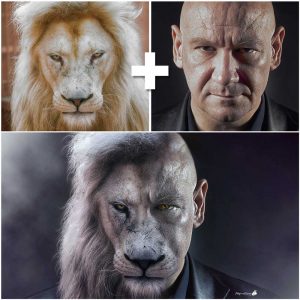
		<title>Tutorial Photoshop Fotomanipulación hombre con cara de león</title>
		<link>https://ildefonsosegura.es/tutorial-photoshop-fotomanipulacion-hombre-con-cara-de-leon/</link>
					<comments>https://ildefonsosegura.es/tutorial-photoshop-fotomanipulacion-hombre-con-cara-de-leon/#respond</comments>
		
		<dc:creator><![CDATA[Ildefonso Segura]]></dc:creator>
		<pubDate>Mon, 05 Nov 2018 16:15:24 +0000</pubDate>
				<category><![CDATA[Efectos]]></category>
		<category><![CDATA[Fotocomposición]]></category>
		<category><![CDATA[Photoshop]]></category>
		<category><![CDATA[Tecnicas]]></category>
		<category><![CDATA[Tutoriales]]></category>
		<category><![CDATA[Video]]></category>
		<category><![CDATA[Wallpaper]]></category>
		<category><![CDATA[adobe]]></category>
		<category><![CDATA[CC]]></category>
		<category><![CDATA[cc2015]]></category>
		<category><![CDATA[cc2016]]></category>
		<category><![CDATA[cc2017]]></category>
		<category><![CDATA[cc2018]]></category>
		<category><![CDATA[cc2019]]></category>
		<category><![CDATA[composición]]></category>
		<category><![CDATA[cs5]]></category>
		<category><![CDATA[cs6]]></category>
		<category><![CDATA[efectos]]></category>
		<category><![CDATA[effect]]></category>
		<category><![CDATA[face effect]]></category>
		<category><![CDATA[fake]]></category>
		<category><![CDATA[fotomanipulación]]></category>
		<category><![CDATA[humano]]></category>
		<category><![CDATA[ilusión]]></category>
		<category><![CDATA[integración]]></category>
		<category><![CDATA[integration]]></category>
		<category><![CDATA[león]]></category>
		<category><![CDATA[poster]]></category>
		<category><![CDATA[tuto]]></category>
		<category><![CDATA[VIDEOTUTORIAL]]></category>
		<category><![CDATA[wallpaper]]></category>
		<category><![CDATA[youtube]]></category>
		<guid isPermaLink="false">http://ildefonsosegura.es/?p=6262</guid>

					<description><![CDATA[<p>Navegando por instagram descubrí la fotomanipulación que ves aquí. El autor se puso en contacto. Puedes visitar las páginas de Rhys Drakeford &#8211; Bennett . Quise desesperadamente aprender cómo realizar una manipulación así. Busqué tutoriales pero no encontré los adecuados para obtener un resultado aceptable desde mi punto de vista (con todos mis respetos a [&#8230;]</p>
La entrada <a href="https://ildefonsosegura.es/tutorial-photoshop-fotomanipulacion-hombre-con-cara-de-leon/">Tutorial Photoshop Fotomanipulación hombre con cara de león</a> apareció primero en <a href="https://ildefonsosegura.es">Ildefonso Segura</a>.]]></description>
										<content:encoded><![CDATA[<div data-elementor-type="wp-post" data-elementor-id="6262" class="elementor elementor-6262">
						<section class="elementor-section elementor-top-section elementor-element elementor-element-7f905ce9 elementor-section-boxed elementor-section-height-default elementor-section-height-default" data-id="7f905ce9" data-element_type="section" data-e-type="section">
						<div class="elementor-container elementor-column-gap-default">
					<div class="elementor-column elementor-col-100 elementor-top-column elementor-element elementor-element-50349214" data-id="50349214" data-element_type="column" data-e-type="column">
			<div class="elementor-widget-wrap elementor-element-populated">
						<div class="elementor-element elementor-element-6c10184e elementor-widget elementor-widget-text-editor" data-id="6c10184e" data-element_type="widget" data-e-type="widget" data-widget_type="text-editor.default">
				<div class="elementor-widget-container">
									<p><img decoding="async" class="wp-image-6263 size-medium alignleft" src="http://ildefonsosegura.es/wp-content/uploads/foto-inspiración-tutorial-259x300.jpg" alt="" width="259" height="300" srcset="https://ildefonsosegura.es/wp-content/uploads/foto-inspiración-tutorial-259x300.jpg 259w, https://ildefonsosegura.es/wp-content/uploads/foto-inspiración-tutorial.jpg 500w" sizes="(max-width: 259px) 100vw, 259px" /></p><p style="text-align: justify;">Navegando por instagram descubrí la fotomanipulación que ves aquí. El autor se puso en contacto. Puedes visitar las páginas de <span style="color: #800000;"><strong><a style="color: #800000;" href="https://www.instagram.com/rhysdb03/" target="_blank" rel="noopener">Rhys Drakeford &#8211; Bennett</a> .</strong></span></p><p style="text-align: justify;">Quise desesperadamente aprender cómo realizar una manipulación así. Busqué tutoriales pero no encontré los adecuados para obtener un resultado aceptable desde mi punto de vista (con todos mis respetos a todos los que han editado y publicado tutoriales al respecto).</p><p style="text-align: left;"> </p>								</div>
				</div>
					</div>
		</div>
					</div>
		</section>
				<section class="elementor-section elementor-top-section elementor-element elementor-element-3b12e7b elementor-section-boxed elementor-section-height-default elementor-section-height-default" data-id="3b12e7b" data-element_type="section" data-e-type="section">
						<div class="elementor-container elementor-column-gap-default">
					<div class="elementor-column elementor-col-100 elementor-top-column elementor-element elementor-element-dc5ed23" data-id="dc5ed23" data-element_type="column" data-e-type="column">
			<div class="elementor-widget-wrap elementor-element-populated">
						<div class="elementor-element elementor-element-7b24633 elementor-widget elementor-widget-text-editor" data-id="7b24633" data-element_type="widget" data-e-type="widget" data-widget_type="text-editor.default">
				<div class="elementor-widget-container">
									<p style="text-align: justify;">Siendo así, decidí embarcarme en realizar un tutorial con mis propias manos aplicando cantidad de técnicas de photoshop para conseguir un resultado aceptable. Creo que lo conseguí y te puedo mostrar el antes y el después a continuación:</p><p><img loading="lazy" decoding="async" class="aligncenter wp-image-6265" src="http://ildefonsosegura.es/wp-content/uploads/Leon_Man-5to-intento-making-of-instagram-300x300.jpg" alt="" width="600" height="600" srcset="https://ildefonsosegura.es/wp-content/uploads/Leon_Man-5to-intento-making-of-instagram-300x300.jpg 300w, https://ildefonsosegura.es/wp-content/uploads/Leon_Man-5to-intento-making-of-instagram-150x150.jpg 150w, https://ildefonsosegura.es/wp-content/uploads/Leon_Man-5to-intento-making-of-instagram-768x768.jpg 768w, https://ildefonsosegura.es/wp-content/uploads/Leon_Man-5to-intento-making-of-instagram.jpg 1000w" sizes="(max-width: 600px) 100vw, 600px" /></p><p style="text-align: left;"> </p>								</div>
				</div>
					</div>
		</div>
					</div>
		</section>
				<section class="elementor-section elementor-top-section elementor-element elementor-element-b485ce1 elementor-section-boxed elementor-section-height-default elementor-section-height-default" data-id="b485ce1" data-element_type="section" data-e-type="section">
						<div class="elementor-container elementor-column-gap-default">
					<div class="elementor-column elementor-col-100 elementor-top-column elementor-element elementor-element-1a2df1a" data-id="1a2df1a" data-element_type="column" data-e-type="column">
			<div class="elementor-widget-wrap elementor-element-populated">
						<div class="elementor-element elementor-element-fc869ca elementor-widget elementor-widget-text-editor" data-id="fc869ca" data-element_type="widget" data-e-type="widget" data-widget_type="text-editor.default">
				<div class="elementor-widget-container">
									<p style="text-align: justify;">Comprueba tu mismo/a cómo he pasado de una imagen de un humano a una manipulación que consigue crear una ilusión donde brillos y sombras, colores y texturas se combinan para conseguir el resultado que me gusta. Quizás tú tengas otras preferencias y te invito a que adaptes el tutorial a tu medida.</p><p>[twenty20 img1=»6264&#8243; img2=»6267&#8243; offset=»0.5&#8243;]</p><p>Mira más ejemplos (<a title="galeria wallpapers" href="https://ildefonsosegura.es/flickr_gallery/galeria-ildefonsosegura-wallpapers/" target="_blank" rel="noopener">revisa mi galería también)</a>:</p>								</div>
				</div>
				<section class="elementor-section elementor-inner-section elementor-element elementor-element-e50ea81 elementor-section-boxed elementor-section-height-default elementor-section-height-default" data-id="e50ea81" data-element_type="section" data-e-type="section">
						<div class="elementor-container elementor-column-gap-default">
					<div class="elementor-column elementor-col-50 elementor-inner-column elementor-element elementor-element-519756a" data-id="519756a" data-element_type="column" data-e-type="column">
			<div class="elementor-widget-wrap elementor-element-populated">
						<div class="elementor-element elementor-element-8653b35 elementor-widget elementor-widget-image" data-id="8653b35" data-element_type="widget" data-e-type="widget" data-widget_type="image.default">
				<div class="elementor-widget-container">
															<img decoding="async" src="https://ildefonsosegura.es/wp-content/uploads/elementor/thumbs/Leon_Man-4to-intento-nykxnudzd98loj8x85ce893u30n60fe3yoeoqe7dn2.jpg" title="Leon_Man-4to-intento" alt="Leon_Man-4to-intento" loading="lazy" />															</div>
				</div>
					</div>
		</div>
				<div class="elementor-column elementor-col-50 elementor-inner-column elementor-element elementor-element-7e20659" data-id="7e20659" data-element_type="column" data-e-type="column">
			<div class="elementor-widget-wrap elementor-element-populated">
						<div class="elementor-element elementor-element-1782fdd elementor-widget elementor-widget-image" data-id="1782fdd" data-element_type="widget" data-e-type="widget" data-widget_type="image.default">
				<div class="elementor-widget-container">
															<img loading="lazy" decoding="async" width="667" height="667" src="https://ildefonsosegura.es/wp-content/uploads/LeonManhatacinturaWeb.jpg" class="attachment-large size-large wp-image-6266" alt="" srcset="https://ildefonsosegura.es/wp-content/uploads/LeonManhatacinturaWeb.jpg 667w, https://ildefonsosegura.es/wp-content/uploads/LeonManhatacinturaWeb-150x150.jpg 150w, https://ildefonsosegura.es/wp-content/uploads/LeonManhatacinturaWeb-300x300.jpg 300w" sizes="(max-width: 667px) 100vw, 667px" />															</div>
				</div>
					</div>
		</div>
					</div>
		</section>
					</div>
		</div>
					</div>
		</section>
				<section class="elementor-section elementor-top-section elementor-element elementor-element-d25b748 elementor-section-boxed elementor-section-height-default elementor-section-height-default" data-id="d25b748" data-element_type="section" data-e-type="section">
						<div class="elementor-container elementor-column-gap-default">
					<div class="elementor-column elementor-col-100 elementor-top-column elementor-element elementor-element-0c6fb16" data-id="0c6fb16" data-element_type="column" data-e-type="column">
			<div class="elementor-widget-wrap elementor-element-populated">
						<div class="elementor-element elementor-element-e406987 elementor-widget elementor-widget-text-editor" data-id="e406987" data-element_type="widget" data-e-type="widget" data-widget_type="text-editor.default">
				<div class="elementor-widget-container">
									<p>Disfruta del tutorial. Yo me lo pasé en grande aunque hay mucho trabajo detrás</p><p><strong><span style="color: #800000;">TUTORIAL</span> </strong></p><center><iframe src="https://www.youtube.com/embed/rgaCFkhgze4" width="640" height="420" frameborder="0" allowfullscreen="allowfullscreen"></iframe></center><p style="text-align: center;"><span style="color: #ff0000;"><strong>Aquí debajo te dejo referencia a las imágenes que he usado</strong></span></p><center></center><p style="text-align: left;"><strong>Imágenes usadas:</strong></p><ul><li style="text-align: left;">Imagen Inspiración tutorial: <a href="https://goo.gl/ycDWVT" target="_blank" rel="noopener">https://goo.gl/ycDWVT</a></li><li style="text-align: left;">Foto león: <a href="https://goo.gl/y9ZrZA" target="_blank" rel="noopener">https://goo.gl/y9ZrZA</a></li><li style="text-align: left;">Foto hombre calvo : <a href="https://mx.depositphotos.com/8511579/stock-photo-character-actor-head-shot.html" target="_blank" rel="noopener">https://mx.depositphotos.com/8511579/stock-photo-character-actor-head-shot.html</a> (esta imágen es de pago y lamento no poder compartirla por los derechos de autor)</li></ul>								</div>
				</div>
					</div>
		</div>
					</div>
		</section>
				<section class="elementor-section elementor-top-section elementor-element elementor-element-2eed9621 elementor-section-boxed elementor-section-height-default elementor-section-height-default" data-id="2eed9621" data-element_type="section" data-e-type="section">
						<div class="elementor-container elementor-column-gap-default">
					<div class="elementor-column elementor-col-100 elementor-top-column elementor-element elementor-element-453ff235" data-id="453ff235" data-element_type="column" data-e-type="column">
			<div class="elementor-widget-wrap elementor-element-populated">
						<div class="elementor-element elementor-element-2b1a9423 elementor-widget-divider--view-line elementor-widget elementor-widget-divider" data-id="2b1a9423" data-element_type="widget" data-e-type="widget" data-widget_type="divider.default">
				<div class="elementor-widget-container">
							<div class="elementor-divider">
			<span class="elementor-divider-separator">
						</span>
		</div>
						</div>
				</div>
					</div>
		</div>
					</div>
		</section>
				<section class="elementor-section elementor-top-section elementor-element elementor-element-48384626 elementor-section-full_width elementor-section-height-default elementor-section-height-default" data-id="48384626" data-element_type="section" data-e-type="section">
						<div class="elementor-container elementor-column-gap-default">
					<div class="elementor-column elementor-col-50 elementor-top-column elementor-element elementor-element-8214633" data-id="8214633" data-element_type="column" data-e-type="column">
			<div class="elementor-widget-wrap elementor-element-populated">
						<div class="elementor-element elementor-element-4abdc483 elementor-align-right elementor-invisible elementor-widget elementor-widget-button" data-id="4abdc483" data-element_type="widget" data-e-type="widget" data-settings="{&quot;_animation&quot;:&quot;shake&quot;}" data-widget_type="button.default">
				<div class="elementor-widget-container">
									<div class="elementor-button-wrapper">
					<a class="elementor-button elementor-button-link elementor-size-sm elementor-animation-grow" href="https://drive.google.com/open?id=1ZXBQt6clgucFYxxgnNlCQgN89YvrT2Vf">
						<span class="elementor-button-content-wrapper">
									<span class="elementor-button-text">PINCELES USADOS</span>
					</span>
					</a>
				</div>
								</div>
				</div>
					</div>
		</div>
				<div class="elementor-column elementor-col-50 elementor-top-column elementor-element elementor-element-3ab10fcc" data-id="3ab10fcc" data-element_type="column" data-e-type="column">
			<div class="elementor-widget-wrap elementor-element-populated">
						<div class="elementor-element elementor-element-75400e60 elementor-widget elementor-widget-html" data-id="75400e60" data-element_type="widget" data-e-type="widget" data-settings="{&quot;_animation&quot;:&quot;none&quot;}" data-widget_type="html.default">
				<div class="elementor-widget-container">
					<form action="https://www.paypal.com/cgi-bin/webscr" method="post" target="_blank">
<input type="hidden" name="cmd" value="_donations">
<input type="hidden" name="business" value="ildefonsosegura@gmail.com">
<input type="hidden" name="lc" value="ES">
<input type="hidden" name="item_name" value="MANTENIMIENTO DE LA PAGINA DE ILDEFONSOSEGURA">
<input type="hidden" name="no_note" value="0">
<input type="hidden" name="currency_code" value="EUR">
<input type="hidden" name="bn" value="PP-DonationsBF:paypal1.jpg:NonHostedGuest">
<input type="image" src="http://ildefonsosegura.es/wp-content/uploads/paypal-updated-1.png" border="0" name="submit" alt="PayPal. La forma rápida y segura de pagar en Internet.">
<img decoding="async" alt="" border="0" src="https://www.paypalobjects.com/es_ES/i/scr/pixel.gif" width="1" height="1">
</form>				</div>
				</div>
					</div>
		</div>
					</div>
		</section>
				<section class="elementor-section elementor-top-section elementor-element elementor-element-65d683ec elementor-section-boxed elementor-section-height-default elementor-section-height-default" data-id="65d683ec" data-element_type="section" data-e-type="section">
						<div class="elementor-container elementor-column-gap-default">
					<div class="elementor-column elementor-col-100 elementor-top-column elementor-element elementor-element-27a7fc31" data-id="27a7fc31" data-element_type="column" data-e-type="column">
			<div class="elementor-widget-wrap elementor-element-populated">
						<div class="elementor-element elementor-element-19783ffd elementor-widget-divider--view-line elementor-widget elementor-widget-divider" data-id="19783ffd" data-element_type="widget" data-e-type="widget" data-widget_type="divider.default">
				<div class="elementor-widget-container">
							<div class="elementor-divider">
			<span class="elementor-divider-separator">
						</span>
		</div>
						</div>
				</div>
					</div>
		</div>
					</div>
		</section>
				<section class="elementor-section elementor-top-section elementor-element elementor-element-7fad65b6 elementor-section-full_width elementor-section-height-default elementor-section-height-default" data-id="7fad65b6" data-element_type="section" data-e-type="section">
						<div class="elementor-container elementor-column-gap-default">
					<div class="elementor-column elementor-col-100 elementor-top-column elementor-element elementor-element-6d37c87d" data-id="6d37c87d" data-element_type="column" data-e-type="column">
			<div class="elementor-widget-wrap elementor-element-populated">
						<div class="elementor-element elementor-element-2ee6db4d elementor-widget elementor-widget-text-editor" data-id="2ee6db4d" data-element_type="widget" data-e-type="widget" data-widget_type="text-editor.default">
				<div class="elementor-widget-container">
									<div><div align="center"><center><strong style="color: #ff0000;">Suscríbete a mi canal de Youtube:</strong></center><div><div><div align="center"><p><script src="https://apis.google.com/js/platform.js"></script></p><div class="g-ytsubscribe" data-channel="ildefonsosegura" data-layout="full" data-count="default"> </div></div></div><p> </p><p style="text-align: center;">No te lo pierdas y comparte tus trabajos en mi página de facebook (<span style="color: #0000ff;"><strong><a style="color: #0000ff;" href="http://www.facebook.com/IldefonsoSeguraPage" target="_blank" rel="noopener noreferrer">IldefonsoSeguraPage</a></strong></span>)<br />Espero que te guste y compartas el vídeo. No dejes de compartir este post.</p><p style="text-align: center;">Así es como me puedes ayudar 🙂 Gracias</p></div></div></div>								</div>
				</div>
					</div>
		</div>
					</div>
		</section>
				</div>La entrada <a href="https://ildefonsosegura.es/tutorial-photoshop-fotomanipulacion-hombre-con-cara-de-leon/">Tutorial Photoshop Fotomanipulación hombre con cara de león</a> apareció primero en <a href="https://ildefonsosegura.es">Ildefonso Segura</a>.]]></content:encoded>
					
					<wfw:commentRss>https://ildefonsosegura.es/tutorial-photoshop-fotomanipulacion-hombre-con-cara-de-leon/feed/</wfw:commentRss>
			<slash:comments>0</slash:comments>
		
		
			</item>
		<item>
		<title>Fotomontaje con #PhotoshopCC, integración de objetos</title>
		<link>https://ildefonsosegura.es/fotomontaje-con-photoshopcc-integracion-de-objetos-by-ildefonsosegura/</link>
					<comments>https://ildefonsosegura.es/fotomontaje-con-photoshopcc-integracion-de-objetos-by-ildefonsosegura/#comments</comments>
		
		<dc:creator><![CDATA[Ildefonso Segura]]></dc:creator>
		<pubDate>Tue, 27 Mar 2018 20:40:00 +0000</pubDate>
				<category><![CDATA[Efectos]]></category>
		<category><![CDATA[Fotocomposición]]></category>
		<category><![CDATA[Photoshop]]></category>
		<category><![CDATA[Speed Art]]></category>
		<category><![CDATA[Tecnicas]]></category>
		<category><![CDATA[Tutoriales]]></category>
		<category><![CDATA[Wallpaper]]></category>
		<category><![CDATA[adobe]]></category>
		<category><![CDATA[cacasco]]></category>
		<category><![CDATA[CC]]></category>
		<category><![CDATA[cc2014]]></category>
		<category><![CDATA[cc2015]]></category>
		<category><![CDATA[clonar]]></category>
		<category><![CDATA[color]]></category>
		<category><![CDATA[color efex pro]]></category>
		<category><![CDATA[creativecloud]]></category>
		<category><![CDATA[creatividad]]></category>
		<category><![CDATA[cs4]]></category>
		<category><![CDATA[cs5]]></category>
		<category><![CDATA[cs6]]></category>
		<category><![CDATA[efectos]]></category>
		<category><![CDATA[fondo]]></category>
		<category><![CDATA[fotomanipulación]]></category>
		<category><![CDATA[fotomontaje]]></category>
		<category><![CDATA[gloriasanis]]></category>
		<category><![CDATA[ildefonsosegura]]></category>
		<category><![CDATA[imagen]]></category>
		<category><![CDATA[integración]]></category>
		<category><![CDATA[photoshop]]></category>
		<category><![CDATA[poster]]></category>
		<category><![CDATA[tampon clonar]]></category>
		<category><![CDATA[tutorial]]></category>
		<category><![CDATA[wall]]></category>
		<category><![CDATA[wallpaper]]></category>
		<category><![CDATA[youtube]]></category>
		<guid isPermaLink="false">http://ildefonsosegura.es/?p=4831</guid>

					<description><![CDATA[<p>En este tutorial de #Photoshop cc vamos a realizar una integración de elementos para construir un wallpaper. Un fotomontaje donde aprenderemos cómo poder engañar a la realidad. En un tutorial anterior puedes ver como trabajar las abolladuras del casco y la rotura. Puedes esforzarte menos si bajas los materiales que te ofrezco donde encontrarás el [&#8230;]</p>
La entrada <a href="https://ildefonsosegura.es/fotomontaje-con-photoshopcc-integracion-de-objetos-by-ildefonsosegura/">Fotomontaje con #PhotoshopCC, integración de objetos</a> apareció primero en <a href="https://ildefonsosegura.es">Ildefonso Segura</a>.]]></description>
										<content:encoded><![CDATA[<div data-elementor-type="wp-post" data-elementor-id="4831" class="elementor elementor-4831">
						<section class="elementor-section elementor-top-section elementor-element elementor-element-5b201b6e elementor-section-boxed elementor-section-height-default elementor-section-height-default" data-id="5b201b6e" data-element_type="section" data-e-type="section">
						<div class="elementor-container elementor-column-gap-default">
					<div class="elementor-column elementor-col-100 elementor-top-column elementor-element elementor-element-3cda53f4" data-id="3cda53f4" data-element_type="column" data-e-type="column">
			<div class="elementor-widget-wrap elementor-element-populated">
						<div class="elementor-element elementor-element-57f7a125 elementor-widget elementor-widget-text-editor" data-id="57f7a125" data-element_type="widget" data-e-type="widget" data-widget_type="text-editor.default">
				<div class="elementor-widget-container">
									<p style="text-align: justify;">En este tutorial de #Photoshop cc vamos a realizar una integración de elementos para construir un wallpaper. Un fotomontaje donde aprenderemos cómo poder engañar a la realidad.</p>
<p style="text-align: justify;">En un tutorial anterior puedes ver como trabajar las abolladuras del casco y la rotura. Puedes esforzarte menos si bajas los materiales que te ofrezco donde encontrarás el stock ya realizado y extraído (eso ya depende de ti). Yo te recomiendo que lo veas pinchando la miniatura siguiente:</p>
<p style="text-align: justify;"><a href="https://ildefonsosegura.es/aprende-a-realizar-abolladuras-y-rotura-en-un-objeto-casco-con-photoshop-by-ildefonsosegura/" target="_blank" rel="attachment noopener wp-att-4820"><img loading="lazy" decoding="async" class=" wp-image-4820 size-medium aligncenter" src="https://ildefonsosegura.es/wp-content/uploads/Casco-rotura-2-300x169.jpg" alt="Casco-rotura-2" width="300" height="169" srcset="https://ildefonsosegura.es/wp-content/uploads/Casco-rotura-2-300x169.jpg 300w, https://ildefonsosegura.es/wp-content/uploads/Casco-rotura-2-1024x576.jpg 1024w, https://ildefonsosegura.es/wp-content/uploads/Casco-rotura-2-720x406.jpg 720w, https://ildefonsosegura.es/wp-content/uploads/Casco-rotura-2.jpg 1280w" sizes="(max-width: 300px) 100vw, 300px" /></a></p>
<p style="text-align: justify;">En el tutorial  que vamos a ver ahora, construiremos este wallpaper</p>
<p style="text-align: justify;"><img loading="lazy" decoding="async" class="aligncenter wp-image-4834 size-full" src="https://ildefonsosegura.es/wp-content/uploads/Casco-en-camino.jpg" alt="Casco-en-camino" width="640" height="420" /></p>
<p style="text-align: justify;">Aprenderemos a:</p>

<ol>
 	<li>Usar máscaras de capa para integrar</li>
 	<li>Usar la herramienta tampón de clonar</li>
 	<li>Texturizar para dar impresión de envejecimiento con máscaras de recorte, capas de ajuste y texturas.</li>
 	<li>Técnicas de integración como desenfoques, sombras, profundidad de campo,&#8230;</li>
 	<li>Despertar el interés por crear escenarios con colores distintos (mención y breve uso del plugin Color Efex Pro 4)</li>
</ol>
Puedes visitar la página del PLUGIN COLOR EFEX PRO 4 para adquirirlo y probarlo. En cualquier caso tienes cientos de tutoriales en la red para ver como funciona y orientación para adquirirlo. Visita su página haciendo clic <strong><a href="https://www.google.com/nikcollection/products/color-efex-pro/" target="_blank" rel="noopener">COLOR EFEX PRO</a></strong>
<p style="text-align: justify;">No te lo pierdas y comparte tus trabajos en mi página de facebook (<a href="http://www.facebook.com/IldefonsoSeguraPage" target="_blank" rel="noopener">IldefonsoSeguraPage</a>)</p>
&nbsp;

Espero que os guste
<p style="text-align: left;"><strong>TUTORIAL</strong>
<iframe src="https://www.youtube.com/embed/5LtrQIwzplU?rel=0" width="640" height="420" frameborder="0" allowfullscreen="allowfullscreen"></iframe></p>

<div><center>

</center><center></center>
<p style="text-align: left;"><strong>SPEEDART</strong>
<iframe src="https://www.youtube.com/embed/vl9AeE3Gts0?rel=0" width="640" height="420" frameborder="0" allowfullscreen="allowfullscreen"></iframe></p>

<div>
<div></div>
<p style="text-align: left;"></p>
&nbsp;

&nbsp;

</div>
</div>								</div>
				</div>
					</div>
		</div>
					</div>
		</section>
				<section class="elementor-section elementor-top-section elementor-element elementor-element-56584954 elementor-section-boxed elementor-section-height-default elementor-section-height-default" data-id="56584954" data-element_type="section" data-e-type="section">
						<div class="elementor-container elementor-column-gap-default">
					<div class="elementor-column elementor-col-100 elementor-top-column elementor-element elementor-element-277c8609" data-id="277c8609" data-element_type="column" data-e-type="column">
			<div class="elementor-widget-wrap elementor-element-populated">
						<div class="elementor-element elementor-element-30496442 elementor-widget-divider--view-line elementor-widget elementor-widget-divider" data-id="30496442" data-element_type="widget" data-e-type="widget" data-widget_type="divider.default">
				<div class="elementor-widget-container">
							<div class="elementor-divider">
			<span class="elementor-divider-separator">
						</span>
		</div>
						</div>
				</div>
					</div>
		</div>
					</div>
		</section>
				<section class="elementor-section elementor-top-section elementor-element elementor-element-5b795a8c elementor-section-full_width elementor-section-height-default elementor-section-height-default" data-id="5b795a8c" data-element_type="section" data-e-type="section">
						<div class="elementor-container elementor-column-gap-default">
					<div class="elementor-column elementor-col-50 elementor-top-column elementor-element elementor-element-48ec4aeb" data-id="48ec4aeb" data-element_type="column" data-e-type="column">
			<div class="elementor-widget-wrap elementor-element-populated">
						<div class="elementor-element elementor-element-3f41d9ec elementor-align-right elementor-invisible elementor-widget elementor-widget-button" data-id="3f41d9ec" data-element_type="widget" data-e-type="widget" data-settings="{&quot;_animation&quot;:&quot;shake&quot;}" data-widget_type="button.default">
				<div class="elementor-widget-container">
									<div class="elementor-button-wrapper">
					<a class="elementor-button elementor-button-link elementor-size-sm elementor-animation-grow" href="https://drive.google.com/open?id=0B_nJkCGJubuceGdseE8xNkV6UE0">
						<span class="elementor-button-content-wrapper">
									<span class="elementor-button-text">DESCARGA EL MATERIAL</span>
					</span>
					</a>
				</div>
								</div>
				</div>
					</div>
		</div>
				<div class="elementor-column elementor-col-50 elementor-top-column elementor-element elementor-element-15e23e96" data-id="15e23e96" data-element_type="column" data-e-type="column">
			<div class="elementor-widget-wrap elementor-element-populated">
						<div class="elementor-element elementor-element-414b8df4 elementor-widget elementor-widget-html" data-id="414b8df4" data-element_type="widget" data-e-type="widget" data-settings="{&quot;_animation&quot;:&quot;none&quot;}" data-widget_type="html.default">
				<div class="elementor-widget-container">
					<form action="https://www.paypal.com/cgi-bin/webscr" method="post" target="_blank">
<input type="hidden" name="cmd" value="_donations">
<input type="hidden" name="business" value="ildefonsosegura@gmail.com">
<input type="hidden" name="lc" value="ES">
<input type="hidden" name="item_name" value="MANTENIMIENTO DE LA PAGINA DE ILDEFONSOSEGURA">
<input type="hidden" name="no_note" value="0">
<input type="hidden" name="currency_code" value="EUR">
<input type="hidden" name="bn" value="PP-DonationsBF:paypal1.jpg:NonHostedGuest">
<input type="image" src="http://ildefonsosegura.es/wp-content/uploads/paypal-updated-1.png" border="0" name="submit" alt="PayPal. La forma rápida y segura de pagar en Internet.">
<img decoding="async" alt="" border="0" src="https://www.paypalobjects.com/es_ES/i/scr/pixel.gif" width="1" height="1">
</form>				</div>
				</div>
					</div>
		</div>
					</div>
		</section>
				<section class="elementor-section elementor-top-section elementor-element elementor-element-619906ad elementor-section-boxed elementor-section-height-default elementor-section-height-default" data-id="619906ad" data-element_type="section" data-e-type="section">
						<div class="elementor-container elementor-column-gap-default">
					<div class="elementor-column elementor-col-100 elementor-top-column elementor-element elementor-element-73edbba6" data-id="73edbba6" data-element_type="column" data-e-type="column">
			<div class="elementor-widget-wrap elementor-element-populated">
						<div class="elementor-element elementor-element-47b8dfc elementor-widget-divider--view-line elementor-widget elementor-widget-divider" data-id="47b8dfc" data-element_type="widget" data-e-type="widget" data-widget_type="divider.default">
				<div class="elementor-widget-container">
							<div class="elementor-divider">
			<span class="elementor-divider-separator">
						</span>
		</div>
						</div>
				</div>
					</div>
		</div>
					</div>
		</section>
				<section class="elementor-section elementor-top-section elementor-element elementor-element-67efbb3c elementor-section-full_width elementor-section-height-default elementor-section-height-default" data-id="67efbb3c" data-element_type="section" data-e-type="section">
						<div class="elementor-container elementor-column-gap-default">
					<div class="elementor-column elementor-col-100 elementor-top-column elementor-element elementor-element-41d07212" data-id="41d07212" data-element_type="column" data-e-type="column">
			<div class="elementor-widget-wrap elementor-element-populated">
						<div class="elementor-element elementor-element-49d1b8e2 elementor-widget elementor-widget-text-editor" data-id="49d1b8e2" data-element_type="widget" data-e-type="widget" data-widget_type="text-editor.default">
				<div class="elementor-widget-container">
									<div><div align="center"><center><strong style="color: #ff0000;">Suscríbete a mi canal de Youtube:</strong></center><div><div><div align="center"><p><script src="https://apis.google.com/js/platform.js"></script></p><div class="g-ytsubscribe" data-channel="ildefonsosegura" data-layout="full" data-count="default"> </div></div></div><p> </p><p style="text-align: center;">No te lo pierdas y comparte tus trabajos en mi página de facebook (<span style="color: #0000ff;"><strong><a style="color: #0000ff;" href="http://www.facebook.com/IldefonsoSeguraPage" target="_blank" rel="noopener noreferrer">IldefonsoSeguraPage</a></strong></span>)<br />Espero que te guste y compartas el vídeo. No dejes de compartir este post.</p><p style="text-align: center;">Así es como me puedes ayudar 🙂 Gracias</p></div></div></div>								</div>
				</div>
					</div>
		</div>
					</div>
		</section>
				</div>La entrada <a href="https://ildefonsosegura.es/fotomontaje-con-photoshopcc-integracion-de-objetos-by-ildefonsosegura/">Fotomontaje con #PhotoshopCC, integración de objetos</a> apareció primero en <a href="https://ildefonsosegura.es">Ildefonso Segura</a>.]]></content:encoded>
					
					<wfw:commentRss>https://ildefonsosegura.es/fotomontaje-con-photoshopcc-integracion-de-objetos-by-ildefonsosegura/feed/</wfw:commentRss>
			<slash:comments>1</slash:comments>
		
		
			</item>
		<item>
		<title>Fotomontaje estilo Alan Wake en un wallpaper con photoshop by @ildefonsosegura</title>
		<link>https://ildefonsosegura.es/fotomontaje-estilo-alan-wake-en-un-wallpaper-con-photoshop-by-ildefonsosegura/</link>
					<comments>https://ildefonsosegura.es/fotomontaje-estilo-alan-wake-en-un-wallpaper-con-photoshop-by-ildefonsosegura/#respond</comments>
		
		<dc:creator><![CDATA[Ildefonso Segura]]></dc:creator>
		<pubDate>Tue, 20 Mar 2018 11:50:21 +0000</pubDate>
				<category><![CDATA[3D]]></category>
		<category><![CDATA[Estilos]]></category>
		<category><![CDATA[Fotocomposición]]></category>
		<category><![CDATA[Photoshop]]></category>
		<category><![CDATA[Textos]]></category>
		<category><![CDATA[Tutoriales]]></category>
		<category><![CDATA[Wallpaper]]></category>
		<category><![CDATA[3d effect]]></category>
		<category><![CDATA[adobe]]></category>
		<category><![CDATA[alan]]></category>
		<category><![CDATA[alan wake]]></category>
		<category><![CDATA[caratula]]></category>
		<category><![CDATA[cc2014]]></category>
		<category><![CDATA[cc2015]]></category>
		<category><![CDATA[cover]]></category>
		<category><![CDATA[cs4]]></category>
		<category><![CDATA[cs5]]></category>
		<category><![CDATA[cs6]]></category>
		<category><![CDATA[efecto 3D]]></category>
		<category><![CDATA[fotomontaje]]></category>
		<category><![CDATA[game]]></category>
		<category><![CDATA[ildefososegura]]></category>
		<category><![CDATA[juego]]></category>
		<category><![CDATA[photoshop]]></category>
		<category><![CDATA[poster]]></category>
		<category><![CDATA[text]]></category>
		<category><![CDATA[texto]]></category>
		<category><![CDATA[tuto]]></category>
		<category><![CDATA[tutorial]]></category>
		<category><![CDATA[videojuego]]></category>
		<category><![CDATA[wake]]></category>
		<category><![CDATA[wallpaper]]></category>
		<category><![CDATA[youtube]]></category>
		<guid isPermaLink="false">http://ildefonsosegura.es/?p=4936</guid>

					<description><![CDATA[<p>En este tutorial de photoshop aprenderemos a hacer un wallpaper/póster al estilo Alan Wake (vídeo juego del género thriller psicológico) pero añadiendo un esfecto 3D en el texto.En este fotomontaje, usaremos objetos inteligentes, máscaras de capa y pinceles especiales para crear una escena de videojuego. A continuación verás el wallpaper original del juego y más [&#8230;]</p>
La entrada <a href="https://ildefonsosegura.es/fotomontaje-estilo-alan-wake-en-un-wallpaper-con-photoshop-by-ildefonsosegura/">Fotomontaje estilo Alan Wake en un wallpaper con photoshop by @ildefonsosegura</a> apareció primero en <a href="https://ildefonsosegura.es">Ildefonso Segura</a>.]]></description>
										<content:encoded><![CDATA[<div data-elementor-type="wp-post" data-elementor-id="4936" class="elementor elementor-4936">
						<section class="elementor-section elementor-top-section elementor-element elementor-element-544ed057 elementor-section-boxed elementor-section-height-default elementor-section-height-default" data-id="544ed057" data-element_type="section" data-e-type="section">
						<div class="elementor-container elementor-column-gap-default">
					<div class="elementor-column elementor-col-100 elementor-top-column elementor-element elementor-element-35a7d1f4" data-id="35a7d1f4" data-element_type="column" data-e-type="column">
			<div class="elementor-widget-wrap elementor-element-populated">
						<div class="elementor-element elementor-element-58a39408 elementor-widget elementor-widget-text-editor" data-id="58a39408" data-element_type="widget" data-e-type="widget" data-widget_type="text-editor.default">
				<div class="elementor-widget-container">
									<p style="text-align: justify;">En este tutorial de photoshop aprenderemos a hacer un wallpaper/póster al estilo Alan Wake (vídeo juego del género thriller psicológico) pero añadiendo un esfecto 3D en el texto.<br />En este fotomontaje, usaremos objetos inteligentes, máscaras de capa y pinceles especiales para crear una escena de videojuego.</p><p style="text-align: justify;">A continuación verás el wallpaper original del juego y más abajo el que construiremos con el tutorial. Como vés hay una similitud bastante elevada aunque nosotros incorporaremos en el tutorial de Photoshop algunos efectos como más iluminación, efecto 3D y otros &#8230;</p><p style="text-align: justify;"><img loading="lazy" decoding="async" class="aligncenter size-full wp-image-4938" src="https://ildefonsosegura.es/wp-content/uploads/alan-wake2.jpg" alt="alan-wake2" width="1280" height="1440" srcset="https://ildefonsosegura.es/wp-content/uploads/alan-wake2.jpg 1280w, https://ildefonsosegura.es/wp-content/uploads/alan-wake2-267x300.jpg 267w, https://ildefonsosegura.es/wp-content/uploads/alan-wake2-910x1024.jpg 910w" sizes="(max-width: 1280px) 100vw, 1280px" /></p><p>No te lo pierdas y comparte tus trabajos en mi página de facebook (<a href="http://www.facebook.com/IldefonsoSeguraPage" target="_blank" rel="noopener noreferrer">IldefonsoSeguraPage</a>)</p><p>Espero que te guste y compartas el video</p><p> </p><p style="text-align: left;"><strong>TUTORIAL EFECTO ALAN WAKE WALLPAPER</strong></p><p style="text-align: left;"><iframe src="https://www.youtube.com/embed/O95YmaUfpp0?rel=0" width="640" height="420" frameborder="0" allowfullscreen="allowfullscreen"></iframe></p><div><p> </p><p style="text-align: left;"><strong>SPEEDART ALAN WAKE WALLPAPER</strong></p><p style="text-align: left;"><iframe src="https://www.youtube.com/embed/3JJt9L7_074?rel=0" width="640" height="420" frameborder="0" allowfullscreen="allowfullscreen"><span data-mce-type="bookmark" style="display: inline-block; width: 0px; overflow: hidden; line-height: 0;" class="mce_SELRES_start">﻿</span></iframe></p><div><div> </div><p style="text-align: left;"> </p></div></div>								</div>
				</div>
					</div>
		</div>
					</div>
		</section>
				<section class="elementor-section elementor-top-section elementor-element elementor-element-793334fd elementor-section-boxed elementor-section-height-default elementor-section-height-default" data-id="793334fd" data-element_type="section" data-e-type="section">
						<div class="elementor-container elementor-column-gap-default">
					<div class="elementor-column elementor-col-100 elementor-top-column elementor-element elementor-element-329bfa4a" data-id="329bfa4a" data-element_type="column" data-e-type="column">
			<div class="elementor-widget-wrap elementor-element-populated">
						<div class="elementor-element elementor-element-107a983d elementor-widget-divider--view-line elementor-widget elementor-widget-divider" data-id="107a983d" data-element_type="widget" data-e-type="widget" data-widget_type="divider.default">
				<div class="elementor-widget-container">
							<div class="elementor-divider">
			<span class="elementor-divider-separator">
						</span>
		</div>
						</div>
				</div>
					</div>
		</div>
					</div>
		</section>
				<section class="elementor-section elementor-top-section elementor-element elementor-element-57c813d3 elementor-section-full_width elementor-section-height-default elementor-section-height-default" data-id="57c813d3" data-element_type="section" data-e-type="section">
						<div class="elementor-container elementor-column-gap-default">
					<div class="elementor-column elementor-col-50 elementor-top-column elementor-element elementor-element-37178585" data-id="37178585" data-element_type="column" data-e-type="column">
			<div class="elementor-widget-wrap elementor-element-populated">
						<div class="elementor-element elementor-element-41c7ef19 elementor-align-right elementor-invisible elementor-widget elementor-widget-button" data-id="41c7ef19" data-element_type="widget" data-e-type="widget" data-settings="{&quot;_animation&quot;:&quot;shake&quot;}" data-widget_type="button.default">
				<div class="elementor-widget-container">
									<div class="elementor-button-wrapper">
					<a class="elementor-button elementor-button-link elementor-size-sm elementor-animation-grow" href="https://drive.google.com/file/d/0B_nJkCGJubucVTV2Xy1IdkVoUnc/view?usp=sharing">
						<span class="elementor-button-content-wrapper">
									<span class="elementor-button-text">DESCARGA EL MATERIAL</span>
					</span>
					</a>
				</div>
								</div>
				</div>
					</div>
		</div>
				<div class="elementor-column elementor-col-50 elementor-top-column elementor-element elementor-element-1a8ab36" data-id="1a8ab36" data-element_type="column" data-e-type="column">
			<div class="elementor-widget-wrap elementor-element-populated">
						<div class="elementor-element elementor-element-153be98c elementor-widget elementor-widget-html" data-id="153be98c" data-element_type="widget" data-e-type="widget" data-settings="{&quot;_animation&quot;:&quot;none&quot;}" data-widget_type="html.default">
				<div class="elementor-widget-container">
					<form action="https://www.paypal.com/cgi-bin/webscr" method="post" target="_blank">
<input type="hidden" name="cmd" value="_donations">
<input type="hidden" name="business" value="ildefonsosegura@gmail.com">
<input type="hidden" name="lc" value="ES">
<input type="hidden" name="item_name" value="MANTENIMIENTO DE LA PAGINA DE ILDEFONSOSEGURA">
<input type="hidden" name="no_note" value="0">
<input type="hidden" name="currency_code" value="EUR">
<input type="hidden" name="bn" value="PP-DonationsBF:paypal1.jpg:NonHostedGuest">
<input type="image" src="http://ildefonsosegura.es/wp-content/uploads/paypal-updated-1.png" border="0" name="submit" alt="PayPal. La forma rápida y segura de pagar en Internet.">
<img decoding="async" alt="" border="0" src="https://www.paypalobjects.com/es_ES/i/scr/pixel.gif" width="1" height="1">
</form>				</div>
				</div>
					</div>
		</div>
					</div>
		</section>
				<section class="elementor-section elementor-top-section elementor-element elementor-element-6e7c9907 elementor-section-boxed elementor-section-height-default elementor-section-height-default" data-id="6e7c9907" data-element_type="section" data-e-type="section">
						<div class="elementor-container elementor-column-gap-default">
					<div class="elementor-column elementor-col-100 elementor-top-column elementor-element elementor-element-1170ee43" data-id="1170ee43" data-element_type="column" data-e-type="column">
			<div class="elementor-widget-wrap elementor-element-populated">
						<div class="elementor-element elementor-element-691fa630 elementor-widget-divider--view-line elementor-widget elementor-widget-divider" data-id="691fa630" data-element_type="widget" data-e-type="widget" data-widget_type="divider.default">
				<div class="elementor-widget-container">
							<div class="elementor-divider">
			<span class="elementor-divider-separator">
						</span>
		</div>
						</div>
				</div>
					</div>
		</div>
					</div>
		</section>
				<section class="elementor-section elementor-top-section elementor-element elementor-element-5a7f31a8 elementor-section-full_width elementor-section-height-default elementor-section-height-default" data-id="5a7f31a8" data-element_type="section" data-e-type="section">
						<div class="elementor-container elementor-column-gap-default">
					<div class="elementor-column elementor-col-100 elementor-top-column elementor-element elementor-element-1d5bc1b4" data-id="1d5bc1b4" data-element_type="column" data-e-type="column">
			<div class="elementor-widget-wrap elementor-element-populated">
						<div class="elementor-element elementor-element-4e0b2ef4 elementor-widget elementor-widget-text-editor" data-id="4e0b2ef4" data-element_type="widget" data-e-type="widget" data-widget_type="text-editor.default">
				<div class="elementor-widget-container">
									<div><div align="center"><center><strong style="color: #ff0000;">Suscríbete a mi canal de Youtube:</strong></center><div><div><div align="center"><p><script src="https://apis.google.com/js/platform.js"></script></p><div class="g-ytsubscribe" data-channel="ildefonsosegura" data-layout="full" data-count="default"> </div></div></div><p> </p><p style="text-align: center;">No te lo pierdas y comparte tus trabajos en mi página de facebook (<span style="color: #0000ff;"><strong><a style="color: #0000ff;" href="http://www.facebook.com/IldefonsoSeguraPage" target="_blank" rel="noopener noreferrer">IldefonsoSeguraPage</a></strong></span>)<br />Espero que te guste y compartas el vídeo. No dejes de compartir este post.</p><p style="text-align: center;">Así es como me puedes ayudar 🙂 Gracias</p></div></div></div>								</div>
				</div>
					</div>
		</div>
					</div>
		</section>
				</div>La entrada <a href="https://ildefonsosegura.es/fotomontaje-estilo-alan-wake-en-un-wallpaper-con-photoshop-by-ildefonsosegura/">Fotomontaje estilo Alan Wake en un wallpaper con photoshop by @ildefonsosegura</a> apareció primero en <a href="https://ildefonsosegura.es">Ildefonso Segura</a>.]]></content:encoded>
					
					<wfw:commentRss>https://ildefonsosegura.es/fotomontaje-estilo-alan-wake-en-un-wallpaper-con-photoshop-by-ildefonsosegura/feed/</wfw:commentRss>
			<slash:comments>0</slash:comments>
		
		
			</item>
		<item>
		<title>Haz un cráneo en llamas con #Photoshop (#ghostrider) by @ildefonsosegura</title>
		<link>https://ildefonsosegura.es/haz-un-craneo-en-llamas-con-photoshop-ghostrider-by-ildefonsosegura/</link>
					<comments>https://ildefonsosegura.es/haz-un-craneo-en-llamas-con-photoshop-ghostrider-by-ildefonsosegura/#respond</comments>
		
		<dc:creator><![CDATA[Ildefonso Segura]]></dc:creator>
		<pubDate>Sun, 11 Mar 2018 13:16:55 +0000</pubDate>
				<category><![CDATA[Efectos]]></category>
		<category><![CDATA[Fotocomposición]]></category>
		<category><![CDATA[Películas]]></category>
		<category><![CDATA[Photoshop]]></category>
		<category><![CDATA[Tecnicas]]></category>
		<category><![CDATA[Tutoriales]]></category>
		<category><![CDATA[Video]]></category>
		<category><![CDATA[Wallpaper]]></category>
		<category><![CDATA[adobe]]></category>
		<category><![CDATA[calavera]]></category>
		<category><![CDATA[cartel]]></category>
		<category><![CDATA[cc2014]]></category>
		<category><![CDATA[cc2015]]></category>
		<category><![CDATA[chispas]]></category>
		<category><![CDATA[cine]]></category>
		<category><![CDATA[cinema]]></category>
		<category><![CDATA[combustion]]></category>
		<category><![CDATA[cráneo]]></category>
		<category><![CDATA[cs6]]></category>
		<category><![CDATA[fantasma.flames]]></category>
		<category><![CDATA[fotomontaje]]></category>
		<category><![CDATA[fuego]]></category>
		<category><![CDATA[fusion]]></category>
		<category><![CDATA[ghost]]></category>
		<category><![CDATA[ildefonsosegura]]></category>
		<category><![CDATA[modo de fusión]]></category>
		<category><![CDATA[motorista]]></category>
		<category><![CDATA[movie]]></category>
		<category><![CDATA[pelicula]]></category>
		<category><![CDATA[photoshop]]></category>
		<category><![CDATA[poster]]></category>
		<category><![CDATA[rider]]></category>
		<category><![CDATA[skull]]></category>
		<category><![CDATA[tecnicas]]></category>
		<category><![CDATA[tuto]]></category>
		<category><![CDATA[tutorial]]></category>
		<category><![CDATA[VIDEOTUTORIAL]]></category>
		<category><![CDATA[wall]]></category>
		<category><![CDATA[wallpaper]]></category>
		<category><![CDATA[youtube]]></category>
		<guid isPermaLink="false">http://ildefonsosegura.es/?p=5264</guid>

					<description><![CDATA[<p>En este tutorial de photoshop te muestro como crear un póster de película inspirado y en homenaje a Ghost Rider (El Motorista Fantasma). Es un personaje que me gustó desde muy pequeño y he encontrado un hueco para poder hacer un trabajo inspirado en él. Creo que el #wallpaper queda muy bien a la vez [&#8230;]</p>
La entrada <a href="https://ildefonsosegura.es/haz-un-craneo-en-llamas-con-photoshop-ghostrider-by-ildefonsosegura/">Haz un cráneo en llamas con #Photoshop (#ghostrider) by @ildefonsosegura</a> apareció primero en <a href="https://ildefonsosegura.es">Ildefonso Segura</a>.]]></description>
										<content:encoded><![CDATA[<div data-elementor-type="wp-post" data-elementor-id="5264" class="elementor elementor-5264">
						<section class="elementor-section elementor-top-section elementor-element elementor-element-7f2cbc6f elementor-section-boxed elementor-section-height-default elementor-section-height-default" data-id="7f2cbc6f" data-element_type="section" data-e-type="section">
						<div class="elementor-container elementor-column-gap-default">
					<div class="elementor-column elementor-col-100 elementor-top-column elementor-element elementor-element-7b7ac83a" data-id="7b7ac83a" data-element_type="column" data-e-type="column">
			<div class="elementor-widget-wrap elementor-element-populated">
						<div class="elementor-element elementor-element-5fc4a9fe elementor-widget elementor-widget-text-editor" data-id="5fc4a9fe" data-element_type="widget" data-e-type="widget" data-widget_type="text-editor.default">
				<div class="elementor-widget-container">
									<p>En este tutorial de photoshop te muestro como crear un póster de película inspirado y en homenaje a Ghost Rider (El Motorista Fantasma). Es un personaje que me gustó desde muy pequeño y he encontrado un hueco para poder hacer un trabajo inspirado en él. Creo que el #wallpaper queda muy bien a la vez que, en su elaboración, muestra varias técnicas que pueden ser aplicables tanto en este tutorial como en otros trabajos</p><p> </p><div><center><img loading="lazy" decoding="async" class="aligncenter size-full wp-image-5268" src="https://ildefonsosegura.es/wp-content/uploads/skull-4.jpg" alt="skull-4" width="800" height="291" srcset="https://ildefonsosegura.es/wp-content/uploads/skull-4.jpg 800w, https://ildefonsosegura.es/wp-content/uploads/skull-4-300x109.jpg 300w, https://ildefonsosegura.es/wp-content/uploads/skull-4-768x279.jpg 768w" sizes="(max-width: 800px) 100vw, 800px" /></center></div><p> </p><p>El resultado del tutorial será este:</p><div><center><img loading="lazy" decoding="async" class="aligncenter size-full wp-image-5265" src="https://ildefonsosegura.es/wp-content/uploads/skull-1.jpg" alt="skull-1" width="400" height="566" srcset="https://ildefonsosegura.es/wp-content/uploads/skull-1.jpg 400w, https://ildefonsosegura.es/wp-content/uploads/skull-1-212x300.jpg 212w" sizes="(max-width: 400px) 100vw, 400px" /></center></div><p> </p><p>En el tutorial aprenderás</p><ol><li style="text-align: justify;">Crear un efecto de incandescencia</li><li style="text-align: justify;">Trabajar con modos de fusión</li><li style="text-align: justify;">Compositing = introducir elementos en la composición para crer contenido que integra el objeto principla del wallpaper</li></ol><p style="text-align: justify;">No te lo pierdas y comparte tus trabajos en mi página de facebook (<a href="http://www.facebook.com/IldefonsoSeguraPage" target="_blank" rel="noopener">IldefonsoSeguraPage</a>)</p><p>Espero que te guste y compartas el video</p><p style="text-align: left;"><strong>TUTORIAL </strong></p><p style="text-align: left;"><iframe src="https://www.youtube.com/embed/V1jAsxCeD6U?rel=0" width="640" height="420" frameborder="0" allowfullscreen="allowfullscreen"></iframe></p><p> </p><p style="text-align: left;"><strong>SPEEDART </strong></p><p style="text-align: left;"><iframe src="https://www.youtube.com/embed/YqdYHtm1eAk?rel=0" width="640" height="420" frameborder="0" allowfullscreen="allowfullscreen"><span data-mce-type="bookmark" style="display: inline-block; width: 0px; overflow: hidden; line-height: 0;" class="mce_SELRES_start">﻿</span></iframe></p><div><p style="text-align: center;">Si quieres los materiales tienes que ver el vídeo. En algunos momentos incluyo la url de los sitios donde he conseguido y/o adquirido los materiales.</p></div><div> </div><p> </p>								</div>
				</div>
					</div>
		</div>
					</div>
		</section>
				<section class="elementor-section elementor-top-section elementor-element elementor-element-59aa5aaf elementor-section-full_width elementor-section-height-default elementor-section-height-default" data-id="59aa5aaf" data-element_type="section" data-e-type="section">
						<div class="elementor-container elementor-column-gap-default">
					<div class="elementor-column elementor-col-100 elementor-top-column elementor-element elementor-element-75cab3d7" data-id="75cab3d7" data-element_type="column" data-e-type="column">
			<div class="elementor-widget-wrap elementor-element-populated">
						<div class="elementor-element elementor-element-592b30fc elementor-widget elementor-widget-text-editor" data-id="592b30fc" data-element_type="widget" data-e-type="widget" data-widget_type="text-editor.default">
				<div class="elementor-widget-container">
									<div><div align="center"><center><strong style="color: #ff0000;">Suscríbete a mi canal de Youtube:</strong></center><div><div><div align="center"><p><script src="https://apis.google.com/js/platform.js"></script></p><div class="g-ytsubscribe" data-channel="ildefonsosegura" data-layout="full" data-count="default"> </div></div></div><p> </p><p style="text-align: center;">No te lo pierdas y comparte tus trabajos en mi página de facebook (<span style="color: #0000ff;"><strong><a style="color: #0000ff;" href="http://www.facebook.com/IldefonsoSeguraPage" target="_blank" rel="noopener noreferrer">IldefonsoSeguraPage</a></strong></span>)<br />Espero que te guste y compartas el vídeo. No dejes de compartir este post.</p><p style="text-align: center;">Así es como me puedes ayudar 🙂 Gracias</p></div></div></div>								</div>
				</div>
					</div>
		</div>
					</div>
		</section>
				</div>La entrada <a href="https://ildefonsosegura.es/haz-un-craneo-en-llamas-con-photoshop-ghostrider-by-ildefonsosegura/">Haz un cráneo en llamas con #Photoshop (#ghostrider) by @ildefonsosegura</a> apareció primero en <a href="https://ildefonsosegura.es">Ildefonso Segura</a>.]]></content:encoded>
					
					<wfw:commentRss>https://ildefonsosegura.es/haz-un-craneo-en-llamas-con-photoshop-ghostrider-by-ildefonsosegura/feed/</wfw:commentRss>
			<slash:comments>0</slash:comments>
		
		
			</item>
		<item>
		<title>Tutorial Photoshop para crear y pintar una máscara de carnaval by @ildefonsosegura</title>
		<link>https://ildefonsosegura.es/tutorial-photoshop-para-crear-y-pintar-una-mascara-de-carnaval-by-ildefonsosegura/</link>
					<comments>https://ildefonsosegura.es/tutorial-photoshop-para-crear-y-pintar-una-mascara-de-carnaval-by-ildefonsosegura/#respond</comments>
		
		<dc:creator><![CDATA[Ildefonso Segura]]></dc:creator>
		<pubDate>Tue, 06 Mar 2018 20:40:39 +0000</pubDate>
				<category><![CDATA[Efectos]]></category>
		<category><![CDATA[Photoshop]]></category>
		<category><![CDATA[Speed Art]]></category>
		<category><![CDATA[Tecnicas]]></category>
		<category><![CDATA[Tutoriales]]></category>
		<category><![CDATA[Video]]></category>
		<category><![CDATA[Wallpaper]]></category>
		<category><![CDATA[adobe]]></category>
		<category><![CDATA[antifaz]]></category>
		<category><![CDATA[cabeza]]></category>
		<category><![CDATA[cara]]></category>
		<category><![CDATA[careta]]></category>
		<category><![CDATA[carnaval]]></category>
		<category><![CDATA[carnavalesca]]></category>
		<category><![CDATA[carnival]]></category>
		<category><![CDATA[cc2014]]></category>
		<category><![CDATA[cc2015]]></category>
		<category><![CDATA[cinta]]></category>
		<category><![CDATA[cs]]></category>
		<category><![CDATA[cs4]]></category>
		<category><![CDATA[cs5]]></category>
		<category><![CDATA[cs6]]></category>
		<category><![CDATA[efecto]]></category>
		<category><![CDATA[humano]]></category>
		<category><![CDATA[image]]></category>
		<category><![CDATA[imagen]]></category>
		<category><![CDATA[máscara]]></category>
		<category><![CDATA[mask]]></category>
		<category><![CDATA[photoshp]]></category>
		<category><![CDATA[pint]]></category>
		<category><![CDATA[pintar]]></category>
		<category><![CDATA[poster]]></category>
		<category><![CDATA[rostro]]></category>
		<category><![CDATA[simulacion]]></category>
		<category><![CDATA[tuto]]></category>
		<category><![CDATA[tutorial]]></category>
		<category><![CDATA[VIDEOTUTORIAL]]></category>
		<guid isPermaLink="false">http://ildefonsosegura.es/?p=5891</guid>

					<description><![CDATA[<p>En este tutorial de photoshop aprenderás a crear una máscara de carnaval usando un rostro humano. Aprenderás también ciertas técnicas que te ayudarán a simular la pintura y los dibujos de la propia máscara creada desde el rostro.Seguro que aprendes algo nuevo. No te lo pierdas y disfruta del photoshop como yo Te muestro varios [&#8230;]</p>
La entrada <a href="https://ildefonsosegura.es/tutorial-photoshop-para-crear-y-pintar-una-mascara-de-carnaval-by-ildefonsosegura/">Tutorial Photoshop para crear y pintar una máscara de carnaval by @ildefonsosegura</a> apareció primero en <a href="https://ildefonsosegura.es">Ildefonso Segura</a>.]]></description>
										<content:encoded><![CDATA[<div data-elementor-type="wp-post" data-elementor-id="5891" class="elementor elementor-5891">
						<section class="elementor-section elementor-top-section elementor-element elementor-element-7f81a906 elementor-section-boxed elementor-section-height-default elementor-section-height-default" data-id="7f81a906" data-element_type="section" data-e-type="section">
						<div class="elementor-container elementor-column-gap-default">
					<div class="elementor-column elementor-col-100 elementor-top-column elementor-element elementor-element-6c3242ec" data-id="6c3242ec" data-element_type="column" data-e-type="column">
			<div class="elementor-widget-wrap elementor-element-populated">
						<div class="elementor-element elementor-element-aa8e54e elementor-widget elementor-widget-text-editor" data-id="aa8e54e" data-element_type="widget" data-e-type="widget" data-widget_type="text-editor.default">
				<div class="elementor-widget-container">
									<p>En este tutorial de photoshop aprenderás a crear una máscara de carnaval usando un rostro humano.</p><p>Aprenderás también ciertas técnicas que te ayudarán a simular la pintura y los dibujos de la propia máscara creada desde el rostro.<br />Seguro que aprendes algo nuevo. No te lo pierdas y disfruta del photoshop como yo</p><p>Te muestro varios pasos en imágenes <img loading="lazy" decoding="async" class="aligncenter size-full wp-image-5892" src="https://ildefonsosegura.es/wp-content/uploads/mascara-1.jpg" alt="" width="1100" height="1100" srcset="https://ildefonsosegura.es/wp-content/uploads/mascara-1.jpg 1100w, https://ildefonsosegura.es/wp-content/uploads/mascara-1-150x150.jpg 150w, https://ildefonsosegura.es/wp-content/uploads/mascara-1-300x300.jpg 300w, https://ildefonsosegura.es/wp-content/uploads/mascara-1-768x768.jpg 768w, https://ildefonsosegura.es/wp-content/uploads/mascara-1-1024x1024.jpg 1024w" sizes="(max-width: 1100px) 100vw, 1100px" /></p><p> </p><p>El resultado final está en tu mano</p><p><strong>TUTORIAL CREAR Y PINTAR MASCARA DE CARNAVAL</strong></p><p style="text-align: left;"><iframe src="https://www.youtube.com/embed/q6JzdOb0Y74?rel=0" width="640" height="420" frameborder="0" allowfullscreen="allowfullscreen"></iframe></p><p style="text-align: left;">En el siguiente vídeo te muestro el speedart si eres uno de los amantes de este tipo de entretenimiento. Disfrútalo</p><p style="text-align: left;"><strong>SPEEDART MASCARA CARNAVAL CON PHOTOSHOP</strong></p><p style="text-align: left;"><iframe src="https://www.youtube.com/embed/hIugVuAzxpc?rel=0" width="640" height="420" frameborder="0" allowfullscreen="allowfullscreen"><span data-mce-type="bookmark" style="display: inline-block; width: 0px; overflow: hidden; line-height: 0;" class="mce_SELRES_start">﻿</span></iframe></p><div> </div><p> </p>								</div>
				</div>
					</div>
		</div>
					</div>
		</section>
				<section class="elementor-section elementor-top-section elementor-element elementor-element-307a708d elementor-section-full_width elementor-section-height-default elementor-section-height-default" data-id="307a708d" data-element_type="section" data-e-type="section">
						<div class="elementor-container elementor-column-gap-default">
					<div class="elementor-column elementor-col-100 elementor-top-column elementor-element elementor-element-34e1b38e" data-id="34e1b38e" data-element_type="column" data-e-type="column">
			<div class="elementor-widget-wrap elementor-element-populated">
						<div class="elementor-element elementor-element-703bee8 elementor-widget elementor-widget-text-editor" data-id="703bee8" data-element_type="widget" data-e-type="widget" data-widget_type="text-editor.default">
				<div class="elementor-widget-container">
									<div><div align="center"><center><strong style="color: #ff0000;">Suscríbete a mi canal de Youtube:</strong></center><div><div><div align="center"><p><script src="https://apis.google.com/js/platform.js"></script></p><div class="g-ytsubscribe" data-channel="ildefonsosegura" data-layout="full" data-count="default"> </div></div></div><p> </p><p style="text-align: center;">No te lo pierdas y comparte tus trabajos en mi página de facebook (<span style="color: #0000ff;"><strong><a style="color: #0000ff;" href="http://www.facebook.com/IldefonsoSeguraPage" target="_blank" rel="noopener noreferrer">IldefonsoSeguraPage</a></strong></span>)<br />Espero que te guste y compartas el vídeo. No dejes de compartir este post.</p><p style="text-align: center;">Así es como me puedes ayudar 🙂 Gracias</p></div></div></div>								</div>
				</div>
					</div>
		</div>
					</div>
		</section>
				</div>La entrada <a href="https://ildefonsosegura.es/tutorial-photoshop-para-crear-y-pintar-una-mascara-de-carnaval-by-ildefonsosegura/">Tutorial Photoshop para crear y pintar una máscara de carnaval by @ildefonsosegura</a> apareció primero en <a href="https://ildefonsosegura.es">Ildefonso Segura</a>.]]></content:encoded>
					
					<wfw:commentRss>https://ildefonsosegura.es/tutorial-photoshop-para-crear-y-pintar-una-mascara-de-carnaval-by-ildefonsosegura/feed/</wfw:commentRss>
			<slash:comments>0</slash:comments>
		
		
			</item>
		<item>
		<title>Tutorial y Editable After Effects Thor opening titles by @ildefonsosegura</title>
		<link>https://ildefonsosegura.es/6125-2/</link>
					<comments>https://ildefonsosegura.es/6125-2/#respond</comments>
		
		<dc:creator><![CDATA[Ildefonso Segura]]></dc:creator>
		<pubDate>Thu, 02 Nov 2017 09:27:40 +0000</pubDate>
				<category><![CDATA[After Effects]]></category>
		<category><![CDATA[Editable]]></category>
		<category><![CDATA[Efectos]]></category>
		<category><![CDATA[Intro]]></category>
		<category><![CDATA[Películas]]></category>
		<category><![CDATA[Tecnicas]]></category>
		<category><![CDATA[Textos]]></category>
		<category><![CDATA[Tutoriales]]></category>
		<category><![CDATA[Video]]></category>
		<category><![CDATA[adobe cc]]></category>
		<category><![CDATA[after effects]]></category>
		<category><![CDATA[aftereffects]]></category>
		<category><![CDATA[animar trazo logo]]></category>
		<category><![CDATA[cc2015]]></category>
		<category><![CDATA[cc2017]]></category>
		<category><![CDATA[cc2018]]></category>
		<category><![CDATA[editable]]></category>
		<category><![CDATA[editable After Effects]]></category>
		<category><![CDATA[efectos]]></category>
		<category><![CDATA[ildefonsosegura]]></category>
		<category><![CDATA[intro]]></category>
		<category><![CDATA[introducción]]></category>
		<category><![CDATA[logo trazado]]></category>
		<category><![CDATA[opener]]></category>
		<category><![CDATA[perfil]]></category>
		<category><![CDATA[plantilla]]></category>
		<category><![CDATA[ragnarok]]></category>
		<category><![CDATA[template]]></category>
		<category><![CDATA[thor]]></category>
		<category><![CDATA[thor 3]]></category>
		<category><![CDATA[thor movie]]></category>
		<category><![CDATA[thor ragnarok]]></category>
		<category><![CDATA[titles]]></category>
		<category><![CDATA[títulos]]></category>
		<category><![CDATA[trazo]]></category>
		<category><![CDATA[tutorial]]></category>
		<category><![CDATA[VIDEOTUTORIAL]]></category>
		<category><![CDATA[youtube]]></category>
		<guid isPermaLink="false">http://ildefonsosegura.es/?p=6125</guid>

					<description><![CDATA[<p>En este tutorial de After Effects veremos como hacer una intro inspirada en la película de Thor Ragnarok (thor opening titles). Paso a paso haremos una dinámica donde un logo pasará a ser trazado creando un efecto de iluminación del mismo mientras se mueve. Aquí vemos tanto el footage original que pretendemos simular como las [&#8230;]</p>
La entrada <a href="https://ildefonsosegura.es/6125-2/">Tutorial y Editable After Effects Thor opening titles by @ildefonsosegura</a> apareció primero en <a href="https://ildefonsosegura.es">Ildefonso Segura</a>.]]></description>
										<content:encoded><![CDATA[<div data-elementor-type="wp-post" data-elementor-id="6125" class="elementor elementor-6125">
						<section class="elementor-section elementor-top-section elementor-element elementor-element-531529dc elementor-section-boxed elementor-section-height-default elementor-section-height-default" data-id="531529dc" data-element_type="section" data-e-type="section">
						<div class="elementor-container elementor-column-gap-default">
					<div class="elementor-column elementor-col-100 elementor-top-column elementor-element elementor-element-44e1c9cf" data-id="44e1c9cf" data-element_type="column" data-e-type="column">
			<div class="elementor-widget-wrap elementor-element-populated">
						<div class="elementor-element elementor-element-391c1814 elementor-widget elementor-widget-text-editor" data-id="391c1814" data-element_type="widget" data-e-type="widget" data-widget_type="text-editor.default">
				<div class="elementor-widget-container">
									<p>En este tutorial de After Effects veremos como hacer una intro inspirada en la película de Thor Ragnarok (thor opening titles). Paso a paso haremos una dinámica donde un logo pasará a ser trazado creando un efecto de iluminación del mismo mientras se mueve.</p><p>Aquí vemos tanto el footage original que pretendemos simular como las adaptaciones que he hecho con After Effects y con el texto MARVEL STUDIOS e ILDEFONSO SEGURA:</p><blockquote class="instagram-media" style="background: #FFF; border: 0; border-radius: 3px; box-shadow: 0 0 1px 0 rgba(0,0,0,0.5),0 1px 10px 0 rgba(0,0,0,0.15); margin: 1px; max-width: 658px; padding: 0; width: calc(100% - 2px);" data-instgrm-captioned="" data-instgrm-version="7"><div style="padding: 8px;"><div style="background: #F8F8F8; line-height: 0; margin-top: 40px; padding: 28.125% 0; text-align: center; width: 100%;"> </div><p style="margin: 8px 0 0 0; padding: 0 4px;"><a style="color: #000; font-family: Arial,sans-serif; font-size: 14px; font-style: normal; font-weight: normal; line-height: 17px; text-decoration: none; word-wrap: break-word;" href="https://www.instagram.com/p/BZYrIicH6My/" target="_blank" rel="noopener">Pronto veremos el estreno de #thor #thorragnarok Yo voy preparando la intro con #aftereffects.</a></p><p style="color: #c9c8cd; font-family: Arial,sans-serif; font-size: 14px; line-height: 17px; margin-bottom: 0; margin-top: 8px; overflow: hidden; padding: 8px 0 7px; text-align: center; text-overflow: ellipsis; white-space: nowrap;">Una publicación compartida de Ildefonso Segura (@ildefonsosegura) el <time style="font-family: Arial,sans-serif; font-size: 14px; line-height: 17px;" datetime="2017-09-23T13:39:47+00:00">23 de Sep de 2017 a la(s) 6:39 PDT</time></p></div></blockquote><p><script async defer src="//platform.instagram.com/en_US/embeds.js"></script></p>								</div>
				</div>
					</div>
		</div>
					</div>
		</section>
				<section class="elementor-section elementor-top-section elementor-element elementor-element-43b9e44 elementor-section-boxed elementor-section-height-default elementor-section-height-default" data-id="43b9e44" data-element_type="section" data-e-type="section">
						<div class="elementor-container elementor-column-gap-default">
					<div class="elementor-column elementor-col-50 elementor-top-column elementor-element elementor-element-a050a26" data-id="a050a26" data-element_type="column" data-e-type="column">
			<div class="elementor-widget-wrap elementor-element-populated">
						<div class="elementor-element elementor-element-2d8b179 elementor-widget elementor-widget-text-editor" data-id="2d8b179" data-element_type="widget" data-e-type="widget" data-widget_type="text-editor.default">
				<div class="elementor-widget-container">
									<p>Puedes ver serie de tutoriales que puedes ver haciendo clic en este enlace <a href="https://ildefonsosegura.es/modelado-y-texturizado-del-martillo-de-thor-con-cinema4d-photoshop-shadermap-by-ildefonsosegura/" target="_blank" rel="noopener">martillo de Thor</a> (Mjǫlnir). Te dejo la primera parte de 3 . El resultado es alucinante:</p>								</div>
				</div>
					</div>
		</div>
				<div class="elementor-column elementor-col-50 elementor-top-column elementor-element elementor-element-91a05ab" data-id="91a05ab" data-element_type="column" data-e-type="column">
			<div class="elementor-widget-wrap elementor-element-populated">
						<div class="elementor-element elementor-element-ad68a69 elementor-widget elementor-widget-image" data-id="ad68a69" data-element_type="widget" data-e-type="widget" data-widget_type="image.default">
				<div class="elementor-widget-container">
															<img loading="lazy" decoding="async" width="680" height="383" src="https://ildefonsosegura.es/wp-content/uploads/Thor-hammer.jpg" class="attachment-large size-large wp-image-3576" alt="" srcset="https://ildefonsosegura.es/wp-content/uploads/Thor-hammer.jpg 680w, https://ildefonsosegura.es/wp-content/uploads/Thor-hammer-300x168.jpg 300w" sizes="(max-width: 680px) 100vw, 680px" />															</div>
				</div>
					</div>
		</div>
					</div>
		</section>
				<section class="elementor-section elementor-top-section elementor-element elementor-element-39a3158 elementor-section-boxed elementor-section-height-default elementor-section-height-default" data-id="39a3158" data-element_type="section" data-e-type="section">
						<div class="elementor-container elementor-column-gap-default">
					<div class="elementor-column elementor-col-100 elementor-top-column elementor-element elementor-element-e090531" data-id="e090531" data-element_type="column" data-e-type="column">
			<div class="elementor-widget-wrap elementor-element-populated">
						<div class="elementor-element elementor-element-64d3837 elementor-widget elementor-widget-video" data-id="64d3837" data-element_type="widget" data-e-type="widget" data-settings="{&quot;youtube_url&quot;:&quot;https:\/\/youtu.be\/10Ms_0guvp4&quot;,&quot;video_type&quot;:&quot;youtube&quot;,&quot;controls&quot;:&quot;yes&quot;}" data-widget_type="video.default">
				<div class="elementor-widget-container">
							<div class="elementor-wrapper elementor-open-inline">
			<div class="elementor-video"></div>		</div>
						</div>
				</div>
					</div>
		</div>
					</div>
		</section>
				<section class="elementor-section elementor-top-section elementor-element elementor-element-a78efeb elementor-section-boxed elementor-section-height-default elementor-section-height-default" data-id="a78efeb" data-element_type="section" data-e-type="section">
						<div class="elementor-container elementor-column-gap-default">
					<div class="elementor-column elementor-col-100 elementor-top-column elementor-element elementor-element-da8c411" data-id="da8c411" data-element_type="column" data-e-type="column">
			<div class="elementor-widget-wrap elementor-element-populated">
						<div class="elementor-element elementor-element-52c06e5 elementor-widget elementor-widget-text-editor" data-id="52c06e5" data-element_type="widget" data-e-type="widget" data-widget_type="text-editor.default">
				<div class="elementor-widget-container">
									<p>Será necesario el plugin Trapcode Shine que puedes adquirir en <a href="https://www.redgiant.com/products/trapcode-shine/" target="_blank" rel="noopener">https://www.redgiant.com/products/trapcode-shine/</a></p>								</div>
				</div>
					</div>
		</div>
					</div>
		</section>
				<section class="elementor-section elementor-top-section elementor-element elementor-element-577e449 elementor-section-boxed elementor-section-height-default elementor-section-height-default" data-id="577e449" data-element_type="section" data-e-type="section">
						<div class="elementor-container elementor-column-gap-default">
					<div class="elementor-column elementor-col-100 elementor-top-column elementor-element elementor-element-ffc1881" data-id="ffc1881" data-element_type="column" data-e-type="column">
			<div class="elementor-widget-wrap elementor-element-populated">
						<div class="elementor-element elementor-element-0b29284 elementor-widget elementor-widget-heading" data-id="0b29284" data-element_type="widget" data-e-type="widget" data-widget_type="heading.default">
				<div class="elementor-widget-container">
					<h2 class="elementor-heading-title elementor-size-default">TUTORIAL THOR OPENING TITLES</h2>				</div>
				</div>
					</div>
		</div>
					</div>
		</section>
				<section class="elementor-section elementor-top-section elementor-element elementor-element-b2dd401 elementor-section-boxed elementor-section-height-default elementor-section-height-default" data-id="b2dd401" data-element_type="section" data-e-type="section">
						<div class="elementor-container elementor-column-gap-default">
					<div class="elementor-column elementor-col-100 elementor-top-column elementor-element elementor-element-be8d30c" data-id="be8d30c" data-element_type="column" data-e-type="column">
			<div class="elementor-widget-wrap elementor-element-populated">
						<div class="elementor-element elementor-element-a2bb7d5 elementor-widget elementor-widget-video" data-id="a2bb7d5" data-element_type="widget" data-e-type="widget" data-settings="{&quot;youtube_url&quot;:&quot;https:\/\/youtu.be\/yx45dKIsHWQ&quot;,&quot;video_type&quot;:&quot;youtube&quot;,&quot;controls&quot;:&quot;yes&quot;}" data-widget_type="video.default">
				<div class="elementor-widget-container">
							<div class="elementor-wrapper elementor-open-inline">
			<div class="elementor-video"></div>		</div>
						</div>
				</div>
					</div>
		</div>
					</div>
		</section>
				<section class="elementor-section elementor-top-section elementor-element elementor-element-bcc71ec elementor-section-boxed elementor-section-height-default elementor-section-height-default" data-id="bcc71ec" data-element_type="section" data-e-type="section">
						<div class="elementor-container elementor-column-gap-default">
					<div class="elementor-column elementor-col-100 elementor-top-column elementor-element elementor-element-be4269a" data-id="be4269a" data-element_type="column" data-e-type="column">
			<div class="elementor-widget-wrap elementor-element-populated">
						<div class="elementor-element elementor-element-64efe0c elementor-align-center elementor-widget elementor-widget-button" data-id="64efe0c" data-element_type="widget" data-e-type="widget" data-widget_type="button.default">
				<div class="elementor-widget-container">
									<div class="elementor-button-wrapper">
					<a class="elementor-button elementor-button-link elementor-size-md elementor-animation-grow" href="https://mega.nz/#!89EnCCgI!pvfcdaUVhlPE9d-nsizWdM2zSNuajiLkDUEU4Kk-Vsw">
						<span class="elementor-button-content-wrapper">
									<span class="elementor-button-text">DESCARGA MATERIALES</span>
					</span>
					</a>
				</div>
								</div>
				</div>
					</div>
		</div>
					</div>
		</section>
				<section class="elementor-section elementor-top-section elementor-element elementor-element-c2bbfe8 elementor-section-full_width elementor-section-height-default elementor-section-height-default" data-id="c2bbfe8" data-element_type="section" data-e-type="section">
						<div class="elementor-container elementor-column-gap-default">
					<div class="elementor-column elementor-col-100 elementor-top-column elementor-element elementor-element-7597acb1" data-id="7597acb1" data-element_type="column" data-e-type="column">
			<div class="elementor-widget-wrap elementor-element-populated">
						<div class="elementor-element elementor-element-34a74818 elementor-widget elementor-widget-text-editor" data-id="34a74818" data-element_type="widget" data-e-type="widget" data-widget_type="text-editor.default">
				<div class="elementor-widget-container">
									<div><div align="center"><center><strong style="color: #ff0000;">Suscríbete a mi canal de Youtube:</strong></center><div><div><div align="center"><p><script src="https://apis.google.com/js/platform.js"></script></p><div class="g-ytsubscribe" data-channel="ildefonsosegura" data-layout="full" data-count="default"> </div></div></div><p> </p><p style="text-align: center;">No te lo pierdas y comparte tus trabajos en mi página de facebook (<span style="color: #0000ff;"><strong><a style="color: #0000ff;" href="http://www.facebook.com/IldefonsoSeguraPage" target="_blank" rel="noopener noreferrer">IldefonsoSeguraPage</a></strong></span>)<br />Espero que te guste y compartas el vídeo. No dejes de compartir este post.</p><p style="text-align: center;">Así es como me puedes ayudar 🙂 Gracias</p></div></div></div>								</div>
				</div>
					</div>
		</div>
					</div>
		</section>
				</div>La entrada <a href="https://ildefonsosegura.es/6125-2/">Tutorial y Editable After Effects Thor opening titles by @ildefonsosegura</a> apareció primero en <a href="https://ildefonsosegura.es">Ildefonso Segura</a>.]]></content:encoded>
					
					<wfw:commentRss>https://ildefonsosegura.es/6125-2/feed/</wfw:commentRss>
			<slash:comments>0</slash:comments>
		
		
			</item>
		<item>
		<title>Tutorial Photoshop Aplicar punto de fuga en un wallpaper by @ildefonsosegura</title>
		<link>https://ildefonsosegura.es/tutorial-photoshop-aplicar-punto-de-fuga-en-un-wallpaper-by-ildefonsosegura/</link>
					<comments>https://ildefonsosegura.es/tutorial-photoshop-aplicar-punto-de-fuga-en-un-wallpaper-by-ildefonsosegura/#respond</comments>
		
		<dc:creator><![CDATA[Ildefonso Segura]]></dc:creator>
		<pubDate>Tue, 19 Sep 2017 23:05:23 +0000</pubDate>
				<category><![CDATA[3D]]></category>
		<category><![CDATA[Efectos]]></category>
		<category><![CDATA[Fotocomposición]]></category>
		<category><![CDATA[Películas]]></category>
		<category><![CDATA[Photoshop]]></category>
		<category><![CDATA[Textos]]></category>
		<category><![CDATA[Tutoriales]]></category>
		<category><![CDATA[Video]]></category>
		<category><![CDATA[Wallpaper]]></category>
		<category><![CDATA[adobe photoshop]]></category>
		<category><![CDATA[cartel]]></category>
		<category><![CDATA[cc2015]]></category>
		<category><![CDATA[cc2017]]></category>
		<category><![CDATA[efecto texto]]></category>
		<category><![CDATA[fondo]]></category>
		<category><![CDATA[ildefonsosegura]]></category>
		<category><![CDATA[laminas de madera]]></category>
		<category><![CDATA[madera]]></category>
		<category><![CDATA[movie poster]]></category>
		<category><![CDATA[movie wallpaper]]></category>
		<category><![CDATA[perspectiva]]></category>
		<category><![CDATA[photoshop]]></category>
		<category><![CDATA[poster]]></category>
		<category><![CDATA[poster de pelicula]]></category>
		<category><![CDATA[punto de fuga]]></category>
		<category><![CDATA[texto]]></category>
		<category><![CDATA[texto con textura]]></category>
		<category><![CDATA[texto laminado]]></category>
		<category><![CDATA[textura]]></category>
		<category><![CDATA[tuto]]></category>
		<category><![CDATA[tutorial photoshop]]></category>
		<category><![CDATA[vanishing point]]></category>
		<category><![CDATA[VIDEOTUTORIAL]]></category>
		<category><![CDATA[wallpaper]]></category>
		<category><![CDATA[youtube]]></category>
		<guid isPermaLink="false">http://ildefonsosegura.es/?p=6101</guid>

					<description><![CDATA[<p>En este tutorial de Photoshop veremos una aplicación del filtro punto de fuga en un poster o wallpaper. Muchas veces no sabemos para qué sirve pero hoy veremos como podemos integrar un texto en un cartel de película al que le añadiremos otros efectos. Conseguiremos un efecto de texto laminado con textura de madera con [&#8230;]</p>
La entrada <a href="https://ildefonsosegura.es/tutorial-photoshop-aplicar-punto-de-fuga-en-un-wallpaper-by-ildefonsosegura/">Tutorial Photoshop Aplicar punto de fuga en un wallpaper by @ildefonsosegura</a> apareció primero en <a href="https://ildefonsosegura.es">Ildefonso Segura</a>.]]></description>
										<content:encoded><![CDATA[<div data-elementor-type="wp-post" data-elementor-id="6101" class="elementor elementor-6101">
						<section class="elementor-section elementor-top-section elementor-element elementor-element-35e68161 elementor-section-boxed elementor-section-height-default elementor-section-height-default" data-id="35e68161" data-element_type="section" data-e-type="section">
						<div class="elementor-container elementor-column-gap-default">
					<div class="elementor-column elementor-col-100 elementor-top-column elementor-element elementor-element-38ae4409" data-id="38ae4409" data-element_type="column" data-e-type="column">
			<div class="elementor-widget-wrap elementor-element-populated">
						<div class="elementor-element elementor-element-3c2c937 elementor-widget elementor-widget-text-editor" data-id="3c2c937" data-element_type="widget" data-e-type="widget" data-widget_type="text-editor.default">
				<div class="elementor-widget-container">
									<p>En este tutorial de Photoshop veremos una aplicación del filtro punto de fuga en un poster o wallpaper. Muchas veces no sabemos para qué sirve pero hoy veremos como podemos integrar un texto en un cartel de película al que le añadiremos otros efectos.</p><p>Conseguiremos un efecto de texto laminado con textura de madera con una perspectiva realizada con el punto de fuga. Aplicaremos sombras e iluminaciones para crear una escena increible.</p><p>[twenty20 img1=»6103&#8243; img2=»6104&#8243; offset=»0.5&#8243; align=»center» width=»75%»]</p><p>Este wallpaper está inspirado en el trabajo del diseñador Charles William. Podeis ver su trabajo en  <a href="https://www.behance.net/madeup" target="_blank" rel="noopener noreferrer">BEHANCE </a></p><p><strong>TUTORIAL VANISHING POINT</strong></p><p style="text-align: left;"><iframe src="https://www.youtube.com/embed/6eHCv6ouWrc?rel=0" width="640" height="420" frameborder="0" allowfullscreen="allowfullscreen"></iframe></p><div><p><span style="font-size: 14px;"> </span></p><p><span style="font-size: 14px;"> </span></p><p><span style="font-size: 14px;">Puedes ver otro tutorial que tengo en mi web sobre este filtro. Puedes </span><a style="font-family: inherit; font-size: 14px; background-color: #f4f4f4;" href="https://ildefonsosegura.es/punto-de-fuga-en-un-wallpaper/" target="_blank" rel="noopener noreferrer"><strong>PINCHA AQUI</strong></a><strong style="font-size: 14px;"> </strong><span style="font-size: 14px;">para ver como trabajar esta composición que os muestro a continuación:</span></p></div><p><a href="https://ildefonsosegura.es/punto-de-fuga-en-un-wallpaper/" target="_blank" rel="noopener noreferrer"><img loading="lazy" decoding="async" class="aligncenter wp-image-687 size-full" src="https://ildefonsosegura.es/wp-content/uploads/ana-analodi1.jpg" alt="" width="369" height="510" srcset="https://ildefonsosegura.es/wp-content/uploads/ana-analodi1.jpg 369w, https://ildefonsosegura.es/wp-content/uploads/ana-analodi1-217x300.jpg 217w" sizes="(max-width: 369px) 100vw, 369px" /></a></p><div><div><p style="text-align: center;"> </p></div></div>								</div>
				</div>
					</div>
		</div>
					</div>
		</section>
				<section class="elementor-section elementor-top-section elementor-element elementor-element-5f0d45d1 elementor-section-boxed elementor-section-height-default elementor-section-height-default" data-id="5f0d45d1" data-element_type="section" data-e-type="section">
						<div class="elementor-container elementor-column-gap-default">
					<div class="elementor-column elementor-col-100 elementor-top-column elementor-element elementor-element-51e7a807" data-id="51e7a807" data-element_type="column" data-e-type="column">
			<div class="elementor-widget-wrap elementor-element-populated">
						<div class="elementor-element elementor-element-370d172f elementor-widget-divider--view-line elementor-widget elementor-widget-divider" data-id="370d172f" data-element_type="widget" data-e-type="widget" data-widget_type="divider.default">
				<div class="elementor-widget-container">
							<div class="elementor-divider">
			<span class="elementor-divider-separator">
						</span>
		</div>
						</div>
				</div>
					</div>
		</div>
					</div>
		</section>
				<section class="elementor-section elementor-top-section elementor-element elementor-element-2770595e elementor-section-full_width elementor-section-height-default elementor-section-height-default" data-id="2770595e" data-element_type="section" data-e-type="section">
						<div class="elementor-container elementor-column-gap-default">
					<div class="elementor-column elementor-col-50 elementor-top-column elementor-element elementor-element-70e2ff6a" data-id="70e2ff6a" data-element_type="column" data-e-type="column">
			<div class="elementor-widget-wrap elementor-element-populated">
						<div class="elementor-element elementor-element-5732abc1 elementor-align-right elementor-invisible elementor-widget elementor-widget-button" data-id="5732abc1" data-element_type="widget" data-e-type="widget" data-settings="{&quot;_animation&quot;:&quot;shake&quot;}" data-widget_type="button.default">
				<div class="elementor-widget-container">
									<div class="elementor-button-wrapper">
					<a class="elementor-button elementor-button-link elementor-size-sm elementor-animation-grow" href="https://goo.gl/5HbikB">
						<span class="elementor-button-content-wrapper">
									<span class="elementor-button-text">DESCARGA EL MATERIAL</span>
					</span>
					</a>
				</div>
								</div>
				</div>
					</div>
		</div>
				<div class="elementor-column elementor-col-50 elementor-top-column elementor-element elementor-element-4a402e0d" data-id="4a402e0d" data-element_type="column" data-e-type="column">
			<div class="elementor-widget-wrap elementor-element-populated">
						<div class="elementor-element elementor-element-6368af8f elementor-widget elementor-widget-html" data-id="6368af8f" data-element_type="widget" data-e-type="widget" data-settings="{&quot;_animation&quot;:&quot;none&quot;}" data-widget_type="html.default">
				<div class="elementor-widget-container">
					<form action="https://www.paypal.com/cgi-bin/webscr" method="post" target="_blank">
<input type="hidden" name="cmd" value="_donations">
<input type="hidden" name="business" value="ildefonsosegura@gmail.com">
<input type="hidden" name="lc" value="ES">
<input type="hidden" name="item_name" value="MANTENIMIENTO DE LA PAGINA DE ILDEFONSOSEGURA">
<input type="hidden" name="no_note" value="0">
<input type="hidden" name="currency_code" value="EUR">
<input type="hidden" name="bn" value="PP-DonationsBF:paypal1.jpg:NonHostedGuest">
<input type="image" src="http://ildefonsosegura.es/wp-content/uploads/paypal-updated-1.png" border="0" name="submit" alt="PayPal. La forma rápida y segura de pagar en Internet.">
<img decoding="async" alt="" border="0" src="https://www.paypalobjects.com/es_ES/i/scr/pixel.gif" width="1" height="1">
</form>				</div>
				</div>
					</div>
		</div>
					</div>
		</section>
				<section class="elementor-section elementor-top-section elementor-element elementor-element-6f98ed55 elementor-section-boxed elementor-section-height-default elementor-section-height-default" data-id="6f98ed55" data-element_type="section" data-e-type="section">
						<div class="elementor-container elementor-column-gap-default">
					<div class="elementor-column elementor-col-100 elementor-top-column elementor-element elementor-element-33d4fb9c" data-id="33d4fb9c" data-element_type="column" data-e-type="column">
			<div class="elementor-widget-wrap elementor-element-populated">
						<div class="elementor-element elementor-element-5300b91 elementor-widget-divider--view-line elementor-widget elementor-widget-divider" data-id="5300b91" data-element_type="widget" data-e-type="widget" data-widget_type="divider.default">
				<div class="elementor-widget-container">
							<div class="elementor-divider">
			<span class="elementor-divider-separator">
						</span>
		</div>
						</div>
				</div>
					</div>
		</div>
					</div>
		</section>
				<section class="elementor-section elementor-top-section elementor-element elementor-element-446928a9 elementor-section-full_width elementor-section-height-default elementor-section-height-default" data-id="446928a9" data-element_type="section" data-e-type="section">
						<div class="elementor-container elementor-column-gap-default">
					<div class="elementor-column elementor-col-100 elementor-top-column elementor-element elementor-element-44f43bf7" data-id="44f43bf7" data-element_type="column" data-e-type="column">
			<div class="elementor-widget-wrap elementor-element-populated">
						<div class="elementor-element elementor-element-75d0703b elementor-widget elementor-widget-text-editor" data-id="75d0703b" data-element_type="widget" data-e-type="widget" data-widget_type="text-editor.default">
				<div class="elementor-widget-container">
									<div><div align="center"><center><strong style="color: #ff0000;">Suscríbete a mi canal de Youtube:</strong></center><div><div><div align="center"><p><script src="https://apis.google.com/js/platform.js"></script></p><div class="g-ytsubscribe" data-channel="ildefonsosegura" data-layout="full" data-count="default"> </div></div></div><p> </p><p style="text-align: center;">No te lo pierdas y comparte tus trabajos en mi página de facebook (<span style="color: #0000ff;"><strong><a style="color: #0000ff;" href="http://www.facebook.com/IldefonsoSeguraPage" target="_blank" rel="noopener noreferrer">IldefonsoSeguraPage</a></strong></span>)<br />Espero que te guste y compartas el vídeo. No dejes de compartir este post.</p><p style="text-align: center;">Así es como me puedes ayudar 🙂 Gracias</p></div></div></div>								</div>
				</div>
					</div>
		</div>
					</div>
		</section>
				</div>La entrada <a href="https://ildefonsosegura.es/tutorial-photoshop-aplicar-punto-de-fuga-en-un-wallpaper-by-ildefonsosegura/">Tutorial Photoshop Aplicar punto de fuga en un wallpaper by @ildefonsosegura</a> apareció primero en <a href="https://ildefonsosegura.es">Ildefonso Segura</a>.]]></content:encoded>
					
					<wfw:commentRss>https://ildefonsosegura.es/tutorial-photoshop-aplicar-punto-de-fuga-en-un-wallpaper-by-ildefonsosegura/feed/</wfw:commentRss>
			<slash:comments>0</slash:comments>
		
		
			</item>
		<item>
		<title>Tutorial Photoshop Haz un fake en tus fotos con rellenar según el contenido by @ildefonsosegura</title>
		<link>https://ildefonsosegura.es/tutorial-photoshop-haz-un-fake-en-tus-fotos-con-rellenar-segun-el-contenido-by-ildefonsosegura/</link>
					<comments>https://ildefonsosegura.es/tutorial-photoshop-haz-un-fake-en-tus-fotos-con-rellenar-segun-el-contenido-by-ildefonsosegura/#respond</comments>
		
		<dc:creator><![CDATA[Ildefonso Segura]]></dc:creator>
		<pubDate>Tue, 29 Aug 2017 18:49:40 +0000</pubDate>
				<category><![CDATA[Efectos]]></category>
		<category><![CDATA[Fotocomposición]]></category>
		<category><![CDATA[Photoshop]]></category>
		<category><![CDATA[Tecnicas]]></category>
		<category><![CDATA[Tutoriales]]></category>
		<category><![CDATA[Video]]></category>
		<category><![CDATA[Wallpaper]]></category>
		<category><![CDATA[adobe]]></category>
		<category><![CDATA[CC]]></category>
		<category><![CDATA[cc2014]]></category>
		<category><![CDATA[cc2015]]></category>
		<category><![CDATA[cc2017]]></category>
		<category><![CDATA[content aware]]></category>
		<category><![CDATA[eliminar]]></category>
		<category><![CDATA[engaño]]></category>
		<category><![CDATA[fake]]></category>
		<category><![CDATA[foto]]></category>
		<category><![CDATA[fotomanipulación]]></category>
		<category><![CDATA[fotomontaje]]></category>
		<category><![CDATA[lie]]></category>
		<category><![CDATA[manipulación]]></category>
		<category><![CDATA[mentira]]></category>
		<category><![CDATA[photoshop]]></category>
		<category><![CDATA[photoshop en español]]></category>
		<category><![CDATA[playa]]></category>
		<category><![CDATA[rellenar segun contenido]]></category>
		<category><![CDATA[remove]]></category>
		<category><![CDATA[tutorial]]></category>
		<category><![CDATA[video]]></category>
		<category><![CDATA[VIDEOTUTORIAL]]></category>
		<category><![CDATA[wallapaper]]></category>
		<category><![CDATA[youtube]]></category>
		<guid isPermaLink="false">http://ildefonsosegura.es/?p=6073</guid>

					<description><![CDATA[<p>Llévate la playa a la ciudad. Si no has tenido vacaciones, no te preocupes porque con este tutorial de Photoshop haremos un fake de una foto y retocaremos la foto para hacer de la ciudad una playa particular. Usaremos la herramienta rellenar según contenido de photoshop depurando una técnica para eliminar partes de la foto [&#8230;]</p>
La entrada <a href="https://ildefonsosegura.es/tutorial-photoshop-haz-un-fake-en-tus-fotos-con-rellenar-segun-el-contenido-by-ildefonsosegura/">Tutorial Photoshop Haz un fake en tus fotos con rellenar según el contenido by @ildefonsosegura</a> apareció primero en <a href="https://ildefonsosegura.es">Ildefonso Segura</a>.]]></description>
										<content:encoded><![CDATA[<div data-elementor-type="wp-post" data-elementor-id="6073" class="elementor elementor-6073">
						<section class="elementor-section elementor-top-section elementor-element elementor-element-331136c9 elementor-section-boxed elementor-section-height-default elementor-section-height-default" data-id="331136c9" data-element_type="section" data-e-type="section">
						<div class="elementor-container elementor-column-gap-default">
					<div class="elementor-column elementor-col-100 elementor-top-column elementor-element elementor-element-afd4c53" data-id="afd4c53" data-element_type="column" data-e-type="column">
			<div class="elementor-widget-wrap elementor-element-populated">
						<div class="elementor-element elementor-element-4de30c23 elementor-widget elementor-widget-text-editor" data-id="4de30c23" data-element_type="widget" data-e-type="widget" data-widget_type="text-editor.default">
				<div class="elementor-widget-container">
									Llévate la playa a la ciudad. Si no has tenido vacaciones, no te preocupes porque con este tutorial de Photoshop haremos un fake de una foto y retocaremos la foto para hacer de la ciudad una playa particular. Usaremos la herramienta rellenar según contenido de photoshop depurando una técnica para eliminar partes de la foto de una manera mucho más precisa.

Luego incorporaremos elementos que ayudarán a mejorar el fake y obtendremos un fotomontaje singular.

[twenty20 img1=»6083&#8243; img2=»6084&#8243; offset=»0.5&#8243;]

Aprenderás cosas como
<ul>
 	<li>Usar el comando «rellenar según contenido» con un truco para eliminar elementos sin perjudicar otros clave en la escena que deben mantenerse</li>
 	<li>Incorporar otra imagen a la escena y fusionarla de una forma realista</li>
 	<li>Crear una iluminación en la escena con su sombra</li>
 	<li>Y todo un abanico de trucos de photoshop para un resultado que hará de tus vacaciones «fake» algo con lo que presumir</li>
</ul>
<strong>TUTORIAL RELLENAR SEGUN CONTENIDO</strong>
<p style="text-align: left;"><iframe src="https://www.youtube.com/embed/yckA3eeLOgU?rel=0" width="640" height="420" frameborder="0" allowfullscreen="allowfullscreen"></iframe></p>

<div>

&nbsp;

&nbsp;

</div>								</div>
				</div>
					</div>
		</div>
					</div>
		</section>
				<section class="elementor-section elementor-top-section elementor-element elementor-element-72ae874d elementor-section-full_width elementor-section-height-default elementor-section-height-default" data-id="72ae874d" data-element_type="section" data-e-type="section">
						<div class="elementor-container elementor-column-gap-default">
					<div class="elementor-column elementor-col-100 elementor-top-column elementor-element elementor-element-dad3c42" data-id="dad3c42" data-element_type="column" data-e-type="column">
			<div class="elementor-widget-wrap elementor-element-populated">
						<div class="elementor-element elementor-element-1260d90c elementor-widget elementor-widget-text-editor" data-id="1260d90c" data-element_type="widget" data-e-type="widget" data-widget_type="text-editor.default">
				<div class="elementor-widget-container">
									<div><div align="center"><center><strong style="color: #ff0000;">Suscríbete a mi canal de Youtube:</strong></center><div><div><div align="center"><p><script src="https://apis.google.com/js/platform.js"></script></p><div class="g-ytsubscribe" data-channel="ildefonsosegura" data-layout="full" data-count="default"> </div></div></div><p> </p><p style="text-align: center;">No te lo pierdas y comparte tus trabajos en mi página de facebook (<span style="color: #0000ff;"><strong><a style="color: #0000ff;" href="http://www.facebook.com/IldefonsoSeguraPage" target="_blank" rel="noopener noreferrer">IldefonsoSeguraPage</a></strong></span>)<br />Espero que te guste y compartas el vídeo. No dejes de compartir este post.</p><p style="text-align: center;">Así es como me puedes ayudar 🙂 Gracias</p></div></div></div>								</div>
				</div>
					</div>
		</div>
					</div>
		</section>
				</div>La entrada <a href="https://ildefonsosegura.es/tutorial-photoshop-haz-un-fake-en-tus-fotos-con-rellenar-segun-el-contenido-by-ildefonsosegura/">Tutorial Photoshop Haz un fake en tus fotos con rellenar según el contenido by @ildefonsosegura</a> apareció primero en <a href="https://ildefonsosegura.es">Ildefonso Segura</a>.]]></content:encoded>
					
					<wfw:commentRss>https://ildefonsosegura.es/tutorial-photoshop-haz-un-fake-en-tus-fotos-con-rellenar-segun-el-contenido-by-ildefonsosegura/feed/</wfw:commentRss>
			<slash:comments>0</slash:comments>
		
		
			</item>
		<item>
		<title>Tutorial Photoshop póster de película terrorífica by @ildefonsosegura</title>
		<link>https://ildefonsosegura.es/tutorial-photoshop-poster-de-pelicula-terrorifica-by-ildefonsosegura/</link>
					<comments>https://ildefonsosegura.es/tutorial-photoshop-poster-de-pelicula-terrorifica-by-ildefonsosegura/#respond</comments>
		
		<dc:creator><![CDATA[Ildefonso Segura]]></dc:creator>
		<pubDate>Mon, 21 Aug 2017 15:05:44 +0000</pubDate>
				<category><![CDATA[Efectos]]></category>
		<category><![CDATA[Fotocomposición]]></category>
		<category><![CDATA[Películas]]></category>
		<category><![CDATA[Photoshop]]></category>
		<category><![CDATA[Tecnicas]]></category>
		<category><![CDATA[Tutoriales]]></category>
		<category><![CDATA[Video]]></category>
		<category><![CDATA[Wallpaper]]></category>
		<category><![CDATA[cartel]]></category>
		<category><![CDATA[cartel de película]]></category>
		<category><![CDATA[cc2015]]></category>
		<category><![CDATA[cc2017]]></category>
		<category><![CDATA[charcos]]></category>
		<category><![CDATA[clown]]></category>
		<category><![CDATA[composición]]></category>
		<category><![CDATA[escena terror]]></category>
		<category><![CDATA[fotocomposición]]></category>
		<category><![CDATA[fotomanipulación]]></category>
		<category><![CDATA[iluminación]]></category>
		<category><![CDATA[it]]></category>
		<category><![CDATA[miedo]]></category>
		<category><![CDATA[movie]]></category>
		<category><![CDATA[movie poster]]></category>
		<category><![CDATA[payaso]]></category>
		<category><![CDATA[payaso de miedo]]></category>
		<category><![CDATA[pelicula]]></category>
		<category><![CDATA[photoshop]]></category>
		<category><![CDATA[poster]]></category>
		<category><![CDATA[puddles]]></category>
		<category><![CDATA[reflexiones]]></category>
		<category><![CDATA[reflexiones en charcos]]></category>
		<category><![CDATA[scary]]></category>
		<category><![CDATA[scary clown]]></category>
		<category><![CDATA[tecnicas]]></category>
		<category><![CDATA[terrifying]]></category>
		<category><![CDATA[terror]]></category>
		<category><![CDATA[tuto]]></category>
		<category><![CDATA[tutorial]]></category>
		<category><![CDATA[tutorial español]]></category>
		<category><![CDATA[youtube]]></category>
		<guid isPermaLink="false">http://ildefonsosegura.es/?p=6054</guid>

					<description><![CDATA[<p>En este tutorial de Photoshop te mostraré como hacer un póster de película de terror inspirado en la película IT del 2017. Aprenderás cosas como integrar una persona y animales en una escena crear charcos con pinceles crear reflexiones de elementos en los charcos Sombras e iluminaciones en la escena Efectos terroríficos y de color. [&#8230;]</p>
La entrada <a href="https://ildefonsosegura.es/tutorial-photoshop-poster-de-pelicula-terrorifica-by-ildefonsosegura/">Tutorial Photoshop póster de película terrorífica by @ildefonsosegura</a> apareció primero en <a href="https://ildefonsosegura.es">Ildefonso Segura</a>.]]></description>
										<content:encoded><![CDATA[<div data-elementor-type="wp-post" data-elementor-id="6054" class="elementor elementor-6054">
						<section class="elementor-section elementor-top-section elementor-element elementor-element-d385d28 elementor-section-boxed elementor-section-height-default elementor-section-height-default" data-id="d385d28" data-element_type="section" data-e-type="section">
						<div class="elementor-container elementor-column-gap-default">
					<div class="elementor-column elementor-col-100 elementor-top-column elementor-element elementor-element-ab0a483" data-id="ab0a483" data-element_type="column" data-e-type="column">
			<div class="elementor-widget-wrap elementor-element-populated">
						<div class="elementor-element elementor-element-5e06582 elementor-widget elementor-widget-text-editor" data-id="5e06582" data-element_type="widget" data-e-type="widget" data-widget_type="text-editor.default">
				<div class="elementor-widget-container">
									<p>En este tutorial de Photoshop te mostraré como hacer un póster de película de terror inspirado en la película IT del 2017.</p>								</div>
				</div>
					</div>
		</div>
					</div>
		</section>
				<section class="elementor-section elementor-top-section elementor-element elementor-element-c0e2bda elementor-section-boxed elementor-section-height-default elementor-section-height-default" data-id="c0e2bda" data-element_type="section" data-e-type="section">
						<div class="elementor-container elementor-column-gap-default">
					<div class="elementor-column elementor-col-100 elementor-top-column elementor-element elementor-element-5bbc50f" data-id="5bbc50f" data-element_type="column" data-e-type="column">
			<div class="elementor-widget-wrap elementor-element-populated">
						<div class="elementor-element elementor-element-031d2e9 elementor-widget elementor-widget-text-editor" data-id="031d2e9" data-element_type="widget" data-e-type="widget" data-widget_type="text-editor.default">
				<div class="elementor-widget-container">
									<p><div style="width: 1200px;" class="wp-video"><video class="wp-video-shortcode" id="video-6054-1" width="1200" height="1200" preload="metadata" controls="controls"><source type="video/mp4" src="https://ildefonsosegura.es/wp-content/uploads/IT-antes-y-despues.mp4?_=1" /><a href="https://ildefonsosegura.es/wp-content/uploads/IT-antes-y-despues.mp4">https://ildefonsosegura.es/wp-content/uploads/IT-antes-y-despues.mp4</a></video></div></p>								</div>
				</div>
					</div>
		</div>
					</div>
		</section>
				<section class="elementor-section elementor-top-section elementor-element elementor-element-e9669b2 elementor-section-boxed elementor-section-height-default elementor-section-height-default" data-id="e9669b2" data-element_type="section" data-e-type="section">
						<div class="elementor-container elementor-column-gap-default">
					<div class="elementor-column elementor-col-100 elementor-top-column elementor-element elementor-element-35237d9" data-id="35237d9" data-element_type="column" data-e-type="column">
			<div class="elementor-widget-wrap elementor-element-populated">
						<div class="elementor-element elementor-element-807e562 elementor-widget elementor-widget-text-editor" data-id="807e562" data-element_type="widget" data-e-type="widget" data-widget_type="text-editor.default">
				<div class="elementor-widget-container">
									<p>Aprenderás cosas como</p><ul><li>integrar una persona y animales en una escena</li><li>crear charcos con pinceles</li><li>crear reflexiones de elementos en los charcos</li><li>Sombras e iluminaciones en la escena</li><li>Efectos terroríficos y de color.</li><li>Y todo un abanico de trucos de photoshop para un resultado profesional de póster de película.</li></ul><p>Para realizar la extracción del payaso, tienes un tutorial en mi web que te ayudará usando la técnica de la pluma <a href="https://ildefonsosegura.es/tutorial-photoshop-integracion-imagenes-con-sombras-originales-by-ildefonsosegura/" target="_blank" rel="noopener noreferrer"><strong>PINCHA AQUI</strong></a></p><p>Te muestro unas imágenes para que veas desde donde hasta donde llegaremos con el tutorial&#8230;</p>								</div>
				</div>
					</div>
		</div>
					</div>
		</section>
				<section class="elementor-section elementor-top-section elementor-element elementor-element-2204dcf elementor-section-boxed elementor-section-height-default elementor-section-height-default" data-id="2204dcf" data-element_type="section" data-e-type="section">
						<div class="elementor-container elementor-column-gap-default">
					<div class="elementor-column elementor-col-100 elementor-top-column elementor-element elementor-element-db32c64" data-id="db32c64" data-element_type="column" data-e-type="column">
			<div class="elementor-widget-wrap elementor-element-populated">
						<div class="elementor-element elementor-element-267aef8 elementor-widget elementor-widget-image" data-id="267aef8" data-element_type="widget" data-e-type="widget" data-widget_type="image.default">
				<div class="elementor-widget-container">
															<img loading="lazy" decoding="async" width="768" height="768" src="https://ildefonsosegura.es/wp-content/uploads/it-3-768x768.jpg" class="attachment-medium_large size-medium_large wp-image-6056" alt="" srcset="https://ildefonsosegura.es/wp-content/uploads/it-3-768x768.jpg 768w, https://ildefonsosegura.es/wp-content/uploads/it-3-150x150.jpg 150w, https://ildefonsosegura.es/wp-content/uploads/it-3-300x300.jpg 300w, https://ildefonsosegura.es/wp-content/uploads/it-3-1024x1024.jpg 1024w, https://ildefonsosegura.es/wp-content/uploads/it-3.jpg 1280w" sizes="(max-width: 768px) 100vw, 768px" />															</div>
				</div>
					</div>
		</div>
					</div>
		</section>
				<section class="elementor-section elementor-top-section elementor-element elementor-element-756039b elementor-section-boxed elementor-section-height-default elementor-section-height-default" data-id="756039b" data-element_type="section" data-e-type="section">
						<div class="elementor-container elementor-column-gap-default">
					<div class="elementor-column elementor-col-100 elementor-top-column elementor-element elementor-element-5c024d8" data-id="5c024d8" data-element_type="column" data-e-type="column">
			<div class="elementor-widget-wrap elementor-element-populated">
						<div class="elementor-element elementor-element-ec9da77 elementor-widget elementor-widget-spacer" data-id="ec9da77" data-element_type="widget" data-e-type="widget" data-widget_type="spacer.default">
				<div class="elementor-widget-container">
							<div class="elementor-spacer">
			<div class="elementor-spacer-inner"></div>
		</div>
						</div>
				</div>
				<div class="elementor-element elementor-element-fc2ae17 elementor-widget elementor-widget-heading" data-id="fc2ae17" data-element_type="widget" data-e-type="widget" data-widget_type="heading.default">
				<div class="elementor-widget-container">
					<h2 class="elementor-heading-title elementor-size-default">TUTORIAL POSTER DE PELÍCULA TERRORÍFICA</h2>				</div>
				</div>
				<div class="elementor-element elementor-element-10458b1 elementor-widget elementor-widget-spacer" data-id="10458b1" data-element_type="widget" data-e-type="widget" data-widget_type="spacer.default">
				<div class="elementor-widget-container">
							<div class="elementor-spacer">
			<div class="elementor-spacer-inner"></div>
		</div>
						</div>
				</div>
				<div class="elementor-element elementor-element-629d17c elementor-widget elementor-widget-video" data-id="629d17c" data-element_type="widget" data-e-type="widget" data-settings="{&quot;youtube_url&quot;:&quot;https:\/\/youtu.be\/lbgNe4C9nJE&quot;,&quot;video_type&quot;:&quot;youtube&quot;,&quot;controls&quot;:&quot;yes&quot;}" data-widget_type="video.default">
				<div class="elementor-widget-container">
							<div class="elementor-wrapper elementor-open-inline">
			<div class="elementor-video"></div>		</div>
						</div>
				</div>
					</div>
		</div>
					</div>
		</section>
				<section class="elementor-section elementor-top-section elementor-element elementor-element-84f9d89 elementor-section-boxed elementor-section-height-default elementor-section-height-default" data-id="84f9d89" data-element_type="section" data-e-type="section">
						<div class="elementor-container elementor-column-gap-default">
					<div class="elementor-column elementor-col-100 elementor-top-column elementor-element elementor-element-00151cf" data-id="00151cf" data-element_type="column" data-e-type="column">
			<div class="elementor-widget-wrap elementor-element-populated">
						<div class="elementor-element elementor-element-41e5918 elementor-widget elementor-widget-spacer" data-id="41e5918" data-element_type="widget" data-e-type="widget" data-widget_type="spacer.default">
				<div class="elementor-widget-container">
							<div class="elementor-spacer">
			<div class="elementor-spacer-inner"></div>
		</div>
						</div>
				</div>
				<div class="elementor-element elementor-element-9fa8160 elementor-widget elementor-widget-text-editor" data-id="9fa8160" data-element_type="widget" data-e-type="widget" data-widget_type="text-editor.default">
				<div class="elementor-widget-container">
									<p style="text-align: center;">Gracias a <a href="https://attemptestock.deviantart.com/">https://attemptestock.deviantart.com/</a> por el stock del callejón</p>								</div>
				</div>
				<div class="elementor-element elementor-element-3ed8bd0 elementor-widget elementor-widget-spacer" data-id="3ed8bd0" data-element_type="widget" data-e-type="widget" data-widget_type="spacer.default">
				<div class="elementor-widget-container">
							<div class="elementor-spacer">
			<div class="elementor-spacer-inner"></div>
		</div>
						</div>
				</div>
				<div class="elementor-element elementor-element-bcd4b15 elementor-widget elementor-widget-text-editor" data-id="bcd4b15" data-element_type="widget" data-e-type="widget" data-widget_type="text-editor.default">
				<div class="elementor-widget-container">
									<p>Pongo a disposición tuya el resto de materiales para que puedas practicar siguiendo mi tutorial. Luego puedes compartir tu resultado en mis redes sociales etiquetándome para ver cómo te quedó.</p>								</div>
				</div>
					</div>
		</div>
					</div>
		</section>
				<section class="elementor-section elementor-top-section elementor-element elementor-element-7082b9fa elementor-section-full_width elementor-section-height-default elementor-section-height-default" data-id="7082b9fa" data-element_type="section" data-e-type="section">
						<div class="elementor-container elementor-column-gap-default">
					<div class="elementor-column elementor-col-50 elementor-top-column elementor-element elementor-element-361fc3e9" data-id="361fc3e9" data-element_type="column" data-e-type="column">
			<div class="elementor-widget-wrap elementor-element-populated">
						<div class="elementor-element elementor-element-7e2172d elementor-align-right elementor-invisible elementor-widget elementor-widget-button" data-id="7e2172d" data-element_type="widget" data-e-type="widget" data-settings="{&quot;_animation&quot;:&quot;shake&quot;}" data-widget_type="button.default">
				<div class="elementor-widget-container">
									<div class="elementor-button-wrapper">
					<a class="elementor-button elementor-button-link elementor-size-sm elementor-animation-grow" href="https://drive.google.com/file/d/0B_nJkCGJubucTlpHUXRJbTVYZTQ/view?resourcekey=0-m5WrzkLwAZ1XemmgoAZ7Hw" target="_blank">
						<span class="elementor-button-content-wrapper">
						<span class="elementor-button-icon">
				<i aria-hidden="true" class="fas fa-download"></i>			</span>
									<span class="elementor-button-text">DESCARGA EL MATERIAL</span>
					</span>
					</a>
				</div>
								</div>
				</div>
					</div>
		</div>
				<div class="elementor-column elementor-col-50 elementor-top-column elementor-element elementor-element-442ae73b" data-id="442ae73b" data-element_type="column" data-e-type="column">
			<div class="elementor-widget-wrap elementor-element-populated">
						<div class="elementor-element elementor-element-693e9b5f elementor-widget elementor-widget-html" data-id="693e9b5f" data-element_type="widget" data-e-type="widget" data-settings="{&quot;_animation&quot;:&quot;none&quot;}" data-widget_type="html.default">
				<div class="elementor-widget-container">
					<form action="https://www.paypal.com/cgi-bin/webscr" method="post" target="_blank">
<input type="hidden" name="cmd" value="_donations">
<input type="hidden" name="business" value="ildefonsosegura@gmail.com">
<input type="hidden" name="lc" value="ES">
<input type="hidden" name="item_name" value="MANTENIMIENTO DE LA PAGINA DE ILDEFONSOSEGURA">
<input type="hidden" name="no_note" value="0">
<input type="hidden" name="currency_code" value="EUR">
<input type="hidden" name="bn" value="PP-DonationsBF:paypal1.jpg:NonHostedGuest">
<input type="image" src="http://ildefonsosegura.es/wp-content/uploads/paypal-updated-1.png" border="0" name="submit" alt="PayPal. La forma rápida y segura de pagar en Internet.">
<img decoding="async" alt="" border="0" src="https://www.paypalobjects.com/es_ES/i/scr/pixel.gif" width="1" height="1">
</form>				</div>
				</div>
					</div>
		</div>
					</div>
		</section>
				<section class="elementor-section elementor-top-section elementor-element elementor-element-56f24177 elementor-section-full_width elementor-section-height-default elementor-section-height-default" data-id="56f24177" data-element_type="section" data-e-type="section">
						<div class="elementor-container elementor-column-gap-default">
					<div class="elementor-column elementor-col-100 elementor-top-column elementor-element elementor-element-662d8898" data-id="662d8898" data-element_type="column" data-e-type="column">
			<div class="elementor-widget-wrap elementor-element-populated">
						<div class="elementor-element elementor-element-2ecd0556 elementor-widget elementor-widget-text-editor" data-id="2ecd0556" data-element_type="widget" data-e-type="widget" data-widget_type="text-editor.default">
				<div class="elementor-widget-container">
									<div><div align="center"><center><strong style="color: #ff0000;">Suscríbete a mi canal de Youtube:</strong></center><div><div><div align="center"><p><script src="https://apis.google.com/js/platform.js"></script></p><div class="g-ytsubscribe" data-channel="ildefonsosegura" data-layout="full" data-count="default"> </div></div></div><p> </p><p style="text-align: center;">No te lo pierdas y comparte tus trabajos en mi página de facebook (<span style="color: #0000ff;"><strong><a style="color: #0000ff;" href="http://www.facebook.com/IldefonsoSeguraPage" target="_blank" rel="noopener noreferrer">IldefonsoSeguraPage</a></strong></span>)<br />Espero que te guste y compartas el vídeo. No dejes de compartir este post.</p><p style="text-align: center;">Así es como me puedes ayudar 🙂 Gracias</p></div></div></div>								</div>
				</div>
					</div>
		</div>
					</div>
		</section>
				</div>La entrada <a href="https://ildefonsosegura.es/tutorial-photoshop-poster-de-pelicula-terrorifica-by-ildefonsosegura/">Tutorial Photoshop póster de película terrorífica by @ildefonsosegura</a> apareció primero en <a href="https://ildefonsosegura.es">Ildefonso Segura</a>.]]></content:encoded>
					
					<wfw:commentRss>https://ildefonsosegura.es/tutorial-photoshop-poster-de-pelicula-terrorifica-by-ildefonsosegura/feed/</wfw:commentRss>
			<slash:comments>0</slash:comments>
		
		<enclosure url="https://ildefonsosegura.es/wp-content/uploads/IT-antes-y-despues.mp4" length="6973251" type="video/mp4" />

			</item>
	</channel>
</rss>

<!--
Performance optimized by W3 Total Cache. Learn more: https://www.boldgrid.com/w3-total-cache/?utm_source=w3tc&utm_medium=footer_comment&utm_campaign=free_plugin

Caché de objetos 0/57 objetos usando Redis
Caché de base de datos usando Redis

Served from: ildefonsosegura.es @ 2026-05-04 10:42:07 by W3 Total Cache
--><br />
<b>Fatal error</b>:  Uncaught TypeError: mysqli_num_fields(): Argument #1 ($result) must be of type mysqli_result, true given in /var/www/vhosts/ildefonsosegura.es/httpdocs/wp-includes/class-wpdb.php:3876
Stack trace:
#0 /var/www/vhosts/ildefonsosegura.es/httpdocs/wp-includes/class-wpdb.php(3876): mysqli_num_fields()
#1 /var/www/vhosts/ildefonsosegura.es/httpdocs/wp-includes/class-wpdb.php(785): wpdb-&gt;load_col_info()
#2 /var/www/vhosts/ildefonsosegura.es/httpdocs/wp-content/plugins/w3-total-cache/DbCache_WpdbInjection_QueryCaching.php(230): wpdb-&gt;__get()
#3 /var/www/vhosts/ildefonsosegura.es/httpdocs/wp-content/plugins/w3-total-cache/DbCache_WpdbNew.php(216): W3TC\DbCache_WpdbInjection_QueryCaching-&gt;query()
#4 /var/www/vhosts/ildefonsosegura.es/httpdocs/wp-content/plugins/aaa-option-optimizer/src/class-database.php(199): W3TC\DbCache_WpdbNew-&gt;query()
#5 /var/www/vhosts/ildefonsosegura.es/httpdocs/wp-content/plugins/aaa-option-optimizer/src/class-plugin.php(182): Progress_Planner\OptionOptimizer\Database::batch_insert()
#6 /var/www/vhosts/ildefonsosegura.es/httpdocs/wp-includes/class-wp-hook.php(341): Progress_Planner\OptionOptimizer\Plugin-&gt;update_tracked_options()
#7 /var/www/vhosts/ildefonsosegura.es/httpdocs/wp-includes/class-wp-hook.php(365): WP_Hook-&gt;apply_filters()
#8 /var/www/vhosts/ildefonsosegura.es/httpdocs/wp-includes/plugin.php(522): WP_Hook-&gt;do_action()
#9 /var/www/vhosts/ildefonsosegura.es/httpdocs/wp-includes/load.php(1308): do_action()
#10 [internal function]: shutdown_action_hook()
#11 {main}
  thrown in <b>/var/www/vhosts/ildefonsosegura.es/httpdocs/wp-includes/class-wpdb.php</b> on line <b>3876</b><br />