<?xml version="1.0" encoding="UTF-8"?><rss version="2.0"
	xmlns:content="http://purl.org/rss/1.0/modules/content/"
	xmlns:wfw="http://wellformedweb.org/CommentAPI/"
	xmlns:dc="http://purl.org/dc/elements/1.1/"
	xmlns:atom="http://www.w3.org/2005/Atom"
	xmlns:sy="http://purl.org/rss/1.0/modules/syndication/"
	xmlns:slash="http://purl.org/rss/1.0/modules/slash/"
	>

<channel>
	<title>retoque | Ildefonso Segura</title>
	<atom:link href="https://ildefonsosegura.es/tag/retoque/feed/" rel="self" type="application/rss+xml" />
	<link>https://ildefonsosegura.es</link>
	<description>Tutoriales de diseño y animación</description>
	<lastBuildDate>Sun, 30 Oct 2022 18:50:16 +0000</lastBuildDate>
	<language>es</language>
	<sy:updatePeriod>
	hourly	</sy:updatePeriod>
	<sy:updateFrequency>
	1	</sy:updateFrequency>
	<generator>https://wordpress.org/?v=6.9.4</generator>

<image>
	<url>https://ildefonsosegura.es/wp-content/uploads/cropped-Favicon-new-logo-website-32x32.png</url>
	<title>retoque | Ildefonso Segura</title>
	<link>https://ildefonsosegura.es</link>
	<width>32</width>
	<height>32</height>
</image> 
	<item>
		<title>Tutorial Photoshop manipulación fotográfica by @ildefonsosegura</title>
		<link>https://ildefonsosegura.es/tutorial-photoshop-manipulacion-fotografica-by-ildefonsosegura/</link>
					<comments>https://ildefonsosegura.es/tutorial-photoshop-manipulacion-fotografica-by-ildefonsosegura/#respond</comments>
		
		<dc:creator><![CDATA[Ildefonso Segura]]></dc:creator>
		<pubDate>Mon, 01 May 2017 00:30:28 +0000</pubDate>
				<category><![CDATA[Fotocomposición]]></category>
		<category><![CDATA[Photoshop]]></category>
		<category><![CDATA[Tecnicas]]></category>
		<category><![CDATA[Tutoriales]]></category>
		<category><![CDATA[Video]]></category>
		<category><![CDATA[Wallpaper]]></category>
		<category><![CDATA[adobe photoshop]]></category>
		<category><![CDATA[cambio color]]></category>
		<category><![CDATA[camera raw]]></category>
		<category><![CDATA[cc2015]]></category>
		<category><![CDATA[cc2016]]></category>
		<category><![CDATA[cc2017]]></category>
		<category><![CDATA[efecto]]></category>
		<category><![CDATA[filtro raw]]></category>
		<category><![CDATA[fondo]]></category>
		<category><![CDATA[iluminación]]></category>
		<category><![CDATA[luces]]></category>
		<category><![CDATA[manipulación]]></category>
		<category><![CDATA[manipulación fotográfica]]></category>
		<category><![CDATA[photoshop]]></category>
		<category><![CDATA[poster]]></category>
		<category><![CDATA[raw]]></category>
		<category><![CDATA[retoque]]></category>
		<category><![CDATA[retoque fotográfico]]></category>
		<category><![CDATA[sombras]]></category>
		<category><![CDATA[tuto]]></category>
		<category><![CDATA[tutorial]]></category>
		<category><![CDATA[VIDEOTUTORIAL]]></category>
		<category><![CDATA[wall]]></category>
		<category><![CDATA[wallpaper]]></category>
		<category><![CDATA[youtube]]></category>
		<guid isPermaLink="false">http://ildefonsosegura.es/?p=5960</guid>

					<description><![CDATA[<p>En este tutorial de Photoshop aprenderemos algunas técnicas para manipular aspectos de una fotografía como las luces y el color, Usaremos el filtro camera RAW que no usamos con la frecuencia que deberíamos. Este filtro es muy útil para la manipulación fotográfica. Puedes visitar la página de David Jambrina&#160; Page&#160;para ver su portfolio. Mira el [&#8230;]</p>
La entrada <a href="https://ildefonsosegura.es/tutorial-photoshop-manipulacion-fotografica-by-ildefonsosegura/">Tutorial Photoshop manipulación fotográfica by @ildefonsosegura</a> apareció primero en <a href="https://ildefonsosegura.es">Ildefonso Segura</a>.]]></description>
										<content:encoded><![CDATA[<div data-elementor-type="wp-post" data-elementor-id="5960" class="elementor elementor-5960">
						<section class="elementor-section elementor-top-section elementor-element elementor-element-4c814a59 elementor-section-boxed elementor-section-height-default elementor-section-height-default" data-id="4c814a59" data-element_type="section" data-e-type="section">
						<div class="elementor-container elementor-column-gap-default">
					<div class="elementor-column elementor-col-100 elementor-top-column elementor-element elementor-element-6d5a4b3c" data-id="6d5a4b3c" data-element_type="column" data-e-type="column">
			<div class="elementor-widget-wrap elementor-element-populated">
						<div class="elementor-element elementor-element-88e0e00 elementor-widget elementor-widget-text-editor" data-id="88e0e00" data-element_type="widget" data-e-type="widget" data-widget_type="text-editor.default">
				<div class="elementor-widget-container">
									<p>En este tutorial de Photoshop aprenderemos algunas técnicas para manipular aspectos de una fotografía como las luces y el color, Usaremos el filtro camera RAW que no usamos con la frecuencia que deberíamos. Este filtro es muy útil para la manipulación fotográfica.</p>
<p>Puedes visitar la página de<span style="color: #ff0000;"><strong> <a style="color: #ff0000;" href="https://www.facebook.com/jambrinasiscarphotoart?fref=ts" target="_blank" rel="noopener noreferrer">David Jambrina&nbsp; Page</a>&nbsp;</strong></span>para ver su portfolio.</p>
<p>Mira el antes y el después de la manipulación:</p>
<p>&nbsp;</p>
<blockquote class="instagram-media" style="background: #FFF; border: 0; border-radius: 3px; box-shadow: 0 0 1px 0 rgba(0,0,0,0.5),0 1px 10px 0 rgba(0,0,0,0.15); margin: 1px; max-width: 658px; padding: 0; width: calc(100% - 2px);" data-instgrm-captioned="" data-instgrm-version="7">
<div style="padding: 8px;">
<div style="background: #F8F8F8; line-height: 0; margin-top: 40px; padding: 62.5% 0; text-align: center; width: 100%;"></div>
<p style="margin: 8px 0 0 0; padding: 0 4px;"><a style="color: #000; font-family: Arial,sans-serif; font-size: 14px; font-style: normal; font-weight: normal; line-height: 17px; text-decoration: none; word-wrap: break-word;" href="https://www.instagram.com/p/BThRyTzB-YZ/" target="_blank" rel="noopener noreferrer">#manipulacion #fotomontaje con #photoshop Próximo #tutorial en mi canal y web (fotografía de @david_jambrina )</a></p>
<p style="color: #c9c8cd; font-family: Arial,sans-serif; font-size: 14px; line-height: 17px; margin-bottom: 0; margin-top: 8px; overflow: hidden; padding: 8px 0 7px; text-align: center; text-overflow: ellipsis; white-space: nowrap;">Una publicación compartida de Ildefonso Segura (@ildefonsosegura) el <time style="font-family: Arial,sans-serif; font-size: 14px; line-height: 17px;" datetime="2017-04-30T18:43:05+00:00">30 de Abr de 2017 a la(s) 11:43 PDT</time></p>
</div>
</blockquote>
<p><script async="" defer="" src="//platform.instagram.com/en_US/embeds.js"></script></p>
<p><strong><br /></strong></p><p><strong>TUTORIAL&nbsp;MANIPULACIÓN FOTOGRÁFICA</strong></p>
<p style="text-align: left;"><iframe src="https://www.youtube.com/embed/eW2teHZq3QY?rel=0" width="640" height="420" frameborder="0" allowfullscreen="allowfullscreen"></iframe></p>
<div></div>
<p style="text-align: left;">
</p><p><br /></p>								</div>
				</div>
					</div>
		</div>
					</div>
		</section>
				<section class="elementor-section elementor-top-section elementor-element elementor-element-5500ec7c elementor-section-full_width elementor-section-height-default elementor-section-height-default" data-id="5500ec7c" data-element_type="section" data-e-type="section">
						<div class="elementor-container elementor-column-gap-default">
					<div class="elementor-column elementor-col-100 elementor-top-column elementor-element elementor-element-77f87495" data-id="77f87495" data-element_type="column" data-e-type="column">
			<div class="elementor-widget-wrap elementor-element-populated">
						<div class="elementor-element elementor-element-6f9e3928 elementor-widget elementor-widget-text-editor" data-id="6f9e3928" data-element_type="widget" data-e-type="widget" data-widget_type="text-editor.default">
				<div class="elementor-widget-container">
									<div><div align="center"><center><strong style="color: #ff0000;">Suscríbete a mi canal de Youtube:</strong></center><div><div><div align="center"><p><script src="https://apis.google.com/js/platform.js"></script></p><div class="g-ytsubscribe" data-channel="ildefonsosegura" data-layout="full" data-count="default"> </div></div></div><p> </p><p style="text-align: center;">No te lo pierdas y comparte tus trabajos en mi página de facebook (<span style="color: #0000ff;"><strong><a style="color: #0000ff;" href="http://www.facebook.com/IldefonsoSeguraPage" target="_blank" rel="noopener noreferrer">IldefonsoSeguraPage</a></strong></span>)<br />Espero que te guste y compartas el vídeo. No dejes de compartir este post.</p><p style="text-align: center;">Así es como me puedes ayudar 🙂 Gracias</p></div></div></div>								</div>
				</div>
					</div>
		</div>
					</div>
		</section>
				</div>La entrada <a href="https://ildefonsosegura.es/tutorial-photoshop-manipulacion-fotografica-by-ildefonsosegura/">Tutorial Photoshop manipulación fotográfica by @ildefonsosegura</a> apareció primero en <a href="https://ildefonsosegura.es">Ildefonso Segura</a>.]]></content:encoded>
					
					<wfw:commentRss>https://ildefonsosegura.es/tutorial-photoshop-manipulacion-fotografica-by-ildefonsosegura/feed/</wfw:commentRss>
			<slash:comments>0</slash:comments>
		
		
			</item>
		<item>
		<title>Crea un poster con trucos de luz y color con #photoshop by @ildefonsosegura</title>
		<link>https://ildefonsosegura.es/crea-un-poster-con-trucos-de-luz-y-color-con-photoshop-by-ildefonsosegura/</link>
					<comments>https://ildefonsosegura.es/crea-un-poster-con-trucos-de-luz-y-color-con-photoshop-by-ildefonsosegura/#respond</comments>
		
		<dc:creator><![CDATA[Ildefonso Segura]]></dc:creator>
		<pubDate>Sat, 28 May 2016 08:38:43 +0000</pubDate>
				<category><![CDATA[Efectos]]></category>
		<category><![CDATA[Fotocomposición]]></category>
		<category><![CDATA[Photoshop]]></category>
		<category><![CDATA[Tecnicas]]></category>
		<category><![CDATA[Tutoriales]]></category>
		<category><![CDATA[Video]]></category>
		<category><![CDATA[Wallpaper]]></category>
		<category><![CDATA[cara]]></category>
		<category><![CDATA[cc2015]]></category>
		<category><![CDATA[color]]></category>
		<category><![CDATA[colour]]></category>
		<category><![CDATA[efecto]]></category>
		<category><![CDATA[efectos]]></category>
		<category><![CDATA[effects]]></category>
		<category><![CDATA[face]]></category>
		<category><![CDATA[fotomanipulación]]></category>
		<category><![CDATA[fotomontaje]]></category>
		<category><![CDATA[illuminating]]></category>
		<category><![CDATA[lighting]]></category>
		<category><![CDATA[luz]]></category>
		<category><![CDATA[photoshop]]></category>
		<category><![CDATA[retoque]]></category>
		<category><![CDATA[rostro]]></category>
		<category><![CDATA[tecnicas]]></category>
		<category><![CDATA[trucos]]></category>
		<category><![CDATA[tuto]]></category>
		<category><![CDATA[tutorial]]></category>
		<category><![CDATA[video]]></category>
		<category><![CDATA[VIDEOTUTORIAL]]></category>
		<category><![CDATA[wall]]></category>
		<category><![CDATA[wallpaper]]></category>
		<category><![CDATA[youtube]]></category>
		<guid isPermaLink="false">http://ildefonsosegura.es/?p=5328</guid>

					<description><![CDATA[<p>En este tutorial de photoshop te muestro algunos trucos de iluminación y color con resultados fantásticos. Respeta sombras y contrastes originales cambiando colores y tonos de piel. Haremos un efecto fantasía final que le da un toque distinguido a la composición wallpaper. Pasaremos de esta imagen: &#160; A esta: No te lo pierdas y comparte [&#8230;]</p>
La entrada <a href="https://ildefonsosegura.es/crea-un-poster-con-trucos-de-luz-y-color-con-photoshop-by-ildefonsosegura/">Crea un poster con trucos de luz y color con #photoshop by @ildefonsosegura</a> apareció primero en <a href="https://ildefonsosegura.es">Ildefonso Segura</a>.]]></description>
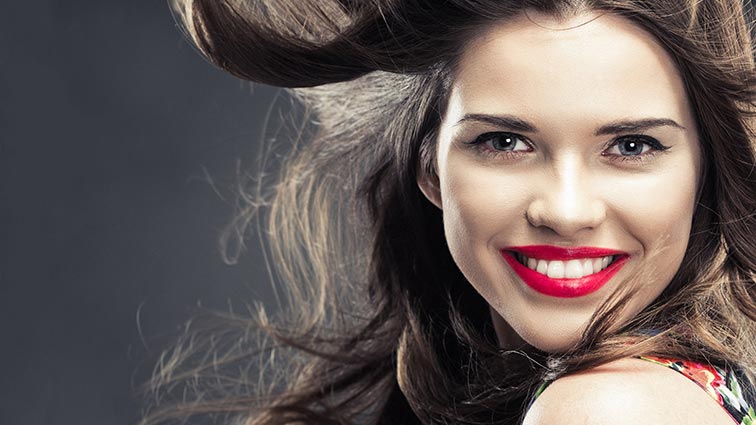
										<content:encoded><![CDATA[<p>En este tutorial de photoshop te muestro algunos trucos de iluminación y color con resultados fantásticos.</p>
<p>Respeta sombras y contrastes originales cambiando colores y tonos de piel.</p>
<p>Haremos un efecto fantasía final que le da un toque distinguido a la composición wallpaper. Pasaremos de esta imagen:</p>
<p><img fetchpriority="high" decoding="async" class="aligncenter size-full wp-image-5322" src="https://ildefonsosegura.es/wp-content/uploads/blanco-a-nego-4.jpg" alt="blanco-a-nego-4" width="756" height="425" srcset="https://ildefonsosegura.es/wp-content/uploads/blanco-a-nego-4.jpg 756w, https://ildefonsosegura.es/wp-content/uploads/blanco-a-nego-4-300x169.jpg 300w, https://ildefonsosegura.es/wp-content/uploads/blanco-a-nego-4-720x406.jpg 720w" sizes="(max-width: 756px) 100vw, 756px" /></p>
<p>&nbsp;</p>
<p>A esta:</p>
<p><img decoding="async" class="aligncenter size-full wp-image-5321" src="https://ildefonsosegura.es/wp-content/uploads/blanco-a-nego-3.jpg" alt="blanco-a-nego-3" width="756" height="425" srcset="https://ildefonsosegura.es/wp-content/uploads/blanco-a-nego-3.jpg 756w, https://ildefonsosegura.es/wp-content/uploads/blanco-a-nego-3-300x169.jpg 300w, https://ildefonsosegura.es/wp-content/uploads/blanco-a-nego-3-720x406.jpg 720w" sizes="(max-width: 756px) 100vw, 756px" /></p>
<p>No te lo pierdas y comparte tus trabajos en mi página de facebook (<a href="http://www.facebook.com/IldefonsoSeguraPage" target="_blank">IldefonsoSeguraPage</a>)</p>
<p>Espero que te guste y compartas el video</p>
<p style="text-align: left;"><strong>TUTORIAL TRUCOS DE COLOR E ILUMINACIÓN</strong></p>
<p style="text-align: left;"><iframe src="https://www.youtube.com/embed/E6Wq6GoCR2g?rel=0" width="640" height="420" frameborder="0" allowfullscreen="allowfullscreen"></iframe></p>
<p>&nbsp;</p>
<div>
<p style="text-align: center;">[vc_button title=»BAJATE LOS MATERIALES» target=»blank» color=»btn-danger» size=»btn-large» href=»https://goo.gl/xQFBPu»]</p>
<p style="text-align: right;">Suscríbete a mi canal de Youtube:</p>
<div align="right">
<p><script src="https://apis.google.com/js/platform.js"></script><script>// <![CDATA[ function onYtEvent(payload) { if (payload.eventType == 'subscribe') { // Add code to handle subscribe event. } else if (payload.eventType == 'unsubscribe') { // Add code to handle unsubscribe event. } if (window.console) { // for debugging only window.console.log('YT event: ', payload); } } // ]]&gt;</script></p>
<div class="g-ytsubscribe" data-channel="ildefonsosegura" data-layout="default" data-count="default" data-onytevent="onYtEvent"></div>
</div>
</div>
<p style="text-align: left;">No dejes de compartir este post.</p>
<p style="text-align: left;">Así es como me puedes ayudar 🙂 Gracias</p>
<p>&nbsp;</p>La entrada <a href="https://ildefonsosegura.es/crea-un-poster-con-trucos-de-luz-y-color-con-photoshop-by-ildefonsosegura/">Crea un poster con trucos de luz y color con #photoshop by @ildefonsosegura</a> apareció primero en <a href="https://ildefonsosegura.es">Ildefonso Segura</a>.]]></content:encoded>
					
					<wfw:commentRss>https://ildefonsosegura.es/crea-un-poster-con-trucos-de-luz-y-color-con-photoshop-by-ildefonsosegura/feed/</wfw:commentRss>
			<slash:comments>0</slash:comments>
		
		
			</item>
		<item>
		<title>Fotomanipulación retoque facial manteniendo textura de piel // tutorial Photoshop</title>
		<link>https://ildefonsosegura.es/fotomanipulacion-retoque-facial-manteniendo-textura-de-piel-con-photoshop/</link>
					<comments>https://ildefonsosegura.es/fotomanipulacion-retoque-facial-manteniendo-textura-de-piel-con-photoshop/#respond</comments>
		
		<dc:creator><![CDATA[Ildefonso Segura]]></dc:creator>
		<pubDate>Sun, 23 Dec 2012 18:06:49 +0000</pubDate>
				<category><![CDATA[Efectos]]></category>
		<category><![CDATA[Fotocomposición]]></category>
		<category><![CDATA[Photoshop]]></category>
		<category><![CDATA[Tecnicas]]></category>
		<category><![CDATA[Tutoriales]]></category>
		<category><![CDATA[cara]]></category>
		<category><![CDATA[corregir]]></category>
		<category><![CDATA[face]]></category>
		<category><![CDATA[fotografia]]></category>
		<category><![CDATA[gloriasanis]]></category>
		<category><![CDATA[ildefonso]]></category>
		<category><![CDATA[ildefonsosegura]]></category>
		<category><![CDATA[manipulación]]></category>
		<category><![CDATA[piel]]></category>
		<category><![CDATA[retoque]]></category>
		<category><![CDATA[tampon]]></category>
		<category><![CDATA[textura]]></category>
		<guid isPermaLink="false">http://ildefonsosegura.es/?p=1153</guid>

					<description><![CDATA[<p>Otro tutorial de Photoshop en el que mostraré como realizar un retoque facial de una persona pero manteniendo la textura original. Para ello, quitaremos la textura, homogeneizaremos, buscaremos tonos uniformes sin impurezas y devolveremos la textura ¿como? Miralo VIDEOTUTORIAL &#160; No dejes de compartir este post. Así es como me puedes ayudar 🙂 Gracias &#160;</p>
La entrada <a href="https://ildefonsosegura.es/fotomanipulacion-retoque-facial-manteniendo-textura-de-piel-con-photoshop/">Fotomanipulación retoque facial manteniendo textura de piel // tutorial Photoshop</a> apareció primero en <a href="https://ildefonsosegura.es">Ildefonso Segura</a>.]]></description>
										<content:encoded><![CDATA[<p><a href="https://ildefonsosegura.es/fotomanipulacion-retoque-facial-manteniendo-textura-de-piel-con-photoshop/dolores/" rel="attachment wp-att-1154"><img decoding="async" class="size-full wp-image-1154 aligncenter" alt="dolores" src="https://ildefonsosegura.es/wp-content/uploads/dolores.jpg" width="498" height="265" srcset="https://ildefonsosegura.es/wp-content/uploads/dolores.jpg 498w, https://ildefonsosegura.es/wp-content/uploads/dolores-300x159.jpg 300w" sizes="(max-width: 498px) 100vw, 498px" /></a></p>
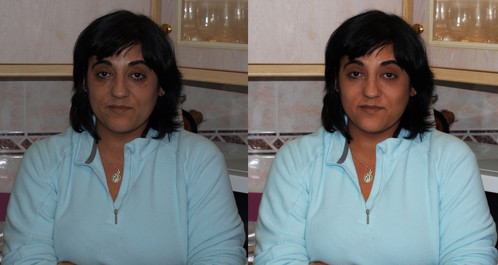
<p>Otro tutorial de <strong>Photoshop</strong> en el que mostraré como realizar un retoque facial de una persona pero manteniendo la textura original. Para ello, quitaremos la textura, homogeneizaremos, buscaremos tonos uniformes sin impurezas y devolveremos la textura ¿como? Miralo</p>
<p><span style="color: #800000;"><strong>VIDEOTUTORIAL </strong></span></p>
<p><center><iframe src="https://www.youtube.com/embed/RBNaZiRIo4s" height="360" width="640" allowfullscreen="" frameborder="0"></iframe></center></p>
<p>&nbsp;</p>
<div align="right">
<p><script src="https://apis.google.com/js/platform.js"></script><script>// <![CDATA[
function onYtEvent(payload) { if (payload.eventType == 'subscribe') { // Add code to handle subscribe event. } else if (payload.eventType == 'unsubscribe') { // Add code to handle unsubscribe event. } if (window.console) { // for debugging only window.console.log('YT event: ', payload); } }
// ]]&gt;</script></p>
<div class="g-ytsubscribe" data-channel="ildefonsosegura" data-layout="default" data-count="default" data-onytevent="onYtEvent"></div>
</div>
</div>
<p style="text-align: left;">No dejes de compartir este post.</p>
<p style="text-align: left;">Así es como me puedes ayudar 🙂 Gracias</p>
<p>&nbsp;</p>La entrada <a href="https://ildefonsosegura.es/fotomanipulacion-retoque-facial-manteniendo-textura-de-piel-con-photoshop/">Fotomanipulación retoque facial manteniendo textura de piel // tutorial Photoshop</a> apareció primero en <a href="https://ildefonsosegura.es">Ildefonso Segura</a>.]]></content:encoded>
					
					<wfw:commentRss>https://ildefonsosegura.es/fotomanipulacion-retoque-facial-manteniendo-textura-de-piel-con-photoshop/feed/</wfw:commentRss>
			<slash:comments>0</slash:comments>
		
		
			</item>
	</channel>
</rss>

<!--
Performance optimized by W3 Total Cache. Learn more: https://www.boldgrid.com/w3-total-cache/?utm_source=w3tc&utm_medium=footer_comment&utm_campaign=free_plugin

Caché de objetos 0/58 objetos usando Redis
Caché de base de datos usando Redis

Served from: ildefonsosegura.es @ 2026-05-03 11:38:23 by W3 Total Cache
--><br />
<b>Fatal error</b>:  Uncaught TypeError: mysqli_num_fields(): Argument #1 ($result) must be of type mysqli_result, true given in /var/www/vhosts/ildefonsosegura.es/httpdocs/wp-includes/class-wpdb.php:3876
Stack trace:
#0 /var/www/vhosts/ildefonsosegura.es/httpdocs/wp-includes/class-wpdb.php(3876): mysqli_num_fields()
#1 /var/www/vhosts/ildefonsosegura.es/httpdocs/wp-includes/class-wpdb.php(785): wpdb-&gt;load_col_info()
#2 /var/www/vhosts/ildefonsosegura.es/httpdocs/wp-content/plugins/w3-total-cache/DbCache_WpdbInjection_QueryCaching.php(230): wpdb-&gt;__get()
#3 /var/www/vhosts/ildefonsosegura.es/httpdocs/wp-content/plugins/w3-total-cache/DbCache_WpdbNew.php(216): W3TC\DbCache_WpdbInjection_QueryCaching-&gt;query()
#4 /var/www/vhosts/ildefonsosegura.es/httpdocs/wp-content/plugins/aaa-option-optimizer/src/class-database.php(199): W3TC\DbCache_WpdbNew-&gt;query()
#5 /var/www/vhosts/ildefonsosegura.es/httpdocs/wp-content/plugins/aaa-option-optimizer/src/class-plugin.php(182): Progress_Planner\OptionOptimizer\Database::batch_insert()
#6 /var/www/vhosts/ildefonsosegura.es/httpdocs/wp-includes/class-wp-hook.php(341): Progress_Planner\OptionOptimizer\Plugin-&gt;update_tracked_options()
#7 /var/www/vhosts/ildefonsosegura.es/httpdocs/wp-includes/class-wp-hook.php(365): WP_Hook-&gt;apply_filters()
#8 /var/www/vhosts/ildefonsosegura.es/httpdocs/wp-includes/plugin.php(522): WP_Hook-&gt;do_action()
#9 /var/www/vhosts/ildefonsosegura.es/httpdocs/wp-includes/load.php(1308): do_action()
#10 [internal function]: shutdown_action_hook()
#11 {main}
  thrown in <b>/var/www/vhosts/ildefonsosegura.es/httpdocs/wp-includes/class-wpdb.php</b> on line <b>3876</b><br />