<?xml version="1.0" encoding="UTF-8"?><rss version="2.0"
	xmlns:content="http://purl.org/rss/1.0/modules/content/"
	xmlns:wfw="http://wellformedweb.org/CommentAPI/"
	xmlns:dc="http://purl.org/dc/elements/1.1/"
	xmlns:atom="http://www.w3.org/2005/Atom"
	xmlns:sy="http://purl.org/rss/1.0/modules/syndication/"
	xmlns:slash="http://purl.org/rss/1.0/modules/slash/"
	>

<channel>
	<title>photoshopeando | Ildefonso Segura</title>
	<atom:link href="https://ildefonsosegura.es/tag/photoshopeando/feed/" rel="self" type="application/rss+xml" />
	<link>https://ildefonsosegura.es</link>
	<description>Tutoriales de diseño y animación</description>
	<lastBuildDate>Sun, 04 Jun 2023 12:19:02 +0000</lastBuildDate>
	<language>es</language>
	<sy:updatePeriod>
	hourly	</sy:updatePeriod>
	<sy:updateFrequency>
	1	</sy:updateFrequency>
	<generator>https://wordpress.org/?v=6.9.4</generator>

<image>
	<url>https://ildefonsosegura.es/wp-content/uploads/cropped-Favicon-new-logo-website-32x32.png</url>
	<title>photoshopeando | Ildefonso Segura</title>
	<link>https://ildefonsosegura.es</link>
	<width>32</width>
	<height>32</height>
</image> 
	<item>
		<title>#Tutorial #Photoshop efecto cuasi sevesiano by @photoshopeando</title>
		<link>https://ildefonsosegura.es/tutorial-photoshop-efecto-cuasi-sevesiano-by-photoshopeando/</link>
					<comments>https://ildefonsosegura.es/tutorial-photoshop-efecto-cuasi-sevesiano-by-photoshopeando/#respond</comments>
		
		<dc:creator><![CDATA[Ildefonso Segura]]></dc:creator>
		<pubDate>Wed, 20 Nov 2013 12:57:20 +0000</pubDate>
				<category><![CDATA[Colaboradores]]></category>
		<category><![CDATA[Fotocomposición]]></category>
		<category><![CDATA[Photoshop]]></category>
		<category><![CDATA[Tecnicas]]></category>
		<category><![CDATA[Tutoriales]]></category>
		<category><![CDATA[Wallpaper]]></category>
		<category><![CDATA[alberto seveso]]></category>
		<category><![CDATA[carlos oliveras]]></category>
		<category><![CDATA[design]]></category>
		<category><![CDATA[efecto]]></category>
		<category><![CDATA[effect]]></category>
		<category><![CDATA[estilo]]></category>
		<category><![CDATA[estilos]]></category>
		<category><![CDATA[fondo]]></category>
		<category><![CDATA[fotos]]></category>
		<category><![CDATA[gloriasanis]]></category>
		<category><![CDATA[ildefonsosegura]]></category>
		<category><![CDATA[imagen]]></category>
		<category><![CDATA[motivos]]></category>
		<category><![CDATA[murall]]></category>
		<category><![CDATA[pattern]]></category>
		<category><![CDATA[photomanipulation]]></category>
		<category><![CDATA[photos]]></category>
		<category><![CDATA[photoshop]]></category>
		<category><![CDATA[photoshopeando]]></category>
		<category><![CDATA[poster]]></category>
		<category><![CDATA[seveso]]></category>
		<category><![CDATA[style]]></category>
		<category><![CDATA[tecnicas]]></category>
		<category><![CDATA[tutorial]]></category>
		<category><![CDATA[wallpaper]]></category>
		<guid isPermaLink="false">http://ildefonsosegura.es/?p=3253</guid>

					<description><![CDATA[<p>En mi intento de ayudar a que todos seamos conocedores de aquellos tutores que pueden añadir valor al conocimiento en la red y de forma gratuita, estoy dando la oportunidad a amigos que no son tan conocidos como se merecen dada su calidad técnica y docente para transmitirnos conocimientos. Mi canal otro pequeño canal de [&#8230;]</p>
La entrada <a href="https://ildefonsosegura.es/tutorial-photoshop-efecto-cuasi-sevesiano-by-photoshopeando/">#Tutorial #Photoshop efecto cuasi sevesiano by @photoshopeando</a> apareció primero en <a href="https://ildefonsosegura.es">Ildefonso Segura</a>.]]></description>
										<content:encoded><![CDATA[<div data-elementor-type="wp-post" data-elementor-id="3253" class="elementor elementor-3253">
						<section class="elementor-section elementor-top-section elementor-element elementor-element-6777161c elementor-section-boxed elementor-section-height-default elementor-section-height-default" data-id="6777161c" data-element_type="section" data-e-type="section">
						<div class="elementor-container elementor-column-gap-default">
					<div class="elementor-column elementor-col-100 elementor-top-column elementor-element elementor-element-205ebc45" data-id="205ebc45" data-element_type="column" data-e-type="column">
			<div class="elementor-widget-wrap elementor-element-populated">
						<div class="elementor-element elementor-element-4ef2406a elementor-widget elementor-widget-text-editor" data-id="4ef2406a" data-element_type="widget" data-e-type="widget" data-widget_type="text-editor.default">
				<div class="elementor-widget-container">
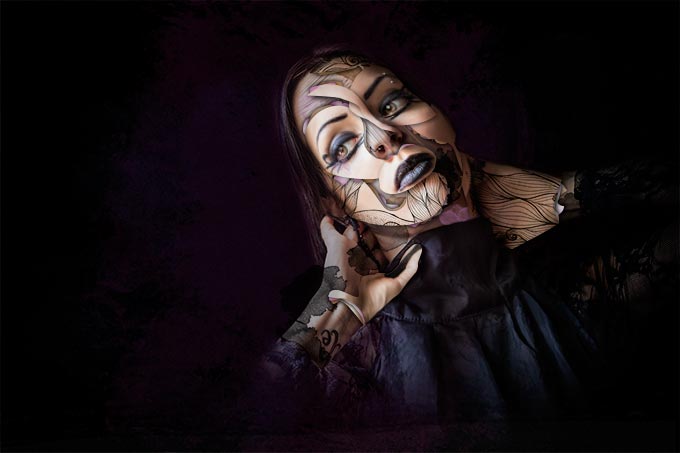
									<p>En mi intento de ayudar a que todos seamos conocedores de aquellos tutores que pueden añadir valor al conocimiento en la red y de forma gratuita, estoy dando la oportunidad a amigos que no son tan conocidos como se merecen dada su calidad técnica y docente para transmitirnos conocimientos. Mi canal otro pequeño canal de los miles que hay para transmitir algo de mi mismo. Quiero que la audiencia que pueda tener sea partícipe de lo que considero es formación de calidad de otros canales.</p><p><span style="color: #ff0000;"><strong>Carlos Oliveras</strong></span> (<a href="https://twitter.com/Photoshopeando" target="_blank" rel="noopener">Photoshopeando</a>) es responsable de este fantástico tutorial que he subido a mi canal en noviembre de 2013 y que intenta mostrar un resultado inspirado en el estilo del famoso <a href="http://burdu976.com/" target="_blank" rel="noopener">Alberto Seveso</a> (chequea <a href="http://burdu976.com/" target="_blank" rel="noopener">burdu976.com</a>).</p><p> </p><p>Muchos diréis que no es lo mismo y con razón pero nos ilustra como poder manipular una fotografía de una forma fácil intentando llegar a un resultado determinado. Despierta nuestra curiosidad por aprender técnicas y aplicar una dosis de creatividad a una imagen. Su resultado fue éste y es fantástico:</p><p><a href="https://ildefonsosegura.es/tutorial-photoshop-efecto-cuasi-sevesiano-by-photoshopeando/imagen-para-web/" rel="attachment wp-att-3254"><img fetchpriority="high" decoding="async" class="size-full wp-image-3254 aligncenter" src="https://ildefonsosegura.es/wp-content/uploads/imagen-para-web.jpg" alt="imagen para web" width="680" height="453" srcset="https://ildefonsosegura.es/wp-content/uploads/imagen-para-web.jpg 680w, https://ildefonsosegura.es/wp-content/uploads/imagen-para-web-300x199.jpg 300w" sizes="(max-width: 680px) 100vw, 680px" /></a></p><p>Gracias Carlos por tu tutorial y en especial el trabajo que realizas en tus redes. Si quereis encontrar a Carlos en Photoshopeando solo tienes que hacer clic en cualquiera de estos links:</p><ol><li><a href="http://www.photoshopeando.com/" target="_blank" rel="noopener">http://www.photoshopeando.com/</a></li><li><a href="http://www.youtube.com/user/photoshopeandotv" target="_blank" rel="noopener">http://www.youtube.com/user/photoshopeandotv</a></li><li><a href="https://twitter.com/#!/Photoshopeando" target="_blank" rel="noopener">https://twitter.com/#!/Photoshopeando</a></li><li><a href="http://www.facebook.com/Photoshopeando" target="_blank" rel="noopener">http://www.facebook.com/Photoshopeando</a></li></ol><p>Espero que te guste el tutorial</p><p> </p><p><span style="color: #800000;"><strong>TUTORIAL  </strong></span></p><center><iframe src="https://www.youtube.com/embed/6OZ8juzYuMM" width="640" height="420" frameborder="0" allowfullscreen="allowfullscreen"></iframe></center><p> </p><p> </p><p> </p>								</div>
				</div>
					</div>
		</div>
					</div>
		</section>
				<section class="elementor-section elementor-top-section elementor-element elementor-element-6b9d3be7 elementor-section-full_width elementor-section-height-default elementor-section-height-default" data-id="6b9d3be7" data-element_type="section" data-e-type="section">
						<div class="elementor-container elementor-column-gap-default">
					<div class="elementor-column elementor-col-100 elementor-top-column elementor-element elementor-element-57a9b1ca" data-id="57a9b1ca" data-element_type="column" data-e-type="column">
			<div class="elementor-widget-wrap elementor-element-populated">
						<div class="elementor-element elementor-element-401c0029 elementor-widget elementor-widget-text-editor" data-id="401c0029" data-element_type="widget" data-e-type="widget" data-widget_type="text-editor.default">
				<div class="elementor-widget-container">
									<div><div align="center"><center><strong style="color: #ff0000;">Suscríbete a mi canal de Youtube:</strong></center><div><div><div align="center"><p><script src="https://apis.google.com/js/platform.js"></script></p><div class="g-ytsubscribe" data-channel="ildefonsosegura" data-layout="full" data-count="default"> </div></div></div><p> </p><p style="text-align: center;">No te lo pierdas y comparte tus trabajos en mi página de facebook (<span style="color: #0000ff;"><strong><a style="color: #0000ff;" href="http://www.facebook.com/IldefonsoSeguraPage" target="_blank" rel="noopener noreferrer">IldefonsoSeguraPage</a></strong></span>)<br />Espero que te guste y compartas el vídeo. No dejes de compartir este post.</p><p style="text-align: center;">Así es como me puedes ayudar 🙂 Gracias</p></div></div></div>								</div>
				</div>
					</div>
		</div>
					</div>
		</section>
				</div>La entrada <a href="https://ildefonsosegura.es/tutorial-photoshop-efecto-cuasi-sevesiano-by-photoshopeando/">#Tutorial #Photoshop efecto cuasi sevesiano by @photoshopeando</a> apareció primero en <a href="https://ildefonsosegura.es">Ildefonso Segura</a>.]]></content:encoded>
					
					<wfw:commentRss>https://ildefonsosegura.es/tutorial-photoshop-efecto-cuasi-sevesiano-by-photoshopeando/feed/</wfw:commentRss>
			<slash:comments>0</slash:comments>
		
		
			</item>
	</channel>
</rss>

<!--
Performance optimized by W3 Total Cache. Learn more: https://www.boldgrid.com/w3-total-cache/?utm_source=w3tc&utm_medium=footer_comment&utm_campaign=free_plugin

Caché de objetos 0/54 objetos usando Redis
Caché de base de datos usando Redis

Served from: ildefonsosegura.es @ 2026-04-07 02:12:33 by W3 Total Cache
--><br />
<b>Fatal error</b>:  Uncaught TypeError: mysqli_num_fields(): Argument #1 ($result) must be of type mysqli_result, true given in /var/www/vhosts/ildefonsosegura.es/httpdocs/wp-includes/class-wpdb.php:3876
Stack trace:
#0 /var/www/vhosts/ildefonsosegura.es/httpdocs/wp-includes/class-wpdb.php(3876): mysqli_num_fields()
#1 /var/www/vhosts/ildefonsosegura.es/httpdocs/wp-includes/class-wpdb.php(785): wpdb-&gt;load_col_info()
#2 /var/www/vhosts/ildefonsosegura.es/httpdocs/wp-content/plugins/w3-total-cache/DbCache_WpdbInjection_QueryCaching.php(230): wpdb-&gt;__get()
#3 /var/www/vhosts/ildefonsosegura.es/httpdocs/wp-content/plugins/w3-total-cache/DbCache_WpdbNew.php(216): W3TC\DbCache_WpdbInjection_QueryCaching-&gt;query()
#4 /var/www/vhosts/ildefonsosegura.es/httpdocs/wp-content/plugins/aaa-option-optimizer/src/class-database.php(199): W3TC\DbCache_WpdbNew-&gt;query()
#5 /var/www/vhosts/ildefonsosegura.es/httpdocs/wp-content/plugins/aaa-option-optimizer/src/class-plugin.php(182): Progress_Planner\OptionOptimizer\Database::batch_insert()
#6 /var/www/vhosts/ildefonsosegura.es/httpdocs/wp-includes/class-wp-hook.php(341): Progress_Planner\OptionOptimizer\Plugin-&gt;update_tracked_options()
#7 /var/www/vhosts/ildefonsosegura.es/httpdocs/wp-includes/class-wp-hook.php(365): WP_Hook-&gt;apply_filters()
#8 /var/www/vhosts/ildefonsosegura.es/httpdocs/wp-includes/plugin.php(522): WP_Hook-&gt;do_action()
#9 /var/www/vhosts/ildefonsosegura.es/httpdocs/wp-includes/load.php(1308): do_action()
#10 [internal function]: shutdown_action_hook()
#11 {main}
  thrown in <b>/var/www/vhosts/ildefonsosegura.es/httpdocs/wp-includes/class-wpdb.php</b> on line <b>3876</b><br />