<?xml version="1.0" encoding="UTF-8"?><rss version="2.0"
	xmlns:content="http://purl.org/rss/1.0/modules/content/"
	xmlns:wfw="http://wellformedweb.org/CommentAPI/"
	xmlns:dc="http://purl.org/dc/elements/1.1/"
	xmlns:atom="http://www.w3.org/2005/Atom"
	xmlns:sy="http://purl.org/rss/1.0/modules/syndication/"
	xmlns:slash="http://purl.org/rss/1.0/modules/slash/"
	>

<channel>
	<title>paisaje | Ildefonso Segura</title>
	<atom:link href="https://ildefonsosegura.es/tag/paisaje/feed/" rel="self" type="application/rss+xml" />
	<link>https://ildefonsosegura.es</link>
	<description>Tutoriales de diseño y animación</description>
	<lastBuildDate>Sun, 11 Jun 2023 17:04:50 +0000</lastBuildDate>
	<language>es</language>
	<sy:updatePeriod>
	hourly	</sy:updatePeriod>
	<sy:updateFrequency>
	1	</sy:updateFrequency>
	<generator>https://wordpress.org/?v=7.0</generator>

<image>
	<url>https://ildefonsosegura.es/wp-content/uploads/cropped-Favicon-new-logo-website-32x32.png</url>
	<title>paisaje | Ildefonso Segura</title>
	<link>https://ildefonsosegura.es</link>
	<width>32</width>
	<height>32</height>
</image> 
	<item>
		<title>Crea tu postal de Navidad con Photoshop by @ildefonsosegura (incluye Editable)</title>
		<link>https://ildefonsosegura.es/crea-tu-postal-de-navidad-con-photoshop-by-ildefonsosegura/</link>
					<comments>https://ildefonsosegura.es/crea-tu-postal-de-navidad-con-photoshop-by-ildefonsosegura/#respond</comments>
		
		<dc:creator><![CDATA[Ildefonso Segura]]></dc:creator>
		<pubDate>Sat, 22 Dec 2018 09:33:43 +0000</pubDate>
				<category><![CDATA[Editable]]></category>
		<category><![CDATA[Efectos]]></category>
		<category><![CDATA[Fotocomposición]]></category>
		<category><![CDATA[Photoshop]]></category>
		<category><![CDATA[Sin categoria]]></category>
		<category><![CDATA[Tecnicas]]></category>
		<category><![CDATA[Tutoriales]]></category>
		<category><![CDATA[Video]]></category>
		<category><![CDATA[Wallpaper]]></category>
		<category><![CDATA[adobe]]></category>
		<category><![CDATA[card]]></category>
		<category><![CDATA[cc2019]]></category>
		<category><![CDATA[christmas]]></category>
		<category><![CDATA[comic]]></category>
		<category><![CDATA[design]]></category>
		<category><![CDATA[felicitación]]></category>
		<category><![CDATA[fotomontaje]]></category>
		<category><![CDATA[gretting]]></category>
		<category><![CDATA[guia]]></category>
		<category><![CDATA[instrucciones]]></category>
		<category><![CDATA[montaje]]></category>
		<category><![CDATA[montañas]]></category>
		<category><![CDATA[navidad]]></category>
		<category><![CDATA[nieve]]></category>
		<category><![CDATA[paisaje]]></category>
		<category><![CDATA[photoshop]]></category>
		<category><![CDATA[postal]]></category>
		<category><![CDATA[tutorial]]></category>
		<category><![CDATA[video]]></category>
		<category><![CDATA[youtube]]></category>
		<guid isPermaLink="false">http://ildefonsosegura.es/?p=6364</guid>

					<description><![CDATA[<p>Un nuevo regalo para todos vosotros a través de una postal de Navidad que he realizado desde cero en Photoshop. Capa a capa y simulando un paisaje dibujado de una linda ciudad al pie de las montañas, vamos incorporando elementos como las montañas con sus sombras, la nieve, las casas, la foto, sombras y texturas, [&#8230;]</p>

La entrada <a href="https://ildefonsosegura.es/crea-tu-postal-de-navidad-con-photoshop-by-ildefonsosegura/">Crea tu postal de Navidad con Photoshop by @ildefonsosegura (incluye Editable)</a> apareció primero en <a href="https://ildefonsosegura.es">Ildefonso Segura</a>.]]></description>
										<content:encoded><![CDATA[<div data-elementor-type="wp-post" data-elementor-id="6364" class="elementor elementor-6364">
						<section class="elementor-section elementor-top-section elementor-element elementor-element-2432b797 elementor-section-boxed elementor-section-height-default elementor-section-height-default" data-id="2432b797" data-element_type="section" data-e-type="section">
						<div class="elementor-container elementor-column-gap-default">
					<div class="elementor-column elementor-col-100 elementor-top-column elementor-element elementor-element-3b7bb8d" data-id="3b7bb8d" data-element_type="column" data-e-type="column">
			<div class="elementor-widget-wrap elementor-element-populated">
						<div class="elementor-element elementor-element-c765ef7 elementor-widget elementor-widget-text-editor" data-id="c765ef7" data-element_type="widget" data-e-type="widget" data-widget_type="text-editor.default">
				<div class="elementor-widget-container">
									<p style="text-align: justify;">Un nuevo regalo para todos vosotros a través de una postal de Navidad que he realizado desde cero en Photoshop.</p><p style="text-align: justify;"><img fetchpriority="high" decoding="async" class="aligncenter size-full wp-image-6365" src="https://ildefonsosegura.es/wp-content/uploads/Christmas-card-Photoshop1.jpg" alt="" width="900" height="900" srcset="https://ildefonsosegura.es/wp-content/uploads/Christmas-card-Photoshop1.jpg 900w, https://ildefonsosegura.es/wp-content/uploads/Christmas-card-Photoshop1-150x150.jpg 150w, https://ildefonsosegura.es/wp-content/uploads/Christmas-card-Photoshop1-300x300.jpg 300w, https://ildefonsosegura.es/wp-content/uploads/Christmas-card-Photoshop1-768x768.jpg 768w" sizes="(max-width: 900px) 100vw, 900px" /></p><p style="text-align: justify;">Capa a capa y simulando un paisaje dibujado de una linda ciudad al pie de las montañas, vamos incorporando elementos como las montañas con sus sombras, la nieve, las casas, la foto, sombras y texturas, nubes, sol, etc&#8230;. Fijaros el resultado. Yo estoy enamorado de él.</p><p>Hice una animación de la misma para que vierais el making of pero el final es espectacular y emocionante. Mis mejores deseos para todos.</p><blockquote class="instagram-media" style="background: #FFF; border: 0; border-radius: 3px; box-shadow: 0 0 1px 0 rgba(0,0,0,0.5),0 1px 10px 0 rgba(0,0,0,0.15); margin: 1px; max-width: 540px; min-width: 326px; padding: 0; width: calc(100% - 2px);" data-instgrm-captioned="" data-instgrm-permalink="https://www.instagram.com/p/Brq5RcxIHd7/?utm_source=ig_embed&amp;utm_medium=loading" data-instgrm-version="12"><div style="padding: 16px;"><p> </p><div style="display: flex; flex-direction: row; align-items: center;"><div style="background-color: #f4f4f4; border-radius: 50%; flex-grow: 0; height: 40px; margin-right: 14px; width: 40px;"> </div><div style="display: flex; flex-direction: column; flex-grow: 1; justify-content: center;"><div style="background-color: #f4f4f4; border-radius: 4px; flex-grow: 0; height: 14px; margin-bottom: 6px; width: 100px;"> </div><div style="background-color: #f4f4f4; border-radius: 4px; flex-grow: 0; height: 14px; width: 60px;"> </div></div></div><div style="padding: 19% 0;"> </div><div style="display: block; height: 50px; margin: 0 auto 12px; width: 50px;"> </div><div style="padding-top: 8px;"><div style="color: #3897f0; font-family: Arial,sans-serif; font-size: 14px; font-style: normal; font-weight: 550; line-height: 18px;">Ver esta publicación en Instagram</div></div><div style="padding: 12.5% 0;"> </div><div style="display: flex; flex-direction: row; margin-bottom: 14px; align-items: center;"><div><div style="background-color: #f4f4f4; border-radius: 50%; height: 12.5px; width: 12.5px; transform: translateX(0px) translateY(7px);"> </div><div style="background-color: #f4f4f4; height: 12.5px; transform: rotate(-45deg) translateX(3px) translateY(1px); width: 12.5px; flex-grow: 0; margin-right: 14px; margin-left: 2px;"> </div><div style="background-color: #f4f4f4; border-radius: 50%; height: 12.5px; width: 12.5px; transform: translateX(9px) translateY(-18px);"> </div></div><div style="margin-left: 8px;"><div style="background-color: #f4f4f4; border-radius: 50%; flex-grow: 0; height: 20px; width: 20px;"> </div><div style="width: 0; height: 0; border-top: 2px solid transparent; border-left: 6px solid #f4f4f4; border-bottom: 2px solid transparent; transform: translateX(16px) translateY(-4px) rotate(30deg);"> </div></div><div style="margin-left: auto;"><div style="width: 0px; border-top: 8px solid #F4F4F4; border-right: 8px solid transparent; transform: translateY(16px);"> </div><div style="background-color: #f4f4f4; flex-grow: 0; height: 12px; width: 16px; transform: translateY(-4px);"> </div><div style="width: 0; height: 0; border-top: 8px solid #F4F4F4; border-left: 8px solid transparent; transform: translateY(-4px) translateX(8px);"> </div></div></div><p> </p><p style="margin: 8px 0 0 0; padding: 0 4px;"><a style="color: #000; font-family: Arial,sans-serif; font-size: 14px; font-style: normal; font-weight: normal; line-height: 17px; text-decoration: none; word-wrap: break-word;" href="https://www.instagram.com/p/Brq5RcxIHd7/?utm_source=ig_embed&amp;utm_medium=loading" target="_blank" rel="noopener">Ya tienes un nuevo #photoshoptutorial en mi canal de youtube. Incluye ? regalo de Editable para que solo tengas que cambiar la foto y los textos. #gratis =============== Visit my website for more free tutorials. Check my Bio =============== #thegraphicspr0ject#creartmood#visual_creatorz#enter_imagination#LaunchDsigns#edit_grams#moodygrams#VisualMobs#simplycooldesign#CreativeOptic#photoshop #edit_perfection#manipulationclan#creativitychasers #edit_mania__#thecreativers#creative_ace#digitallyart#xceptionaledits#imaginativeuniverse#artist #igworldclub_edits#visualcreative#discoveredit#thehub_edit#bestvisualz#theuniversalart#photomanipulation</a></p><p style="color: #c9c8cd; font-family: Arial,sans-serif; font-size: 14px; line-height: 17px; margin-bottom: 0; margin-top: 8px; overflow: hidden; padding: 8px 0 7px; text-align: center; text-overflow: ellipsis; white-space: nowrap;">Una publicación compartida de <a style="color: #c9c8cd; font-family: Arial,sans-serif; font-size: 14px; font-style: normal; font-weight: normal; line-height: 17px;" href="https://www.instagram.com/ildefonsosegura/?utm_source=ig_embed&amp;utm_medium=loading" target="_blank" rel="noopener"> Ildefonso Segura</a> (@ildefonsosegura) el <time style="font-family: Arial,sans-serif; font-size: 14px; line-height: 17px;" datetime="2018-12-22T00:57:04+00:00">21 Dic, 2018 a las 4:57 PST</time></p></div></blockquote><p><script async="" src="//www.instagram.com/embed.js"></script></p><p>Disfruta del tutorial. Yo me lo pasé en grande aunque hay mucho trabajo detrás. Si quieres el editable, puedes seguir leyendo hacia abajo y tendrás un vídeo guía y un botón que te llevará al regalo (sección de REGALOS  de mi web)</p><p><strong><span style="color: #800000;">TUTORIAL</span> </strong></p><center><iframe src="https://www.youtube.com/embed/m1H-C_f-xRM" width="640" height="420" frameborder="0" allowfullscreen="allowfullscreen"><span data-mce-type="bookmark" style="display: inline-block; width: 0px; overflow: hidden; line-height: 0;" class="mce_SELRES_start">﻿</span></iframe></center><div><div><div align="center"><div><p style="text-align: left;"> </p></div></div></div></div>								</div>
				</div>
					</div>
		</div>
					</div>
		</section>
				<section class="elementor-section elementor-top-section elementor-element elementor-element-65ef1d83 elementor-section-full_width elementor-section-height-default elementor-section-height-default" data-id="65ef1d83" data-element_type="section" data-e-type="section">
						<div class="elementor-container elementor-column-gap-default">
					<div class="elementor-column elementor-col-50 elementor-top-column elementor-element elementor-element-601b6609" data-id="601b6609" data-element_type="column" data-e-type="column">
			<div class="elementor-widget-wrap elementor-element-populated">
						<div class="elementor-element elementor-element-4b9d187c elementor-align-right elementor-invisible elementor-widget elementor-widget-button" data-id="4b9d187c" data-element_type="widget" data-e-type="widget" data-settings="{&quot;_animation&quot;:&quot;shake&quot;}" data-widget_type="button.default">
				<div class="elementor-widget-container">
									<div class="elementor-button-wrapper">
					<a class="elementor-button elementor-button-link elementor-size-sm elementor-animation-grow" href="https://mega.nz/#!Akk3QQ6Z!lv0bH7I0JOARJmhWrnWCJjnFxPdFrbkg_P2sbYx8tCU">
						<span class="elementor-button-content-wrapper">
									<span class="elementor-button-text">DESCARGA EL MATERIAL</span>
					</span>
					</a>
				</div>
								</div>
				</div>
					</div>
		</div>
				<div class="elementor-column elementor-col-50 elementor-top-column elementor-element elementor-element-56a26921" data-id="56a26921" data-element_type="column" data-e-type="column">
			<div class="elementor-widget-wrap elementor-element-populated">
						<div class="elementor-element elementor-element-327f0f27 elementor-widget elementor-widget-html" data-id="327f0f27" data-element_type="widget" data-e-type="widget" data-settings="{&quot;_animation&quot;:&quot;none&quot;}" data-widget_type="html.default">
				<div class="elementor-widget-container">
					<form action="https://www.paypal.com/cgi-bin/webscr" method="post" target="_blank">
<input type="hidden" name="cmd" value="_donations">
<input type="hidden" name="business" value="ildefonsosegura@gmail.com">
<input type="hidden" name="lc" value="ES">
<input type="hidden" name="item_name" value="MANTENIMIENTO DE LA PAGINA DE ILDEFONSOSEGURA">
<input type="hidden" name="no_note" value="0">
<input type="hidden" name="currency_code" value="EUR">
<input type="hidden" name="bn" value="PP-DonationsBF:paypal1.jpg:NonHostedGuest">
<input type="image" src="http://ildefonsosegura.es/wp-content/uploads/paypal-updated-1.png" border="0" name="submit" alt="PayPal. La forma rápida y segura de pagar en Internet.">
<img decoding="async" alt="" border="0" src="https://www.paypalobjects.com/es_ES/i/scr/pixel.gif" width="1" height="1">
</form>				</div>
				</div>
					</div>
		</div>
					</div>
		</section>
				<section class="elementor-section elementor-top-section elementor-element elementor-element-6b8d5b7 elementor-section-boxed elementor-section-height-default elementor-section-height-default" data-id="6b8d5b7" data-element_type="section" data-e-type="section">
						<div class="elementor-container elementor-column-gap-default">
					<div class="elementor-column elementor-col-100 elementor-top-column elementor-element elementor-element-0ee7e0a" data-id="0ee7e0a" data-element_type="column" data-e-type="column">
			<div class="elementor-widget-wrap elementor-element-populated">
						<div class="elementor-element elementor-element-61c6617 elementor-widget elementor-widget-heading" data-id="61c6617" data-element_type="widget" data-e-type="widget" data-widget_type="heading.default">
				<div class="elementor-widget-container">
					<h2 class="elementor-heading-title elementor-size-default">EDITABLE</h2>				</div>
				</div>
					</div>
		</div>
					</div>
		</section>
				<section class="elementor-section elementor-top-section elementor-element elementor-element-0da06aa elementor-section-boxed elementor-section-height-default elementor-section-height-default" data-id="0da06aa" data-element_type="section" data-e-type="section">
						<div class="elementor-container elementor-column-gap-default">
					<div class="elementor-column elementor-col-100 elementor-top-column elementor-element elementor-element-6bae1e8" data-id="6bae1e8" data-element_type="column" data-e-type="column">
			<div class="elementor-widget-wrap elementor-element-populated">
						<div class="elementor-element elementor-element-34ecf63 elementor-widget elementor-widget-video" data-id="34ecf63" data-element_type="widget" data-e-type="widget" data-settings="{&quot;youtube_url&quot;:&quot;https:\/\/youtu.be\/NJToC7g_aNo&quot;,&quot;video_type&quot;:&quot;youtube&quot;,&quot;controls&quot;:&quot;yes&quot;}" data-widget_type="video.default">
				<div class="elementor-widget-container">
							<div class="elementor-wrapper elementor-open-inline">
			<div class="elementor-video"></div>		</div>
						</div>
				</div>
					</div>
		</div>
					</div>
		</section>
				<section class="elementor-section elementor-top-section elementor-element elementor-element-5cccea45 elementor-section-boxed elementor-section-height-default elementor-section-height-default" data-id="5cccea45" data-element_type="section" data-e-type="section">
						<div class="elementor-container elementor-column-gap-default">
					<div class="elementor-column elementor-col-100 elementor-top-column elementor-element elementor-element-1b9460b8" data-id="1b9460b8" data-element_type="column" data-e-type="column">
			<div class="elementor-widget-wrap elementor-element-populated">
						<div class="elementor-element elementor-element-155b0c13 elementor-widget-divider--view-line elementor-widget elementor-widget-divider" data-id="155b0c13" data-element_type="widget" data-e-type="widget" data-widget_type="divider.default">
				<div class="elementor-widget-container">
							<div class="elementor-divider">
			<span class="elementor-divider-separator">
						</span>
		</div>
						</div>
				</div>
					</div>
		</div>
					</div>
		</section>
				<section class="elementor-section elementor-top-section elementor-element elementor-element-4cfabb30 elementor-section-full_width elementor-section-height-default elementor-section-height-default" data-id="4cfabb30" data-element_type="section" data-e-type="section">
						<div class="elementor-container elementor-column-gap-default">
					<div class="elementor-column elementor-col-50 elementor-top-column elementor-element elementor-element-3fcfeb7c" data-id="3fcfeb7c" data-element_type="column" data-e-type="column">
			<div class="elementor-widget-wrap elementor-element-populated">
						<div class="elementor-element elementor-element-69c3fb6e elementor-align-right elementor-invisible elementor-widget elementor-widget-button" data-id="69c3fb6e" data-element_type="widget" data-e-type="widget" data-settings="{&quot;_animation&quot;:&quot;shake&quot;}" data-widget_type="button.default">
				<div class="elementor-widget-container">
									<div class="elementor-button-wrapper">
					<a class="elementor-button elementor-button-link elementor-size-sm elementor-animation-grow" href="https://ildefonsosegura.es/regalos/">
						<span class="elementor-button-content-wrapper">
									<span class="elementor-button-text">BAJATE EL EDITABLE</span>
					</span>
					</a>
				</div>
								</div>
				</div>
					</div>
		</div>
				<div class="elementor-column elementor-col-50 elementor-top-column elementor-element elementor-element-286e1c58" data-id="286e1c58" data-element_type="column" data-e-type="column">
			<div class="elementor-widget-wrap elementor-element-populated">
						<div class="elementor-element elementor-element-8c8635d elementor-widget elementor-widget-html" data-id="8c8635d" data-element_type="widget" data-e-type="widget" data-settings="{&quot;_animation&quot;:&quot;none&quot;}" data-widget_type="html.default">
				<div class="elementor-widget-container">
					<form action="https://www.paypal.com/cgi-bin/webscr" method="post" target="_blank">
<input type="hidden" name="cmd" value="_donations">
<input type="hidden" name="business" value="ildefonsosegura@gmail.com">
<input type="hidden" name="lc" value="ES">
<input type="hidden" name="item_name" value="MANTENIMIENTO DE LA PAGINA DE ILDEFONSOSEGURA">
<input type="hidden" name="no_note" value="0">
<input type="hidden" name="currency_code" value="EUR">
<input type="hidden" name="bn" value="PP-DonationsBF:paypal1.jpg:NonHostedGuest">
<input type="image" src="http://ildefonsosegura.es/wp-content/uploads/paypal-updated-1.png" border="0" name="submit" alt="PayPal. La forma rápida y segura de pagar en Internet.">
<img decoding="async" alt="" border="0" src="https://www.paypalobjects.com/es_ES/i/scr/pixel.gif" width="1" height="1">
</form>				</div>
				</div>
					</div>
		</div>
					</div>
		</section>
				<section class="elementor-section elementor-top-section elementor-element elementor-element-35df1815 elementor-section-boxed elementor-section-height-default elementor-section-height-default" data-id="35df1815" data-element_type="section" data-e-type="section">
						<div class="elementor-container elementor-column-gap-default">
					<div class="elementor-column elementor-col-100 elementor-top-column elementor-element elementor-element-27099cb6" data-id="27099cb6" data-element_type="column" data-e-type="column">
			<div class="elementor-widget-wrap elementor-element-populated">
						<div class="elementor-element elementor-element-217878e elementor-widget-divider--view-line elementor-widget elementor-widget-divider" data-id="217878e" data-element_type="widget" data-e-type="widget" data-widget_type="divider.default">
				<div class="elementor-widget-container">
							<div class="elementor-divider">
			<span class="elementor-divider-separator">
						</span>
		</div>
						</div>
				</div>
					</div>
		</div>
					</div>
		</section>
				<section class="elementor-section elementor-top-section elementor-element elementor-element-5bef05c8 elementor-section-full_width elementor-section-height-default elementor-section-height-default" data-id="5bef05c8" data-element_type="section" data-e-type="section">
						<div class="elementor-container elementor-column-gap-default">
					<div class="elementor-column elementor-col-100 elementor-top-column elementor-element elementor-element-967db59" data-id="967db59" data-element_type="column" data-e-type="column">
			<div class="elementor-widget-wrap elementor-element-populated">
						<div class="elementor-element elementor-element-324a1c90 elementor-widget elementor-widget-text-editor" data-id="324a1c90" data-element_type="widget" data-e-type="widget" data-widget_type="text-editor.default">
				<div class="elementor-widget-container">
									<div><div align="center"><center><strong style="color: #ff0000;">Suscríbete a mi canal de Youtube:</strong></center><div><div><div align="center"><p><script src="https://apis.google.com/js/platform.js"></script></p><div class="g-ytsubscribe" data-channel="ildefonsosegura" data-layout="full" data-count="default"> </div></div></div><p> </p><p style="text-align: center;">No te lo pierdas y comparte tus trabajos en mi página de facebook (<span style="color: #0000ff;"><strong><a style="color: #0000ff;" href="http://www.facebook.com/IldefonsoSeguraPage" target="_blank" rel="noopener noreferrer">IldefonsoSeguraPage</a></strong></span>)<br />Espero que te guste y compartas el vídeo. No dejes de compartir este post.</p><p style="text-align: center;">Así es como me puedes ayudar 🙂 Gracias</p></div></div></div>								</div>
				</div>
					</div>
		</div>
					</div>
		</section>
				</div>La entrada <a href="https://ildefonsosegura.es/crea-tu-postal-de-navidad-con-photoshop-by-ildefonsosegura/">Crea tu postal de Navidad con Photoshop by @ildefonsosegura (incluye Editable)</a> apareció primero en <a href="https://ildefonsosegura.es">Ildefonso Segura</a>.]]></content:encoded>
					
					<wfw:commentRss>https://ildefonsosegura.es/crea-tu-postal-de-navidad-con-photoshop-by-ildefonsosegura/feed/</wfw:commentRss>
			<slash:comments>0</slash:comments>
		
		
			</item>
		<item>
		<title>Tutorial Photoshop fotomanipulación paisaje verano a paisaje nevado en invierno by @ildefonsosegura</title>
		<link>https://ildefonsosegura.es/tutorial-photoshop-fotomanipulacion-paisaje-verano-a-paisaje-nevado-en-invierno-by-ildefonsosegura/</link>
					<comments>https://ildefonsosegura.es/tutorial-photoshop-fotomanipulacion-paisaje-verano-a-paisaje-nevado-en-invierno-by-ildefonsosegura/#respond</comments>
		
		<dc:creator><![CDATA[Ildefonso Segura]]></dc:creator>
		<pubDate>Mon, 31 Aug 2015 17:41:54 +0000</pubDate>
				<category><![CDATA[Efectos]]></category>
		<category><![CDATA[Fotocomposición]]></category>
		<category><![CDATA[Photoshop]]></category>
		<category><![CDATA[Tecnicas]]></category>
		<category><![CDATA[Tutoriales]]></category>
		<category><![CDATA[Wallpaper]]></category>
		<category><![CDATA[adobe]]></category>
		<category><![CDATA[bosque]]></category>
		<category><![CDATA[cambio]]></category>
		<category><![CDATA[CC]]></category>
		<category><![CDATA[cc2014]]></category>
		<category><![CDATA[cc2015]]></category>
		<category><![CDATA[clima]]></category>
		<category><![CDATA[efecto]]></category>
		<category><![CDATA[fotomanipulación]]></category>
		<category><![CDATA[fotomontaje]]></category>
		<category><![CDATA[gloriasanis]]></category>
		<category><![CDATA[ildefonsosegura]]></category>
		<category><![CDATA[invierno]]></category>
		<category><![CDATA[nieve]]></category>
		<category><![CDATA[paisaje]]></category>
		<category><![CDATA[photoshop]]></category>
		<category><![CDATA[ps]]></category>
		<category><![CDATA[snow]]></category>
		<category><![CDATA[tecnicas]]></category>
		<category><![CDATA[tuto]]></category>
		<category><![CDATA[tutorial]]></category>
		<category><![CDATA[verano]]></category>
		<guid isPermaLink="false">http://ildefonsosegura.es/?p=4867</guid>

					<description><![CDATA[<p>En esta fotomanipulación veremos como cambiar el clima de verano-primavera a invierno. Todo con técnicas sencillas de photoshop. Aprenderemos a incorporar nieve y elementos en la escena que refuercen el cambio de clima que se propone en el wallpaper. Espero que te guste y que publiques en mis redes sociales el resultado de tu trabajo [&#8230;]</p>
La entrada <a href="https://ildefonsosegura.es/tutorial-photoshop-fotomanipulacion-paisaje-verano-a-paisaje-nevado-en-invierno-by-ildefonsosegura/">Tutorial Photoshop fotomanipulación paisaje verano a paisaje nevado en invierno by @ildefonsosegura</a> apareció primero en <a href="https://ildefonsosegura.es">Ildefonso Segura</a>.]]></description>
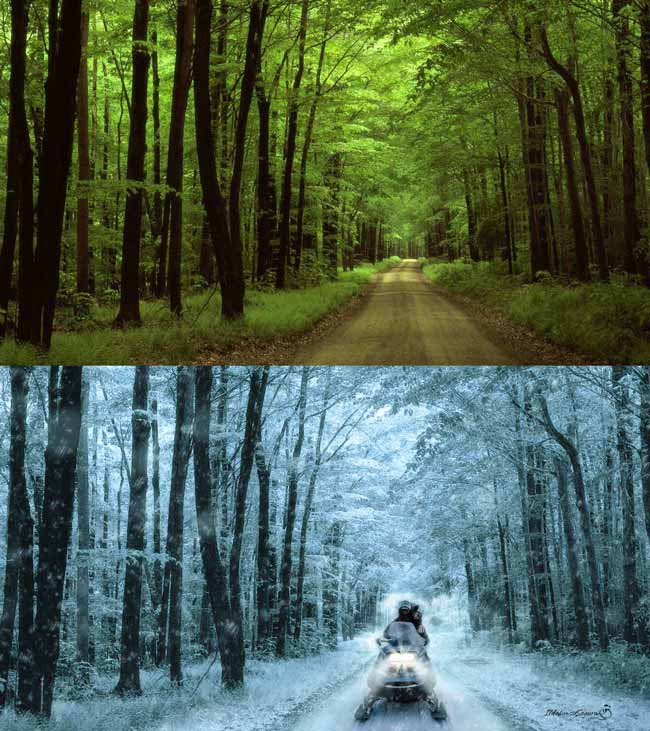
										<content:encoded><![CDATA[<p style="text-align: justify;">En esta fotomanipulación veremos como cambiar el clima de verano-primavera a invierno. Todo con técnicas sencillas de photoshop. Aprenderemos a incorporar nieve y elementos en la escena que refuercen el cambio de clima que se propone en el wallpaper. Espero que te guste y que publiques en mis redes sociales el resultado de tu trabajo al aplicar el tutorial.</p>
<p style="text-align: justify;">En el tutorial  que vamos a ver ahora, construiremos este wallpaper</p>
<p style="text-align: justify;"><img decoding="async" class="aligncenter wp-image-4865 size-full" src="https://ildefonsosegura.es/wp-content/uploads/clima-invierno.jpg" alt="clima-invierno" width="650" height="731" srcset="https://ildefonsosegura.es/wp-content/uploads/clima-invierno.jpg 650w, https://ildefonsosegura.es/wp-content/uploads/clima-invierno-267x300.jpg 267w" sizes="(max-width: 650px) 100vw, 650px" /></p>
<p>No te lo pierdas y comparte tus trabajos en mi página de facebook (<a href="http://www.facebook.com/IldefonsoSeguraPage" target="_blank" rel="noopener">IldefonsoSeguraPage</a>)</p>
<p>&nbsp;</p>
<p>Espero que os guste</p>
<p style="text-align: left;"><strong>TUTORIAL CAMBIO DE CLIMA EN UN PAISAJE</strong><iframe src="https://www.youtube.com/embed/RLWkTmt4ANs?rel=0" width="640" height="420" frameborder="0" allowfullscreen="allowfullscreen"></iframe></p>
<div><center>[vc_button title=»BAJATE LOS MATERIALES» target=»blank» color=»btn-danger» size=»btn-large» href=»https://drive.google.com/file/d/0B_nJkCGJubucczgwLUhubnVoV0E/view?usp=sharing&amp;resourcekey=0-ISWBn90EYnK94ZPrQIb3ug»]</center></p>
<p style="text-align: center;">Suscríbete a mi canal de Youtube:</p>
<div align="right">
<p><script src="https://apis.google.com/js/platform.js" type="mce-no/type"></script><script type="mce-no/type">// <![CDATA[ function onYtEvent(payload) { if (payload.eventType == 'subscribe') { // Add code to handle subscribe event. } else if (payload.eventType == 'unsubscribe') { // Add code to handle unsubscribe event. } if (window.console) { // for debugging only window.console.log('YT event: ', payload); } } // ]]&gt;</script></p>
<div class="g-ytsubscribe" data-channel="ildefonsosegura" data-layout="default" data-count="default" data-onytevent="onYtEvent"></div>
</div>
</div>
<p style="text-align: left;">No dejes de compartir este post.</p>
<p style="text-align: left;">Así es como me puedes ayudar 🙂 Gracias</p>
<p>&nbsp;</p>La entrada <a href="https://ildefonsosegura.es/tutorial-photoshop-fotomanipulacion-paisaje-verano-a-paisaje-nevado-en-invierno-by-ildefonsosegura/">Tutorial Photoshop fotomanipulación paisaje verano a paisaje nevado en invierno by @ildefonsosegura</a> apareció primero en <a href="https://ildefonsosegura.es">Ildefonso Segura</a>.]]></content:encoded>
					
					<wfw:commentRss>https://ildefonsosegura.es/tutorial-photoshop-fotomanipulacion-paisaje-verano-a-paisaje-nevado-en-invierno-by-ildefonsosegura/feed/</wfw:commentRss>
			<slash:comments>0</slash:comments>
		
		
			</item>
		<item>
		<title>Tutorial Photoshop // Cómo crear profundidad con la Iluminación by @ildefonsosegura</title>
		<link>https://ildefonsosegura.es/como-crear-profundidad-con-la-iluminacion-con-photoshop-by-ildefonsosegura/</link>
					<comments>https://ildefonsosegura.es/como-crear-profundidad-con-la-iluminacion-con-photoshop-by-ildefonsosegura/#respond</comments>
		
		<dc:creator><![CDATA[Ildefonso Segura]]></dc:creator>
		<pubDate>Sun, 28 Sep 2014 16:11:22 +0000</pubDate>
				<category><![CDATA[Efectos]]></category>
		<category><![CDATA[Fotocomposición]]></category>
		<category><![CDATA[Películas]]></category>
		<category><![CDATA[Photoshop]]></category>
		<category><![CDATA[Tecnicas]]></category>
		<category><![CDATA[Tutoriales]]></category>
		<category><![CDATA[Wallpaper]]></category>
		<category><![CDATA[adobe]]></category>
		<category><![CDATA[cc 2014]]></category>
		<category><![CDATA[cs3]]></category>
		<category><![CDATA[cs4]]></category>
		<category><![CDATA[cs5]]></category>
		<category><![CDATA[cs6]]></category>
		<category><![CDATA[fotocomposición]]></category>
		<category><![CDATA[fotomanipulación]]></category>
		<category><![CDATA[fotomontaje]]></category>
		<category><![CDATA[manipulación]]></category>
		<category><![CDATA[montaje]]></category>
		<category><![CDATA[paisaje]]></category>
		<category><![CDATA[photoshop]]></category>
		<category><![CDATA[ps]]></category>
		<category><![CDATA[simios]]></category>
		<category><![CDATA[tecnicas]]></category>
		<category><![CDATA[tuto]]></category>
		<category><![CDATA[tutorial]]></category>
		<category><![CDATA[wallpaper]]></category>
		<guid isPermaLink="false">http://ildefonsosegura.es/?p=3522</guid>

					<description><![CDATA[<p>Vamos a crear un efecto de profundidad en una escena boscosa a través de la iluminación solar. Conseguiremos una atmosfera propia de un amanecer o un ocaso.     TUTORIAL        Gracias por tu tiempo DESCARGA EL MATERIAL Suscríbete a mi canal de Youtube:     No te lo pierdas y comparte tus [&#8230;]</p>

La entrada <a href="https://ildefonsosegura.es/como-crear-profundidad-con-la-iluminacion-con-photoshop-by-ildefonsosegura/">Tutorial Photoshop // Cómo crear profundidad con la Iluminación by @ildefonsosegura</a> apareció primero en <a href="https://ildefonsosegura.es">Ildefonso Segura</a>.]]></description>
										<content:encoded><![CDATA[<div data-elementor-type="wp-post" data-elementor-id="3522" class="elementor elementor-3522">
						<section class="elementor-section elementor-top-section elementor-element elementor-element-106da414 elementor-section-boxed elementor-section-height-default elementor-section-height-default" data-id="106da414" data-element_type="section" data-e-type="section">
						<div class="elementor-container elementor-column-gap-default">
					<div class="elementor-column elementor-col-100 elementor-top-column elementor-element elementor-element-92ae05a" data-id="92ae05a" data-element_type="column" data-e-type="column">
			<div class="elementor-widget-wrap elementor-element-populated">
						<div class="elementor-element elementor-element-10371c27 elementor-widget elementor-widget-text-editor" data-id="10371c27" data-element_type="widget" data-e-type="widget" data-widget_type="text-editor.default">
				<div class="elementor-widget-container">
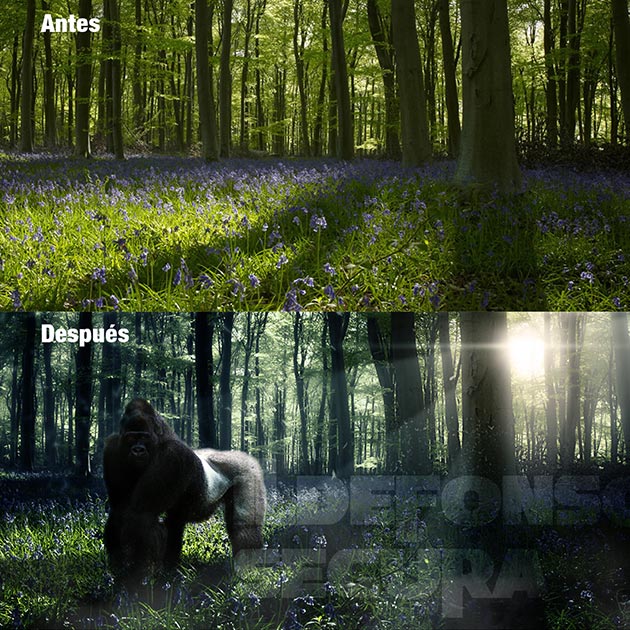
									<p><img loading="lazy" decoding="async" class="size-full wp-image-3523 aligncenter" src="https://ildefonsosegura.es/wp-content/uploads/simio1.jpg" alt="simio1" width="630" height="630" srcset="https://ildefonsosegura.es/wp-content/uploads/simio1.jpg 630w, https://ildefonsosegura.es/wp-content/uploads/simio1-150x150.jpg 150w, https://ildefonsosegura.es/wp-content/uploads/simio1-300x300.jpg 300w, https://ildefonsosegura.es/wp-content/uploads/simio1-50x50.jpg 50w" sizes="(max-width: 630px) 100vw, 630px" /></p><p style="text-align: justify;">Vamos a crear un efecto de profundidad en una escena boscosa a través de la iluminación solar. Conseguiremos una atmosfera propia de un amanecer o un ocaso.</p><p> </p><p> </p><p><strong style="color: #800000;">TUTORIAL   </strong></p><center><iframe src="https://www.youtube.com/embed/YjziBfLSTpQ" width="640" height="420" frameborder="0" allowfullscreen="allowfullscreen"></iframe></center><p> </p><p> </p><center></center><p><br />Gracias por tu tiempo</p>								</div>
				</div>
					</div>
		</div>
					</div>
		</section>
				<section class="elementor-section elementor-top-section elementor-element elementor-element-3d209f16 elementor-section-boxed elementor-section-height-default elementor-section-height-default" data-id="3d209f16" data-element_type="section" data-e-type="section">
						<div class="elementor-container elementor-column-gap-default">
					<div class="elementor-column elementor-col-100 elementor-top-column elementor-element elementor-element-35d1b25b" data-id="35d1b25b" data-element_type="column" data-e-type="column">
			<div class="elementor-widget-wrap elementor-element-populated">
						<div class="elementor-element elementor-element-5636eb78 elementor-widget-divider--view-line elementor-widget elementor-widget-divider" data-id="5636eb78" data-element_type="widget" data-e-type="widget" data-widget_type="divider.default">
				<div class="elementor-widget-container">
							<div class="elementor-divider">
			<span class="elementor-divider-separator">
						</span>
		</div>
						</div>
				</div>
					</div>
		</div>
					</div>
		</section>
				<section class="elementor-section elementor-top-section elementor-element elementor-element-68eb404a elementor-section-full_width elementor-section-height-default elementor-section-height-default" data-id="68eb404a" data-element_type="section" data-e-type="section">
						<div class="elementor-container elementor-column-gap-default">
					<div class="elementor-column elementor-col-50 elementor-top-column elementor-element elementor-element-6f28116e" data-id="6f28116e" data-element_type="column" data-e-type="column">
			<div class="elementor-widget-wrap elementor-element-populated">
						<div class="elementor-element elementor-element-49c7699b elementor-align-right elementor-invisible elementor-widget elementor-widget-button" data-id="49c7699b" data-element_type="widget" data-e-type="widget" data-settings="{&quot;_animation&quot;:&quot;shake&quot;}" data-widget_type="button.default">
				<div class="elementor-widget-container">
									<div class="elementor-button-wrapper">
					<a class="elementor-button elementor-button-link elementor-size-sm elementor-animation-grow" href="https://drive.google.com/file/d/0B_nJkCGJubucZGlkRGhHUjRNOUk/view?usp=drive_link&#038;resourcekey=0-FskkIdhg9N76bbpFT6dglg" target="_blank">
						<span class="elementor-button-content-wrapper">
									<span class="elementor-button-text">DESCARGA EL MATERIAL</span>
					</span>
					</a>
				</div>
								</div>
				</div>
					</div>
		</div>
				<div class="elementor-column elementor-col-50 elementor-top-column elementor-element elementor-element-7ae81eda" data-id="7ae81eda" data-element_type="column" data-e-type="column">
			<div class="elementor-widget-wrap elementor-element-populated">
						<div class="elementor-element elementor-element-773ca61f elementor-widget elementor-widget-html" data-id="773ca61f" data-element_type="widget" data-e-type="widget" data-settings="{&quot;_animation&quot;:&quot;none&quot;}" data-widget_type="html.default">
				<div class="elementor-widget-container">
					<form action="https://www.paypal.com/cgi-bin/webscr" method="post" target="_blank">
<input type="hidden" name="cmd" value="_donations">
<input type="hidden" name="business" value="ildefonsosegura@gmail.com">
<input type="hidden" name="lc" value="ES">
<input type="hidden" name="item_name" value="MANTENIMIENTO DE LA PAGINA DE ILDEFONSOSEGURA">
<input type="hidden" name="no_note" value="0">
<input type="hidden" name="currency_code" value="EUR">
<input type="hidden" name="bn" value="PP-DonationsBF:paypal1.jpg:NonHostedGuest">
<input type="image" src="http://ildefonsosegura.es/wp-content/uploads/paypal-updated-1.png" border="0" name="submit" alt="PayPal. La forma rápida y segura de pagar en Internet.">
<img decoding="async" alt="" border="0" src="https://www.paypalobjects.com/es_ES/i/scr/pixel.gif" width="1" height="1">
</form>				</div>
				</div>
					</div>
		</div>
					</div>
		</section>
				<section class="elementor-section elementor-top-section elementor-element elementor-element-2972e1a8 elementor-section-boxed elementor-section-height-default elementor-section-height-default" data-id="2972e1a8" data-element_type="section" data-e-type="section">
						<div class="elementor-container elementor-column-gap-default">
					<div class="elementor-column elementor-col-100 elementor-top-column elementor-element elementor-element-14047c1a" data-id="14047c1a" data-element_type="column" data-e-type="column">
			<div class="elementor-widget-wrap elementor-element-populated">
						<div class="elementor-element elementor-element-58b56db7 elementor-widget-divider--view-line elementor-widget elementor-widget-divider" data-id="58b56db7" data-element_type="widget" data-e-type="widget" data-widget_type="divider.default">
				<div class="elementor-widget-container">
							<div class="elementor-divider">
			<span class="elementor-divider-separator">
						</span>
		</div>
						</div>
				</div>
					</div>
		</div>
					</div>
		</section>
				<section class="elementor-section elementor-top-section elementor-element elementor-element-5912651f elementor-section-full_width elementor-section-height-default elementor-section-height-default" data-id="5912651f" data-element_type="section" data-e-type="section">
						<div class="elementor-container elementor-column-gap-default">
					<div class="elementor-column elementor-col-100 elementor-top-column elementor-element elementor-element-5e3eb1ef" data-id="5e3eb1ef" data-element_type="column" data-e-type="column">
			<div class="elementor-widget-wrap elementor-element-populated">
						<div class="elementor-element elementor-element-18200916 elementor-widget elementor-widget-text-editor" data-id="18200916" data-element_type="widget" data-e-type="widget" data-widget_type="text-editor.default">
				<div class="elementor-widget-container">
									<div><div align="center"><center><strong style="color: #ff0000;">Suscríbete a mi canal de Youtube:</strong></center><div><div><div align="center"><p><script src="https://apis.google.com/js/platform.js"></script></p><div class="g-ytsubscribe" data-channel="ildefonsosegura" data-layout="full" data-count="default"> </div></div></div><p> </p><p style="text-align: center;">No te lo pierdas y comparte tus trabajos en mi página de facebook (<span style="color: #0000ff;"><strong><a style="color: #0000ff;" href="http://www.facebook.com/IldefonsoSeguraPage" target="_blank" rel="noopener noreferrer">IldefonsoSeguraPage</a></strong></span>)<br />Espero que te guste y compartas el vídeo. No dejes de compartir este post.</p><p style="text-align: center;">Así es como me puedes ayudar 🙂 Gracias</p></div></div></div>								</div>
				</div>
					</div>
		</div>
					</div>
		</section>
				</div>La entrada <a href="https://ildefonsosegura.es/como-crear-profundidad-con-la-iluminacion-con-photoshop-by-ildefonsosegura/">Tutorial Photoshop // Cómo crear profundidad con la Iluminación by @ildefonsosegura</a> apareció primero en <a href="https://ildefonsosegura.es">Ildefonso Segura</a>.]]></content:encoded>
					
					<wfw:commentRss>https://ildefonsosegura.es/como-crear-profundidad-con-la-iluminacion-con-photoshop-by-ildefonsosegura/feed/</wfw:commentRss>
			<slash:comments>0</slash:comments>
		
		
			</item>
		<item>
		<title>#Tutorial #Photoshop: Wallpaper paisaje pirata by @ildefonsosegura</title>
		<link>https://ildefonsosegura.es/tutorial-photoshop-wallpaper-paisaje-pirata-by-ildefonsosegura/</link>
					<comments>https://ildefonsosegura.es/tutorial-photoshop-wallpaper-paisaje-pirata-by-ildefonsosegura/#respond</comments>
		
		<dc:creator><![CDATA[Ildefonso Segura]]></dc:creator>
		<pubDate>Thu, 02 Jan 2014 09:13:12 +0000</pubDate>
				<category><![CDATA[Efectos]]></category>
		<category><![CDATA[Fotocomposición]]></category>
		<category><![CDATA[Photoshop]]></category>
		<category><![CDATA[Tecnicas]]></category>
		<category><![CDATA[Tutoriales]]></category>
		<category><![CDATA[Wallpaper]]></category>
		<category><![CDATA[adobe]]></category>
		<category><![CDATA[agua]]></category>
		<category><![CDATA[barco]]></category>
		<category><![CDATA[boat]]></category>
		<category><![CDATA[calavera]]></category>
		<category><![CDATA[CC]]></category>
		<category><![CDATA[color]]></category>
		<category><![CDATA[creative loud]]></category>
		<category><![CDATA[cs4]]></category>
		<category><![CDATA[cs5]]></category>
		<category><![CDATA[cs6]]></category>
		<category><![CDATA[fondo]]></category>
		<category><![CDATA[foto]]></category>
		<category><![CDATA[fotocomposición]]></category>
		<category><![CDATA[fotomontaje]]></category>
		<category><![CDATA[gloriasanis]]></category>
		<category><![CDATA[ildefonsosegura]]></category>
		<category><![CDATA[mar]]></category>
		<category><![CDATA[paisaje]]></category>
		<category><![CDATA[photoshop]]></category>
		<category><![CDATA[piratas]]></category>
		<category><![CDATA[pirates]]></category>
		<category><![CDATA[poster]]></category>
		<category><![CDATA[tuto]]></category>
		<category><![CDATA[tutorial]]></category>
		<category><![CDATA[wallpaper]]></category>
		<guid isPermaLink="false">http://ildefonsosegura.es/?p=3318</guid>

					<description><![CDATA[<p>  Despues de realizar el speedart sobre el waalpaper del paisaje pirata, he hecho el  tutorial para que te inspire. Suelo realizar el speedart dado que la duración del tutorial para un wallpaper es muy larga. Aún así y si la audiencia lo solicitó y por eso os lo traigo paso a paso. «Pirates in [&#8230;]</p>
La entrada <a href="https://ildefonsosegura.es/tutorial-photoshop-wallpaper-paisaje-pirata-by-ildefonsosegura/">#Tutorial #Photoshop: Wallpaper paisaje pirata by @ildefonsosegura</a> apareció primero en <a href="https://ildefonsosegura.es">Ildefonso Segura</a>.]]></description>
										<content:encoded><![CDATA[<div data-elementor-type="wp-post" data-elementor-id="3318" class="elementor elementor-3318">
						<section class="elementor-section elementor-top-section elementor-element elementor-element-5dbe7e4 elementor-section-boxed elementor-section-height-default elementor-section-height-default" data-id="5dbe7e4" data-element_type="section" data-e-type="section">
						<div class="elementor-container elementor-column-gap-default">
					<div class="elementor-column elementor-col-100 elementor-top-column elementor-element elementor-element-7755dd1f" data-id="7755dd1f" data-element_type="column" data-e-type="column">
			<div class="elementor-widget-wrap elementor-element-populated">
						<div class="elementor-element elementor-element-88637e3 elementor-widget elementor-widget-text-editor" data-id="88637e3" data-element_type="widget" data-e-type="widget" data-widget_type="text-editor.default">
				<div class="elementor-widget-container">
									<p><img loading="lazy" decoding="async" class="wp-image-3319 aligncenter" src="https://ildefonsosegura.es/wp-content/uploads/Pirates-in-anywhere-para-Christian.jpg" alt="Pirates-in-anywhere-para-Christian" width="408" height="797" srcset="https://ildefonsosegura.es/wp-content/uploads/Pirates-in-anywhere-para-Christian.jpg 680w, https://ildefonsosegura.es/wp-content/uploads/Pirates-in-anywhere-para-Christian-153x300.jpg 153w, https://ildefonsosegura.es/wp-content/uploads/Pirates-in-anywhere-para-Christian-524x1024.jpg 524w" sizes="(max-width: 408px) 100vw, 408px" /></p><p> </p><p>Despues de realizar el speedart sobre el waalpaper del paisaje pirata, he hecho el  tutorial para que te inspire. Suelo realizar el speedart dado que la duración del tutorial para un wallpaper es muy larga. Aún así y si la audiencia lo solicitó y por eso os lo traigo paso a paso.</p><p>«Pirates in anywhere» es una obra basada en la visión que tengo sobre la creación del símbolo de los piratas. Una calavera en el mar junto con los huesos de alguien que lucho por defender lo suyo. Color y desaturación combinados para crear una escena de contrastes que como un todo llama la atención en aquellas partes que deseo hacerlo.</p><p>Aprenderás muchos trucos además de recordar otros muchos también. A tu disposición para que lo valores y me digas si quieres que haga el tutorial. Deja tu comment y tu like</p><p>Si quieres ver el wallpaper completo, mira mi galería en <a href="http://www.flickr.com/photos/ildefonsosegura/9824889444/" target="_blank" rel="noopener"><strong>FLICKr Pirates in anywhere</strong></a></p><p>Gracias por tu tiempo</p><p> </p><p><strong style="color: #800000;">TUTORIAL </strong></p><center><iframe src="https://www.youtube.com/embed/ciziEQkkHpo" width="640" height="420" frameborder="0" allowfullscreen="allowfullscreen"></iframe></center><p> </p><center></center><p><br />Wallpaper dedicado a <strong>Christian Ramírez</strong> ganador del concurso que organizé en septiembre de 2013 en mi facebook. (wallpaper http://goo.gl/LRnC5n)<br />Visita sus sitios si quieres ver más trabajos</p><p>facebook : <a href="https://www.facebook.com/christian.ramirez.395017" target="_blank" rel="noopener">https://www.facebook.com/christian.ramirez.395017</a><br />twitter :<a href="https://twitter.com/ChristianRamre4" target="_blank" rel="noopener"> @ChristianRamre4</a><br />youtube canal:<a href="http://www.youtube.com/channel/UClxCmV2HFDBTbk86w6KugWw" target="_blank" rel="noopener"> http://www.youtube.com/channel/UClxCmV2HFDBTbk86w6KugWw</a></p><p><strong style="color: #800000;">SPEEDART </strong></p><p> </p><center><iframe src="https://www.youtube.com/embed/8rO4Jh4RW90" width="640" height="420" frameborder="0" allowfullscreen="allowfullscreen"></iframe></center><p> </p><p> </p><p> </p>								</div>
				</div>
					</div>
		</div>
					</div>
		</section>
				<section class="elementor-section elementor-top-section elementor-element elementor-element-3370b090 elementor-section-boxed elementor-section-height-default elementor-section-height-default" data-id="3370b090" data-element_type="section" data-e-type="section">
						<div class="elementor-container elementor-column-gap-default">
					<div class="elementor-column elementor-col-100 elementor-top-column elementor-element elementor-element-ed981bc" data-id="ed981bc" data-element_type="column" data-e-type="column">
			<div class="elementor-widget-wrap elementor-element-populated">
						<div class="elementor-element elementor-element-6fa6b585 elementor-widget-divider--view-line elementor-widget elementor-widget-divider" data-id="6fa6b585" data-element_type="widget" data-e-type="widget" data-widget_type="divider.default">
				<div class="elementor-widget-container">
							<div class="elementor-divider">
			<span class="elementor-divider-separator">
						</span>
		</div>
						</div>
				</div>
					</div>
		</div>
					</div>
		</section>
				<section class="elementor-section elementor-top-section elementor-element elementor-element-10356d78 elementor-section-full_width elementor-section-height-default elementor-section-height-default" data-id="10356d78" data-element_type="section" data-e-type="section">
						<div class="elementor-container elementor-column-gap-default">
					<div class="elementor-column elementor-col-50 elementor-top-column elementor-element elementor-element-6b75aece" data-id="6b75aece" data-element_type="column" data-e-type="column">
			<div class="elementor-widget-wrap elementor-element-populated">
						<div class="elementor-element elementor-element-1bcdb929 elementor-align-right elementor-invisible elementor-widget elementor-widget-button" data-id="1bcdb929" data-element_type="widget" data-e-type="widget" data-settings="{&quot;_animation&quot;:&quot;shake&quot;}" data-widget_type="button.default">
				<div class="elementor-widget-container">
									<div class="elementor-button-wrapper">
					<a class="elementor-button elementor-button-link elementor-size-sm elementor-animation-grow" href="https://drive.google.com/open?id=0B_nJkCGJubucV2VZeGlZUEVoSk0" target="_blank">
						<span class="elementor-button-content-wrapper">
									<span class="elementor-button-text">DESCARGA EL MATERIAL</span>
					</span>
					</a>
				</div>
								</div>
				</div>
					</div>
		</div>
				<div class="elementor-column elementor-col-50 elementor-top-column elementor-element elementor-element-521bc468" data-id="521bc468" data-element_type="column" data-e-type="column">
			<div class="elementor-widget-wrap elementor-element-populated">
						<div class="elementor-element elementor-element-164ff9b2 elementor-widget elementor-widget-html" data-id="164ff9b2" data-element_type="widget" data-e-type="widget" data-settings="{&quot;_animation&quot;:&quot;none&quot;}" data-widget_type="html.default">
				<div class="elementor-widget-container">
					<form action="https://www.paypal.com/cgi-bin/webscr" method="post" target="_blank">
<input type="hidden" name="cmd" value="_donations">
<input type="hidden" name="business" value="ildefonsosegura@gmail.com">
<input type="hidden" name="lc" value="ES">
<input type="hidden" name="item_name" value="MANTENIMIENTO DE LA PAGINA DE ILDEFONSOSEGURA">
<input type="hidden" name="no_note" value="0">
<input type="hidden" name="currency_code" value="EUR">
<input type="hidden" name="bn" value="PP-DonationsBF:paypal1.jpg:NonHostedGuest">
<input type="image" src="http://ildefonsosegura.es/wp-content/uploads/paypal-updated-1.png" border="0" name="submit" alt="PayPal. La forma rápida y segura de pagar en Internet.">
<img decoding="async" alt="" border="0" src="https://www.paypalobjects.com/es_ES/i/scr/pixel.gif" width="1" height="1">
</form>				</div>
				</div>
					</div>
		</div>
					</div>
		</section>
				<section class="elementor-section elementor-top-section elementor-element elementor-element-39e7f5c5 elementor-section-boxed elementor-section-height-default elementor-section-height-default" data-id="39e7f5c5" data-element_type="section" data-e-type="section">
						<div class="elementor-container elementor-column-gap-default">
					<div class="elementor-column elementor-col-100 elementor-top-column elementor-element elementor-element-36efad57" data-id="36efad57" data-element_type="column" data-e-type="column">
			<div class="elementor-widget-wrap elementor-element-populated">
						<div class="elementor-element elementor-element-aef7b10 elementor-widget-divider--view-line elementor-widget elementor-widget-divider" data-id="aef7b10" data-element_type="widget" data-e-type="widget" data-widget_type="divider.default">
				<div class="elementor-widget-container">
							<div class="elementor-divider">
			<span class="elementor-divider-separator">
						</span>
		</div>
						</div>
				</div>
					</div>
		</div>
					</div>
		</section>
				<section class="elementor-section elementor-top-section elementor-element elementor-element-15d87c95 elementor-section-full_width elementor-section-height-default elementor-section-height-default" data-id="15d87c95" data-element_type="section" data-e-type="section">
						<div class="elementor-container elementor-column-gap-default">
					<div class="elementor-column elementor-col-100 elementor-top-column elementor-element elementor-element-39b5cbd7" data-id="39b5cbd7" data-element_type="column" data-e-type="column">
			<div class="elementor-widget-wrap elementor-element-populated">
						<div class="elementor-element elementor-element-1677fea1 elementor-widget elementor-widget-text-editor" data-id="1677fea1" data-element_type="widget" data-e-type="widget" data-widget_type="text-editor.default">
				<div class="elementor-widget-container">
									<div><div align="center"><center><strong style="color: #ff0000;">Suscríbete a mi canal de Youtube:</strong></center><div><div><div align="center"><p><script src="https://apis.google.com/js/platform.js"></script></p><div class="g-ytsubscribe" data-channel="ildefonsosegura" data-layout="full" data-count="default"> </div></div></div><p> </p><p style="text-align: center;">No te lo pierdas y comparte tus trabajos en mi página de facebook (<span style="color: #0000ff;"><strong><a style="color: #0000ff;" href="http://www.facebook.com/IldefonsoSeguraPage" target="_blank" rel="noopener noreferrer">IldefonsoSeguraPage</a></strong></span>)<br />Espero que te guste y compartas el vídeo. No dejes de compartir este post.</p><p style="text-align: center;">Así es como me puedes ayudar 🙂 Gracias</p></div></div></div>								</div>
				</div>
					</div>
		</div>
					</div>
		</section>
				</div>La entrada <a href="https://ildefonsosegura.es/tutorial-photoshop-wallpaper-paisaje-pirata-by-ildefonsosegura/">#Tutorial #Photoshop: Wallpaper paisaje pirata by @ildefonsosegura</a> apareció primero en <a href="https://ildefonsosegura.es">Ildefonso Segura</a>.]]></content:encoded>
					
					<wfw:commentRss>https://ildefonsosegura.es/tutorial-photoshop-wallpaper-paisaje-pirata-by-ildefonsosegura/feed/</wfw:commentRss>
			<slash:comments>0</slash:comments>
		
		
			</item>
		<item>
		<title>Tutorial Photoshop // Paisaje con texto 3D</title>
		<link>https://ildefonsosegura.es/paisaje-con-texto-3d-con-photoshop-cs6/</link>
					<comments>https://ildefonsosegura.es/paisaje-con-texto-3d-con-photoshop-cs6/#respond</comments>
		
		<dc:creator><![CDATA[Ildefonso Segura]]></dc:creator>
		<pubDate>Sat, 29 Dec 2012 00:52:09 +0000</pubDate>
				<category><![CDATA[3D]]></category>
		<category><![CDATA[Efectos]]></category>
		<category><![CDATA[Fotocomposición]]></category>
		<category><![CDATA[Photoshop]]></category>
		<category><![CDATA[Tecnicas]]></category>
		<category><![CDATA[Textos]]></category>
		<category><![CDATA[Tutoriales]]></category>
		<category><![CDATA[Wallpaper]]></category>
		<category><![CDATA[agua]]></category>
		<category><![CDATA[desenfoque]]></category>
		<category><![CDATA[extrusión]]></category>
		<category><![CDATA[gloriasanis]]></category>
		<category><![CDATA[ildefonsosegura]]></category>
		<category><![CDATA[iluminación]]></category>
		<category><![CDATA[luz]]></category>
		<category><![CDATA[mar]]></category>
		<category><![CDATA[modulo 3D]]></category>
		<category><![CDATA[oceano]]></category>
		<category><![CDATA[paisaje]]></category>
		<category><![CDATA[perspectiva]]></category>
		<category><![CDATA[tilt-shift]]></category>
		<guid isPermaLink="false">http://ildefonsosegura.es/?p=1131</guid>

					<description><![CDATA[<p>Aquí tienes este bonito wallpaper para tu fondo de escritorio o para regalar a tu familia o amigos. En el tutorial que muestro aprenderemos algunas mejoras que Adobe ha incorporado tales como: 1.- Herramienta recortar para aplanar 2.- Nuevo filtro de desenfoque tilt-shift 3.- Módulo 3D con nuevas referencias y panel de objetos (sombras, luces, [&#8230;]</p>
La entrada <a href="https://ildefonsosegura.es/paisaje-con-texto-3d-con-photoshop-cs6/">Tutorial Photoshop // Paisaje con texto 3D</a> apareció primero en <a href="https://ildefonsosegura.es">Ildefonso Segura</a>.]]></description>
										<content:encoded><![CDATA[<p>Aquí tienes este bonito wallpaper para tu fondo de escritorio o para regalar a tu familia o amigos.</p>
<p style="text-align: center;"><img loading="lazy" decoding="async" class="size-full wp-image-1126 aligncenter" alt="Wallpaper-texto-3D" src="https://ildefonsosegura.es/wp-content/uploads/Wallpaper-texto-3D.jpg" width="550" height="309" srcset="https://ildefonsosegura.es/wp-content/uploads/Wallpaper-texto-3D.jpg 550w, https://ildefonsosegura.es/wp-content/uploads/Wallpaper-texto-3D-300x168.jpg 300w" sizes="(max-width: 550px) 100vw, 550px" /></p>
<p>En el tutorial que muestro aprenderemos algunas mejoras que Adobe ha incorporado tales como:<br />
1.- Herramienta recortar para aplanar</p>
<p>2.- Nuevo filtro de desenfoque tilt-shift</p>
<p>3.- Módulo 3D con nuevas referencias y panel de objetos (sombras, luces, reflexión,..)</p>
<p>&nbsp;</p>
<p><span style="color: #800000;"><strong>VIDEOTUTORIAL </strong></span></p>
<p><center><iframe src="https://www.youtube.com/embed/Xf2AwV5GvLU" height="360" width="640" allowfullscreen="" frameborder="0"></iframe></center></p>
<p><center>[vc_button title=»BAJATE LOS MATERIALES» target=»blank» color=»btn-danger» size=»btn-large» href=»https://drive.google.com/open?id=0B_nJkCGJubucT2l6aGtJVHNueDg»]</center>&nbsp;</p>La entrada <a href="https://ildefonsosegura.es/paisaje-con-texto-3d-con-photoshop-cs6/">Tutorial Photoshop // Paisaje con texto 3D</a> apareció primero en <a href="https://ildefonsosegura.es">Ildefonso Segura</a>.]]></content:encoded>
					
					<wfw:commentRss>https://ildefonsosegura.es/paisaje-con-texto-3d-con-photoshop-cs6/feed/</wfw:commentRss>
			<slash:comments>0</slash:comments>
		
		
			</item>
		<item>
		<title>Tutorial Photoshop // Paisaje Avatar (Wallpaper futurista)</title>
		<link>https://ildefonsosegura.es/paisaje-avatar-wallpaper-futurista/</link>
					<comments>https://ildefonsosegura.es/paisaje-avatar-wallpaper-futurista/#respond</comments>
		
		<dc:creator><![CDATA[Ildefonso Segura]]></dc:creator>
		<pubDate>Sat, 22 Dec 2012 08:37:44 +0000</pubDate>
				<category><![CDATA[Películas]]></category>
		<category><![CDATA[Photoshop]]></category>
		<category><![CDATA[Tutorial Escrito]]></category>
		<category><![CDATA[Tutoriales]]></category>
		<category><![CDATA[Wallpaper]]></category>
		<category><![CDATA[avatar]]></category>
		<category><![CDATA[cameron]]></category>
		<category><![CDATA[fondo]]></category>
		<category><![CDATA[ildefonsosegura]]></category>
		<category><![CDATA[james]]></category>
		<category><![CDATA[movie]]></category>
		<category><![CDATA[navi]]></category>
		<category><![CDATA[paisaje]]></category>
		<category><![CDATA[pelicula]]></category>
		<category><![CDATA[wall]]></category>
		<category><![CDATA[wallpaper]]></category>
		<guid isPermaLink="false">http://ildefonsosegura.es/?p=694</guid>

					<description><![CDATA[<p>  Wallpaper inspirado en la película de James Cameron «AVATAR». Reconstruimos los paisajes futuristas de un mundo donde las montañas están suspendidas en el aire. La iluminación de la escena es espcecial y en este tutorial aprenderemos algunos trucos para conseguir el resutlado que veis arriba. Este tutorial lo publiqué en un primer momento en [&#8230;]</p>
La entrada <a href="https://ildefonsosegura.es/paisaje-avatar-wallpaper-futurista/">Tutorial Photoshop // Paisaje Avatar (Wallpaper futurista)</a> apareció primero en <a href="https://ildefonsosegura.es">Ildefonso Segura</a>.]]></description>
										<content:encoded><![CDATA[<div data-elementor-type="wp-post" data-elementor-id="694" class="elementor elementor-694">
						<section class="elementor-section elementor-top-section elementor-element elementor-element-4186a348 elementor-section-boxed elementor-section-height-default elementor-section-height-default" data-id="4186a348" data-element_type="section" data-e-type="section">
						<div class="elementor-container elementor-column-gap-default">
					<div class="elementor-column elementor-col-100 elementor-top-column elementor-element elementor-element-59ef82be" data-id="59ef82be" data-element_type="column" data-e-type="column">
			<div class="elementor-widget-wrap elementor-element-populated">
						<div class="elementor-element elementor-element-660311f1 elementor-widget elementor-widget-text-editor" data-id="660311f1" data-element_type="widget" data-e-type="widget" data-widget_type="text-editor.default">
				<div class="elementor-widget-container">
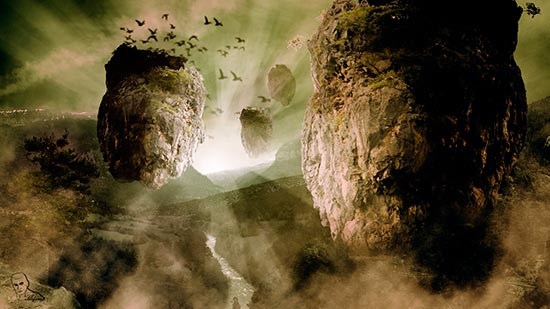
									<p style="text-align: center;"> <img loading="lazy" decoding="async" class="size-full wp-image-697 aligncenter" src="https://ildefonsosegura.es/wp-content/uploads/Paisaje-avatar.jpg" alt="Paisaje-avatar" width="550" height="309" srcset="https://ildefonsosegura.es/wp-content/uploads/Paisaje-avatar.jpg 550w, https://ildefonsosegura.es/wp-content/uploads/Paisaje-avatar-300x168.jpg 300w" sizes="(max-width: 550px) 100vw, 550px" /></p><p>Wallpaper inspirado en la película de James Cameron «AVATAR». Reconstruimos los paisajes futuristas de un mundo donde las montañas están suspendidas en el aire. La iluminación de la escena es espcecial y en este tutorial aprenderemos algunos trucos para conseguir el resutlado que veis arriba. Este tutorial lo publiqué en un primer momento en el canal de Jovany Cámara y me dio a conocer en mis comienzos en el youtube. Posteriormente me cedió los derechos para volver a publiarlo en mi canal y aquí lo mantengo para disfrutar de esta composición de película. Muchos tips para aplicar a tus propias composiciones. Disfrútalo.</p><p style="text-align: left;"><strong style="color: #800000; font-size: 14px;">VIDEOTUTORIAL</strong></p><p> </p><p> </p><center><iframe src="https://www.youtube.com/embed/2UvcdaPQ_YY" width="640" height="360" frameborder="0" allowfullscreen="allowfullscreen"></iframe></center><p> </p><p> </p><p> </p><center><strong style="color: #800000; font-size: 14px;"> TUTORIAL ESCRITO</strong></center><p> </p><p> </p><center></center><p> </p><p><a style="margin: 12px auto 6px auto; font-family: Helvetica,Arial,Sans-serif; font-style: normal; font-variant: normal; font-weight: normal; font-size: 14px; line-height: normal; font-size-adjust: none; font-stretch: normal; -x-system-font: none; display: block; text-decoration: underline;" title="View Tutorial de Photoshop: Wallpaper AVATAR on Scribd" href="http://www.scribd.com/doc/51785992">Tutorial de Photoshop: Wallpaper AVATAR</a><iframe id="doc_83067" src="https://www.scribd.com/embeds/51785992/content?start_page=1&amp;view_mode=scroll" width="100%" height="600" frameborder="0" scrolling="no" data-auto-height="true" data-aspect-ratio=""></iframe></p><p> </p>								</div>
				</div>
					</div>
		</div>
					</div>
		</section>
				<section class="elementor-section elementor-top-section elementor-element elementor-element-1ab80719 elementor-section-boxed elementor-section-height-default elementor-section-height-default" data-id="1ab80719" data-element_type="section" data-e-type="section">
						<div class="elementor-container elementor-column-gap-default">
					<div class="elementor-column elementor-col-100 elementor-top-column elementor-element elementor-element-1b50b135" data-id="1b50b135" data-element_type="column" data-e-type="column">
			<div class="elementor-widget-wrap elementor-element-populated">
						<div class="elementor-element elementor-element-777e343e elementor-widget-divider--view-line elementor-widget elementor-widget-divider" data-id="777e343e" data-element_type="widget" data-e-type="widget" data-widget_type="divider.default">
				<div class="elementor-widget-container">
							<div class="elementor-divider">
			<span class="elementor-divider-separator">
						</span>
		</div>
						</div>
				</div>
					</div>
		</div>
					</div>
		</section>
				<section class="elementor-section elementor-top-section elementor-element elementor-element-7ccab5e9 elementor-section-full_width elementor-section-height-default elementor-section-height-default" data-id="7ccab5e9" data-element_type="section" data-e-type="section">
						<div class="elementor-container elementor-column-gap-default">
					<div class="elementor-column elementor-col-50 elementor-top-column elementor-element elementor-element-4c6763a5" data-id="4c6763a5" data-element_type="column" data-e-type="column">
			<div class="elementor-widget-wrap elementor-element-populated">
						<div class="elementor-element elementor-element-5de74ec8 elementor-align-right elementor-invisible elementor-widget elementor-widget-button" data-id="5de74ec8" data-element_type="widget" data-e-type="widget" data-settings="{&quot;_animation&quot;:&quot;shake&quot;}" data-widget_type="button.default">
				<div class="elementor-widget-container">
									<div class="elementor-button-wrapper">
					<a class="elementor-button elementor-button-link elementor-size-sm elementor-animation-grow" href="https://drive.google.com/open?id=0B_nJkCGJubuceDgtM2JFeGRrWnM" target="_blank">
						<span class="elementor-button-content-wrapper">
									<span class="elementor-button-text">DESCARGA EL MATERIAL</span>
					</span>
					</a>
				</div>
								</div>
				</div>
					</div>
		</div>
				<div class="elementor-column elementor-col-50 elementor-top-column elementor-element elementor-element-2ed838f9" data-id="2ed838f9" data-element_type="column" data-e-type="column">
			<div class="elementor-widget-wrap elementor-element-populated">
						<div class="elementor-element elementor-element-2eec913c elementor-widget elementor-widget-html" data-id="2eec913c" data-element_type="widget" data-e-type="widget" data-settings="{&quot;_animation&quot;:&quot;none&quot;}" data-widget_type="html.default">
				<div class="elementor-widget-container">
					<form action="https://www.paypal.com/cgi-bin/webscr" method="post" target="_blank">
<input type="hidden" name="cmd" value="_donations">
<input type="hidden" name="business" value="ildefonsosegura@gmail.com">
<input type="hidden" name="lc" value="ES">
<input type="hidden" name="item_name" value="MANTENIMIENTO DE LA PAGINA DE ILDEFONSOSEGURA">
<input type="hidden" name="no_note" value="0">
<input type="hidden" name="currency_code" value="EUR">
<input type="hidden" name="bn" value="PP-DonationsBF:paypal1.jpg:NonHostedGuest">
<input type="image" src="http://ildefonsosegura.es/wp-content/uploads/paypal-updated-1.png" border="0" name="submit" alt="PayPal. La forma rápida y segura de pagar en Internet.">
<img decoding="async" alt="" border="0" src="https://www.paypalobjects.com/es_ES/i/scr/pixel.gif" width="1" height="1">
</form>				</div>
				</div>
					</div>
		</div>
					</div>
		</section>
				<section class="elementor-section elementor-top-section elementor-element elementor-element-caa1f6e elementor-section-boxed elementor-section-height-default elementor-section-height-default" data-id="caa1f6e" data-element_type="section" data-e-type="section">
						<div class="elementor-container elementor-column-gap-default">
					<div class="elementor-column elementor-col-100 elementor-top-column elementor-element elementor-element-47fc109" data-id="47fc109" data-element_type="column" data-e-type="column">
			<div class="elementor-widget-wrap elementor-element-populated">
						<div class="elementor-element elementor-element-a4639cd elementor-widget-divider--view-line_icon elementor-view-default elementor-widget-divider--element-align-center elementor-widget elementor-widget-divider" data-id="a4639cd" data-element_type="widget" data-e-type="widget" data-widget_type="divider.default">
				<div class="elementor-widget-container">
							<div class="elementor-divider">
			<span class="elementor-divider-separator">
							<div class="elementor-icon elementor-divider__element">
					<i aria-hidden="true" class="fas fa-star"></i></div>
						</span>
		</div>
						</div>
				</div>
					</div>
		</div>
					</div>
		</section>
				<section class="elementor-section elementor-top-section elementor-element elementor-element-56d90a7 elementor-section-full_width elementor-section-height-default elementor-section-height-default" data-id="56d90a7" data-element_type="section" data-e-type="section">
						<div class="elementor-container elementor-column-gap-default">
					<div class="elementor-column elementor-col-50 elementor-top-column elementor-element elementor-element-fb57ce2" data-id="fb57ce2" data-element_type="column" data-e-type="column">
			<div class="elementor-widget-wrap elementor-element-populated">
						<div class="elementor-element elementor-element-7a4a95a elementor-align-right elementor-invisible elementor-widget elementor-widget-button" data-id="7a4a95a" data-element_type="widget" data-e-type="widget" data-settings="{&quot;_animation&quot;:&quot;shake&quot;}" data-widget_type="button.default">
				<div class="elementor-widget-container">
									<div class="elementor-button-wrapper">
					<a class="elementor-button elementor-button-link elementor-size-sm elementor-animation-grow" href="https://drive.google.com/open?id=0B_nJkCGJubucTUxoTTdTd25JUzA" target="_blank">
						<span class="elementor-button-content-wrapper">
									<span class="elementor-button-text">DESCARGA EL TUTORIAL ESCRITO</span>
					</span>
					</a>
				</div>
								</div>
				</div>
					</div>
		</div>
				<div class="elementor-column elementor-col-50 elementor-top-column elementor-element elementor-element-7d98bff" data-id="7d98bff" data-element_type="column" data-e-type="column">
			<div class="elementor-widget-wrap elementor-element-populated">
						<div class="elementor-element elementor-element-c4b7758 elementor-widget elementor-widget-html" data-id="c4b7758" data-element_type="widget" data-e-type="widget" data-settings="{&quot;_animation&quot;:&quot;none&quot;}" data-widget_type="html.default">
				<div class="elementor-widget-container">
					<form action="https://www.paypal.com/cgi-bin/webscr" method="post" target="_blank">
<input type="hidden" name="cmd" value="_donations">
<input type="hidden" name="business" value="ildefonsosegura@gmail.com">
<input type="hidden" name="lc" value="ES">
<input type="hidden" name="item_name" value="MANTENIMIENTO DE LA PAGINA DE ILDEFONSOSEGURA">
<input type="hidden" name="no_note" value="0">
<input type="hidden" name="currency_code" value="EUR">
<input type="hidden" name="bn" value="PP-DonationsBF:paypal1.jpg:NonHostedGuest">
<input type="image" src="http://ildefonsosegura.es/wp-content/uploads/paypal-updated-1.png" border="0" name="submit" alt="PayPal. La forma rápida y segura de pagar en Internet.">
<img decoding="async" alt="" border="0" src="https://www.paypalobjects.com/es_ES/i/scr/pixel.gif" width="1" height="1">
</form>				</div>
				</div>
					</div>
		</div>
					</div>
		</section>
				<section class="elementor-section elementor-top-section elementor-element elementor-element-3b4896f6 elementor-section-boxed elementor-section-height-default elementor-section-height-default" data-id="3b4896f6" data-element_type="section" data-e-type="section">
						<div class="elementor-container elementor-column-gap-default">
					<div class="elementor-column elementor-col-100 elementor-top-column elementor-element elementor-element-67109c9d" data-id="67109c9d" data-element_type="column" data-e-type="column">
			<div class="elementor-widget-wrap elementor-element-populated">
						<div class="elementor-element elementor-element-5ec290ae elementor-widget-divider--view-line elementor-widget elementor-widget-divider" data-id="5ec290ae" data-element_type="widget" data-e-type="widget" data-widget_type="divider.default">
				<div class="elementor-widget-container">
							<div class="elementor-divider">
			<span class="elementor-divider-separator">
						</span>
		</div>
						</div>
				</div>
					</div>
		</div>
					</div>
		</section>
				<section class="elementor-section elementor-top-section elementor-element elementor-element-1c8a60fb elementor-section-full_width elementor-section-height-default elementor-section-height-default" data-id="1c8a60fb" data-element_type="section" data-e-type="section">
						<div class="elementor-container elementor-column-gap-default">
					<div class="elementor-column elementor-col-100 elementor-top-column elementor-element elementor-element-137521b3" data-id="137521b3" data-element_type="column" data-e-type="column">
			<div class="elementor-widget-wrap elementor-element-populated">
						<div class="elementor-element elementor-element-4c4fb610 elementor-widget elementor-widget-text-editor" data-id="4c4fb610" data-element_type="widget" data-e-type="widget" data-widget_type="text-editor.default">
				<div class="elementor-widget-container">
									<div><div align="center"><center><strong style="color: #ff0000;">Suscríbete a mi canal de Youtube:</strong></center><div><div><div align="center"><p><script src="https://apis.google.com/js/platform.js"></script></p><div class="g-ytsubscribe" data-channel="ildefonsosegura" data-layout="full" data-count="default"> </div></div></div><p> </p><p style="text-align: center;">No te lo pierdas y comparte tus trabajos en mi página de facebook (<span style="color: #0000ff;"><strong><a style="color: #0000ff;" href="http://www.facebook.com/IldefonsoSeguraPage" target="_blank" rel="noopener noreferrer">IldefonsoSeguraPage</a></strong></span>)<br />Espero que te guste y compartas el vídeo. No dejes de compartir este post.</p><p style="text-align: center;">Así es como me puedes ayudar 🙂 Gracias</p></div></div></div>								</div>
				</div>
					</div>
		</div>
					</div>
		</section>
				</div>La entrada <a href="https://ildefonsosegura.es/paisaje-avatar-wallpaper-futurista/">Tutorial Photoshop // Paisaje Avatar (Wallpaper futurista)</a> apareció primero en <a href="https://ildefonsosegura.es">Ildefonso Segura</a>.]]></content:encoded>
					
					<wfw:commentRss>https://ildefonsosegura.es/paisaje-avatar-wallpaper-futurista/feed/</wfw:commentRss>
			<slash:comments>0</slash:comments>
		
		
			</item>
		<item>
		<title>Fusionar imágenes con Photoshop</title>
		<link>https://ildefonsosegura.es/fusionar-imagenes/</link>
					<comments>https://ildefonsosegura.es/fusionar-imagenes/#respond</comments>
		
		<dc:creator><![CDATA[Ildefonso Segura]]></dc:creator>
		<pubDate>Fri, 21 Dec 2012 17:34:39 +0000</pubDate>
				<category><![CDATA[Efectos]]></category>
		<category><![CDATA[Photoshop]]></category>
		<category><![CDATA[Tecnicas]]></category>
		<category><![CDATA[Tutoriales]]></category>
		<category><![CDATA[Wallpaper]]></category>
		<category><![CDATA[fusion]]></category>
		<category><![CDATA[mar]]></category>
		<category><![CDATA[máscara]]></category>
		<category><![CDATA[paisaje]]></category>
		<guid isPermaLink="false">http://ildefonsosegura.es/?p=551</guid>

					<description><![CDATA[<p>En este videotutorial veremos como realizar una fusión de imágenes con máscaras de capa. Igualmente aplicaremos la técnica a un ejemplo para ver su aplicabilidad y conseguiremos una puesta de sol maravillosa. Disfrútalo &#160; VIDEOTUTORIAL &#160; Suscríbete a mi canal de Youtube:     No te lo pierdas y comparte tus trabajos en mi página [&#8230;]</p>
La entrada <a href="https://ildefonsosegura.es/fusionar-imagenes/">Fusionar imágenes con Photoshop</a> apareció primero en <a href="https://ildefonsosegura.es">Ildefonso Segura</a>.]]></description>
										<content:encoded><![CDATA[<div data-elementor-type="wp-post" data-elementor-id="551" class="elementor elementor-551">
						<section class="elementor-section elementor-top-section elementor-element elementor-element-29f9726a elementor-section-boxed elementor-section-height-default elementor-section-height-default" data-id="29f9726a" data-element_type="section" data-e-type="section">
						<div class="elementor-container elementor-column-gap-default">
					<div class="elementor-column elementor-col-100 elementor-top-column elementor-element elementor-element-6c35b7e" data-id="6c35b7e" data-element_type="column" data-e-type="column">
			<div class="elementor-widget-wrap elementor-element-populated">
						<div class="elementor-element elementor-element-69677037 elementor-widget elementor-widget-text-editor" data-id="69677037" data-element_type="widget" data-e-type="widget" data-widget_type="text-editor.default">
				<div class="elementor-widget-container">
									<p>En este videotutorial veremos como realizar una fusión de imágenes con máscaras de capa. Igualmente aplicaremos la técnica a un ejemplo para ver su aplicabilidad y conseguiremos una puesta de sol maravillosa. Disfrútalo</p>
<p>&nbsp;</p>
<p><span style="color: #800000;"><strong>VIDEOTUTORIAL </strong></span></p>
<p></p><center><iframe src="https://www.youtube.com/embed/iYzKw_pqdnA" width="640" height="360" frameborder="0" allowfullscreen="allowfullscreen"></iframe></center>&nbsp;<p></p>								</div>
				</div>
					</div>
		</div>
					</div>
		</section>
				<section class="elementor-section elementor-top-section elementor-element elementor-element-4c396dc8 elementor-section-full_width elementor-section-height-default elementor-section-height-default" data-id="4c396dc8" data-element_type="section" data-e-type="section">
						<div class="elementor-container elementor-column-gap-default">
					<div class="elementor-column elementor-col-100 elementor-top-column elementor-element elementor-element-2c974d78" data-id="2c974d78" data-element_type="column" data-e-type="column">
			<div class="elementor-widget-wrap elementor-element-populated">
						<div class="elementor-element elementor-element-6bd38b6b elementor-widget elementor-widget-text-editor" data-id="6bd38b6b" data-element_type="widget" data-e-type="widget" data-widget_type="text-editor.default">
				<div class="elementor-widget-container">
									<div><div align="center"><center><strong style="color: #ff0000;">Suscríbete a mi canal de Youtube:</strong></center><div><div><div align="center"><p><script src="https://apis.google.com/js/platform.js"></script></p><div class="g-ytsubscribe" data-channel="ildefonsosegura" data-layout="full" data-count="default"> </div></div></div><p> </p><p style="text-align: center;">No te lo pierdas y comparte tus trabajos en mi página de facebook (<span style="color: #0000ff;"><strong><a style="color: #0000ff;" href="http://www.facebook.com/IldefonsoSeguraPage" target="_blank" rel="noopener noreferrer">IldefonsoSeguraPage</a></strong></span>)<br />Espero que te guste y compartas el vídeo. No dejes de compartir este post.</p><p style="text-align: center;">Así es como me puedes ayudar 🙂 Gracias</p></div></div></div>								</div>
				</div>
					</div>
		</div>
					</div>
		</section>
				</div>La entrada <a href="https://ildefonsosegura.es/fusionar-imagenes/">Fusionar imágenes con Photoshop</a> apareció primero en <a href="https://ildefonsosegura.es">Ildefonso Segura</a>.]]></content:encoded>
					
					<wfw:commentRss>https://ildefonsosegura.es/fusionar-imagenes/feed/</wfw:commentRss>
			<slash:comments>0</slash:comments>
		
		
			</item>
	</channel>
</rss>

<!--
Performance optimized by W3 Total Cache. Learn more: https://www.boldgrid.com/w3-total-cache/?utm_source=w3tc&utm_medium=footer_comment&utm_campaign=free_plugin

Caché de objetos 0/53 objetos usando Redis
Caché de base de datos usando Redis

Served from: ildefonsosegura.es @ 2026-07-15 18:21:19 by W3 Total Cache
--><br />
<b>Fatal error</b>:  Uncaught TypeError: mysqli_num_fields(): Argument #1 ($result) must be of type mysqli_result, bool given in /var/www/vhosts/ildefonsosegura.es/httpdocs/wp-includes/class-wpdb.php:3870
Stack trace:
#0 /var/www/vhosts/ildefonsosegura.es/httpdocs/wp-includes/class-wpdb.php(3870): mysqli_num_fields()
#1 /var/www/vhosts/ildefonsosegura.es/httpdocs/wp-includes/class-wpdb.php(785): wpdb-&gt;load_col_info()
#2 /var/www/vhosts/ildefonsosegura.es/httpdocs/wp-content/plugins/w3-total-cache/DbCache_WpdbInjection_QueryCaching.php(230): wpdb-&gt;__get()
#3 /var/www/vhosts/ildefonsosegura.es/httpdocs/wp-content/plugins/w3-total-cache/DbCache_WpdbNew.php(216): W3TC\DbCache_WpdbInjection_QueryCaching-&gt;query()
#4 /var/www/vhosts/ildefonsosegura.es/httpdocs/wp-content/plugins/aaa-option-optimizer/src/class-database.php(199): W3TC\DbCache_WpdbNew-&gt;query()
#5 /var/www/vhosts/ildefonsosegura.es/httpdocs/wp-content/plugins/aaa-option-optimizer/src/class-plugin.php(182): Progress_Planner\OptionOptimizer\Database::batch_insert()
#6 /var/www/vhosts/ildefonsosegura.es/httpdocs/wp-includes/class-wp-hook.php(341): Progress_Planner\OptionOptimizer\Plugin-&gt;update_tracked_options()
#7 /var/www/vhosts/ildefonsosegura.es/httpdocs/wp-includes/class-wp-hook.php(365): WP_Hook-&gt;apply_filters()
#8 /var/www/vhosts/ildefonsosegura.es/httpdocs/wp-includes/plugin.php(522): WP_Hook-&gt;do_action()
#9 /var/www/vhosts/ildefonsosegura.es/httpdocs/wp-includes/load.php(1308): do_action()
#10 [internal function]: shutdown_action_hook()
#11 {main}
  thrown in <b>/var/www/vhosts/ildefonsosegura.es/httpdocs/wp-includes/class-wpdb.php</b> on line <b>3870</b><br />