<?xml version="1.0" encoding="UTF-8"?><rss version="2.0"
	xmlns:content="http://purl.org/rss/1.0/modules/content/"
	xmlns:wfw="http://wellformedweb.org/CommentAPI/"
	xmlns:dc="http://purl.org/dc/elements/1.1/"
	xmlns:atom="http://www.w3.org/2005/Atom"
	xmlns:sy="http://purl.org/rss/1.0/modules/syndication/"
	xmlns:slash="http://purl.org/rss/1.0/modules/slash/"
	>

<channel>
	<title>mar | Ildefonso Segura</title>
	<atom:link href="https://ildefonsosegura.es/tag/mar/feed/" rel="self" type="application/rss+xml" />
	<link>https://ildefonsosegura.es</link>
	<description>Tutoriales de diseño y animación</description>
	<lastBuildDate>Sun, 17 Mar 2024 21:44:34 +0000</lastBuildDate>
	<language>es</language>
	<sy:updatePeriod>
	hourly	</sy:updatePeriod>
	<sy:updateFrequency>
	1	</sy:updateFrequency>
	<generator>https://wordpress.org/?v=7.0.3</generator>

<image>
	<url>https://ildefonsosegura.es/wp-content/uploads/cropped-Favicon-new-logo-website-32x32.png</url>
	<title>mar | Ildefonso Segura</title>
	<link>https://ildefonsosegura.es</link>
	<width>32</width>
	<height>32</height>
</image> 
	<item>
		<title>Tutorial cinema4d-Textura océano y texto de roca</title>
		<link>https://ildefonsosegura.es/creacion-de-textura-de-oceano-en-cinema4d/</link>
					<comments>https://ildefonsosegura.es/creacion-de-textura-de-oceano-en-cinema4d/#respond</comments>
		
		<dc:creator><![CDATA[Ildefonso Segura]]></dc:creator>
		<pubDate>Mon, 26 Feb 2018 20:30:56 +0000</pubDate>
				<category><![CDATA[3D]]></category>
		<category><![CDATA[Cinema4D]]></category>
		<category><![CDATA[Efectos]]></category>
		<category><![CDATA[Tecnicas]]></category>
		<category><![CDATA[Tutoriales]]></category>
		<category><![CDATA[Video]]></category>
		<category><![CDATA[Wallpaper]]></category>
		<category><![CDATA[agua]]></category>
		<category><![CDATA[animación]]></category>
		<category><![CDATA[c4d]]></category>
		<category><![CDATA[capas]]></category>
		<category><![CDATA[conectatutoriales]]></category>
		<category><![CDATA[effects]]></category>
		<category><![CDATA[ildefonsosegura.gloriasanis]]></category>
		<category><![CDATA[image]]></category>
		<category><![CDATA[mar]]></category>
		<category><![CDATA[oceano]]></category>
		<category><![CDATA[piedra]]></category>
		<category><![CDATA[roca]]></category>
		<category><![CDATA[textura]]></category>
		<category><![CDATA[texturizar]]></category>
		<category><![CDATA[tuto]]></category>
		<category><![CDATA[video]]></category>
		<category><![CDATA[wave]]></category>
		<category><![CDATA[youtube]]></category>
		<guid isPermaLink="false">http://ildefonsosegura.es/?p=1505</guid>

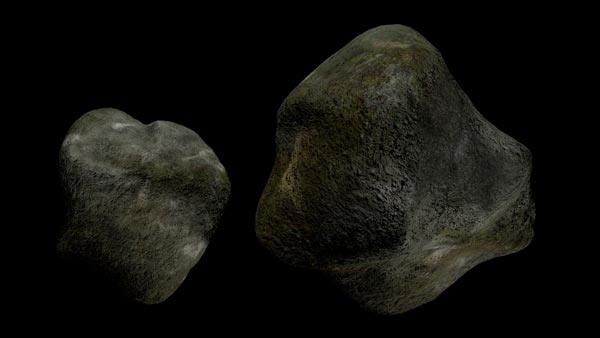
					<description><![CDATA[<p>Fantástico tutorial de C4D en el que animaremos y texturizaremos agua de mar u oceano. Con un solo material aplicando técnicas de capas, conseguiremos una textura muy realista. Animamos con deformadores. No te lo pierdas. Puedes ver como se hace la textura de roca en el tutorial que tambíen tengo en el blog y publiqué [&#8230;]</p>
La entrada <a href="https://ildefonsosegura.es/creacion-de-textura-de-oceano-en-cinema4d/">Tutorial cinema4d-Textura océano y texto de roca</a> apareció primero en <a href="https://ildefonsosegura.es">Ildefonso Segura</a>.]]></description>
										<content:encoded><![CDATA[<div data-elementor-type="wp-post" data-elementor-id="1505" class="elementor elementor-1505">
						<section class="elementor-section elementor-top-section elementor-element elementor-element-602de4d6 elementor-section-boxed elementor-section-height-default elementor-section-height-default" data-id="602de4d6" data-element_type="section" data-e-type="section">
						<div class="elementor-container elementor-column-gap-default">
					<div class="elementor-column elementor-col-100 elementor-top-column elementor-element elementor-element-11f2a602" data-id="11f2a602" data-element_type="column" data-e-type="column">
			<div class="elementor-widget-wrap elementor-element-populated">
						<div class="elementor-element elementor-element-630d9716 elementor-widget elementor-widget-text-editor" data-id="630d9716" data-element_type="widget" data-e-type="widget" data-widget_type="text-editor.default">
				<div class="elementor-widget-container">
									<p>Fantástico tutorial de C4D en el que animaremos y texturizaremos agua de mar u oceano. Con un solo material aplicando técnicas de capas, conseguiremos una textura muy realista. Animamos con deformadores. No te lo pierdas.</p><p>Puedes ver como se ha<a href="https://ildefonsosegura.es/textura-de-roca-realista-con-cinema4d/" rel="attachment wp-att-1389"><img decoding="async" class="size-full wp-image-1389 alignleft" src="https://ildefonsosegura.es/wp-content/uploads/Piedra2.jpg" alt="Piedra2" width="199" height="112" srcset="https://ildefonsosegura.es/wp-content/uploads/Piedra2.jpg 600w, https://ildefonsosegura.es/wp-content/uploads/Piedra2-300x169.jpg 300w" sizes="(max-width: 199px) 100vw, 199px" /></a>ce la textura de roca en el tutorial que tambíen tengo en el blog y publiqué en el canal de <a href="http://www.youtube.com/user/conectatutoriales" target="_blank" rel="noopener">conectatutoriales</a> .Pincha la imagen</p><p> </p><p> </p><p> </p><p>En septiembre de 2012, la famosa web <a href="http://abduzeedo.com" target="_blank" rel="noopener">abduzeedo.com</a> seleccionó una de mis composiciones para publicarla en su apartado de typography mania (inspiración).  Esta fue la imagen resultante que animaremos con cinema4D</p><div><p style="text-align: center;"><a href="http://abduzeedo.com/typography-mania-150" rel="attachment wp-att-1390"><img fetchpriority="high" decoding="async" class="size-full wp-image-1390 aligncenter" src="https://ildefonsosegura.es/wp-content/uploads/Oceano-ilde-test-composicion-2-Photoshop.jpg" alt="Oceano-ilde-test-composicion-2-Photoshop" width="600" height="338" srcset="https://ildefonsosegura.es/wp-content/uploads/Oceano-ilde-test-composicion-2-Photoshop.jpg 600w, https://ildefonsosegura.es/wp-content/uploads/Oceano-ilde-test-composicion-2-Photoshop-300x169.jpg 300w" sizes="(max-width: 600px) 100vw, 600px" /></a></p><p>En este tutorial aprendemos:</p><p>1.- Usar deformadores como fórmula y desplazador</p><p>2.- Texturizar con la técnica de capa (similar a Photoshop)</p><p>3.- Distintos tipos de ruido</p><p>4.- Posicionamiento de luces</p><p>Un efecto muy realista de agua de ocena propio de una película de animación. Visita el canal de <a href="http://www.youtube.com/user/renderready" target="_blank" rel="noopener">RENDERREADY</a> donde también puedes ver en inglés la técnica además de otros tutoriales de cinema4d y after effects muy interesantes.</p><p> </p></div><p><span style="color: #800000;"><strong>VIDEOTUTORIAL </strong></span></p><center><iframe src="https://www.youtube.com/embed/LknGU4BJRSA" width="640" height="420" frameborder="0" allowfullscreen="allowfullscreen"><span data-mce-type="bookmark" style="display: inline-block; width: 0px; overflow: hidden; line-height: 0;" class="mce_SELRES_start">﻿</span></iframe></center><p> </p><center></center><p> </p><p>A continuación veremos el tutorial para hacer el texto sumergido en el océano<br /><span style="color: #800000;"><strong>VIDEOTUTORIAL </strong></span></p><center><iframe src="https://www.youtube.com/embed/zrckyiohhXE" width="640" height="420" frameborder="0" allowfullscreen="allowfullscreen"><span data-mce-type="bookmark" style="display: inline-block; width: 0px; overflow: hidden; line-height: 0;" class="mce_SELRES_start">﻿</span></iframe></center><p> </p><p> </p><p><br /><span style="color: #800000;"><strong>ANIMACIÓN</strong></span></p><center><iframe src="https://www.youtube.com/embed/jnAlpedx4-g" width="640" height="420" frameborder="0" allowfullscreen="allowfullscreen"><span data-mce-type="bookmark" style="display: inline-block; width: 0px; overflow: hidden; line-height: 0;" class="mce_SELRES_start">﻿</span><span data-mce-type="bookmark" style="display: inline-block; width: 0px; overflow: hidden; line-height: 0;" class="mce_SELRES_start">﻿</span></iframe></center><div align="right"><p><script src="https://apis.google.com/js/platform.js"></script><script>// <![CDATA[ function onYtEvent(payload) { if (payload.eventType == 'subscribe') { // Add code to handle subscribe event. } else if (payload.eventType == 'unsubscribe') { // Add code to handle unsubscribe event. } if (window.console) { // for debugging only window.console.log('YT event: ', payload); } } // ]]&gt;</script></p><div class="g-ytsubscribe" data-channel="ildefonsosegura" data-layout="default" data-count="default" data-onytevent="onYtEvent"> </div></div><p style="text-align: left;"> </p>								</div>
				</div>
					</div>
		</div>
					</div>
		</section>
				<section class="elementor-section elementor-top-section elementor-element elementor-element-9830fdb elementor-section-boxed elementor-section-height-default elementor-section-height-default" data-id="9830fdb" data-element_type="section" data-e-type="section">
						<div class="elementor-container elementor-column-gap-default">
					<div class="elementor-column elementor-col-100 elementor-top-column elementor-element elementor-element-211b313a" data-id="211b313a" data-element_type="column" data-e-type="column">
			<div class="elementor-widget-wrap elementor-element-populated">
						<div class="elementor-element elementor-element-78cffe77 elementor-widget-divider--view-line elementor-widget elementor-widget-divider" data-id="78cffe77" data-element_type="widget" data-e-type="widget" data-widget_type="divider.default">
				<div class="elementor-widget-container">
							<div class="elementor-divider">
			<span class="elementor-divider-separator">
						</span>
		</div>
						</div>
				</div>
					</div>
		</div>
					</div>
		</section>
				<section class="elementor-section elementor-top-section elementor-element elementor-element-56a83306 elementor-section-full_width elementor-section-height-default elementor-section-height-default" data-id="56a83306" data-element_type="section" data-e-type="section">
						<div class="elementor-container elementor-column-gap-default">
					<div class="elementor-column elementor-col-50 elementor-top-column elementor-element elementor-element-776b48d4" data-id="776b48d4" data-element_type="column" data-e-type="column">
			<div class="elementor-widget-wrap elementor-element-populated">
						<div class="elementor-element elementor-element-4057efc4 elementor-align-right elementor-invisible elementor-widget elementor-widget-button" data-id="4057efc4" data-element_type="widget" data-e-type="widget" data-settings="{&quot;_animation&quot;:&quot;shake&quot;}" data-widget_type="button.default">
				<div class="elementor-widget-container">
									<div class="elementor-button-wrapper">
					<a class="elementor-button elementor-button-link elementor-size-sm elementor-animation-grow" href="https://drive.google.com/open?id=0B_nJkCGJubucR2VpRzVoYU9jOHM">
						<span class="elementor-button-content-wrapper">
									<span class="elementor-button-text">DESCARGA EL MATERIAL</span>
					</span>
					</a>
				</div>
								</div>
				</div>
					</div>
		</div>
				<div class="elementor-column elementor-col-50 elementor-top-column elementor-element elementor-element-28a2feab" data-id="28a2feab" data-element_type="column" data-e-type="column">
			<div class="elementor-widget-wrap elementor-element-populated">
						<div class="elementor-element elementor-element-1f9aed4e elementor-widget elementor-widget-html" data-id="1f9aed4e" data-element_type="widget" data-e-type="widget" data-settings="{&quot;_animation&quot;:&quot;none&quot;}" data-widget_type="html.default">
				<div class="elementor-widget-container">
					<form action="https://www.paypal.com/cgi-bin/webscr" method="post" target="_blank">
<input type="hidden" name="cmd" value="_donations">
<input type="hidden" name="business" value="ildefonsosegura@gmail.com">
<input type="hidden" name="lc" value="ES">
<input type="hidden" name="item_name" value="MANTENIMIENTO DE LA PAGINA DE ILDEFONSOSEGURA">
<input type="hidden" name="no_note" value="0">
<input type="hidden" name="currency_code" value="EUR">
<input type="hidden" name="bn" value="PP-DonationsBF:paypal1.jpg:NonHostedGuest">
<input type="image" src="http://ildefonsosegura.es/wp-content/uploads/paypal-updated-1.png" border="0" name="submit" alt="PayPal. La forma rápida y segura de pagar en Internet.">
<img decoding="async" alt="" border="0" src="https://www.paypalobjects.com/es_ES/i/scr/pixel.gif" width="1" height="1">
</form>				</div>
				</div>
					</div>
		</div>
					</div>
		</section>
				<section class="elementor-section elementor-top-section elementor-element elementor-element-791f8773 elementor-section-boxed elementor-section-height-default elementor-section-height-default" data-id="791f8773" data-element_type="section" data-e-type="section">
						<div class="elementor-container elementor-column-gap-default">
					<div class="elementor-column elementor-col-100 elementor-top-column elementor-element elementor-element-76ee2b4c" data-id="76ee2b4c" data-element_type="column" data-e-type="column">
			<div class="elementor-widget-wrap elementor-element-populated">
						<div class="elementor-element elementor-element-87dd767 elementor-widget-divider--view-line elementor-widget elementor-widget-divider" data-id="87dd767" data-element_type="widget" data-e-type="widget" data-widget_type="divider.default">
				<div class="elementor-widget-container">
							<div class="elementor-divider">
			<span class="elementor-divider-separator">
						</span>
		</div>
						</div>
				</div>
					</div>
		</div>
					</div>
		</section>
				<section class="elementor-section elementor-top-section elementor-element elementor-element-b2bd510 elementor-section-full_width elementor-section-height-default elementor-section-height-default" data-id="b2bd510" data-element_type="section" data-e-type="section">
						<div class="elementor-container elementor-column-gap-default">
					<div class="elementor-column elementor-col-100 elementor-top-column elementor-element elementor-element-2b8638b8" data-id="2b8638b8" data-element_type="column" data-e-type="column">
			<div class="elementor-widget-wrap elementor-element-populated">
						<div class="elementor-element elementor-element-387f55c0 elementor-widget elementor-widget-text-editor" data-id="387f55c0" data-element_type="widget" data-e-type="widget" data-widget_type="text-editor.default">
				<div class="elementor-widget-container">
									<div><div align="center"><center><strong style="color: #ff0000;">Suscríbete a mi canal de Youtube:</strong></center><div><div><div align="center"><p><script src="https://apis.google.com/js/platform.js"></script></p><div class="g-ytsubscribe" data-channel="ildefonsosegura" data-layout="full" data-count="default"> </div></div></div><p> </p><p style="text-align: center;">No te lo pierdas y comparte tus trabajos en mi página de facebook (<span style="color: #0000ff;"><strong><a style="color: #0000ff;" href="http://www.facebook.com/IldefonsoSeguraPage" target="_blank" rel="noopener noreferrer">IldefonsoSeguraPage</a></strong></span>)<br />Espero que te guste y compartas el vídeo. No dejes de compartir este post.</p><p style="text-align: center;">Así es como me puedes ayudar 🙂 Gracias</p></div></div></div>								</div>
				</div>
					</div>
		</div>
					</div>
		</section>
				</div>La entrada <a href="https://ildefonsosegura.es/creacion-de-textura-de-oceano-en-cinema4d/">Tutorial cinema4d-Textura océano y texto de roca</a> apareció primero en <a href="https://ildefonsosegura.es">Ildefonso Segura</a>.]]></content:encoded>
					
					<wfw:commentRss>https://ildefonsosegura.es/creacion-de-textura-de-oceano-en-cinema4d/feed/</wfw:commentRss>
			<slash:comments>0</slash:comments>
		
		
			</item>
		<item>
		<title>#Tutorial #Photoshop: Wallpaper paisaje pirata by @ildefonsosegura</title>
		<link>https://ildefonsosegura.es/tutorial-photoshop-wallpaper-paisaje-pirata-by-ildefonsosegura/</link>
					<comments>https://ildefonsosegura.es/tutorial-photoshop-wallpaper-paisaje-pirata-by-ildefonsosegura/#respond</comments>
		
		<dc:creator><![CDATA[Ildefonso Segura]]></dc:creator>
		<pubDate>Thu, 02 Jan 2014 09:13:12 +0000</pubDate>
				<category><![CDATA[Efectos]]></category>
		<category><![CDATA[Fotocomposición]]></category>
		<category><![CDATA[Photoshop]]></category>
		<category><![CDATA[Tecnicas]]></category>
		<category><![CDATA[Tutoriales]]></category>
		<category><![CDATA[Wallpaper]]></category>
		<category><![CDATA[adobe]]></category>
		<category><![CDATA[agua]]></category>
		<category><![CDATA[barco]]></category>
		<category><![CDATA[boat]]></category>
		<category><![CDATA[calavera]]></category>
		<category><![CDATA[CC]]></category>
		<category><![CDATA[color]]></category>
		<category><![CDATA[creative loud]]></category>
		<category><![CDATA[cs4]]></category>
		<category><![CDATA[cs5]]></category>
		<category><![CDATA[cs6]]></category>
		<category><![CDATA[fondo]]></category>
		<category><![CDATA[foto]]></category>
		<category><![CDATA[fotocomposición]]></category>
		<category><![CDATA[fotomontaje]]></category>
		<category><![CDATA[gloriasanis]]></category>
		<category><![CDATA[ildefonsosegura]]></category>
		<category><![CDATA[mar]]></category>
		<category><![CDATA[paisaje]]></category>
		<category><![CDATA[photoshop]]></category>
		<category><![CDATA[piratas]]></category>
		<category><![CDATA[pirates]]></category>
		<category><![CDATA[poster]]></category>
		<category><![CDATA[tuto]]></category>
		<category><![CDATA[tutorial]]></category>
		<category><![CDATA[wallpaper]]></category>
		<guid isPermaLink="false">http://ildefonsosegura.es/?p=3318</guid>

					<description><![CDATA[<p>  Despues de realizar el speedart sobre el waalpaper del paisaje pirata, he hecho el  tutorial para que te inspire. Suelo realizar el speedart dado que la duración del tutorial para un wallpaper es muy larga. Aún así y si la audiencia lo solicitó y por eso os lo traigo paso a paso. «Pirates in [&#8230;]</p>
La entrada <a href="https://ildefonsosegura.es/tutorial-photoshop-wallpaper-paisaje-pirata-by-ildefonsosegura/">#Tutorial #Photoshop: Wallpaper paisaje pirata by @ildefonsosegura</a> apareció primero en <a href="https://ildefonsosegura.es">Ildefonso Segura</a>.]]></description>
										<content:encoded><![CDATA[<div data-elementor-type="wp-post" data-elementor-id="3318" class="elementor elementor-3318">
						<section class="elementor-section elementor-top-section elementor-element elementor-element-5dbe7e4 elementor-section-boxed elementor-section-height-default elementor-section-height-default" data-id="5dbe7e4" data-element_type="section" data-e-type="section">
						<div class="elementor-container elementor-column-gap-default">
					<div class="elementor-column elementor-col-100 elementor-top-column elementor-element elementor-element-7755dd1f" data-id="7755dd1f" data-element_type="column" data-e-type="column">
			<div class="elementor-widget-wrap elementor-element-populated">
						<div class="elementor-element elementor-element-88637e3 elementor-widget elementor-widget-text-editor" data-id="88637e3" data-element_type="widget" data-e-type="widget" data-widget_type="text-editor.default">
				<div class="elementor-widget-container">
									<p><img loading="lazy" decoding="async" class="wp-image-3319 aligncenter" src="https://ildefonsosegura.es/wp-content/uploads/Pirates-in-anywhere-para-Christian.jpg" alt="Pirates-in-anywhere-para-Christian" width="408" height="797" srcset="https://ildefonsosegura.es/wp-content/uploads/Pirates-in-anywhere-para-Christian.jpg 680w, https://ildefonsosegura.es/wp-content/uploads/Pirates-in-anywhere-para-Christian-153x300.jpg 153w, https://ildefonsosegura.es/wp-content/uploads/Pirates-in-anywhere-para-Christian-524x1024.jpg 524w" sizes="(max-width: 408px) 100vw, 408px" /></p><p> </p><p>Despues de realizar el speedart sobre el waalpaper del paisaje pirata, he hecho el  tutorial para que te inspire. Suelo realizar el speedart dado que la duración del tutorial para un wallpaper es muy larga. Aún así y si la audiencia lo solicitó y por eso os lo traigo paso a paso.</p><p>«Pirates in anywhere» es una obra basada en la visión que tengo sobre la creación del símbolo de los piratas. Una calavera en el mar junto con los huesos de alguien que lucho por defender lo suyo. Color y desaturación combinados para crear una escena de contrastes que como un todo llama la atención en aquellas partes que deseo hacerlo.</p><p>Aprenderás muchos trucos además de recordar otros muchos también. A tu disposición para que lo valores y me digas si quieres que haga el tutorial. Deja tu comment y tu like</p><p>Si quieres ver el wallpaper completo, mira mi galería en <a href="http://www.flickr.com/photos/ildefonsosegura/9824889444/" target="_blank" rel="noopener"><strong>FLICKr Pirates in anywhere</strong></a></p><p>Gracias por tu tiempo</p><p> </p><p><strong style="color: #800000;">TUTORIAL </strong></p><center><iframe src="https://www.youtube.com/embed/ciziEQkkHpo" width="640" height="420" frameborder="0" allowfullscreen="allowfullscreen"></iframe></center><p> </p><center></center><p><br />Wallpaper dedicado a <strong>Christian Ramírez</strong> ganador del concurso que organizé en septiembre de 2013 en mi facebook. (wallpaper http://goo.gl/LRnC5n)<br />Visita sus sitios si quieres ver más trabajos</p><p>facebook : <a href="https://www.facebook.com/christian.ramirez.395017" target="_blank" rel="noopener">https://www.facebook.com/christian.ramirez.395017</a><br />twitter :<a href="https://twitter.com/ChristianRamre4" target="_blank" rel="noopener"> @ChristianRamre4</a><br />youtube canal:<a href="http://www.youtube.com/channel/UClxCmV2HFDBTbk86w6KugWw" target="_blank" rel="noopener"> http://www.youtube.com/channel/UClxCmV2HFDBTbk86w6KugWw</a></p><p><strong style="color: #800000;">SPEEDART </strong></p><p> </p><center><iframe src="https://www.youtube.com/embed/8rO4Jh4RW90" width="640" height="420" frameborder="0" allowfullscreen="allowfullscreen"></iframe></center><p> </p><p> </p><p> </p>								</div>
				</div>
					</div>
		</div>
					</div>
		</section>
				<section class="elementor-section elementor-top-section elementor-element elementor-element-3370b090 elementor-section-boxed elementor-section-height-default elementor-section-height-default" data-id="3370b090" data-element_type="section" data-e-type="section">
						<div class="elementor-container elementor-column-gap-default">
					<div class="elementor-column elementor-col-100 elementor-top-column elementor-element elementor-element-ed981bc" data-id="ed981bc" data-element_type="column" data-e-type="column">
			<div class="elementor-widget-wrap elementor-element-populated">
						<div class="elementor-element elementor-element-6fa6b585 elementor-widget-divider--view-line elementor-widget elementor-widget-divider" data-id="6fa6b585" data-element_type="widget" data-e-type="widget" data-widget_type="divider.default">
				<div class="elementor-widget-container">
							<div class="elementor-divider">
			<span class="elementor-divider-separator">
						</span>
		</div>
						</div>
				</div>
					</div>
		</div>
					</div>
		</section>
				<section class="elementor-section elementor-top-section elementor-element elementor-element-10356d78 elementor-section-full_width elementor-section-height-default elementor-section-height-default" data-id="10356d78" data-element_type="section" data-e-type="section">
						<div class="elementor-container elementor-column-gap-default">
					<div class="elementor-column elementor-col-50 elementor-top-column elementor-element elementor-element-6b75aece" data-id="6b75aece" data-element_type="column" data-e-type="column">
			<div class="elementor-widget-wrap elementor-element-populated">
						<div class="elementor-element elementor-element-1bcdb929 elementor-align-right elementor-invisible elementor-widget elementor-widget-button" data-id="1bcdb929" data-element_type="widget" data-e-type="widget" data-settings="{&quot;_animation&quot;:&quot;shake&quot;}" data-widget_type="button.default">
				<div class="elementor-widget-container">
									<div class="elementor-button-wrapper">
					<a class="elementor-button elementor-button-link elementor-size-sm elementor-animation-grow" href="https://drive.google.com/open?id=0B_nJkCGJubucV2VZeGlZUEVoSk0" target="_blank">
						<span class="elementor-button-content-wrapper">
									<span class="elementor-button-text">DESCARGA EL MATERIAL</span>
					</span>
					</a>
				</div>
								</div>
				</div>
					</div>
		</div>
				<div class="elementor-column elementor-col-50 elementor-top-column elementor-element elementor-element-521bc468" data-id="521bc468" data-element_type="column" data-e-type="column">
			<div class="elementor-widget-wrap elementor-element-populated">
						<div class="elementor-element elementor-element-164ff9b2 elementor-widget elementor-widget-html" data-id="164ff9b2" data-element_type="widget" data-e-type="widget" data-settings="{&quot;_animation&quot;:&quot;none&quot;}" data-widget_type="html.default">
				<div class="elementor-widget-container">
					<form action="https://www.paypal.com/cgi-bin/webscr" method="post" target="_blank">
<input type="hidden" name="cmd" value="_donations">
<input type="hidden" name="business" value="ildefonsosegura@gmail.com">
<input type="hidden" name="lc" value="ES">
<input type="hidden" name="item_name" value="MANTENIMIENTO DE LA PAGINA DE ILDEFONSOSEGURA">
<input type="hidden" name="no_note" value="0">
<input type="hidden" name="currency_code" value="EUR">
<input type="hidden" name="bn" value="PP-DonationsBF:paypal1.jpg:NonHostedGuest">
<input type="image" src="http://ildefonsosegura.es/wp-content/uploads/paypal-updated-1.png" border="0" name="submit" alt="PayPal. La forma rápida y segura de pagar en Internet.">
<img decoding="async" alt="" border="0" src="https://www.paypalobjects.com/es_ES/i/scr/pixel.gif" width="1" height="1">
</form>				</div>
				</div>
					</div>
		</div>
					</div>
		</section>
				<section class="elementor-section elementor-top-section elementor-element elementor-element-39e7f5c5 elementor-section-boxed elementor-section-height-default elementor-section-height-default" data-id="39e7f5c5" data-element_type="section" data-e-type="section">
						<div class="elementor-container elementor-column-gap-default">
					<div class="elementor-column elementor-col-100 elementor-top-column elementor-element elementor-element-36efad57" data-id="36efad57" data-element_type="column" data-e-type="column">
			<div class="elementor-widget-wrap elementor-element-populated">
						<div class="elementor-element elementor-element-aef7b10 elementor-widget-divider--view-line elementor-widget elementor-widget-divider" data-id="aef7b10" data-element_type="widget" data-e-type="widget" data-widget_type="divider.default">
				<div class="elementor-widget-container">
							<div class="elementor-divider">
			<span class="elementor-divider-separator">
						</span>
		</div>
						</div>
				</div>
					</div>
		</div>
					</div>
		</section>
				<section class="elementor-section elementor-top-section elementor-element elementor-element-15d87c95 elementor-section-full_width elementor-section-height-default elementor-section-height-default" data-id="15d87c95" data-element_type="section" data-e-type="section">
						<div class="elementor-container elementor-column-gap-default">
					<div class="elementor-column elementor-col-100 elementor-top-column elementor-element elementor-element-39b5cbd7" data-id="39b5cbd7" data-element_type="column" data-e-type="column">
			<div class="elementor-widget-wrap elementor-element-populated">
						<div class="elementor-element elementor-element-1677fea1 elementor-widget elementor-widget-text-editor" data-id="1677fea1" data-element_type="widget" data-e-type="widget" data-widget_type="text-editor.default">
				<div class="elementor-widget-container">
									<div><div align="center"><center><strong style="color: #ff0000;">Suscríbete a mi canal de Youtube:</strong></center><div><div><div align="center"><p><script src="https://apis.google.com/js/platform.js"></script></p><div class="g-ytsubscribe" data-channel="ildefonsosegura" data-layout="full" data-count="default"> </div></div></div><p> </p><p style="text-align: center;">No te lo pierdas y comparte tus trabajos en mi página de facebook (<span style="color: #0000ff;"><strong><a style="color: #0000ff;" href="http://www.facebook.com/IldefonsoSeguraPage" target="_blank" rel="noopener noreferrer">IldefonsoSeguraPage</a></strong></span>)<br />Espero que te guste y compartas el vídeo. No dejes de compartir este post.</p><p style="text-align: center;">Así es como me puedes ayudar 🙂 Gracias</p></div></div></div>								</div>
				</div>
					</div>
		</div>
					</div>
		</section>
				</div>La entrada <a href="https://ildefonsosegura.es/tutorial-photoshop-wallpaper-paisaje-pirata-by-ildefonsosegura/">#Tutorial #Photoshop: Wallpaper paisaje pirata by @ildefonsosegura</a> apareció primero en <a href="https://ildefonsosegura.es">Ildefonso Segura</a>.]]></content:encoded>
					
					<wfw:commentRss>https://ildefonsosegura.es/tutorial-photoshop-wallpaper-paisaje-pirata-by-ildefonsosegura/feed/</wfw:commentRss>
			<slash:comments>0</slash:comments>
		
		
			</item>
		<item>
		<title>Speedart #photoshop #wallpaper «Pirates in anywhere» by @ildefonsosegura</title>
		<link>https://ildefonsosegura.es/speedart-photoshop-wallpaper-pirates-in-anywhere-by-ildefonsosegura/</link>
					<comments>https://ildefonsosegura.es/speedart-photoshop-wallpaper-pirates-in-anywhere-by-ildefonsosegura/#respond</comments>
		
		<dc:creator><![CDATA[Ildefonso Segura]]></dc:creator>
		<pubDate>Sun, 29 Sep 2013 11:44:33 +0000</pubDate>
				<category><![CDATA[Efectos]]></category>
		<category><![CDATA[Fotocomposición]]></category>
		<category><![CDATA[Speed Art]]></category>
		<category><![CDATA[Tecnicas]]></category>
		<category><![CDATA[Tutoriales]]></category>
		<category><![CDATA[Video]]></category>
		<category><![CDATA[Wallpaper]]></category>
		<category><![CDATA[anywhere]]></category>
		<category><![CDATA[barco]]></category>
		<category><![CDATA[boat]]></category>
		<category><![CDATA[CC]]></category>
		<category><![CDATA[colores]]></category>
		<category><![CDATA[cs4]]></category>
		<category><![CDATA[cs5]]></category>
		<category><![CDATA[cs6]]></category>
		<category><![CDATA[fondo]]></category>
		<category><![CDATA[foto]]></category>
		<category><![CDATA[fotocomposición]]></category>
		<category><![CDATA[gloriasanis]]></category>
		<category><![CDATA[ildefonsosegura]]></category>
		<category><![CDATA[iluminiacion]]></category>
		<category><![CDATA[luces]]></category>
		<category><![CDATA[manipulación]]></category>
		<category><![CDATA[mar]]></category>
		<category><![CDATA[oceano]]></category>
		<category><![CDATA[photo]]></category>
		<category><![CDATA[photoshop]]></category>
		<category><![CDATA[piratas]]></category>
		<category><![CDATA[pirate]]></category>
		<category><![CDATA[ps]]></category>
		<category><![CDATA[sea]]></category>
		<category><![CDATA[sombras]]></category>
		<category><![CDATA[tutorial]]></category>
		<category><![CDATA[wallpaper]]></category>
		<guid isPermaLink="false">http://ildefonsosegura.es/?p=3082</guid>

					<description><![CDATA[<p>  Aquí tienes otro de mis speedart que periódicamente realizo en ciertas composiciones cuyo resultado es sensacional. Suelo realizarlo en este formato dado que la duración de su elaboración es muy larga como para mostrarlo en un tutorial. Aún así y si la audiencia lo solicita haré el tutorial paso a paso. «Pirates in anywhere» [&#8230;]</p>
La entrada <a href="https://ildefonsosegura.es/speedart-photoshop-wallpaper-pirates-in-anywhere-by-ildefonsosegura/">Speedart #photoshop #wallpaper «Pirates in anywhere» by @ildefonsosegura</a> apareció primero en <a href="https://ildefonsosegura.es">Ildefonso Segura</a>.]]></description>
										<content:encoded><![CDATA[<div data-elementor-type="wp-post" data-elementor-id="3082" class="elementor elementor-3082">
						<section class="elementor-section elementor-top-section elementor-element elementor-element-a53d0c4 elementor-section-boxed elementor-section-height-default elementor-section-height-default" data-id="a53d0c4" data-element_type="section" data-e-type="section">
						<div class="elementor-container elementor-column-gap-default">
					<div class="elementor-column elementor-col-100 elementor-top-column elementor-element elementor-element-2ca63ca6" data-id="2ca63ca6" data-element_type="column" data-e-type="column">
			<div class="elementor-widget-wrap elementor-element-populated">
						<div class="elementor-element elementor-element-68b79939 elementor-widget elementor-widget-text-editor" data-id="68b79939" data-element_type="widget" data-e-type="widget" data-widget_type="text-editor.default">
				<div class="elementor-widget-container">
									<p><a href="https://ildefonsosegura.es/3075/pirates-anywere-2/" rel="attachment wp-att-3077"><img loading="lazy" decoding="async" class="size-full wp-image-3077 aligncenter" src="https://ildefonsosegura.es/wp-content/uploads/pirates-anywere-2.jpg" alt="pirates-anywere-2" width="600" height="338" srcset="https://ildefonsosegura.es/wp-content/uploads/pirates-anywere-2.jpg 600w, https://ildefonsosegura.es/wp-content/uploads/pirates-anywere-2-300x169.jpg 300w" sizes="(max-width: 600px) 100vw, 600px" /></a></p><p> </p><p>Aquí tienes otro de mis speedart que periódicamente realizo en ciertas composiciones cuyo resultado es sensacional. Suelo realizarlo en este formato dado que la duración de su elaboración es muy larga como para mostrarlo en un tutorial. Aún así y si la audiencia lo solicita haré el tutorial paso a paso.</p><p>«Pirates in anywhere» es una obra basada en la visión que tengo sobre la creación del símbolo de los piratas. Una calavera en el mar junto con los huesos de alguien que lucho por defender lo suyo. Color y desaturación combinados para crear una escena de contrastes que como un todo llama la atención en aquellas partes que deseo hacerlo.</p><p>Aprenderás muchos trucos además de recordar otros muchos también. A tu disposición para que lo valores y me digas si quieres que haga el tutorial. Deja tu comment y tu like</p><p>Si quieres ver el wallpaper completo, mira mi galería en <a href="http://www.flickr.com/photos/ildefonsosegura/9824889444/" target="_blank" rel="noopener"><strong>FLICKr Pirates in anywhere</strong></a></p><p>Gracias por tu tiempo</p><p> </p><p><strong style="color: #800000;">TUTORIAL  </strong></p><p> </p><center><iframe src="https://www.youtube.com/embed/8rO4Jh4RW90" width="640" height="420" frameborder="0" allowfullscreen="allowfullscreen"></iframe></center><p> </p><p> </p><p> </p>								</div>
				</div>
					</div>
		</div>
					</div>
		</section>
				<section class="elementor-section elementor-top-section elementor-element elementor-element-5a2b843f elementor-section-full_width elementor-section-height-default elementor-section-height-default" data-id="5a2b843f" data-element_type="section" data-e-type="section">
						<div class="elementor-container elementor-column-gap-default">
					<div class="elementor-column elementor-col-100 elementor-top-column elementor-element elementor-element-6b00866" data-id="6b00866" data-element_type="column" data-e-type="column">
			<div class="elementor-widget-wrap elementor-element-populated">
						<div class="elementor-element elementor-element-63bf8ec5 elementor-widget elementor-widget-text-editor" data-id="63bf8ec5" data-element_type="widget" data-e-type="widget" data-widget_type="text-editor.default">
				<div class="elementor-widget-container">
									<div><div align="center"><center><strong style="color: #ff0000;">Suscríbete a mi canal de Youtube:</strong></center><div><div><div align="center"><p><script src="https://apis.google.com/js/platform.js"></script></p><div class="g-ytsubscribe" data-channel="ildefonsosegura" data-layout="full" data-count="default"> </div></div></div><p> </p><p style="text-align: center;">No te lo pierdas y comparte tus trabajos en mi página de facebook (<span style="color: #0000ff;"><strong><a style="color: #0000ff;" href="http://www.facebook.com/IldefonsoSeguraPage" target="_blank" rel="noopener noreferrer">IldefonsoSeguraPage</a></strong></span>)<br />Espero que te guste y compartas el vídeo. No dejes de compartir este post.</p><p style="text-align: center;">Así es como me puedes ayudar 🙂 Gracias</p></div></div></div>								</div>
				</div>
					</div>
		</div>
					</div>
		</section>
				</div>La entrada <a href="https://ildefonsosegura.es/speedart-photoshop-wallpaper-pirates-in-anywhere-by-ildefonsosegura/">Speedart #photoshop #wallpaper «Pirates in anywhere» by @ildefonsosegura</a> apareció primero en <a href="https://ildefonsosegura.es">Ildefonso Segura</a>.]]></content:encoded>
					
					<wfw:commentRss>https://ildefonsosegura.es/speedart-photoshop-wallpaper-pirates-in-anywhere-by-ildefonsosegura/feed/</wfw:commentRss>
			<slash:comments>0</slash:comments>
		
		
			</item>
		<item>
		<title>Tutorial Photoshop // Convertir una persona en agua</title>
		<link>https://ildefonsosegura.es/convertir-una-persona-en-agua/</link>
					<comments>https://ildefonsosegura.es/convertir-una-persona-en-agua/#comments</comments>
		
		<dc:creator><![CDATA[Ildefonso Segura]]></dc:creator>
		<pubDate>Thu, 03 Jan 2013 10:47:20 +0000</pubDate>
				<category><![CDATA[Efectos]]></category>
		<category><![CDATA[Photoshop]]></category>
		<category><![CDATA[Tecnicas]]></category>
		<category><![CDATA[Tutorial Escrito]]></category>
		<category><![CDATA[Tutoriales]]></category>
		<category><![CDATA[Wallpaper]]></category>
		<category><![CDATA[agua]]></category>
		<category><![CDATA[burbujas]]></category>
		<category><![CDATA[ciudad]]></category>
		<category><![CDATA[composición]]></category>
		<category><![CDATA[convertir]]></category>
		<category><![CDATA[deep]]></category>
		<category><![CDATA[entorno]]></category>
		<category><![CDATA[ildefonsosegura]]></category>
		<category><![CDATA[mar]]></category>
		<category><![CDATA[photoshop]]></category>
		<category><![CDATA[pincel]]></category>
		<category><![CDATA[pinceles]]></category>
		<category><![CDATA[reflexión]]></category>
		<category><![CDATA[sumergir]]></category>
		<category><![CDATA[tuto]]></category>
		<category><![CDATA[video]]></category>
		<category><![CDATA[youtube]]></category>
		<guid isPermaLink="false">http://ildefonsosegura.es/?p=595</guid>

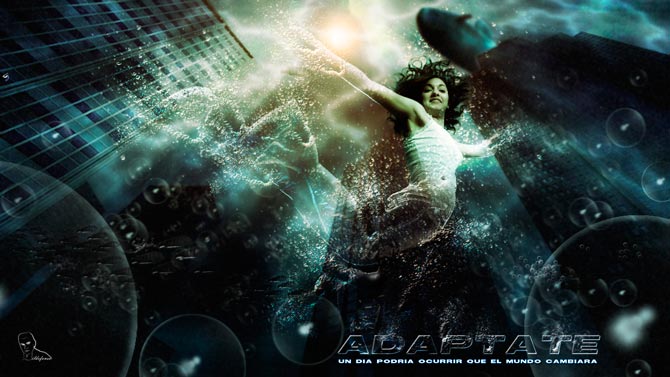
					<description><![CDATA[<p>La composición creada en enero de 2011 (ADAPTATE) es una reflexión sobre la dura situación actual por la que estamos pasando. Los tiempos cambian y el entorno turbulento hace más difícil un seguimiento de los estándares habituales. Hemos de adaptarnos a las situaciones anticipándonos y formando parte de la realidad como responsables de los cambios, [&#8230;]</p>
La entrada <a href="https://ildefonsosegura.es/convertir-una-persona-en-agua/">Tutorial Photoshop // Convertir una persona en agua</a> apareció primero en <a href="https://ildefonsosegura.es">Ildefonso Segura</a>.]]></description>
										<content:encoded><![CDATA[<div data-elementor-type="wp-post" data-elementor-id="595" class="elementor elementor-595">
						<section class="elementor-section elementor-top-section elementor-element elementor-element-7108801d elementor-section-boxed elementor-section-height-default elementor-section-height-default" data-id="7108801d" data-element_type="section" data-e-type="section">
						<div class="elementor-container elementor-column-gap-default">
					<div class="elementor-column elementor-col-100 elementor-top-column elementor-element elementor-element-34b3edc9" data-id="34b3edc9" data-element_type="column" data-e-type="column">
			<div class="elementor-widget-wrap elementor-element-populated">
						<div class="elementor-element elementor-element-5bebf176 elementor-widget__width-initial elementor-widget elementor-widget-text-editor" data-id="5bebf176" data-element_type="widget" data-e-type="widget" data-widget_type="text-editor.default">
				<div class="elementor-widget-container">
									<p>La composición creada en enero de 2011 (<span style="color: #800000;"><strong>ADAPTATE</strong></span>) es una reflexión sobre la dura situación actual por la que estamos pasando. Los tiempos cambian y el entorno turbulento hace más difícil un seguimiento de los estándares habituales. <strong>Hemos de adaptarnos</strong> a las situaciones anticipándonos y formando parte de la realidad como responsables de los cambios, actores y no como víctimas de las circunstancias, Adáptate.</p><p>Esta composición está explicada en tres tutoriales:</p><p>1.- <strong>Convertir una persona en agua</strong></p><p>2.- <strong>Crear burbujas</strong> (pinceles).</p><p>3.- <strong>Sumergir una ciudad</strong>.</p><p><a href="https://ildefonsosegura.es/convertir-una-persona-en-agua/adaptate/" rel="attachment wp-att-607"><img loading="lazy" decoding="async" class="size-full wp-image-607 aligncenter" src="https://ildefonsosegura.es/wp-content/uploads/ADAPTATE.jpg" alt="ADAPTATE" width="670" height="377" /></a></p><p>Abajo puedes ver y descargar el tutorial escrito. Disfrútalo</p><p><span style="color: #800000;"><strong>VIDEOTUTORIAL CONVERTIR LA PERSONA EN AGUA </strong></span></p><center><iframe src="https://www.youtube.com/embed/5Tu7gPUxBaY" width="640" height="420" frameborder="0" allowfullscreen="allowfullscreen"></iframe></center><center></center><pre><span style="color: #800000;"><strong>VIDEOTUTORIAL CREAR BURBUJAS </strong></span></pre><center><iframe src="https://www.youtube.com/embed/6qxumiHis2Y" width="640" height="420" frameborder="0" allowfullscreen="allowfullscreen"></iframe></center><p><span style="color: #800000;"><strong>VIDEOTUTORIAL SUMERGIR UNA CIUDAD </strong></span></p><center><iframe src="https://www.youtube.com/embed/BBhg9IfrbKM" width="640" height="420" frameborder="0" allowfullscreen="allowfullscreen"></iframe></center><p> </p><p><a style="margin: 12px auto 6px auto; font-family: Helvetica,Arial,Sans-serif; font-style: normal; font-variant: normal; font-weight: normal; font-size: 14px; line-height: normal; font-size-adjust: none; font-stretch: normal; -x-system-font: none; display: block; text-decoration: underline;" title="View Tutorial Agua Adaptate on Scribd" href="http://www.scribd.com/doc/46550681">Tutorial Agua Adaptate</a><iframe id="doc_40324" src="https://www.scribd.com/embeds/46550681/content?start_page=1&amp;view_mode=scroll" width="100%" height="600" frameborder="0" scrolling="no" data-auto-height="true" data-aspect-ratio=""></iframe></p><p style="text-align: left;"> </p>								</div>
				</div>
					</div>
		</div>
					</div>
		</section>
				<section class="elementor-section elementor-top-section elementor-element elementor-element-4589eff6 elementor-section-boxed elementor-section-height-default elementor-section-height-default" data-id="4589eff6" data-element_type="section" data-e-type="section">
						<div class="elementor-container elementor-column-gap-default">
					<div class="elementor-column elementor-col-100 elementor-top-column elementor-element elementor-element-2c7b42d" data-id="2c7b42d" data-element_type="column" data-e-type="column">
			<div class="elementor-widget-wrap elementor-element-populated">
						<div class="elementor-element elementor-element-58439ffd elementor-widget-divider--view-line elementor-widget elementor-widget-divider" data-id="58439ffd" data-element_type="widget" data-e-type="widget" data-widget_type="divider.default">
				<div class="elementor-widget-container">
							<div class="elementor-divider">
			<span class="elementor-divider-separator">
						</span>
		</div>
						</div>
				</div>
					</div>
		</div>
					</div>
		</section>
				<section class="elementor-section elementor-top-section elementor-element elementor-element-14ff095b elementor-section-full_width elementor-section-height-default elementor-section-height-default" data-id="14ff095b" data-element_type="section" data-e-type="section">
						<div class="elementor-container elementor-column-gap-default">
					<div class="elementor-column elementor-col-33 elementor-top-column elementor-element elementor-element-30a56b07" data-id="30a56b07" data-element_type="column" data-e-type="column">
			<div class="elementor-widget-wrap elementor-element-populated">
						<div class="elementor-element elementor-element-2a14cf81 elementor-align-right elementor-invisible elementor-widget elementor-widget-button" data-id="2a14cf81" data-element_type="widget" data-e-type="widget" data-settings="{&quot;_animation&quot;:&quot;shake&quot;}" data-widget_type="button.default">
				<div class="elementor-widget-container">
									<div class="elementor-button-wrapper">
					<a class="elementor-button elementor-button-link elementor-size-sm elementor-animation-grow" href="https://drive.google.com/open?id=0B_nJkCGJubucY2x4RTFnREl2cjA" target="_blank">
						<span class="elementor-button-content-wrapper">
									<span class="elementor-button-text">DESCARGA EL MATERIAL</span>
					</span>
					</a>
				</div>
								</div>
				</div>
					</div>
		</div>
				<div class="elementor-column elementor-col-33 elementor-top-column elementor-element elementor-element-a48b21c" data-id="a48b21c" data-element_type="column" data-e-type="column">
			<div class="elementor-widget-wrap elementor-element-populated">
						<div class="elementor-element elementor-element-22e3f7ac elementor-align-right elementor-invisible elementor-widget elementor-widget-button" data-id="22e3f7ac" data-element_type="widget" data-e-type="widget" data-settings="{&quot;_animation&quot;:&quot;shake&quot;}" data-widget_type="button.default">
				<div class="elementor-widget-container">
									<div class="elementor-button-wrapper">
					<a class="elementor-button elementor-button-link elementor-size-sm elementor-animation-grow" href="https://drive.google.com/open?id=0B_nJkCGJubucc0FnRkdicVdRak0">
						<span class="elementor-button-content-wrapper">
									<span class="elementor-button-text">BAJATE TUTORIAL ESCRITO</span>
					</span>
					</a>
				</div>
								</div>
				</div>
					</div>
		</div>
				<div class="elementor-column elementor-col-33 elementor-top-column elementor-element elementor-element-98bb30" data-id="98bb30" data-element_type="column" data-e-type="column">
			<div class="elementor-widget-wrap elementor-element-populated">
						<div class="elementor-element elementor-element-dea1543 elementor-widget elementor-widget-html" data-id="dea1543" data-element_type="widget" data-e-type="widget" data-settings="{&quot;_animation&quot;:&quot;none&quot;}" data-widget_type="html.default">
				<div class="elementor-widget-container">
					<form action="https://www.paypal.com/cgi-bin/webscr" method="post" target="_blank">
<input type="hidden" name="cmd" value="_donations">
<input type="hidden" name="business" value="ildefonsosegura@gmail.com">
<input type="hidden" name="lc" value="ES">
<input type="hidden" name="item_name" value="MANTENIMIENTO DE LA PAGINA DE ILDEFONSOSEGURA">
<input type="hidden" name="no_note" value="0">
<input type="hidden" name="currency_code" value="EUR">
<input type="hidden" name="bn" value="PP-DonationsBF:paypal1.jpg:NonHostedGuest">
<input type="image" src="http://ildefonsosegura.es/wp-content/uploads/paypal-updated-1.png" border="0" name="submit" alt="PayPal. La forma rápida y segura de pagar en Internet.">
<img decoding="async" alt="" border="0" src="https://www.paypalobjects.com/es_ES/i/scr/pixel.gif" width="1" height="1">
</form>				</div>
				</div>
					</div>
		</div>
					</div>
		</section>
				<section class="elementor-section elementor-top-section elementor-element elementor-element-220132b1 elementor-section-boxed elementor-section-height-default elementor-section-height-default" data-id="220132b1" data-element_type="section" data-e-type="section">
						<div class="elementor-container elementor-column-gap-default">
					<div class="elementor-column elementor-col-100 elementor-top-column elementor-element elementor-element-69202122" data-id="69202122" data-element_type="column" data-e-type="column">
			<div class="elementor-widget-wrap elementor-element-populated">
						<div class="elementor-element elementor-element-3ce834fd elementor-widget-divider--view-line elementor-widget elementor-widget-divider" data-id="3ce834fd" data-element_type="widget" data-e-type="widget" data-widget_type="divider.default">
				<div class="elementor-widget-container">
							<div class="elementor-divider">
			<span class="elementor-divider-separator">
						</span>
		</div>
						</div>
				</div>
					</div>
		</div>
					</div>
		</section>
				<section class="elementor-section elementor-top-section elementor-element elementor-element-7523bbee elementor-section-full_width elementor-section-height-default elementor-section-height-default" data-id="7523bbee" data-element_type="section" data-e-type="section">
						<div class="elementor-container elementor-column-gap-default">
					<div class="elementor-column elementor-col-100 elementor-top-column elementor-element elementor-element-54410855" data-id="54410855" data-element_type="column" data-e-type="column">
			<div class="elementor-widget-wrap elementor-element-populated">
						<div class="elementor-element elementor-element-6ad9a09 elementor-widget elementor-widget-text-editor" data-id="6ad9a09" data-element_type="widget" data-e-type="widget" data-widget_type="text-editor.default">
				<div class="elementor-widget-container">
									<div><div align="center"><center><strong style="color: #ff0000;">Suscríbete a mi canal de Youtube:</strong></center><div><div><div align="center"><p><script src="https://apis.google.com/js/platform.js"></script></p><div class="g-ytsubscribe" data-channel="ildefonsosegura" data-layout="full" data-count="default"> </div></div></div><p> </p><p style="text-align: center;">No te lo pierdas y comparte tus trabajos en mi página de facebook (<span style="color: #0000ff;"><strong><a style="color: #0000ff;" href="http://www.facebook.com/IldefonsoSeguraPage" target="_blank" rel="noopener noreferrer">IldefonsoSeguraPage</a></strong></span>)<br />Espero que te guste y compartas el vídeo. No dejes de compartir este post.</p><p style="text-align: center;">Así es como me puedes ayudar 🙂 Gracias</p></div></div></div>								</div>
				</div>
					</div>
		</div>
					</div>
		</section>
				</div>La entrada <a href="https://ildefonsosegura.es/convertir-una-persona-en-agua/">Tutorial Photoshop // Convertir una persona en agua</a> apareció primero en <a href="https://ildefonsosegura.es">Ildefonso Segura</a>.]]></content:encoded>
					
					<wfw:commentRss>https://ildefonsosegura.es/convertir-una-persona-en-agua/feed/</wfw:commentRss>
			<slash:comments>1</slash:comments>
		
		
			</item>
		<item>
		<title>Tutorial Photoshop // Wallpaper Tsunami en New York</title>
		<link>https://ildefonsosegura.es/wallpaper-tsunami-en-new-york/</link>
					<comments>https://ildefonsosegura.es/wallpaper-tsunami-en-new-york/#respond</comments>
		
		<dc:creator><![CDATA[Ildefonso Segura]]></dc:creator>
		<pubDate>Thu, 03 Jan 2013 02:56:55 +0000</pubDate>
				<category><![CDATA[Photoshop]]></category>
		<category><![CDATA[Tutorial Escrito]]></category>
		<category><![CDATA[Tutoriales]]></category>
		<category><![CDATA[Wallpaper]]></category>
		<category><![CDATA[destrucción]]></category>
		<category><![CDATA[liberty]]></category>
		<category><![CDATA[mar]]></category>
		<category><![CDATA[new york]]></category>
		<category><![CDATA[oceano]]></category>
		<category><![CDATA[tsunami]]></category>
		<guid isPermaLink="false">http://ildefonsosegura.es/?p=381</guid>

					<description><![CDATA[<p>Fotomontaje realizado en el verano del 2010 que intenta representar un Tsunami que arrasa la emblematica Estatua de la Libertad. Se utilizaron 5 stocks y multitud de técnicas y herramientas de Photoshop. Este fotomontaje se explica tanto en video tutorial como en tutorial escrito. El link está debajo del segundo video tutorial VIDEOTUTORIAL 1ª PARTE [&#8230;]</p>
La entrada <a href="https://ildefonsosegura.es/wallpaper-tsunami-en-new-york/">Tutorial Photoshop // Wallpaper Tsunami en New York</a> apareció primero en <a href="https://ildefonsosegura.es">Ildefonso Segura</a>.]]></description>
										<content:encoded><![CDATA[<p style="text-align: center;"><img loading="lazy" decoding="async" class="size-large wp-image-382 aligncenter" alt="Liberty Statue 2" src="https://ildefonsosegura.es/wp-content/uploads/Liberty-Statue-2-1024x576.jpg" width="678" height="381" srcset="https://ildefonsosegura.es/wp-content/uploads/Liberty-Statue-2-1024x576.jpg 1024w, https://ildefonsosegura.es/wp-content/uploads/Liberty-Statue-2-300x168.jpg 300w, https://ildefonsosegura.es/wp-content/uploads/Liberty-Statue-2.jpg 1575w" sizes="(max-width: 678px) 100vw, 678px" /></p>
<p>Fotomontaje realizado en el verano del 2010 que intenta representar un Tsunami que arrasa la emblematica Estatua de la Libertad. Se utilizaron 5 stocks y multitud de técnicas y herramientas de Photoshop. Este fotomontaje se explica tanto en video tutorial como en <strong>tutorial escrito</strong>. El link está debajo del segundo video tutorial</p>
<p style="text-align: left;"><span style="color: #800000;"><strong>VIDEOTUTORIAL 1ª PARTE </strong></span></p>
<p><center><iframe src="https://www.youtube.com/embed/9CLyWRButVs" height="360" width="640" allowfullscreen="" frameborder="0"></iframe></center><br />
<span style="color: #800000;"><strong>VIDEOTUTORIAL 2ª PARTE </strong></span></p>
<p><center><iframe src="https://www.youtube.com/embed/fn2_wLaAUBU" height="360" width="640" allowfullscreen="" frameborder="0"></iframe></center><br />
<center>[vc_button title=»BAJATE LOS MATERIALES» target=»blank» color=»btn-danger» size=»btn-large» href=»https://drive.google.com/open?id=0B_nJkCGJubucUWlDNnREdGdVdDA»]</center>&nbsp;</p>
<p><span style="color: #800000;"><strong>TUTORIAL ESCRITO</strong></span><br />
<center>[vc_button title=»BAJATE EL TUTO ESCRITO» target=»blank» color=»btn-danger» size=»btn-large» href=»https://drive.google.com/open?id=0B_nJkCGJubucMjhBZnRRalZFaDA»]</center>&nbsp;<br />
<a style="margin: 12px auto 6px auto; font-family: Helvetica,Arial,Sans-serif; font-style: normal; font-variant: normal; font-weight: normal; font-size: 14px; line-height: normal; font-size-adjust: none; font-stretch: normal; -x-system-font: none; display: block; text-decoration: underline;" title="View Tutorial Liberty Statue Tsunami on Scribd" href="http://www.scribd.com/doc/46050358">Tutorial Liberty Statue Tsunami</a><iframe id="doc_32790" src="https://www.scribd.com/embeds/46050358/content?start_page=1&amp;view_mode=scroll" height="600" width="100%" frameborder="0" scrolling="no" data-auto-height="true" data-aspect-ratio=""></iframe></p>
<p>&nbsp;</p>
<div align="right">
<p><script src="https://apis.google.com/js/platform.js"></script><script>// <![CDATA[
function onYtEvent(payload) { if (payload.eventType == 'subscribe') { // Add code to handle subscribe event. } else if (payload.eventType == 'unsubscribe') { // Add code to handle unsubscribe event. } if (window.console) { // for debugging only window.console.log('YT event: ', payload); } }
// ]]&gt;</script></p>
<div class="g-ytsubscribe" data-channel="ildefonsosegura" data-layout="default" data-count="default" data-onytevent="onYtEvent"></div>
</div>
</div>
<p style="text-align: left;">No dejes de compartir este post.</p>
<p style="text-align: left;">Así es como me puedes ayudar 🙂 Gracias</p>
<p>&nbsp;</p>La entrada <a href="https://ildefonsosegura.es/wallpaper-tsunami-en-new-york/">Tutorial Photoshop // Wallpaper Tsunami en New York</a> apareció primero en <a href="https://ildefonsosegura.es">Ildefonso Segura</a>.]]></content:encoded>
					
					<wfw:commentRss>https://ildefonsosegura.es/wallpaper-tsunami-en-new-york/feed/</wfw:commentRss>
			<slash:comments>0</slash:comments>
		
		
			</item>
		<item>
		<title>Tutorial Photoshop // Paisaje con texto 3D</title>
		<link>https://ildefonsosegura.es/paisaje-con-texto-3d-con-photoshop-cs6/</link>
					<comments>https://ildefonsosegura.es/paisaje-con-texto-3d-con-photoshop-cs6/#respond</comments>
		
		<dc:creator><![CDATA[Ildefonso Segura]]></dc:creator>
		<pubDate>Sat, 29 Dec 2012 00:52:09 +0000</pubDate>
				<category><![CDATA[3D]]></category>
		<category><![CDATA[Efectos]]></category>
		<category><![CDATA[Fotocomposición]]></category>
		<category><![CDATA[Photoshop]]></category>
		<category><![CDATA[Tecnicas]]></category>
		<category><![CDATA[Textos]]></category>
		<category><![CDATA[Tutoriales]]></category>
		<category><![CDATA[Wallpaper]]></category>
		<category><![CDATA[agua]]></category>
		<category><![CDATA[desenfoque]]></category>
		<category><![CDATA[extrusión]]></category>
		<category><![CDATA[gloriasanis]]></category>
		<category><![CDATA[ildefonsosegura]]></category>
		<category><![CDATA[iluminación]]></category>
		<category><![CDATA[luz]]></category>
		<category><![CDATA[mar]]></category>
		<category><![CDATA[modulo 3D]]></category>
		<category><![CDATA[oceano]]></category>
		<category><![CDATA[paisaje]]></category>
		<category><![CDATA[perspectiva]]></category>
		<category><![CDATA[tilt-shift]]></category>
		<guid isPermaLink="false">http://ildefonsosegura.es/?p=1131</guid>

					<description><![CDATA[<p>Aquí tienes este bonito wallpaper para tu fondo de escritorio o para regalar a tu familia o amigos. En el tutorial que muestro aprenderemos algunas mejoras que Adobe ha incorporado tales como: 1.- Herramienta recortar para aplanar 2.- Nuevo filtro de desenfoque tilt-shift 3.- Módulo 3D con nuevas referencias y panel de objetos (sombras, luces, [&#8230;]</p>
La entrada <a href="https://ildefonsosegura.es/paisaje-con-texto-3d-con-photoshop-cs6/">Tutorial Photoshop // Paisaje con texto 3D</a> apareció primero en <a href="https://ildefonsosegura.es">Ildefonso Segura</a>.]]></description>
										<content:encoded><![CDATA[<p>Aquí tienes este bonito wallpaper para tu fondo de escritorio o para regalar a tu familia o amigos.</p>
<p style="text-align: center;"><img loading="lazy" decoding="async" class="size-full wp-image-1126 aligncenter" alt="Wallpaper-texto-3D" src="https://ildefonsosegura.es/wp-content/uploads/Wallpaper-texto-3D.jpg" width="550" height="309" srcset="https://ildefonsosegura.es/wp-content/uploads/Wallpaper-texto-3D.jpg 550w, https://ildefonsosegura.es/wp-content/uploads/Wallpaper-texto-3D-300x168.jpg 300w" sizes="(max-width: 550px) 100vw, 550px" /></p>
<p>En el tutorial que muestro aprenderemos algunas mejoras que Adobe ha incorporado tales como:<br />
1.- Herramienta recortar para aplanar</p>
<p>2.- Nuevo filtro de desenfoque tilt-shift</p>
<p>3.- Módulo 3D con nuevas referencias y panel de objetos (sombras, luces, reflexión,..)</p>
<p>&nbsp;</p>
<p><span style="color: #800000;"><strong>VIDEOTUTORIAL </strong></span></p>
<p><center><iframe src="https://www.youtube.com/embed/Xf2AwV5GvLU" height="360" width="640" allowfullscreen="" frameborder="0"></iframe></center></p>
<p><center>[vc_button title=»BAJATE LOS MATERIALES» target=»blank» color=»btn-danger» size=»btn-large» href=»https://drive.google.com/open?id=0B_nJkCGJubucT2l6aGtJVHNueDg»]</center>&nbsp;</p>La entrada <a href="https://ildefonsosegura.es/paisaje-con-texto-3d-con-photoshop-cs6/">Tutorial Photoshop // Paisaje con texto 3D</a> apareció primero en <a href="https://ildefonsosegura.es">Ildefonso Segura</a>.]]></content:encoded>
					
					<wfw:commentRss>https://ildefonsosegura.es/paisaje-con-texto-3d-con-photoshop-cs6/feed/</wfw:commentRss>
			<slash:comments>0</slash:comments>
		
		
			</item>
		<item>
		<title>Tutorial Photoshop // Rostro dibujado en arena de playa (filtro iluminación)</title>
		<link>https://ildefonsosegura.es/rostro-dibujado-en-arena-de-playa/</link>
					<comments>https://ildefonsosegura.es/rostro-dibujado-en-arena-de-playa/#respond</comments>
		
		<dc:creator><![CDATA[Ildefonso Segura]]></dc:creator>
		<pubDate>Sat, 22 Dec 2012 10:14:34 +0000</pubDate>
				<category><![CDATA[Efectos]]></category>
		<category><![CDATA[Fotocomposición]]></category>
		<category><![CDATA[Photoshop]]></category>
		<category><![CDATA[Tecnicas]]></category>
		<category><![CDATA[Tutoriales]]></category>
		<category><![CDATA[Wallpaper]]></category>
		<category><![CDATA[arena]]></category>
		<category><![CDATA[cara]]></category>
		<category><![CDATA[dibujar]]></category>
		<category><![CDATA[efect]]></category>
		<category><![CDATA[glorias]]></category>
		<category><![CDATA[ildefonsosegura]]></category>
		<category><![CDATA[mar]]></category>
		<category><![CDATA[oceano]]></category>
		<category><![CDATA[playa]]></category>
		<category><![CDATA[rostro]]></category>
		<category><![CDATA[rotular]]></category>
		<category><![CDATA[sand]]></category>
		<category><![CDATA[tatuaje]]></category>
		<guid isPermaLink="false">http://ildefonsosegura.es/?p=757</guid>

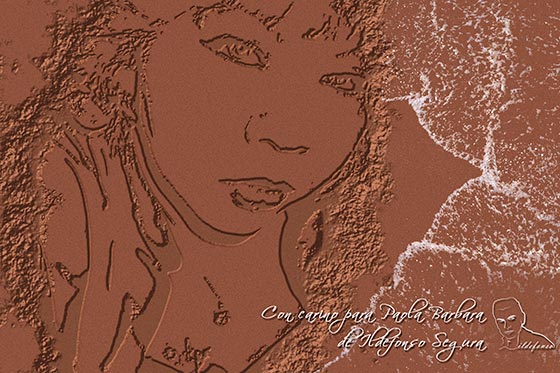
					<description><![CDATA[<p>Aprende a crear un efecto de dibujo en la arena mojada de playa ¿nunca has escrito o dibujado con algo en la arena? ahora puedes desde casa. En algún punto del tutorial verás que también se consigue el formato tatuaje del rostro con lo que tienes dos tutoriales en uno.   VIDEOTUTORIAL ROSTRO EN ARENA [&#8230;]</p>

La entrada <a href="https://ildefonsosegura.es/rostro-dibujado-en-arena-de-playa/">Tutorial Photoshop // Rostro dibujado en arena de playa (filtro iluminación)</a> apareció primero en <a href="https://ildefonsosegura.es">Ildefonso Segura</a>.]]></description>
										<content:encoded><![CDATA[<div data-elementor-type="wp-post" data-elementor-id="757" class="elementor elementor-757">
						<section class="elementor-section elementor-top-section elementor-element elementor-element-659c0aaa elementor-section-boxed elementor-section-height-default elementor-section-height-default" data-id="659c0aaa" data-element_type="section" data-e-type="section">
						<div class="elementor-container elementor-column-gap-default">
					<div class="elementor-column elementor-col-100 elementor-top-column elementor-element elementor-element-797e0a03" data-id="797e0a03" data-element_type="column" data-e-type="column">
			<div class="elementor-widget-wrap elementor-element-populated">
						<div class="elementor-element elementor-element-77125e90 elementor-widget elementor-widget-text-editor" data-id="77125e90" data-element_type="widget" data-e-type="widget" data-widget_type="text-editor.default">
				<div class="elementor-widget-container">
									<p><img loading="lazy" decoding="async" class="size-full wp-image-758 aligncenter" src="https://ildefonsosegura.es/wp-content/uploads/Rostro-en-arena-de-playa.jpg" alt="Rostro-en-arena-de-playa" width="560" height="373" srcset="https://ildefonsosegura.es/wp-content/uploads/Rostro-en-arena-de-playa.jpg 560w, https://ildefonsosegura.es/wp-content/uploads/Rostro-en-arena-de-playa-300x199.jpg 300w" sizes="(max-width: 560px) 100vw, 560px" /></p><p>Aprende a crear un efecto de dibujo en la arena mojada de playa ¿nunca has escrito o dibujado con algo en la arena? ahora puedes desde casa. <strong>En algún punto del tutorial verás que también se consigue el </strong><strong>formato tatuaje</strong> del rostro con lo que tienes dos tutoriales en uno.</p><p> </p><p><strong style="color: #800000; font-size: 14px;">VIDEOTUTORIAL ROSTRO EN ARENA</strong></p><p> </p><p> </p><center><iframe src="https://www.youtube.com/embed/d8x9QH-QtYE" width="640" height="360" frameborder="0" allowfullscreen="allowfullscreen"></iframe></center><p> </p><p> </p><p> </p><center></center><p> </p><p> </p>								</div>
				</div>
					</div>
		</div>
					</div>
		</section>
				<section class="elementor-section elementor-top-section elementor-element elementor-element-f741438 elementor-section-full_width elementor-section-height-default elementor-section-height-default" data-id="f741438" data-element_type="section" data-e-type="section">
						<div class="elementor-container elementor-column-gap-default">
					<div class="elementor-column elementor-col-50 elementor-top-column elementor-element elementor-element-98c42cf" data-id="98c42cf" data-element_type="column" data-e-type="column">
			<div class="elementor-widget-wrap elementor-element-populated">
						<div class="elementor-element elementor-element-a695b79 elementor-align-right elementor-invisible elementor-widget elementor-widget-button" data-id="a695b79" data-element_type="widget" data-e-type="widget" data-settings="{&quot;_animation&quot;:&quot;shake&quot;}" data-widget_type="button.default">
				<div class="elementor-widget-container">
									<div class="elementor-button-wrapper">
					<a class="elementor-button elementor-button-link elementor-size-sm elementor-animation-grow" href="https://drive.google.com/open?id=0B_nJkCGJubuceFlvSUJkTTZLNTQ" target="_blank">
						<span class="elementor-button-content-wrapper">
									<span class="elementor-button-text">DESCARGA EL MATERIAL</span>
					</span>
					</a>
				</div>
								</div>
				</div>
					</div>
		</div>
				<div class="elementor-column elementor-col-50 elementor-top-column elementor-element elementor-element-b23f1f1" data-id="b23f1f1" data-element_type="column" data-e-type="column">
			<div class="elementor-widget-wrap elementor-element-populated">
						<div class="elementor-element elementor-element-c4e349a elementor-widget elementor-widget-html" data-id="c4e349a" data-element_type="widget" data-e-type="widget" data-settings="{&quot;_animation&quot;:&quot;none&quot;}" data-widget_type="html.default">
				<div class="elementor-widget-container">
					<form action="https://www.paypal.com/cgi-bin/webscr" method="post" target="_blank">
<input type="hidden" name="cmd" value="_donations">
<input type="hidden" name="business" value="ildefonsosegura@gmail.com">
<input type="hidden" name="lc" value="ES">
<input type="hidden" name="item_name" value="MANTENIMIENTO DE LA PAGINA DE ILDEFONSOSEGURA">
<input type="hidden" name="no_note" value="0">
<input type="hidden" name="currency_code" value="EUR">
<input type="hidden" name="bn" value="PP-DonationsBF:paypal1.jpg:NonHostedGuest">
<input type="image" src="http://ildefonsosegura.es/wp-content/uploads/paypal-updated-1.png" border="0" name="submit" alt="PayPal. La forma rápida y segura de pagar en Internet.">
<img decoding="async" alt="" border="0" src="https://www.paypalobjects.com/es_ES/i/scr/pixel.gif" width="1" height="1">
</form>				</div>
				</div>
					</div>
		</div>
					</div>
		</section>
				<section class="elementor-section elementor-top-section elementor-element elementor-element-6e080e0f elementor-section-boxed elementor-section-height-default elementor-section-height-default" data-id="6e080e0f" data-element_type="section" data-e-type="section">
						<div class="elementor-container elementor-column-gap-default">
					<div class="elementor-column elementor-col-100 elementor-top-column elementor-element elementor-element-5cd53b6c" data-id="5cd53b6c" data-element_type="column" data-e-type="column">
			<div class="elementor-widget-wrap elementor-element-populated">
						<div class="elementor-element elementor-element-7fcef462 elementor-widget-divider--view-line elementor-widget elementor-widget-divider" data-id="7fcef462" data-element_type="widget" data-e-type="widget" data-widget_type="divider.default">
				<div class="elementor-widget-container">
							<div class="elementor-divider">
			<span class="elementor-divider-separator">
						</span>
		</div>
						</div>
				</div>
					</div>
		</div>
					</div>
		</section>
				<section class="elementor-section elementor-top-section elementor-element elementor-element-c8b8baf elementor-section-boxed elementor-section-height-default elementor-section-height-default" data-id="c8b8baf" data-element_type="section" data-e-type="section">
						<div class="elementor-container elementor-column-gap-default">
					<div class="elementor-column elementor-col-100 elementor-top-column elementor-element elementor-element-8ff1e1d" data-id="8ff1e1d" data-element_type="column" data-e-type="column">
			<div class="elementor-widget-wrap elementor-element-populated">
						<div class="elementor-element elementor-element-316074e elementor-widget elementor-widget-text-editor" data-id="316074e" data-element_type="widget" data-e-type="widget" data-widget_type="text-editor.default">
				<div class="elementor-widget-container">
									<p><span style="font-size: 14px;">Aplica técnicas similares para </span><strong style="font-size: 14px;">conseguir el mismo efecto </strong><span style="font-size: 14px;">pero en esta ocasión</span><strong style="font-size: 14px;"> con texto</strong><span style="font-size: 14px;">.</span></p><p style="text-align: left;"><span style="color: #800000;"><strong>VIDEOTUTORIAL ESCRITURA EN LA ARENA </strong></span></p><p> </p><p> </p><center><iframe src="https://www.youtube.com/embed/quk0LVdXi2Y" width="640" height="360" frameborder="0" allowfullscreen="allowfullscreen"></iframe></center><p> </p><p> </p><p> </p><center></center><p> </p><p> </p>								</div>
				</div>
					</div>
		</div>
					</div>
		</section>
				<section class="elementor-section elementor-top-section elementor-element elementor-element-4444576c elementor-section-full_width elementor-section-height-default elementor-section-height-default" data-id="4444576c" data-element_type="section" data-e-type="section">
						<div class="elementor-container elementor-column-gap-default">
					<div class="elementor-column elementor-col-50 elementor-top-column elementor-element elementor-element-b53ea04" data-id="b53ea04" data-element_type="column" data-e-type="column">
			<div class="elementor-widget-wrap elementor-element-populated">
						<div class="elementor-element elementor-element-5765b281 elementor-align-right elementor-invisible elementor-widget elementor-widget-button" data-id="5765b281" data-element_type="widget" data-e-type="widget" data-settings="{&quot;_animation&quot;:&quot;shake&quot;}" data-widget_type="button.default">
				<div class="elementor-widget-container">
									<div class="elementor-button-wrapper">
					<a class="elementor-button elementor-button-link elementor-size-sm elementor-animation-grow" href="https://drive.google.com/open?id=0B_nJkCGJubucNXRzUXVWMlVzbEk" target="_blank">
						<span class="elementor-button-content-wrapper">
									<span class="elementor-button-text">DESCARGA EL MATERIAL</span>
					</span>
					</a>
				</div>
								</div>
				</div>
					</div>
		</div>
				<div class="elementor-column elementor-col-50 elementor-top-column elementor-element elementor-element-6dd55a30" data-id="6dd55a30" data-element_type="column" data-e-type="column">
			<div class="elementor-widget-wrap elementor-element-populated">
						<div class="elementor-element elementor-element-718fd0c2 elementor-widget elementor-widget-html" data-id="718fd0c2" data-element_type="widget" data-e-type="widget" data-settings="{&quot;_animation&quot;:&quot;none&quot;}" data-widget_type="html.default">
				<div class="elementor-widget-container">
					<form action="https://www.paypal.com/cgi-bin/webscr" method="post" target="_blank">
<input type="hidden" name="cmd" value="_donations">
<input type="hidden" name="business" value="ildefonsosegura@gmail.com">
<input type="hidden" name="lc" value="ES">
<input type="hidden" name="item_name" value="MANTENIMIENTO DE LA PAGINA DE ILDEFONSOSEGURA">
<input type="hidden" name="no_note" value="0">
<input type="hidden" name="currency_code" value="EUR">
<input type="hidden" name="bn" value="PP-DonationsBF:paypal1.jpg:NonHostedGuest">
<input type="image" src="http://ildefonsosegura.es/wp-content/uploads/paypal-updated-1.png" border="0" name="submit" alt="PayPal. La forma rápida y segura de pagar en Internet.">
<img decoding="async" alt="" border="0" src="https://www.paypalobjects.com/es_ES/i/scr/pixel.gif" width="1" height="1">
</form>				</div>
				</div>
					</div>
		</div>
					</div>
		</section>
				<section class="elementor-section elementor-top-section elementor-element elementor-element-1d2176a0 elementor-section-full_width elementor-section-height-default elementor-section-height-default" data-id="1d2176a0" data-element_type="section" data-e-type="section">
						<div class="elementor-container elementor-column-gap-default">
					<div class="elementor-column elementor-col-100 elementor-top-column elementor-element elementor-element-5e9af1d7" data-id="5e9af1d7" data-element_type="column" data-e-type="column">
			<div class="elementor-widget-wrap elementor-element-populated">
						<div class="elementor-element elementor-element-1f0c7056 elementor-widget elementor-widget-text-editor" data-id="1f0c7056" data-element_type="widget" data-e-type="widget" data-widget_type="text-editor.default">
				<div class="elementor-widget-container">
									<div><div align="center"><center><strong style="color: #ff0000;">Suscríbete a mi canal de Youtube:</strong></center><div><div><div align="center"><p><script src="https://apis.google.com/js/platform.js"></script></p><div class="g-ytsubscribe" data-channel="ildefonsosegura" data-layout="full" data-count="default"> </div></div></div><p> </p><p style="text-align: center;">No te lo pierdas y comparte tus trabajos en mi página de facebook (<span style="color: #0000ff;"><strong><a style="color: #0000ff;" href="http://www.facebook.com/IldefonsoSeguraPage" target="_blank" rel="noopener noreferrer">IldefonsoSeguraPage</a></strong></span>)<br />Espero que te guste y compartas el vídeo. No dejes de compartir este post.</p><p style="text-align: center;">Así es como me puedes ayudar 🙂 Gracias</p></div></div></div>								</div>
				</div>
					</div>
		</div>
					</div>
		</section>
				</div>La entrada <a href="https://ildefonsosegura.es/rostro-dibujado-en-arena-de-playa/">Tutorial Photoshop // Rostro dibujado en arena de playa (filtro iluminación)</a> apareció primero en <a href="https://ildefonsosegura.es">Ildefonso Segura</a>.]]></content:encoded>
					
					<wfw:commentRss>https://ildefonsosegura.es/rostro-dibujado-en-arena-de-playa/feed/</wfw:commentRss>
			<slash:comments>0</slash:comments>
		
		
			</item>
		<item>
		<title>Tutorial Photoshop // Texto de arena de playa (filtro iluminación)</title>
		<link>https://ildefonsosegura.es/texto-de-arena-de-playa-filtro-iluminacion/</link>
					<comments>https://ildefonsosegura.es/texto-de-arena-de-playa-filtro-iluminacion/#respond</comments>
		
		<dc:creator><![CDATA[Ildefonso Segura]]></dc:creator>
		<pubDate>Sat, 22 Dec 2012 10:07:44 +0000</pubDate>
				<category><![CDATA[Efectos]]></category>
		<category><![CDATA[Photoshop]]></category>
		<category><![CDATA[Tecnicas]]></category>
		<category><![CDATA[Textos]]></category>
		<category><![CDATA[Tutoriales]]></category>
		<category><![CDATA[Wallpaper]]></category>
		<category><![CDATA[arena]]></category>
		<category><![CDATA[beach]]></category>
		<category><![CDATA[dibujar]]></category>
		<category><![CDATA[escribir]]></category>
		<category><![CDATA[gloriasanis]]></category>
		<category><![CDATA[ildefonsosegura]]></category>
		<category><![CDATA[mar]]></category>
		<category><![CDATA[playa]]></category>
		<category><![CDATA[rostro]]></category>
		<category><![CDATA[sand]]></category>
		<category><![CDATA[text]]></category>
		<category><![CDATA[textura]]></category>
		<guid isPermaLink="false">http://ildefonsosegura.es/?p=750</guid>

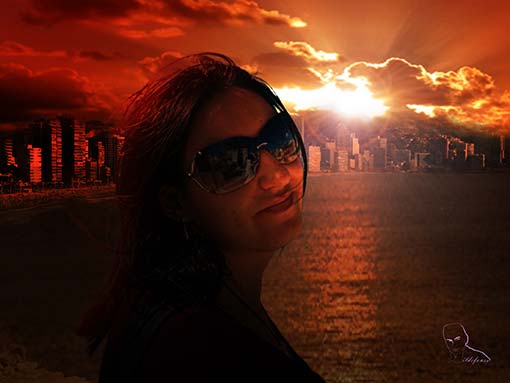
					<description><![CDATA[<p>Aprende a crear un efecto de escritura en la arena mojada de playa ¿nunca has escrito con algo en la arena? ahora puedes desde casa   VIDEOTUTORIAL         DESCARGA EL MATERIAL   Aplica técnicas similares para conseguir el mismo efecto pero en esta ocasión con un rostro. En algún punto del tutorial [&#8230;]</p>
La entrada <a href="https://ildefonsosegura.es/texto-de-arena-de-playa-filtro-iluminacion/">Tutorial Photoshop // Texto de arena de playa (filtro iluminación)</a> apareció primero en <a href="https://ildefonsosegura.es">Ildefonso Segura</a>.]]></description>
										<content:encoded><![CDATA[<div data-elementor-type="wp-post" data-elementor-id="750" class="elementor elementor-750">
						<section class="elementor-section elementor-top-section elementor-element elementor-element-71a07590 elementor-section-boxed elementor-section-height-default elementor-section-height-default" data-id="71a07590" data-element_type="section" data-e-type="section">
						<div class="elementor-container elementor-column-gap-default">
					<div class="elementor-column elementor-col-100 elementor-top-column elementor-element elementor-element-7d8d82dd" data-id="7d8d82dd" data-element_type="column" data-e-type="column">
			<div class="elementor-widget-wrap elementor-element-populated">
						<div class="elementor-element elementor-element-744d8fe8 elementor-widget elementor-widget-text-editor" data-id="744d8fe8" data-element_type="widget" data-e-type="widget" data-widget_type="text-editor.default">
				<div class="elementor-widget-container">
									<p style="text-align: center;"><img loading="lazy" decoding="async" class="size-full wp-image-751 aligncenter" src="https://ildefonsosegura.es/wp-content/uploads/texto-en-arena-playa-hd.jpg" alt="texto-en-arena-playa-hd" width="550" height="309" srcset="https://ildefonsosegura.es/wp-content/uploads/texto-en-arena-playa-hd.jpg 550w, https://ildefonsosegura.es/wp-content/uploads/texto-en-arena-playa-hd-300x168.jpg 300w" sizes="(max-width: 550px) 100vw, 550px" /></p><p>Aprende a crear un efecto de escritura en la arena mojada de playa ¿nunca has escrito con algo en la arena? ahora puedes desde casa</p><p> </p><p style="text-align: left;"><span style="color: #800000;"><strong>VIDEOTUTORIAL </strong></span></p><p> </p><p> </p><center><iframe src="https://www.youtube.com/embed/quk0LVdXi2Y" width="640" height="360" frameborder="0" allowfullscreen="allowfullscreen"></iframe></center><p> </p><p> </p>								</div>
				</div>
					</div>
		</div>
					</div>
		</section>
				<section class="elementor-section elementor-top-section elementor-element elementor-element-6c01213b elementor-section-full_width elementor-section-height-default elementor-section-height-default" data-id="6c01213b" data-element_type="section" data-e-type="section">
						<div class="elementor-container elementor-column-gap-default">
					<div class="elementor-column elementor-col-50 elementor-top-column elementor-element elementor-element-6e1ccaae" data-id="6e1ccaae" data-element_type="column" data-e-type="column">
			<div class="elementor-widget-wrap elementor-element-populated">
						<div class="elementor-element elementor-element-54ac0627 elementor-align-right elementor-invisible elementor-widget elementor-widget-button" data-id="54ac0627" data-element_type="widget" data-e-type="widget" data-settings="{&quot;_animation&quot;:&quot;shake&quot;}" data-widget_type="button.default">
				<div class="elementor-widget-container">
									<div class="elementor-button-wrapper">
					<a class="elementor-button elementor-button-link elementor-size-sm elementor-animation-grow" href="https://drive.google.com/open?id=0B_nJkCGJubucNXRzUXVWMlVzbEk" target="_blank">
						<span class="elementor-button-content-wrapper">
									<span class="elementor-button-text">DESCARGA EL MATERIAL</span>
					</span>
					</a>
				</div>
								</div>
				</div>
					</div>
		</div>
				<div class="elementor-column elementor-col-50 elementor-top-column elementor-element elementor-element-54f2224f" data-id="54f2224f" data-element_type="column" data-e-type="column">
			<div class="elementor-widget-wrap elementor-element-populated">
						<div class="elementor-element elementor-element-2f63c1b4 elementor-widget elementor-widget-html" data-id="2f63c1b4" data-element_type="widget" data-e-type="widget" data-settings="{&quot;_animation&quot;:&quot;none&quot;}" data-widget_type="html.default">
				<div class="elementor-widget-container">
					<form action="https://www.paypal.com/cgi-bin/webscr" method="post" target="_blank">
<input type="hidden" name="cmd" value="_donations">
<input type="hidden" name="business" value="ildefonsosegura@gmail.com">
<input type="hidden" name="lc" value="ES">
<input type="hidden" name="item_name" value="MANTENIMIENTO DE LA PAGINA DE ILDEFONSOSEGURA">
<input type="hidden" name="no_note" value="0">
<input type="hidden" name="currency_code" value="EUR">
<input type="hidden" name="bn" value="PP-DonationsBF:paypal1.jpg:NonHostedGuest">
<input type="image" src="http://ildefonsosegura.es/wp-content/uploads/paypal-updated-1.png" border="0" name="submit" alt="PayPal. La forma rápida y segura de pagar en Internet.">
<img decoding="async" alt="" border="0" src="https://www.paypalobjects.com/es_ES/i/scr/pixel.gif" width="1" height="1">
</form>				</div>
				</div>
					</div>
		</div>
					</div>
		</section>
				<section class="elementor-section elementor-top-section elementor-element elementor-element-dca98e5 elementor-section-boxed elementor-section-height-default elementor-section-height-default" data-id="dca98e5" data-element_type="section" data-e-type="section">
						<div class="elementor-container elementor-column-gap-default">
					<div class="elementor-column elementor-col-100 elementor-top-column elementor-element elementor-element-20b793f" data-id="20b793f" data-element_type="column" data-e-type="column">
			<div class="elementor-widget-wrap elementor-element-populated">
						<div class="elementor-element elementor-element-1255e9d elementor-widget-divider--view-line_icon elementor-view-default elementor-widget-divider--element-align-center elementor-widget elementor-widget-divider" data-id="1255e9d" data-element_type="widget" data-e-type="widget" data-widget_type="divider.default">
				<div class="elementor-widget-container">
							<div class="elementor-divider">
			<span class="elementor-divider-separator">
							<div class="elementor-icon elementor-divider__element">
					<i aria-hidden="true" class="fas fa-star"></i></div>
						</span>
		</div>
						</div>
				</div>
					</div>
		</div>
					</div>
		</section>
				<section class="elementor-section elementor-top-section elementor-element elementor-element-6bfd7a6 elementor-section-boxed elementor-section-height-default elementor-section-height-default" data-id="6bfd7a6" data-element_type="section" data-e-type="section">
						<div class="elementor-container elementor-column-gap-default">
					<div class="elementor-column elementor-col-100 elementor-top-column elementor-element elementor-element-55b1d31" data-id="55b1d31" data-element_type="column" data-e-type="column">
			<div class="elementor-widget-wrap elementor-element-populated">
						<div class="elementor-element elementor-element-7637109 elementor-widget elementor-widget-text-editor" data-id="7637109" data-element_type="widget" data-e-type="widget" data-widget_type="text-editor.default">
				<div class="elementor-widget-container">
									<p style="text-align: center;"> </p><p>Aplica técnicas similares para <strong>conseguir el mismo efecto </strong>pero en esta ocasión<strong> con un rostro</strong>. En algún punto del tutorial verás que también se consigue el <strong>formato tatuaje</strong> del rostro con lo que tienes dos tutoriales en uno.</p><p style="text-align: left;"><span style="color: #800000;"><strong>VIDEOTUTORIAL ROSTRO EN ARENA</strong></span></p><p> </p><p> </p><center><iframe src="https://www.youtube.com/embed/d8x9QH-QtYE" width="640" height="360" frameborder="0" allowfullscreen="allowfullscreen"></iframe></center><p> </p><p> </p>								</div>
				</div>
					</div>
		</div>
					</div>
		</section>
				<section class="elementor-section elementor-top-section elementor-element elementor-element-4d5bcc50 elementor-section-full_width elementor-section-height-default elementor-section-height-default" data-id="4d5bcc50" data-element_type="section" data-e-type="section">
						<div class="elementor-container elementor-column-gap-default">
					<div class="elementor-column elementor-col-50 elementor-top-column elementor-element elementor-element-3906e67e" data-id="3906e67e" data-element_type="column" data-e-type="column">
			<div class="elementor-widget-wrap elementor-element-populated">
						<div class="elementor-element elementor-element-43f509a1 elementor-align-right elementor-invisible elementor-widget elementor-widget-button" data-id="43f509a1" data-element_type="widget" data-e-type="widget" data-settings="{&quot;_animation&quot;:&quot;shake&quot;}" data-widget_type="button.default">
				<div class="elementor-widget-container">
									<div class="elementor-button-wrapper">
					<a class="elementor-button elementor-button-link elementor-size-sm elementor-animation-grow" href="https://drive.google.com/open?id=0B_nJkCGJubuceFlvSUJkTTZLNTQ" target="_blank">
						<span class="elementor-button-content-wrapper">
									<span class="elementor-button-text">DESCARGA EL MATERIAL</span>
					</span>
					</a>
				</div>
								</div>
				</div>
					</div>
		</div>
				<div class="elementor-column elementor-col-50 elementor-top-column elementor-element elementor-element-6640f449" data-id="6640f449" data-element_type="column" data-e-type="column">
			<div class="elementor-widget-wrap elementor-element-populated">
						<div class="elementor-element elementor-element-37904420 elementor-widget elementor-widget-html" data-id="37904420" data-element_type="widget" data-e-type="widget" data-settings="{&quot;_animation&quot;:&quot;none&quot;}" data-widget_type="html.default">
				<div class="elementor-widget-container">
					<form action="https://www.paypal.com/cgi-bin/webscr" method="post" target="_blank">
<input type="hidden" name="cmd" value="_donations">
<input type="hidden" name="business" value="ildefonsosegura@gmail.com">
<input type="hidden" name="lc" value="ES">
<input type="hidden" name="item_name" value="MANTENIMIENTO DE LA PAGINA DE ILDEFONSOSEGURA">
<input type="hidden" name="no_note" value="0">
<input type="hidden" name="currency_code" value="EUR">
<input type="hidden" name="bn" value="PP-DonationsBF:paypal1.jpg:NonHostedGuest">
<input type="image" src="http://ildefonsosegura.es/wp-content/uploads/paypal-updated-1.png" border="0" name="submit" alt="PayPal. La forma rápida y segura de pagar en Internet.">
<img decoding="async" alt="" border="0" src="https://www.paypalobjects.com/es_ES/i/scr/pixel.gif" width="1" height="1">
</form>				</div>
				</div>
					</div>
		</div>
					</div>
		</section>
				<section class="elementor-section elementor-top-section elementor-element elementor-element-4ac03d40 elementor-section-boxed elementor-section-height-default elementor-section-height-default" data-id="4ac03d40" data-element_type="section" data-e-type="section">
						<div class="elementor-container elementor-column-gap-default">
					<div class="elementor-column elementor-col-100 elementor-top-column elementor-element elementor-element-554b96e3" data-id="554b96e3" data-element_type="column" data-e-type="column">
			<div class="elementor-widget-wrap elementor-element-populated">
						<div class="elementor-element elementor-element-7c344a58 elementor-widget-divider--view-line elementor-widget elementor-widget-divider" data-id="7c344a58" data-element_type="widget" data-e-type="widget" data-widget_type="divider.default">
				<div class="elementor-widget-container">
							<div class="elementor-divider">
			<span class="elementor-divider-separator">
						</span>
		</div>
						</div>
				</div>
					</div>
		</div>
					</div>
		</section>
				<section class="elementor-section elementor-top-section elementor-element elementor-element-94a12a9 elementor-section-full_width elementor-section-height-default elementor-section-height-default" data-id="94a12a9" data-element_type="section" data-e-type="section">
						<div class="elementor-container elementor-column-gap-default">
					<div class="elementor-column elementor-col-100 elementor-top-column elementor-element elementor-element-4723d5af" data-id="4723d5af" data-element_type="column" data-e-type="column">
			<div class="elementor-widget-wrap elementor-element-populated">
						<div class="elementor-element elementor-element-76c92e7f elementor-widget elementor-widget-text-editor" data-id="76c92e7f" data-element_type="widget" data-e-type="widget" data-widget_type="text-editor.default">
				<div class="elementor-widget-container">
									<div><div align="center"><center><strong style="color: #ff0000;">Suscríbete a mi canal de Youtube:</strong></center><div><div><div align="center"><p><script src="https://apis.google.com/js/platform.js"></script></p><div class="g-ytsubscribe" data-channel="ildefonsosegura" data-layout="full" data-count="default"> </div></div></div><p> </p><p style="text-align: center;">No te lo pierdas y comparte tus trabajos en mi página de facebook (<span style="color: #0000ff;"><strong><a style="color: #0000ff;" href="http://www.facebook.com/IldefonsoSeguraPage" target="_blank" rel="noopener noreferrer">IldefonsoSeguraPage</a></strong></span>)<br />Espero que te guste y compartas el vídeo. No dejes de compartir este post.</p><p style="text-align: center;">Así es como me puedes ayudar 🙂 Gracias</p></div></div></div>								</div>
				</div>
					</div>
		</div>
					</div>
		</section>
				</div>La entrada <a href="https://ildefonsosegura.es/texto-de-arena-de-playa-filtro-iluminacion/">Tutorial Photoshop // Texto de arena de playa (filtro iluminación)</a> apareció primero en <a href="https://ildefonsosegura.es">Ildefonso Segura</a>.]]></content:encoded>
					
					<wfw:commentRss>https://ildefonsosegura.es/texto-de-arena-de-playa-filtro-iluminacion/feed/</wfw:commentRss>
			<slash:comments>0</slash:comments>
		
		
			</item>
		<item>
		<title>Tutorial Photoshop // Transforma una escena del día a una puesta de sol</title>
		<link>https://ildefonsosegura.es/561/</link>
					<comments>https://ildefonsosegura.es/561/#comments</comments>
		
		<dc:creator><![CDATA[Ildefonso Segura]]></dc:creator>
		<pubDate>Fri, 21 Dec 2012 17:49:29 +0000</pubDate>
				<category><![CDATA[Photoshop]]></category>
		<category><![CDATA[Tecnicas]]></category>
		<category><![CDATA[Tutoriales]]></category>
		<category><![CDATA[Wallpaper]]></category>
		<category><![CDATA[fondo]]></category>
		<category><![CDATA[mar]]></category>
		<category><![CDATA[noche]]></category>
		<category><![CDATA[sol]]></category>
		<category><![CDATA[wall]]></category>
		<guid isPermaLink="false">http://ildefonsosegura.es/?p=561</guid>

					<description><![CDATA[<p>  Esta fotocomposición está precedida por dos tutoriales previos que podéis encontrar en mi página (haced clic en los links que a continuación veréis): 1.- Extracción de la persona de un contexto para posicionarlo en el background que vemos   2.- Fusionar imágenes para conseguir el horizonte con iluminación de ocaso.     He visto [&#8230;]</p>


La entrada <a href="https://ildefonsosegura.es/561/">Tutorial Photoshop // Transforma una escena del día a una puesta de sol</a> apareció primero en <a href="https://ildefonsosegura.es">Ildefonso Segura</a>.]]></description>
										<content:encoded><![CDATA[<div data-elementor-type="wp-post" data-elementor-id="561" class="elementor elementor-561">
						<section class="elementor-section elementor-top-section elementor-element elementor-element-366cdf40 elementor-section-boxed elementor-section-height-default elementor-section-height-default" data-id="366cdf40" data-element_type="section" data-e-type="section">
						<div class="elementor-container elementor-column-gap-default">
					<div class="elementor-column elementor-col-100 elementor-top-column elementor-element elementor-element-1042eccf" data-id="1042eccf" data-element_type="column" data-e-type="column">
			<div class="elementor-widget-wrap elementor-element-populated">
						<div class="elementor-element elementor-element-79eea3bb elementor-widget elementor-widget-text-editor" data-id="79eea3bb" data-element_type="widget" data-e-type="widget" data-widget_type="text-editor.default">
				<div class="elementor-widget-container">
									<p><a href="https://ildefonsosegura.es/561/gloria-dia-a-noche/" rel="attachment wp-att-564"><img loading="lazy" decoding="async" class="size-full wp-image-564 aligncenter" src="https://ildefonsosegura.es/wp-content/uploads/Gloria-Dia-a-Noche.jpg" alt="Gloria-Dia-a-Noche" width="510" height="383" srcset="https://ildefonsosegura.es/wp-content/uploads/Gloria-Dia-a-Noche.jpg 510w, https://ildefonsosegura.es/wp-content/uploads/Gloria-Dia-a-Noche-300x225.jpg 300w" sizes="(max-width: 510px) 100vw, 510px" /></a></p><p> </p><p>Esta fotocomposición está precedida por dos tutoriales previos que podéis encontrar en mi página (haced clic en los links que a continuación veréis):</p><p><a href="https://ildefonsosegura.es/tecnicas-de-extraccion-combinadas/" rel="attachment wp-att-500"><img loading="lazy" decoding="async" class=" wp-image-500 alignleft" src="https://ildefonsosegura.es/wp-content/uploads/Gloria-Dia-a-Noche-miniatura.jpg" alt="Gloria-Dia-a-Noche-miniatura" width="102" height="57" srcset="https://ildefonsosegura.es/wp-content/uploads/Gloria-Dia-a-Noche-miniatura.jpg 1280w, https://ildefonsosegura.es/wp-content/uploads/Gloria-Dia-a-Noche-miniatura-300x168.jpg 300w, https://ildefonsosegura.es/wp-content/uploads/Gloria-Dia-a-Noche-miniatura-1024x576.jpg 1024w" sizes="(max-width: 102px) 100vw, 102px" /></a>1.- Extracción de la persona de un contexto para posicionarlo en el background que vemos</p><p> </p><p><a href="https://ildefonsosegura.es/fusionar-imagenes/"><img loading="lazy" decoding="async" class=" wp-image-559 alignleft" src="https://ildefonsosegura.es/wp-content/uploads/Gloria-Dia-a-Noche-miniatura2.jpg" alt="Gloria-Dia-a-Noche-miniatura2" width="102" height="57" srcset="https://ildefonsosegura.es/wp-content/uploads/Gloria-Dia-a-Noche-miniatura2.jpg 1280w, https://ildefonsosegura.es/wp-content/uploads/Gloria-Dia-a-Noche-miniatura2-300x168.jpg 300w, https://ildefonsosegura.es/wp-content/uploads/Gloria-Dia-a-Noche-miniatura2-1024x576.jpg 1024w" sizes="(max-width: 102px) 100vw, 102px" /></a>2.- Fusionar imágenes para conseguir el horizonte con iluminación de ocaso.</p><p> </p><p> </p><p><span style="font-size: 14px;">He visto muchos tutoriales en el que se hablaba de cambios de iluminación del día a la noche pero no incluían personas. En este tutorial podemos ver cómo iluminar a la persona de forma que haya una correlación de luces respecto del background. Esta escena es propia de unos momentos especiales en la vida de una pareja. El amor hacer ver expresiones sinceras de los ojos incluso a través de las gafas de sol.</span></p><p> </p><p><span style="color: #800000;"><strong>VIDEOTUTORIAL </strong></span></p><p> </p><center><iframe src="https://www.youtube.com/embed/l8IvntBtV8M" width="640" height="420" frameborder="0" allowfullscreen="allowfullscreen"></iframe></center><p> </p><p> </p>								</div>
				</div>
					</div>
		</div>
					</div>
		</section>
				<section class="elementor-section elementor-top-section elementor-element elementor-element-5896afcd elementor-section-full_width elementor-section-height-default elementor-section-height-default" data-id="5896afcd" data-element_type="section" data-e-type="section">
						<div class="elementor-container elementor-column-gap-default">
					<div class="elementor-column elementor-col-100 elementor-top-column elementor-element elementor-element-6cfde425" data-id="6cfde425" data-element_type="column" data-e-type="column">
			<div class="elementor-widget-wrap elementor-element-populated">
						<div class="elementor-element elementor-element-9c7ea3c elementor-widget elementor-widget-text-editor" data-id="9c7ea3c" data-element_type="widget" data-e-type="widget" data-widget_type="text-editor.default">
				<div class="elementor-widget-container">
									<div><div align="center"><center><strong style="color: #ff0000;">Suscríbete a mi canal de Youtube:</strong></center><div><div><div align="center"><p><script src="https://apis.google.com/js/platform.js"></script></p><div class="g-ytsubscribe" data-channel="ildefonsosegura" data-layout="full" data-count="default"> </div></div></div><p> </p><p style="text-align: center;">No te lo pierdas y comparte tus trabajos en mi página de facebook (<span style="color: #0000ff;"><strong><a style="color: #0000ff;" href="http://www.facebook.com/IldefonsoSeguraPage" target="_blank" rel="noopener noreferrer">IldefonsoSeguraPage</a></strong></span>)<br />Espero que te guste y compartas el vídeo. No dejes de compartir este post.</p><p style="text-align: center;">Así es como me puedes ayudar 🙂 Gracias</p></div></div></div>								</div>
				</div>
					</div>
		</div>
					</div>
		</section>
				</div>La entrada <a href="https://ildefonsosegura.es/561/">Tutorial Photoshop // Transforma una escena del día a una puesta de sol</a> apareció primero en <a href="https://ildefonsosegura.es">Ildefonso Segura</a>.]]></content:encoded>
					
					<wfw:commentRss>https://ildefonsosegura.es/561/feed/</wfw:commentRss>
			<slash:comments>1</slash:comments>
		
		
			</item>
		<item>
		<title>Fusionar imágenes con Photoshop</title>
		<link>https://ildefonsosegura.es/fusionar-imagenes/</link>
					<comments>https://ildefonsosegura.es/fusionar-imagenes/#respond</comments>
		
		<dc:creator><![CDATA[Ildefonso Segura]]></dc:creator>
		<pubDate>Fri, 21 Dec 2012 17:34:39 +0000</pubDate>
				<category><![CDATA[Efectos]]></category>
		<category><![CDATA[Photoshop]]></category>
		<category><![CDATA[Tecnicas]]></category>
		<category><![CDATA[Tutoriales]]></category>
		<category><![CDATA[Wallpaper]]></category>
		<category><![CDATA[fusion]]></category>
		<category><![CDATA[mar]]></category>
		<category><![CDATA[máscara]]></category>
		<category><![CDATA[paisaje]]></category>
		<guid isPermaLink="false">http://ildefonsosegura.es/?p=551</guid>

					<description><![CDATA[<p>En este videotutorial veremos como realizar una fusión de imágenes con máscaras de capa. Igualmente aplicaremos la técnica a un ejemplo para ver su aplicabilidad y conseguiremos una puesta de sol maravillosa. Disfrútalo &#160; VIDEOTUTORIAL &#160; Suscríbete a mi canal de Youtube:     No te lo pierdas y comparte tus trabajos en mi página [&#8230;]</p>
La entrada <a href="https://ildefonsosegura.es/fusionar-imagenes/">Fusionar imágenes con Photoshop</a> apareció primero en <a href="https://ildefonsosegura.es">Ildefonso Segura</a>.]]></description>
										<content:encoded><![CDATA[<div data-elementor-type="wp-post" data-elementor-id="551" class="elementor elementor-551">
						<section class="elementor-section elementor-top-section elementor-element elementor-element-29f9726a elementor-section-boxed elementor-section-height-default elementor-section-height-default" data-id="29f9726a" data-element_type="section" data-e-type="section">
						<div class="elementor-container elementor-column-gap-default">
					<div class="elementor-column elementor-col-100 elementor-top-column elementor-element elementor-element-6c35b7e" data-id="6c35b7e" data-element_type="column" data-e-type="column">
			<div class="elementor-widget-wrap elementor-element-populated">
						<div class="elementor-element elementor-element-69677037 elementor-widget elementor-widget-text-editor" data-id="69677037" data-element_type="widget" data-e-type="widget" data-widget_type="text-editor.default">
				<div class="elementor-widget-container">
									<p>En este videotutorial veremos como realizar una fusión de imágenes con máscaras de capa. Igualmente aplicaremos la técnica a un ejemplo para ver su aplicabilidad y conseguiremos una puesta de sol maravillosa. Disfrútalo</p>
<p>&nbsp;</p>
<p><span style="color: #800000;"><strong>VIDEOTUTORIAL </strong></span></p>
<p></p><center><iframe src="https://www.youtube.com/embed/iYzKw_pqdnA" width="640" height="360" frameborder="0" allowfullscreen="allowfullscreen"></iframe></center>&nbsp;<p></p>								</div>
				</div>
					</div>
		</div>
					</div>
		</section>
				<section class="elementor-section elementor-top-section elementor-element elementor-element-4c396dc8 elementor-section-full_width elementor-section-height-default elementor-section-height-default" data-id="4c396dc8" data-element_type="section" data-e-type="section">
						<div class="elementor-container elementor-column-gap-default">
					<div class="elementor-column elementor-col-100 elementor-top-column elementor-element elementor-element-2c974d78" data-id="2c974d78" data-element_type="column" data-e-type="column">
			<div class="elementor-widget-wrap elementor-element-populated">
						<div class="elementor-element elementor-element-6bd38b6b elementor-widget elementor-widget-text-editor" data-id="6bd38b6b" data-element_type="widget" data-e-type="widget" data-widget_type="text-editor.default">
				<div class="elementor-widget-container">
									<div><div align="center"><center><strong style="color: #ff0000;">Suscríbete a mi canal de Youtube:</strong></center><div><div><div align="center"><p><script src="https://apis.google.com/js/platform.js"></script></p><div class="g-ytsubscribe" data-channel="ildefonsosegura" data-layout="full" data-count="default"> </div></div></div><p> </p><p style="text-align: center;">No te lo pierdas y comparte tus trabajos en mi página de facebook (<span style="color: #0000ff;"><strong><a style="color: #0000ff;" href="http://www.facebook.com/IldefonsoSeguraPage" target="_blank" rel="noopener noreferrer">IldefonsoSeguraPage</a></strong></span>)<br />Espero que te guste y compartas el vídeo. No dejes de compartir este post.</p><p style="text-align: center;">Así es como me puedes ayudar 🙂 Gracias</p></div></div></div>								</div>
				</div>
					</div>
		</div>
					</div>
		</section>
				</div>La entrada <a href="https://ildefonsosegura.es/fusionar-imagenes/">Fusionar imágenes con Photoshop</a> apareció primero en <a href="https://ildefonsosegura.es">Ildefonso Segura</a>.]]></content:encoded>
					
					<wfw:commentRss>https://ildefonsosegura.es/fusionar-imagenes/feed/</wfw:commentRss>
			<slash:comments>0</slash:comments>
		
		
			</item>
	</channel>
</rss>
<br />
<b>Fatal error</b>:  Uncaught TypeError: mysqli_num_fields(): Argument #1 ($result) must be of type mysqli_result, bool given in /var/www/vhosts/ildefonsosegura.es/httpdocs/wp-includes/class-wpdb.php:3870
Stack trace:
#0 /var/www/vhosts/ildefonsosegura.es/httpdocs/wp-includes/class-wpdb.php(3870): mysqli_num_fields()
#1 /var/www/vhosts/ildefonsosegura.es/httpdocs/wp-includes/class-wpdb.php(785): wpdb-&gt;load_col_info()
#2 /var/www/vhosts/ildefonsosegura.es/httpdocs/wp-content/plugins/w3-total-cache/DbCache_WpdbInjection_QueryCaching.php(230): wpdb-&gt;__get()
#3 /var/www/vhosts/ildefonsosegura.es/httpdocs/wp-content/plugins/w3-total-cache/DbCache_WpdbNew.php(216): W3TC\DbCache_WpdbInjection_QueryCaching-&gt;query()
#4 /var/www/vhosts/ildefonsosegura.es/httpdocs/wp-content/plugins/aaa-option-optimizer/src/class-database.php(199): W3TC\DbCache_WpdbNew-&gt;query()
#5 /var/www/vhosts/ildefonsosegura.es/httpdocs/wp-content/plugins/aaa-option-optimizer/src/class-plugin.php(182): Progress_Planner\OptionOptimizer\Database::batch_insert()
#6 /var/www/vhosts/ildefonsosegura.es/httpdocs/wp-includes/class-wp-hook.php(341): Progress_Planner\OptionOptimizer\Plugin-&gt;update_tracked_options()
#7 /var/www/vhosts/ildefonsosegura.es/httpdocs/wp-includes/class-wp-hook.php(365): WP_Hook-&gt;apply_filters()
#8 /var/www/vhosts/ildefonsosegura.es/httpdocs/wp-includes/plugin.php(522): WP_Hook-&gt;do_action()
#9 /var/www/vhosts/ildefonsosegura.es/httpdocs/wp-includes/load.php(1308): do_action()
#10 [internal function]: shutdown_action_hook()
#11 {main}
  thrown in <b>/var/www/vhosts/ildefonsosegura.es/httpdocs/wp-includes/class-wpdb.php</b> on line <b>3870</b><br />