<?xml version="1.0" encoding="UTF-8"?><rss version="2.0"
	xmlns:content="http://purl.org/rss/1.0/modules/content/"
	xmlns:wfw="http://wellformedweb.org/CommentAPI/"
	xmlns:dc="http://purl.org/dc/elements/1.1/"
	xmlns:atom="http://www.w3.org/2005/Atom"
	xmlns:sy="http://purl.org/rss/1.0/modules/syndication/"
	xmlns:slash="http://purl.org/rss/1.0/modules/slash/"
	>

<channel>
	<title>mapa de desplazamiento | Ildefonso Segura</title>
	<atom:link href="https://ildefonsosegura.es/tag/mapa-de-desplazamiento/feed/" rel="self" type="application/rss+xml" />
	<link>https://ildefonsosegura.es</link>
	<description>Tutoriales de diseño y animación</description>
	<lastBuildDate>Sun, 04 Jun 2023 11:39:11 +0000</lastBuildDate>
	<language>es</language>
	<sy:updatePeriod>
	hourly	</sy:updatePeriod>
	<sy:updateFrequency>
	1	</sy:updateFrequency>
	<generator>https://wordpress.org/?v=7.1</generator>

<image>
	<url>https://ildefonsosegura.es/wp-content/uploads/cropped-Favicon-new-logo-website-32x32.png</url>
	<title>mapa de desplazamiento | Ildefonso Segura</title>
	<link>https://ildefonsosegura.es</link>
	<width>32</width>
	<height>32</height>
</image> 
	<item>
		<title>Tutorial Photoshop construye y aplica un mapa de desplazamiento by @ildefonsosegura</title>
		<link>https://ildefonsosegura.es/tutorial-photoshop-construye-y-aplica-un-mapa-de-desplazamiento-by-ildefonsosegura/</link>
					<comments>https://ildefonsosegura.es/tutorial-photoshop-construye-y-aplica-un-mapa-de-desplazamiento-by-ildefonsosegura/#respond</comments>
		
		<dc:creator><![CDATA[Ildefonso Segura]]></dc:creator>
		<pubDate>Mon, 22 May 2017 17:35:20 +0000</pubDate>
				<category><![CDATA[Efectos]]></category>
		<category><![CDATA[Photoshop]]></category>
		<category><![CDATA[Tecnicas]]></category>
		<category><![CDATA[Tutoriales]]></category>
		<category><![CDATA[Wallpaper]]></category>
		<category><![CDATA[adobe]]></category>
		<category><![CDATA[camisetas]]></category>
		<category><![CDATA[cc2014]]></category>
		<category><![CDATA[cc2015]]></category>
		<category><![CDATA[cc2016]]></category>
		<category><![CDATA[cc2017]]></category>
		<category><![CDATA[contrasted displacement map]]></category>
		<category><![CDATA[desplazamiento]]></category>
		<category><![CDATA[displacement map]]></category>
		<category><![CDATA[efecto desplazamiento]]></category>
		<category><![CDATA[ildefonsosegura]]></category>
		<category><![CDATA[imprimación]]></category>
		<category><![CDATA[integración]]></category>
		<category><![CDATA[mapa]]></category>
		<category><![CDATA[mapa de desplazamiento]]></category>
		<category><![CDATA[photoshop]]></category>
		<category><![CDATA[relieve en camisetas]]></category>
		<category><![CDATA[t-shirt]]></category>
		<category><![CDATA[tuto]]></category>
		<category><![CDATA[tutorial]]></category>
		<category><![CDATA[video]]></category>
		<category><![CDATA[VIDEOTUTORIAL]]></category>
		<category><![CDATA[youtube]]></category>
		<guid isPermaLink="false">http://ildefonsosegura.es/?p=5973</guid>

					<description><![CDATA[<p>En este tutorial de photoshop te muestro como elaborar un mapa de desplazamiento para conseguir integrar imágenes simulando el relieve de una camiseta. Habitualmente encontramos imágenes que necesitan poco trabajo para crear un mapa de desplazamiento que nos ofrezca resultados aceptables en la aplicación del filtro DESPLAZAR de photoshop. En mi tutorial creamos desde cero [&#8230;]</p>
La entrada <a href="https://ildefonsosegura.es/tutorial-photoshop-construye-y-aplica-un-mapa-de-desplazamiento-by-ildefonsosegura/">Tutorial Photoshop construye y aplica un mapa de desplazamiento by @ildefonsosegura</a> apareció primero en <a href="https://ildefonsosegura.es">Ildefonso Segura</a>.]]></description>
										<content:encoded><![CDATA[<div data-elementor-type="wp-post" data-elementor-id="5973" class="elementor elementor-5973">
						<section class="elementor-section elementor-top-section elementor-element elementor-element-2dbce22b elementor-section-boxed elementor-section-height-default elementor-section-height-default" data-id="2dbce22b" data-element_type="section" data-e-type="section">
						<div class="elementor-container elementor-column-gap-default">
					<div class="elementor-column elementor-col-100 elementor-top-column elementor-element elementor-element-700fcd11" data-id="700fcd11" data-element_type="column" data-e-type="column">
			<div class="elementor-widget-wrap elementor-element-populated">
						<div class="elementor-element elementor-element-2c64bc9a elementor-widget elementor-widget-text-editor" data-id="2c64bc9a" data-element_type="widget" data-e-type="widget" data-widget_type="text-editor.default">
				<div class="elementor-widget-container">
									En este tutorial de photoshop te muestro como elaborar un mapa de desplazamiento para conseguir integrar imágenes simulando el relieve de una camiseta.

Habitualmente encontramos imágenes que necesitan poco trabajo para crear un mapa de desplazamiento que nos ofrezca resultados aceptables en la aplicación del filtro DESPLAZAR de photoshop. En mi tutorial creamos desde cero un mapa de desplazamiento pero lo curioso del tutorial es que el mapa se crea usando una imagen con elementos muy oscuros que hay que aclarar y contrastar para conseguir un resultado aceptable cuando lo usemos.

Mira lo que conseguiremos:

<img fetchpriority="high" decoding="async" class="aligncenter size-full wp-image-5974" src="https://ildefonsosegura.es/wp-content/uploads/desplaza-1.jpg" alt="" width="1500" height="500" srcset="https://ildefonsosegura.es/wp-content/uploads/desplaza-1.jpg 1500w, https://ildefonsosegura.es/wp-content/uploads/desplaza-1-300x100.jpg 300w, https://ildefonsosegura.es/wp-content/uploads/desplaza-1-768x256.jpg 768w, https://ildefonsosegura.es/wp-content/uploads/desplaza-1-1024x341.jpg 1024w" sizes="(max-width: 1500px) 100vw, 1500px" />

Seguro que la técnica te sirve para otros trabajos.

&nbsp;

<strong>TUTORIAL MAPA DESPLAZAMIENTO</strong>
<p style="text-align: left;"><iframe src="https://www.youtube.com/embed/TUejjkX4R9s?rel=0" width="640" height="420" frameborder="0" allowfullscreen="allowfullscreen"></iframe></p>

<center></center>&nbsp;
<div></div>
<p style="text-align: left;"></p>
&nbsp;								</div>
				</div>
					</div>
		</div>
					</div>
		</section>
				<section class="elementor-section elementor-top-section elementor-element elementor-element-37b031b7 elementor-section-full_width elementor-section-height-default elementor-section-height-default" data-id="37b031b7" data-element_type="section" data-e-type="section">
						<div class="elementor-container elementor-column-gap-default">
					<div class="elementor-column elementor-col-100 elementor-top-column elementor-element elementor-element-73ce8cbe" data-id="73ce8cbe" data-element_type="column" data-e-type="column">
			<div class="elementor-widget-wrap elementor-element-populated">
						<div class="elementor-element elementor-element-62efa272 elementor-widget elementor-widget-text-editor" data-id="62efa272" data-element_type="widget" data-e-type="widget" data-widget_type="text-editor.default">
				<div class="elementor-widget-container">
									<div><div align="center"><center><strong style="color: #ff0000;">Suscríbete a mi canal de Youtube:</strong></center><div><div><div align="center"><p><script src="https://apis.google.com/js/platform.js"></script></p><div class="g-ytsubscribe" data-channel="ildefonsosegura" data-layout="full" data-count="default"> </div></div></div><p> </p><p style="text-align: center;">No te lo pierdas y comparte tus trabajos en mi página de facebook (<span style="color: #0000ff;"><strong><a style="color: #0000ff;" href="http://www.facebook.com/IldefonsoSeguraPage" target="_blank" rel="noopener noreferrer">IldefonsoSeguraPage</a></strong></span>)<br />Espero que te guste y compartas el vídeo. No dejes de compartir este post.</p><p style="text-align: center;">Así es como me puedes ayudar 🙂 Gracias</p></div></div></div>								</div>
				</div>
					</div>
		</div>
					</div>
		</section>
				</div>La entrada <a href="https://ildefonsosegura.es/tutorial-photoshop-construye-y-aplica-un-mapa-de-desplazamiento-by-ildefonsosegura/">Tutorial Photoshop construye y aplica un mapa de desplazamiento by @ildefonsosegura</a> apareció primero en <a href="https://ildefonsosegura.es">Ildefonso Segura</a>.]]></content:encoded>
					
					<wfw:commentRss>https://ildefonsosegura.es/tutorial-photoshop-construye-y-aplica-un-mapa-de-desplazamiento-by-ildefonsosegura/feed/</wfw:commentRss>
			<slash:comments>0</slash:comments>
		
		
			</item>
		<item>
		<title>Tutorial #C4D y #AfterEffects Felicitación Navidad de #conectatutoriales by @ildefonsosegura</title>
		<link>https://ildefonsosegura.es/tutorial-c4d-y-aftereffects-felicitacion-navidad-de-conectatutoriales-by-ildefonsosegura-2/</link>
					<comments>https://ildefonsosegura.es/tutorial-c4d-y-aftereffects-felicitacion-navidad-de-conectatutoriales-by-ildefonsosegura-2/#respond</comments>
		
		<dc:creator><![CDATA[Ildefonso Segura]]></dc:creator>
		<pubDate>Thu, 26 Dec 2013 22:46:18 +0000</pubDate>
				<category><![CDATA[After Effects]]></category>
		<category><![CDATA[Cinema4D]]></category>
		<category><![CDATA[Conectatutoriales]]></category>
		<category><![CDATA[Efectos]]></category>
		<category><![CDATA[Fotocomposición]]></category>
		<category><![CDATA[Intro]]></category>
		<category><![CDATA[Tecnicas]]></category>
		<category><![CDATA[Tutoriales]]></category>
		<category><![CDATA[Wallpaper]]></category>
		<category><![CDATA[adobe]]></category>
		<category><![CDATA[after]]></category>
		<category><![CDATA[bola]]></category>
		<category><![CDATA[bola cristal]]></category>
		<category><![CDATA[bola nevada]]></category>
		<category><![CDATA[c4d]]></category>
		<category><![CDATA[CC]]></category>
		<category><![CDATA[cinema4D]]></category>
		<category><![CDATA[cristal]]></category>
		<category><![CDATA[cs4]]></category>
		<category><![CDATA[cs5]]></category>
		<category><![CDATA[cs6]]></category>
		<category><![CDATA[desplazamiento]]></category>
		<category><![CDATA[desplazar]]></category>
		<category><![CDATA[efecto]]></category>
		<category><![CDATA[effects]]></category>
		<category><![CDATA[glass ball]]></category>
		<category><![CDATA[mapa de desplazamiento]]></category>
		<category><![CDATA[maxon]]></category>
		<category><![CDATA[montaña]]></category>
		<category><![CDATA[r12]]></category>
		<category><![CDATA[r13]]></category>
		<category><![CDATA[r14]]></category>
		<category><![CDATA[r15]]></category>
		<category><![CDATA[snow]]></category>
		<category><![CDATA[textura]]></category>
		<category><![CDATA[texturizar]]></category>
		<category><![CDATA[tutorial]]></category>
		<guid isPermaLink="false">http://ildefonsosegura.es/?p=3314</guid>

					<description><![CDATA[<p>En la sección de intros de esta web puedes encontrar la felicitación navideña que he realizado para el canal de @Adobeusers #conectatutoriales. Ir a sección de Intros &#62;&#62; La felicitación consiste en crear una escena nevada en una montaña que se situará en el interior de una bola de cristal. La escena transcurre desde el [&#8230;]</p>
La entrada <a href="https://ildefonsosegura.es/tutorial-c4d-y-aftereffects-felicitacion-navidad-de-conectatutoriales-by-ildefonsosegura-2/">Tutorial #C4D y #AfterEffects Felicitación Navidad de #conectatutoriales by @ildefonsosegura</a> apareció primero en <a href="https://ildefonsosegura.es">Ildefonso Segura</a>.]]></description>
										<content:encoded><![CDATA[<div data-elementor-type="wp-post" data-elementor-id="3314" class="elementor elementor-3314">
						<section class="elementor-section elementor-top-section elementor-element elementor-element-157f3a07 elementor-section-boxed elementor-section-height-default elementor-section-height-default" data-id="157f3a07" data-element_type="section" data-e-type="section">
						<div class="elementor-container elementor-column-gap-default">
					<div class="elementor-column elementor-col-100 elementor-top-column elementor-element elementor-element-7863e8d5" data-id="7863e8d5" data-element_type="column" data-e-type="column">
			<div class="elementor-widget-wrap elementor-element-populated">
						<div class="elementor-element elementor-element-15cd9a81 elementor-widget elementor-widget-text-editor" data-id="15cd9a81" data-element_type="widget" data-e-type="widget" data-widget_type="text-editor.default">
				<div class="elementor-widget-container">
									<p>En la sección de intros de esta web puedes encontrar la felicitación navideña que he realizado para el canal de @Adobeusers #<a title="Web de conectatutoriales" href="http://www.tutorialesadobe.conectatutoriales.com/" target="_blank" rel="noopener">conectatutoriales</a>. Ir a <a title="Intros IldefonsoSegura" href="https://ildefonsosegura.es/galeria-de-intros/" target="_blank" rel="noopener"><strong>sección de Intros &gt;&gt;</strong></a></p>
<p></p>
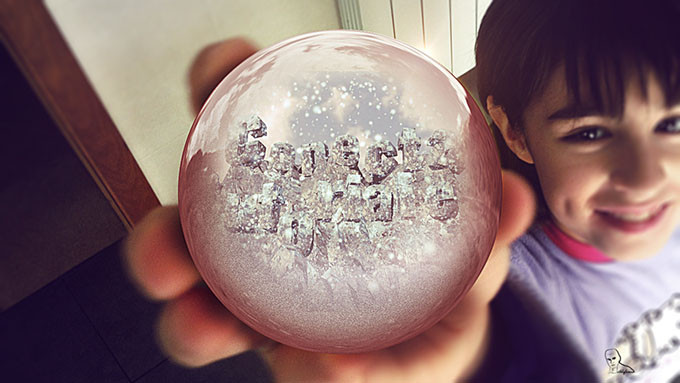
<p><span style="line-height: 1.5em;">La felicitación consiste en crear una escena nevada en una montaña que se situará en el interior de una bola de cristal. La escena transcurre desde el interior de la bola al exterior creando un efecto singular de traspaso del cristal. La escena pasa de un paisaje frío y nevado a una escena tierna con un bebé que disfruta jugando con la bola de cristal nevada. En una segunda versión, la bola está siendo sostenida por una niña que enseña el juguete a la cámara</span></p>
<p style="text-align: center;"><a title="Felicitación navidad" href="http://youtu.be/Sk1QWxUD7IM" target="_blank" rel="attachment noopener wp-att-3315"><img decoding="async" class="size-full wp-image-3315 aligncenter" src="https://ildefonsosegura.es/wp-content/uploads/sandra-con-bola.jpg" alt="sandra con bola" width="680" height="383" srcset="https://ildefonsosegura.es/wp-content/uploads/sandra-con-bola.jpg 680w, https://ildefonsosegura.es/wp-content/uploads/sandra-con-bola-300x168.jpg 300w" sizes="(max-width: 680px) 100vw, 680px" /></a></p>
<p>He realizado dos tutoriales para explicar cómo se realiza la felicitación</p>
<p><span style="color: #800000;"><strong>TUTORIAL 1.- CINEMA4D</strong></span></p>
<p>En este tutorial veremos:</p>
<ol>
<li>Crear una montaña</li>
<li>Texturizar la montaña creando materiales a través de capas para emular la roca mezclada con la nieve</li>
<li>Incorporar un cielo</li>
<li>Movimiento de cámara controlado por un nulo</li>
<li>Exportar canales alfa a través de multipases para ser usados en After Effects en el segundo tutorial</li>
</ol>
<p><strong style="color: #800000; line-height: 1.5em;">&nbsp; &nbsp; &nbsp;TUTORIAL </strong><span style="color: #800000; line-height: 1.5em;">&nbsp;PUBLICADO EN <a href="http://www.youtube.com/user/conectatutoriales" target="_blank" rel="noopener">CONECTATUTORIALES.COM</a></span></p>
<p>Te invito a visitar la web de&nbsp;<a href="http://www.tutorialesadobe.conectatutoriales.com/" target="_blank" rel="noopener">conectatutoriales&nbsp;</a>para ver muchos más tutoriales, consejos, recursos,&#8230;.</p>
<p>Conectatutoriales es un usuario oficial de adobe</p>
<p></p><center><iframe src="https://www.youtube.com/embed/3jbeHnzsYOc" width="640" height="420" frameborder="0" allowfullscreen="allowfullscreen"></iframe></center><p></p>
<p style="text-align: justify;"><span style="color: #800000;"><strong>TUTORIAL 2.- AFTER EFFECTS</strong></span></p>
<p style="text-align: justify;">En este tutorial veremos:</p>
<ol>
<li style="text-align: justify;">Colorear escena con efectos de curvas</li>
<li style="text-align: justify;">Crear nieve</li>
<li style="text-align: justify;">Introducir elementos (footage) en la escena</li>
<li style="text-align: justify;">Efecto de cámara para emular movimiento a través del cristal de la bola nevada</li>
<li style="text-align: justify;">Mapas de Desplazamiento para conseguir efecto de traspaso de cristal.</li>
</ol>
<p><strong style="color: #800000; line-height: 1.5em;">&nbsp; &nbsp; &nbsp;TUTORIAL&nbsp;</strong></p>
<p></p><center><iframe src="https://www.youtube.com/embed/znybfZn8Tjs" width="640" height="420" frameborder="0" allowfullscreen="allowfullscreen"></iframe></center><p></p>								</div>
				</div>
					</div>
		</div>
					</div>
		</section>
				<section class="elementor-section elementor-top-section elementor-element elementor-element-7039eff2 elementor-section-full_width elementor-section-height-default elementor-section-height-default" data-id="7039eff2" data-element_type="section" data-e-type="section">
						<div class="elementor-container elementor-column-gap-default">
					<div class="elementor-column elementor-col-100 elementor-top-column elementor-element elementor-element-2aeefa6d" data-id="2aeefa6d" data-element_type="column" data-e-type="column">
			<div class="elementor-widget-wrap elementor-element-populated">
						<div class="elementor-element elementor-element-4162e8d elementor-widget elementor-widget-text-editor" data-id="4162e8d" data-element_type="widget" data-e-type="widget" data-widget_type="text-editor.default">
				<div class="elementor-widget-container">
									<div><div align="center"><center><strong style="color: #ff0000;">Suscríbete a mi canal de Youtube:</strong></center><div><div><div align="center"><p><script src="https://apis.google.com/js/platform.js"></script></p><div class="g-ytsubscribe" data-channel="ildefonsosegura" data-layout="full" data-count="default"> </div></div></div><p> </p><p style="text-align: center;">No te lo pierdas y comparte tus trabajos en mi página de facebook (<span style="color: #0000ff;"><strong><a style="color: #0000ff;" href="http://www.facebook.com/IldefonsoSeguraPage" target="_blank" rel="noopener noreferrer">IldefonsoSeguraPage</a></strong></span>)<br />Espero que te guste y compartas el vídeo. No dejes de compartir este post.</p><p style="text-align: center;">Así es como me puedes ayudar 🙂 Gracias</p></div></div></div>								</div>
				</div>
					</div>
		</div>
					</div>
		</section>
				</div>La entrada <a href="https://ildefonsosegura.es/tutorial-c4d-y-aftereffects-felicitacion-navidad-de-conectatutoriales-by-ildefonsosegura-2/">Tutorial #C4D y #AfterEffects Felicitación Navidad de #conectatutoriales by @ildefonsosegura</a> apareció primero en <a href="https://ildefonsosegura.es">Ildefonso Segura</a>.]]></content:encoded>
					
					<wfw:commentRss>https://ildefonsosegura.es/tutorial-c4d-y-aftereffects-felicitacion-navidad-de-conectatutoriales-by-ildefonsosegura-2/feed/</wfw:commentRss>
			<slash:comments>0</slash:comments>
		
		
			</item>
	</channel>
</rss>
<br />
<b>Fatal error</b>:  Uncaught TypeError: mysqli_num_fields(): Argument #1 ($result) must be of type mysqli_result, bool given in /var/www/vhosts/ildefonsosegura.es/httpdocs/wp-includes/class-wpdb.php:3941
Stack trace:
#0 /var/www/vhosts/ildefonsosegura.es/httpdocs/wp-includes/class-wpdb.php(3941): mysqli_num_fields()
#1 /var/www/vhosts/ildefonsosegura.es/httpdocs/wp-includes/class-wpdb.php(785): wpdb-&gt;load_col_info()
#2 /var/www/vhosts/ildefonsosegura.es/httpdocs/wp-content/plugins/w3-total-cache/DbCache_WpdbInjection_QueryCaching.php(230): wpdb-&gt;__get()
#3 /var/www/vhosts/ildefonsosegura.es/httpdocs/wp-content/plugins/w3-total-cache/DbCache_WpdbNew.php(220): W3TC\DbCache_WpdbInjection_QueryCaching-&gt;query()
#4 /var/www/vhosts/ildefonsosegura.es/httpdocs/wp-content/plugins/aaa-option-optimizer/src/class-database.php(199): W3TC\DbCache_WpdbNew-&gt;query()
#5 /var/www/vhosts/ildefonsosegura.es/httpdocs/wp-content/plugins/aaa-option-optimizer/src/class-plugin.php(182): Progress_Planner\OptionOptimizer\Database::batch_insert()
#6 /var/www/vhosts/ildefonsosegura.es/httpdocs/wp-includes/class-wp-hook.php(353): Progress_Planner\OptionOptimizer\Plugin-&gt;update_tracked_options()
#7 /var/www/vhosts/ildefonsosegura.es/httpdocs/wp-includes/class-wp-hook.php(377): WP_Hook-&gt;apply_filters()
#8 /var/www/vhosts/ildefonsosegura.es/httpdocs/wp-includes/plugin.php(523): WP_Hook-&gt;do_action()
#9 /var/www/vhosts/ildefonsosegura.es/httpdocs/wp-includes/load.php(1308): do_action()
#10 [internal function]: shutdown_action_hook()
#11 {main}
  thrown in <b>/var/www/vhosts/ildefonsosegura.es/httpdocs/wp-includes/class-wpdb.php</b> on line <b>3941</b><br />