<?xml version="1.0" encoding="UTF-8"?><rss version="2.0"
	xmlns:content="http://purl.org/rss/1.0/modules/content/"
	xmlns:wfw="http://wellformedweb.org/CommentAPI/"
	xmlns:dc="http://purl.org/dc/elements/1.1/"
	xmlns:atom="http://www.w3.org/2005/Atom"
	xmlns:sy="http://purl.org/rss/1.0/modules/syndication/"
	xmlns:slash="http://purl.org/rss/1.0/modules/slash/"
	>

<channel>
	<title>león | Ildefonso Segura</title>
	<atom:link href="https://ildefonsosegura.es/tag/leon/feed/" rel="self" type="application/rss+xml" />
	<link>https://ildefonsosegura.es</link>
	<description>Tutoriales de diseño y animación</description>
	<lastBuildDate>Fri, 07 Oct 2022 18:18:25 +0000</lastBuildDate>
	<language>es</language>
	<sy:updatePeriod>
	hourly	</sy:updatePeriod>
	<sy:updateFrequency>
	1	</sy:updateFrequency>
	<generator>https://wordpress.org/?v=6.9.4</generator>

<image>
	<url>https://ildefonsosegura.es/wp-content/uploads/cropped-Favicon-new-logo-website-32x32.png</url>
	<title>león | Ildefonso Segura</title>
	<link>https://ildefonsosegura.es</link>
	<width>32</width>
	<height>32</height>
</image> 
	<item>
		<title>Tutorial Photoshop Fotomanipulación hombre con cara de león</title>
		<link>https://ildefonsosegura.es/tutorial-photoshop-fotomanipulacion-hombre-con-cara-de-leon/</link>
					<comments>https://ildefonsosegura.es/tutorial-photoshop-fotomanipulacion-hombre-con-cara-de-leon/#respond</comments>
		
		<dc:creator><![CDATA[Ildefonso Segura]]></dc:creator>
		<pubDate>Mon, 05 Nov 2018 16:15:24 +0000</pubDate>
				<category><![CDATA[Efectos]]></category>
		<category><![CDATA[Fotocomposición]]></category>
		<category><![CDATA[Photoshop]]></category>
		<category><![CDATA[Tecnicas]]></category>
		<category><![CDATA[Tutoriales]]></category>
		<category><![CDATA[Video]]></category>
		<category><![CDATA[Wallpaper]]></category>
		<category><![CDATA[adobe]]></category>
		<category><![CDATA[CC]]></category>
		<category><![CDATA[cc2015]]></category>
		<category><![CDATA[cc2016]]></category>
		<category><![CDATA[cc2017]]></category>
		<category><![CDATA[cc2018]]></category>
		<category><![CDATA[cc2019]]></category>
		<category><![CDATA[composición]]></category>
		<category><![CDATA[cs5]]></category>
		<category><![CDATA[cs6]]></category>
		<category><![CDATA[efectos]]></category>
		<category><![CDATA[effect]]></category>
		<category><![CDATA[face effect]]></category>
		<category><![CDATA[fake]]></category>
		<category><![CDATA[fotomanipulación]]></category>
		<category><![CDATA[humano]]></category>
		<category><![CDATA[ilusión]]></category>
		<category><![CDATA[integración]]></category>
		<category><![CDATA[integration]]></category>
		<category><![CDATA[león]]></category>
		<category><![CDATA[poster]]></category>
		<category><![CDATA[tuto]]></category>
		<category><![CDATA[VIDEOTUTORIAL]]></category>
		<category><![CDATA[wallpaper]]></category>
		<category><![CDATA[youtube]]></category>
		<guid isPermaLink="false">http://ildefonsosegura.es/?p=6262</guid>

					<description><![CDATA[<p>Navegando por instagram descubrí la fotomanipulación que ves aquí. El autor se puso en contacto. Puedes visitar las páginas de Rhys Drakeford &#8211; Bennett . Quise desesperadamente aprender cómo realizar una manipulación así. Busqué tutoriales pero no encontré los adecuados para obtener un resultado aceptable desde mi punto de vista (con todos mis respetos a [&#8230;]</p>
La entrada <a href="https://ildefonsosegura.es/tutorial-photoshop-fotomanipulacion-hombre-con-cara-de-leon/">Tutorial Photoshop Fotomanipulación hombre con cara de león</a> apareció primero en <a href="https://ildefonsosegura.es">Ildefonso Segura</a>.]]></description>
										<content:encoded><![CDATA[<div data-elementor-type="wp-post" data-elementor-id="6262" class="elementor elementor-6262">
						<section class="elementor-section elementor-top-section elementor-element elementor-element-7f905ce9 elementor-section-boxed elementor-section-height-default elementor-section-height-default" data-id="7f905ce9" data-element_type="section" data-e-type="section">
						<div class="elementor-container elementor-column-gap-default">
					<div class="elementor-column elementor-col-100 elementor-top-column elementor-element elementor-element-50349214" data-id="50349214" data-element_type="column" data-e-type="column">
			<div class="elementor-widget-wrap elementor-element-populated">
						<div class="elementor-element elementor-element-6c10184e elementor-widget elementor-widget-text-editor" data-id="6c10184e" data-element_type="widget" data-e-type="widget" data-widget_type="text-editor.default">
				<div class="elementor-widget-container">
									<p><img fetchpriority="high" decoding="async" class="wp-image-6263 size-medium alignleft" src="http://ildefonsosegura.es/wp-content/uploads/foto-inspiración-tutorial-259x300.jpg" alt="" width="259" height="300" srcset="https://ildefonsosegura.es/wp-content/uploads/foto-inspiración-tutorial-259x300.jpg 259w, https://ildefonsosegura.es/wp-content/uploads/foto-inspiración-tutorial.jpg 500w" sizes="(max-width: 259px) 100vw, 259px" /></p><p style="text-align: justify;">Navegando por instagram descubrí la fotomanipulación que ves aquí. El autor se puso en contacto. Puedes visitar las páginas de <span style="color: #800000;"><strong><a style="color: #800000;" href="https://www.instagram.com/rhysdb03/" target="_blank" rel="noopener">Rhys Drakeford &#8211; Bennett</a> .</strong></span></p><p style="text-align: justify;">Quise desesperadamente aprender cómo realizar una manipulación así. Busqué tutoriales pero no encontré los adecuados para obtener un resultado aceptable desde mi punto de vista (con todos mis respetos a todos los que han editado y publicado tutoriales al respecto).</p><p style="text-align: left;"> </p>								</div>
				</div>
					</div>
		</div>
					</div>
		</section>
				<section class="elementor-section elementor-top-section elementor-element elementor-element-3b12e7b elementor-section-boxed elementor-section-height-default elementor-section-height-default" data-id="3b12e7b" data-element_type="section" data-e-type="section">
						<div class="elementor-container elementor-column-gap-default">
					<div class="elementor-column elementor-col-100 elementor-top-column elementor-element elementor-element-dc5ed23" data-id="dc5ed23" data-element_type="column" data-e-type="column">
			<div class="elementor-widget-wrap elementor-element-populated">
						<div class="elementor-element elementor-element-7b24633 elementor-widget elementor-widget-text-editor" data-id="7b24633" data-element_type="widget" data-e-type="widget" data-widget_type="text-editor.default">
				<div class="elementor-widget-container">
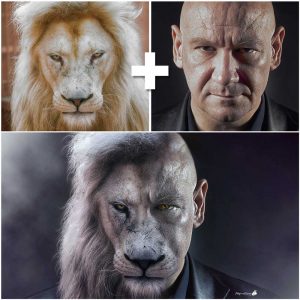
									<p style="text-align: justify;">Siendo así, decidí embarcarme en realizar un tutorial con mis propias manos aplicando cantidad de técnicas de photoshop para conseguir un resultado aceptable. Creo que lo conseguí y te puedo mostrar el antes y el después a continuación:</p><p><img decoding="async" class="aligncenter wp-image-6265" src="http://ildefonsosegura.es/wp-content/uploads/Leon_Man-5to-intento-making-of-instagram-300x300.jpg" alt="" width="600" height="600" srcset="https://ildefonsosegura.es/wp-content/uploads/Leon_Man-5to-intento-making-of-instagram-300x300.jpg 300w, https://ildefonsosegura.es/wp-content/uploads/Leon_Man-5to-intento-making-of-instagram-150x150.jpg 150w, https://ildefonsosegura.es/wp-content/uploads/Leon_Man-5to-intento-making-of-instagram-768x768.jpg 768w, https://ildefonsosegura.es/wp-content/uploads/Leon_Man-5to-intento-making-of-instagram.jpg 1000w" sizes="(max-width: 600px) 100vw, 600px" /></p><p style="text-align: left;"> </p>								</div>
				</div>
					</div>
		</div>
					</div>
		</section>
				<section class="elementor-section elementor-top-section elementor-element elementor-element-b485ce1 elementor-section-boxed elementor-section-height-default elementor-section-height-default" data-id="b485ce1" data-element_type="section" data-e-type="section">
						<div class="elementor-container elementor-column-gap-default">
					<div class="elementor-column elementor-col-100 elementor-top-column elementor-element elementor-element-1a2df1a" data-id="1a2df1a" data-element_type="column" data-e-type="column">
			<div class="elementor-widget-wrap elementor-element-populated">
						<div class="elementor-element elementor-element-fc869ca elementor-widget elementor-widget-text-editor" data-id="fc869ca" data-element_type="widget" data-e-type="widget" data-widget_type="text-editor.default">
				<div class="elementor-widget-container">
									<p style="text-align: justify;">Comprueba tu mismo/a cómo he pasado de una imagen de un humano a una manipulación que consigue crear una ilusión donde brillos y sombras, colores y texturas se combinan para conseguir el resultado que me gusta. Quizás tú tengas otras preferencias y te invito a que adaptes el tutorial a tu medida.</p><p>[twenty20 img1=»6264&#8243; img2=»6267&#8243; offset=»0.5&#8243;]</p><p>Mira más ejemplos (<a title="galeria wallpapers" href="https://ildefonsosegura.es/flickr_gallery/galeria-ildefonsosegura-wallpapers/" target="_blank" rel="noopener">revisa mi galería también)</a>:</p>								</div>
				</div>
				<section class="elementor-section elementor-inner-section elementor-element elementor-element-e50ea81 elementor-section-boxed elementor-section-height-default elementor-section-height-default" data-id="e50ea81" data-element_type="section" data-e-type="section">
						<div class="elementor-container elementor-column-gap-default">
					<div class="elementor-column elementor-col-50 elementor-inner-column elementor-element elementor-element-519756a" data-id="519756a" data-element_type="column" data-e-type="column">
			<div class="elementor-widget-wrap elementor-element-populated">
						<div class="elementor-element elementor-element-8653b35 elementor-widget elementor-widget-image" data-id="8653b35" data-element_type="widget" data-e-type="widget" data-widget_type="image.default">
				<div class="elementor-widget-container">
															<img decoding="async" src="https://ildefonsosegura.es/wp-content/uploads/elementor/thumbs/Leon_Man-4to-intento-nykxnudzd98loj8x85ce893u30n60fe3yoeoqe7dn2.jpg" title="Leon_Man-4to-intento" alt="Leon_Man-4to-intento" loading="lazy" />															</div>
				</div>
					</div>
		</div>
				<div class="elementor-column elementor-col-50 elementor-inner-column elementor-element elementor-element-7e20659" data-id="7e20659" data-element_type="column" data-e-type="column">
			<div class="elementor-widget-wrap elementor-element-populated">
						<div class="elementor-element elementor-element-1782fdd elementor-widget elementor-widget-image" data-id="1782fdd" data-element_type="widget" data-e-type="widget" data-widget_type="image.default">
				<div class="elementor-widget-container">
															<img decoding="async" width="667" height="667" src="https://ildefonsosegura.es/wp-content/uploads/LeonManhatacinturaWeb.jpg" class="attachment-large size-large wp-image-6266" alt="" srcset="https://ildefonsosegura.es/wp-content/uploads/LeonManhatacinturaWeb.jpg 667w, https://ildefonsosegura.es/wp-content/uploads/LeonManhatacinturaWeb-150x150.jpg 150w, https://ildefonsosegura.es/wp-content/uploads/LeonManhatacinturaWeb-300x300.jpg 300w" sizes="(max-width: 667px) 100vw, 667px" />															</div>
				</div>
					</div>
		</div>
					</div>
		</section>
					</div>
		</div>
					</div>
		</section>
				<section class="elementor-section elementor-top-section elementor-element elementor-element-d25b748 elementor-section-boxed elementor-section-height-default elementor-section-height-default" data-id="d25b748" data-element_type="section" data-e-type="section">
						<div class="elementor-container elementor-column-gap-default">
					<div class="elementor-column elementor-col-100 elementor-top-column elementor-element elementor-element-0c6fb16" data-id="0c6fb16" data-element_type="column" data-e-type="column">
			<div class="elementor-widget-wrap elementor-element-populated">
						<div class="elementor-element elementor-element-e406987 elementor-widget elementor-widget-text-editor" data-id="e406987" data-element_type="widget" data-e-type="widget" data-widget_type="text-editor.default">
				<div class="elementor-widget-container">
									<p>Disfruta del tutorial. Yo me lo pasé en grande aunque hay mucho trabajo detrás</p><p><strong><span style="color: #800000;">TUTORIAL</span> </strong></p><center><iframe src="https://www.youtube.com/embed/rgaCFkhgze4" width="640" height="420" frameborder="0" allowfullscreen="allowfullscreen"></iframe></center><p style="text-align: center;"><span style="color: #ff0000;"><strong>Aquí debajo te dejo referencia a las imágenes que he usado</strong></span></p><center></center><p style="text-align: left;"><strong>Imágenes usadas:</strong></p><ul><li style="text-align: left;">Imagen Inspiración tutorial: <a href="https://goo.gl/ycDWVT" target="_blank" rel="noopener">https://goo.gl/ycDWVT</a></li><li style="text-align: left;">Foto león: <a href="https://goo.gl/y9ZrZA" target="_blank" rel="noopener">https://goo.gl/y9ZrZA</a></li><li style="text-align: left;">Foto hombre calvo : <a href="https://mx.depositphotos.com/8511579/stock-photo-character-actor-head-shot.html" target="_blank" rel="noopener">https://mx.depositphotos.com/8511579/stock-photo-character-actor-head-shot.html</a> (esta imágen es de pago y lamento no poder compartirla por los derechos de autor)</li></ul>								</div>
				</div>
					</div>
		</div>
					</div>
		</section>
				<section class="elementor-section elementor-top-section elementor-element elementor-element-2eed9621 elementor-section-boxed elementor-section-height-default elementor-section-height-default" data-id="2eed9621" data-element_type="section" data-e-type="section">
						<div class="elementor-container elementor-column-gap-default">
					<div class="elementor-column elementor-col-100 elementor-top-column elementor-element elementor-element-453ff235" data-id="453ff235" data-element_type="column" data-e-type="column">
			<div class="elementor-widget-wrap elementor-element-populated">
						<div class="elementor-element elementor-element-2b1a9423 elementor-widget-divider--view-line elementor-widget elementor-widget-divider" data-id="2b1a9423" data-element_type="widget" data-e-type="widget" data-widget_type="divider.default">
				<div class="elementor-widget-container">
							<div class="elementor-divider">
			<span class="elementor-divider-separator">
						</span>
		</div>
						</div>
				</div>
					</div>
		</div>
					</div>
		</section>
				<section class="elementor-section elementor-top-section elementor-element elementor-element-48384626 elementor-section-full_width elementor-section-height-default elementor-section-height-default" data-id="48384626" data-element_type="section" data-e-type="section">
						<div class="elementor-container elementor-column-gap-default">
					<div class="elementor-column elementor-col-50 elementor-top-column elementor-element elementor-element-8214633" data-id="8214633" data-element_type="column" data-e-type="column">
			<div class="elementor-widget-wrap elementor-element-populated">
						<div class="elementor-element elementor-element-4abdc483 elementor-align-right elementor-invisible elementor-widget elementor-widget-button" data-id="4abdc483" data-element_type="widget" data-e-type="widget" data-settings="{&quot;_animation&quot;:&quot;shake&quot;}" data-widget_type="button.default">
				<div class="elementor-widget-container">
									<div class="elementor-button-wrapper">
					<a class="elementor-button elementor-button-link elementor-size-sm elementor-animation-grow" href="https://drive.google.com/open?id=1ZXBQt6clgucFYxxgnNlCQgN89YvrT2Vf">
						<span class="elementor-button-content-wrapper">
									<span class="elementor-button-text">PINCELES USADOS</span>
					</span>
					</a>
				</div>
								</div>
				</div>
					</div>
		</div>
				<div class="elementor-column elementor-col-50 elementor-top-column elementor-element elementor-element-3ab10fcc" data-id="3ab10fcc" data-element_type="column" data-e-type="column">
			<div class="elementor-widget-wrap elementor-element-populated">
						<div class="elementor-element elementor-element-75400e60 elementor-widget elementor-widget-html" data-id="75400e60" data-element_type="widget" data-e-type="widget" data-settings="{&quot;_animation&quot;:&quot;none&quot;}" data-widget_type="html.default">
				<div class="elementor-widget-container">
					<form action="https://www.paypal.com/cgi-bin/webscr" method="post" target="_blank">
<input type="hidden" name="cmd" value="_donations">
<input type="hidden" name="business" value="ildefonsosegura@gmail.com">
<input type="hidden" name="lc" value="ES">
<input type="hidden" name="item_name" value="MANTENIMIENTO DE LA PAGINA DE ILDEFONSOSEGURA">
<input type="hidden" name="no_note" value="0">
<input type="hidden" name="currency_code" value="EUR">
<input type="hidden" name="bn" value="PP-DonationsBF:paypal1.jpg:NonHostedGuest">
<input type="image" src="http://ildefonsosegura.es/wp-content/uploads/paypal-updated-1.png" border="0" name="submit" alt="PayPal. La forma rápida y segura de pagar en Internet.">
<img loading="lazy" decoding="async" alt="" border="0" src="https://www.paypalobjects.com/es_ES/i/scr/pixel.gif" width="1" height="1">
</form>				</div>
				</div>
					</div>
		</div>
					</div>
		</section>
				<section class="elementor-section elementor-top-section elementor-element elementor-element-65d683ec elementor-section-boxed elementor-section-height-default elementor-section-height-default" data-id="65d683ec" data-element_type="section" data-e-type="section">
						<div class="elementor-container elementor-column-gap-default">
					<div class="elementor-column elementor-col-100 elementor-top-column elementor-element elementor-element-27a7fc31" data-id="27a7fc31" data-element_type="column" data-e-type="column">
			<div class="elementor-widget-wrap elementor-element-populated">
						<div class="elementor-element elementor-element-19783ffd elementor-widget-divider--view-line elementor-widget elementor-widget-divider" data-id="19783ffd" data-element_type="widget" data-e-type="widget" data-widget_type="divider.default">
				<div class="elementor-widget-container">
							<div class="elementor-divider">
			<span class="elementor-divider-separator">
						</span>
		</div>
						</div>
				</div>
					</div>
		</div>
					</div>
		</section>
				<section class="elementor-section elementor-top-section elementor-element elementor-element-7fad65b6 elementor-section-full_width elementor-section-height-default elementor-section-height-default" data-id="7fad65b6" data-element_type="section" data-e-type="section">
						<div class="elementor-container elementor-column-gap-default">
					<div class="elementor-column elementor-col-100 elementor-top-column elementor-element elementor-element-6d37c87d" data-id="6d37c87d" data-element_type="column" data-e-type="column">
			<div class="elementor-widget-wrap elementor-element-populated">
						<div class="elementor-element elementor-element-2ee6db4d elementor-widget elementor-widget-text-editor" data-id="2ee6db4d" data-element_type="widget" data-e-type="widget" data-widget_type="text-editor.default">
				<div class="elementor-widget-container">
									<div><div align="center"><center><strong style="color: #ff0000;">Suscríbete a mi canal de Youtube:</strong></center><div><div><div align="center"><p><script src="https://apis.google.com/js/platform.js"></script></p><div class="g-ytsubscribe" data-channel="ildefonsosegura" data-layout="full" data-count="default"> </div></div></div><p> </p><p style="text-align: center;">No te lo pierdas y comparte tus trabajos en mi página de facebook (<span style="color: #0000ff;"><strong><a style="color: #0000ff;" href="http://www.facebook.com/IldefonsoSeguraPage" target="_blank" rel="noopener noreferrer">IldefonsoSeguraPage</a></strong></span>)<br />Espero que te guste y compartas el vídeo. No dejes de compartir este post.</p><p style="text-align: center;">Así es como me puedes ayudar 🙂 Gracias</p></div></div></div>								</div>
				</div>
					</div>
		</div>
					</div>
		</section>
				</div>La entrada <a href="https://ildefonsosegura.es/tutorial-photoshop-fotomanipulacion-hombre-con-cara-de-leon/">Tutorial Photoshop Fotomanipulación hombre con cara de león</a> apareció primero en <a href="https://ildefonsosegura.es">Ildefonso Segura</a>.]]></content:encoded>
					
					<wfw:commentRss>https://ildefonsosegura.es/tutorial-photoshop-fotomanipulacion-hombre-con-cara-de-leon/feed/</wfw:commentRss>
			<slash:comments>0</slash:comments>
		
		
			</item>
	</channel>
</rss>

<!--
Performance optimized by W3 Total Cache. Learn more: https://www.boldgrid.com/w3-total-cache/?utm_source=w3tc&utm_medium=footer_comment&utm_campaign=free_plugin

Caché de objetos 0/54 objetos usando Redis
Caché de base de datos usando Redis

Served from: ildefonsosegura.es @ 2026-04-09 17:20:51 by W3 Total Cache
--><br />
<b>Fatal error</b>:  Uncaught TypeError: mysqli_num_fields(): Argument #1 ($result) must be of type mysqli_result, true given in /var/www/vhosts/ildefonsosegura.es/httpdocs/wp-includes/class-wpdb.php:3876
Stack trace:
#0 /var/www/vhosts/ildefonsosegura.es/httpdocs/wp-includes/class-wpdb.php(3876): mysqli_num_fields()
#1 /var/www/vhosts/ildefonsosegura.es/httpdocs/wp-includes/class-wpdb.php(785): wpdb-&gt;load_col_info()
#2 /var/www/vhosts/ildefonsosegura.es/httpdocs/wp-content/plugins/w3-total-cache/DbCache_WpdbInjection_QueryCaching.php(230): wpdb-&gt;__get()
#3 /var/www/vhosts/ildefonsosegura.es/httpdocs/wp-content/plugins/w3-total-cache/DbCache_WpdbNew.php(216): W3TC\DbCache_WpdbInjection_QueryCaching-&gt;query()
#4 /var/www/vhosts/ildefonsosegura.es/httpdocs/wp-content/plugins/aaa-option-optimizer/src/class-database.php(199): W3TC\DbCache_WpdbNew-&gt;query()
#5 /var/www/vhosts/ildefonsosegura.es/httpdocs/wp-content/plugins/aaa-option-optimizer/src/class-plugin.php(182): Progress_Planner\OptionOptimizer\Database::batch_insert()
#6 /var/www/vhosts/ildefonsosegura.es/httpdocs/wp-includes/class-wp-hook.php(341): Progress_Planner\OptionOptimizer\Plugin-&gt;update_tracked_options()
#7 /var/www/vhosts/ildefonsosegura.es/httpdocs/wp-includes/class-wp-hook.php(365): WP_Hook-&gt;apply_filters()
#8 /var/www/vhosts/ildefonsosegura.es/httpdocs/wp-includes/plugin.php(522): WP_Hook-&gt;do_action()
#9 /var/www/vhosts/ildefonsosegura.es/httpdocs/wp-includes/load.php(1308): do_action()
#10 [internal function]: shutdown_action_hook()
#11 {main}
  thrown in <b>/var/www/vhosts/ildefonsosegura.es/httpdocs/wp-includes/class-wpdb.php</b> on line <b>3876</b><br />