<?xml version="1.0" encoding="UTF-8"?><rss version="2.0"
	xmlns:content="http://purl.org/rss/1.0/modules/content/"
	xmlns:wfw="http://wellformedweb.org/CommentAPI/"
	xmlns:dc="http://purl.org/dc/elements/1.1/"
	xmlns:atom="http://www.w3.org/2005/Atom"
	xmlns:sy="http://purl.org/rss/1.0/modules/syndication/"
	xmlns:slash="http://purl.org/rss/1.0/modules/slash/"
	>

<channel>
	<title>fotomontaje | Ildefonso Segura</title>
	<atom:link href="https://ildefonsosegura.es/tag/fotomontaje/feed/" rel="self" type="application/rss+xml" />
	<link>https://ildefonsosegura.es</link>
	<description>Tutoriales de diseño y animación</description>
	<lastBuildDate>Sat, 29 Oct 2022 12:49:52 +0000</lastBuildDate>
	<language>es</language>
	<sy:updatePeriod>
	hourly	</sy:updatePeriod>
	<sy:updateFrequency>
	1	</sy:updateFrequency>
	<generator>https://wordpress.org/?v=7.1</generator>

<image>
	<url>https://ildefonsosegura.es/wp-content/uploads/cropped-Favicon-new-logo-website-32x32.png</url>
	<title>fotomontaje | Ildefonso Segura</title>
	<link>https://ildefonsosegura.es</link>
	<width>32</width>
	<height>32</height>
</image> 
	<item>
		<title>Logo de Flash desde cero con Photoshop by @ildefonsosegura</title>
		<link>https://ildefonsosegura.es/logo-de-flash-desde-cero-con-photoshop-by-ildefonsosegura/</link>
		
		<dc:creator><![CDATA[Ildefonso Segura]]></dc:creator>
		<pubDate>Fri, 16 Apr 2021 17:26:00 +0000</pubDate>
				<category><![CDATA[Efectos]]></category>
		<category><![CDATA[Estilos]]></category>
		<category><![CDATA[Películas]]></category>
		<category><![CDATA[Photoshop]]></category>
		<category><![CDATA[Tecnicas]]></category>
		<category><![CDATA[Textura]]></category>
		<category><![CDATA[Tutoriales]]></category>
		<category><![CDATA[Video]]></category>
		<category><![CDATA[Wallpaper]]></category>
		<category><![CDATA[adobe]]></category>
		<category><![CDATA[cartel]]></category>
		<category><![CDATA[cc2019]]></category>
		<category><![CDATA[cc2020]]></category>
		<category><![CDATA[flash]]></category>
		<category><![CDATA[fotomontaje]]></category>
		<category><![CDATA[guias]]></category>
		<category><![CDATA[ildefonsosegura]]></category>
		<category><![CDATA[justicia]]></category>
		<category><![CDATA[liga justicia]]></category>
		<category><![CDATA[logo]]></category>
		<category><![CDATA[logo flash]]></category>
		<category><![CDATA[movie]]></category>
		<category><![CDATA[photoshop]]></category>
		<category><![CDATA[superheroe]]></category>
		<category><![CDATA[textura]]></category>
		<category><![CDATA[tuto]]></category>
		<category><![CDATA[tutorial]]></category>
		<category><![CDATA[video]]></category>
		<category><![CDATA[wallpaper]]></category>
		<category><![CDATA[youtube]]></category>
		<guid isPermaLink="false">http://ildefonsosegura.es/?p=61434</guid>

					<description><![CDATA[<p>En este tutorial de Photoshop te muestro como reconstruir el diseño del logo del fantástico superheroe Flash. En otros posts encontrarás más temática relacionada con superheroes: Avengers Wallpaper para smartphone Hulk IronMan Spiderman y otros&#8230; Nos adentraremos en el poder de las guías para poder tener referencias en la reconstrucción. Aplicaremos estilos de capa, efectos [&#8230;]</p>

La entrada <a href="https://ildefonsosegura.es/logo-de-flash-desde-cero-con-photoshop-by-ildefonsosegura/">Logo de Flash desde cero con Photoshop by @ildefonsosegura</a> apareció primero en <a href="https://ildefonsosegura.es">Ildefonso Segura</a>.]]></description>
										<content:encoded><![CDATA[<div data-elementor-type="wp-post" data-elementor-id="61434" class="elementor elementor-61434">
						<section class="elementor-section elementor-top-section elementor-element elementor-element-20d238ab elementor-section-boxed elementor-section-height-default elementor-section-height-default" data-id="20d238ab" data-element_type="section" data-e-type="section">
						<div class="elementor-container elementor-column-gap-default">
					<div class="elementor-column elementor-col-100 elementor-top-column elementor-element elementor-element-76efa643" data-id="76efa643" data-element_type="column" data-e-type="column">
			<div class="elementor-widget-wrap elementor-element-populated">
						<div class="elementor-element elementor-element-d6bbc15 elementor-widget elementor-widget-text-editor" data-id="d6bbc15" data-element_type="widget" data-e-type="widget" data-widget_type="text-editor.default">
				<div class="elementor-widget-container">
									<p style="text-align: justify;">En este tutorial de Photoshop te muestro como reconstruir el diseño del logo del fantástico superheroe Flash.</p><p style="text-align: center;"><img fetchpriority="high" decoding="async" class="aligncenter wp-image-61435 size-medium" src="http://ildefonsosegura.es/wp-content/uploads/flash-200x300.jpg" alt="" width="200" height="300" srcset="https://ildefonsosegura.es/wp-content/uploads/flash-200x300.jpg 200w, https://ildefonsosegura.es/wp-content/uploads/flash.jpg 400w" sizes="(max-width: 200px) 100vw, 200px" /></p><p style="text-align: justify;">En otros posts encontrarás más temática relacionada con superheroes:</p><ul><li style="text-align: justify;"><strong><a href="https://ildefonsosegura.es/intro-the-avengers-los-vengadores/"><span style="color: #800000;">Avengers</span></a></strong></li><li><strong><a href="https://ildefonsosegura.es/tutorial-photoshop-wallpaper-superheroe-para-smartphone/"><span style="color: #800000;">Wallpaper para smartphone</span></a></strong></li><li><strong><a href="https://ildefonsosegura.es/trucos-curiosos-de-iluminacion-con-photoshop-by-ildefonsosegura-wallpaper-hulk/"><span style="color: #800000;">Hulk</span></a></strong></li><li><strong><a href="https://ildefonsosegura.es/efectos-de-luz-en-el-corazon-de-iron-man-con-photoshop-by-ildefonsosegura/"><span style="color: #800000;">IronMan</span></a></strong></li><li><a href="https://ildefonsosegura.es/trucos-de-iluminacion-con-photoshop-crea-alucinantes-wallpapers-de-pelicula-by-ildefonsosegura/"><span style="color: #800000;"><strong>Spiderman</strong></span></a></li><li>y otros&#8230;</li></ul><p> </p><p style="text-align: justify;">Nos adentraremos en el poder de las guías para poder tener referencias en la reconstrucción.</p><p style="text-align: justify;">Aplicaremos estilos de capa, efectos de iluminación y recrearemos ese bisel tan particular del rayo del logo de Flash.</p><p style="text-align: justify;">Photoshop nos ayudará a crear un resultado brillante.</p><p style="text-align: justify;">El resultado es fantástico y lo mejor de todo es que puedes cambiar la iluminación y los colores para conseguir tu propio resultado. Si quieres ver el wallapaper final puedes ver al antes y después siguiente o ve a mi cuenta de <a href="https://flic.kr/p/2j5iN7f" target="_blank" rel="noopener noreferrer"><strong>FLICKr IldefonsoSegura</strong></a> haciendo click</p><p style="text-align: justify;">[twenty20 img1=»61439&#8243; img2=»61438&#8243; offset=»0.5&#8243;]</p><p><strong><span style="color: #800000;">TUTORIAL CREA EL LOGO DE FLASH DESDE CERO</span></strong></p><p><iframe title="YouTube video player" src="https://www.youtube.com/embed/RHtT5OZEV2A" width="560" height="490" frameborder="0" allowfullscreen="allowfullscreen"></iframe></p>								</div>
				</div>
				<div class="elementor-element elementor-element-6682adc elementor-align-center elementor-widget elementor-widget-button" data-id="6682adc" data-element_type="widget" data-e-type="widget" data-widget_type="button.default">
				<div class="elementor-widget-container">
									<div class="elementor-button-wrapper">
					<a class="elementor-button elementor-button-link elementor-size-md elementor-animation-grow" href="https://bit.ly/2TzdIfX" target="_blank">
						<span class="elementor-button-content-wrapper">
									<span class="elementor-button-text">DESCARGA LOS MATERIALES</span>
					</span>
					</a>
				</div>
								</div>
				</div>
					</div>
		</div>
					</div>
		</section>
				<section class="elementor-section elementor-top-section elementor-element elementor-element-2654a680 elementor-section-full_width elementor-section-height-default elementor-section-height-default" data-id="2654a680" data-element_type="section" data-e-type="section">
						<div class="elementor-container elementor-column-gap-default">
					<div class="elementor-column elementor-col-100 elementor-top-column elementor-element elementor-element-1a0a9ed8" data-id="1a0a9ed8" data-element_type="column" data-e-type="column">
			<div class="elementor-widget-wrap elementor-element-populated">
						<div class="elementor-element elementor-element-155afb46 elementor-widget elementor-widget-text-editor" data-id="155afb46" data-element_type="widget" data-e-type="widget" data-widget_type="text-editor.default">
				<div class="elementor-widget-container">
									<div><div align="center"><center><strong style="color: #ff0000;">Suscríbete a mi canal de Youtube:</strong></center><center></center><div><div><div align="center"><p><script src="https://apis.google.com/js/platform.js"></script></p><div class="g-ytsubscribe" data-channel="ildefonsosegura" data-layout="full" data-count="default"> </div></div></div><p> </p><p style="text-align: left;">No te lo pierdas y comparte tus trabajos en mi página de facebook (<span style="color: #0000ff;"><strong><a style="color: #0000ff;" href="http://www.facebook.com/IldefonsoSeguraPage" target="_blank" rel="noopener noreferrer">IldefonsoSeguraPage</a></strong></span>)<br />Espero que te guste y compartas el vídeo. No dejes de compartir este post.</p><p style="text-align: left;">Así es como me puedes ayudar 🙂 Gracias</p></div></div></div>								</div>
				</div>
					</div>
		</div>
					</div>
		</section>
				</div>La entrada <a href="https://ildefonsosegura.es/logo-de-flash-desde-cero-con-photoshop-by-ildefonsosegura/">Logo de Flash desde cero con Photoshop by @ildefonsosegura</a> apareció primero en <a href="https://ildefonsosegura.es">Ildefonso Segura</a>.]]></content:encoded>


			</item>
		<item>
		<title>Papel roto y doblado en una felicitación Tutorial Photoshop by @ildefonsosegura</title>
		<link>https://ildefonsosegura.es/papel-roto-y-doblado-en-una-felicitacion-tutorial-photoshop-by-ildefonsosegura/</link>
					<comments>https://ildefonsosegura.es/papel-roto-y-doblado-en-una-felicitacion-tutorial-photoshop-by-ildefonsosegura/#comments</comments>
		
		<dc:creator><![CDATA[Ildefonso Segura]]></dc:creator>
		<pubDate>Fri, 04 Jan 2019 19:02:55 +0000</pubDate>
				<category><![CDATA[Editable]]></category>
		<category><![CDATA[Efectos]]></category>
		<category><![CDATA[Fotocomposición]]></category>
		<category><![CDATA[Photoshop]]></category>
		<category><![CDATA[Sin categoria]]></category>
		<category><![CDATA[Tecnicas]]></category>
		<category><![CDATA[Textos]]></category>
		<category><![CDATA[Textura]]></category>
		<category><![CDATA[Tutoriales]]></category>
		<category><![CDATA[Video]]></category>
		<category><![CDATA[Wallpaper]]></category>
		<category><![CDATA[adobe]]></category>
		<category><![CDATA[adobe photoshop]]></category>
		<category><![CDATA[cartel]]></category>
		<category><![CDATA[composición]]></category>
		<category><![CDATA[doblar]]></category>
		<category><![CDATA[editable]]></category>
		<category><![CDATA[felicitación]]></category>
		<category><![CDATA[felicitar]]></category>
		<category><![CDATA[fondo]]></category>
		<category><![CDATA[fotocomposición]]></category>
		<category><![CDATA[fotomontaje]]></category>
		<category><![CDATA[ildefonsosegura]]></category>
		<category><![CDATA[montaje]]></category>
		<category><![CDATA[papel]]></category>
		<category><![CDATA[papel doblado]]></category>
		<category><![CDATA[photomanipulation]]></category>
		<category><![CDATA[photoshop]]></category>
		<category><![CDATA[postal]]></category>
		<category><![CDATA[poster]]></category>
		<category><![CDATA[puerta papel]]></category>
		<category><![CDATA[tarjeta]]></category>
		<category><![CDATA[textura]]></category>
		<category><![CDATA[tuto]]></category>
		<category><![CDATA[tutorial]]></category>
		<category><![CDATA[VIDEOTUTORIAL]]></category>
		<category><![CDATA[wallpaper]]></category>
		<category><![CDATA[youtube]]></category>
		<guid isPermaLink="false">http://ildefonsosegura.es/?p=6426</guid>

					<description><![CDATA[<p>En este tutorial de Photoshop aprenderemos como diseñar una felicitación creando un efecto de papel roto y doblado simulando que es la puerta por donde aparece el motivo de la felicitación. Yo he considerado un bebé pero podríais incorporar las imágenes que considerarais de acuerdo con el motivo de vuestra felicitación. La clave del tutorial [&#8230;]</p>
La entrada <a href="https://ildefonsosegura.es/papel-roto-y-doblado-en-una-felicitacion-tutorial-photoshop-by-ildefonsosegura/">Papel roto y doblado en una felicitación Tutorial Photoshop by @ildefonsosegura</a> apareció primero en <a href="https://ildefonsosegura.es">Ildefonso Segura</a>.]]></description>
										<content:encoded><![CDATA[<div data-elementor-type="wp-post" data-elementor-id="6426" class="elementor elementor-6426">
						<section class="elementor-section elementor-top-section elementor-element elementor-element-1fa6dc87 elementor-section-boxed elementor-section-height-default elementor-section-height-default" data-id="1fa6dc87" data-element_type="section" data-e-type="section">
						<div class="elementor-container elementor-column-gap-default">
					<div class="elementor-column elementor-col-100 elementor-top-column elementor-element elementor-element-321a0fe3" data-id="321a0fe3" data-element_type="column" data-e-type="column">
			<div class="elementor-widget-wrap elementor-element-populated">
						<div class="elementor-element elementor-element-698f9efe elementor-widget elementor-widget-text-editor" data-id="698f9efe" data-element_type="widget" data-e-type="widget" data-widget_type="text-editor.default">
				<div class="elementor-widget-container">
									<p style="text-align: justify;">En este tutorial de Photoshop aprenderemos como diseñar una felicitación creando un efecto de papel roto y doblado simulando que es la puerta por donde aparece el motivo de la felicitación.</p><p style="text-align: justify;">Yo he considerado un bebé pero podríais incorporar las imágenes que considerarais de acuerdo con el motivo de vuestra felicitación. La clave del tutorial es aprender a realizar el efecto de papel roto y doblado con Photoshop. El resto dependerá de tu creatividad.</p><p><img decoding="async" class="aligncenter size-full wp-image-6427" src="https://ildefonsosegura.es/wp-content/uploads/PAPEL-DOBLADO-1.jpg" alt="" width="1000" height="563" srcset="https://ildefonsosegura.es/wp-content/uploads/PAPEL-DOBLADO-1.jpg 1000w, https://ildefonsosegura.es/wp-content/uploads/PAPEL-DOBLADO-1-300x169.jpg 300w, https://ildefonsosegura.es/wp-content/uploads/PAPEL-DOBLADO-1-768x432.jpg 768w, https://ildefonsosegura.es/wp-content/uploads/PAPEL-DOBLADO-1-720x406.jpg 720w" sizes="(max-width: 1000px) 100vw, 1000px" /></p><p style="text-align: justify;">Aquí te dejo el antes y el después del efecto conseguido</p><p>[twenty20 img1=»6429&#8243; img2=»6427&#8243; offset=»0.5&#8243;]</p><p><span style="color: #000000;">En instagram posteé el </span><strong><span style="color: #800000;">MAKING OF</span></strong></p><p> </p><blockquote class="instagram-media" style="background: #FFF; border: 0; border-radius: 3px; box-shadow: 0 0 1px 0 rgba(0,0,0,0.5),0 1px 10px 0 rgba(0,0,0,0.15); margin: 1px; max-width: 540px; min-width: 326px; padding: 0; width: calc(100% - 2px);" data-instgrm-captioned="" data-instgrm-permalink="https://www.instagram.com/p/BsOTEYeI3rk/?utm_source=ig_embed&amp;utm_medium=loading" data-instgrm-version="12"><div style="padding: 16px;"><p> </p><div style="display: flex; flex-direction: row; align-items: center;"><div style="background-color: #f4f4f4; border-radius: 50%; flex-grow: 0; height: 40px; margin-right: 14px; width: 40px;"> </div><div style="display: flex; flex-direction: column; flex-grow: 1; justify-content: center;"><div style="background-color: #f4f4f4; border-radius: 4px; flex-grow: 0; height: 14px; margin-bottom: 6px; width: 100px;"> </div><div style="background-color: #f4f4f4; border-radius: 4px; flex-grow: 0; height: 14px; width: 60px;"> </div></div></div><div style="padding: 19% 0;"> </div><div style="display: block; height: 50px; margin: 0 auto 12px; width: 50px;"> </div><div style="padding-top: 8px;"><div style="color: #3897f0; font-family: Arial,sans-serif; font-size: 14px; font-style: normal; font-weight: 550; line-height: 18px;">Ver esta publicación en Instagram</div></div><div style="padding: 12.5% 0;"> </div><div style="display: flex; flex-direction: row; margin-bottom: 14px; align-items: center;"><div><div style="background-color: #f4f4f4; border-radius: 50%; height: 12.5px; width: 12.5px; transform: translateX(0px) translateY(7px);"> </div><div style="background-color: #f4f4f4; height: 12.5px; transform: rotate(-45deg) translateX(3px) translateY(1px); width: 12.5px; flex-grow: 0; margin-right: 14px; margin-left: 2px;"> </div><div style="background-color: #f4f4f4; border-radius: 50%; height: 12.5px; width: 12.5px; transform: translateX(9px) translateY(-18px);"> </div></div><div style="margin-left: 8px;"><div style="background-color: #f4f4f4; border-radius: 50%; flex-grow: 0; height: 20px; width: 20px;"> </div><div style="width: 0; height: 0; border-top: 2px solid transparent; border-left: 6px solid #f4f4f4; border-bottom: 2px solid transparent; transform: translateX(16px) translateY(-4px) rotate(30deg);"> </div></div><div style="margin-left: auto;"><div style="width: 0px; border-top: 8px solid #F4F4F4; border-right: 8px solid transparent; transform: translateY(16px);"> </div><div style="background-color: #f4f4f4; flex-grow: 0; height: 12px; width: 16px; transform: translateY(-4px);"> </div><div style="width: 0; height: 0; border-top: 8px solid #F4F4F4; border-left: 8px solid transparent; transform: translateY(-4px) translateX(8px);"> </div></div></div><p> </p><p style="margin: 8px 0 0 0; padding: 0 4px;"><a style="color: #000; font-family: Arial,sans-serif; font-size: 14px; font-style: normal; font-weight: normal; line-height: 17px; text-decoration: none; word-wrap: break-word;" href="https://www.instagram.com/p/BsOTEYeI3rk/?utm_source=ig_embed&amp;utm_medium=loading" target="_blank" rel="noopener">New #photoshop tutorial. Break and Bend your paper texture and create the door where happy things. Link in my bio or web ••••••••••••••••••••••• Visit my website for more free tutorials. Check my Bio ••••••••••••••••••••••• #thegraphicspr0ject#creartmood#visual_creatorz#enter_imagination#LaunchDsigns#edit_grams#moodygrams#VisualMobs#simplycooldesign#CreativeOptic#photoshop #edit_perfection#manipulationclan#creativitychasers #edit_mania__#thecreativers#creative_ace#digitallyart#xceptionaledits#imaginativeuniverse#artist #igworldclub_edits#visualcreative#discoveredit#thehub_edit#bestvisualz#theuniversalart#photomanipulation #greetingcard</a></p><p style="color: #c9c8cd; font-family: Arial,sans-serif; font-size: 14px; line-height: 17px; margin-bottom: 0; margin-top: 8px; overflow: hidden; padding: 8px 0 7px; text-align: center; text-overflow: ellipsis; white-space: nowrap;">Una publicación compartida de <a style="color: #c9c8cd; font-family: Arial,sans-serif; font-size: 14px; font-style: normal; font-weight: normal; line-height: 17px;" href="https://www.instagram.com/ildefonsosegura/?utm_source=ig_embed&amp;utm_medium=loading" target="_blank" rel="noopener"> Ildefonso Segura</a> (@ildefonsosegura) el <time style="font-family: Arial,sans-serif; font-size: 14px; line-height: 17px;" datetime="2019-01-04T18:56:35+00:00">4 Ene, 2019 a las 10:56 PST</time></p></div></blockquote><p><script async="" src="//www.instagram.com/embed.js"></script></p><p> </p><p>Disfruta del tutorial de Photoshop. Yo me lo pasé en grande aunque hay mucho trabajo detrás. Compártelo y así me ayudas.</p><p><strong><span style="color: #800000;">TUTORIAL Fotomontaje Postal felicitación papel doblado</span></strong></p><center><iframe src="https://www.youtube.com/embed/IWWJzIMsmEA" width="640" height="420" frameborder="0" allowfullscreen="allowfullscreen"><span data-mce-type="bookmark" style="display: inline-block; width: 0px; overflow: hidden; line-height: 0;" class="mce_SELRES_start"></span></iframe></center><p style="text-align: center;"><span style="color: #ff0000;"><strong>Aquí debajo te dejo referencia al editable que regalo a cambio de compartir el vídeo en tus redes sociales. El editable tiene los materiales</strong></span></p>								</div>
				</div>
					</div>
		</div>
					</div>
		</section>
				<section class="elementor-section elementor-top-section elementor-element elementor-element-29b65ff4 elementor-section-boxed elementor-section-height-default elementor-section-height-default" data-id="29b65ff4" data-element_type="section" data-e-type="section">
						<div class="elementor-container elementor-column-gap-default">
					<div class="elementor-column elementor-col-100 elementor-top-column elementor-element elementor-element-59a2a969" data-id="59a2a969" data-element_type="column" data-e-type="column">
			<div class="elementor-widget-wrap elementor-element-populated">
						<div class="elementor-element elementor-element-1f05cc5a elementor-widget-divider--view-line elementor-widget elementor-widget-divider" data-id="1f05cc5a" data-element_type="widget" data-e-type="widget" data-widget_type="divider.default">
				<div class="elementor-widget-container">
							<div class="elementor-divider">
			<span class="elementor-divider-separator">
						</span>
		</div>
						</div>
				</div>
					</div>
		</div>
					</div>
		</section>
				<section class="elementor-section elementor-top-section elementor-element elementor-element-4f2d0ab2 elementor-section-full_width elementor-section-height-default elementor-section-height-default" data-id="4f2d0ab2" data-element_type="section" data-e-type="section">
						<div class="elementor-container elementor-column-gap-default">
					<div class="elementor-column elementor-col-50 elementor-top-column elementor-element elementor-element-5f625835" data-id="5f625835" data-element_type="column" data-e-type="column">
			<div class="elementor-widget-wrap elementor-element-populated">
						<div class="elementor-element elementor-element-1bd6517f elementor-align-right elementor-invisible elementor-widget elementor-widget-button" data-id="1bd6517f" data-element_type="widget" data-e-type="widget" data-settings="{&quot;_animation&quot;:&quot;shake&quot;}" data-widget_type="button.default">
				<div class="elementor-widget-container">
									<div class="elementor-button-wrapper">
					<a class="elementor-button elementor-button-link elementor-size-sm elementor-animation-grow" href="https://ildefonsosegura.es/regalos/">
						<span class="elementor-button-content-wrapper">
									<span class="elementor-button-text">BAJATE EL EDITABLE</span>
					</span>
					</a>
				</div>
								</div>
				</div>
					</div>
		</div>
				<div class="elementor-column elementor-col-50 elementor-top-column elementor-element elementor-element-6129366c" data-id="6129366c" data-element_type="column" data-e-type="column">
			<div class="elementor-widget-wrap elementor-element-populated">
						<div class="elementor-element elementor-element-4ef0f858 elementor-widget elementor-widget-html" data-id="4ef0f858" data-element_type="widget" data-e-type="widget" data-settings="{&quot;_animation&quot;:&quot;none&quot;}" data-widget_type="html.default">
				<div class="elementor-widget-container">
					<form action="https://www.paypal.com/cgi-bin/webscr" method="post" target="_blank">
<input type="hidden" name="cmd" value="_donations">
<input type="hidden" name="business" value="ildefonsosegura@gmail.com">
<input type="hidden" name="lc" value="ES">
<input type="hidden" name="item_name" value="MANTENIMIENTO DE LA PAGINA DE ILDEFONSOSEGURA">
<input type="hidden" name="no_note" value="0">
<input type="hidden" name="currency_code" value="EUR">
<input type="hidden" name="bn" value="PP-DonationsBF:paypal1.jpg:NonHostedGuest">
<input type="image" src="http://ildefonsosegura.es/wp-content/uploads/paypal-updated-1.png" border="0" name="submit" alt="PayPal. La forma rápida y segura de pagar en Internet.">
<img decoding="async" alt="" border="0" src="https://www.paypalobjects.com/es_ES/i/scr/pixel.gif" width="1" height="1">
</form>				</div>
				</div>
					</div>
		</div>
					</div>
		</section>
				<section class="elementor-section elementor-top-section elementor-element elementor-element-497e7240 elementor-section-boxed elementor-section-height-default elementor-section-height-default" data-id="497e7240" data-element_type="section" data-e-type="section">
						<div class="elementor-container elementor-column-gap-default">
					<div class="elementor-column elementor-col-100 elementor-top-column elementor-element elementor-element-3d487981" data-id="3d487981" data-element_type="column" data-e-type="column">
			<div class="elementor-widget-wrap elementor-element-populated">
						<div class="elementor-element elementor-element-5b2670ab elementor-widget-divider--view-line elementor-widget elementor-widget-divider" data-id="5b2670ab" data-element_type="widget" data-e-type="widget" data-widget_type="divider.default">
				<div class="elementor-widget-container">
							<div class="elementor-divider">
			<span class="elementor-divider-separator">
						</span>
		</div>
						</div>
				</div>
					</div>
		</div>
					</div>
		</section>
				<section class="elementor-section elementor-top-section elementor-element elementor-element-3c191232 elementor-section-boxed elementor-section-height-default elementor-section-height-default" data-id="3c191232" data-element_type="section" data-e-type="section">
						<div class="elementor-container elementor-column-gap-default">
					<div class="elementor-column elementor-col-100 elementor-top-column elementor-element elementor-element-138d2a87" data-id="138d2a87" data-element_type="column" data-e-type="column">
			<div class="elementor-widget-wrap elementor-element-populated">
						<div class="elementor-element elementor-element-64afc68e elementor-widget elementor-widget-spacer" data-id="64afc68e" data-element_type="widget" data-e-type="widget" data-widget_type="spacer.default">
				<div class="elementor-widget-container">
							<div class="elementor-spacer">
			<div class="elementor-spacer-inner"></div>
		</div>
						</div>
				</div>
					</div>
		</div>
					</div>
		</section>
				<section class="elementor-section elementor-top-section elementor-element elementor-element-7a8dea12 elementor-section-full_width elementor-section-height-default elementor-section-height-default" data-id="7a8dea12" data-element_type="section" data-e-type="section">
						<div class="elementor-container elementor-column-gap-default">
					<div class="elementor-column elementor-col-100 elementor-top-column elementor-element elementor-element-52a8ffc3" data-id="52a8ffc3" data-element_type="column" data-e-type="column">
			<div class="elementor-widget-wrap elementor-element-populated">
						<div class="elementor-element elementor-element-b38733f elementor-widget elementor-widget-text-editor" data-id="b38733f" data-element_type="widget" data-e-type="widget" data-widget_type="text-editor.default">
				<div class="elementor-widget-container">
									<div><div align="center"><center><strong style="color: #ff0000;">Suscríbete a mi canal de Youtube:</strong></center><div><div><div align="center"><p><script src="https://apis.google.com/js/platform.js"></script></p><div class="g-ytsubscribe" data-channel="ildefonsosegura" data-layout="full" data-count="default"> </div></div></div><p> </p><p style="text-align: center;">No te lo pierdas y comparte tus trabajos en mi página de facebook (<span style="color: #0000ff;"><strong><a style="color: #0000ff;" href="http://www.facebook.com/IldefonsoSeguraPage" target="_blank" rel="noopener noreferrer">IldefonsoSeguraPage</a></strong></span>)<br />Espero que te guste y compartas el vídeo. No dejes de compartir este post.</p><p style="text-align: center;">Así es como me puedes ayudar 🙂 Gracias</p></div></div></div>								</div>
				</div>
					</div>
		</div>
					</div>
		</section>
				</div>La entrada <a href="https://ildefonsosegura.es/papel-roto-y-doblado-en-una-felicitacion-tutorial-photoshop-by-ildefonsosegura/">Papel roto y doblado en una felicitación Tutorial Photoshop by @ildefonsosegura</a> apareció primero en <a href="https://ildefonsosegura.es">Ildefonso Segura</a>.]]></content:encoded>
					
					<wfw:commentRss>https://ildefonsosegura.es/papel-roto-y-doblado-en-una-felicitacion-tutorial-photoshop-by-ildefonsosegura/feed/</wfw:commentRss>
			<slash:comments>2</slash:comments>
		
		
			</item>
		<item>
		<title>Fotomontaje nadando en una carretera Tutorial Photoshop by @ildefonsosegura</title>
		<link>https://ildefonsosegura.es/fotomontaje-nadando-en-una-carretera-tutorial-photoshop-by-ildefonsosegura/</link>
					<comments>https://ildefonsosegura.es/fotomontaje-nadando-en-una-carretera-tutorial-photoshop-by-ildefonsosegura/#respond</comments>
		
		<dc:creator><![CDATA[Ildefonso Segura]]></dc:creator>
		<pubDate>Sat, 29 Dec 2018 15:30:27 +0000</pubDate>
				<category><![CDATA[Efectos]]></category>
		<category><![CDATA[Fotocomposición]]></category>
		<category><![CDATA[Photoshop]]></category>
		<category><![CDATA[Tecnicas]]></category>
		<category><![CDATA[Tutoriales]]></category>
		<category><![CDATA[Video]]></category>
		<category><![CDATA[Wallpaper]]></category>
		<category><![CDATA[adobe]]></category>
		<category><![CDATA[agua]]></category>
		<category><![CDATA[agua en asfalto]]></category>
		<category><![CDATA[carretera]]></category>
		<category><![CDATA[cc2018]]></category>
		<category><![CDATA[cc2019]]></category>
		<category><![CDATA[creative cloud]]></category>
		<category><![CDATA[design]]></category>
		<category><![CDATA[diseño]]></category>
		<category><![CDATA[fotomanipulación]]></category>
		<category><![CDATA[fotomontaje]]></category>
		<category><![CDATA[highway]]></category>
		<category><![CDATA[ildefonsosegura]]></category>
		<category><![CDATA[imagiación]]></category>
		<category><![CDATA[manipulación]]></category>
		<category><![CDATA[montaje]]></category>
		<category><![CDATA[nadando]]></category>
		<category><![CDATA[photoshop]]></category>
		<category><![CDATA[road]]></category>
		<category><![CDATA[simulacion]]></category>
		<category><![CDATA[swimmer]]></category>
		<category><![CDATA[swimming]]></category>
		<category><![CDATA[swimming into the highway]]></category>
		<category><![CDATA[teaching]]></category>
		<category><![CDATA[textura asfalto]]></category>
		<category><![CDATA[tuto]]></category>
		<category><![CDATA[tutorial]]></category>
		<category><![CDATA[video]]></category>
		<category><![CDATA[youtube]]></category>
		<guid isPermaLink="false">http://ildefonsosegura.es/?p=6382</guid>

					<description><![CDATA[<p>En la red habrás visto efectos similares al que he desarrollado yo. Los resultados que he visto son fantásticos y quise hacer mi fotomontaje con photoshop intentando crear una textura que mezclara agua con asfalto. Creo que lo conseguí a pesar que el fotomontaje requiere mucha labor de pruebas y aplicación de técnicas que consigan [&#8230;]</p>
La entrada <a href="https://ildefonsosegura.es/fotomontaje-nadando-en-una-carretera-tutorial-photoshop-by-ildefonsosegura/">Fotomontaje nadando en una carretera Tutorial Photoshop by @ildefonsosegura</a> apareció primero en <a href="https://ildefonsosegura.es">Ildefonso Segura</a>.]]></description>
										<content:encoded><![CDATA[<div data-elementor-type="wp-post" data-elementor-id="6382" class="elementor elementor-6382">
						<section class="elementor-section elementor-top-section elementor-element elementor-element-635be54 elementor-section-boxed elementor-section-height-default elementor-section-height-default" data-id="635be54" data-element_type="section" data-e-type="section">
						<div class="elementor-container elementor-column-gap-default">
					<div class="elementor-column elementor-col-100 elementor-top-column elementor-element elementor-element-9b2e46e" data-id="9b2e46e" data-element_type="column" data-e-type="column">
			<div class="elementor-widget-wrap elementor-element-populated">
						<div class="elementor-element elementor-element-7539534 elementor-widget elementor-widget-text-editor" data-id="7539534" data-element_type="widget" data-e-type="widget" data-widget_type="text-editor.default">
				<div class="elementor-widget-container">
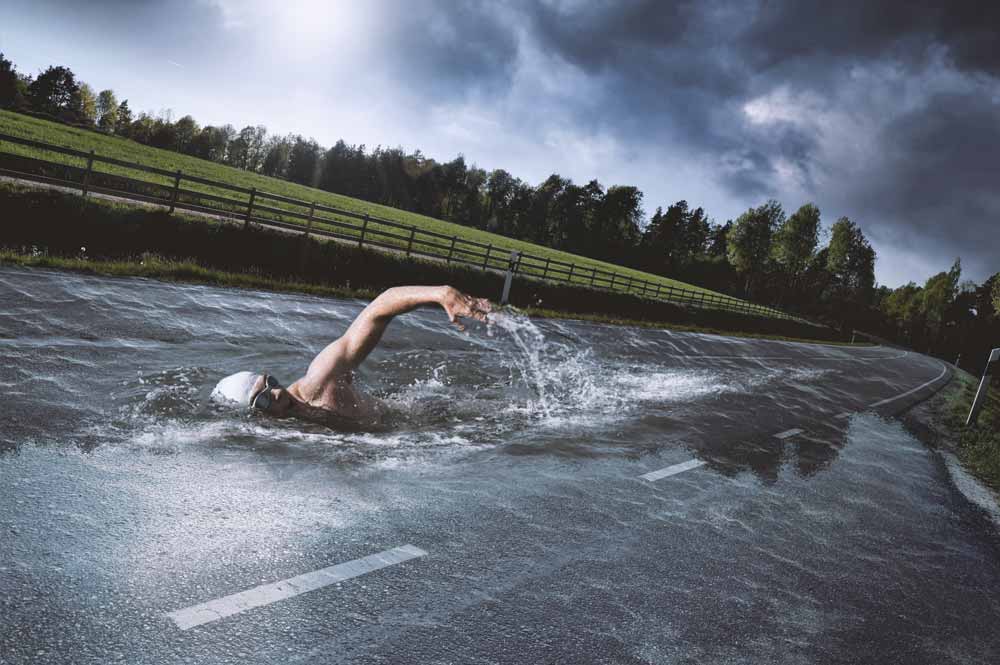
									<p style="text-align: justify;">En la red habrás visto efectos similares al que he desarrollado yo. Los resultados que he visto son fantásticos y quise hacer mi fotomontaje con photoshop intentando crear una textura que mezclara agua con asfalto. Creo que lo conseguí a pesar que el fotomontaje requiere mucha labor de pruebas y aplicación de técnicas que consigan el resultado esperado. Creo que el que hemos obtenido es genial y mantiene el espíritu de la manipulación que no es otra que simular un nadador en el asfalto. Verás como tu mente no asocia e, nadador al mar sino a la propia carretera que ha cambiado la textura.</p>								</div>
				</div>
					</div>
		</div>
					</div>
		</section>
				<section class="elementor-section elementor-top-section elementor-element elementor-element-2f8f55d elementor-section-boxed elementor-section-height-default elementor-section-height-default" data-id="2f8f55d" data-element_type="section" data-e-type="section">
						<div class="elementor-container elementor-column-gap-default">
					<div class="elementor-column elementor-col-100 elementor-top-column elementor-element elementor-element-4fe8f561" data-id="4fe8f561" data-element_type="column" data-e-type="column">
			<div class="elementor-widget-wrap elementor-element-populated">
						<div class="elementor-element elementor-element-19409cd7 elementor-widget elementor-widget-text-editor" data-id="19409cd7" data-element_type="widget" data-e-type="widget" data-widget_type="text-editor.default">
				<div class="elementor-widget-container">
									<p><img loading="lazy" decoding="async" class="aligncenter size-full wp-image-6389" src="https://ildefonsosegura.es/wp-content/uploads/swimmer-1.jpg" alt="" width="1000" height="665" srcset="https://ildefonsosegura.es/wp-content/uploads/swimmer-1.jpg 1000w, https://ildefonsosegura.es/wp-content/uploads/swimmer-1-300x200.jpg 300w, https://ildefonsosegura.es/wp-content/uploads/swimmer-1-768x511.jpg 768w" sizes="(max-width: 1000px) 100vw, 1000px" /></p><p style="text-align: justify;">Aquí te dejo el antes y el después del efecto conseguido</p>								</div>
				</div>
					</div>
		</div>
					</div>
		</section>
				<section class="elementor-section elementor-top-section elementor-element elementor-element-2e52303 elementor-section-boxed elementor-section-height-default elementor-section-height-default" data-id="2e52303" data-element_type="section" data-e-type="section">
						<div class="elementor-container elementor-column-gap-default">
					<div class="elementor-column elementor-col-100 elementor-top-column elementor-element elementor-element-5272861" data-id="5272861" data-element_type="column" data-e-type="column">
			<div class="elementor-widget-wrap">
							</div>
		</div>
					</div>
		</section>
				<section class="elementor-section elementor-top-section elementor-element elementor-element-3a9d68c elementor-section-boxed elementor-section-height-default elementor-section-height-default" data-id="3a9d68c" data-element_type="section" data-e-type="section">
						<div class="elementor-container elementor-column-gap-default">
					<div class="elementor-column elementor-col-100 elementor-top-column elementor-element elementor-element-5e562a7" data-id="5e562a7" data-element_type="column" data-e-type="column">
			<div class="elementor-widget-wrap elementor-element-populated">
						<div class="elementor-element elementor-element-8d14208 elementor-widget elementor-widget-heading" data-id="8d14208" data-element_type="widget" data-e-type="widget" data-widget_type="heading.default">
				<div class="elementor-widget-container">
					<h2 class="elementor-heading-title elementor-size-default"><strong><span style="color: #800000">TUTORIAL Fotomontaje nadador en la carretera</span></strong></h2>				</div>
				</div>
					</div>
		</div>
					</div>
		</section>
				<section class="elementor-section elementor-top-section elementor-element elementor-element-e4cfe0c elementor-section-boxed elementor-section-height-default elementor-section-height-default" data-id="e4cfe0c" data-element_type="section" data-e-type="section">
						<div class="elementor-container elementor-column-gap-default">
					<div class="elementor-column elementor-col-100 elementor-top-column elementor-element elementor-element-7c929fb" data-id="7c929fb" data-element_type="column" data-e-type="column">
			<div class="elementor-widget-wrap elementor-element-populated">
						<div class="elementor-element elementor-element-dc65739 elementor-widget elementor-widget-video" data-id="dc65739" data-element_type="widget" data-e-type="widget" data-settings="{&quot;youtube_url&quot;:&quot;https:\/\/youtu.be\/tvUTrt292Ro&quot;,&quot;video_type&quot;:&quot;youtube&quot;,&quot;controls&quot;:&quot;yes&quot;}" data-widget_type="video.default">
				<div class="elementor-widget-container">
							<div class="elementor-wrapper elementor-open-inline">
			<div class="elementor-video"></div>		</div>
						</div>
				</div>
					</div>
		</div>
					</div>
		</section>
				<section class="elementor-section elementor-top-section elementor-element elementor-element-00cc613 elementor-section-boxed elementor-section-height-default elementor-section-height-default" data-id="00cc613" data-element_type="section" data-e-type="section">
						<div class="elementor-container elementor-column-gap-default">
					<div class="elementor-column elementor-col-100 elementor-top-column elementor-element elementor-element-ad4a015" data-id="ad4a015" data-element_type="column" data-e-type="column">
			<div class="elementor-widget-wrap elementor-element-populated">
						<div class="elementor-element elementor-element-06b657f elementor-widget-divider--view-line elementor-widget elementor-widget-divider" data-id="06b657f" data-element_type="widget" data-e-type="widget" data-widget_type="divider.default">
				<div class="elementor-widget-container">
							<div class="elementor-divider">
			<span class="elementor-divider-separator">
						</span>
		</div>
						</div>
				</div>
					</div>
		</div>
					</div>
		</section>
				<section class="elementor-section elementor-top-section elementor-element elementor-element-42e470d6 elementor-section-full_width elementor-section-height-default elementor-section-height-default" data-id="42e470d6" data-element_type="section" data-e-type="section">
						<div class="elementor-container elementor-column-gap-default">
					<div class="elementor-column elementor-col-50 elementor-top-column elementor-element elementor-element-5a630e80" data-id="5a630e80" data-element_type="column" data-e-type="column">
			<div class="elementor-widget-wrap elementor-element-populated">
						<div class="elementor-element elementor-element-56cdcb38 elementor-align-right elementor-invisible elementor-widget elementor-widget-button" data-id="56cdcb38" data-element_type="widget" data-e-type="widget" data-settings="{&quot;_animation&quot;:&quot;shake&quot;}" data-widget_type="button.default">
				<div class="elementor-widget-container">
									<div class="elementor-button-wrapper">
					<a class="elementor-button elementor-button-link elementor-size-sm elementor-animation-grow" href="https://drive.google.com/open?id=1dc1DhWfa3Y6bqo6Yy-CuSs4omHgSAQCa" target="_blank">
						<span class="elementor-button-content-wrapper">
									<span class="elementor-button-text">DESCARGA EL MATERIAL</span>
					</span>
					</a>
				</div>
								</div>
				</div>
					</div>
		</div>
				<div class="elementor-column elementor-col-50 elementor-top-column elementor-element elementor-element-5c13b7e8" data-id="5c13b7e8" data-element_type="column" data-e-type="column">
			<div class="elementor-widget-wrap elementor-element-populated">
						<div class="elementor-element elementor-element-fe4eaa7 elementor-widget elementor-widget-html" data-id="fe4eaa7" data-element_type="widget" data-e-type="widget" data-settings="{&quot;_animation&quot;:&quot;none&quot;}" data-widget_type="html.default">
				<div class="elementor-widget-container">
					<form action="https://www.paypal.com/cgi-bin/webscr" method="post" target="_blank">
<input type="hidden" name="cmd" value="_donations">
<input type="hidden" name="business" value="ildefonsosegura@gmail.com">
<input type="hidden" name="lc" value="ES">
<input type="hidden" name="item_name" value="MANTENIMIENTO DE LA PAGINA DE ILDEFONSOSEGURA">
<input type="hidden" name="no_note" value="0">
<input type="hidden" name="currency_code" value="EUR">
<input type="hidden" name="bn" value="PP-DonationsBF:paypal1.jpg:NonHostedGuest">
<input type="image" src="http://ildefonsosegura.es/wp-content/uploads/paypal-updated-1.png" border="0" name="submit" alt="PayPal. La forma rápida y segura de pagar en Internet.">
<img decoding="async" alt="" border="0" src="https://www.paypalobjects.com/es_ES/i/scr/pixel.gif" width="1" height="1">
</form>				</div>
				</div>
					</div>
		</div>
					</div>
		</section>
				<section class="elementor-section elementor-top-section elementor-element elementor-element-bd3526c elementor-section-boxed elementor-section-height-default elementor-section-height-default" data-id="bd3526c" data-element_type="section" data-e-type="section">
						<div class="elementor-container elementor-column-gap-default">
					<div class="elementor-column elementor-col-100 elementor-top-column elementor-element elementor-element-9a2fb04" data-id="9a2fb04" data-element_type="column" data-e-type="column">
			<div class="elementor-widget-wrap elementor-element-populated">
						<div class="elementor-element elementor-element-3f77c63 elementor-widget-divider--view-line elementor-widget elementor-widget-divider" data-id="3f77c63" data-element_type="widget" data-e-type="widget" data-widget_type="divider.default">
				<div class="elementor-widget-container">
							<div class="elementor-divider">
			<span class="elementor-divider-separator">
						</span>
		</div>
						</div>
				</div>
					</div>
		</div>
					</div>
		</section>
				<section class="elementor-section elementor-top-section elementor-element elementor-element-7d4657b2 elementor-section-full_width elementor-section-height-default elementor-section-height-default" data-id="7d4657b2" data-element_type="section" data-e-type="section">
						<div class="elementor-container elementor-column-gap-default">
					<div class="elementor-column elementor-col-100 elementor-top-column elementor-element elementor-element-6ac95064" data-id="6ac95064" data-element_type="column" data-e-type="column">
			<div class="elementor-widget-wrap elementor-element-populated">
						<div class="elementor-element elementor-element-d9e940b elementor-widget elementor-widget-text-editor" data-id="d9e940b" data-element_type="widget" data-e-type="widget" data-widget_type="text-editor.default">
				<div class="elementor-widget-container">
									<div><div align="center"><center><strong style="color: #ff0000;">Suscríbete a mi canal de Youtube:</strong></center><div><div><div align="center"><p><script src="https://apis.google.com/js/platform.js"></script></p><div class="g-ytsubscribe" data-channel="ildefonsosegura" data-layout="full" data-count="default"> </div></div></div><p> </p><p style="text-align: center;">No te lo pierdas y comparte tus trabajos en mi página de facebook (<span style="color: #0000ff;"><strong><a style="color: #0000ff;" href="http://www.facebook.com/IldefonsoSeguraPage" target="_blank" rel="noopener noreferrer">IldefonsoSeguraPage</a></strong></span>)<br />Espero que te guste y compartas el vídeo. No dejes de compartir este post.</p><p style="text-align: center;">Así es como me puedes ayudar 🙂 Gracias</p></div></div></div>								</div>
				</div>
					</div>
		</div>
					</div>
		</section>
				</div>La entrada <a href="https://ildefonsosegura.es/fotomontaje-nadando-en-una-carretera-tutorial-photoshop-by-ildefonsosegura/">Fotomontaje nadando en una carretera Tutorial Photoshop by @ildefonsosegura</a> apareció primero en <a href="https://ildefonsosegura.es">Ildefonso Segura</a>.]]></content:encoded>
					
					<wfw:commentRss>https://ildefonsosegura.es/fotomontaje-nadando-en-una-carretera-tutorial-photoshop-by-ildefonsosegura/feed/</wfw:commentRss>
			<slash:comments>0</slash:comments>
		
		
			</item>
		<item>
		<title>Crea tu postal de Navidad con Photoshop by @ildefonsosegura (incluye Editable)</title>
		<link>https://ildefonsosegura.es/crea-tu-postal-de-navidad-con-photoshop-by-ildefonsosegura/</link>
					<comments>https://ildefonsosegura.es/crea-tu-postal-de-navidad-con-photoshop-by-ildefonsosegura/#respond</comments>
		
		<dc:creator><![CDATA[Ildefonso Segura]]></dc:creator>
		<pubDate>Sat, 22 Dec 2018 09:33:43 +0000</pubDate>
				<category><![CDATA[Editable]]></category>
		<category><![CDATA[Efectos]]></category>
		<category><![CDATA[Fotocomposición]]></category>
		<category><![CDATA[Photoshop]]></category>
		<category><![CDATA[Sin categoria]]></category>
		<category><![CDATA[Tecnicas]]></category>
		<category><![CDATA[Tutoriales]]></category>
		<category><![CDATA[Video]]></category>
		<category><![CDATA[Wallpaper]]></category>
		<category><![CDATA[adobe]]></category>
		<category><![CDATA[card]]></category>
		<category><![CDATA[cc2019]]></category>
		<category><![CDATA[christmas]]></category>
		<category><![CDATA[comic]]></category>
		<category><![CDATA[design]]></category>
		<category><![CDATA[felicitación]]></category>
		<category><![CDATA[fotomontaje]]></category>
		<category><![CDATA[gretting]]></category>
		<category><![CDATA[guia]]></category>
		<category><![CDATA[instrucciones]]></category>
		<category><![CDATA[montaje]]></category>
		<category><![CDATA[montañas]]></category>
		<category><![CDATA[navidad]]></category>
		<category><![CDATA[nieve]]></category>
		<category><![CDATA[paisaje]]></category>
		<category><![CDATA[photoshop]]></category>
		<category><![CDATA[postal]]></category>
		<category><![CDATA[tutorial]]></category>
		<category><![CDATA[video]]></category>
		<category><![CDATA[youtube]]></category>
		<guid isPermaLink="false">http://ildefonsosegura.es/?p=6364</guid>

					<description><![CDATA[<p>Un nuevo regalo para todos vosotros a través de una postal de Navidad que he realizado desde cero en Photoshop. Capa a capa y simulando un paisaje dibujado de una linda ciudad al pie de las montañas, vamos incorporando elementos como las montañas con sus sombras, la nieve, las casas, la foto, sombras y texturas, [&#8230;]</p>

La entrada <a href="https://ildefonsosegura.es/crea-tu-postal-de-navidad-con-photoshop-by-ildefonsosegura/">Crea tu postal de Navidad con Photoshop by @ildefonsosegura (incluye Editable)</a> apareció primero en <a href="https://ildefonsosegura.es">Ildefonso Segura</a>.]]></description>
										<content:encoded><![CDATA[<div data-elementor-type="wp-post" data-elementor-id="6364" class="elementor elementor-6364">
						<section class="elementor-section elementor-top-section elementor-element elementor-element-2432b797 elementor-section-boxed elementor-section-height-default elementor-section-height-default" data-id="2432b797" data-element_type="section" data-e-type="section">
						<div class="elementor-container elementor-column-gap-default">
					<div class="elementor-column elementor-col-100 elementor-top-column elementor-element elementor-element-3b7bb8d" data-id="3b7bb8d" data-element_type="column" data-e-type="column">
			<div class="elementor-widget-wrap elementor-element-populated">
						<div class="elementor-element elementor-element-c765ef7 elementor-widget elementor-widget-text-editor" data-id="c765ef7" data-element_type="widget" data-e-type="widget" data-widget_type="text-editor.default">
				<div class="elementor-widget-container">
									<p style="text-align: justify;">Un nuevo regalo para todos vosotros a través de una postal de Navidad que he realizado desde cero en Photoshop.</p><p style="text-align: justify;"><img loading="lazy" decoding="async" class="aligncenter size-full wp-image-6365" src="https://ildefonsosegura.es/wp-content/uploads/Christmas-card-Photoshop1.jpg" alt="" width="900" height="900" srcset="https://ildefonsosegura.es/wp-content/uploads/Christmas-card-Photoshop1.jpg 900w, https://ildefonsosegura.es/wp-content/uploads/Christmas-card-Photoshop1-150x150.jpg 150w, https://ildefonsosegura.es/wp-content/uploads/Christmas-card-Photoshop1-300x300.jpg 300w, https://ildefonsosegura.es/wp-content/uploads/Christmas-card-Photoshop1-768x768.jpg 768w" sizes="(max-width: 900px) 100vw, 900px" /></p><p style="text-align: justify;">Capa a capa y simulando un paisaje dibujado de una linda ciudad al pie de las montañas, vamos incorporando elementos como las montañas con sus sombras, la nieve, las casas, la foto, sombras y texturas, nubes, sol, etc&#8230;. Fijaros el resultado. Yo estoy enamorado de él.</p><p>Hice una animación de la misma para que vierais el making of pero el final es espectacular y emocionante. Mis mejores deseos para todos.</p><blockquote class="instagram-media" style="background: #FFF; border: 0; border-radius: 3px; box-shadow: 0 0 1px 0 rgba(0,0,0,0.5),0 1px 10px 0 rgba(0,0,0,0.15); margin: 1px; max-width: 540px; min-width: 326px; padding: 0; width: calc(100% - 2px);" data-instgrm-captioned="" data-instgrm-permalink="https://www.instagram.com/p/Brq5RcxIHd7/?utm_source=ig_embed&amp;utm_medium=loading" data-instgrm-version="12"><div style="padding: 16px;"><p> </p><div style="display: flex; flex-direction: row; align-items: center;"><div style="background-color: #f4f4f4; border-radius: 50%; flex-grow: 0; height: 40px; margin-right: 14px; width: 40px;"> </div><div style="display: flex; flex-direction: column; flex-grow: 1; justify-content: center;"><div style="background-color: #f4f4f4; border-radius: 4px; flex-grow: 0; height: 14px; margin-bottom: 6px; width: 100px;"> </div><div style="background-color: #f4f4f4; border-radius: 4px; flex-grow: 0; height: 14px; width: 60px;"> </div></div></div><div style="padding: 19% 0;"> </div><div style="display: block; height: 50px; margin: 0 auto 12px; width: 50px;"> </div><div style="padding-top: 8px;"><div style="color: #3897f0; font-family: Arial,sans-serif; font-size: 14px; font-style: normal; font-weight: 550; line-height: 18px;">Ver esta publicación en Instagram</div></div><div style="padding: 12.5% 0;"> </div><div style="display: flex; flex-direction: row; margin-bottom: 14px; align-items: center;"><div><div style="background-color: #f4f4f4; border-radius: 50%; height: 12.5px; width: 12.5px; transform: translateX(0px) translateY(7px);"> </div><div style="background-color: #f4f4f4; height: 12.5px; transform: rotate(-45deg) translateX(3px) translateY(1px); width: 12.5px; flex-grow: 0; margin-right: 14px; margin-left: 2px;"> </div><div style="background-color: #f4f4f4; border-radius: 50%; height: 12.5px; width: 12.5px; transform: translateX(9px) translateY(-18px);"> </div></div><div style="margin-left: 8px;"><div style="background-color: #f4f4f4; border-radius: 50%; flex-grow: 0; height: 20px; width: 20px;"> </div><div style="width: 0; height: 0; border-top: 2px solid transparent; border-left: 6px solid #f4f4f4; border-bottom: 2px solid transparent; transform: translateX(16px) translateY(-4px) rotate(30deg);"> </div></div><div style="margin-left: auto;"><div style="width: 0px; border-top: 8px solid #F4F4F4; border-right: 8px solid transparent; transform: translateY(16px);"> </div><div style="background-color: #f4f4f4; flex-grow: 0; height: 12px; width: 16px; transform: translateY(-4px);"> </div><div style="width: 0; height: 0; border-top: 8px solid #F4F4F4; border-left: 8px solid transparent; transform: translateY(-4px) translateX(8px);"> </div></div></div><p> </p><p style="margin: 8px 0 0 0; padding: 0 4px;"><a style="color: #000; font-family: Arial,sans-serif; font-size: 14px; font-style: normal; font-weight: normal; line-height: 17px; text-decoration: none; word-wrap: break-word;" href="https://www.instagram.com/p/Brq5RcxIHd7/?utm_source=ig_embed&amp;utm_medium=loading" target="_blank" rel="noopener">Ya tienes un nuevo #photoshoptutorial en mi canal de youtube. Incluye ? regalo de Editable para que solo tengas que cambiar la foto y los textos. #gratis =============== Visit my website for more free tutorials. Check my Bio =============== #thegraphicspr0ject#creartmood#visual_creatorz#enter_imagination#LaunchDsigns#edit_grams#moodygrams#VisualMobs#simplycooldesign#CreativeOptic#photoshop #edit_perfection#manipulationclan#creativitychasers #edit_mania__#thecreativers#creative_ace#digitallyart#xceptionaledits#imaginativeuniverse#artist #igworldclub_edits#visualcreative#discoveredit#thehub_edit#bestvisualz#theuniversalart#photomanipulation</a></p><p style="color: #c9c8cd; font-family: Arial,sans-serif; font-size: 14px; line-height: 17px; margin-bottom: 0; margin-top: 8px; overflow: hidden; padding: 8px 0 7px; text-align: center; text-overflow: ellipsis; white-space: nowrap;">Una publicación compartida de <a style="color: #c9c8cd; font-family: Arial,sans-serif; font-size: 14px; font-style: normal; font-weight: normal; line-height: 17px;" href="https://www.instagram.com/ildefonsosegura/?utm_source=ig_embed&amp;utm_medium=loading" target="_blank" rel="noopener"> Ildefonso Segura</a> (@ildefonsosegura) el <time style="font-family: Arial,sans-serif; font-size: 14px; line-height: 17px;" datetime="2018-12-22T00:57:04+00:00">21 Dic, 2018 a las 4:57 PST</time></p></div></blockquote><p><script async="" src="//www.instagram.com/embed.js"></script></p><p>Disfruta del tutorial. Yo me lo pasé en grande aunque hay mucho trabajo detrás. Si quieres el editable, puedes seguir leyendo hacia abajo y tendrás un vídeo guía y un botón que te llevará al regalo (sección de REGALOS  de mi web)</p><p><strong><span style="color: #800000;">TUTORIAL</span> </strong></p><center><iframe src="https://www.youtube.com/embed/m1H-C_f-xRM" width="640" height="420" frameborder="0" allowfullscreen="allowfullscreen"><span data-mce-type="bookmark" style="display: inline-block; width: 0px; overflow: hidden; line-height: 0;" class="mce_SELRES_start">﻿</span></iframe></center><div><div><div align="center"><div><p style="text-align: left;"> </p></div></div></div></div>								</div>
				</div>
					</div>
		</div>
					</div>
		</section>
				<section class="elementor-section elementor-top-section elementor-element elementor-element-65ef1d83 elementor-section-full_width elementor-section-height-default elementor-section-height-default" data-id="65ef1d83" data-element_type="section" data-e-type="section">
						<div class="elementor-container elementor-column-gap-default">
					<div class="elementor-column elementor-col-50 elementor-top-column elementor-element elementor-element-601b6609" data-id="601b6609" data-element_type="column" data-e-type="column">
			<div class="elementor-widget-wrap elementor-element-populated">
						<div class="elementor-element elementor-element-4b9d187c elementor-align-right elementor-invisible elementor-widget elementor-widget-button" data-id="4b9d187c" data-element_type="widget" data-e-type="widget" data-settings="{&quot;_animation&quot;:&quot;shake&quot;}" data-widget_type="button.default">
				<div class="elementor-widget-container">
									<div class="elementor-button-wrapper">
					<a class="elementor-button elementor-button-link elementor-size-sm elementor-animation-grow" href="https://mega.nz/#!Akk3QQ6Z!lv0bH7I0JOARJmhWrnWCJjnFxPdFrbkg_P2sbYx8tCU">
						<span class="elementor-button-content-wrapper">
									<span class="elementor-button-text">DESCARGA EL MATERIAL</span>
					</span>
					</a>
				</div>
								</div>
				</div>
					</div>
		</div>
				<div class="elementor-column elementor-col-50 elementor-top-column elementor-element elementor-element-56a26921" data-id="56a26921" data-element_type="column" data-e-type="column">
			<div class="elementor-widget-wrap elementor-element-populated">
						<div class="elementor-element elementor-element-327f0f27 elementor-widget elementor-widget-html" data-id="327f0f27" data-element_type="widget" data-e-type="widget" data-settings="{&quot;_animation&quot;:&quot;none&quot;}" data-widget_type="html.default">
				<div class="elementor-widget-container">
					<form action="https://www.paypal.com/cgi-bin/webscr" method="post" target="_blank">
<input type="hidden" name="cmd" value="_donations">
<input type="hidden" name="business" value="ildefonsosegura@gmail.com">
<input type="hidden" name="lc" value="ES">
<input type="hidden" name="item_name" value="MANTENIMIENTO DE LA PAGINA DE ILDEFONSOSEGURA">
<input type="hidden" name="no_note" value="0">
<input type="hidden" name="currency_code" value="EUR">
<input type="hidden" name="bn" value="PP-DonationsBF:paypal1.jpg:NonHostedGuest">
<input type="image" src="http://ildefonsosegura.es/wp-content/uploads/paypal-updated-1.png" border="0" name="submit" alt="PayPal. La forma rápida y segura de pagar en Internet.">
<img decoding="async" alt="" border="0" src="https://www.paypalobjects.com/es_ES/i/scr/pixel.gif" width="1" height="1">
</form>				</div>
				</div>
					</div>
		</div>
					</div>
		</section>
				<section class="elementor-section elementor-top-section elementor-element elementor-element-6b8d5b7 elementor-section-boxed elementor-section-height-default elementor-section-height-default" data-id="6b8d5b7" data-element_type="section" data-e-type="section">
						<div class="elementor-container elementor-column-gap-default">
					<div class="elementor-column elementor-col-100 elementor-top-column elementor-element elementor-element-0ee7e0a" data-id="0ee7e0a" data-element_type="column" data-e-type="column">
			<div class="elementor-widget-wrap elementor-element-populated">
						<div class="elementor-element elementor-element-61c6617 elementor-widget elementor-widget-heading" data-id="61c6617" data-element_type="widget" data-e-type="widget" data-widget_type="heading.default">
				<div class="elementor-widget-container">
					<h2 class="elementor-heading-title elementor-size-default">EDITABLE</h2>				</div>
				</div>
					</div>
		</div>
					</div>
		</section>
				<section class="elementor-section elementor-top-section elementor-element elementor-element-0da06aa elementor-section-boxed elementor-section-height-default elementor-section-height-default" data-id="0da06aa" data-element_type="section" data-e-type="section">
						<div class="elementor-container elementor-column-gap-default">
					<div class="elementor-column elementor-col-100 elementor-top-column elementor-element elementor-element-6bae1e8" data-id="6bae1e8" data-element_type="column" data-e-type="column">
			<div class="elementor-widget-wrap elementor-element-populated">
						<div class="elementor-element elementor-element-34ecf63 elementor-widget elementor-widget-video" data-id="34ecf63" data-element_type="widget" data-e-type="widget" data-settings="{&quot;youtube_url&quot;:&quot;https:\/\/youtu.be\/NJToC7g_aNo&quot;,&quot;video_type&quot;:&quot;youtube&quot;,&quot;controls&quot;:&quot;yes&quot;}" data-widget_type="video.default">
				<div class="elementor-widget-container">
							<div class="elementor-wrapper elementor-open-inline">
			<div class="elementor-video"></div>		</div>
						</div>
				</div>
					</div>
		</div>
					</div>
		</section>
				<section class="elementor-section elementor-top-section elementor-element elementor-element-5cccea45 elementor-section-boxed elementor-section-height-default elementor-section-height-default" data-id="5cccea45" data-element_type="section" data-e-type="section">
						<div class="elementor-container elementor-column-gap-default">
					<div class="elementor-column elementor-col-100 elementor-top-column elementor-element elementor-element-1b9460b8" data-id="1b9460b8" data-element_type="column" data-e-type="column">
			<div class="elementor-widget-wrap elementor-element-populated">
						<div class="elementor-element elementor-element-155b0c13 elementor-widget-divider--view-line elementor-widget elementor-widget-divider" data-id="155b0c13" data-element_type="widget" data-e-type="widget" data-widget_type="divider.default">
				<div class="elementor-widget-container">
							<div class="elementor-divider">
			<span class="elementor-divider-separator">
						</span>
		</div>
						</div>
				</div>
					</div>
		</div>
					</div>
		</section>
				<section class="elementor-section elementor-top-section elementor-element elementor-element-4cfabb30 elementor-section-full_width elementor-section-height-default elementor-section-height-default" data-id="4cfabb30" data-element_type="section" data-e-type="section">
						<div class="elementor-container elementor-column-gap-default">
					<div class="elementor-column elementor-col-50 elementor-top-column elementor-element elementor-element-3fcfeb7c" data-id="3fcfeb7c" data-element_type="column" data-e-type="column">
			<div class="elementor-widget-wrap elementor-element-populated">
						<div class="elementor-element elementor-element-69c3fb6e elementor-align-right elementor-invisible elementor-widget elementor-widget-button" data-id="69c3fb6e" data-element_type="widget" data-e-type="widget" data-settings="{&quot;_animation&quot;:&quot;shake&quot;}" data-widget_type="button.default">
				<div class="elementor-widget-container">
									<div class="elementor-button-wrapper">
					<a class="elementor-button elementor-button-link elementor-size-sm elementor-animation-grow" href="https://ildefonsosegura.es/regalos/">
						<span class="elementor-button-content-wrapper">
									<span class="elementor-button-text">BAJATE EL EDITABLE</span>
					</span>
					</a>
				</div>
								</div>
				</div>
					</div>
		</div>
				<div class="elementor-column elementor-col-50 elementor-top-column elementor-element elementor-element-286e1c58" data-id="286e1c58" data-element_type="column" data-e-type="column">
			<div class="elementor-widget-wrap elementor-element-populated">
						<div class="elementor-element elementor-element-8c8635d elementor-widget elementor-widget-html" data-id="8c8635d" data-element_type="widget" data-e-type="widget" data-settings="{&quot;_animation&quot;:&quot;none&quot;}" data-widget_type="html.default">
				<div class="elementor-widget-container">
					<form action="https://www.paypal.com/cgi-bin/webscr" method="post" target="_blank">
<input type="hidden" name="cmd" value="_donations">
<input type="hidden" name="business" value="ildefonsosegura@gmail.com">
<input type="hidden" name="lc" value="ES">
<input type="hidden" name="item_name" value="MANTENIMIENTO DE LA PAGINA DE ILDEFONSOSEGURA">
<input type="hidden" name="no_note" value="0">
<input type="hidden" name="currency_code" value="EUR">
<input type="hidden" name="bn" value="PP-DonationsBF:paypal1.jpg:NonHostedGuest">
<input type="image" src="http://ildefonsosegura.es/wp-content/uploads/paypal-updated-1.png" border="0" name="submit" alt="PayPal. La forma rápida y segura de pagar en Internet.">
<img decoding="async" alt="" border="0" src="https://www.paypalobjects.com/es_ES/i/scr/pixel.gif" width="1" height="1">
</form>				</div>
				</div>
					</div>
		</div>
					</div>
		</section>
				<section class="elementor-section elementor-top-section elementor-element elementor-element-35df1815 elementor-section-boxed elementor-section-height-default elementor-section-height-default" data-id="35df1815" data-element_type="section" data-e-type="section">
						<div class="elementor-container elementor-column-gap-default">
					<div class="elementor-column elementor-col-100 elementor-top-column elementor-element elementor-element-27099cb6" data-id="27099cb6" data-element_type="column" data-e-type="column">
			<div class="elementor-widget-wrap elementor-element-populated">
						<div class="elementor-element elementor-element-217878e elementor-widget-divider--view-line elementor-widget elementor-widget-divider" data-id="217878e" data-element_type="widget" data-e-type="widget" data-widget_type="divider.default">
				<div class="elementor-widget-container">
							<div class="elementor-divider">
			<span class="elementor-divider-separator">
						</span>
		</div>
						</div>
				</div>
					</div>
		</div>
					</div>
		</section>
				<section class="elementor-section elementor-top-section elementor-element elementor-element-5bef05c8 elementor-section-full_width elementor-section-height-default elementor-section-height-default" data-id="5bef05c8" data-element_type="section" data-e-type="section">
						<div class="elementor-container elementor-column-gap-default">
					<div class="elementor-column elementor-col-100 elementor-top-column elementor-element elementor-element-967db59" data-id="967db59" data-element_type="column" data-e-type="column">
			<div class="elementor-widget-wrap elementor-element-populated">
						<div class="elementor-element elementor-element-324a1c90 elementor-widget elementor-widget-text-editor" data-id="324a1c90" data-element_type="widget" data-e-type="widget" data-widget_type="text-editor.default">
				<div class="elementor-widget-container">
									<div><div align="center"><center><strong style="color: #ff0000;">Suscríbete a mi canal de Youtube:</strong></center><div><div><div align="center"><p><script src="https://apis.google.com/js/platform.js"></script></p><div class="g-ytsubscribe" data-channel="ildefonsosegura" data-layout="full" data-count="default"> </div></div></div><p> </p><p style="text-align: center;">No te lo pierdas y comparte tus trabajos en mi página de facebook (<span style="color: #0000ff;"><strong><a style="color: #0000ff;" href="http://www.facebook.com/IldefonsoSeguraPage" target="_blank" rel="noopener noreferrer">IldefonsoSeguraPage</a></strong></span>)<br />Espero que te guste y compartas el vídeo. No dejes de compartir este post.</p><p style="text-align: center;">Así es como me puedes ayudar 🙂 Gracias</p></div></div></div>								</div>
				</div>
					</div>
		</div>
					</div>
		</section>
				</div>La entrada <a href="https://ildefonsosegura.es/crea-tu-postal-de-navidad-con-photoshop-by-ildefonsosegura/">Crea tu postal de Navidad con Photoshop by @ildefonsosegura (incluye Editable)</a> apareció primero en <a href="https://ildefonsosegura.es">Ildefonso Segura</a>.]]></content:encoded>
					
					<wfw:commentRss>https://ildefonsosegura.es/crea-tu-postal-de-navidad-con-photoshop-by-ildefonsosegura/feed/</wfw:commentRss>
			<slash:comments>0</slash:comments>
		
		
			</item>
		<item>
		<title>Fotomontaje con #PhotoshopCC, integración de objetos</title>
		<link>https://ildefonsosegura.es/fotomontaje-con-photoshopcc-integracion-de-objetos-by-ildefonsosegura/</link>
					<comments>https://ildefonsosegura.es/fotomontaje-con-photoshopcc-integracion-de-objetos-by-ildefonsosegura/#comments</comments>
		
		<dc:creator><![CDATA[Ildefonso Segura]]></dc:creator>
		<pubDate>Tue, 27 Mar 2018 20:40:00 +0000</pubDate>
				<category><![CDATA[Efectos]]></category>
		<category><![CDATA[Fotocomposición]]></category>
		<category><![CDATA[Photoshop]]></category>
		<category><![CDATA[Speed Art]]></category>
		<category><![CDATA[Tecnicas]]></category>
		<category><![CDATA[Tutoriales]]></category>
		<category><![CDATA[Wallpaper]]></category>
		<category><![CDATA[adobe]]></category>
		<category><![CDATA[cacasco]]></category>
		<category><![CDATA[CC]]></category>
		<category><![CDATA[cc2014]]></category>
		<category><![CDATA[cc2015]]></category>
		<category><![CDATA[clonar]]></category>
		<category><![CDATA[color]]></category>
		<category><![CDATA[color efex pro]]></category>
		<category><![CDATA[creativecloud]]></category>
		<category><![CDATA[creatividad]]></category>
		<category><![CDATA[cs4]]></category>
		<category><![CDATA[cs5]]></category>
		<category><![CDATA[cs6]]></category>
		<category><![CDATA[efectos]]></category>
		<category><![CDATA[fondo]]></category>
		<category><![CDATA[fotomanipulación]]></category>
		<category><![CDATA[fotomontaje]]></category>
		<category><![CDATA[gloriasanis]]></category>
		<category><![CDATA[ildefonsosegura]]></category>
		<category><![CDATA[imagen]]></category>
		<category><![CDATA[integración]]></category>
		<category><![CDATA[photoshop]]></category>
		<category><![CDATA[poster]]></category>
		<category><![CDATA[tampon clonar]]></category>
		<category><![CDATA[tutorial]]></category>
		<category><![CDATA[wall]]></category>
		<category><![CDATA[wallpaper]]></category>
		<category><![CDATA[youtube]]></category>
		<guid isPermaLink="false">http://ildefonsosegura.es/?p=4831</guid>

					<description><![CDATA[<p>En este tutorial de #Photoshop cc vamos a realizar una integración de elementos para construir un wallpaper. Un fotomontaje donde aprenderemos cómo poder engañar a la realidad. En un tutorial anterior puedes ver como trabajar las abolladuras del casco y la rotura. Puedes esforzarte menos si bajas los materiales que te ofrezco donde encontrarás el [&#8230;]</p>
La entrada <a href="https://ildefonsosegura.es/fotomontaje-con-photoshopcc-integracion-de-objetos-by-ildefonsosegura/">Fotomontaje con #PhotoshopCC, integración de objetos</a> apareció primero en <a href="https://ildefonsosegura.es">Ildefonso Segura</a>.]]></description>
										<content:encoded><![CDATA[<div data-elementor-type="wp-post" data-elementor-id="4831" class="elementor elementor-4831">
						<section class="elementor-section elementor-top-section elementor-element elementor-element-5b201b6e elementor-section-boxed elementor-section-height-default elementor-section-height-default" data-id="5b201b6e" data-element_type="section" data-e-type="section">
						<div class="elementor-container elementor-column-gap-default">
					<div class="elementor-column elementor-col-100 elementor-top-column elementor-element elementor-element-3cda53f4" data-id="3cda53f4" data-element_type="column" data-e-type="column">
			<div class="elementor-widget-wrap elementor-element-populated">
						<div class="elementor-element elementor-element-57f7a125 elementor-widget elementor-widget-text-editor" data-id="57f7a125" data-element_type="widget" data-e-type="widget" data-widget_type="text-editor.default">
				<div class="elementor-widget-container">
									<p style="text-align: justify;">En este tutorial de #Photoshop cc vamos a realizar una integración de elementos para construir un wallpaper. Un fotomontaje donde aprenderemos cómo poder engañar a la realidad.</p>
<p style="text-align: justify;">En un tutorial anterior puedes ver como trabajar las abolladuras del casco y la rotura. Puedes esforzarte menos si bajas los materiales que te ofrezco donde encontrarás el stock ya realizado y extraído (eso ya depende de ti). Yo te recomiendo que lo veas pinchando la miniatura siguiente:</p>
<p style="text-align: justify;"><a href="https://ildefonsosegura.es/aprende-a-realizar-abolladuras-y-rotura-en-un-objeto-casco-con-photoshop-by-ildefonsosegura/" target="_blank" rel="attachment noopener wp-att-4820"><img loading="lazy" decoding="async" class=" wp-image-4820 size-medium aligncenter" src="https://ildefonsosegura.es/wp-content/uploads/Casco-rotura-2-300x169.jpg" alt="Casco-rotura-2" width="300" height="169" srcset="https://ildefonsosegura.es/wp-content/uploads/Casco-rotura-2-300x169.jpg 300w, https://ildefonsosegura.es/wp-content/uploads/Casco-rotura-2-1024x576.jpg 1024w, https://ildefonsosegura.es/wp-content/uploads/Casco-rotura-2-720x406.jpg 720w, https://ildefonsosegura.es/wp-content/uploads/Casco-rotura-2.jpg 1280w" sizes="(max-width: 300px) 100vw, 300px" /></a></p>
<p style="text-align: justify;">En el tutorial  que vamos a ver ahora, construiremos este wallpaper</p>
<p style="text-align: justify;"><img loading="lazy" decoding="async" class="aligncenter wp-image-4834 size-full" src="https://ildefonsosegura.es/wp-content/uploads/Casco-en-camino.jpg" alt="Casco-en-camino" width="640" height="420" /></p>
<p style="text-align: justify;">Aprenderemos a:</p>

<ol>
 	<li>Usar máscaras de capa para integrar</li>
 	<li>Usar la herramienta tampón de clonar</li>
 	<li>Texturizar para dar impresión de envejecimiento con máscaras de recorte, capas de ajuste y texturas.</li>
 	<li>Técnicas de integración como desenfoques, sombras, profundidad de campo,&#8230;</li>
 	<li>Despertar el interés por crear escenarios con colores distintos (mención y breve uso del plugin Color Efex Pro 4)</li>
</ol>
Puedes visitar la página del PLUGIN COLOR EFEX PRO 4 para adquirirlo y probarlo. En cualquier caso tienes cientos de tutoriales en la red para ver como funciona y orientación para adquirirlo. Visita su página haciendo clic <strong><a href="https://www.google.com/nikcollection/products/color-efex-pro/" target="_blank" rel="noopener">COLOR EFEX PRO</a></strong>
<p style="text-align: justify;">No te lo pierdas y comparte tus trabajos en mi página de facebook (<a href="http://www.facebook.com/IldefonsoSeguraPage" target="_blank" rel="noopener">IldefonsoSeguraPage</a>)</p>
&nbsp;

Espero que os guste
<p style="text-align: left;"><strong>TUTORIAL</strong>
<iframe src="https://www.youtube.com/embed/5LtrQIwzplU?rel=0" width="640" height="420" frameborder="0" allowfullscreen="allowfullscreen"></iframe></p>

<div><center>

</center><center></center>
<p style="text-align: left;"><strong>SPEEDART</strong>
<iframe src="https://www.youtube.com/embed/vl9AeE3Gts0?rel=0" width="640" height="420" frameborder="0" allowfullscreen="allowfullscreen"></iframe></p>

<div>
<div></div>
<p style="text-align: left;"></p>
&nbsp;

&nbsp;

</div>
</div>								</div>
				</div>
					</div>
		</div>
					</div>
		</section>
				<section class="elementor-section elementor-top-section elementor-element elementor-element-56584954 elementor-section-boxed elementor-section-height-default elementor-section-height-default" data-id="56584954" data-element_type="section" data-e-type="section">
						<div class="elementor-container elementor-column-gap-default">
					<div class="elementor-column elementor-col-100 elementor-top-column elementor-element elementor-element-277c8609" data-id="277c8609" data-element_type="column" data-e-type="column">
			<div class="elementor-widget-wrap elementor-element-populated">
						<div class="elementor-element elementor-element-30496442 elementor-widget-divider--view-line elementor-widget elementor-widget-divider" data-id="30496442" data-element_type="widget" data-e-type="widget" data-widget_type="divider.default">
				<div class="elementor-widget-container">
							<div class="elementor-divider">
			<span class="elementor-divider-separator">
						</span>
		</div>
						</div>
				</div>
					</div>
		</div>
					</div>
		</section>
				<section class="elementor-section elementor-top-section elementor-element elementor-element-5b795a8c elementor-section-full_width elementor-section-height-default elementor-section-height-default" data-id="5b795a8c" data-element_type="section" data-e-type="section">
						<div class="elementor-container elementor-column-gap-default">
					<div class="elementor-column elementor-col-50 elementor-top-column elementor-element elementor-element-48ec4aeb" data-id="48ec4aeb" data-element_type="column" data-e-type="column">
			<div class="elementor-widget-wrap elementor-element-populated">
						<div class="elementor-element elementor-element-3f41d9ec elementor-align-right elementor-invisible elementor-widget elementor-widget-button" data-id="3f41d9ec" data-element_type="widget" data-e-type="widget" data-settings="{&quot;_animation&quot;:&quot;shake&quot;}" data-widget_type="button.default">
				<div class="elementor-widget-container">
									<div class="elementor-button-wrapper">
					<a class="elementor-button elementor-button-link elementor-size-sm elementor-animation-grow" href="https://drive.google.com/open?id=0B_nJkCGJubuceGdseE8xNkV6UE0">
						<span class="elementor-button-content-wrapper">
									<span class="elementor-button-text">DESCARGA EL MATERIAL</span>
					</span>
					</a>
				</div>
								</div>
				</div>
					</div>
		</div>
				<div class="elementor-column elementor-col-50 elementor-top-column elementor-element elementor-element-15e23e96" data-id="15e23e96" data-element_type="column" data-e-type="column">
			<div class="elementor-widget-wrap elementor-element-populated">
						<div class="elementor-element elementor-element-414b8df4 elementor-widget elementor-widget-html" data-id="414b8df4" data-element_type="widget" data-e-type="widget" data-settings="{&quot;_animation&quot;:&quot;none&quot;}" data-widget_type="html.default">
				<div class="elementor-widget-container">
					<form action="https://www.paypal.com/cgi-bin/webscr" method="post" target="_blank">
<input type="hidden" name="cmd" value="_donations">
<input type="hidden" name="business" value="ildefonsosegura@gmail.com">
<input type="hidden" name="lc" value="ES">
<input type="hidden" name="item_name" value="MANTENIMIENTO DE LA PAGINA DE ILDEFONSOSEGURA">
<input type="hidden" name="no_note" value="0">
<input type="hidden" name="currency_code" value="EUR">
<input type="hidden" name="bn" value="PP-DonationsBF:paypal1.jpg:NonHostedGuest">
<input type="image" src="http://ildefonsosegura.es/wp-content/uploads/paypal-updated-1.png" border="0" name="submit" alt="PayPal. La forma rápida y segura de pagar en Internet.">
<img decoding="async" alt="" border="0" src="https://www.paypalobjects.com/es_ES/i/scr/pixel.gif" width="1" height="1">
</form>				</div>
				</div>
					</div>
		</div>
					</div>
		</section>
				<section class="elementor-section elementor-top-section elementor-element elementor-element-619906ad elementor-section-boxed elementor-section-height-default elementor-section-height-default" data-id="619906ad" data-element_type="section" data-e-type="section">
						<div class="elementor-container elementor-column-gap-default">
					<div class="elementor-column elementor-col-100 elementor-top-column elementor-element elementor-element-73edbba6" data-id="73edbba6" data-element_type="column" data-e-type="column">
			<div class="elementor-widget-wrap elementor-element-populated">
						<div class="elementor-element elementor-element-47b8dfc elementor-widget-divider--view-line elementor-widget elementor-widget-divider" data-id="47b8dfc" data-element_type="widget" data-e-type="widget" data-widget_type="divider.default">
				<div class="elementor-widget-container">
							<div class="elementor-divider">
			<span class="elementor-divider-separator">
						</span>
		</div>
						</div>
				</div>
					</div>
		</div>
					</div>
		</section>
				<section class="elementor-section elementor-top-section elementor-element elementor-element-67efbb3c elementor-section-full_width elementor-section-height-default elementor-section-height-default" data-id="67efbb3c" data-element_type="section" data-e-type="section">
						<div class="elementor-container elementor-column-gap-default">
					<div class="elementor-column elementor-col-100 elementor-top-column elementor-element elementor-element-41d07212" data-id="41d07212" data-element_type="column" data-e-type="column">
			<div class="elementor-widget-wrap elementor-element-populated">
						<div class="elementor-element elementor-element-49d1b8e2 elementor-widget elementor-widget-text-editor" data-id="49d1b8e2" data-element_type="widget" data-e-type="widget" data-widget_type="text-editor.default">
				<div class="elementor-widget-container">
									<div><div align="center"><center><strong style="color: #ff0000;">Suscríbete a mi canal de Youtube:</strong></center><div><div><div align="center"><p><script src="https://apis.google.com/js/platform.js"></script></p><div class="g-ytsubscribe" data-channel="ildefonsosegura" data-layout="full" data-count="default"> </div></div></div><p> </p><p style="text-align: center;">No te lo pierdas y comparte tus trabajos en mi página de facebook (<span style="color: #0000ff;"><strong><a style="color: #0000ff;" href="http://www.facebook.com/IldefonsoSeguraPage" target="_blank" rel="noopener noreferrer">IldefonsoSeguraPage</a></strong></span>)<br />Espero que te guste y compartas el vídeo. No dejes de compartir este post.</p><p style="text-align: center;">Así es como me puedes ayudar 🙂 Gracias</p></div></div></div>								</div>
				</div>
					</div>
		</div>
					</div>
		</section>
				</div>La entrada <a href="https://ildefonsosegura.es/fotomontaje-con-photoshopcc-integracion-de-objetos-by-ildefonsosegura/">Fotomontaje con #PhotoshopCC, integración de objetos</a> apareció primero en <a href="https://ildefonsosegura.es">Ildefonso Segura</a>.]]></content:encoded>
					
					<wfw:commentRss>https://ildefonsosegura.es/fotomontaje-con-photoshopcc-integracion-de-objetos-by-ildefonsosegura/feed/</wfw:commentRss>
			<slash:comments>1</slash:comments>
		
		
			</item>
		<item>
		<title>Tutorial Photoshop efectos de brillo e iluminación en un wallpaper by @ildefonsosegura</title>
		<link>https://ildefonsosegura.es/como-hacer-efectos-de-iluminacion-alucinantes-con-photoshop-by-ildefonsosegura/</link>
					<comments>https://ildefonsosegura.es/como-hacer-efectos-de-iluminacion-alucinantes-con-photoshop-by-ildefonsosegura/#respond</comments>
		
		<dc:creator><![CDATA[Ildefonso Segura]]></dc:creator>
		<pubDate>Tue, 20 Mar 2018 12:05:44 +0000</pubDate>
				<category><![CDATA[Efectos]]></category>
		<category><![CDATA[Fotocomposición]]></category>
		<category><![CDATA[Photoshop]]></category>
		<category><![CDATA[Speed Art]]></category>
		<category><![CDATA[Tutoriales]]></category>
		<category><![CDATA[Wallpaper]]></category>
		<category><![CDATA[cc2014]]></category>
		<category><![CDATA[cs5]]></category>
		<category><![CDATA[cs6]]></category>
		<category><![CDATA[flare]]></category>
		<category><![CDATA[flares]]></category>
		<category><![CDATA[fotocomposición]]></category>
		<category><![CDATA[fotomontaje]]></category>
		<category><![CDATA[gloriasanis]]></category>
		<category><![CDATA[haz]]></category>
		<category><![CDATA[ildefonsosegura]]></category>
		<category><![CDATA[iluminación]]></category>
		<category><![CDATA[iluminar]]></category>
		<category><![CDATA[imagen]]></category>
		<category><![CDATA[lighting]]></category>
		<category><![CDATA[luz]]></category>
		<category><![CDATA[montaje]]></category>
		<category><![CDATA[poster]]></category>
		<category><![CDATA[tuto]]></category>
		<category><![CDATA[tutorial]]></category>
		<category><![CDATA[wallpaper]]></category>
		<guid isPermaLink="false">http://ildefonsosegura.es/?p=3677</guid>

					<description><![CDATA[<p>He disfrutado un montón haciendo este fantástico tutorial de photoshop para ayuaros a hacer vuestro propio wallpaper con unos efectos de iluminación y brillo alucinante. En el propio tutorial te muestro unos ejemplos para que te hagas una idea de qué puedes hacer. Cuando veas el tuto podrás hacer unos haces de luces alucinantes y con [&#8230;]</p>
La entrada <a href="https://ildefonsosegura.es/como-hacer-efectos-de-iluminacion-alucinantes-con-photoshop-by-ildefonsosegura/">Tutorial Photoshop efectos de brillo e iluminación en un wallpaper by @ildefonsosegura</a> apareció primero en <a href="https://ildefonsosegura.es">Ildefonso Segura</a>.]]></description>
										<content:encoded><![CDATA[<div data-elementor-type="wp-post" data-elementor-id="3677" class="elementor elementor-3677">
						<section class="elementor-section elementor-top-section elementor-element elementor-element-7f3cdb25 elementor-section-boxed elementor-section-height-default elementor-section-height-default" data-id="7f3cdb25" data-element_type="section" data-e-type="section">
						<div class="elementor-container elementor-column-gap-default">
					<div class="elementor-column elementor-col-100 elementor-top-column elementor-element elementor-element-6f0ce4fa" data-id="6f0ce4fa" data-element_type="column" data-e-type="column">
			<div class="elementor-widget-wrap elementor-element-populated">
						<div class="elementor-element elementor-element-79414706 elementor-widget elementor-widget-text-editor" data-id="79414706" data-element_type="widget" data-e-type="widget" data-widget_type="text-editor.default">
				<div class="elementor-widget-container">
									<p>He disfrutado un montón haciendo este fantástico tutorial de photoshop para ayuaros a hacer vuestro propio wallpaper con unos efectos de iluminación y brillo alucinante. En el propio tutorial te muestro unos ejemplos para que te hagas una idea de qué puedes hacer.</p><p style="text-align: justify;">Cuando veas el tuto podrás hacer unos haces de luces alucinantes y con los modos de fusión podrás crear iluminaciones increíbles.</p><p>[twenty20 img1=»6091&#8243; img2=»6092&#8243; offset=»0.5&#8243;]</p><p style="text-align: justify;">Desde el background hasta la iluminación final con colorido y con un aspecto de fantasía, podrás hacer tus propias creaciones. Espero que te ayude y enseñe algún truco para tus propias creaciones.</p><p>Mira más ejemplos:</p><p><img loading="lazy" decoding="async" class="aligncenter wp-image-3679 size-full" src="https://ildefonsosegura.es/wp-content/uploads/shining-and-lighting.jpg" alt="shining-and-lighting" width="680" height="680" srcset="https://ildefonsosegura.es/wp-content/uploads/shining-and-lighting.jpg 680w, https://ildefonsosegura.es/wp-content/uploads/shining-and-lighting-150x150.jpg 150w, https://ildefonsosegura.es/wp-content/uploads/shining-and-lighting-300x300.jpg 300w, https://ildefonsosegura.es/wp-content/uploads/shining-and-lighting-50x50.jpg 50w" sizes="(max-width: 680px) 100vw, 680px" /></p><p><strong><span style="color: #800000;">TUTORIAL</span> </strong></p><center><iframe src="https://www.youtube.com/embed/gXqWnqcIOH0" width="640" height="420" frameborder="0" allowfullscreen="allowfullscreen"></iframe></center><p>Imagen usada en el tutorial está disponible en el link que te dejo más abajo.</p><p>Si te gustan los speedarts también tienes uno donde verás los mismos efectos pero aplicados a la imagen de Assasin&#8217;s Creed</p><p><strong><span style="color: #800000;">SPEED ART</span> </strong></p><center><iframe src="https://www.youtube.com/embed/b3mwLrV9EXM" width="640" height="420" frameborder="0" allowfullscreen="allowfullscreen"><span data-mce-type="bookmark" style="display: inline-block; width: 0px; overflow: hidden; line-height: 0;" class="mce_SELRES_start">﻿</span></iframe></center><div><div> </div><p style="text-align: left;"> </p></div>								</div>
				</div>
					</div>
		</div>
					</div>
		</section>
				<section class="elementor-section elementor-top-section elementor-element elementor-element-65592945 elementor-section-full_width elementor-section-height-default elementor-section-height-default" data-id="65592945" data-element_type="section" data-e-type="section">
						<div class="elementor-container elementor-column-gap-default">
					<div class="elementor-column elementor-col-33 elementor-top-column elementor-element elementor-element-1e2dc656" data-id="1e2dc656" data-element_type="column" data-e-type="column">
			<div class="elementor-widget-wrap elementor-element-populated">
						<div class="elementor-element elementor-element-7398a4f2 elementor-align-right elementor-invisible elementor-widget elementor-widget-button" data-id="7398a4f2" data-element_type="widget" data-e-type="widget" data-settings="{&quot;_animation&quot;:&quot;shake&quot;}" data-widget_type="button.default">
				<div class="elementor-widget-container">
									<div class="elementor-button-wrapper">
					<a class="elementor-button elementor-button-link elementor-size-sm elementor-animation-grow" href="https://drive.google.com/open?id=0B_nJkCGJubucV2VJTjZLSDJyUWM" target="_blank">
						<span class="elementor-button-content-wrapper">
									<span class="elementor-button-text">DESCARGA EL MATERIAL</span>
					</span>
					</a>
				</div>
								</div>
				</div>
					</div>
		</div>
				<div class="elementor-column elementor-col-33 elementor-top-column elementor-element elementor-element-3676016" data-id="3676016" data-element_type="column" data-e-type="column">
			<div class="elementor-widget-wrap elementor-element-populated">
						<div class="elementor-element elementor-element-7f826463 elementor-align-right elementor-invisible elementor-widget elementor-widget-button" data-id="7f826463" data-element_type="widget" data-e-type="widget" data-settings="{&quot;_animation&quot;:&quot;shake&quot;}" data-widget_type="button.default">
				<div class="elementor-widget-container">
									<div class="elementor-button-wrapper">
					<a class="elementor-button elementor-button-link elementor-size-sm elementor-animation-grow" href="https://es.gamewallpapers.com/viewwallpaper.php?wallpaper=wallpaper_dark_souls_2_01&#038;titel=Dark+Souls+2&#038;nummer=01&#038;normal=1" target="_blank">
						<span class="elementor-button-content-wrapper">
									<span class="elementor-button-text">BAJATE LA IMAGEN DEL GUERRERO</span>
					</span>
					</a>
				</div>
								</div>
				</div>
					</div>
		</div>
				<div class="elementor-column elementor-col-33 elementor-top-column elementor-element elementor-element-6db4982c" data-id="6db4982c" data-element_type="column" data-e-type="column">
			<div class="elementor-widget-wrap elementor-element-populated">
						<div class="elementor-element elementor-element-602f05f7 elementor-widget elementor-widget-html" data-id="602f05f7" data-element_type="widget" data-e-type="widget" data-settings="{&quot;_animation&quot;:&quot;none&quot;}" data-widget_type="html.default">
				<div class="elementor-widget-container">
					<form action="https://www.paypal.com/cgi-bin/webscr" method="post" target="_blank">
<input type="hidden" name="cmd" value="_donations">
<input type="hidden" name="business" value="ildefonsosegura@gmail.com">
<input type="hidden" name="lc" value="ES">
<input type="hidden" name="item_name" value="MANTENIMIENTO DE LA PAGINA DE ILDEFONSOSEGURA">
<input type="hidden" name="no_note" value="0">
<input type="hidden" name="currency_code" value="EUR">
<input type="hidden" name="bn" value="PP-DonationsBF:paypal1.jpg:NonHostedGuest">
<input type="image" src="http://ildefonsosegura.es/wp-content/uploads/paypal-updated-1.png" border="0" name="submit" alt="PayPal. La forma rápida y segura de pagar en Internet.">
<img decoding="async" alt="" border="0" src="https://www.paypalobjects.com/es_ES/i/scr/pixel.gif" width="1" height="1">
</form>				</div>
				</div>
					</div>
		</div>
					</div>
		</section>
				<section class="elementor-section elementor-top-section elementor-element elementor-element-6f344bdf elementor-section-boxed elementor-section-height-default elementor-section-height-default" data-id="6f344bdf" data-element_type="section" data-e-type="section">
						<div class="elementor-container elementor-column-gap-default">
					<div class="elementor-column elementor-col-100 elementor-top-column elementor-element elementor-element-2617939e" data-id="2617939e" data-element_type="column" data-e-type="column">
			<div class="elementor-widget-wrap elementor-element-populated">
						<div class="elementor-element elementor-element-75ece0a4 elementor-widget-divider--view-line elementor-widget elementor-widget-divider" data-id="75ece0a4" data-element_type="widget" data-e-type="widget" data-widget_type="divider.default">
				<div class="elementor-widget-container">
							<div class="elementor-divider">
			<span class="elementor-divider-separator">
						</span>
		</div>
						</div>
				</div>
					</div>
		</div>
					</div>
		</section>
				<section class="elementor-section elementor-top-section elementor-element elementor-element-3f285a4f elementor-section-full_width elementor-section-height-default elementor-section-height-default" data-id="3f285a4f" data-element_type="section" data-e-type="section">
						<div class="elementor-container elementor-column-gap-default">
					<div class="elementor-column elementor-col-100 elementor-top-column elementor-element elementor-element-4c2a2566" data-id="4c2a2566" data-element_type="column" data-e-type="column">
			<div class="elementor-widget-wrap elementor-element-populated">
						<div class="elementor-element elementor-element-2853ebd5 elementor-widget elementor-widget-text-editor" data-id="2853ebd5" data-element_type="widget" data-e-type="widget" data-widget_type="text-editor.default">
				<div class="elementor-widget-container">
									<div><div align="center"><center><strong style="color: #ff0000;">Suscríbete a mi canal de Youtube:</strong></center><div><div><div align="center"><p><script src="https://apis.google.com/js/platform.js"></script></p><div class="g-ytsubscribe" data-channel="ildefonsosegura" data-layout="full" data-count="default"> </div></div></div><p> </p><p style="text-align: center;">No te lo pierdas y comparte tus trabajos en mi página de facebook (<span style="color: #0000ff;"><strong><a style="color: #0000ff;" href="http://www.facebook.com/IldefonsoSeguraPage" target="_blank" rel="noopener noreferrer">IldefonsoSeguraPage</a></strong></span>)<br />Espero que te guste y compartas el vídeo. No dejes de compartir este post.</p><p style="text-align: center;">Así es como me puedes ayudar 🙂 Gracias</p></div></div></div>								</div>
				</div>
					</div>
		</div>
					</div>
		</section>
				</div>La entrada <a href="https://ildefonsosegura.es/como-hacer-efectos-de-iluminacion-alucinantes-con-photoshop-by-ildefonsosegura/">Tutorial Photoshop efectos de brillo e iluminación en un wallpaper by @ildefonsosegura</a> apareció primero en <a href="https://ildefonsosegura.es">Ildefonso Segura</a>.]]></content:encoded>
					
					<wfw:commentRss>https://ildefonsosegura.es/como-hacer-efectos-de-iluminacion-alucinantes-con-photoshop-by-ildefonsosegura/feed/</wfw:commentRss>
			<slash:comments>0</slash:comments>
		
		
			</item>
		<item>
		<title>Fotomontaje estilo Alan Wake en un wallpaper con photoshop by @ildefonsosegura</title>
		<link>https://ildefonsosegura.es/fotomontaje-estilo-alan-wake-en-un-wallpaper-con-photoshop-by-ildefonsosegura/</link>
					<comments>https://ildefonsosegura.es/fotomontaje-estilo-alan-wake-en-un-wallpaper-con-photoshop-by-ildefonsosegura/#respond</comments>
		
		<dc:creator><![CDATA[Ildefonso Segura]]></dc:creator>
		<pubDate>Tue, 20 Mar 2018 11:50:21 +0000</pubDate>
				<category><![CDATA[3D]]></category>
		<category><![CDATA[Estilos]]></category>
		<category><![CDATA[Fotocomposición]]></category>
		<category><![CDATA[Photoshop]]></category>
		<category><![CDATA[Textos]]></category>
		<category><![CDATA[Tutoriales]]></category>
		<category><![CDATA[Wallpaper]]></category>
		<category><![CDATA[3d effect]]></category>
		<category><![CDATA[adobe]]></category>
		<category><![CDATA[alan]]></category>
		<category><![CDATA[alan wake]]></category>
		<category><![CDATA[caratula]]></category>
		<category><![CDATA[cc2014]]></category>
		<category><![CDATA[cc2015]]></category>
		<category><![CDATA[cover]]></category>
		<category><![CDATA[cs4]]></category>
		<category><![CDATA[cs5]]></category>
		<category><![CDATA[cs6]]></category>
		<category><![CDATA[efecto 3D]]></category>
		<category><![CDATA[fotomontaje]]></category>
		<category><![CDATA[game]]></category>
		<category><![CDATA[ildefososegura]]></category>
		<category><![CDATA[juego]]></category>
		<category><![CDATA[photoshop]]></category>
		<category><![CDATA[poster]]></category>
		<category><![CDATA[text]]></category>
		<category><![CDATA[texto]]></category>
		<category><![CDATA[tuto]]></category>
		<category><![CDATA[tutorial]]></category>
		<category><![CDATA[videojuego]]></category>
		<category><![CDATA[wake]]></category>
		<category><![CDATA[wallpaper]]></category>
		<category><![CDATA[youtube]]></category>
		<guid isPermaLink="false">http://ildefonsosegura.es/?p=4936</guid>

					<description><![CDATA[<p>En este tutorial de photoshop aprenderemos a hacer un wallpaper/póster al estilo Alan Wake (vídeo juego del género thriller psicológico) pero añadiendo un esfecto 3D en el texto.En este fotomontaje, usaremos objetos inteligentes, máscaras de capa y pinceles especiales para crear una escena de videojuego. A continuación verás el wallpaper original del juego y más [&#8230;]</p>
La entrada <a href="https://ildefonsosegura.es/fotomontaje-estilo-alan-wake-en-un-wallpaper-con-photoshop-by-ildefonsosegura/">Fotomontaje estilo Alan Wake en un wallpaper con photoshop by @ildefonsosegura</a> apareció primero en <a href="https://ildefonsosegura.es">Ildefonso Segura</a>.]]></description>
										<content:encoded><![CDATA[<div data-elementor-type="wp-post" data-elementor-id="4936" class="elementor elementor-4936">
						<section class="elementor-section elementor-top-section elementor-element elementor-element-544ed057 elementor-section-boxed elementor-section-height-default elementor-section-height-default" data-id="544ed057" data-element_type="section" data-e-type="section">
						<div class="elementor-container elementor-column-gap-default">
					<div class="elementor-column elementor-col-100 elementor-top-column elementor-element elementor-element-35a7d1f4" data-id="35a7d1f4" data-element_type="column" data-e-type="column">
			<div class="elementor-widget-wrap elementor-element-populated">
						<div class="elementor-element elementor-element-58a39408 elementor-widget elementor-widget-text-editor" data-id="58a39408" data-element_type="widget" data-e-type="widget" data-widget_type="text-editor.default">
				<div class="elementor-widget-container">
									<p style="text-align: justify;">En este tutorial de photoshop aprenderemos a hacer un wallpaper/póster al estilo Alan Wake (vídeo juego del género thriller psicológico) pero añadiendo un esfecto 3D en el texto.<br />En este fotomontaje, usaremos objetos inteligentes, máscaras de capa y pinceles especiales para crear una escena de videojuego.</p><p style="text-align: justify;">A continuación verás el wallpaper original del juego y más abajo el que construiremos con el tutorial. Como vés hay una similitud bastante elevada aunque nosotros incorporaremos en el tutorial de Photoshop algunos efectos como más iluminación, efecto 3D y otros &#8230;</p><p style="text-align: justify;"><img loading="lazy" decoding="async" class="aligncenter size-full wp-image-4938" src="https://ildefonsosegura.es/wp-content/uploads/alan-wake2.jpg" alt="alan-wake2" width="1280" height="1440" srcset="https://ildefonsosegura.es/wp-content/uploads/alan-wake2.jpg 1280w, https://ildefonsosegura.es/wp-content/uploads/alan-wake2-267x300.jpg 267w, https://ildefonsosegura.es/wp-content/uploads/alan-wake2-910x1024.jpg 910w" sizes="(max-width: 1280px) 100vw, 1280px" /></p><p>No te lo pierdas y comparte tus trabajos en mi página de facebook (<a href="http://www.facebook.com/IldefonsoSeguraPage" target="_blank" rel="noopener noreferrer">IldefonsoSeguraPage</a>)</p><p>Espero que te guste y compartas el video</p><p> </p><p style="text-align: left;"><strong>TUTORIAL EFECTO ALAN WAKE WALLPAPER</strong></p><p style="text-align: left;"><iframe src="https://www.youtube.com/embed/O95YmaUfpp0?rel=0" width="640" height="420" frameborder="0" allowfullscreen="allowfullscreen"></iframe></p><div><p> </p><p style="text-align: left;"><strong>SPEEDART ALAN WAKE WALLPAPER</strong></p><p style="text-align: left;"><iframe src="https://www.youtube.com/embed/3JJt9L7_074?rel=0" width="640" height="420" frameborder="0" allowfullscreen="allowfullscreen"><span data-mce-type="bookmark" style="display: inline-block; width: 0px; overflow: hidden; line-height: 0;" class="mce_SELRES_start">﻿</span></iframe></p><div><div> </div><p style="text-align: left;"> </p></div></div>								</div>
				</div>
					</div>
		</div>
					</div>
		</section>
				<section class="elementor-section elementor-top-section elementor-element elementor-element-793334fd elementor-section-boxed elementor-section-height-default elementor-section-height-default" data-id="793334fd" data-element_type="section" data-e-type="section">
						<div class="elementor-container elementor-column-gap-default">
					<div class="elementor-column elementor-col-100 elementor-top-column elementor-element elementor-element-329bfa4a" data-id="329bfa4a" data-element_type="column" data-e-type="column">
			<div class="elementor-widget-wrap elementor-element-populated">
						<div class="elementor-element elementor-element-107a983d elementor-widget-divider--view-line elementor-widget elementor-widget-divider" data-id="107a983d" data-element_type="widget" data-e-type="widget" data-widget_type="divider.default">
				<div class="elementor-widget-container">
							<div class="elementor-divider">
			<span class="elementor-divider-separator">
						</span>
		</div>
						</div>
				</div>
					</div>
		</div>
					</div>
		</section>
				<section class="elementor-section elementor-top-section elementor-element elementor-element-57c813d3 elementor-section-full_width elementor-section-height-default elementor-section-height-default" data-id="57c813d3" data-element_type="section" data-e-type="section">
						<div class="elementor-container elementor-column-gap-default">
					<div class="elementor-column elementor-col-50 elementor-top-column elementor-element elementor-element-37178585" data-id="37178585" data-element_type="column" data-e-type="column">
			<div class="elementor-widget-wrap elementor-element-populated">
						<div class="elementor-element elementor-element-41c7ef19 elementor-align-right elementor-invisible elementor-widget elementor-widget-button" data-id="41c7ef19" data-element_type="widget" data-e-type="widget" data-settings="{&quot;_animation&quot;:&quot;shake&quot;}" data-widget_type="button.default">
				<div class="elementor-widget-container">
									<div class="elementor-button-wrapper">
					<a class="elementor-button elementor-button-link elementor-size-sm elementor-animation-grow" href="https://drive.google.com/file/d/0B_nJkCGJubucVTV2Xy1IdkVoUnc/view?usp=sharing">
						<span class="elementor-button-content-wrapper">
									<span class="elementor-button-text">DESCARGA EL MATERIAL</span>
					</span>
					</a>
				</div>
								</div>
				</div>
					</div>
		</div>
				<div class="elementor-column elementor-col-50 elementor-top-column elementor-element elementor-element-1a8ab36" data-id="1a8ab36" data-element_type="column" data-e-type="column">
			<div class="elementor-widget-wrap elementor-element-populated">
						<div class="elementor-element elementor-element-153be98c elementor-widget elementor-widget-html" data-id="153be98c" data-element_type="widget" data-e-type="widget" data-settings="{&quot;_animation&quot;:&quot;none&quot;}" data-widget_type="html.default">
				<div class="elementor-widget-container">
					<form action="https://www.paypal.com/cgi-bin/webscr" method="post" target="_blank">
<input type="hidden" name="cmd" value="_donations">
<input type="hidden" name="business" value="ildefonsosegura@gmail.com">
<input type="hidden" name="lc" value="ES">
<input type="hidden" name="item_name" value="MANTENIMIENTO DE LA PAGINA DE ILDEFONSOSEGURA">
<input type="hidden" name="no_note" value="0">
<input type="hidden" name="currency_code" value="EUR">
<input type="hidden" name="bn" value="PP-DonationsBF:paypal1.jpg:NonHostedGuest">
<input type="image" src="http://ildefonsosegura.es/wp-content/uploads/paypal-updated-1.png" border="0" name="submit" alt="PayPal. La forma rápida y segura de pagar en Internet.">
<img decoding="async" alt="" border="0" src="https://www.paypalobjects.com/es_ES/i/scr/pixel.gif" width="1" height="1">
</form>				</div>
				</div>
					</div>
		</div>
					</div>
		</section>
				<section class="elementor-section elementor-top-section elementor-element elementor-element-6e7c9907 elementor-section-boxed elementor-section-height-default elementor-section-height-default" data-id="6e7c9907" data-element_type="section" data-e-type="section">
						<div class="elementor-container elementor-column-gap-default">
					<div class="elementor-column elementor-col-100 elementor-top-column elementor-element elementor-element-1170ee43" data-id="1170ee43" data-element_type="column" data-e-type="column">
			<div class="elementor-widget-wrap elementor-element-populated">
						<div class="elementor-element elementor-element-691fa630 elementor-widget-divider--view-line elementor-widget elementor-widget-divider" data-id="691fa630" data-element_type="widget" data-e-type="widget" data-widget_type="divider.default">
				<div class="elementor-widget-container">
							<div class="elementor-divider">
			<span class="elementor-divider-separator">
						</span>
		</div>
						</div>
				</div>
					</div>
		</div>
					</div>
		</section>
				<section class="elementor-section elementor-top-section elementor-element elementor-element-5a7f31a8 elementor-section-full_width elementor-section-height-default elementor-section-height-default" data-id="5a7f31a8" data-element_type="section" data-e-type="section">
						<div class="elementor-container elementor-column-gap-default">
					<div class="elementor-column elementor-col-100 elementor-top-column elementor-element elementor-element-1d5bc1b4" data-id="1d5bc1b4" data-element_type="column" data-e-type="column">
			<div class="elementor-widget-wrap elementor-element-populated">
						<div class="elementor-element elementor-element-4e0b2ef4 elementor-widget elementor-widget-text-editor" data-id="4e0b2ef4" data-element_type="widget" data-e-type="widget" data-widget_type="text-editor.default">
				<div class="elementor-widget-container">
									<div><div align="center"><center><strong style="color: #ff0000;">Suscríbete a mi canal de Youtube:</strong></center><div><div><div align="center"><p><script src="https://apis.google.com/js/platform.js"></script></p><div class="g-ytsubscribe" data-channel="ildefonsosegura" data-layout="full" data-count="default"> </div></div></div><p> </p><p style="text-align: center;">No te lo pierdas y comparte tus trabajos en mi página de facebook (<span style="color: #0000ff;"><strong><a style="color: #0000ff;" href="http://www.facebook.com/IldefonsoSeguraPage" target="_blank" rel="noopener noreferrer">IldefonsoSeguraPage</a></strong></span>)<br />Espero que te guste y compartas el vídeo. No dejes de compartir este post.</p><p style="text-align: center;">Así es como me puedes ayudar 🙂 Gracias</p></div></div></div>								</div>
				</div>
					</div>
		</div>
					</div>
		</section>
				</div>La entrada <a href="https://ildefonsosegura.es/fotomontaje-estilo-alan-wake-en-un-wallpaper-con-photoshop-by-ildefonsosegura/">Fotomontaje estilo Alan Wake en un wallpaper con photoshop by @ildefonsosegura</a> apareció primero en <a href="https://ildefonsosegura.es">Ildefonso Segura</a>.]]></content:encoded>
					
					<wfw:commentRss>https://ildefonsosegura.es/fotomontaje-estilo-alan-wake-en-un-wallpaper-con-photoshop-by-ildefonsosegura/feed/</wfw:commentRss>
			<slash:comments>0</slash:comments>
		
		
			</item>
		<item>
		<title>Aprende a crear una explosión por impacto en Big Ben con #Photoshop by @ildefonsosegura</title>
		<link>https://ildefonsosegura.es/aprende-a-crear-una-explosion-por-impacto-en-big-ben-con-photoshop-by-ildefonsosegura/</link>
					<comments>https://ildefonsosegura.es/aprende-a-crear-una-explosion-por-impacto-en-big-ben-con-photoshop-by-ildefonsosegura/#respond</comments>
		
		<dc:creator><![CDATA[Ildefonso Segura]]></dc:creator>
		<pubDate>Sun, 11 Mar 2018 13:40:34 +0000</pubDate>
				<category><![CDATA[Efectos]]></category>
		<category><![CDATA[Fotocomposición]]></category>
		<category><![CDATA[Photoshop]]></category>
		<category><![CDATA[Tecnicas]]></category>
		<category><![CDATA[Tutoriales]]></category>
		<category><![CDATA[Wallpaper]]></category>
		<category><![CDATA[adobe]]></category>
		<category><![CDATA[cartel]]></category>
		<category><![CDATA[CC]]></category>
		<category><![CDATA[color]]></category>
		<category><![CDATA[destrucción]]></category>
		<category><![CDATA[efectos]]></category>
		<category><![CDATA[effex pro 4]]></category>
		<category><![CDATA[explosion]]></category>
		<category><![CDATA[fondo]]></category>
		<category><![CDATA[fotomanipulación]]></category>
		<category><![CDATA[fotomontaje]]></category>
		<category><![CDATA[ildefonsosegura]]></category>
		<category><![CDATA[iluminación]]></category>
		<category><![CDATA[image]]></category>
		<category><![CDATA[imagen]]></category>
		<category><![CDATA[impacto]]></category>
		<category><![CDATA[photoshop]]></category>
		<category><![CDATA[poster]]></category>
		<category><![CDATA[tuto]]></category>
		<category><![CDATA[tutorial]]></category>
		<category><![CDATA[video]]></category>
		<category><![CDATA[VIDEOTUTORIAL]]></category>
		<category><![CDATA[wall]]></category>
		<category><![CDATA[wallpaper]]></category>
		<category><![CDATA[youtube]]></category>
		<guid isPermaLink="false">http://ildefonsosegura.es/?p=5063</guid>

					<description><![CDATA[<p>En este tutorial de photoshop veremos trucos para crear un wallpaper con efectos de explosión por impacto en el emblemático Big Ben de Londres. Usaremos el plugin Color Effex Pro 4 que puedes descargar gratuitamente en Plugin antiguo En el tutorial aprenderás Reemplazar cielo Distorsionar objetos Resaltar high lights en objetos Usar la herramienta Fusiones [&#8230;]</p>
La entrada <a href="https://ildefonsosegura.es/aprende-a-crear-una-explosion-por-impacto-en-big-ben-con-photoshop-by-ildefonsosegura/">Aprende a crear una explosión por impacto en Big Ben con #Photoshop by @ildefonsosegura</a> apareció primero en <a href="https://ildefonsosegura.es">Ildefonso Segura</a>.]]></description>
										<content:encoded><![CDATA[<div data-elementor-type="wp-post" data-elementor-id="5063" class="elementor elementor-5063">
						<section class="elementor-section elementor-top-section elementor-element elementor-element-5a22e4a8 elementor-section-boxed elementor-section-height-default elementor-section-height-default" data-id="5a22e4a8" data-element_type="section" data-e-type="section">
						<div class="elementor-container elementor-column-gap-default">
					<div class="elementor-column elementor-col-100 elementor-top-column elementor-element elementor-element-73426cf8" data-id="73426cf8" data-element_type="column" data-e-type="column">
			<div class="elementor-widget-wrap elementor-element-populated">
						<div class="elementor-element elementor-element-67f2fc1c elementor-widget elementor-widget-text-editor" data-id="67f2fc1c" data-element_type="widget" data-e-type="widget" data-widget_type="text-editor.default">
				<div class="elementor-widget-container">
									En este tutorial de photoshop veremos trucos para crear un wallpaper con efectos de explosión por impacto en el emblemático Big Ben de Londres.

Usaremos el plugin Color Effex Pro 4 que puedes descargar gratuitamente en <a href="https://drive.google.com/file/d/1IBLFVMzOCkDRcp7a8d5UrWEk8vTX0L-j/view" target="_blank" rel="noopener noreferrer">Plugin antiguo</a>

<img loading="lazy" decoding="async" class="aligncenter wp-image-5065 size-full" src="https://ildefonsosegura.es/wp-content/uploads/Tutorial-bigben.jpg" alt="Tutorial-bigben" width="800" height="400" srcset="https://ildefonsosegura.es/wp-content/uploads/Tutorial-bigben.jpg 800w, https://ildefonsosegura.es/wp-content/uploads/Tutorial-bigben-300x150.jpg 300w, https://ildefonsosegura.es/wp-content/uploads/Tutorial-bigben-768x384.jpg 768w" sizes="(max-width: 800px) 100vw, 800px" />
<p style="text-align: justify;">En el tutorial aprenderás</p>

<ol>
 	<li style="list-style-type: none;">
<ol>
 	<li style="text-align: justify;">Reemplazar cielo</li>
</ol>
</li>
</ol>
<ol>
 	<li style="list-style-type: none;">
<ol>
 	<li style="text-align: justify;">Distorsionar objetos</li>
</ol>
</li>
</ol>
<ol>
 	<li style="list-style-type: none;">
<ol>
 	<li style="text-align: justify;">Resaltar high lights en objetos</li>
</ol>
</li>
</ol>
<ol>
 	<li style="list-style-type: none;">
<ol>
 	<li style="text-align: justify;">Usar la herramienta Fusiones si&#8230;</li>
</ol>
</li>
</ol>
<ol>
 	<li style="list-style-type: none;">
<ol>
 	<li style="text-align: justify;">Integrar objetos con la escena</li>
</ol>
</li>
</ol>
<ol>
 	<li style="list-style-type: none;">
<ol>
 	<li style="text-align: justify;">Usar máscaras de recorte</li>
</ol>
</li>
</ol>
<ol>
 	<li style="text-align: justify;">Y muchos trucos más</li>
</ol>
<p style="text-align: justify;">No te lo pierdas y comparte tus trabajos en mi página de facebook (<a href="http://www.facebook.com/IldefonsoSeguraPage" target="_blank" rel="noopener noreferrer">IldefonsoSeguraPage</a>)</p>
Espero que te guste y compartas el video
<p style="text-align: left;"><strong>TUTORIAL PARTE 1</strong><iframe src="https://www.youtube.com/embed/7QRzKrQzGk0?rel=0" width="640" height="420" frameborder="0" allowfullscreen="allowfullscreen"></iframe></p>
<p style="text-align: left;"><strong>TUTORIAL PARTE 2</strong><iframe src="https://www.youtube.com/embed/gaIA3vacTg8?rel=0" width="640" height="420" frameborder="0" allowfullscreen="allowfullscreen"></iframe></p>
<p style="text-align: left;"><strong>SPEEDART</strong><iframe src="https://www.youtube.com/embed/maUVAB5HGK4?rel=0" width="640" height="420" frameborder="0" allowfullscreen="allowfullscreen"><span data-mce-type="bookmark" style="display: inline-block; width: 0px; overflow: hidden; line-height: 0;" class="mce_SELRES_start">﻿</span></iframe></p>

<div></div>
<p style="text-align: left;"></p>								</div>
				</div>
					</div>
		</div>
					</div>
		</section>
				<section class="elementor-section elementor-top-section elementor-element elementor-element-2b55f23b elementor-section-boxed elementor-section-height-default elementor-section-height-default" data-id="2b55f23b" data-element_type="section" data-e-type="section">
						<div class="elementor-container elementor-column-gap-default">
					<div class="elementor-column elementor-col-100 elementor-top-column elementor-element elementor-element-103af5b7" data-id="103af5b7" data-element_type="column" data-e-type="column">
			<div class="elementor-widget-wrap elementor-element-populated">
						<div class="elementor-element elementor-element-27c20537 elementor-widget-divider--view-line elementor-widget elementor-widget-divider" data-id="27c20537" data-element_type="widget" data-e-type="widget" data-widget_type="divider.default">
				<div class="elementor-widget-container">
							<div class="elementor-divider">
			<span class="elementor-divider-separator">
						</span>
		</div>
						</div>
				</div>
					</div>
		</div>
					</div>
		</section>
				<section class="elementor-section elementor-top-section elementor-element elementor-element-7f930c98 elementor-section-full_width elementor-section-height-default elementor-section-height-default" data-id="7f930c98" data-element_type="section" data-e-type="section">
						<div class="elementor-container elementor-column-gap-default">
					<div class="elementor-column elementor-col-50 elementor-top-column elementor-element elementor-element-3d8a76db" data-id="3d8a76db" data-element_type="column" data-e-type="column">
			<div class="elementor-widget-wrap elementor-element-populated">
						<div class="elementor-element elementor-element-7f0af57b elementor-align-right elementor-invisible elementor-widget elementor-widget-button" data-id="7f0af57b" data-element_type="widget" data-e-type="widget" data-settings="{&quot;_animation&quot;:&quot;shake&quot;}" data-widget_type="button.default">
				<div class="elementor-widget-container">
									<div class="elementor-button-wrapper">
					<a class="elementor-button elementor-button-link elementor-size-sm elementor-animation-grow" href="https://drive.google.com/file/d/0B_nJkCGJubucZGU1M3c1TXV6TlU/view?usp=sharing" target="_blank">
						<span class="elementor-button-content-wrapper">
									<span class="elementor-button-text">DESCARGA EL MATERIAL</span>
					</span>
					</a>
				</div>
								</div>
				</div>
					</div>
		</div>
				<div class="elementor-column elementor-col-50 elementor-top-column elementor-element elementor-element-6eb0fa3c" data-id="6eb0fa3c" data-element_type="column" data-e-type="column">
			<div class="elementor-widget-wrap elementor-element-populated">
						<div class="elementor-element elementor-element-47c78e94 elementor-widget elementor-widget-html" data-id="47c78e94" data-element_type="widget" data-e-type="widget" data-settings="{&quot;_animation&quot;:&quot;none&quot;}" data-widget_type="html.default">
				<div class="elementor-widget-container">
					<form action="https://www.paypal.com/cgi-bin/webscr" method="post" target="_blank">
<input type="hidden" name="cmd" value="_donations">
<input type="hidden" name="business" value="ildefonsosegura@gmail.com">
<input type="hidden" name="lc" value="ES">
<input type="hidden" name="item_name" value="MANTENIMIENTO DE LA PAGINA DE ILDEFONSOSEGURA">
<input type="hidden" name="no_note" value="0">
<input type="hidden" name="currency_code" value="EUR">
<input type="hidden" name="bn" value="PP-DonationsBF:paypal1.jpg:NonHostedGuest">
<input type="image" src="http://ildefonsosegura.es/wp-content/uploads/paypal-updated-1.png" border="0" name="submit" alt="PayPal. La forma rápida y segura de pagar en Internet.">
<img decoding="async" alt="" border="0" src="https://www.paypalobjects.com/es_ES/i/scr/pixel.gif" width="1" height="1">
</form>				</div>
				</div>
					</div>
		</div>
					</div>
		</section>
				<section class="elementor-section elementor-top-section elementor-element elementor-element-7f1ddda elementor-section-boxed elementor-section-height-default elementor-section-height-default" data-id="7f1ddda" data-element_type="section" data-e-type="section">
						<div class="elementor-container elementor-column-gap-default">
					<div class="elementor-column elementor-col-100 elementor-top-column elementor-element elementor-element-7194c7bf" data-id="7194c7bf" data-element_type="column" data-e-type="column">
			<div class="elementor-widget-wrap elementor-element-populated">
						<div class="elementor-element elementor-element-ad12e85 elementor-widget-divider--view-line elementor-widget elementor-widget-divider" data-id="ad12e85" data-element_type="widget" data-e-type="widget" data-widget_type="divider.default">
				<div class="elementor-widget-container">
							<div class="elementor-divider">
			<span class="elementor-divider-separator">
						</span>
		</div>
						</div>
				</div>
					</div>
		</div>
					</div>
		</section>
				<section class="elementor-section elementor-top-section elementor-element elementor-element-4412b1d2 elementor-section-full_width elementor-section-height-default elementor-section-height-default" data-id="4412b1d2" data-element_type="section" data-e-type="section">
						<div class="elementor-container elementor-column-gap-default">
					<div class="elementor-column elementor-col-100 elementor-top-column elementor-element elementor-element-25baea92" data-id="25baea92" data-element_type="column" data-e-type="column">
			<div class="elementor-widget-wrap elementor-element-populated">
						<div class="elementor-element elementor-element-7b39e117 elementor-widget elementor-widget-text-editor" data-id="7b39e117" data-element_type="widget" data-e-type="widget" data-widget_type="text-editor.default">
				<div class="elementor-widget-container">
									<div><div align="center"><center><strong style="color: #ff0000;">Suscríbete a mi canal de Youtube:</strong></center><div><div><div align="center"><p><script src="https://apis.google.com/js/platform.js"></script></p><div class="g-ytsubscribe" data-channel="ildefonsosegura" data-layout="full" data-count="default"> </div></div></div><p> </p><p style="text-align: center;">No te lo pierdas y comparte tus trabajos en mi página de facebook (<span style="color: #0000ff;"><strong><a style="color: #0000ff;" href="http://www.facebook.com/IldefonsoSeguraPage" target="_blank" rel="noopener noreferrer">IldefonsoSeguraPage</a></strong></span>)<br />Espero que te guste y compartas el vídeo. No dejes de compartir este post.</p><p style="text-align: center;">Así es como me puedes ayudar 🙂 Gracias</p></div></div></div>								</div>
				</div>
					</div>
		</div>
					</div>
		</section>
				</div>La entrada <a href="https://ildefonsosegura.es/aprende-a-crear-una-explosion-por-impacto-en-big-ben-con-photoshop-by-ildefonsosegura/">Aprende a crear una explosión por impacto en Big Ben con #Photoshop by @ildefonsosegura</a> apareció primero en <a href="https://ildefonsosegura.es">Ildefonso Segura</a>.]]></content:encoded>
					
					<wfw:commentRss>https://ildefonsosegura.es/aprende-a-crear-una-explosion-por-impacto-en-big-ben-con-photoshop-by-ildefonsosegura/feed/</wfw:commentRss>
			<slash:comments>0</slash:comments>
		
		
			</item>
		<item>
		<title>Haz un cráneo en llamas con #Photoshop (#ghostrider) by @ildefonsosegura</title>
		<link>https://ildefonsosegura.es/haz-un-craneo-en-llamas-con-photoshop-ghostrider-by-ildefonsosegura/</link>
					<comments>https://ildefonsosegura.es/haz-un-craneo-en-llamas-con-photoshop-ghostrider-by-ildefonsosegura/#respond</comments>
		
		<dc:creator><![CDATA[Ildefonso Segura]]></dc:creator>
		<pubDate>Sun, 11 Mar 2018 13:16:55 +0000</pubDate>
				<category><![CDATA[Efectos]]></category>
		<category><![CDATA[Fotocomposición]]></category>
		<category><![CDATA[Películas]]></category>
		<category><![CDATA[Photoshop]]></category>
		<category><![CDATA[Tecnicas]]></category>
		<category><![CDATA[Tutoriales]]></category>
		<category><![CDATA[Video]]></category>
		<category><![CDATA[Wallpaper]]></category>
		<category><![CDATA[adobe]]></category>
		<category><![CDATA[calavera]]></category>
		<category><![CDATA[cartel]]></category>
		<category><![CDATA[cc2014]]></category>
		<category><![CDATA[cc2015]]></category>
		<category><![CDATA[chispas]]></category>
		<category><![CDATA[cine]]></category>
		<category><![CDATA[cinema]]></category>
		<category><![CDATA[combustion]]></category>
		<category><![CDATA[cráneo]]></category>
		<category><![CDATA[cs6]]></category>
		<category><![CDATA[fantasma.flames]]></category>
		<category><![CDATA[fotomontaje]]></category>
		<category><![CDATA[fuego]]></category>
		<category><![CDATA[fusion]]></category>
		<category><![CDATA[ghost]]></category>
		<category><![CDATA[ildefonsosegura]]></category>
		<category><![CDATA[modo de fusión]]></category>
		<category><![CDATA[motorista]]></category>
		<category><![CDATA[movie]]></category>
		<category><![CDATA[pelicula]]></category>
		<category><![CDATA[photoshop]]></category>
		<category><![CDATA[poster]]></category>
		<category><![CDATA[rider]]></category>
		<category><![CDATA[skull]]></category>
		<category><![CDATA[tecnicas]]></category>
		<category><![CDATA[tuto]]></category>
		<category><![CDATA[tutorial]]></category>
		<category><![CDATA[VIDEOTUTORIAL]]></category>
		<category><![CDATA[wall]]></category>
		<category><![CDATA[wallpaper]]></category>
		<category><![CDATA[youtube]]></category>
		<guid isPermaLink="false">http://ildefonsosegura.es/?p=5264</guid>

					<description><![CDATA[<p>En este tutorial de photoshop te muestro como crear un póster de película inspirado y en homenaje a Ghost Rider (El Motorista Fantasma). Es un personaje que me gustó desde muy pequeño y he encontrado un hueco para poder hacer un trabajo inspirado en él. Creo que el #wallpaper queda muy bien a la vez [&#8230;]</p>
La entrada <a href="https://ildefonsosegura.es/haz-un-craneo-en-llamas-con-photoshop-ghostrider-by-ildefonsosegura/">Haz un cráneo en llamas con #Photoshop (#ghostrider) by @ildefonsosegura</a> apareció primero en <a href="https://ildefonsosegura.es">Ildefonso Segura</a>.]]></description>
										<content:encoded><![CDATA[<div data-elementor-type="wp-post" data-elementor-id="5264" class="elementor elementor-5264">
						<section class="elementor-section elementor-top-section elementor-element elementor-element-7f2cbc6f elementor-section-boxed elementor-section-height-default elementor-section-height-default" data-id="7f2cbc6f" data-element_type="section" data-e-type="section">
						<div class="elementor-container elementor-column-gap-default">
					<div class="elementor-column elementor-col-100 elementor-top-column elementor-element elementor-element-7b7ac83a" data-id="7b7ac83a" data-element_type="column" data-e-type="column">
			<div class="elementor-widget-wrap elementor-element-populated">
						<div class="elementor-element elementor-element-5fc4a9fe elementor-widget elementor-widget-text-editor" data-id="5fc4a9fe" data-element_type="widget" data-e-type="widget" data-widget_type="text-editor.default">
				<div class="elementor-widget-container">
									<p>En este tutorial de photoshop te muestro como crear un póster de película inspirado y en homenaje a Ghost Rider (El Motorista Fantasma). Es un personaje que me gustó desde muy pequeño y he encontrado un hueco para poder hacer un trabajo inspirado en él. Creo que el #wallpaper queda muy bien a la vez que, en su elaboración, muestra varias técnicas que pueden ser aplicables tanto en este tutorial como en otros trabajos</p><p> </p><div><center><img loading="lazy" decoding="async" class="aligncenter size-full wp-image-5268" src="https://ildefonsosegura.es/wp-content/uploads/skull-4.jpg" alt="skull-4" width="800" height="291" srcset="https://ildefonsosegura.es/wp-content/uploads/skull-4.jpg 800w, https://ildefonsosegura.es/wp-content/uploads/skull-4-300x109.jpg 300w, https://ildefonsosegura.es/wp-content/uploads/skull-4-768x279.jpg 768w" sizes="(max-width: 800px) 100vw, 800px" /></center></div><p> </p><p>El resultado del tutorial será este:</p><div><center><img loading="lazy" decoding="async" class="aligncenter size-full wp-image-5265" src="https://ildefonsosegura.es/wp-content/uploads/skull-1.jpg" alt="skull-1" width="400" height="566" srcset="https://ildefonsosegura.es/wp-content/uploads/skull-1.jpg 400w, https://ildefonsosegura.es/wp-content/uploads/skull-1-212x300.jpg 212w" sizes="(max-width: 400px) 100vw, 400px" /></center></div><p> </p><p>En el tutorial aprenderás</p><ol><li style="text-align: justify;">Crear un efecto de incandescencia</li><li style="text-align: justify;">Trabajar con modos de fusión</li><li style="text-align: justify;">Compositing = introducir elementos en la composición para crer contenido que integra el objeto principla del wallpaper</li></ol><p style="text-align: justify;">No te lo pierdas y comparte tus trabajos en mi página de facebook (<a href="http://www.facebook.com/IldefonsoSeguraPage" target="_blank" rel="noopener">IldefonsoSeguraPage</a>)</p><p>Espero que te guste y compartas el video</p><p style="text-align: left;"><strong>TUTORIAL </strong></p><p style="text-align: left;"><iframe src="https://www.youtube.com/embed/V1jAsxCeD6U?rel=0" width="640" height="420" frameborder="0" allowfullscreen="allowfullscreen"></iframe></p><p> </p><p style="text-align: left;"><strong>SPEEDART </strong></p><p style="text-align: left;"><iframe src="https://www.youtube.com/embed/YqdYHtm1eAk?rel=0" width="640" height="420" frameborder="0" allowfullscreen="allowfullscreen"><span data-mce-type="bookmark" style="display: inline-block; width: 0px; overflow: hidden; line-height: 0;" class="mce_SELRES_start">﻿</span></iframe></p><div><p style="text-align: center;">Si quieres los materiales tienes que ver el vídeo. En algunos momentos incluyo la url de los sitios donde he conseguido y/o adquirido los materiales.</p></div><div> </div><p> </p>								</div>
				</div>
					</div>
		</div>
					</div>
		</section>
				<section class="elementor-section elementor-top-section elementor-element elementor-element-59aa5aaf elementor-section-full_width elementor-section-height-default elementor-section-height-default" data-id="59aa5aaf" data-element_type="section" data-e-type="section">
						<div class="elementor-container elementor-column-gap-default">
					<div class="elementor-column elementor-col-100 elementor-top-column elementor-element elementor-element-75cab3d7" data-id="75cab3d7" data-element_type="column" data-e-type="column">
			<div class="elementor-widget-wrap elementor-element-populated">
						<div class="elementor-element elementor-element-592b30fc elementor-widget elementor-widget-text-editor" data-id="592b30fc" data-element_type="widget" data-e-type="widget" data-widget_type="text-editor.default">
				<div class="elementor-widget-container">
									<div><div align="center"><center><strong style="color: #ff0000;">Suscríbete a mi canal de Youtube:</strong></center><div><div><div align="center"><p><script src="https://apis.google.com/js/platform.js"></script></p><div class="g-ytsubscribe" data-channel="ildefonsosegura" data-layout="full" data-count="default"> </div></div></div><p> </p><p style="text-align: center;">No te lo pierdas y comparte tus trabajos en mi página de facebook (<span style="color: #0000ff;"><strong><a style="color: #0000ff;" href="http://www.facebook.com/IldefonsoSeguraPage" target="_blank" rel="noopener noreferrer">IldefonsoSeguraPage</a></strong></span>)<br />Espero que te guste y compartas el vídeo. No dejes de compartir este post.</p><p style="text-align: center;">Así es como me puedes ayudar 🙂 Gracias</p></div></div></div>								</div>
				</div>
					</div>
		</div>
					</div>
		</section>
				</div>La entrada <a href="https://ildefonsosegura.es/haz-un-craneo-en-llamas-con-photoshop-ghostrider-by-ildefonsosegura/">Haz un cráneo en llamas con #Photoshop (#ghostrider) by @ildefonsosegura</a> apareció primero en <a href="https://ildefonsosegura.es">Ildefonso Segura</a>.]]></content:encoded>
					
					<wfw:commentRss>https://ildefonsosegura.es/haz-un-craneo-en-llamas-con-photoshop-ghostrider-by-ildefonsosegura/feed/</wfw:commentRss>
			<slash:comments>0</slash:comments>
		
		
			</item>
		<item>
		<title>Tutorial Photoshop Haz un fake en tus fotos con rellenar según el contenido by @ildefonsosegura</title>
		<link>https://ildefonsosegura.es/tutorial-photoshop-haz-un-fake-en-tus-fotos-con-rellenar-segun-el-contenido-by-ildefonsosegura/</link>
					<comments>https://ildefonsosegura.es/tutorial-photoshop-haz-un-fake-en-tus-fotos-con-rellenar-segun-el-contenido-by-ildefonsosegura/#respond</comments>
		
		<dc:creator><![CDATA[Ildefonso Segura]]></dc:creator>
		<pubDate>Tue, 29 Aug 2017 18:49:40 +0000</pubDate>
				<category><![CDATA[Efectos]]></category>
		<category><![CDATA[Fotocomposición]]></category>
		<category><![CDATA[Photoshop]]></category>
		<category><![CDATA[Tecnicas]]></category>
		<category><![CDATA[Tutoriales]]></category>
		<category><![CDATA[Video]]></category>
		<category><![CDATA[Wallpaper]]></category>
		<category><![CDATA[adobe]]></category>
		<category><![CDATA[CC]]></category>
		<category><![CDATA[cc2014]]></category>
		<category><![CDATA[cc2015]]></category>
		<category><![CDATA[cc2017]]></category>
		<category><![CDATA[content aware]]></category>
		<category><![CDATA[eliminar]]></category>
		<category><![CDATA[engaño]]></category>
		<category><![CDATA[fake]]></category>
		<category><![CDATA[foto]]></category>
		<category><![CDATA[fotomanipulación]]></category>
		<category><![CDATA[fotomontaje]]></category>
		<category><![CDATA[lie]]></category>
		<category><![CDATA[manipulación]]></category>
		<category><![CDATA[mentira]]></category>
		<category><![CDATA[photoshop]]></category>
		<category><![CDATA[photoshop en español]]></category>
		<category><![CDATA[playa]]></category>
		<category><![CDATA[rellenar segun contenido]]></category>
		<category><![CDATA[remove]]></category>
		<category><![CDATA[tutorial]]></category>
		<category><![CDATA[video]]></category>
		<category><![CDATA[VIDEOTUTORIAL]]></category>
		<category><![CDATA[wallapaper]]></category>
		<category><![CDATA[youtube]]></category>
		<guid isPermaLink="false">http://ildefonsosegura.es/?p=6073</guid>

					<description><![CDATA[<p>Llévate la playa a la ciudad. Si no has tenido vacaciones, no te preocupes porque con este tutorial de Photoshop haremos un fake de una foto y retocaremos la foto para hacer de la ciudad una playa particular. Usaremos la herramienta rellenar según contenido de photoshop depurando una técnica para eliminar partes de la foto [&#8230;]</p>
La entrada <a href="https://ildefonsosegura.es/tutorial-photoshop-haz-un-fake-en-tus-fotos-con-rellenar-segun-el-contenido-by-ildefonsosegura/">Tutorial Photoshop Haz un fake en tus fotos con rellenar según el contenido by @ildefonsosegura</a> apareció primero en <a href="https://ildefonsosegura.es">Ildefonso Segura</a>.]]></description>
										<content:encoded><![CDATA[<div data-elementor-type="wp-post" data-elementor-id="6073" class="elementor elementor-6073">
						<section class="elementor-section elementor-top-section elementor-element elementor-element-331136c9 elementor-section-boxed elementor-section-height-default elementor-section-height-default" data-id="331136c9" data-element_type="section" data-e-type="section">
						<div class="elementor-container elementor-column-gap-default">
					<div class="elementor-column elementor-col-100 elementor-top-column elementor-element elementor-element-afd4c53" data-id="afd4c53" data-element_type="column" data-e-type="column">
			<div class="elementor-widget-wrap elementor-element-populated">
						<div class="elementor-element elementor-element-4de30c23 elementor-widget elementor-widget-text-editor" data-id="4de30c23" data-element_type="widget" data-e-type="widget" data-widget_type="text-editor.default">
				<div class="elementor-widget-container">
									Llévate la playa a la ciudad. Si no has tenido vacaciones, no te preocupes porque con este tutorial de Photoshop haremos un fake de una foto y retocaremos la foto para hacer de la ciudad una playa particular. Usaremos la herramienta rellenar según contenido de photoshop depurando una técnica para eliminar partes de la foto de una manera mucho más precisa.

Luego incorporaremos elementos que ayudarán a mejorar el fake y obtendremos un fotomontaje singular.

[twenty20 img1=»6083&#8243; img2=»6084&#8243; offset=»0.5&#8243;]

Aprenderás cosas como
<ul>
 	<li>Usar el comando «rellenar según contenido» con un truco para eliminar elementos sin perjudicar otros clave en la escena que deben mantenerse</li>
 	<li>Incorporar otra imagen a la escena y fusionarla de una forma realista</li>
 	<li>Crear una iluminación en la escena con su sombra</li>
 	<li>Y todo un abanico de trucos de photoshop para un resultado que hará de tus vacaciones «fake» algo con lo que presumir</li>
</ul>
<strong>TUTORIAL RELLENAR SEGUN CONTENIDO</strong>
<p style="text-align: left;"><iframe src="https://www.youtube.com/embed/yckA3eeLOgU?rel=0" width="640" height="420" frameborder="0" allowfullscreen="allowfullscreen"></iframe></p>

<div>

&nbsp;

&nbsp;

</div>								</div>
				</div>
					</div>
		</div>
					</div>
		</section>
				<section class="elementor-section elementor-top-section elementor-element elementor-element-72ae874d elementor-section-full_width elementor-section-height-default elementor-section-height-default" data-id="72ae874d" data-element_type="section" data-e-type="section">
						<div class="elementor-container elementor-column-gap-default">
					<div class="elementor-column elementor-col-100 elementor-top-column elementor-element elementor-element-dad3c42" data-id="dad3c42" data-element_type="column" data-e-type="column">
			<div class="elementor-widget-wrap elementor-element-populated">
						<div class="elementor-element elementor-element-1260d90c elementor-widget elementor-widget-text-editor" data-id="1260d90c" data-element_type="widget" data-e-type="widget" data-widget_type="text-editor.default">
				<div class="elementor-widget-container">
									<div><div align="center"><center><strong style="color: #ff0000;">Suscríbete a mi canal de Youtube:</strong></center><div><div><div align="center"><p><script src="https://apis.google.com/js/platform.js"></script></p><div class="g-ytsubscribe" data-channel="ildefonsosegura" data-layout="full" data-count="default"> </div></div></div><p> </p><p style="text-align: center;">No te lo pierdas y comparte tus trabajos en mi página de facebook (<span style="color: #0000ff;"><strong><a style="color: #0000ff;" href="http://www.facebook.com/IldefonsoSeguraPage" target="_blank" rel="noopener noreferrer">IldefonsoSeguraPage</a></strong></span>)<br />Espero que te guste y compartas el vídeo. No dejes de compartir este post.</p><p style="text-align: center;">Así es como me puedes ayudar 🙂 Gracias</p></div></div></div>								</div>
				</div>
					</div>
		</div>
					</div>
		</section>
				</div>La entrada <a href="https://ildefonsosegura.es/tutorial-photoshop-haz-un-fake-en-tus-fotos-con-rellenar-segun-el-contenido-by-ildefonsosegura/">Tutorial Photoshop Haz un fake en tus fotos con rellenar según el contenido by @ildefonsosegura</a> apareció primero en <a href="https://ildefonsosegura.es">Ildefonso Segura</a>.]]></content:encoded>
					
					<wfw:commentRss>https://ildefonsosegura.es/tutorial-photoshop-haz-un-fake-en-tus-fotos-con-rellenar-segun-el-contenido-by-ildefonsosegura/feed/</wfw:commentRss>
			<slash:comments>0</slash:comments>
		
		
			</item>
	</channel>
</rss>
<br />
<b>Fatal error</b>:  Uncaught TypeError: mysqli_num_fields(): Argument #1 ($result) must be of type mysqli_result, bool given in /var/www/vhosts/ildefonsosegura.es/httpdocs/wp-includes/class-wpdb.php:3941
Stack trace:
#0 /var/www/vhosts/ildefonsosegura.es/httpdocs/wp-includes/class-wpdb.php(3941): mysqli_num_fields()
#1 /var/www/vhosts/ildefonsosegura.es/httpdocs/wp-includes/class-wpdb.php(785): wpdb-&gt;load_col_info()
#2 /var/www/vhosts/ildefonsosegura.es/httpdocs/wp-content/plugins/w3-total-cache/DbCache_WpdbInjection_QueryCaching.php(230): wpdb-&gt;__get()
#3 /var/www/vhosts/ildefonsosegura.es/httpdocs/wp-content/plugins/w3-total-cache/DbCache_WpdbNew.php(220): W3TC\DbCache_WpdbInjection_QueryCaching-&gt;query()
#4 /var/www/vhosts/ildefonsosegura.es/httpdocs/wp-content/plugins/aaa-option-optimizer/src/class-database.php(199): W3TC\DbCache_WpdbNew-&gt;query()
#5 /var/www/vhosts/ildefonsosegura.es/httpdocs/wp-content/plugins/aaa-option-optimizer/src/class-plugin.php(182): Progress_Planner\OptionOptimizer\Database::batch_insert()
#6 /var/www/vhosts/ildefonsosegura.es/httpdocs/wp-includes/class-wp-hook.php(353): Progress_Planner\OptionOptimizer\Plugin-&gt;update_tracked_options()
#7 /var/www/vhosts/ildefonsosegura.es/httpdocs/wp-includes/class-wp-hook.php(377): WP_Hook-&gt;apply_filters()
#8 /var/www/vhosts/ildefonsosegura.es/httpdocs/wp-includes/plugin.php(523): WP_Hook-&gt;do_action()
#9 /var/www/vhosts/ildefonsosegura.es/httpdocs/wp-includes/load.php(1308): do_action()
#10 [internal function]: shutdown_action_hook()
#11 {main}
  thrown in <b>/var/www/vhosts/ildefonsosegura.es/httpdocs/wp-includes/class-wpdb.php</b> on line <b>3941</b><br />