<?xml version="1.0" encoding="UTF-8"?><rss version="2.0"
	xmlns:content="http://purl.org/rss/1.0/modules/content/"
	xmlns:wfw="http://wellformedweb.org/CommentAPI/"
	xmlns:dc="http://purl.org/dc/elements/1.1/"
	xmlns:atom="http://www.w3.org/2005/Atom"
	xmlns:sy="http://purl.org/rss/1.0/modules/syndication/"
	xmlns:slash="http://purl.org/rss/1.0/modules/slash/"
	>

<channel>
	<title>extrusión | Ildefonso Segura</title>
	<atom:link href="https://ildefonsosegura.es/tag/extrusion/feed/" rel="self" type="application/rss+xml" />
	<link>https://ildefonsosegura.es</link>
	<description>Tutoriales de diseño y animación</description>
	<lastBuildDate>Sun, 11 Jun 2023 17:14:34 +0000</lastBuildDate>
	<language>es</language>
	<sy:updatePeriod>
	hourly	</sy:updatePeriod>
	<sy:updateFrequency>
	1	</sy:updateFrequency>
	<generator>https://wordpress.org/?v=7.0</generator>

<image>
	<url>https://ildefonsosegura.es/wp-content/uploads/cropped-Favicon-new-logo-website-32x32.png</url>
	<title>extrusión | Ildefonso Segura</title>
	<link>https://ildefonsosegura.es</link>
	<width>32</width>
	<height>32</height>
</image> 
	<item>
		<title>Tutorial Photoshop wallpaper superheroe para smartphone</title>
		<link>https://ildefonsosegura.es/tutorial-photoshop-wallpaper-superheroe-para-smartphone/</link>
					<comments>https://ildefonsosegura.es/tutorial-photoshop-wallpaper-superheroe-para-smartphone/#respond</comments>
		
		<dc:creator><![CDATA[Ildefonso Segura]]></dc:creator>
		<pubDate>Thu, 25 Apr 2019 16:18:57 +0000</pubDate>
				<category><![CDATA[3D]]></category>
		<category><![CDATA[Efectos]]></category>
		<category><![CDATA[Estilos]]></category>
		<category><![CDATA[Fotocomposición]]></category>
		<category><![CDATA[Películas]]></category>
		<category><![CDATA[Photoshop]]></category>
		<category><![CDATA[Tecnicas]]></category>
		<category><![CDATA[Textos]]></category>
		<category><![CDATA[Tutoriales]]></category>
		<category><![CDATA[Video]]></category>
		<category><![CDATA[Wallpaper]]></category>
		<category><![CDATA[adobe]]></category>
		<category><![CDATA[adobe cc]]></category>
		<category><![CDATA[avengers]]></category>
		<category><![CDATA[cartel]]></category>
		<category><![CDATA[creatividad]]></category>
		<category><![CDATA[extrusión]]></category>
		<category><![CDATA[gloriasanis]]></category>
		<category><![CDATA[ildefonsosegura]]></category>
		<category><![CDATA[imagen]]></category>
		<category><![CDATA[luces]]></category>
		<category><![CDATA[mobil]]></category>
		<category><![CDATA[movil]]></category>
		<category><![CDATA[photoshop]]></category>
		<category><![CDATA[poster]]></category>
		<category><![CDATA[smartphone]]></category>
		<category><![CDATA[spiderman]]></category>
		<category><![CDATA[spidey]]></category>
		<category><![CDATA[texto 3d]]></category>
		<category><![CDATA[tuto]]></category>
		<category><![CDATA[tutorial]]></category>
		<category><![CDATA[vengadores]]></category>
		<category><![CDATA[video]]></category>
		<category><![CDATA[VIDEOTUTORIAL]]></category>
		<category><![CDATA[wallpaper]]></category>
		<category><![CDATA[youtube]]></category>
		<guid isPermaLink="false">http://ildefonsosegura.es/?p=61141</guid>

					<description><![CDATA[<p>En este tutorial de photoshop te muestro como crear un wallpaper para smartphone con tu superheroe preferido. Dividimos el tutorial en 3 partes Parte 1 : Creamos el texto, lo formateamos, trabajaremos técnicas de extrusión a través de acciones, aplicaremos estilos de texto para conseguir una perfecta iluminación y mostreremos cómo mejorar los brillos o [&#8230;]</p>
La entrada <a href="https://ildefonsosegura.es/tutorial-photoshop-wallpaper-superheroe-para-smartphone/">Tutorial Photoshop wallpaper superheroe para smartphone</a> apareció primero en <a href="https://ildefonsosegura.es">Ildefonso Segura</a>.]]></description>
										<content:encoded><![CDATA[<div data-elementor-type="wp-post" data-elementor-id="61141" class="elementor elementor-61141">
						<section class="elementor-section elementor-top-section elementor-element elementor-element-5551dfbb elementor-section-boxed elementor-section-height-default elementor-section-height-default" data-id="5551dfbb" data-element_type="section" data-e-type="section">
						<div class="elementor-container elementor-column-gap-default">
					<div class="elementor-column elementor-col-100 elementor-top-column elementor-element elementor-element-dd87ead" data-id="dd87ead" data-element_type="column" data-e-type="column">
			<div class="elementor-widget-wrap elementor-element-populated">
						<div class="elementor-element elementor-element-58431a4a elementor-widget elementor-widget-text-editor" data-id="58431a4a" data-element_type="widget" data-e-type="widget" data-widget_type="text-editor.default">
				<div class="elementor-widget-container">
									<p style="text-align: justify;">En este tutorial de photoshop te muestro como crear un wallpaper para smartphone con tu superheroe preferido.</p><p>Dividimos el tutorial en 3 partes</p><ul><li><strong>Parte 1</strong> : Creamos el texto, lo formateamos, trabajaremos técnicas de extrusión a través de acciones, aplicaremos estilos de texto para conseguir una perfecta iluminación y mostreremos cómo mejorar los brillos o «high ligths con algún truquillo muy sencillo.</li><li><strong>Parte 2</strong> : Creamos un fondo apropiado a un superheroe con diferentes capas de ajuste que consigan una luz consistente con la que hemos simulado en el texto anteriormente.</li><li><strong>Parte 3</strong> : Trabajaremos la iluminación sobre el mismo superheroe que usamos como stock. Muestro unos trucos para crear high lights y modificar el tono discriminando entre sombras y luces que vienen con el propio stock.</li></ul><p>El resultado es evidente. Tú puedes ver el antes y el después</p><p>[twenty20 img1=»61145&#8243; img2=»61146&#8243; offset=»0.5&#8243;]</p><p>Me gustaría ver tu wallpaper de superheroe para smartphone siguiendo mi tutorial de photoshop</p><p>Disfruta del tutorial de Photoshop. Hay mucho trabajo detrás. Compártelo y así nos ayudas.</p><p><strong><span style="color: #800000;">TUTORIAL WALLPAPER AVENGERS</span></strong></p><center><iframe src="https://www.youtube.com/embed/T2Sc2Lynlq4" width="640" height="420" frameborder="0" allowfullscreen="allowfullscreen">&lt;span data-mce-type=»bookmark» style=»display: inline-block; width: 0px; overflow: hidden; line-height: 0;» class=»mce_SELRES_start»&gt;&lt;/span&gt;</iframe></center><div><div><p style="text-align: left;"> </p></div></div>								</div>
				</div>
					</div>
		</div>
					</div>
		</section>
				<section class="elementor-section elementor-top-section elementor-element elementor-element-b311e30 elementor-section-boxed elementor-section-height-default elementor-section-height-default" data-id="b311e30" data-element_type="section" data-e-type="section">
						<div class="elementor-container elementor-column-gap-default">
					<div class="elementor-column elementor-col-50 elementor-top-column elementor-element elementor-element-b93681f" data-id="b93681f" data-element_type="column" data-e-type="column">
			<div class="elementor-widget-wrap elementor-element-populated">
						<div class="elementor-element elementor-element-adfc8e1 elementor-widget elementor-widget-text-editor" data-id="adfc8e1" data-element_type="widget" data-e-type="widget" data-widget_type="text-editor.default">
				<div class="elementor-widget-container">
									<p>Puedes ver muchos más tutoriales relacionados con los <span style="color: #ff0000;"><strong><em>Avengers</em> </strong></span>haciendo clic en el botón:</p>								</div>
				</div>
					</div>
		</div>
				<div class="elementor-column elementor-col-50 elementor-top-column elementor-element elementor-element-c958f88" data-id="c958f88" data-element_type="column" data-e-type="column">
			<div class="elementor-widget-wrap elementor-element-populated">
						<div class="elementor-element elementor-element-d929b6e elementor-align-center elementor-widget elementor-widget-button" data-id="d929b6e" data-element_type="widget" data-e-type="widget" data-widget_type="button.default">
				<div class="elementor-widget-container">
									<div class="elementor-button-wrapper">
					<a class="elementor-button elementor-button-link elementor-size-md" href="https://ildefonsosegura.es/?s=avengers" target="_blank">
						<span class="elementor-button-content-wrapper">
									<span class="elementor-button-text">Tutos Avengers</span>
					</span>
					</a>
				</div>
								</div>
				</div>
					</div>
		</div>
					</div>
		</section>
				<section class="elementor-section elementor-top-section elementor-element elementor-element-2ff11e47 elementor-section-full_width elementor-section-height-default elementor-section-height-default" data-id="2ff11e47" data-element_type="section" data-e-type="section">
						<div class="elementor-container elementor-column-gap-default">
					<div class="elementor-column elementor-col-50 elementor-top-column elementor-element elementor-element-6b381bf3" data-id="6b381bf3" data-element_type="column" data-e-type="column">
			<div class="elementor-widget-wrap elementor-element-populated">
						<div class="elementor-element elementor-element-1aeb7d6b elementor-align-right elementor-invisible elementor-widget elementor-widget-button" data-id="1aeb7d6b" data-element_type="widget" data-e-type="widget" data-settings="{&quot;_animation&quot;:&quot;shake&quot;}" data-widget_type="button.default">
				<div class="elementor-widget-container">
									<div class="elementor-button-wrapper">
					<a class="elementor-button elementor-button-link elementor-size-sm elementor-animation-grow" href="https://drive.google.com/open?id=16t71Lo1sja_E8A6Az-eZPXDIs5ZdeUFe" target="_blank">
						<span class="elementor-button-content-wrapper">
									<span class="elementor-button-text">DESCARGA EL MATERIAL</span>
					</span>
					</a>
				</div>
								</div>
				</div>
					</div>
		</div>
				<div class="elementor-column elementor-col-50 elementor-top-column elementor-element elementor-element-1974ca2" data-id="1974ca2" data-element_type="column" data-e-type="column">
			<div class="elementor-widget-wrap elementor-element-populated">
						<div class="elementor-element elementor-element-acda019 elementor-widget elementor-widget-html" data-id="acda019" data-element_type="widget" data-e-type="widget" data-settings="{&quot;_animation&quot;:&quot;none&quot;}" data-widget_type="html.default">
				<div class="elementor-widget-container">
					<form action="https://www.paypal.com/cgi-bin/webscr" method="post" target="_blank">
<input type="hidden" name="cmd" value="_donations">
<input type="hidden" name="business" value="ildefonsosegura@gmail.com">
<input type="hidden" name="lc" value="ES">
<input type="hidden" name="item_name" value="MANTENIMIENTO DE LA PAGINA DE ILDEFONSOSEGURA">
<input type="hidden" name="no_note" value="0">
<input type="hidden" name="currency_code" value="EUR">
<input type="hidden" name="bn" value="PP-DonationsBF:paypal1.jpg:NonHostedGuest">
<input type="image" src="http://ildefonsosegura.es/wp-content/uploads/paypal-updated-1.png" border="0" name="submit" alt="PayPal. La forma rápida y segura de pagar en Internet.">
<img decoding="async" alt="" border="0" src="https://www.paypalobjects.com/es_ES/i/scr/pixel.gif" width="1" height="1">
</form>				</div>
				</div>
					</div>
		</div>
					</div>
		</section>
				<section class="elementor-section elementor-top-section elementor-element elementor-element-24c5a1bf elementor-section-full_width elementor-section-height-default elementor-section-height-default" data-id="24c5a1bf" data-element_type="section" data-e-type="section">
						<div class="elementor-container elementor-column-gap-default">
					<div class="elementor-column elementor-col-100 elementor-top-column elementor-element elementor-element-6c525d4a" data-id="6c525d4a" data-element_type="column" data-e-type="column">
			<div class="elementor-widget-wrap elementor-element-populated">
						<div class="elementor-element elementor-element-1f2ff6e5 elementor-widget elementor-widget-text-editor" data-id="1f2ff6e5" data-element_type="widget" data-e-type="widget" data-widget_type="text-editor.default">
				<div class="elementor-widget-container">
									<div><div align="center"><center><strong style="color: #ff0000;">Suscríbete a mi canal de Youtube:</strong></center><div><div><div align="center"><p><script src="https://apis.google.com/js/platform.js"></script></p><div class="g-ytsubscribe" data-channel="ildefonsosegura" data-layout="full" data-count="default"> </div></div></div><p> </p><p style="text-align: center;">No te lo pierdas y comparte tus trabajos en mi página de facebook (<span style="color: #0000ff;"><strong><a style="color: #0000ff;" href="http://www.facebook.com/IldefonsoSeguraPage" target="_blank" rel="noopener noreferrer">IldefonsoSeguraPage</a></strong></span>)<br />Espero que te guste y compartas el vídeo. No dejes de compartir este post.</p><p style="text-align: center;">Así es como me puedes ayudar 🙂 Gracias</p></div></div></div>								</div>
				</div>
					</div>
		</div>
					</div>
		</section>
				</div>La entrada <a href="https://ildefonsosegura.es/tutorial-photoshop-wallpaper-superheroe-para-smartphone/">Tutorial Photoshop wallpaper superheroe para smartphone</a> apareció primero en <a href="https://ildefonsosegura.es">Ildefonso Segura</a>.]]></content:encoded>
					
					<wfw:commentRss>https://ildefonsosegura.es/tutorial-photoshop-wallpaper-superheroe-para-smartphone/feed/</wfw:commentRss>
			<slash:comments>0</slash:comments>
		
		
			</item>
		<item>
		<title>Vaciado de volúmenes con boleanos en Cinema4D</title>
		<link>https://ildefonsosegura.es/vaciado-de-volumenes-con-boleanos-en-cinema4d/</link>
					<comments>https://ildefonsosegura.es/vaciado-de-volumenes-con-boleanos-en-cinema4d/#respond</comments>
		
		<dc:creator><![CDATA[Ildefonso Segura]]></dc:creator>
		<pubDate>Tue, 24 Jul 2018 16:10:53 +0000</pubDate>
				<category><![CDATA[3D]]></category>
		<category><![CDATA[Cinema4D]]></category>
		<category><![CDATA[Tecnicas]]></category>
		<category><![CDATA[Tutoriales]]></category>
		<category><![CDATA[Wallpaper]]></category>
		<category><![CDATA[boleano]]></category>
		<category><![CDATA[c4d]]></category>
		<category><![CDATA[calabaza]]></category>
		<category><![CDATA[cara]]></category>
		<category><![CDATA[cinema4D]]></category>
		<category><![CDATA[extrusión]]></category>
		<category><![CDATA[gloriasanis]]></category>
		<category><![CDATA[halloween]]></category>
		<category><![CDATA[ildefonsosegura]]></category>
		<category><![CDATA[r15]]></category>
		<category><![CDATA[r16]]></category>
		<category><![CDATA[r17]]></category>
		<category><![CDATA[r18]]></category>
		<category><![CDATA[r19]]></category>
		<category><![CDATA[texto 3d]]></category>
		<category><![CDATA[texto vacío]]></category>
		<category><![CDATA[textura]]></category>
		<category><![CDATA[texturizar]]></category>
		<category><![CDATA[tuto]]></category>
		<category><![CDATA[tutorial]]></category>
		<category><![CDATA[vaciado]]></category>
		<category><![CDATA[wallpaper]]></category>
		<category><![CDATA[youtube]]></category>
		<guid isPermaLink="false">http://ildefonsosegura.es/?p=1303</guid>

					<description><![CDATA[<p>Ya hicimos un tutorial previo donde explicabamos cómo hacer la textura de calabaza que veis. Ve a ver el tutorial. Ahora vamos a usar el BOLEANO en cinema4D para crear vaciados que nos ofrece una gran posibilidad de realizar combinaciones graciosas como la que veis.     VIDEOTUTORIAL ﻿   Suscríbete a mi canal de [&#8230;]</p>

La entrada <a href="https://ildefonsosegura.es/vaciado-de-volumenes-con-boleanos-en-cinema4d/">Vaciado de volúmenes con boleanos en Cinema4D</a> apareció primero en <a href="https://ildefonsosegura.es">Ildefonso Segura</a>.]]></description>
										<content:encoded><![CDATA[<div data-elementor-type="wp-post" data-elementor-id="1303" class="elementor elementor-1303">
						<section class="elementor-section elementor-top-section elementor-element elementor-element-3e56669b elementor-section-boxed elementor-section-height-default elementor-section-height-default" data-id="3e56669b" data-element_type="section" data-e-type="section">
						<div class="elementor-container elementor-column-gap-default">
					<div class="elementor-column elementor-col-100 elementor-top-column elementor-element elementor-element-71586457" data-id="71586457" data-element_type="column" data-e-type="column">
			<div class="elementor-widget-wrap elementor-element-populated">
						<div class="elementor-element elementor-element-7e44d4c8 elementor-widget elementor-widget-text-editor" data-id="7e44d4c8" data-element_type="widget" data-e-type="widget" data-widget_type="text-editor.default">
				<div class="elementor-widget-container">
									<p><span style="color: #800000;"><strong><img fetchpriority="high" decoding="async" class="size-full wp-image-1304 aligncenter" src="https://ildefonsosegura.es/wp-content/uploads/Cara-de-calabaza.jpg" alt="Cara-de-calabaza" width="600" height="338" /></strong></span></p><center></center><p>Ya hicimos un tutorial previo donde explicabamos cómo hacer la textura de calabaza que veis. <a title="Texto con textura de calabaza con Cinema4D y Photoshop (Wallpaper halloween)" href="https://ildefonsosegura.es/texto-con-textura-de-calabaza-con-cinema4d-y-photoshop-wallpaper-halloween/" target="_blank" rel="noopener noreferrer">Ve a ver el tutorial</a>.</p><p>Ahora vamos a usar el BOLEANO en cinema4D para crear vaciados que nos ofrece una gran posibilidad de realizar combinaciones graciosas como la que veis.</p><p> </p><p> </p><p><span style="color: #800000;"><strong>VIDEOTUTORIAL </strong></span></p><center><iframe src="https://www.youtube.com/embed/XipXSyzl6-s" width="640" height="420" frameborder="0" allowfullscreen="allowfullscreen"><span data-mce-type="bookmark" style="display: inline-block; width: 0px; overflow: hidden; line-height: 0;" class="mce_SELRES_start">﻿</span></iframe></center><div align="right"><div><p style="text-align: left;"> </p></div></div>								</div>
				</div>
					</div>
		</div>
					</div>
		</section>
				<section class="elementor-section elementor-top-section elementor-element elementor-element-4c900ceb elementor-section-full_width elementor-section-height-default elementor-section-height-default" data-id="4c900ceb" data-element_type="section" data-e-type="section">
						<div class="elementor-container elementor-column-gap-default">
					<div class="elementor-column elementor-col-100 elementor-top-column elementor-element elementor-element-49c8f601" data-id="49c8f601" data-element_type="column" data-e-type="column">
			<div class="elementor-widget-wrap elementor-element-populated">
						<div class="elementor-element elementor-element-5bcab826 elementor-widget elementor-widget-text-editor" data-id="5bcab826" data-element_type="widget" data-e-type="widget" data-widget_type="text-editor.default">
				<div class="elementor-widget-container">
									<div><div align="center"><center><strong style="color: #ff0000;">Suscríbete a mi canal de Youtube:</strong></center><div><div><div align="center"><p><script src="https://apis.google.com/js/platform.js"></script></p><div class="g-ytsubscribe" data-channel="ildefonsosegura" data-layout="full" data-count="default"> </div></div></div><p> </p><p style="text-align: center;">No te lo pierdas y comparte tus trabajos en mi página de facebook (<span style="color: #0000ff;"><strong><a style="color: #0000ff;" href="http://www.facebook.com/IldefonsoSeguraPage" target="_blank" rel="noopener noreferrer">IldefonsoSeguraPage</a></strong></span>)<br />Espero que te guste y compartas el vídeo. No dejes de compartir este post.</p><p style="text-align: center;">Así es como me puedes ayudar 🙂 Gracias</p></div></div></div>								</div>
				</div>
					</div>
		</div>
					</div>
		</section>
				</div>La entrada <a href="https://ildefonsosegura.es/vaciado-de-volumenes-con-boleanos-en-cinema4d/">Vaciado de volúmenes con boleanos en Cinema4D</a> apareció primero en <a href="https://ildefonsosegura.es">Ildefonso Segura</a>.]]></content:encoded>
					
					<wfw:commentRss>https://ildefonsosegura.es/vaciado-de-volumenes-con-boleanos-en-cinema4d/feed/</wfw:commentRss>
			<slash:comments>0</slash:comments>
		
		
			</item>
		<item>
		<title>Tutorial Photoshop Texto arenoso 3D (exportar canal alfa)</title>
		<link>https://ildefonsosegura.es/texto-arenoso-iluminado-3d/</link>
					<comments>https://ildefonsosegura.es/texto-arenoso-iluminado-3d/#respond</comments>
		
		<dc:creator><![CDATA[Ildefonso Segura]]></dc:creator>
		<pubDate>Sat, 24 Mar 2018 16:40:27 +0000</pubDate>
				<category><![CDATA[3D]]></category>
		<category><![CDATA[Cinema4D]]></category>
		<category><![CDATA[Efectos]]></category>
		<category><![CDATA[Photoshop]]></category>
		<category><![CDATA[Tecnicas]]></category>
		<category><![CDATA[Textos]]></category>
		<category><![CDATA[Tutorial Escrito]]></category>
		<category><![CDATA[Tutoriales]]></category>
		<category><![CDATA[Wallpaper]]></category>
		<category><![CDATA[arena]]></category>
		<category><![CDATA[extrusión]]></category>
		<category><![CDATA[firma]]></category>
		<category><![CDATA[gloriasanis]]></category>
		<category><![CDATA[ildefonso]]></category>
		<category><![CDATA[ildefonsosegura]]></category>
		<category><![CDATA[iluminación]]></category>
		<category><![CDATA[luces]]></category>
		<category><![CDATA[photobook]]></category>
		<category><![CDATA[sombras]]></category>
		<category><![CDATA[text]]></category>
		<category><![CDATA[textura]]></category>
		<category><![CDATA[wall]]></category>
		<guid isPermaLink="false">http://ildefonsosegura.es/?p=651</guid>

					<description><![CDATA[<p>En esta bonita composición realizamos tres videotutoriales que explican Tutorial Photoshop: Cómo realizar el wallpaper con el texto e iluminarlo Tutorial Cinema4D: Cómo exportar el texto 3D desde cinema4D a photoshop a través del canal alfa Tutorial Photoshop: Cómo realizar el efecto de iluminación de la cara (Firma o Photobook) VIDEOTUTORIAL TEXTO ARENOSO 3D    [&#8230;]</p>
La entrada <a href="https://ildefonsosegura.es/texto-arenoso-iluminado-3d/">Tutorial Photoshop Texto arenoso 3D (exportar canal alfa)</a> apareció primero en <a href="https://ildefonsosegura.es">Ildefonso Segura</a>.]]></description>
										<content:encoded><![CDATA[<div data-elementor-type="wp-post" data-elementor-id="651" class="elementor elementor-651">
						<section class="elementor-section elementor-top-section elementor-element elementor-element-45945c05 elementor-section-boxed elementor-section-height-default elementor-section-height-default" data-id="45945c05" data-element_type="section" data-e-type="section">
						<div class="elementor-container elementor-column-gap-default">
					<div class="elementor-column elementor-col-100 elementor-top-column elementor-element elementor-element-48bf51f9" data-id="48bf51f9" data-element_type="column" data-e-type="column">
			<div class="elementor-widget-wrap elementor-element-populated">
						<div class="elementor-element elementor-element-4342eff2 elementor-widget elementor-widget-text-editor" data-id="4342eff2" data-element_type="widget" data-e-type="widget" data-widget_type="text-editor.default">
				<div class="elementor-widget-container">
									<p><a href="https://ildefonsosegura.es/texto-arenoso-iluminado-3d/ilde-text-burning/" rel="attachment wp-att-653"><img decoding="async" class="size-full wp-image-653 aligncenter" src="https://ildefonsosegura.es/wp-content/uploads/Ilde-text-burning.jpg" alt="Ilde-text-burning" width="369" height="510" srcset="https://ildefonsosegura.es/wp-content/uploads/Ilde-text-burning.jpg 369w, https://ildefonsosegura.es/wp-content/uploads/Ilde-text-burning-217x300.jpg 217w" sizes="(max-width: 369px) 100vw, 369px" /></a></p><p>En esta bonita composición realizamos tres videotutoriales que explican</p><ol><li>Tutorial Photoshop: Cómo realizar el wallpaper con el texto e iluminarlo</li><li>Tutorial Cinema4D: Cómo exportar el texto 3D desde cinema4D a photoshop a través del canal alfa</li><li>Tutorial Photoshop: Cómo realizar el efecto de iluminación de la cara (Firma o Photobook)</li></ol><p style="text-align: left;"><span style="color: #800000;"><strong>VIDEOTUTORIAL TEXTO ARENOSO 3D  </strong></span></p><center><iframe src="https://www.youtube.com/embed/SmnNgwf79Mo" width="640" height="420" frameborder="0" allowfullscreen="allowfullscreen"></iframe></center><div><p style="text-align: left;"> </p></div>								</div>
				</div>
					</div>
		</div>
					</div>
		</section>
				<section class="elementor-section elementor-top-section elementor-element elementor-element-15db076d elementor-section-boxed elementor-section-height-default elementor-section-height-default" data-id="15db076d" data-element_type="section" data-e-type="section">
						<div class="elementor-container elementor-column-gap-default">
					<div class="elementor-column elementor-col-100 elementor-top-column elementor-element elementor-element-5c4f620a" data-id="5c4f620a" data-element_type="column" data-e-type="column">
			<div class="elementor-widget-wrap elementor-element-populated">
						<div class="elementor-element elementor-element-605e7221 elementor-widget-divider--view-line elementor-widget elementor-widget-divider" data-id="605e7221" data-element_type="widget" data-e-type="widget" data-widget_type="divider.default">
				<div class="elementor-widget-container">
							<div class="elementor-divider">
			<span class="elementor-divider-separator">
						</span>
		</div>
						</div>
				</div>
					</div>
		</div>
					</div>
		</section>
				<section class="elementor-section elementor-top-section elementor-element elementor-element-56fbb9d4 elementor-section-full_width elementor-section-height-default elementor-section-height-default" data-id="56fbb9d4" data-element_type="section" data-e-type="section">
						<div class="elementor-container elementor-column-gap-default">
					<div class="elementor-column elementor-col-50 elementor-top-column elementor-element elementor-element-d00faa4" data-id="d00faa4" data-element_type="column" data-e-type="column">
			<div class="elementor-widget-wrap elementor-element-populated">
						<div class="elementor-element elementor-element-fa4cba3 elementor-align-right elementor-invisible elementor-widget elementor-widget-button" data-id="fa4cba3" data-element_type="widget" data-e-type="widget" data-settings="{&quot;_animation&quot;:&quot;shake&quot;}" data-widget_type="button.default">
				<div class="elementor-widget-container">
									<div class="elementor-button-wrapper">
					<a class="elementor-button elementor-button-link elementor-size-sm elementor-animation-grow" href="https://drive.google.com/open?id=0B_nJkCGJubucQkswOXZNc2dfdHc">
						<span class="elementor-button-content-wrapper">
									<span class="elementor-button-text">DESCARGA EL MATERIAL</span>
					</span>
					</a>
				</div>
								</div>
				</div>
					</div>
		</div>
				<div class="elementor-column elementor-col-50 elementor-top-column elementor-element elementor-element-2211e3dc" data-id="2211e3dc" data-element_type="column" data-e-type="column">
			<div class="elementor-widget-wrap elementor-element-populated">
						<div class="elementor-element elementor-element-10c4f6ff elementor-widget elementor-widget-html" data-id="10c4f6ff" data-element_type="widget" data-e-type="widget" data-settings="{&quot;_animation&quot;:&quot;none&quot;}" data-widget_type="html.default">
				<div class="elementor-widget-container">
					<form action="https://www.paypal.com/cgi-bin/webscr" method="post" target="_blank">
<input type="hidden" name="cmd" value="_donations">
<input type="hidden" name="business" value="ildefonsosegura@gmail.com">
<input type="hidden" name="lc" value="ES">
<input type="hidden" name="item_name" value="MANTENIMIENTO DE LA PAGINA DE ILDEFONSOSEGURA">
<input type="hidden" name="no_note" value="0">
<input type="hidden" name="currency_code" value="EUR">
<input type="hidden" name="bn" value="PP-DonationsBF:paypal1.jpg:NonHostedGuest">
<input type="image" src="http://ildefonsosegura.es/wp-content/uploads/paypal-updated-1.png" border="0" name="submit" alt="PayPal. La forma rápida y segura de pagar en Internet.">
<img decoding="async" alt="" border="0" src="https://www.paypalobjects.com/es_ES/i/scr/pixel.gif" width="1" height="1">
</form>				</div>
				</div>
					</div>
		</div>
					</div>
		</section>
				<section class="elementor-section elementor-top-section elementor-element elementor-element-77a5934a elementor-section-boxed elementor-section-height-default elementor-section-height-default" data-id="77a5934a" data-element_type="section" data-e-type="section">
						<div class="elementor-container elementor-column-gap-default">
					<div class="elementor-column elementor-col-100 elementor-top-column elementor-element elementor-element-15cd3ab2" data-id="15cd3ab2" data-element_type="column" data-e-type="column">
			<div class="elementor-widget-wrap elementor-element-populated">
						<div class="elementor-element elementor-element-4cae1fdd elementor-widget-divider--view-line elementor-widget elementor-widget-divider" data-id="4cae1fdd" data-element_type="widget" data-e-type="widget" data-widget_type="divider.default">
				<div class="elementor-widget-container">
							<div class="elementor-divider">
			<span class="elementor-divider-separator">
						</span>
		</div>
						</div>
				</div>
					</div>
		</div>
					</div>
		</section>
				<section class="elementor-section elementor-top-section elementor-element elementor-element-57d17c8f elementor-section-boxed elementor-section-height-default elementor-section-height-default" data-id="57d17c8f" data-element_type="section" data-e-type="section">
						<div class="elementor-container elementor-column-gap-default">
					<div class="elementor-column elementor-col-100 elementor-top-column elementor-element elementor-element-4490a2dd" data-id="4490a2dd" data-element_type="column" data-e-type="column">
			<div class="elementor-widget-wrap elementor-element-populated">
						<div class="elementor-element elementor-element-128d8af4 elementor-widget elementor-widget-spacer" data-id="128d8af4" data-element_type="widget" data-e-type="widget" data-widget_type="spacer.default">
				<div class="elementor-widget-container">
							<div class="elementor-spacer">
			<div class="elementor-spacer-inner"></div>
		</div>
						</div>
				</div>
					</div>
		</div>
					</div>
		</section>
				<section class="elementor-section elementor-top-section elementor-element elementor-element-fe8bc17 elementor-section-boxed elementor-section-height-default elementor-section-height-default" data-id="fe8bc17" data-element_type="section" data-e-type="section">
						<div class="elementor-container elementor-column-gap-default">
					<div class="elementor-column elementor-col-100 elementor-top-column elementor-element elementor-element-05d0e34" data-id="05d0e34" data-element_type="column" data-e-type="column">
			<div class="elementor-widget-wrap elementor-element-populated">
						<div class="elementor-element elementor-element-61545d3 elementor-widget elementor-widget-text-editor" data-id="61545d3" data-element_type="widget" data-e-type="widget" data-widget_type="text-editor.default">
				<div class="elementor-widget-container">
									<p style="text-align: left;"><span style="color: #800000;"><strong>VIDEOTUTORIAL EXPORTAR EL TEXTO EN CANAL ALFA </strong></span></p><center><iframe src="https://www.youtube.com/embed/1aTEd4EBJbk" width="640" height="420" frameborder="0" allowfullscreen="allowfullscreen"><span data-mce-type="bookmark" style="display: inline-block; width: 0px; overflow: hidden; line-height: 0;" class="mce_SELRES_start">﻿</span><span data-mce-type="bookmark" style="display: inline-block; width: 0px; overflow: hidden; line-height: 0;" class="mce_SELRES_start">﻿</span><span data-mce-type="bookmark" style="display: inline-block; width: 0px; overflow: hidden; line-height: 0;" class="mce_SELRES_start">﻿</span></iframe></center><p> </p><p> </p><p style="text-align: left;"><span style="color: #800000;"><strong>VIDEOTUTORIAL FIRMA PARA WEB O PHOTOBOOK </strong></span></p><p style="text-align: center;"><img loading="lazy" decoding="async" class="size-full wp-image-657 aligncenter" src="https://ildefonsosegura.es/wp-content/uploads/Portada-fotobook-Robert-D-Jr.jpg" alt="Portada-fotobook-Robert-D-Jr" width="462" height="258" /></p><center></center><center></center><center></center><center><iframe src="https://www.youtube.com/embed/VDnQ83krYzQ" width="640" height="420" frameborder="0" allowfullscreen="allowfullscreen"></iframe></center><p> </p><p style="text-align: left;"><strong><span style="color: #800000;">TUTORIAL ESCRITO</span></strong></p><div><p style="text-align: left;"> </p></div>								</div>

				</div>
					</div>
		</div>
					</div>
		</section>
				<section class="elementor-section elementor-top-section elementor-element elementor-element-b7b1f9c elementor-section-boxed elementor-section-height-default elementor-section-height-default" data-id="b7b1f9c" data-element_type="section" data-e-type="section">
						<div class="elementor-container elementor-column-gap-default">
					<div class="elementor-column elementor-col-100 elementor-top-column elementor-element elementor-element-42178dd8" data-id="42178dd8" data-element_type="column" data-e-type="column">
			<div class="elementor-widget-wrap elementor-element-populated">
						<div class="elementor-element elementor-element-606f32a elementor-widget-divider--view-line elementor-widget elementor-widget-divider" data-id="606f32a" data-element_type="widget" data-e-type="widget" data-widget_type="divider.default">
				<div class="elementor-widget-container">
							<div class="elementor-divider">
			<span class="elementor-divider-separator">
						</span>
		</div>
						</div>
				</div>
					</div>
		</div>
					</div>
		</section>
				<section class="elementor-section elementor-top-section elementor-element elementor-element-4b8e7859 elementor-section-full_width elementor-section-height-default elementor-section-height-default" data-id="4b8e7859" data-element_type="section" data-e-type="section">
						<div class="elementor-container elementor-column-gap-default">
					<div class="elementor-column elementor-col-50 elementor-top-column elementor-element elementor-element-67dea9f" data-id="67dea9f" data-element_type="column" data-e-type="column">
			<div class="elementor-widget-wrap elementor-element-populated">
						<div class="elementor-element elementor-element-720fd882 elementor-align-right elementor-invisible elementor-widget elementor-widget-button" data-id="720fd882" data-element_type="widget" data-e-type="widget" data-settings="{&quot;_animation&quot;:&quot;shake&quot;}" data-widget_type="button.default">
				<div class="elementor-widget-container">
									<div class="elementor-button-wrapper">
					<a class="elementor-button elementor-button-link elementor-size-sm elementor-animation-grow" href="https://drive.google.com/open?id=0B_nJkCGJubucZEMtVU9tT0tyZEU">
						<span class="elementor-button-content-wrapper">
									<span class="elementor-button-text">TUTORIAL ESCRITO</span>
					</span>
					</a>
				</div>
								</div>
				</div>
					</div>
		</div>
				<div class="elementor-column elementor-col-50 elementor-top-column elementor-element elementor-element-71d2f7c1" data-id="71d2f7c1" data-element_type="column" data-e-type="column">
			<div class="elementor-widget-wrap elementor-element-populated">
						<div class="elementor-element elementor-element-28d1507e elementor-widget elementor-widget-html" data-id="28d1507e" data-element_type="widget" data-e-type="widget" data-settings="{&quot;_animation&quot;:&quot;none&quot;}" data-widget_type="html.default">
				<div class="elementor-widget-container">
					<form action="https://www.paypal.com/cgi-bin/webscr" method="post" target="_blank">
<input type="hidden" name="cmd" value="_donations">
<input type="hidden" name="business" value="ildefonsosegura@gmail.com">
<input type="hidden" name="lc" value="ES">
<input type="hidden" name="item_name" value="MANTENIMIENTO DE LA PAGINA DE ILDEFONSOSEGURA">
<input type="hidden" name="no_note" value="0">
<input type="hidden" name="currency_code" value="EUR">
<input type="hidden" name="bn" value="PP-DonationsBF:paypal1.jpg:NonHostedGuest">
<input type="image" src="http://ildefonsosegura.es/wp-content/uploads/paypal-updated-1.png" border="0" name="submit" alt="PayPal. La forma rápida y segura de pagar en Internet.">
<img decoding="async" alt="" border="0" src="https://www.paypalobjects.com/es_ES/i/scr/pixel.gif" width="1" height="1">
</form>				</div>
				</div>
					</div>
		</div>
					</div>
		</section>
				<section class="elementor-section elementor-top-section elementor-element elementor-element-9e01720 elementor-section-boxed elementor-section-height-default elementor-section-height-default" data-id="9e01720" data-element_type="section" data-e-type="section">
						<div class="elementor-container elementor-column-gap-default">
					<div class="elementor-column elementor-col-100 elementor-top-column elementor-element elementor-element-68b1b89b" data-id="68b1b89b" data-element_type="column" data-e-type="column">
			<div class="elementor-widget-wrap elementor-element-populated">
						<div class="elementor-element elementor-element-42fa585f elementor-widget-divider--view-line elementor-widget elementor-widget-divider" data-id="42fa585f" data-element_type="widget" data-e-type="widget" data-widget_type="divider.default">
				<div class="elementor-widget-container">
							<div class="elementor-divider">
			<span class="elementor-divider-separator">
						</span>
		</div>
						</div>
				</div>
					</div>
		</div>
					</div>
		</section>
				<section class="elementor-section elementor-top-section elementor-element elementor-element-14e6bb07 elementor-section-full_width elementor-section-height-default elementor-section-height-default" data-id="14e6bb07" data-element_type="section" data-e-type="section">
						<div class="elementor-container elementor-column-gap-default">
					<div class="elementor-column elementor-col-100 elementor-top-column elementor-element elementor-element-1f3cdbcd" data-id="1f3cdbcd" data-element_type="column" data-e-type="column">
			<div class="elementor-widget-wrap elementor-element-populated">
						<div class="elementor-element elementor-element-3f87ca3c elementor-widget elementor-widget-text-editor" data-id="3f87ca3c" data-element_type="widget" data-e-type="widget" data-widget_type="text-editor.default">
				<div class="elementor-widget-container">
									<div><div align="center"><center><strong style="color: #ff0000;">Suscríbete a mi canal de Youtube:</strong></center><div><div><div align="center"><p><script src="https://apis.google.com/js/platform.js"></script></p><div class="g-ytsubscribe" data-channel="ildefonsosegura" data-layout="full" data-count="default"> </div></div></div><p> </p><p style="text-align: center;">No te lo pierdas y comparte tus trabajos en mi página de facebook (<span style="color: #0000ff;"><strong><a style="color: #0000ff;" href="http://www.facebook.com/IldefonsoSeguraPage" target="_blank" rel="noopener noreferrer">IldefonsoSeguraPage</a></strong></span>)<br />Espero que te guste y compartas el vídeo. No dejes de compartir este post.</p><p style="text-align: center;">Así es como me puedes ayudar 🙂 Gracias</p></div></div></div>								</div>
				</div>
					</div>
		</div>
					</div>
		</section>
				</div>La entrada <a href="https://ildefonsosegura.es/texto-arenoso-iluminado-3d/">Tutorial Photoshop Texto arenoso 3D (exportar canal alfa)</a> apareció primero en <a href="https://ildefonsosegura.es">Ildefonso Segura</a>.]]></content:encoded>
					
					<wfw:commentRss>https://ildefonsosegura.es/texto-arenoso-iluminado-3d/feed/</wfw:commentRss>
			<slash:comments>0</slash:comments>
		
		
			</item>
		<item>
		<title>Tutorial after effects intro de película con texto 3d sin plugins by @ildefonsosegura</title>
		<link>https://ildefonsosegura.es/tutorial-after-effects-intro-de-pelicula-con-texto-3d-sin-plugins-by-ildefonsosegura/</link>
					<comments>https://ildefonsosegura.es/tutorial-after-effects-intro-de-pelicula-con-texto-3d-sin-plugins-by-ildefonsosegura/#respond</comments>
		
		<dc:creator><![CDATA[Ildefonso Segura]]></dc:creator>
		<pubDate>Mon, 14 Aug 2017 15:15:22 +0000</pubDate>
				<category><![CDATA[3D]]></category>
		<category><![CDATA[After Effects]]></category>
		<category><![CDATA[Efectos]]></category>
		<category><![CDATA[Intro]]></category>
		<category><![CDATA[Películas]]></category>
		<category><![CDATA[Tecnicas]]></category>
		<category><![CDATA[Textos]]></category>
		<category><![CDATA[Tutoriales]]></category>
		<category><![CDATA[Video]]></category>
		<category><![CDATA[adobe]]></category>
		<category><![CDATA[after]]></category>
		<category><![CDATA[after effects]]></category>
		<category><![CDATA[animación]]></category>
		<category><![CDATA[animation]]></category>
		<category><![CDATA[apes]]></category>
		<category><![CDATA[cabecera]]></category>
		<category><![CDATA[effects]]></category>
		<category><![CDATA[extrusión]]></category>
		<category><![CDATA[Film]]></category>
		<category><![CDATA[ildefonsosegura]]></category>
		<category><![CDATA[movie]]></category>
		<category><![CDATA[no plugins]]></category>
		<category><![CDATA[opener]]></category>
		<category><![CDATA[opening]]></category>
		<category><![CDATA[pelicula]]></category>
		<category><![CDATA[planeta de los simios]]></category>
		<category><![CDATA[simios]]></category>
		<category><![CDATA[texto 3d]]></category>
		<category><![CDATA[texto piedra]]></category>
		<category><![CDATA[tuto]]></category>
		<category><![CDATA[tutorial]]></category>
		<category><![CDATA[war for the planet of the apes]]></category>
		<category><![CDATA[youtube]]></category>
		<guid isPermaLink="false">http://ildefonsosegura.es/?p=6038</guid>

					<description><![CDATA[<p>En este tutorial de after effects aprenderemos a crear texto 3D sin plugins. Crearemos una expresión para automatizar la profundidad de la extrusión. También aprenderemos a realizar trucos de luces a la vez que la aparición y desaparición cinemática del texto . PRESENTACION DE LA INTRO (NO PLUGINS) TUTORIAL INTRO DE PELICULA CON TEXTO 3D [&#8230;]</p>
La entrada <a href="https://ildefonsosegura.es/tutorial-after-effects-intro-de-pelicula-con-texto-3d-sin-plugins-by-ildefonsosegura/">Tutorial after effects intro de película con texto 3d sin plugins by @ildefonsosegura</a> apareció primero en <a href="https://ildefonsosegura.es">Ildefonso Segura</a>.]]></description>
										<content:encoded><![CDATA[<div data-elementor-type="wp-post" data-elementor-id="6038" class="elementor elementor-6038">
						<section class="elementor-section elementor-top-section elementor-element elementor-element-555f159d elementor-section-boxed elementor-section-height-default elementor-section-height-default" data-id="555f159d" data-element_type="section" data-e-type="section">
						<div class="elementor-container elementor-column-gap-default">
					<div class="elementor-column elementor-col-100 elementor-top-column elementor-element elementor-element-2dae3afa" data-id="2dae3afa" data-element_type="column" data-e-type="column">
			<div class="elementor-widget-wrap elementor-element-populated">
						<div class="elementor-element elementor-element-1e0cfef9 elementor-widget elementor-widget-text-editor" data-id="1e0cfef9" data-element_type="widget" data-e-type="widget" data-widget_type="text-editor.default">
				<div class="elementor-widget-container">
									En este tutorial de after effects aprenderemos a crear texto 3D sin plugins. Crearemos una expresión para automatizar la profundidad de la extrusión. También aprenderemos a realizar trucos de luces a la vez que la aparición y desaparición cinemática del texto .

<strong>PRESENTACION DE LA INTRO (NO PLUGINS)</strong>
<p style="text-align: left;"><iframe src="https://www.youtube.com/embed/w6V5QucY5LQ?rel=0" width="640" height="420" frameborder="0" allowfullscreen="allowfullscreen"></iframe></p>
<strong>TUTORIAL INTRO DE PELICULA CON TEXTO 3D (NO PLUGINS)</strong>
<p style="text-align: left;"><iframe src="https://www.youtube.com/embed/4yyvVNZsZrE?rel=0" width="640" height="420" frameborder="0" allowfullscreen="allowfullscreen"></iframe></p>

<div>
<p style="text-align: left;"></p>

</div>								</div>
				</div>
					</div>
		</div>
					</div>
		</section>
				<section class="elementor-section elementor-top-section elementor-element elementor-element-7c287566 elementor-section-boxed elementor-section-height-default elementor-section-height-default" data-id="7c287566" data-element_type="section" data-e-type="section">
						<div class="elementor-container elementor-column-gap-default">
					<div class="elementor-column elementor-col-100 elementor-top-column elementor-element elementor-element-22c26680" data-id="22c26680" data-element_type="column" data-e-type="column">
			<div class="elementor-widget-wrap elementor-element-populated">
						<div class="elementor-element elementor-element-42b4e621 elementor-widget-divider--view-line elementor-widget elementor-widget-divider" data-id="42b4e621" data-element_type="widget" data-e-type="widget" data-widget_type="divider.default">
				<div class="elementor-widget-container">
							<div class="elementor-divider">
			<span class="elementor-divider-separator">
						</span>
		</div>
						</div>
				</div>
					</div>
		</div>
					</div>
		</section>
				<section class="elementor-section elementor-top-section elementor-element elementor-element-552c155c elementor-section-full_width elementor-section-height-default elementor-section-height-default" data-id="552c155c" data-element_type="section" data-e-type="section">
						<div class="elementor-container elementor-column-gap-default">
					<div class="elementor-column elementor-col-50 elementor-top-column elementor-element elementor-element-2bccb015" data-id="2bccb015" data-element_type="column" data-e-type="column">
			<div class="elementor-widget-wrap elementor-element-populated">
						<div class="elementor-element elementor-element-885c280 elementor-align-right elementor-invisible elementor-widget elementor-widget-button" data-id="885c280" data-element_type="widget" data-e-type="widget" data-settings="{&quot;_animation&quot;:&quot;shake&quot;}" data-widget_type="button.default">
				<div class="elementor-widget-container">
									<div class="elementor-button-wrapper">
					<a class="elementor-button elementor-button-link elementor-size-sm elementor-animation-grow" href="https://goo.gl/CCXXMY" target="_blank">
						<span class="elementor-button-content-wrapper">
									<span class="elementor-button-text">DESCARGA EL MATERIAL</span>
					</span>
					</a>
				</div>
								</div>
				</div>
					</div>
		</div>
				<div class="elementor-column elementor-col-50 elementor-top-column elementor-element elementor-element-1a0c5f25" data-id="1a0c5f25" data-element_type="column" data-e-type="column">
			<div class="elementor-widget-wrap elementor-element-populated">
						<div class="elementor-element elementor-element-1ed7bc2e elementor-widget elementor-widget-html" data-id="1ed7bc2e" data-element_type="widget" data-e-type="widget" data-settings="{&quot;_animation&quot;:&quot;none&quot;}" data-widget_type="html.default">
				<div class="elementor-widget-container">
					<form action="https://www.paypal.com/cgi-bin/webscr" method="post" target="_blank">
<input type="hidden" name="cmd" value="_donations">
<input type="hidden" name="business" value="ildefonsosegura@gmail.com">
<input type="hidden" name="lc" value="ES">
<input type="hidden" name="item_name" value="MANTENIMIENTO DE LA PAGINA DE ILDEFONSOSEGURA">
<input type="hidden" name="no_note" value="0">
<input type="hidden" name="currency_code" value="EUR">
<input type="hidden" name="bn" value="PP-DonationsBF:paypal1.jpg:NonHostedGuest">
<input type="image" src="http://ildefonsosegura.es/wp-content/uploads/paypal-updated-1.png" border="0" name="submit" alt="PayPal. La forma rápida y segura de pagar en Internet.">
<img decoding="async" alt="" border="0" src="https://www.paypalobjects.com/es_ES/i/scr/pixel.gif" width="1" height="1">
</form>				</div>
				</div>
					</div>
		</div>
					</div>
		</section>
				<section class="elementor-section elementor-top-section elementor-element elementor-element-85f434e elementor-section-boxed elementor-section-height-default elementor-section-height-default" data-id="85f434e" data-element_type="section" data-e-type="section">
						<div class="elementor-container elementor-column-gap-default">
					<div class="elementor-column elementor-col-100 elementor-top-column elementor-element elementor-element-1014f2ea" data-id="1014f2ea" data-element_type="column" data-e-type="column">
			<div class="elementor-widget-wrap elementor-element-populated">
						<div class="elementor-element elementor-element-670287ff elementor-widget-divider--view-line elementor-widget elementor-widget-divider" data-id="670287ff" data-element_type="widget" data-e-type="widget" data-widget_type="divider.default">
				<div class="elementor-widget-container">
							<div class="elementor-divider">
			<span class="elementor-divider-separator">
						</span>
		</div>
						</div>
				</div>
					</div>
		</div>
					</div>
		</section>
				<section class="elementor-section elementor-top-section elementor-element elementor-element-2bc9e8dd elementor-section-full_width elementor-section-height-default elementor-section-height-default" data-id="2bc9e8dd" data-element_type="section" data-e-type="section">
						<div class="elementor-container elementor-column-gap-default">
					<div class="elementor-column elementor-col-100 elementor-top-column elementor-element elementor-element-13dda211" data-id="13dda211" data-element_type="column" data-e-type="column">
			<div class="elementor-widget-wrap elementor-element-populated">
						<div class="elementor-element elementor-element-3d93d7aa elementor-widget elementor-widget-text-editor" data-id="3d93d7aa" data-element_type="widget" data-e-type="widget" data-widget_type="text-editor.default">
				<div class="elementor-widget-container">
									<div><div align="center"><center><strong style="color: #ff0000;">Suscríbete a mi canal de Youtube:</strong></center><div><div><div align="center"><p><script src="https://apis.google.com/js/platform.js"></script></p><div class="g-ytsubscribe" data-channel="ildefonsosegura" data-layout="full" data-count="default"> </div></div></div><p> </p><p style="text-align: center;">No te lo pierdas y comparte tus trabajos en mi página de facebook (<span style="color: #0000ff;"><strong><a style="color: #0000ff;" href="http://www.facebook.com/IldefonsoSeguraPage" target="_blank" rel="noopener noreferrer">IldefonsoSeguraPage</a></strong></span>)<br />Espero que te guste y compartas el vídeo. No dejes de compartir este post.</p><p style="text-align: center;">Así es como me puedes ayudar 🙂 Gracias</p></div></div></div>								</div>
				</div>
					</div>
		</div>
					</div>
		</section>
				</div>La entrada <a href="https://ildefonsosegura.es/tutorial-after-effects-intro-de-pelicula-con-texto-3d-sin-plugins-by-ildefonsosegura/">Tutorial after effects intro de película con texto 3d sin plugins by @ildefonsosegura</a> apareció primero en <a href="https://ildefonsosegura.es">Ildefonso Segura</a>.]]></content:encoded>
					
					<wfw:commentRss>https://ildefonsosegura.es/tutorial-after-effects-intro-de-pelicula-con-texto-3d-sin-plugins-by-ildefonsosegura/feed/</wfw:commentRss>
			<slash:comments>0</slash:comments>
		
		
			</item>
		<item>
		<title>Haz un texto de queso con #Cinema4d mapeando coordenadas UV // tutorial by @ildefonsosegura</title>
		<link>https://ildefonsosegura.es/haz-un-texto-de-queso-con-cinema4d-mapeando-coordenadas-uv-tutorial-by-ildefonsosegura/</link>
					<comments>https://ildefonsosegura.es/haz-un-texto-de-queso-con-cinema4d-mapeando-coordenadas-uv-tutorial-by-ildefonsosegura/#comments</comments>
		
		<dc:creator><![CDATA[Ildefonso Segura]]></dc:creator>
		<pubDate>Wed, 20 Apr 2016 20:28:48 +0000</pubDate>
				<category><![CDATA[3D]]></category>
		<category><![CDATA[Cinema4D]]></category>
		<category><![CDATA[Efectos]]></category>
		<category><![CDATA[Tecnicas]]></category>
		<category><![CDATA[Textos]]></category>
		<category><![CDATA[Textura]]></category>
		<category><![CDATA[Tutoriales]]></category>
		<category><![CDATA[Video]]></category>
		<category><![CDATA[cheese]]></category>
		<category><![CDATA[cinema4D]]></category>
		<category><![CDATA[coordenadas uv]]></category>
		<category><![CDATA[efecto]]></category>
		<category><![CDATA[extrusión]]></category>
		<category><![CDATA[ildefonsosegura]]></category>
		<category><![CDATA[mapeado]]></category>
		<category><![CDATA[maxon]]></category>
		<category><![CDATA[queso]]></category>
		<category><![CDATA[texto 3d]]></category>
		<category><![CDATA[texture]]></category>
		<category><![CDATA[tuto]]></category>
		<category><![CDATA[tutorial]]></category>
		<category><![CDATA[uv]]></category>
		<category><![CDATA[VIDEOTUTORIAL]]></category>
		<category><![CDATA[youtube]]></category>
		<guid isPermaLink="false">http://ildefonsosegura.es/?p=5299</guid>

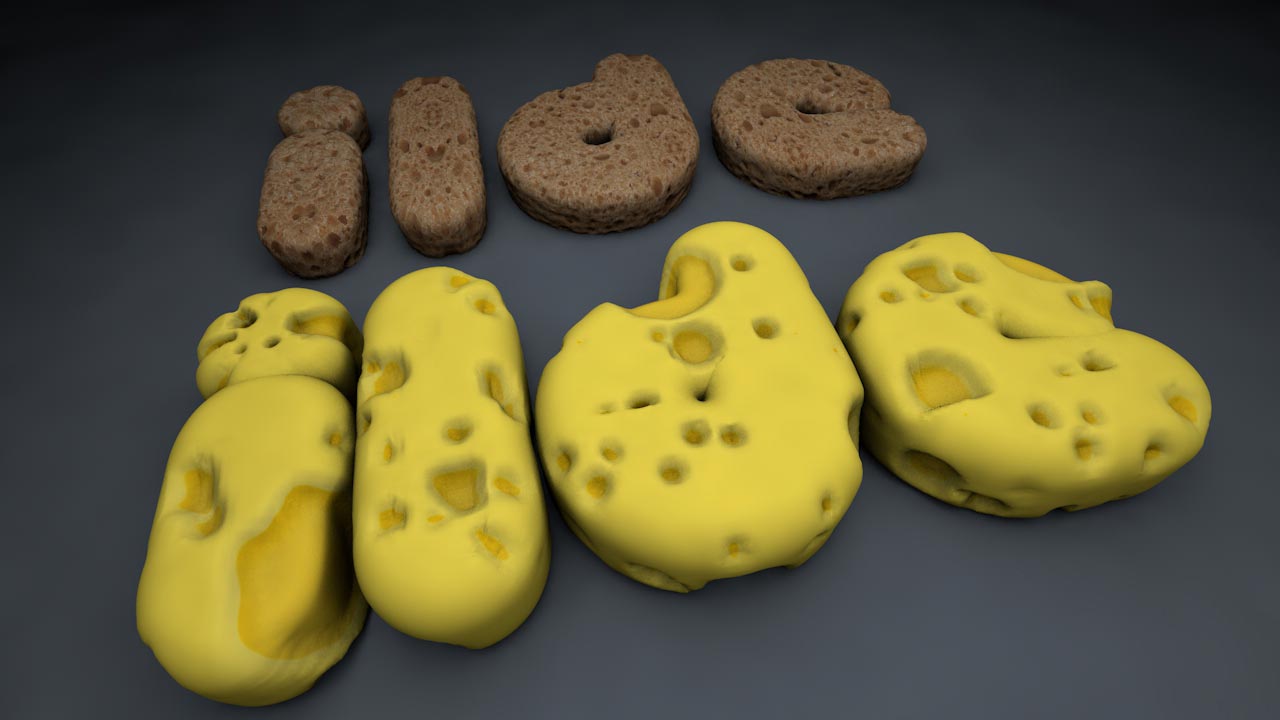
					<description><![CDATA[<p>En este tutorial de cinema4d aprenderemos a poner texturas en textos que nos ayuden a crear aspectos de comida como el queso. En el tutorial uso textura de queso pero puede ser cualquier textura irregular de alimentos. Creamos texto con aspecto de queso haciendo mapeados UV adecuados para conseguir resultados muy reales en los renders. [&#8230;]</p>
La entrada <a href="https://ildefonsosegura.es/haz-un-texto-de-queso-con-cinema4d-mapeando-coordenadas-uv-tutorial-by-ildefonsosegura/">Haz un texto de queso con #Cinema4d mapeando coordenadas UV // tutorial by @ildefonsosegura</a> apareció primero en <a href="https://ildefonsosegura.es">Ildefonso Segura</a>.]]></description>
										<content:encoded><![CDATA[<p>En este tutorial de cinema4d aprenderemos a poner texturas en textos que nos ayuden a crear aspectos de comida como el queso. En el tutorial uso textura de queso pero puede ser cualquier textura irregular de alimentos.</p>
<p><img loading="lazy" decoding="async" class="aligncenter size-full wp-image-5300" src="https://ildefonsosegura.es/wp-content/uploads/queso-1.jpg" alt="queso-1" width="640" height="420" /></p>
<p>Creamos texto con aspecto de queso haciendo mapeados UV adecuados para conseguir resultados muy reales en los renders.</p>
<p><img loading="lazy" decoding="async" class="aligncenter size-full wp-image-5301" src="https://ildefonsosegura.es/wp-content/uploads/queso-2.jpg" alt="queso-2" width="640" height="420" /></p>
<p>Por ejemplo también podemos trabajar textura de hamburguesa</p>
<p><img loading="lazy" decoding="async" class="aligncenter size-full wp-image-5302" src="https://ildefonsosegura.es/wp-content/uploads/queso-3.jpg" alt="queso-3" width="1200" height="1697" srcset="https://ildefonsosegura.es/wp-content/uploads/queso-3.jpg 1200w, https://ildefonsosegura.es/wp-content/uploads/queso-3-212x300.jpg 212w, https://ildefonsosegura.es/wp-content/uploads/queso-3-768x1086.jpg 768w, https://ildefonsosegura.es/wp-content/uploads/queso-3-724x1024.jpg 724w" sizes="(max-width: 1200px) 100vw, 1200px" /></p>
<p>En el tutorial aprenderás</p>
<ol>
<li style="text-align: justify;">Iluminar una escena</li>
<li style="text-align: justify;">Crear un texto 3D</li>
<li style="text-align: justify;">Asignar coordenadas UV</li>
<li style="text-align: justify;">Adaptar el mapeado a la extrusión del texto para crear una textura menos deformada en los materiales que se le asignen</li>
<li style="text-align: justify;">Crear un material que simula textura de queso</li>
<li style="text-align: justify;">Y muchos otros trucos que, aún siendo simples, te ilustrarán en su aplicación práctica</li>
</ol>
<p style="text-align: justify;">No te lo pierdas y comparte tus trabajos en mi página de facebook (<a href="http://www.facebook.com/IldefonsoSeguraPage" target="_blank">IldefonsoSeguraPage</a>)</p>
<p>Espero que te guste y compartas el video</p>
<p style="text-align: left;"><strong>TUTORIAL MAPEADO UV (TEXTURA QUESO CON CINEMA4D)</strong></p>
<p style="text-align: left;"><iframe src="https://www.youtube.com/embed/YSSFzf1uZQs?rel=0" width="640" height="420" frameborder="0" allowfullscreen="allowfullscreen"></iframe></p>
<p>&nbsp;</p>
<p style="text-align: left;">
<div>
<p style="text-align: center;">[vc_button title=»BAJATE LOS MATERIALES» target=»blank» color=»btn-danger» size=»btn-large» href=»https://goo.gl/ExC60E»]</p>
<p style="text-align: right;">Suscríbete a mi canal de Youtube:</p>
<div align="right">
<p><script src="https://apis.google.com/js/platform.js"></script><script>// <![CDATA[
function onYtEvent(payload) { if (payload.eventType == 'subscribe') { // Add code to handle subscribe event. } else if (payload.eventType == 'unsubscribe') { // Add code to handle unsubscribe event. } if (window.console) { // for debugging only window.console.log('YT event: ', payload); } }
// ]]&gt;</script></p>
<div class="g-ytsubscribe" data-channel="ildefonsosegura" data-layout="default" data-count="default" data-onytevent="onYtEvent"></div>
</div>
</div>
<p style="text-align: left;">No dejes de compartir este post.</p>
<p style="text-align: left;">Así es como me puedes ayudar 🙂 Gracias</p>
<p>&nbsp;</p>La entrada <a href="https://ildefonsosegura.es/haz-un-texto-de-queso-con-cinema4d-mapeando-coordenadas-uv-tutorial-by-ildefonsosegura/">Haz un texto de queso con #Cinema4d mapeando coordenadas UV // tutorial by @ildefonsosegura</a> apareció primero en <a href="https://ildefonsosegura.es">Ildefonso Segura</a>.]]></content:encoded>
					
					<wfw:commentRss>https://ildefonsosegura.es/haz-un-texto-de-queso-con-cinema4d-mapeando-coordenadas-uv-tutorial-by-ildefonsosegura/feed/</wfw:commentRss>
			<slash:comments>2</slash:comments>
		
		
			</item>
		<item>
		<title>Tutorial Photoshop // Paisaje con texto 3D</title>
		<link>https://ildefonsosegura.es/paisaje-con-texto-3d-con-photoshop-cs6/</link>
					<comments>https://ildefonsosegura.es/paisaje-con-texto-3d-con-photoshop-cs6/#respond</comments>
		
		<dc:creator><![CDATA[Ildefonso Segura]]></dc:creator>
		<pubDate>Sat, 29 Dec 2012 00:52:09 +0000</pubDate>
				<category><![CDATA[3D]]></category>
		<category><![CDATA[Efectos]]></category>
		<category><![CDATA[Fotocomposición]]></category>
		<category><![CDATA[Photoshop]]></category>
		<category><![CDATA[Tecnicas]]></category>
		<category><![CDATA[Textos]]></category>
		<category><![CDATA[Tutoriales]]></category>
		<category><![CDATA[Wallpaper]]></category>
		<category><![CDATA[agua]]></category>
		<category><![CDATA[desenfoque]]></category>
		<category><![CDATA[extrusión]]></category>
		<category><![CDATA[gloriasanis]]></category>
		<category><![CDATA[ildefonsosegura]]></category>
		<category><![CDATA[iluminación]]></category>
		<category><![CDATA[luz]]></category>
		<category><![CDATA[mar]]></category>
		<category><![CDATA[modulo 3D]]></category>
		<category><![CDATA[oceano]]></category>
		<category><![CDATA[paisaje]]></category>
		<category><![CDATA[perspectiva]]></category>
		<category><![CDATA[tilt-shift]]></category>
		<guid isPermaLink="false">http://ildefonsosegura.es/?p=1131</guid>

					<description><![CDATA[<p>Aquí tienes este bonito wallpaper para tu fondo de escritorio o para regalar a tu familia o amigos. En el tutorial que muestro aprenderemos algunas mejoras que Adobe ha incorporado tales como: 1.- Herramienta recortar para aplanar 2.- Nuevo filtro de desenfoque tilt-shift 3.- Módulo 3D con nuevas referencias y panel de objetos (sombras, luces, [&#8230;]</p>
La entrada <a href="https://ildefonsosegura.es/paisaje-con-texto-3d-con-photoshop-cs6/">Tutorial Photoshop // Paisaje con texto 3D</a> apareció primero en <a href="https://ildefonsosegura.es">Ildefonso Segura</a>.]]></description>
										<content:encoded><![CDATA[<p>Aquí tienes este bonito wallpaper para tu fondo de escritorio o para regalar a tu familia o amigos.</p>
<p style="text-align: center;"><img loading="lazy" decoding="async" class="size-full wp-image-1126 aligncenter" alt="Wallpaper-texto-3D" src="https://ildefonsosegura.es/wp-content/uploads/Wallpaper-texto-3D.jpg" width="550" height="309" srcset="https://ildefonsosegura.es/wp-content/uploads/Wallpaper-texto-3D.jpg 550w, https://ildefonsosegura.es/wp-content/uploads/Wallpaper-texto-3D-300x168.jpg 300w" sizes="(max-width: 550px) 100vw, 550px" /></p>
<p>En el tutorial que muestro aprenderemos algunas mejoras que Adobe ha incorporado tales como:<br />
1.- Herramienta recortar para aplanar</p>
<p>2.- Nuevo filtro de desenfoque tilt-shift</p>
<p>3.- Módulo 3D con nuevas referencias y panel de objetos (sombras, luces, reflexión,..)</p>
<p>&nbsp;</p>
<p><span style="color: #800000;"><strong>VIDEOTUTORIAL </strong></span></p>
<p><center><iframe src="https://www.youtube.com/embed/Xf2AwV5GvLU" height="360" width="640" allowfullscreen="" frameborder="0"></iframe></center></p>
<p><center>[vc_button title=»BAJATE LOS MATERIALES» target=»blank» color=»btn-danger» size=»btn-large» href=»https://drive.google.com/open?id=0B_nJkCGJubucT2l6aGtJVHNueDg»]</center>&nbsp;</p>La entrada <a href="https://ildefonsosegura.es/paisaje-con-texto-3d-con-photoshop-cs6/">Tutorial Photoshop // Paisaje con texto 3D</a> apareció primero en <a href="https://ildefonsosegura.es">Ildefonso Segura</a>.]]></content:encoded>
					
					<wfw:commentRss>https://ildefonsosegura.es/paisaje-con-texto-3d-con-photoshop-cs6/feed/</wfw:commentRss>
			<slash:comments>0</slash:comments>
		
		
			</item>
		<item>
		<title>Intro de la película Total Recall 2012 con Cinema4D y After Effects</title>
		<link>https://ildefonsosegura.es/intro-de-la-pelicula-total-recall-2012-con-cinema4d-y-after-effects/</link>
					<comments>https://ildefonsosegura.es/intro-de-la-pelicula-total-recall-2012-con-cinema4d-y-after-effects/#respond</comments>
		
		<dc:creator><![CDATA[Ildefonso Segura]]></dc:creator>
		<pubDate>Fri, 28 Dec 2012 02:59:20 +0000</pubDate>
				<category><![CDATA[3D]]></category>
		<category><![CDATA[After Effects]]></category>
		<category><![CDATA[Cinema4D]]></category>
		<category><![CDATA[Efectos]]></category>
		<category><![CDATA[Intro]]></category>
		<category><![CDATA[Películas]]></category>
		<category><![CDATA[Tecnicas]]></category>
		<category><![CDATA[Textos]]></category>
		<category><![CDATA[Tutoriales]]></category>
		<category><![CDATA[Video]]></category>
		<category><![CDATA[after effects]]></category>
		<category><![CDATA[brillo]]></category>
		<category><![CDATA[cine]]></category>
		<category><![CDATA[cinema4D]]></category>
		<category><![CDATA[desafio total]]></category>
		<category><![CDATA[efecto]]></category>
		<category><![CDATA[efectos]]></category>
		<category><![CDATA[effects]]></category>
		<category><![CDATA[enter]]></category>
		<category><![CDATA[extrusión]]></category>
		<category><![CDATA[fondo]]></category>
		<category><![CDATA[gloriasanis]]></category>
		<category><![CDATA[ildefonsosegura]]></category>
		<category><![CDATA[intro]]></category>
		<category><![CDATA[movie]]></category>
		<category><![CDATA[movimiento]]></category>
		<category><![CDATA[particular]]></category>
		<category><![CDATA[plugin]]></category>
		<category><![CDATA[poster]]></category>
		<category><![CDATA[recall]]></category>
		<category><![CDATA[text]]></category>
		<category><![CDATA[total recall]]></category>
		<category><![CDATA[tuto]]></category>
		<category><![CDATA[video]]></category>
		<category><![CDATA[youtube]]></category>
		<guid isPermaLink="false">http://ildefonsosegura.es/?p=1255</guid>

					<description><![CDATA[<p>&#160; Este video tutorial mostraré como trabajar con dos softwares : Cinema4D y After Effects. En cinema4D aprenderemos a: Introducir texto en cinema4D con extrusión Aplicaremos un efecto de rotación de las letras sobre su propio eje en varias direcciones Movimiento de cámara Efectos de reflexión En After Effects aprenderemos a: Crear un fondo animado [&#8230;]</p>
La entrada <a href="https://ildefonsosegura.es/intro-de-la-pelicula-total-recall-2012-con-cinema4d-y-after-effects/">Intro de la película Total Recall 2012 con Cinema4D y After Effects</a> apareció primero en <a href="https://ildefonsosegura.es">Ildefonso Segura</a>.]]></description>
										<content:encoded><![CDATA[<p>&nbsp;</p>
<p>Este video tutorial mostraré como trabajar con dos softwares : Cinema4D y After Effects.</p>
<p>En cinema4D aprenderemos a:</p>
<ol>
<li>Introducir texto en cinema4D con extrusión</li>
<li>Aplicaremos un efecto de rotación de las letras sobre su propio eje en varias direcciones</li>
<li>Movimiento de cámara</li>
<li>Efectos de reflexión</li>
</ol>
<p>En After Effects aprenderemos a:</p>
<ol>
<li>Crear un fondo animado abstracto</li>
<li>Usar el plugin particular</li>
<li>Usar el plugin shine</li>
<li>Usar el plugin Starglow</li>
<li>Usar mates com plantillas</li>
<li>Crear efectos de brillo</li>
</ol>
<p>&nbsp;</p>
<p><span style="color: #800000;"><strong>PRESENTACION DE LA INTRO </strong></span></p>
<p><center><iframe src="https://www.youtube.com/embed/0wsBZybyCpI" height="360" width="640" allowfullscreen="" frameborder="0"></iframe></center>&nbsp;</p>
<p><span style="color: #800000;"><strong>VIDEOTUTORIAL </strong></span></p>
<p><center><iframe src="https://www.youtube.com/embed/A3TXMowq9uw" height="360" width="640" allowfullscreen="" frameborder="0"></iframe></center>&nbsp;</p>
<p><center>[vc_button title=»BAJATE LOS MATERIALES» target=»blank» color=»btn-danger» size=»btn-large» href=»https://drive.google.com/open?id=0B_nJkCGJubucZjhZejZ3b1FFdVE»]</center>&nbsp;</p>La entrada <a href="https://ildefonsosegura.es/intro-de-la-pelicula-total-recall-2012-con-cinema4d-y-after-effects/">Intro de la película Total Recall 2012 con Cinema4D y After Effects</a> apareció primero en <a href="https://ildefonsosegura.es">Ildefonso Segura</a>.]]></content:encoded>
					
					<wfw:commentRss>https://ildefonsosegura.es/intro-de-la-pelicula-total-recall-2012-con-cinema4d-y-after-effects/feed/</wfw:commentRss>
			<slash:comments>0</slash:comments>
		
		
			</item>
		<item>
		<title>Texto 3D reflejado // Tutorial After Effects</title>
		<link>https://ildefonsosegura.es/texto-3d-reflejado-con-after-effects/</link>
					<comments>https://ildefonsosegura.es/texto-3d-reflejado-con-after-effects/#respond</comments>
		
		<dc:creator><![CDATA[Ildefonso Segura]]></dc:creator>
		<pubDate>Sat, 22 Dec 2012 19:04:29 +0000</pubDate>
				<category><![CDATA[3D]]></category>
		<category><![CDATA[After Effects]]></category>
		<category><![CDATA[Editable]]></category>
		<category><![CDATA[Efectos]]></category>
		<category><![CDATA[Textos]]></category>
		<category><![CDATA[Tutoriales]]></category>
		<category><![CDATA[camara]]></category>
		<category><![CDATA[camera]]></category>
		<category><![CDATA[extrusión]]></category>
		<category><![CDATA[flares]]></category>
		<category><![CDATA[gloriasanis]]></category>
		<category><![CDATA[ildefonsosegura]]></category>
		<category><![CDATA[movimiento camara]]></category>
		<category><![CDATA[optical]]></category>
		<category><![CDATA[reflejar]]></category>
		<category><![CDATA[reflejo]]></category>
		<category><![CDATA[text]]></category>
		<guid isPermaLink="false">http://ildefonsosegura.es/?p=924</guid>

					<description><![CDATA[<p>Aprende a crear un texto 3D con After Effects e incorporalo a una intro con el efecto-plugin OPTICAL FLARE que puedes adquirir en VIDEOCOPILOT.NET además de aplicar un movimiento de cámara. &#160; VIDEOTUTORIAL &#160; Este videotutorial tiene una intro editable en la que se aplica este efecto de texto.  Puedes descargarte la intro y los [&#8230;]</p>
La entrada <a href="https://ildefonsosegura.es/texto-3d-reflejado-con-after-effects/">Texto 3D reflejado // Tutorial After Effects</a> apareció primero en <a href="https://ildefonsosegura.es">Ildefonso Segura</a>.]]></description>
										<content:encoded><![CDATA[<p>Aprende a crear un texto 3D con After Effects e incorporalo a una intro con el efecto-plugin OPTICAL FLARE que puedes adquirir en VIDEOCOPILOT.NET además de aplicar un movimiento de cámara.</p>
<p>&nbsp;</p>
<p><span style="color: #800000;"><strong>VIDEOTUTORIAL </strong></span></p>
<p><center><iframe src="https://www.youtube.com/embed/cG0GKeecJrs" height="360" width="640" allowfullscreen="" frameborder="0"></iframe></center>&nbsp;</p>
<p>Este videotutorial tiene una intro editable en la que se aplica este efecto de texto.  Puedes descargarte la intro y los materiales</p>
<p><center>[vc_button title=»BAJATE LOS MATERIALES» target=»blank» color=»btn-danger» size=»btn-large» href=»https://drive.google.com/open?id=0B_nJkCGJubucRDc3V24xTWQzcGM»]</center>&nbsp;</p>
<p>&nbsp;</p>
<div align="right">
<p><script src="https://apis.google.com/js/platform.js"></script><script>// <![CDATA[
function onYtEvent(payload) { if (payload.eventType == 'subscribe') { // Add code to handle subscribe event. } else if (payload.eventType == 'unsubscribe') { // Add code to handle unsubscribe event. } if (window.console) { // for debugging only window.console.log('YT event: ', payload); } }
// ]]&gt;</script></p>
<div class="g-ytsubscribe" data-channel="ildefonsosegura" data-layout="default" data-count="default" data-onytevent="onYtEvent"></div>
</div>
</div>
<p style="text-align: left;">No dejes de compartir este post.</p>
<p style="text-align: left;">Así es como me puedes ayudar 🙂 Gracias</p>
<p>&nbsp;</p>La entrada <a href="https://ildefonsosegura.es/texto-3d-reflejado-con-after-effects/">Texto 3D reflejado // Tutorial After Effects</a> apareció primero en <a href="https://ildefonsosegura.es">Ildefonso Segura</a>.]]></content:encoded>
					
					<wfw:commentRss>https://ildefonsosegura.es/texto-3d-reflejado-con-after-effects/feed/</wfw:commentRss>
			<slash:comments>0</slash:comments>
		
		
			</item>
		<item>
		<title>Tutorial Photoshop // Texto Digital</title>
		<link>https://ildefonsosegura.es/texto-digital/</link>
					<comments>https://ildefonsosegura.es/texto-digital/#respond</comments>
		
		<dc:creator><![CDATA[Ildefonso Segura]]></dc:creator>
		<pubDate>Sat, 22 Dec 2012 09:36:14 +0000</pubDate>
				<category><![CDATA[Photoshop]]></category>
		<category><![CDATA[Tecnicas]]></category>
		<category><![CDATA[Textos]]></category>
		<category><![CDATA[Tutoriales]]></category>
		<category><![CDATA[capas]]></category>
		<category><![CDATA[digital]]></category>
		<category><![CDATA[extrusión]]></category>
		<category><![CDATA[gloriasanis]]></category>
		<category><![CDATA[ildefonsosegura]]></category>
		<category><![CDATA[placas]]></category>
		<category><![CDATA[text]]></category>
		<guid isPermaLink="false">http://ildefonsosegura.es/?p=733</guid>

					<description><![CDATA[<p>A través de capas y filtros creamos un efecto de texto tan atractivo como el que se ve en la imagen. La técnica puede utilizarse en otros tipos de objetos.   VIDEOTUTORIAL         DESCARGA EL MATERIAL Suscríbete a mi canal de Youtube:     No te lo pierdas y comparte tus trabajos [&#8230;]</p>

La entrada <a href="https://ildefonsosegura.es/texto-digital/">Tutorial Photoshop // Texto Digital</a> apareció primero en <a href="https://ildefonsosegura.es">Ildefonso Segura</a>.]]></description>
										<content:encoded><![CDATA[<div data-elementor-type="wp-post" data-elementor-id="733" class="elementor elementor-733">
						<section class="elementor-section elementor-top-section elementor-element elementor-element-78e4e18e elementor-section-boxed elementor-section-height-default elementor-section-height-default" data-id="78e4e18e" data-element_type="section" data-e-type="section">
						<div class="elementor-container elementor-column-gap-default">
					<div class="elementor-column elementor-col-100 elementor-top-column elementor-element elementor-element-4a868ad3" data-id="4a868ad3" data-element_type="column" data-e-type="column">
			<div class="elementor-widget-wrap elementor-element-populated">
						<div class="elementor-element elementor-element-22e2636f elementor-widget elementor-widget-text-editor" data-id="22e2636f" data-element_type="widget" data-e-type="widget" data-widget_type="text-editor.default">
				<div class="elementor-widget-container">
									<p style="text-align: center;"><a href="https://ildefonsosegura.es/texto-digital/digital/" rel="attachment wp-att-734"><img loading="lazy" decoding="async" class="alignnone size-full wp-image-734" src="https://ildefonsosegura.es/wp-content/uploads/Digital.jpg" alt="Digital" width="454" height="255" srcset="https://ildefonsosegura.es/wp-content/uploads/Digital.jpg 454w, https://ildefonsosegura.es/wp-content/uploads/Digital-300x168.jpg 300w" sizes="(max-width: 454px) 100vw, 454px" /></a></p><p>A través de capas y filtros creamos un efecto de texto tan atractivo como el que se ve en la imagen. La técnica puede utilizarse en otros tipos de objetos.</p><p><strong style="color: #800000; font-size: 14px;"> </strong></p><p><strong style="color: #800000; font-size: 14px;">VIDEOTUTORIAL</strong></p><p> </p><center><iframe src="https://www.youtube.com/embed/_GfrT50qlPs" width="640" height="360" frameborder="0" allowfullscreen="allowfullscreen"></iframe></center><p> </p><p> </p><p> </p>								</div>
				</div>
					</div>
		</div>
					</div>
		</section>
				<section class="elementor-section elementor-top-section elementor-element elementor-element-491006aa elementor-section-boxed elementor-section-height-default elementor-section-height-default" data-id="491006aa" data-element_type="section" data-e-type="section">
						<div class="elementor-container elementor-column-gap-default">
					<div class="elementor-column elementor-col-100 elementor-top-column elementor-element elementor-element-4badc670" data-id="4badc670" data-element_type="column" data-e-type="column">
			<div class="elementor-widget-wrap elementor-element-populated">
						<div class="elementor-element elementor-element-6e74b4bb elementor-widget-divider--view-line elementor-widget elementor-widget-divider" data-id="6e74b4bb" data-element_type="widget" data-e-type="widget" data-widget_type="divider.default">
				<div class="elementor-widget-container">
							<div class="elementor-divider">
			<span class="elementor-divider-separator">
						</span>
		</div>
						</div>
				</div>
					</div>
		</div>
					</div>
		</section>
				<section class="elementor-section elementor-top-section elementor-element elementor-element-75312e02 elementor-section-full_width elementor-section-height-default elementor-section-height-default" data-id="75312e02" data-element_type="section" data-e-type="section">
						<div class="elementor-container elementor-column-gap-default">
					<div class="elementor-column elementor-col-50 elementor-top-column elementor-element elementor-element-5667a65" data-id="5667a65" data-element_type="column" data-e-type="column">
			<div class="elementor-widget-wrap elementor-element-populated">
						<div class="elementor-element elementor-element-37723ca7 elementor-align-right elementor-invisible elementor-widget elementor-widget-button" data-id="37723ca7" data-element_type="widget" data-e-type="widget" data-settings="{&quot;_animation&quot;:&quot;shake&quot;}" data-widget_type="button.default">
				<div class="elementor-widget-container">
									<div class="elementor-button-wrapper">
					<a class="elementor-button elementor-button-link elementor-size-sm elementor-animation-grow" href="https://drive.google.com/open?id=0B_nJkCGJubucM2kwSDVYRTN1YzQ" target="_blank">
						<span class="elementor-button-content-wrapper">
									<span class="elementor-button-text">DESCARGA EL MATERIAL</span>
					</span>
					</a>
				</div>
								</div>
				</div>
					</div>
		</div>
				<div class="elementor-column elementor-col-50 elementor-top-column elementor-element elementor-element-1f96860b" data-id="1f96860b" data-element_type="column" data-e-type="column">
			<div class="elementor-widget-wrap elementor-element-populated">
						<div class="elementor-element elementor-element-7ca0c594 elementor-widget elementor-widget-html" data-id="7ca0c594" data-element_type="widget" data-e-type="widget" data-settings="{&quot;_animation&quot;:&quot;none&quot;}" data-widget_type="html.default">
				<div class="elementor-widget-container">
					<form action="https://www.paypal.com/cgi-bin/webscr" method="post" target="_blank">
<input type="hidden" name="cmd" value="_donations">
<input type="hidden" name="business" value="ildefonsosegura@gmail.com">
<input type="hidden" name="lc" value="ES">
<input type="hidden" name="item_name" value="MANTENIMIENTO DE LA PAGINA DE ILDEFONSOSEGURA">
<input type="hidden" name="no_note" value="0">
<input type="hidden" name="currency_code" value="EUR">
<input type="hidden" name="bn" value="PP-DonationsBF:paypal1.jpg:NonHostedGuest">
<input type="image" src="http://ildefonsosegura.es/wp-content/uploads/paypal-updated-1.png" border="0" name="submit" alt="PayPal. La forma rápida y segura de pagar en Internet.">
<img decoding="async" alt="" border="0" src="https://www.paypalobjects.com/es_ES/i/scr/pixel.gif" width="1" height="1">
</form>				</div>
				</div>
					</div>
		</div>
					</div>
		</section>
				<section class="elementor-section elementor-top-section elementor-element elementor-element-7949abe0 elementor-section-boxed elementor-section-height-default elementor-section-height-default" data-id="7949abe0" data-element_type="section" data-e-type="section">
						<div class="elementor-container elementor-column-gap-default">
					<div class="elementor-column elementor-col-100 elementor-top-column elementor-element elementor-element-24d7bff1" data-id="24d7bff1" data-element_type="column" data-e-type="column">
			<div class="elementor-widget-wrap elementor-element-populated">
						<div class="elementor-element elementor-element-58f9d10d elementor-widget-divider--view-line elementor-widget elementor-widget-divider" data-id="58f9d10d" data-element_type="widget" data-e-type="widget" data-widget_type="divider.default">
				<div class="elementor-widget-container">
							<div class="elementor-divider">
			<span class="elementor-divider-separator">
						</span>
		</div>
						</div>
				</div>
					</div>
		</div>
					</div>
		</section>
				<section class="elementor-section elementor-top-section elementor-element elementor-element-c85b03c elementor-section-full_width elementor-section-height-default elementor-section-height-default" data-id="c85b03c" data-element_type="section" data-e-type="section">
						<div class="elementor-container elementor-column-gap-default">
					<div class="elementor-column elementor-col-100 elementor-top-column elementor-element elementor-element-11e4479a" data-id="11e4479a" data-element_type="column" data-e-type="column">
			<div class="elementor-widget-wrap elementor-element-populated">
						<div class="elementor-element elementor-element-61e356a0 elementor-widget elementor-widget-text-editor" data-id="61e356a0" data-element_type="widget" data-e-type="widget" data-widget_type="text-editor.default">
				<div class="elementor-widget-container">
									<div><div align="center"><center><strong style="color: #ff0000;">Suscríbete a mi canal de Youtube:</strong></center><div><div><div align="center"><p><script src="https://apis.google.com/js/platform.js"></script></p><div class="g-ytsubscribe" data-channel="ildefonsosegura" data-layout="full" data-count="default"> </div></div></div><p> </p><p style="text-align: center;">No te lo pierdas y comparte tus trabajos en mi página de facebook (<span style="color: #0000ff;"><strong><a style="color: #0000ff;" href="http://www.facebook.com/IldefonsoSeguraPage" target="_blank" rel="noopener noreferrer">IldefonsoSeguraPage</a></strong></span>)<br />Espero que te guste y compartas el vídeo. No dejes de compartir este post.</p><p style="text-align: center;">Así es como me puedes ayudar 🙂 Gracias</p></div></div></div>								</div>
				</div>
					</div>
		</div>
					</div>
		</section>
				</div>La entrada <a href="https://ildefonsosegura.es/texto-digital/">Tutorial Photoshop // Texto Digital</a> apareció primero en <a href="https://ildefonsosegura.es">Ildefonso Segura</a>.]]></content:encoded>
					
					<wfw:commentRss>https://ildefonsosegura.es/texto-digital/feed/</wfw:commentRss>
			<slash:comments>0</slash:comments>
		
		
			</item>
		<item>
		<title>Tutorial Photoshop // Texto laminado con reflexión 3D (Uso de Acciones)</title>
		<link>https://ildefonsosegura.es/texto-laminado-con-reflexion-3d-uso-de-acciones/</link>
					<comments>https://ildefonsosegura.es/texto-laminado-con-reflexion-3d-uso-de-acciones/#respond</comments>
		
		<dc:creator><![CDATA[Ildefonso Segura]]></dc:creator>
		<pubDate>Sat, 22 Dec 2012 09:18:34 +0000</pubDate>
				<category><![CDATA[3D]]></category>
		<category><![CDATA[Photoshop]]></category>
		<category><![CDATA[Tecnicas]]></category>
		<category><![CDATA[Textos]]></category>
		<category><![CDATA[Tutoriales]]></category>
		<category><![CDATA[Wallpaper]]></category>
		<category><![CDATA[extrusión]]></category>
		<category><![CDATA[gloriasanis]]></category>
		<category><![CDATA[ildefonsosegura]]></category>
		<category><![CDATA[refrexión]]></category>
		<guid isPermaLink="false">http://ildefonsosegura.es/?p=714</guid>

					<description><![CDATA[<p>De nuevo utilizamos las acciones para crear una extrusión con el texto pero en esta ocasión con un efecto previo en el que conseguiremos una laminación del texto utilizando acciones. Con las acciones realizamos en poco tiempo funciones repetitivas agilizando nuestro trabajo. Además podemos salvarlas para aplicarlas a otras composiciones.  Disfruta el tutorial   VIDEOTUTORIAL [&#8230;]</p>
La entrada <a href="https://ildefonsosegura.es/texto-laminado-con-reflexion-3d-uso-de-acciones/">Tutorial Photoshop // Texto laminado con reflexión 3D (Uso de Acciones)</a> apareció primero en <a href="https://ildefonsosegura.es">Ildefonso Segura</a>.]]></description>
										<content:encoded><![CDATA[<div data-elementor-type="wp-post" data-elementor-id="714" class="elementor elementor-714">
						<section class="elementor-section elementor-top-section elementor-element elementor-element-53f1c5ec elementor-section-boxed elementor-section-height-default elementor-section-height-default" data-id="53f1c5ec" data-element_type="section" data-e-type="section">
						<div class="elementor-container elementor-column-gap-default">
					<div class="elementor-column elementor-col-100 elementor-top-column elementor-element elementor-element-4d98a648" data-id="4d98a648" data-element_type="column" data-e-type="column">
			<div class="elementor-widget-wrap elementor-element-populated">
						<div class="elementor-element elementor-element-58dd83bd elementor-widget elementor-widget-text-editor" data-id="58dd83bd" data-element_type="widget" data-e-type="widget" data-widget_type="text-editor.default">
				<div class="elementor-widget-container">
									<p style="text-align: center;"><img loading="lazy" decoding="async" class="size-full wp-image-718 aligncenter" src="https://ildefonsosegura.es/wp-content/uploads/Letras-3D-segmentadas2.jpg" alt="Letras-3D-segmentadas2" width="550" height="309" /></p><p>De nuevo utilizamos las acciones para crear una extrusión con el texto pero en esta ocasión con un efecto previo en el que conseguiremos una laminación del texto utilizando acciones. Con las acciones realizamos en poco tiempo funciones repetitivas agilizando nuestro trabajo. Además podemos salvarlas para aplicarlas a otras composiciones.  Disfruta el tutorial</p><p> </p><p style="text-align: left;"><span style="color: #800000;"><strong>VIDEOTUTORIAL </strong></span></p><p> </p><center><iframe src="https://www.youtube.com/embed/XERQMkbrQB0" width="640" height="420" frameborder="0" allowfullscreen="allowfullscreen"></iframe></center><p> </p><p> </p><p> </p>								</div>
				</div>
					</div>
		</div>
					</div>
		</section>
				<section class="elementor-section elementor-top-section elementor-element elementor-element-e689f4 elementor-section-boxed elementor-section-height-default elementor-section-height-default" data-id="e689f4" data-element_type="section" data-e-type="section">
						<div class="elementor-container elementor-column-gap-default">
					<div class="elementor-column elementor-col-100 elementor-top-column elementor-element elementor-element-7ee1a9af" data-id="7ee1a9af" data-element_type="column" data-e-type="column">
			<div class="elementor-widget-wrap elementor-element-populated">
						<div class="elementor-element elementor-element-1542ad59 elementor-widget-divider--view-line elementor-widget elementor-widget-divider" data-id="1542ad59" data-element_type="widget" data-e-type="widget" data-widget_type="divider.default">
				<div class="elementor-widget-container">
							<div class="elementor-divider">
			<span class="elementor-divider-separator">
						</span>
		</div>
						</div>
				</div>
					</div>
		</div>
					</div>
		</section>
				<section class="elementor-section elementor-top-section elementor-element elementor-element-4aac2786 elementor-section-full_width elementor-section-height-default elementor-section-height-default" data-id="4aac2786" data-element_type="section" data-e-type="section">
						<div class="elementor-container elementor-column-gap-default">
					<div class="elementor-column elementor-col-50 elementor-top-column elementor-element elementor-element-5ebcd7f3" data-id="5ebcd7f3" data-element_type="column" data-e-type="column">
			<div class="elementor-widget-wrap elementor-element-populated">
						<div class="elementor-element elementor-element-3511c4fa elementor-align-right elementor-invisible elementor-widget elementor-widget-button" data-id="3511c4fa" data-element_type="widget" data-e-type="widget" data-settings="{&quot;_animation&quot;:&quot;shake&quot;}" data-widget_type="button.default">
				<div class="elementor-widget-container">
									<div class="elementor-button-wrapper">
					<a class="elementor-button elementor-button-link elementor-size-sm elementor-animation-grow" href="https://drive.google.com/open?id=0B_nJkCGJubucZXVGdXpzSVVLeEk" target="_blank">
						<span class="elementor-button-content-wrapper">
									<span class="elementor-button-text">DESCARGA EL MATERIAL</span>
					</span>
					</a>
				</div>
								</div>
				</div>
					</div>
		</div>
				<div class="elementor-column elementor-col-50 elementor-top-column elementor-element elementor-element-5a20917b" data-id="5a20917b" data-element_type="column" data-e-type="column">
			<div class="elementor-widget-wrap elementor-element-populated">
						<div class="elementor-element elementor-element-1437b894 elementor-widget elementor-widget-html" data-id="1437b894" data-element_type="widget" data-e-type="widget" data-settings="{&quot;_animation&quot;:&quot;none&quot;}" data-widget_type="html.default">
				<div class="elementor-widget-container">
					<form action="https://www.paypal.com/cgi-bin/webscr" method="post" target="_blank">
<input type="hidden" name="cmd" value="_donations">
<input type="hidden" name="business" value="ildefonsosegura@gmail.com">
<input type="hidden" name="lc" value="ES">
<input type="hidden" name="item_name" value="MANTENIMIENTO DE LA PAGINA DE ILDEFONSOSEGURA">
<input type="hidden" name="no_note" value="0">
<input type="hidden" name="currency_code" value="EUR">
<input type="hidden" name="bn" value="PP-DonationsBF:paypal1.jpg:NonHostedGuest">
<input type="image" src="http://ildefonsosegura.es/wp-content/uploads/paypal-updated-1.png" border="0" name="submit" alt="PayPal. La forma rápida y segura de pagar en Internet.">
<img decoding="async" alt="" border="0" src="https://www.paypalobjects.com/es_ES/i/scr/pixel.gif" width="1" height="1">
</form>				</div>
				</div>
					</div>
		</div>
					</div>
		</section>
				<section class="elementor-section elementor-top-section elementor-element elementor-element-341887a5 elementor-section-boxed elementor-section-height-default elementor-section-height-default" data-id="341887a5" data-element_type="section" data-e-type="section">
						<div class="elementor-container elementor-column-gap-default">
					<div class="elementor-column elementor-col-100 elementor-top-column elementor-element elementor-element-516faeb2" data-id="516faeb2" data-element_type="column" data-e-type="column">
			<div class="elementor-widget-wrap elementor-element-populated">
						<div class="elementor-element elementor-element-675bea35 elementor-widget-divider--view-line elementor-widget elementor-widget-divider" data-id="675bea35" data-element_type="widget" data-e-type="widget" data-widget_type="divider.default">
				<div class="elementor-widget-container">
							<div class="elementor-divider">
			<span class="elementor-divider-separator">
						</span>
		</div>
						</div>
				</div>
					</div>
		</div>
					</div>
		</section>
				<section class="elementor-section elementor-top-section elementor-element elementor-element-16eb9363 elementor-section-full_width elementor-section-height-default elementor-section-height-default" data-id="16eb9363" data-element_type="section" data-e-type="section">
						<div class="elementor-container elementor-column-gap-default">
					<div class="elementor-column elementor-col-100 elementor-top-column elementor-element elementor-element-9d49d7f" data-id="9d49d7f" data-element_type="column" data-e-type="column">
			<div class="elementor-widget-wrap elementor-element-populated">
						<div class="elementor-element elementor-element-16822069 elementor-widget elementor-widget-text-editor" data-id="16822069" data-element_type="widget" data-e-type="widget" data-widget_type="text-editor.default">
				<div class="elementor-widget-container">
									<div><div align="center"><center><strong style="color: #ff0000;">Suscríbete a mi canal de Youtube:</strong></center><div><div><div align="center"><p><script src="https://apis.google.com/js/platform.js"></script></p><div class="g-ytsubscribe" data-channel="ildefonsosegura" data-layout="full" data-count="default"> </div></div></div><p> </p><p style="text-align: center;">No te lo pierdas y comparte tus trabajos en mi página de facebook (<span style="color: #0000ff;"><strong><a style="color: #0000ff;" href="http://www.facebook.com/IldefonsoSeguraPage" target="_blank" rel="noopener noreferrer">IldefonsoSeguraPage</a></strong></span>)<br />Espero que te guste y compartas el vídeo. No dejes de compartir este post.</p><p style="text-align: center;">Así es como me puedes ayudar 🙂 Gracias</p></div></div></div>								</div>
				</div>
					</div>
		</div>
					</div>
		</section>
				</div>La entrada <a href="https://ildefonsosegura.es/texto-laminado-con-reflexion-3d-uso-de-acciones/">Tutorial Photoshop // Texto laminado con reflexión 3D (Uso de Acciones)</a> apareció primero en <a href="https://ildefonsosegura.es">Ildefonso Segura</a>.]]></content:encoded>
					
					<wfw:commentRss>https://ildefonsosegura.es/texto-laminado-con-reflexion-3d-uso-de-acciones/feed/</wfw:commentRss>
			<slash:comments>0</slash:comments>
		
		
			</item>
	</channel>
</rss>

<!--
Performance optimized by W3 Total Cache. Learn more: https://www.boldgrid.com/w3-total-cache/?utm_source=w3tc&utm_medium=footer_comment&utm_campaign=free_plugin

Caché de objetos 0/52 objetos usando Redis
Caché de base de datos usando Redis

Served from: ildefonsosegura.es @ 2026-06-19 09:53:47 by W3 Total Cache
--><br />
<b>Fatal error</b>:  Uncaught TypeError: mysqli_num_fields(): Argument #1 ($result) must be of type mysqli_result, bool given in /var/www/vhosts/ildefonsosegura.es/httpdocs/wp-includes/class-wpdb.php:3870
Stack trace:
#0 /var/www/vhosts/ildefonsosegura.es/httpdocs/wp-includes/class-wpdb.php(3870): mysqli_num_fields()
#1 /var/www/vhosts/ildefonsosegura.es/httpdocs/wp-includes/class-wpdb.php(785): wpdb-&gt;load_col_info()
#2 /var/www/vhosts/ildefonsosegura.es/httpdocs/wp-content/plugins/w3-total-cache/DbCache_WpdbInjection_QueryCaching.php(230): wpdb-&gt;__get()
#3 /var/www/vhosts/ildefonsosegura.es/httpdocs/wp-content/plugins/w3-total-cache/DbCache_WpdbNew.php(216): W3TC\DbCache_WpdbInjection_QueryCaching-&gt;query()
#4 /var/www/vhosts/ildefonsosegura.es/httpdocs/wp-content/plugins/aaa-option-optimizer/src/class-database.php(199): W3TC\DbCache_WpdbNew-&gt;query()
#5 /var/www/vhosts/ildefonsosegura.es/httpdocs/wp-content/plugins/aaa-option-optimizer/src/class-plugin.php(182): Progress_Planner\OptionOptimizer\Database::batch_insert()
#6 /var/www/vhosts/ildefonsosegura.es/httpdocs/wp-includes/class-wp-hook.php(341): Progress_Planner\OptionOptimizer\Plugin-&gt;update_tracked_options()
#7 /var/www/vhosts/ildefonsosegura.es/httpdocs/wp-includes/class-wp-hook.php(365): WP_Hook-&gt;apply_filters()
#8 /var/www/vhosts/ildefonsosegura.es/httpdocs/wp-includes/plugin.php(522): WP_Hook-&gt;do_action()
#9 /var/www/vhosts/ildefonsosegura.es/httpdocs/wp-includes/load.php(1308): do_action()
#10 [internal function]: shutdown_action_hook()
#11 {main}
  thrown in <b>/var/www/vhosts/ildefonsosegura.es/httpdocs/wp-includes/class-wpdb.php</b> on line <b>3870</b><br />