<?xml version="1.0" encoding="UTF-8"?><rss version="2.0"
	xmlns:content="http://purl.org/rss/1.0/modules/content/"
	xmlns:wfw="http://wellformedweb.org/CommentAPI/"
	xmlns:dc="http://purl.org/dc/elements/1.1/"
	xmlns:atom="http://www.w3.org/2005/Atom"
	xmlns:sy="http://purl.org/rss/1.0/modules/syndication/"
	xmlns:slash="http://purl.org/rss/1.0/modules/slash/"
	>

<channel>
	<title>design | Ildefonso Segura</title>
	<atom:link href="https://ildefonsosegura.es/tag/design/feed/" rel="self" type="application/rss+xml" />
	<link>https://ildefonsosegura.es</link>
	<description>Tutoriales de diseño y animación</description>
	<lastBuildDate>Sun, 04 Jun 2023 12:19:02 +0000</lastBuildDate>
	<language>es</language>
	<sy:updatePeriod>
	hourly	</sy:updatePeriod>
	<sy:updateFrequency>
	1	</sy:updateFrequency>
	<generator>https://wordpress.org/?v=7.1.1</generator>

<image>
	<url>https://ildefonsosegura.es/wp-content/uploads/cropped-Favicon-new-logo-website-32x32.png</url>
	<title>design | Ildefonso Segura</title>
	<link>https://ildefonsosegura.es</link>
	<width>32</width>
	<height>32</height>
</image> 
	<item>
		<title>Fotomontaje nadando en una carretera Tutorial Photoshop by @ildefonsosegura</title>
		<link>https://ildefonsosegura.es/fotomontaje-nadando-en-una-carretera-tutorial-photoshop-by-ildefonsosegura/</link>
					<comments>https://ildefonsosegura.es/fotomontaje-nadando-en-una-carretera-tutorial-photoshop-by-ildefonsosegura/#respond</comments>
		
		<dc:creator><![CDATA[Ildefonso Segura]]></dc:creator>
		<pubDate>Sat, 29 Dec 2018 15:30:27 +0000</pubDate>
				<category><![CDATA[Efectos]]></category>
		<category><![CDATA[Fotocomposición]]></category>
		<category><![CDATA[Photoshop]]></category>
		<category><![CDATA[Tecnicas]]></category>
		<category><![CDATA[Tutoriales]]></category>
		<category><![CDATA[Video]]></category>
		<category><![CDATA[Wallpaper]]></category>
		<category><![CDATA[adobe]]></category>
		<category><![CDATA[agua]]></category>
		<category><![CDATA[agua en asfalto]]></category>
		<category><![CDATA[carretera]]></category>
		<category><![CDATA[cc2018]]></category>
		<category><![CDATA[cc2019]]></category>
		<category><![CDATA[creative cloud]]></category>
		<category><![CDATA[design]]></category>
		<category><![CDATA[diseño]]></category>
		<category><![CDATA[fotomanipulación]]></category>
		<category><![CDATA[fotomontaje]]></category>
		<category><![CDATA[highway]]></category>
		<category><![CDATA[ildefonsosegura]]></category>
		<category><![CDATA[imagiación]]></category>
		<category><![CDATA[manipulación]]></category>
		<category><![CDATA[montaje]]></category>
		<category><![CDATA[nadando]]></category>
		<category><![CDATA[photoshop]]></category>
		<category><![CDATA[road]]></category>
		<category><![CDATA[simulacion]]></category>
		<category><![CDATA[swimmer]]></category>
		<category><![CDATA[swimming]]></category>
		<category><![CDATA[swimming into the highway]]></category>
		<category><![CDATA[teaching]]></category>
		<category><![CDATA[textura asfalto]]></category>
		<category><![CDATA[tuto]]></category>
		<category><![CDATA[tutorial]]></category>
		<category><![CDATA[video]]></category>
		<category><![CDATA[youtube]]></category>
		<guid isPermaLink="false">http://ildefonsosegura.es/?p=6382</guid>

					<description><![CDATA[<p>En la red habrás visto efectos similares al que he desarrollado yo. Los resultados que he visto son fantásticos y quise hacer mi fotomontaje con photoshop intentando crear una textura que mezclara agua con asfalto. Creo que lo conseguí a pesar que el fotomontaje requiere mucha labor de pruebas y aplicación de técnicas que consigan [&#8230;]</p>
La entrada <a href="https://ildefonsosegura.es/fotomontaje-nadando-en-una-carretera-tutorial-photoshop-by-ildefonsosegura/">Fotomontaje nadando en una carretera Tutorial Photoshop by @ildefonsosegura</a> apareció primero en <a href="https://ildefonsosegura.es">Ildefonso Segura</a>.]]></description>
										<content:encoded><![CDATA[<div data-elementor-type="wp-post" data-elementor-id="6382" class="elementor elementor-6382">
						<section class="elementor-section elementor-top-section elementor-element elementor-element-635be54 elementor-section-boxed elementor-section-height-default elementor-section-height-default" data-id="635be54" data-element_type="section" data-e-type="section">
						<div class="elementor-container elementor-column-gap-default">
					<div class="elementor-column elementor-col-100 elementor-top-column elementor-element elementor-element-9b2e46e" data-id="9b2e46e" data-element_type="column" data-e-type="column">
			<div class="elementor-widget-wrap elementor-element-populated">
						<div class="elementor-element elementor-element-7539534 elementor-widget elementor-widget-text-editor" data-id="7539534" data-element_type="widget" data-e-type="widget" data-widget_type="text-editor.default">
				<div class="elementor-widget-container">
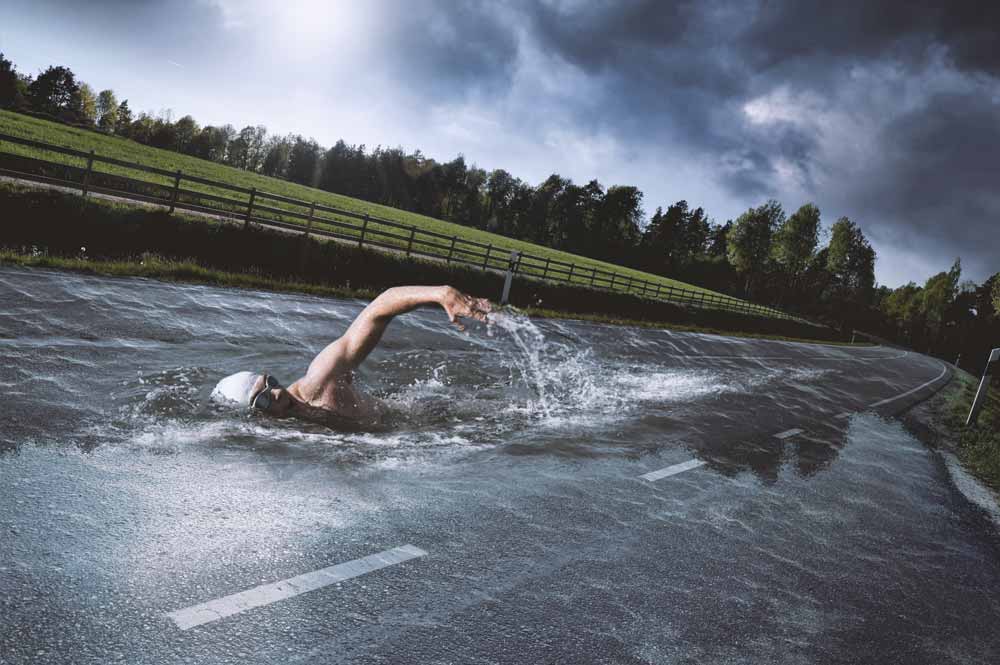
									<p style="text-align: justify;">En la red habrás visto efectos similares al que he desarrollado yo. Los resultados que he visto son fantásticos y quise hacer mi fotomontaje con photoshop intentando crear una textura que mezclara agua con asfalto. Creo que lo conseguí a pesar que el fotomontaje requiere mucha labor de pruebas y aplicación de técnicas que consigan el resultado esperado. Creo que el que hemos obtenido es genial y mantiene el espíritu de la manipulación que no es otra que simular un nadador en el asfalto. Verás como tu mente no asocia e, nadador al mar sino a la propia carretera que ha cambiado la textura.</p>								</div>
				</div>
					</div>
		</div>
					</div>
		</section>
				<section class="elementor-section elementor-top-section elementor-element elementor-element-2f8f55d elementor-section-boxed elementor-section-height-default elementor-section-height-default" data-id="2f8f55d" data-element_type="section" data-e-type="section">
						<div class="elementor-container elementor-column-gap-default">
					<div class="elementor-column elementor-col-100 elementor-top-column elementor-element elementor-element-4fe8f561" data-id="4fe8f561" data-element_type="column" data-e-type="column">
			<div class="elementor-widget-wrap elementor-element-populated">
						<div class="elementor-element elementor-element-19409cd7 elementor-widget elementor-widget-text-editor" data-id="19409cd7" data-element_type="widget" data-e-type="widget" data-widget_type="text-editor.default">
				<div class="elementor-widget-container">
									<p><img fetchpriority="high" decoding="async" class="aligncenter size-full wp-image-6389" src="https://ildefonsosegura.es/wp-content/uploads/swimmer-1.jpg" alt="" width="1000" height="665" srcset="https://ildefonsosegura.es/wp-content/uploads/swimmer-1.jpg 1000w, https://ildefonsosegura.es/wp-content/uploads/swimmer-1-300x200.jpg 300w, https://ildefonsosegura.es/wp-content/uploads/swimmer-1-768x511.jpg 768w" sizes="(max-width: 1000px) 100vw, 1000px" /></p><p style="text-align: justify;">Aquí te dejo el antes y el después del efecto conseguido</p>								</div>
				</div>
					</div>
		</div>
					</div>
		</section>
				<section class="elementor-section elementor-top-section elementor-element elementor-element-2e52303 elementor-section-boxed elementor-section-height-default elementor-section-height-default" data-id="2e52303" data-element_type="section" data-e-type="section">
						<div class="elementor-container elementor-column-gap-default">
					<div class="elementor-column elementor-col-100 elementor-top-column elementor-element elementor-element-5272861" data-id="5272861" data-element_type="column" data-e-type="column">
			<div class="elementor-widget-wrap">
							</div>
		</div>
					</div>
		</section>
				<section class="elementor-section elementor-top-section elementor-element elementor-element-3a9d68c elementor-section-boxed elementor-section-height-default elementor-section-height-default" data-id="3a9d68c" data-element_type="section" data-e-type="section">
						<div class="elementor-container elementor-column-gap-default">
					<div class="elementor-column elementor-col-100 elementor-top-column elementor-element elementor-element-5e562a7" data-id="5e562a7" data-element_type="column" data-e-type="column">
			<div class="elementor-widget-wrap elementor-element-populated">
						<div class="elementor-element elementor-element-8d14208 elementor-widget elementor-widget-heading" data-id="8d14208" data-element_type="widget" data-e-type="widget" data-widget_type="heading.default">
				<div class="elementor-widget-container">
					<h2 class="elementor-heading-title elementor-size-default"><strong><span style="color: #800000">TUTORIAL Fotomontaje nadador en la carretera</span></strong></h2>				</div>
				</div>
					</div>
		</div>
					</div>
		</section>
				<section class="elementor-section elementor-top-section elementor-element elementor-element-e4cfe0c elementor-section-boxed elementor-section-height-default elementor-section-height-default" data-id="e4cfe0c" data-element_type="section" data-e-type="section">
						<div class="elementor-container elementor-column-gap-default">
					<div class="elementor-column elementor-col-100 elementor-top-column elementor-element elementor-element-7c929fb" data-id="7c929fb" data-element_type="column" data-e-type="column">
			<div class="elementor-widget-wrap elementor-element-populated">
						<div class="elementor-element elementor-element-dc65739 elementor-widget elementor-widget-video" data-id="dc65739" data-element_type="widget" data-e-type="widget" data-settings="{&quot;youtube_url&quot;:&quot;https:\/\/youtu.be\/tvUTrt292Ro&quot;,&quot;video_type&quot;:&quot;youtube&quot;,&quot;controls&quot;:&quot;yes&quot;}" data-widget_type="video.default">
				<div class="elementor-widget-container">
							<div class="elementor-wrapper elementor-open-inline">
			<div class="elementor-video"></div>		</div>
						</div>
				</div>
					</div>
		</div>
					</div>
		</section>
				<section class="elementor-section elementor-top-section elementor-element elementor-element-00cc613 elementor-section-boxed elementor-section-height-default elementor-section-height-default" data-id="00cc613" data-element_type="section" data-e-type="section">
						<div class="elementor-container elementor-column-gap-default">
					<div class="elementor-column elementor-col-100 elementor-top-column elementor-element elementor-element-ad4a015" data-id="ad4a015" data-element_type="column" data-e-type="column">
			<div class="elementor-widget-wrap elementor-element-populated">
						<div class="elementor-element elementor-element-06b657f elementor-widget-divider--view-line elementor-widget elementor-widget-divider" data-id="06b657f" data-element_type="widget" data-e-type="widget" data-widget_type="divider.default">
				<div class="elementor-widget-container">
							<div class="elementor-divider">
			<span class="elementor-divider-separator">
						</span>
		</div>
						</div>
				</div>
					</div>
		</div>
					</div>
		</section>
				<section class="elementor-section elementor-top-section elementor-element elementor-element-42e470d6 elementor-section-full_width elementor-section-height-default elementor-section-height-default" data-id="42e470d6" data-element_type="section" data-e-type="section">
						<div class="elementor-container elementor-column-gap-default">
					<div class="elementor-column elementor-col-50 elementor-top-column elementor-element elementor-element-5a630e80" data-id="5a630e80" data-element_type="column" data-e-type="column">
			<div class="elementor-widget-wrap elementor-element-populated">
						<div class="elementor-element elementor-element-56cdcb38 elementor-align-right elementor-invisible elementor-widget elementor-widget-button" data-id="56cdcb38" data-element_type="widget" data-e-type="widget" data-settings="{&quot;_animation&quot;:&quot;shake&quot;}" data-widget_type="button.default">
				<div class="elementor-widget-container">
									<div class="elementor-button-wrapper">
					<a class="elementor-button elementor-button-link elementor-size-sm elementor-animation-grow" href="https://drive.google.com/open?id=1dc1DhWfa3Y6bqo6Yy-CuSs4omHgSAQCa" target="_blank">
						<span class="elementor-button-content-wrapper">
									<span class="elementor-button-text">DESCARGA EL MATERIAL</span>
					</span>
					</a>
				</div>
								</div>
				</div>
					</div>
		</div>
				<div class="elementor-column elementor-col-50 elementor-top-column elementor-element elementor-element-5c13b7e8" data-id="5c13b7e8" data-element_type="column" data-e-type="column">
			<div class="elementor-widget-wrap elementor-element-populated">
						<div class="elementor-element elementor-element-fe4eaa7 elementor-widget elementor-widget-html" data-id="fe4eaa7" data-element_type="widget" data-e-type="widget" data-settings="{&quot;_animation&quot;:&quot;none&quot;}" data-widget_type="html.default">
				<div class="elementor-widget-container">
					<form action="https://www.paypal.com/cgi-bin/webscr" method="post" target="_blank">
<input type="hidden" name="cmd" value="_donations">
<input type="hidden" name="business" value="ildefonsosegura@gmail.com">
<input type="hidden" name="lc" value="ES">
<input type="hidden" name="item_name" value="MANTENIMIENTO DE LA PAGINA DE ILDEFONSOSEGURA">
<input type="hidden" name="no_note" value="0">
<input type="hidden" name="currency_code" value="EUR">
<input type="hidden" name="bn" value="PP-DonationsBF:paypal1.jpg:NonHostedGuest">
<input type="image" src="http://ildefonsosegura.es/wp-content/uploads/paypal-updated-1.png" border="0" name="submit" alt="PayPal. La forma rápida y segura de pagar en Internet.">
<img decoding="async" alt="" border="0" src="https://www.paypalobjects.com/es_ES/i/scr/pixel.gif" width="1" height="1">
</form>				</div>
				</div>
					</div>
		</div>
					</div>
		</section>
				<section class="elementor-section elementor-top-section elementor-element elementor-element-bd3526c elementor-section-boxed elementor-section-height-default elementor-section-height-default" data-id="bd3526c" data-element_type="section" data-e-type="section">
						<div class="elementor-container elementor-column-gap-default">
					<div class="elementor-column elementor-col-100 elementor-top-column elementor-element elementor-element-9a2fb04" data-id="9a2fb04" data-element_type="column" data-e-type="column">
			<div class="elementor-widget-wrap elementor-element-populated">
						<div class="elementor-element elementor-element-3f77c63 elementor-widget-divider--view-line elementor-widget elementor-widget-divider" data-id="3f77c63" data-element_type="widget" data-e-type="widget" data-widget_type="divider.default">
				<div class="elementor-widget-container">
							<div class="elementor-divider">
			<span class="elementor-divider-separator">
						</span>
		</div>
						</div>
				</div>
					</div>
		</div>
					</div>
		</section>
				<section class="elementor-section elementor-top-section elementor-element elementor-element-7d4657b2 elementor-section-full_width elementor-section-height-default elementor-section-height-default" data-id="7d4657b2" data-element_type="section" data-e-type="section">
						<div class="elementor-container elementor-column-gap-default">
					<div class="elementor-column elementor-col-100 elementor-top-column elementor-element elementor-element-6ac95064" data-id="6ac95064" data-element_type="column" data-e-type="column">
			<div class="elementor-widget-wrap elementor-element-populated">
						<div class="elementor-element elementor-element-d9e940b elementor-widget elementor-widget-text-editor" data-id="d9e940b" data-element_type="widget" data-e-type="widget" data-widget_type="text-editor.default">
				<div class="elementor-widget-container">
									<div><div align="center"><center><strong style="color: #ff0000;">Suscríbete a mi canal de Youtube:</strong></center><div><div><div align="center"><p><script src="https://apis.google.com/js/platform.js"></script></p><div class="g-ytsubscribe" data-channel="ildefonsosegura" data-layout="full" data-count="default"> </div></div></div><p> </p><p style="text-align: center;">No te lo pierdas y comparte tus trabajos en mi página de facebook (<span style="color: #0000ff;"><strong><a style="color: #0000ff;" href="http://www.facebook.com/IldefonsoSeguraPage" target="_blank" rel="noopener noreferrer">IldefonsoSeguraPage</a></strong></span>)<br />Espero que te guste y compartas el vídeo. No dejes de compartir este post.</p><p style="text-align: center;">Así es como me puedes ayudar 🙂 Gracias</p></div></div></div>								</div>
				</div>
					</div>
		</div>
					</div>
		</section>
				</div>La entrada <a href="https://ildefonsosegura.es/fotomontaje-nadando-en-una-carretera-tutorial-photoshop-by-ildefonsosegura/">Fotomontaje nadando en una carretera Tutorial Photoshop by @ildefonsosegura</a> apareció primero en <a href="https://ildefonsosegura.es">Ildefonso Segura</a>.]]></content:encoded>
					
					<wfw:commentRss>https://ildefonsosegura.es/fotomontaje-nadando-en-una-carretera-tutorial-photoshop-by-ildefonsosegura/feed/</wfw:commentRss>
			<slash:comments>0</slash:comments>
		
		
			</item>
		<item>
		<title>Crea tu postal de Navidad con Photoshop by @ildefonsosegura (incluye Editable)</title>
		<link>https://ildefonsosegura.es/crea-tu-postal-de-navidad-con-photoshop-by-ildefonsosegura/</link>
					<comments>https://ildefonsosegura.es/crea-tu-postal-de-navidad-con-photoshop-by-ildefonsosegura/#respond</comments>
		
		<dc:creator><![CDATA[Ildefonso Segura]]></dc:creator>
		<pubDate>Sat, 22 Dec 2018 09:33:43 +0000</pubDate>
				<category><![CDATA[Editable]]></category>
		<category><![CDATA[Efectos]]></category>
		<category><![CDATA[Fotocomposición]]></category>
		<category><![CDATA[Photoshop]]></category>
		<category><![CDATA[Sin categoria]]></category>
		<category><![CDATA[Tecnicas]]></category>
		<category><![CDATA[Tutoriales]]></category>
		<category><![CDATA[Video]]></category>
		<category><![CDATA[Wallpaper]]></category>
		<category><![CDATA[adobe]]></category>
		<category><![CDATA[card]]></category>
		<category><![CDATA[cc2019]]></category>
		<category><![CDATA[christmas]]></category>
		<category><![CDATA[comic]]></category>
		<category><![CDATA[design]]></category>
		<category><![CDATA[felicitación]]></category>
		<category><![CDATA[fotomontaje]]></category>
		<category><![CDATA[gretting]]></category>
		<category><![CDATA[guia]]></category>
		<category><![CDATA[instrucciones]]></category>
		<category><![CDATA[montaje]]></category>
		<category><![CDATA[montañas]]></category>
		<category><![CDATA[navidad]]></category>
		<category><![CDATA[nieve]]></category>
		<category><![CDATA[paisaje]]></category>
		<category><![CDATA[photoshop]]></category>
		<category><![CDATA[postal]]></category>
		<category><![CDATA[tutorial]]></category>
		<category><![CDATA[video]]></category>
		<category><![CDATA[youtube]]></category>
		<guid isPermaLink="false">http://ildefonsosegura.es/?p=6364</guid>

					<description><![CDATA[<p>Un nuevo regalo para todos vosotros a través de una postal de Navidad que he realizado desde cero en Photoshop. Capa a capa y simulando un paisaje dibujado de una linda ciudad al pie de las montañas, vamos incorporando elementos como las montañas con sus sombras, la nieve, las casas, la foto, sombras y texturas, [&#8230;]</p>

La entrada <a href="https://ildefonsosegura.es/crea-tu-postal-de-navidad-con-photoshop-by-ildefonsosegura/">Crea tu postal de Navidad con Photoshop by @ildefonsosegura (incluye Editable)</a> apareció primero en <a href="https://ildefonsosegura.es">Ildefonso Segura</a>.]]></description>
										<content:encoded><![CDATA[<div data-elementor-type="wp-post" data-elementor-id="6364" class="elementor elementor-6364">
						<section class="elementor-section elementor-top-section elementor-element elementor-element-2432b797 elementor-section-boxed elementor-section-height-default elementor-section-height-default" data-id="2432b797" data-element_type="section" data-e-type="section">
						<div class="elementor-container elementor-column-gap-default">
					<div class="elementor-column elementor-col-100 elementor-top-column elementor-element elementor-element-3b7bb8d" data-id="3b7bb8d" data-element_type="column" data-e-type="column">
			<div class="elementor-widget-wrap elementor-element-populated">
						<div class="elementor-element elementor-element-c765ef7 elementor-widget elementor-widget-text-editor" data-id="c765ef7" data-element_type="widget" data-e-type="widget" data-widget_type="text-editor.default">
				<div class="elementor-widget-container">
									<p style="text-align: justify;">Un nuevo regalo para todos vosotros a través de una postal de Navidad que he realizado desde cero en Photoshop.</p><p style="text-align: justify;"><img decoding="async" class="aligncenter size-full wp-image-6365" src="https://ildefonsosegura.es/wp-content/uploads/Christmas-card-Photoshop1.jpg" alt="" width="900" height="900" srcset="https://ildefonsosegura.es/wp-content/uploads/Christmas-card-Photoshop1.jpg 900w, https://ildefonsosegura.es/wp-content/uploads/Christmas-card-Photoshop1-150x150.jpg 150w, https://ildefonsosegura.es/wp-content/uploads/Christmas-card-Photoshop1-300x300.jpg 300w, https://ildefonsosegura.es/wp-content/uploads/Christmas-card-Photoshop1-768x768.jpg 768w" sizes="(max-width: 900px) 100vw, 900px" /></p><p style="text-align: justify;">Capa a capa y simulando un paisaje dibujado de una linda ciudad al pie de las montañas, vamos incorporando elementos como las montañas con sus sombras, la nieve, las casas, la foto, sombras y texturas, nubes, sol, etc&#8230;. Fijaros el resultado. Yo estoy enamorado de él.</p><p>Hice una animación de la misma para que vierais el making of pero el final es espectacular y emocionante. Mis mejores deseos para todos.</p><blockquote class="instagram-media" style="background: #FFF; border: 0; border-radius: 3px; box-shadow: 0 0 1px 0 rgba(0,0,0,0.5),0 1px 10px 0 rgba(0,0,0,0.15); margin: 1px; max-width: 540px; min-width: 326px; padding: 0; width: calc(100% - 2px);" data-instgrm-captioned="" data-instgrm-permalink="https://www.instagram.com/p/Brq5RcxIHd7/?utm_source=ig_embed&amp;utm_medium=loading" data-instgrm-version="12"><div style="padding: 16px;"><p> </p><div style="display: flex; flex-direction: row; align-items: center;"><div style="background-color: #f4f4f4; border-radius: 50%; flex-grow: 0; height: 40px; margin-right: 14px; width: 40px;"> </div><div style="display: flex; flex-direction: column; flex-grow: 1; justify-content: center;"><div style="background-color: #f4f4f4; border-radius: 4px; flex-grow: 0; height: 14px; margin-bottom: 6px; width: 100px;"> </div><div style="background-color: #f4f4f4; border-radius: 4px; flex-grow: 0; height: 14px; width: 60px;"> </div></div></div><div style="padding: 19% 0;"> </div><div style="display: block; height: 50px; margin: 0 auto 12px; width: 50px;"> </div><div style="padding-top: 8px;"><div style="color: #3897f0; font-family: Arial,sans-serif; font-size: 14px; font-style: normal; font-weight: 550; line-height: 18px;">Ver esta publicación en Instagram</div></div><div style="padding: 12.5% 0;"> </div><div style="display: flex; flex-direction: row; margin-bottom: 14px; align-items: center;"><div><div style="background-color: #f4f4f4; border-radius: 50%; height: 12.5px; width: 12.5px; transform: translateX(0px) translateY(7px);"> </div><div style="background-color: #f4f4f4; height: 12.5px; transform: rotate(-45deg) translateX(3px) translateY(1px); width: 12.5px; flex-grow: 0; margin-right: 14px; margin-left: 2px;"> </div><div style="background-color: #f4f4f4; border-radius: 50%; height: 12.5px; width: 12.5px; transform: translateX(9px) translateY(-18px);"> </div></div><div style="margin-left: 8px;"><div style="background-color: #f4f4f4; border-radius: 50%; flex-grow: 0; height: 20px; width: 20px;"> </div><div style="width: 0; height: 0; border-top: 2px solid transparent; border-left: 6px solid #f4f4f4; border-bottom: 2px solid transparent; transform: translateX(16px) translateY(-4px) rotate(30deg);"> </div></div><div style="margin-left: auto;"><div style="width: 0px; border-top: 8px solid #F4F4F4; border-right: 8px solid transparent; transform: translateY(16px);"> </div><div style="background-color: #f4f4f4; flex-grow: 0; height: 12px; width: 16px; transform: translateY(-4px);"> </div><div style="width: 0; height: 0; border-top: 8px solid #F4F4F4; border-left: 8px solid transparent; transform: translateY(-4px) translateX(8px);"> </div></div></div><p> </p><p style="margin: 8px 0 0 0; padding: 0 4px;"><a style="color: #000; font-family: Arial,sans-serif; font-size: 14px; font-style: normal; font-weight: normal; line-height: 17px; text-decoration: none; word-wrap: break-word;" href="https://www.instagram.com/p/Brq5RcxIHd7/?utm_source=ig_embed&amp;utm_medium=loading" target="_blank" rel="noopener">Ya tienes un nuevo #photoshoptutorial en mi canal de youtube. Incluye ? regalo de Editable para que solo tengas que cambiar la foto y los textos. #gratis =============== Visit my website for more free tutorials. Check my Bio =============== #thegraphicspr0ject#creartmood#visual_creatorz#enter_imagination#LaunchDsigns#edit_grams#moodygrams#VisualMobs#simplycooldesign#CreativeOptic#photoshop #edit_perfection#manipulationclan#creativitychasers #edit_mania__#thecreativers#creative_ace#digitallyart#xceptionaledits#imaginativeuniverse#artist #igworldclub_edits#visualcreative#discoveredit#thehub_edit#bestvisualz#theuniversalart#photomanipulation</a></p><p style="color: #c9c8cd; font-family: Arial,sans-serif; font-size: 14px; line-height: 17px; margin-bottom: 0; margin-top: 8px; overflow: hidden; padding: 8px 0 7px; text-align: center; text-overflow: ellipsis; white-space: nowrap;">Una publicación compartida de <a style="color: #c9c8cd; font-family: Arial,sans-serif; font-size: 14px; font-style: normal; font-weight: normal; line-height: 17px;" href="https://www.instagram.com/ildefonsosegura/?utm_source=ig_embed&amp;utm_medium=loading" target="_blank" rel="noopener"> Ildefonso Segura</a> (@ildefonsosegura) el <time style="font-family: Arial,sans-serif; font-size: 14px; line-height: 17px;" datetime="2018-12-22T00:57:04+00:00">21 Dic, 2018 a las 4:57 PST</time></p></div></blockquote><p><script async="" src="//www.instagram.com/embed.js"></script></p><p>Disfruta del tutorial. Yo me lo pasé en grande aunque hay mucho trabajo detrás. Si quieres el editable, puedes seguir leyendo hacia abajo y tendrás un vídeo guía y un botón que te llevará al regalo (sección de REGALOS  de mi web)</p><p><strong><span style="color: #800000;">TUTORIAL</span> </strong></p><center><iframe src="https://www.youtube.com/embed/m1H-C_f-xRM" width="640" height="420" frameborder="0" allowfullscreen="allowfullscreen"><span data-mce-type="bookmark" style="display: inline-block; width: 0px; overflow: hidden; line-height: 0;" class="mce_SELRES_start">﻿</span></iframe></center><div><div><div align="center"><div><p style="text-align: left;"> </p></div></div></div></div>								</div>
				</div>
					</div>
		</div>
					</div>
		</section>
				<section class="elementor-section elementor-top-section elementor-element elementor-element-65ef1d83 elementor-section-full_width elementor-section-height-default elementor-section-height-default" data-id="65ef1d83" data-element_type="section" data-e-type="section">
						<div class="elementor-container elementor-column-gap-default">
					<div class="elementor-column elementor-col-50 elementor-top-column elementor-element elementor-element-601b6609" data-id="601b6609" data-element_type="column" data-e-type="column">
			<div class="elementor-widget-wrap elementor-element-populated">
						<div class="elementor-element elementor-element-4b9d187c elementor-align-right elementor-invisible elementor-widget elementor-widget-button" data-id="4b9d187c" data-element_type="widget" data-e-type="widget" data-settings="{&quot;_animation&quot;:&quot;shake&quot;}" data-widget_type="button.default">
				<div class="elementor-widget-container">
									<div class="elementor-button-wrapper">
					<a class="elementor-button elementor-button-link elementor-size-sm elementor-animation-grow" href="https://mega.nz/#!Akk3QQ6Z!lv0bH7I0JOARJmhWrnWCJjnFxPdFrbkg_P2sbYx8tCU">
						<span class="elementor-button-content-wrapper">
									<span class="elementor-button-text">DESCARGA EL MATERIAL</span>
					</span>
					</a>
				</div>
								</div>
				</div>
					</div>
		</div>
				<div class="elementor-column elementor-col-50 elementor-top-column elementor-element elementor-element-56a26921" data-id="56a26921" data-element_type="column" data-e-type="column">
			<div class="elementor-widget-wrap elementor-element-populated">
						<div class="elementor-element elementor-element-327f0f27 elementor-widget elementor-widget-html" data-id="327f0f27" data-element_type="widget" data-e-type="widget" data-settings="{&quot;_animation&quot;:&quot;none&quot;}" data-widget_type="html.default">
				<div class="elementor-widget-container">
					<form action="https://www.paypal.com/cgi-bin/webscr" method="post" target="_blank">
<input type="hidden" name="cmd" value="_donations">
<input type="hidden" name="business" value="ildefonsosegura@gmail.com">
<input type="hidden" name="lc" value="ES">
<input type="hidden" name="item_name" value="MANTENIMIENTO DE LA PAGINA DE ILDEFONSOSEGURA">
<input type="hidden" name="no_note" value="0">
<input type="hidden" name="currency_code" value="EUR">
<input type="hidden" name="bn" value="PP-DonationsBF:paypal1.jpg:NonHostedGuest">
<input type="image" src="http://ildefonsosegura.es/wp-content/uploads/paypal-updated-1.png" border="0" name="submit" alt="PayPal. La forma rápida y segura de pagar en Internet.">
<img decoding="async" alt="" border="0" src="https://www.paypalobjects.com/es_ES/i/scr/pixel.gif" width="1" height="1">
</form>				</div>
				</div>
					</div>
		</div>
					</div>
		</section>
				<section class="elementor-section elementor-top-section elementor-element elementor-element-6b8d5b7 elementor-section-boxed elementor-section-height-default elementor-section-height-default" data-id="6b8d5b7" data-element_type="section" data-e-type="section">
						<div class="elementor-container elementor-column-gap-default">
					<div class="elementor-column elementor-col-100 elementor-top-column elementor-element elementor-element-0ee7e0a" data-id="0ee7e0a" data-element_type="column" data-e-type="column">
			<div class="elementor-widget-wrap elementor-element-populated">
						<div class="elementor-element elementor-element-61c6617 elementor-widget elementor-widget-heading" data-id="61c6617" data-element_type="widget" data-e-type="widget" data-widget_type="heading.default">
				<div class="elementor-widget-container">
					<h2 class="elementor-heading-title elementor-size-default">EDITABLE</h2>				</div>
				</div>
					</div>
		</div>
					</div>
		</section>
				<section class="elementor-section elementor-top-section elementor-element elementor-element-0da06aa elementor-section-boxed elementor-section-height-default elementor-section-height-default" data-id="0da06aa" data-element_type="section" data-e-type="section">
						<div class="elementor-container elementor-column-gap-default">
					<div class="elementor-column elementor-col-100 elementor-top-column elementor-element elementor-element-6bae1e8" data-id="6bae1e8" data-element_type="column" data-e-type="column">
			<div class="elementor-widget-wrap elementor-element-populated">
						<div class="elementor-element elementor-element-34ecf63 elementor-widget elementor-widget-video" data-id="34ecf63" data-element_type="widget" data-e-type="widget" data-settings="{&quot;youtube_url&quot;:&quot;https:\/\/youtu.be\/NJToC7g_aNo&quot;,&quot;video_type&quot;:&quot;youtube&quot;,&quot;controls&quot;:&quot;yes&quot;}" data-widget_type="video.default">
				<div class="elementor-widget-container">
							<div class="elementor-wrapper elementor-open-inline">
			<div class="elementor-video"></div>		</div>
						</div>
				</div>
					</div>
		</div>
					</div>
		</section>
				<section class="elementor-section elementor-top-section elementor-element elementor-element-5cccea45 elementor-section-boxed elementor-section-height-default elementor-section-height-default" data-id="5cccea45" data-element_type="section" data-e-type="section">
						<div class="elementor-container elementor-column-gap-default">
					<div class="elementor-column elementor-col-100 elementor-top-column elementor-element elementor-element-1b9460b8" data-id="1b9460b8" data-element_type="column" data-e-type="column">
			<div class="elementor-widget-wrap elementor-element-populated">
						<div class="elementor-element elementor-element-155b0c13 elementor-widget-divider--view-line elementor-widget elementor-widget-divider" data-id="155b0c13" data-element_type="widget" data-e-type="widget" data-widget_type="divider.default">
				<div class="elementor-widget-container">
							<div class="elementor-divider">
			<span class="elementor-divider-separator">
						</span>
		</div>
						</div>
				</div>
					</div>
		</div>
					</div>
		</section>
				<section class="elementor-section elementor-top-section elementor-element elementor-element-4cfabb30 elementor-section-full_width elementor-section-height-default elementor-section-height-default" data-id="4cfabb30" data-element_type="section" data-e-type="section">
						<div class="elementor-container elementor-column-gap-default">
					<div class="elementor-column elementor-col-50 elementor-top-column elementor-element elementor-element-3fcfeb7c" data-id="3fcfeb7c" data-element_type="column" data-e-type="column">
			<div class="elementor-widget-wrap elementor-element-populated">
						<div class="elementor-element elementor-element-69c3fb6e elementor-align-right elementor-invisible elementor-widget elementor-widget-button" data-id="69c3fb6e" data-element_type="widget" data-e-type="widget" data-settings="{&quot;_animation&quot;:&quot;shake&quot;}" data-widget_type="button.default">
				<div class="elementor-widget-container">
									<div class="elementor-button-wrapper">
					<a class="elementor-button elementor-button-link elementor-size-sm elementor-animation-grow" href="https://ildefonsosegura.es/regalos/">
						<span class="elementor-button-content-wrapper">
									<span class="elementor-button-text">BAJATE EL EDITABLE</span>
					</span>
					</a>
				</div>
								</div>
				</div>
					</div>
		</div>
				<div class="elementor-column elementor-col-50 elementor-top-column elementor-element elementor-element-286e1c58" data-id="286e1c58" data-element_type="column" data-e-type="column">
			<div class="elementor-widget-wrap elementor-element-populated">
						<div class="elementor-element elementor-element-8c8635d elementor-widget elementor-widget-html" data-id="8c8635d" data-element_type="widget" data-e-type="widget" data-settings="{&quot;_animation&quot;:&quot;none&quot;}" data-widget_type="html.default">
				<div class="elementor-widget-container">
					<form action="https://www.paypal.com/cgi-bin/webscr" method="post" target="_blank">
<input type="hidden" name="cmd" value="_donations">
<input type="hidden" name="business" value="ildefonsosegura@gmail.com">
<input type="hidden" name="lc" value="ES">
<input type="hidden" name="item_name" value="MANTENIMIENTO DE LA PAGINA DE ILDEFONSOSEGURA">
<input type="hidden" name="no_note" value="0">
<input type="hidden" name="currency_code" value="EUR">
<input type="hidden" name="bn" value="PP-DonationsBF:paypal1.jpg:NonHostedGuest">
<input type="image" src="http://ildefonsosegura.es/wp-content/uploads/paypal-updated-1.png" border="0" name="submit" alt="PayPal. La forma rápida y segura de pagar en Internet.">
<img decoding="async" alt="" border="0" src="https://www.paypalobjects.com/es_ES/i/scr/pixel.gif" width="1" height="1">
</form>				</div>
				</div>
					</div>
		</div>
					</div>
		</section>
				<section class="elementor-section elementor-top-section elementor-element elementor-element-35df1815 elementor-section-boxed elementor-section-height-default elementor-section-height-default" data-id="35df1815" data-element_type="section" data-e-type="section">
						<div class="elementor-container elementor-column-gap-default">
					<div class="elementor-column elementor-col-100 elementor-top-column elementor-element elementor-element-27099cb6" data-id="27099cb6" data-element_type="column" data-e-type="column">
			<div class="elementor-widget-wrap elementor-element-populated">
						<div class="elementor-element elementor-element-217878e elementor-widget-divider--view-line elementor-widget elementor-widget-divider" data-id="217878e" data-element_type="widget" data-e-type="widget" data-widget_type="divider.default">
				<div class="elementor-widget-container">
							<div class="elementor-divider">
			<span class="elementor-divider-separator">
						</span>
		</div>
						</div>
				</div>
					</div>
		</div>
					</div>
		</section>
				<section class="elementor-section elementor-top-section elementor-element elementor-element-5bef05c8 elementor-section-full_width elementor-section-height-default elementor-section-height-default" data-id="5bef05c8" data-element_type="section" data-e-type="section">
						<div class="elementor-container elementor-column-gap-default">
					<div class="elementor-column elementor-col-100 elementor-top-column elementor-element elementor-element-967db59" data-id="967db59" data-element_type="column" data-e-type="column">
			<div class="elementor-widget-wrap elementor-element-populated">
						<div class="elementor-element elementor-element-324a1c90 elementor-widget elementor-widget-text-editor" data-id="324a1c90" data-element_type="widget" data-e-type="widget" data-widget_type="text-editor.default">
				<div class="elementor-widget-container">
									<div><div align="center"><center><strong style="color: #ff0000;">Suscríbete a mi canal de Youtube:</strong></center><div><div><div align="center"><p><script src="https://apis.google.com/js/platform.js"></script></p><div class="g-ytsubscribe" data-channel="ildefonsosegura" data-layout="full" data-count="default"> </div></div></div><p> </p><p style="text-align: center;">No te lo pierdas y comparte tus trabajos en mi página de facebook (<span style="color: #0000ff;"><strong><a style="color: #0000ff;" href="http://www.facebook.com/IldefonsoSeguraPage" target="_blank" rel="noopener noreferrer">IldefonsoSeguraPage</a></strong></span>)<br />Espero que te guste y compartas el vídeo. No dejes de compartir este post.</p><p style="text-align: center;">Así es como me puedes ayudar 🙂 Gracias</p></div></div></div>								</div>
				</div>
					</div>
		</div>
					</div>
		</section>
				</div>La entrada <a href="https://ildefonsosegura.es/crea-tu-postal-de-navidad-con-photoshop-by-ildefonsosegura/">Crea tu postal de Navidad con Photoshop by @ildefonsosegura (incluye Editable)</a> apareció primero en <a href="https://ildefonsosegura.es">Ildefonso Segura</a>.]]></content:encoded>
					
					<wfw:commentRss>https://ildefonsosegura.es/crea-tu-postal-de-navidad-con-photoshop-by-ildefonsosegura/feed/</wfw:commentRss>
			<slash:comments>0</slash:comments>
		
		
			</item>
		<item>
		<title>Efecto cinematográfico (gradación de color) con #Photoshop by @JRfromPTC</title>
		<link>https://ildefonsosegura.es/efecto-cinematografico-gradacion-de-color-con-photoshop-by-jrfromptc/</link>
					<comments>https://ildefonsosegura.es/efecto-cinematografico-gradacion-de-color-con-photoshop-by-jrfromptc/#respond</comments>
		
		<dc:creator><![CDATA[Ildefonso Segura]]></dc:creator>
		<pubDate>Mon, 15 Aug 2016 13:57:50 +0000</pubDate>
				<category><![CDATA[Colaboradores]]></category>
		<category><![CDATA[Efectos]]></category>
		<category><![CDATA[Películas]]></category>
		<category><![CDATA[Photoshop]]></category>
		<category><![CDATA[Tecnicas]]></category>
		<category><![CDATA[Tutoriales]]></category>
		<category><![CDATA[Wallpaper]]></category>
		<category><![CDATA[adobe]]></category>
		<category><![CDATA[Adobe Photoshop (Software)]]></category>
		<category><![CDATA[CC]]></category>
		<category><![CDATA[cc 2015]]></category>
		<category><![CDATA[CMYK]]></category>
		<category><![CDATA[color]]></category>
		<category><![CDATA[Color Correction]]></category>
		<category><![CDATA[Color Grading (Film Job)]]></category>
		<category><![CDATA[creatividad]]></category>
		<category><![CDATA[cs6]]></category>
		<category><![CDATA[Curves adjustment]]></category>
		<category><![CDATA[design]]></category>
		<category><![CDATA[Film]]></category>
		<category><![CDATA[Grading]]></category>
		<category><![CDATA[graphic]]></category>
		<category><![CDATA[green]]></category>
		<category><![CDATA[how to]]></category>
		<category><![CDATA[ildefonsosegura]]></category>
		<category><![CDATA[learn]]></category>
		<category><![CDATA[moody]]></category>
		<category><![CDATA[movie color effect]]></category>
		<category><![CDATA[Movie look]]></category>
		<category><![CDATA[Photography]]></category>
		<category><![CDATA[photoshop]]></category>
		<category><![CDATA[retouch]]></category>
		<category><![CDATA[RGB]]></category>
		<category><![CDATA[teal]]></category>
		<category><![CDATA[training]]></category>
		<category><![CDATA[tutorial]]></category>
		<category><![CDATA[tutorials]]></category>
		<category><![CDATA[video]]></category>
		<guid isPermaLink="false">http://ildefonsosegura.es/?p=5341</guid>

					<description><![CDATA[<p>Tengo de nuevo el placer de contar con la colaboración de Jesús Ramirez del reconocido canal Photoshop Training Channel (@jrfromPtc) Nos ilustra con un tutorial que ya hizo en su canal en inglés. Si quieres verlo sólo tienes que hacer clic en este enlace https://youtu.be/GFuenozbiE0 En esta ocasión nos trae un tutorial de photoshop donde nos enseña [&#8230;]</p>
La entrada <a href="https://ildefonsosegura.es/efecto-cinematografico-gradacion-de-color-con-photoshop-by-jrfromptc/">Efecto cinematográfico (gradación de color) con #Photoshop by @JRfromPTC</a> apareció primero en <a href="https://ildefonsosegura.es">Ildefonso Segura</a>.]]></description>
										<content:encoded><![CDATA[<p>Tengo de nuevo el placer de contar con la colaboración de Jesús Ramirez del reconocido canal <a href="https://www.youtube.com/channel/UCdQ_ZkYaMe6qPoueUyPQgpQ" target="_blank">Photoshop Training Channel</a> (<a href="https://twitter.com/JRfromPTC" target="_blank">@jrfromPtc</a>)</p>
<p>Nos ilustra con un tutorial que ya hizo en su canal en inglés. Si quieres verlo sólo tienes que hacer clic en este enlace <a href="https://youtu.be/GFuenozbiE0">https://youtu.be/GFuenozbiE0</a></p>
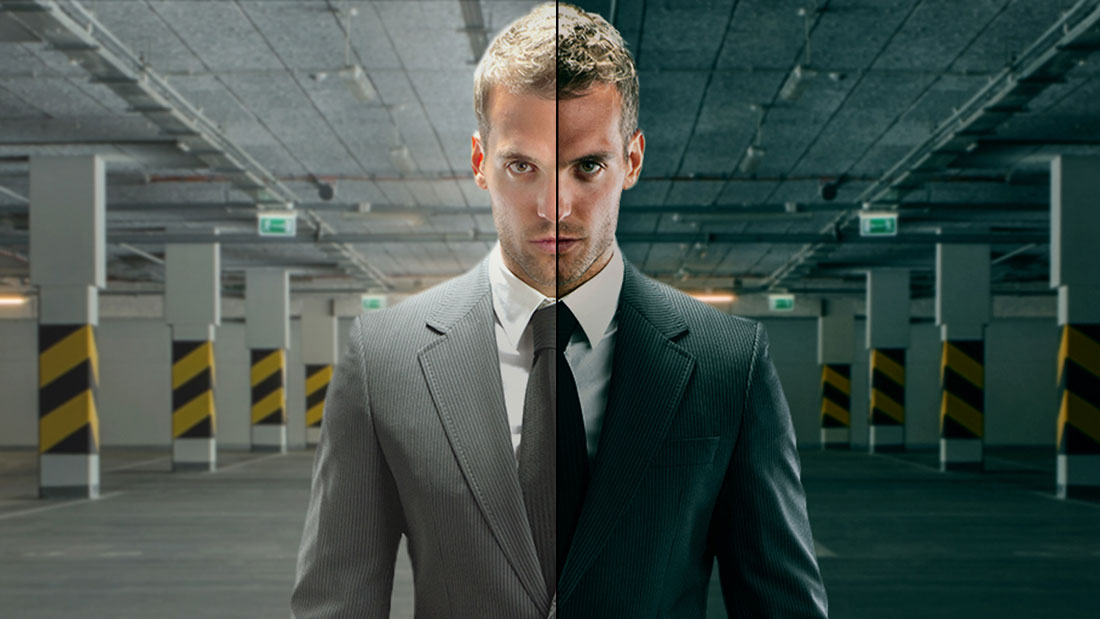
<p>En esta ocasión nos trae un tutorial de photoshop donde nos enseña muchas técnicas para darle un aspecto cinematográfico a nuestras imágenes.</p>
<p>Este efecto le da a las sombras oscuras de la imagen de un tono verde azulado fresco, mientras que los tonos claros se trabajan en naranja caliente. Esto hace que el actor se destacan ya que los colores son complementarios y se crea un «pop» cuando se puso al lado del otro. Es una buena idea hacer una corrección de color en la imagen, por lo que que tiene grises neutros y sin tinte de color.</p>
<p><img loading="lazy" decoding="async" class="aligncenter size-full wp-image-5342" src="https://ildefonsosegura.es/wp-content/uploads/cinematic-ptc-1.jpg" alt="cinematic-ptc-1" width="1100" height="619" srcset="https://ildefonsosegura.es/wp-content/uploads/cinematic-ptc-1.jpg 1100w, https://ildefonsosegura.es/wp-content/uploads/cinematic-ptc-1-300x169.jpg 300w, https://ildefonsosegura.es/wp-content/uploads/cinematic-ptc-1-768x432.jpg 768w, https://ildefonsosegura.es/wp-content/uploads/cinematic-ptc-1-1024x576.jpg 1024w, https://ildefonsosegura.es/wp-content/uploads/cinematic-ptc-1-720x406.jpg 720w" sizes="(max-width: 1100px) 100vw, 1100px" /></p>
<p>No te lo pierdas y comparte tus trabajos en mi página de facebook (<a href="http://www.facebook.com/IldefonsoSeguraPage" target="_blank">IldefonsoSeguraPage</a>)</p>
<p>Te recomiendo seguir a Jesús. Para ello, pasa por su web y allí tienes sus redes sociales <a href="http://photoshoptrainingchannel.com" target="_blank">http://photoshoptrainingchannel.com</a></p>
<p>&nbsp;</p>
<p>Espero que te guste y compartas el video</p>
<p style="text-align: left;"><strong>TUTORIAL EFECTO CINEMATOGRÁFICO</strong></p>
<p style="text-align: left;"><iframe src="https://www.youtube.com/embed/w1jqbuPaWu4?rel=0" width="640" height="420" frameborder="0" allowfullscreen="allowfullscreen"></iframe></p>
<p>&nbsp;</p>
<div>
<p style="text-align: center;">[vc_button title=»BAJATE LOS MATERIALES» target=»blank» color=»btn-danger» size=»btn-large» href=»https://photoshoptrainingchannel.com/cinematic-color-grading/»]</p>
<p style="text-align: right;">Suscríbete a mi canal de Youtube:</p>
<div align="right">
<p><script src="https://apis.google.com/js/platform.js"></script><script>// <![CDATA[ function onYtEvent(payload) { if (payload.eventType == 'subscribe') { // Add code to handle subscribe event. } else if (payload.eventType == 'unsubscribe') { // Add code to handle unsubscribe event. } if (window.console) { // for debugging only window.console.log('YT event: ', payload); } } // ]]&gt;</script></p>
<div class="g-ytsubscribe" data-channel="ildefonsosegura" data-layout="default" data-count="default" data-onytevent="onYtEvent"></div>
</div>
</div>
<p style="text-align: left;">No dejes de compartir este post.</p>
<p style="text-align: left;">Así es como me puedes ayudar 🙂 Gracias</p>
<p>&nbsp;</p>
<p>&nbsp;</p>La entrada <a href="https://ildefonsosegura.es/efecto-cinematografico-gradacion-de-color-con-photoshop-by-jrfromptc/">Efecto cinematográfico (gradación de color) con #Photoshop by @JRfromPTC</a> apareció primero en <a href="https://ildefonsosegura.es">Ildefonso Segura</a>.]]></content:encoded>
					
					<wfw:commentRss>https://ildefonsosegura.es/efecto-cinematografico-gradacion-de-color-con-photoshop-by-jrfromptc/feed/</wfw:commentRss>
			<slash:comments>0</slash:comments>
		
		
			</item>
		<item>
		<title>#Tutorial #Photoshop efecto cuasi sevesiano by @photoshopeando</title>
		<link>https://ildefonsosegura.es/tutorial-photoshop-efecto-cuasi-sevesiano-by-photoshopeando/</link>
					<comments>https://ildefonsosegura.es/tutorial-photoshop-efecto-cuasi-sevesiano-by-photoshopeando/#respond</comments>
		
		<dc:creator><![CDATA[Ildefonso Segura]]></dc:creator>
		<pubDate>Wed, 20 Nov 2013 12:57:20 +0000</pubDate>
				<category><![CDATA[Colaboradores]]></category>
		<category><![CDATA[Fotocomposición]]></category>
		<category><![CDATA[Photoshop]]></category>
		<category><![CDATA[Tecnicas]]></category>
		<category><![CDATA[Tutoriales]]></category>
		<category><![CDATA[Wallpaper]]></category>
		<category><![CDATA[alberto seveso]]></category>
		<category><![CDATA[carlos oliveras]]></category>
		<category><![CDATA[design]]></category>
		<category><![CDATA[efecto]]></category>
		<category><![CDATA[effect]]></category>
		<category><![CDATA[estilo]]></category>
		<category><![CDATA[estilos]]></category>
		<category><![CDATA[fondo]]></category>
		<category><![CDATA[fotos]]></category>
		<category><![CDATA[gloriasanis]]></category>
		<category><![CDATA[ildefonsosegura]]></category>
		<category><![CDATA[imagen]]></category>
		<category><![CDATA[motivos]]></category>
		<category><![CDATA[murall]]></category>
		<category><![CDATA[pattern]]></category>
		<category><![CDATA[photomanipulation]]></category>
		<category><![CDATA[photos]]></category>
		<category><![CDATA[photoshop]]></category>
		<category><![CDATA[photoshopeando]]></category>
		<category><![CDATA[poster]]></category>
		<category><![CDATA[seveso]]></category>
		<category><![CDATA[style]]></category>
		<category><![CDATA[tecnicas]]></category>
		<category><![CDATA[tutorial]]></category>
		<category><![CDATA[wallpaper]]></category>
		<guid isPermaLink="false">http://ildefonsosegura.es/?p=3253</guid>

					<description><![CDATA[<p>En mi intento de ayudar a que todos seamos conocedores de aquellos tutores que pueden añadir valor al conocimiento en la red y de forma gratuita, estoy dando la oportunidad a amigos que no son tan conocidos como se merecen dada su calidad técnica y docente para transmitirnos conocimientos. Mi canal otro pequeño canal de [&#8230;]</p>
La entrada <a href="https://ildefonsosegura.es/tutorial-photoshop-efecto-cuasi-sevesiano-by-photoshopeando/">#Tutorial #Photoshop efecto cuasi sevesiano by @photoshopeando</a> apareció primero en <a href="https://ildefonsosegura.es">Ildefonso Segura</a>.]]></description>
										<content:encoded><![CDATA[<div data-elementor-type="wp-post" data-elementor-id="3253" class="elementor elementor-3253">
						<section class="elementor-section elementor-top-section elementor-element elementor-element-6777161c elementor-section-boxed elementor-section-height-default elementor-section-height-default" data-id="6777161c" data-element_type="section" data-e-type="section">
						<div class="elementor-container elementor-column-gap-default">
					<div class="elementor-column elementor-col-100 elementor-top-column elementor-element elementor-element-205ebc45" data-id="205ebc45" data-element_type="column" data-e-type="column">
			<div class="elementor-widget-wrap elementor-element-populated">
						<div class="elementor-element elementor-element-4ef2406a elementor-widget elementor-widget-text-editor" data-id="4ef2406a" data-element_type="widget" data-e-type="widget" data-widget_type="text-editor.default">
				<div class="elementor-widget-container">
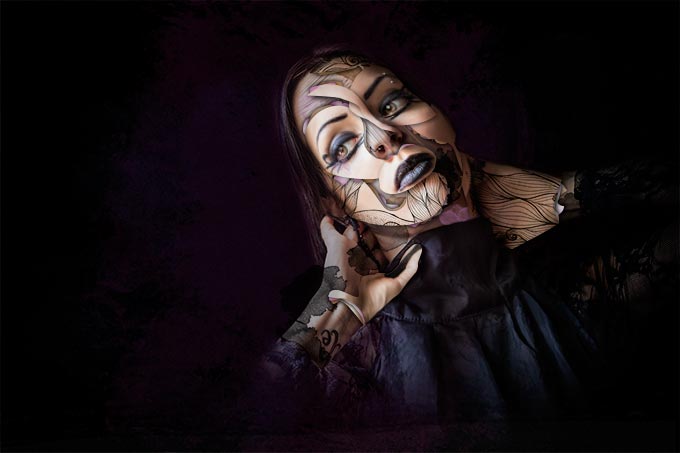
									<p>En mi intento de ayudar a que todos seamos conocedores de aquellos tutores que pueden añadir valor al conocimiento en la red y de forma gratuita, estoy dando la oportunidad a amigos que no son tan conocidos como se merecen dada su calidad técnica y docente para transmitirnos conocimientos. Mi canal otro pequeño canal de los miles que hay para transmitir algo de mi mismo. Quiero que la audiencia que pueda tener sea partícipe de lo que considero es formación de calidad de otros canales.</p><p><span style="color: #ff0000;"><strong>Carlos Oliveras</strong></span> (<a href="https://twitter.com/Photoshopeando" target="_blank" rel="noopener">Photoshopeando</a>) es responsable de este fantástico tutorial que he subido a mi canal en noviembre de 2013 y que intenta mostrar un resultado inspirado en el estilo del famoso <a href="http://burdu976.com/" target="_blank" rel="noopener">Alberto Seveso</a> (chequea <a href="http://burdu976.com/" target="_blank" rel="noopener">burdu976.com</a>).</p><p> </p><p>Muchos diréis que no es lo mismo y con razón pero nos ilustra como poder manipular una fotografía de una forma fácil intentando llegar a un resultado determinado. Despierta nuestra curiosidad por aprender técnicas y aplicar una dosis de creatividad a una imagen. Su resultado fue éste y es fantástico:</p><p><a href="https://ildefonsosegura.es/tutorial-photoshop-efecto-cuasi-sevesiano-by-photoshopeando/imagen-para-web/" rel="attachment wp-att-3254"><img loading="lazy" decoding="async" class="size-full wp-image-3254 aligncenter" src="https://ildefonsosegura.es/wp-content/uploads/imagen-para-web.jpg" alt="imagen para web" width="680" height="453" srcset="https://ildefonsosegura.es/wp-content/uploads/imagen-para-web.jpg 680w, https://ildefonsosegura.es/wp-content/uploads/imagen-para-web-300x199.jpg 300w" sizes="(max-width: 680px) 100vw, 680px" /></a></p><p>Gracias Carlos por tu tutorial y en especial el trabajo que realizas en tus redes. Si quereis encontrar a Carlos en Photoshopeando solo tienes que hacer clic en cualquiera de estos links:</p><ol><li><a href="http://www.photoshopeando.com/" target="_blank" rel="noopener">http://www.photoshopeando.com/</a></li><li><a href="http://www.youtube.com/user/photoshopeandotv" target="_blank" rel="noopener">http://www.youtube.com/user/photoshopeandotv</a></li><li><a href="https://twitter.com/#!/Photoshopeando" target="_blank" rel="noopener">https://twitter.com/#!/Photoshopeando</a></li><li><a href="http://www.facebook.com/Photoshopeando" target="_blank" rel="noopener">http://www.facebook.com/Photoshopeando</a></li></ol><p>Espero que te guste el tutorial</p><p> </p><p><span style="color: #800000;"><strong>TUTORIAL  </strong></span></p><center><iframe src="https://www.youtube.com/embed/6OZ8juzYuMM" width="640" height="420" frameborder="0" allowfullscreen="allowfullscreen"></iframe></center><p> </p><p> </p><p> </p>								</div>
				</div>
					</div>
		</div>
					</div>
		</section>
				<section class="elementor-section elementor-top-section elementor-element elementor-element-6b9d3be7 elementor-section-full_width elementor-section-height-default elementor-section-height-default" data-id="6b9d3be7" data-element_type="section" data-e-type="section">
						<div class="elementor-container elementor-column-gap-default">
					<div class="elementor-column elementor-col-100 elementor-top-column elementor-element elementor-element-57a9b1ca" data-id="57a9b1ca" data-element_type="column" data-e-type="column">
			<div class="elementor-widget-wrap elementor-element-populated">
						<div class="elementor-element elementor-element-401c0029 elementor-widget elementor-widget-text-editor" data-id="401c0029" data-element_type="widget" data-e-type="widget" data-widget_type="text-editor.default">
				<div class="elementor-widget-container">
									<div><div align="center"><center><strong style="color: #ff0000;">Suscríbete a mi canal de Youtube:</strong></center><div><div><div align="center"><p><script src="https://apis.google.com/js/platform.js"></script></p><div class="g-ytsubscribe" data-channel="ildefonsosegura" data-layout="full" data-count="default"> </div></div></div><p> </p><p style="text-align: center;">No te lo pierdas y comparte tus trabajos en mi página de facebook (<span style="color: #0000ff;"><strong><a style="color: #0000ff;" href="http://www.facebook.com/IldefonsoSeguraPage" target="_blank" rel="noopener noreferrer">IldefonsoSeguraPage</a></strong></span>)<br />Espero que te guste y compartas el vídeo. No dejes de compartir este post.</p><p style="text-align: center;">Así es como me puedes ayudar 🙂 Gracias</p></div></div></div>								</div>
				</div>
					</div>
		</div>
					</div>
		</section>
				</div>La entrada <a href="https://ildefonsosegura.es/tutorial-photoshop-efecto-cuasi-sevesiano-by-photoshopeando/">#Tutorial #Photoshop efecto cuasi sevesiano by @photoshopeando</a> apareció primero en <a href="https://ildefonsosegura.es">Ildefonso Segura</a>.]]></content:encoded>
					
					<wfw:commentRss>https://ildefonsosegura.es/tutorial-photoshop-efecto-cuasi-sevesiano-by-photoshopeando/feed/</wfw:commentRss>
			<slash:comments>0</slash:comments>
		
		
			</item>
	</channel>
</rss>
<br />
<b>Fatal error</b>:  Uncaught TypeError: mysqli_num_fields(): Argument #1 ($result) must be of type mysqli_result, bool given in /var/www/vhosts/ildefonsosegura.es/httpdocs/wp-includes/class-wpdb.php:3941
Stack trace:
#0 /var/www/vhosts/ildefonsosegura.es/httpdocs/wp-includes/class-wpdb.php(3941): mysqli_num_fields()
#1 /var/www/vhosts/ildefonsosegura.es/httpdocs/wp-includes/class-wpdb.php(785): wpdb-&gt;load_col_info()
#2 /var/www/vhosts/ildefonsosegura.es/httpdocs/wp-content/plugins/w3-total-cache/DbCache_WpdbInjection_QueryCaching.php(230): wpdb-&gt;__get()
#3 /var/www/vhosts/ildefonsosegura.es/httpdocs/wp-content/plugins/w3-total-cache/DbCache_WpdbNew.php(220): W3TC\DbCache_WpdbInjection_QueryCaching-&gt;query()
#4 /var/www/vhosts/ildefonsosegura.es/httpdocs/wp-content/plugins/aaa-option-optimizer/src/class-database.php(199): W3TC\DbCache_WpdbNew-&gt;query()
#5 /var/www/vhosts/ildefonsosegura.es/httpdocs/wp-content/plugins/aaa-option-optimizer/src/class-plugin.php(182): Progress_Planner\OptionOptimizer\Database::batch_insert()
#6 /var/www/vhosts/ildefonsosegura.es/httpdocs/wp-includes/class-wp-hook.php(353): Progress_Planner\OptionOptimizer\Plugin-&gt;update_tracked_options()
#7 /var/www/vhosts/ildefonsosegura.es/httpdocs/wp-includes/class-wp-hook.php(377): WP_Hook-&gt;apply_filters()
#8 /var/www/vhosts/ildefonsosegura.es/httpdocs/wp-includes/plugin.php(523): WP_Hook-&gt;do_action()
#9 /var/www/vhosts/ildefonsosegura.es/httpdocs/wp-includes/load.php(1308): do_action()
#10 [internal function]: shutdown_action_hook()
#11 {main}
  thrown in <b>/var/www/vhosts/ildefonsosegura.es/httpdocs/wp-includes/class-wpdb.php</b> on line <b>3941</b><br />