<?xml version="1.0" encoding="UTF-8"?><rss version="2.0"
	xmlns:content="http://purl.org/rss/1.0/modules/content/"
	xmlns:wfw="http://wellformedweb.org/CommentAPI/"
	xmlns:dc="http://purl.org/dc/elements/1.1/"
	xmlns:atom="http://www.w3.org/2005/Atom"
	xmlns:sy="http://purl.org/rss/1.0/modules/syndication/"
	xmlns:slash="http://purl.org/rss/1.0/modules/slash/"
	>

<channel>
	<title>cristal | Ildefonso Segura</title>
	<atom:link href="https://ildefonsosegura.es/tag/cristal/feed/" rel="self" type="application/rss+xml" />
	<link>https://ildefonsosegura.es</link>
	<description>Tutoriales de diseño y animación</description>
	<lastBuildDate>Sun, 11 Jun 2023 16:35:45 +0000</lastBuildDate>
	<language>es</language>
	<sy:updatePeriod>
	hourly	</sy:updatePeriod>
	<sy:updateFrequency>
	1	</sy:updateFrequency>
	<generator>https://wordpress.org/?v=7.0.3</generator>

<image>
	<url>https://ildefonsosegura.es/wp-content/uploads/cropped-Favicon-new-logo-website-32x32.png</url>
	<title>cristal | Ildefonso Segura</title>
	<link>https://ildefonsosegura.es</link>
	<width>32</width>
	<height>32</height>
</image> 
	<item>
		<title>Tutorial #C4D y #AfterEffects Felicitación Navidad de #conectatutoriales by @ildefonsosegura</title>
		<link>https://ildefonsosegura.es/tutorial-c4d-y-aftereffects-felicitacion-navidad-de-conectatutoriales-by-ildefonsosegura-2/</link>
					<comments>https://ildefonsosegura.es/tutorial-c4d-y-aftereffects-felicitacion-navidad-de-conectatutoriales-by-ildefonsosegura-2/#respond</comments>
		
		<dc:creator><![CDATA[Ildefonso Segura]]></dc:creator>
		<pubDate>Thu, 26 Dec 2013 22:46:18 +0000</pubDate>
				<category><![CDATA[After Effects]]></category>
		<category><![CDATA[Cinema4D]]></category>
		<category><![CDATA[Conectatutoriales]]></category>
		<category><![CDATA[Efectos]]></category>
		<category><![CDATA[Fotocomposición]]></category>
		<category><![CDATA[Intro]]></category>
		<category><![CDATA[Tecnicas]]></category>
		<category><![CDATA[Tutoriales]]></category>
		<category><![CDATA[Wallpaper]]></category>
		<category><![CDATA[adobe]]></category>
		<category><![CDATA[after]]></category>
		<category><![CDATA[bola]]></category>
		<category><![CDATA[bola cristal]]></category>
		<category><![CDATA[bola nevada]]></category>
		<category><![CDATA[c4d]]></category>
		<category><![CDATA[CC]]></category>
		<category><![CDATA[cinema4D]]></category>
		<category><![CDATA[cristal]]></category>
		<category><![CDATA[cs4]]></category>
		<category><![CDATA[cs5]]></category>
		<category><![CDATA[cs6]]></category>
		<category><![CDATA[desplazamiento]]></category>
		<category><![CDATA[desplazar]]></category>
		<category><![CDATA[efecto]]></category>
		<category><![CDATA[effects]]></category>
		<category><![CDATA[glass ball]]></category>
		<category><![CDATA[mapa de desplazamiento]]></category>
		<category><![CDATA[maxon]]></category>
		<category><![CDATA[montaña]]></category>
		<category><![CDATA[r12]]></category>
		<category><![CDATA[r13]]></category>
		<category><![CDATA[r14]]></category>
		<category><![CDATA[r15]]></category>
		<category><![CDATA[snow]]></category>
		<category><![CDATA[textura]]></category>
		<category><![CDATA[texturizar]]></category>
		<category><![CDATA[tutorial]]></category>
		<guid isPermaLink="false">http://ildefonsosegura.es/?p=3314</guid>

					<description><![CDATA[<p>En la sección de intros de esta web puedes encontrar la felicitación navideña que he realizado para el canal de @Adobeusers #conectatutoriales. Ir a sección de Intros &#62;&#62; La felicitación consiste en crear una escena nevada en una montaña que se situará en el interior de una bola de cristal. La escena transcurre desde el [&#8230;]</p>
La entrada <a href="https://ildefonsosegura.es/tutorial-c4d-y-aftereffects-felicitacion-navidad-de-conectatutoriales-by-ildefonsosegura-2/">Tutorial #C4D y #AfterEffects Felicitación Navidad de #conectatutoriales by @ildefonsosegura</a> apareció primero en <a href="https://ildefonsosegura.es">Ildefonso Segura</a>.]]></description>
										<content:encoded><![CDATA[<div data-elementor-type="wp-post" data-elementor-id="3314" class="elementor elementor-3314">
						<section class="elementor-section elementor-top-section elementor-element elementor-element-157f3a07 elementor-section-boxed elementor-section-height-default elementor-section-height-default" data-id="157f3a07" data-element_type="section" data-e-type="section">
						<div class="elementor-container elementor-column-gap-default">
					<div class="elementor-column elementor-col-100 elementor-top-column elementor-element elementor-element-7863e8d5" data-id="7863e8d5" data-element_type="column" data-e-type="column">
			<div class="elementor-widget-wrap elementor-element-populated">
						<div class="elementor-element elementor-element-15cd9a81 elementor-widget elementor-widget-text-editor" data-id="15cd9a81" data-element_type="widget" data-e-type="widget" data-widget_type="text-editor.default">
				<div class="elementor-widget-container">
									<p>En la sección de intros de esta web puedes encontrar la felicitación navideña que he realizado para el canal de @Adobeusers #<a title="Web de conectatutoriales" href="http://www.tutorialesadobe.conectatutoriales.com/" target="_blank" rel="noopener">conectatutoriales</a>. Ir a <a title="Intros IldefonsoSegura" href="https://ildefonsosegura.es/galeria-de-intros/" target="_blank" rel="noopener"><strong>sección de Intros &gt;&gt;</strong></a></p>
<p></p>
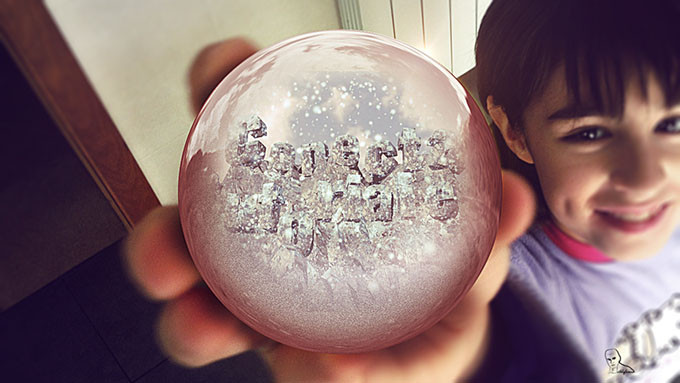
<p><span style="line-height: 1.5em;">La felicitación consiste en crear una escena nevada en una montaña que se situará en el interior de una bola de cristal. La escena transcurre desde el interior de la bola al exterior creando un efecto singular de traspaso del cristal. La escena pasa de un paisaje frío y nevado a una escena tierna con un bebé que disfruta jugando con la bola de cristal nevada. En una segunda versión, la bola está siendo sostenida por una niña que enseña el juguete a la cámara</span></p>
<p style="text-align: center;"><a title="Felicitación navidad" href="http://youtu.be/Sk1QWxUD7IM" target="_blank" rel="attachment noopener wp-att-3315"><img fetchpriority="high" decoding="async" class="size-full wp-image-3315 aligncenter" src="https://ildefonsosegura.es/wp-content/uploads/sandra-con-bola.jpg" alt="sandra con bola" width="680" height="383" srcset="https://ildefonsosegura.es/wp-content/uploads/sandra-con-bola.jpg 680w, https://ildefonsosegura.es/wp-content/uploads/sandra-con-bola-300x168.jpg 300w" sizes="(max-width: 680px) 100vw, 680px" /></a></p>
<p>He realizado dos tutoriales para explicar cómo se realiza la felicitación</p>
<p><span style="color: #800000;"><strong>TUTORIAL 1.- CINEMA4D</strong></span></p>
<p>En este tutorial veremos:</p>
<ol>
<li>Crear una montaña</li>
<li>Texturizar la montaña creando materiales a través de capas para emular la roca mezclada con la nieve</li>
<li>Incorporar un cielo</li>
<li>Movimiento de cámara controlado por un nulo</li>
<li>Exportar canales alfa a través de multipases para ser usados en After Effects en el segundo tutorial</li>
</ol>
<p><strong style="color: #800000; line-height: 1.5em;">&nbsp; &nbsp; &nbsp;TUTORIAL </strong><span style="color: #800000; line-height: 1.5em;">&nbsp;PUBLICADO EN <a href="http://www.youtube.com/user/conectatutoriales" target="_blank" rel="noopener">CONECTATUTORIALES.COM</a></span></p>
<p>Te invito a visitar la web de&nbsp;<a href="http://www.tutorialesadobe.conectatutoriales.com/" target="_blank" rel="noopener">conectatutoriales&nbsp;</a>para ver muchos más tutoriales, consejos, recursos,&#8230;.</p>
<p>Conectatutoriales es un usuario oficial de adobe</p>
<p></p><center><iframe src="https://www.youtube.com/embed/3jbeHnzsYOc" width="640" height="420" frameborder="0" allowfullscreen="allowfullscreen"></iframe></center><p></p>
<p style="text-align: justify;"><span style="color: #800000;"><strong>TUTORIAL 2.- AFTER EFFECTS</strong></span></p>
<p style="text-align: justify;">En este tutorial veremos:</p>
<ol>
<li style="text-align: justify;">Colorear escena con efectos de curvas</li>
<li style="text-align: justify;">Crear nieve</li>
<li style="text-align: justify;">Introducir elementos (footage) en la escena</li>
<li style="text-align: justify;">Efecto de cámara para emular movimiento a través del cristal de la bola nevada</li>
<li style="text-align: justify;">Mapas de Desplazamiento para conseguir efecto de traspaso de cristal.</li>
</ol>
<p><strong style="color: #800000; line-height: 1.5em;">&nbsp; &nbsp; &nbsp;TUTORIAL&nbsp;</strong></p>
<p></p><center><iframe src="https://www.youtube.com/embed/znybfZn8Tjs" width="640" height="420" frameborder="0" allowfullscreen="allowfullscreen"></iframe></center><p></p>								</div>
				</div>
					</div>
		</div>
					</div>
		</section>
				<section class="elementor-section elementor-top-section elementor-element elementor-element-7039eff2 elementor-section-full_width elementor-section-height-default elementor-section-height-default" data-id="7039eff2" data-element_type="section" data-e-type="section">
						<div class="elementor-container elementor-column-gap-default">
					<div class="elementor-column elementor-col-100 elementor-top-column elementor-element elementor-element-2aeefa6d" data-id="2aeefa6d" data-element_type="column" data-e-type="column">
			<div class="elementor-widget-wrap elementor-element-populated">
						<div class="elementor-element elementor-element-4162e8d elementor-widget elementor-widget-text-editor" data-id="4162e8d" data-element_type="widget" data-e-type="widget" data-widget_type="text-editor.default">
				<div class="elementor-widget-container">
									<div><div align="center"><center><strong style="color: #ff0000;">Suscríbete a mi canal de Youtube:</strong></center><div><div><div align="center"><p><script src="https://apis.google.com/js/platform.js"></script></p><div class="g-ytsubscribe" data-channel="ildefonsosegura" data-layout="full" data-count="default"> </div></div></div><p> </p><p style="text-align: center;">No te lo pierdas y comparte tus trabajos en mi página de facebook (<span style="color: #0000ff;"><strong><a style="color: #0000ff;" href="http://www.facebook.com/IldefonsoSeguraPage" target="_blank" rel="noopener noreferrer">IldefonsoSeguraPage</a></strong></span>)<br />Espero que te guste y compartas el vídeo. No dejes de compartir este post.</p><p style="text-align: center;">Así es como me puedes ayudar 🙂 Gracias</p></div></div></div>								</div>
				</div>
					</div>
		</div>
					</div>
		</section>
				</div>La entrada <a href="https://ildefonsosegura.es/tutorial-c4d-y-aftereffects-felicitacion-navidad-de-conectatutoriales-by-ildefonsosegura-2/">Tutorial #C4D y #AfterEffects Felicitación Navidad de #conectatutoriales by @ildefonsosegura</a> apareció primero en <a href="https://ildefonsosegura.es">Ildefonso Segura</a>.]]></content:encoded>
					
					<wfw:commentRss>https://ildefonsosegura.es/tutorial-c4d-y-aftereffects-felicitacion-navidad-de-conectatutoriales-by-ildefonsosegura-2/feed/</wfw:commentRss>
			<slash:comments>0</slash:comments>
		
		
			</item>
		<item>
		<title>Texto estilo metal líquido con Photoshop (Terminator 2) by @ildefonsosegura</title>
		<link>https://ildefonsosegura.es/texto-metal-liquido/</link>
					<comments>https://ildefonsosegura.es/texto-metal-liquido/#respond</comments>
		
		<dc:creator><![CDATA[Ildefonso Segura]]></dc:creator>
		<pubDate>Wed, 02 Jan 2013 12:35:12 +0000</pubDate>
				<category><![CDATA[3D]]></category>
		<category><![CDATA[Efectos]]></category>
		<category><![CDATA[Estilos]]></category>
		<category><![CDATA[Photoshop]]></category>
		<category><![CDATA[Tecnicas]]></category>
		<category><![CDATA[Textos]]></category>
		<category><![CDATA[Tutoriales]]></category>
		<category><![CDATA[Wallpaper]]></category>
		<category><![CDATA[cristal]]></category>
		<category><![CDATA[efecto]]></category>
		<category><![CDATA[efectos]]></category>
		<category><![CDATA[estilo]]></category>
		<category><![CDATA[ildefonsosegura]]></category>
		<category><![CDATA[liquido]]></category>
		<category><![CDATA[materiales]]></category>
		<category><![CDATA[metal]]></category>
		<category><![CDATA[tecnica]]></category>
		<category><![CDATA[tecnicas]]></category>
		<category><![CDATA[terminator]]></category>
		<category><![CDATA[text]]></category>
		<category><![CDATA[texto]]></category>
		<category><![CDATA[tuto]]></category>
		<category><![CDATA[video]]></category>
		<category><![CDATA[youtube]]></category>
		<guid isPermaLink="false">http://ildefonsosegura.es/?p=486</guid>

					<description><![CDATA[<p>Este tutorial hace rererencia a otro tutorial anterior llamado TEXTO CRISTAL (MODELO 1). VISUALIZAR PREVIO Un efecto realísimo de metal líquido propio de los efectos especiales de TERMINATOR 2. Un nuevo estilo con resultados muy realistas. &#160; VIDEOTUTORIAL La fuente es Freehand575 BT [vc_button title=»BAJATE LOS MATERIALES» target=»blank» color=»btn-danger» size=»btn-large» href=»https://drive.google.com/open?id=0B_nJkCGJubucakxpZU8wdkRXdms»] VIDEOTUTORIAL EXTRACCION DE SALPICADURAS [&#8230;]</p>
La entrada <a href="https://ildefonsosegura.es/texto-metal-liquido/">Texto estilo metal líquido con Photoshop (Terminator 2) by @ildefonsosegura</a> apareció primero en <a href="https://ildefonsosegura.es">Ildefonso Segura</a>.]]></description>
										<content:encoded><![CDATA[<p style="text-align: center;"><img decoding="async" class="size-full wp-image-494 aligncenter" src="https://ildefonsosegura.es/wp-content/uploads/Metal-liquido.jpg" alt="Metal-liquido" width="670" height="377" /></p>
<p>Este tutorial hace rererencia a otro tutorial anterior llamado TEXTO CRISTAL (MODELO 1). <a title="Cristal tipo 1" href="https://ildefonsosegura.es/texto-de-cristal-modelo-1/" target="_blank"><strong>VISUALIZAR PREVIO</strong></a></p>
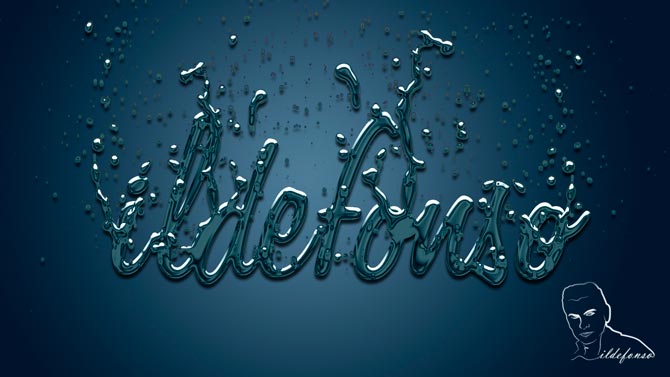
<p>Un efecto realísimo de metal líquido propio de los efectos especiales de TERMINATOR 2. Un nuevo estilo con resultados muy realistas.</p>
<p>&nbsp;</p>
<p><span style="color: #800000;"><strong>VIDEOTUTORIAL </strong></span></p>
<p><center><iframe src="https://www.youtube.com/embed/mZD1FwQVKTI" width="640" height="420" frameborder="0" allowfullscreen="allowfullscreen"></iframe></center></p>
<p style="text-align: center;">La fuente es <strong>Freehand575 BT</strong></p>
<p><center>[vc_button title=»BAJATE LOS MATERIALES» target=»blank» color=»btn-danger» size=»btn-large» href=»https://drive.google.com/open?id=0B_nJkCGJubucakxpZU8wdkRXdms»]</center></p>
<p style="text-align: center;">
<p><span style="color: #800000;"><strong>VIDEOTUTORIAL EXTRACCION DE SALPICADURAS </strong></span></p>
<p>En un momento del tutorial anterior se comenta que en los materiales hay unas imágenes de salpicaduras que se usan para completar el efecto más realista de metal líquido. En el tutorial de abajo explico como se extraen de forma sencilla en 2 minutos las salpicaduras para poder trabajarlas en el texto. No te lo pierdas tampoco.</p>
<p><center><iframe src="https://www.youtube.com/embed/8TWSzrMfLGo" width="640" height="420" frameborder="0" allowfullscreen="allowfullscreen"></iframe></center>&nbsp;</p>
<p><span style="color: #800000;"><strong>VIDEOTUTORIAL TECNICAS DE EXTRACCION </strong></span></p>
<p><center><iframe src="https://www.youtube.com/embed/hHUjWnE9jsQ" width="640" height="420" frameborder="0" allowfullscreen="allowfullscreen"></iframe></center>&nbsp;</p>
<div align="right">
<p><script src="https://apis.google.com/js/platform.js"></script><script>// <![CDATA[ function onYtEvent(payload) { if (payload.eventType == 'subscribe') { // Add code to handle subscribe event. } else if (payload.eventType == 'unsubscribe') { // Add code to handle unsubscribe event. } if (window.console) { // for debugging only window.console.log('YT event: ', payload); } } // ]]&gt;</script></p>
<div class="g-ytsubscribe" data-channel="ildefonsosegura" data-layout="default" data-count="default" data-onytevent="onYtEvent"></div>
</div>
<p style="text-align: left;">No dejes de compartir este post.</p>
<p style="text-align: left;">Así es como me puedes ayudar 🙂 Gracias</p>
<p>&nbsp;</p>La entrada <a href="https://ildefonsosegura.es/texto-metal-liquido/">Texto estilo metal líquido con Photoshop (Terminator 2) by @ildefonsosegura</a> apareció primero en <a href="https://ildefonsosegura.es">Ildefonso Segura</a>.]]></content:encoded>
					
					<wfw:commentRss>https://ildefonsosegura.es/texto-metal-liquido/feed/</wfw:commentRss>
			<slash:comments>0</slash:comments>
		
		
			</item>
		<item>
		<title>Construye un Medallón con tu logo gracias a Photoshop</title>
		<link>https://ildefonsosegura.es/construye-un-medallon-con-tu-logo-gracias-a-photoshop/</link>
					<comments>https://ildefonsosegura.es/construye-un-medallon-con-tu-logo-gracias-a-photoshop/#respond</comments>
		
		<dc:creator><![CDATA[Ildefonso Segura]]></dc:creator>
		<pubDate>Sat, 22 Dec 2012 18:47:56 +0000</pubDate>
				<category><![CDATA[Fotocomposición]]></category>
		<category><![CDATA[Photoshop]]></category>
		<category><![CDATA[Tutoriales]]></category>
		<category><![CDATA[Wallpaper]]></category>
		<category><![CDATA[brillo]]></category>
		<category><![CDATA[coin]]></category>
		<category><![CDATA[cristal]]></category>
		<category><![CDATA[degradado]]></category>
		<category><![CDATA[escudo]]></category>
		<category><![CDATA[formas]]></category>
		<category><![CDATA[gloriasanis]]></category>
		<category><![CDATA[identificación]]></category>
		<category><![CDATA[ildefonsosegura]]></category>
		<category><![CDATA[logo]]></category>
		<category><![CDATA[medallón]]></category>
		<category><![CDATA[moneda]]></category>
		<guid isPermaLink="false">http://ildefonsosegura.es/?p=913</guid>

					<description><![CDATA[<p>Siempre me ha gustado poder hacer un MEDALLON como distintivo de una familia, grupo, comunidad, etc…en esta ocasión, PhotoShop me permite darle forma a mi imaginación con la propuesta de la imagen que muestra como se consiguen efectos 3D con la combinación de valores en los estilos de capas y los modos de fusión de [&#8230;]</p>
La entrada <a href="https://ildefonsosegura.es/construye-un-medallon-con-tu-logo-gracias-a-photoshop/">Construye un Medallón con tu logo gracias a Photoshop</a> apareció primero en <a href="https://ildefonsosegura.es">Ildefonso Segura</a>.]]></description>
										<content:encoded><![CDATA[<p><a href="https://ildefonsosegura.es/construye-un-medallon-con-tu-logo-gracias-a-photoshop/boton-logo-big-1/" rel="attachment wp-att-916"><img decoding="async" class="size-full wp-image-916 aligncenter" alt="boton-logo-big-1" src="https://ildefonsosegura.es/wp-content/uploads/boton-logo-big-1.jpg" width="500" height="281" srcset="https://ildefonsosegura.es/wp-content/uploads/boton-logo-big-1.jpg 500w, https://ildefonsosegura.es/wp-content/uploads/boton-logo-big-1-300x168.jpg 300w" sizes="(max-width: 500px) 100vw, 500px" /></a></p>
<p>Siempre me ha gustado poder hacer un MEDALLON como distintivo de una familia, grupo, comunidad, etc…en esta ocasión, PhotoShop me permite darle forma a mi imaginación con la propuesta de la imagen que muestra como se consiguen efectos 3D con la combinación de valores en los estilos de capas y los modos de fusión de las mismas. Mira el videotutoiral y créate tu propio medallón</p>
<p>&nbsp;</p>
<p><span style="color: #800000;"><strong>VIDEOTUTORIAL </strong></span></p>
<p><center><iframe src="https://www.youtube.com/embed/xXhIyC3PtSc" height="360" width="640" allowfullscreen="" frameborder="0"></iframe></center>&nbsp;<br />
<center>[vc_button title=»BAJATE LOS MATERIALES» target=»blank» color=»btn-danger» size=»btn-large» href=»https://drive.google.com/open?id=0B_nJkCGJubucNEwwLXg4Y0VVN2c»]</center>&nbsp;</p>
<p>&nbsp;</p>
<div align="right">
<p><script src="https://apis.google.com/js/platform.js"></script><script>// <![CDATA[
function onYtEvent(payload) { if (payload.eventType == 'subscribe') { // Add code to handle subscribe event. } else if (payload.eventType == 'unsubscribe') { // Add code to handle unsubscribe event. } if (window.console) { // for debugging only window.console.log('YT event: ', payload); } }
// ]]&gt;</script></p>
<div class="g-ytsubscribe" data-channel="ildefonsosegura" data-layout="default" data-count="default" data-onytevent="onYtEvent"></div>
</div>
</div>
<p style="text-align: left;">No dejes de compartir este post.</p>
<p style="text-align: left;">Así es como me puedes ayudar 🙂 Gracias</p>
<p>&nbsp;</p>La entrada <a href="https://ildefonsosegura.es/construye-un-medallon-con-tu-logo-gracias-a-photoshop/">Construye un Medallón con tu logo gracias a Photoshop</a> apareció primero en <a href="https://ildefonsosegura.es">Ildefonso Segura</a>.]]></content:encoded>
					
					<wfw:commentRss>https://ildefonsosegura.es/construye-un-medallon-con-tu-logo-gracias-a-photoshop/feed/</wfw:commentRss>
			<slash:comments>0</slash:comments>
		
		
			</item>
		<item>
		<title>Texto de Cristal (Modelo 1)</title>
		<link>https://ildefonsosegura.es/texto-de-cristal-modelo-1/</link>
					<comments>https://ildefonsosegura.es/texto-de-cristal-modelo-1/#respond</comments>
		
		<dc:creator><![CDATA[Ildefonso Segura]]></dc:creator>
		<pubDate>Thu, 20 Dec 2012 19:23:39 +0000</pubDate>
				<category><![CDATA[3D]]></category>
		<category><![CDATA[Estilos]]></category>
		<category><![CDATA[Photoshop]]></category>
		<category><![CDATA[Textos]]></category>
		<category><![CDATA[Tutoriales]]></category>
		<category><![CDATA[Wallpaper]]></category>
		<category><![CDATA[background]]></category>
		<category><![CDATA[cristal]]></category>
		<category><![CDATA[postal]]></category>
		<category><![CDATA[wall]]></category>
		<guid isPermaLink="false">http://ildefonsosegura.es/?p=477</guid>

					<description><![CDATA[<p>El primero de los efectos de cristal que he realizado creando un texto a base de estilos de fusión. Entra en el mundo de los estilos con este videotutorial de cristal para ver lo excitante de esta opción de Photoshop. No todo lo que ves es real. VIDEOTUTORIAL &#160; &#160; &#160; DESCARGA EL MATERIAL Suscríbete [&#8230;]</p>
La entrada <a href="https://ildefonsosegura.es/texto-de-cristal-modelo-1/">Texto de Cristal (Modelo 1)</a> apareció primero en <a href="https://ildefonsosegura.es">Ildefonso Segura</a>.]]></description>
										<content:encoded><![CDATA[<div data-elementor-type="wp-post" data-elementor-id="477" class="elementor elementor-477">
						<section class="elementor-section elementor-top-section elementor-element elementor-element-46489eac elementor-section-boxed elementor-section-height-default elementor-section-height-default" data-id="46489eac" data-element_type="section" data-e-type="section">
						<div class="elementor-container elementor-column-gap-default">
					<div class="elementor-column elementor-col-100 elementor-top-column elementor-element elementor-element-e59d9b6" data-id="e59d9b6" data-element_type="column" data-e-type="column">
			<div class="elementor-widget-wrap elementor-element-populated">
						<div class="elementor-element elementor-element-349dfc26 elementor-widget elementor-widget-text-editor" data-id="349dfc26" data-element_type="widget" data-e-type="widget" data-widget_type="text-editor.default">
				<div class="elementor-widget-container">
									<p style="text-align: center;"><img loading="lazy" decoding="async" class="size-full wp-image-481 aligncenter" src="https://ildefonsosegura.es/wp-content/uploads/CRISTAL-1b.jpg" alt="CRISTAL-1b" width="670" height="377"/></p>
<p><br /></p><p>El primero de los efectos de cristal que he realizado creando un texto a base de estilos de fusión. Entra en el mundo de los estilos con este videotutorial de cristal para ver lo excitante de esta opción de Photoshop. No todo lo que ves es real.</p><p><br />
<span style="color: #800000;"><strong>VIDEOTUTORIAL </strong></span></p>
<p>&nbsp;</p>
<p></p><center><iframe src="https://www.youtube.com/embed/6SrRcppwx2Q" width="640" height="360" frameborder="0" allowfullscreen="allowfullscreen"></iframe></center>&nbsp;
<p>&nbsp;</p>								</div>
				</div>
					</div>
		</div>
					</div>
		</section>
				<section class="elementor-section elementor-top-section elementor-element elementor-element-45cf448d elementor-section-boxed elementor-section-height-default elementor-section-height-default" data-id="45cf448d" data-element_type="section" data-e-type="section">
						<div class="elementor-container elementor-column-gap-default">
					<div class="elementor-column elementor-col-100 elementor-top-column elementor-element elementor-element-53c55829" data-id="53c55829" data-element_type="column" data-e-type="column">
			<div class="elementor-widget-wrap elementor-element-populated">
						<div class="elementor-element elementor-element-25316632 elementor-widget-divider--view-line elementor-widget elementor-widget-divider" data-id="25316632" data-element_type="widget" data-e-type="widget" data-widget_type="divider.default">
				<div class="elementor-widget-container">
							<div class="elementor-divider">
			<span class="elementor-divider-separator">
						</span>
		</div>
						</div>
				</div>
					</div>
		</div>
					</div>
		</section>
				<section class="elementor-section elementor-top-section elementor-element elementor-element-18a216ae elementor-section-full_width elementor-section-height-default elementor-section-height-default" data-id="18a216ae" data-element_type="section" data-e-type="section">
						<div class="elementor-container elementor-column-gap-default">
					<div class="elementor-column elementor-col-50 elementor-top-column elementor-element elementor-element-64eaead1" data-id="64eaead1" data-element_type="column" data-e-type="column">
			<div class="elementor-widget-wrap elementor-element-populated">
						<div class="elementor-element elementor-element-421ab703 elementor-align-right elementor-invisible elementor-widget elementor-widget-button" data-id="421ab703" data-element_type="widget" data-e-type="widget" data-settings="{&quot;_animation&quot;:&quot;shake&quot;}" data-widget_type="button.default">
				<div class="elementor-widget-container">
									<div class="elementor-button-wrapper">
					<a class="elementor-button elementor-button-link elementor-size-sm elementor-animation-grow" href="https://drive.google.com/open?id=0B_nJkCGJubucblAwWXEzcEkzZVk" target="_blank">
						<span class="elementor-button-content-wrapper">
									<span class="elementor-button-text">DESCARGA EL MATERIAL</span>
					</span>
					</a>
				</div>
								</div>
				</div>
					</div>
		</div>
				<div class="elementor-column elementor-col-50 elementor-top-column elementor-element elementor-element-77f9285c" data-id="77f9285c" data-element_type="column" data-e-type="column">
			<div class="elementor-widget-wrap elementor-element-populated">
						<div class="elementor-element elementor-element-6abd4329 elementor-widget elementor-widget-html" data-id="6abd4329" data-element_type="widget" data-e-type="widget" data-settings="{&quot;_animation&quot;:&quot;none&quot;}" data-widget_type="html.default">
				<div class="elementor-widget-container">
					<form action="https://www.paypal.com/cgi-bin/webscr" method="post" target="_blank">
<input type="hidden" name="cmd" value="_donations">
<input type="hidden" name="business" value="ildefonsosegura@gmail.com">
<input type="hidden" name="lc" value="ES">
<input type="hidden" name="item_name" value="MANTENIMIENTO DE LA PAGINA DE ILDEFONSOSEGURA">
<input type="hidden" name="no_note" value="0">
<input type="hidden" name="currency_code" value="EUR">
<input type="hidden" name="bn" value="PP-DonationsBF:paypal1.jpg:NonHostedGuest">
<input type="image" src="http://ildefonsosegura.es/wp-content/uploads/paypal-updated-1.png" border="0" name="submit" alt="PayPal. La forma rápida y segura de pagar en Internet.">
<img loading="lazy" decoding="async" alt="" border="0" src="https://www.paypalobjects.com/es_ES/i/scr/pixel.gif" width="1" height="1">
</form>				</div>
				</div>
					</div>
		</div>
					</div>
		</section>
				<section class="elementor-section elementor-top-section elementor-element elementor-element-1c938680 elementor-section-boxed elementor-section-height-default elementor-section-height-default" data-id="1c938680" data-element_type="section" data-e-type="section">
						<div class="elementor-container elementor-column-gap-default">
					<div class="elementor-column elementor-col-100 elementor-top-column elementor-element elementor-element-57382437" data-id="57382437" data-element_type="column" data-e-type="column">
			<div class="elementor-widget-wrap elementor-element-populated">
						<div class="elementor-element elementor-element-5082ecbd elementor-widget-divider--view-line elementor-widget elementor-widget-divider" data-id="5082ecbd" data-element_type="widget" data-e-type="widget" data-widget_type="divider.default">
				<div class="elementor-widget-container">
							<div class="elementor-divider">
			<span class="elementor-divider-separator">
						</span>
		</div>
						</div>
				</div>
					</div>
		</div>
					</div>
		</section>
				<section class="elementor-section elementor-top-section elementor-element elementor-element-4a823961 elementor-section-full_width elementor-section-height-default elementor-section-height-default" data-id="4a823961" data-element_type="section" data-e-type="section">
						<div class="elementor-container elementor-column-gap-default">
					<div class="elementor-column elementor-col-100 elementor-top-column elementor-element elementor-element-662b0c59" data-id="662b0c59" data-element_type="column" data-e-type="column">
			<div class="elementor-widget-wrap elementor-element-populated">
						<div class="elementor-element elementor-element-3bd3435a elementor-widget elementor-widget-text-editor" data-id="3bd3435a" data-element_type="widget" data-e-type="widget" data-widget_type="text-editor.default">
				<div class="elementor-widget-container">
									<div><div align="center"><center><strong style="color: #ff0000;">Suscríbete a mi canal de Youtube:</strong></center><div><div><div align="center"><p><script src="https://apis.google.com/js/platform.js"></script></p><div class="g-ytsubscribe" data-channel="ildefonsosegura" data-layout="full" data-count="default"> </div></div></div><p> </p><p style="text-align: center;">No te lo pierdas y comparte tus trabajos en mi página de facebook (<span style="color: #0000ff;"><strong><a style="color: #0000ff;" href="http://www.facebook.com/IldefonsoSeguraPage" target="_blank" rel="noopener noreferrer">IldefonsoSeguraPage</a></strong></span>)<br />Espero que te guste y compartas el vídeo. No dejes de compartir este post.</p><p style="text-align: center;">Así es como me puedes ayudar 🙂 Gracias</p></div></div></div>								</div>
				</div>
					</div>
		</div>
					</div>
		</section>
				</div>La entrada <a href="https://ildefonsosegura.es/texto-de-cristal-modelo-1/">Texto de Cristal (Modelo 1)</a> apareció primero en <a href="https://ildefonsosegura.es">Ildefonso Segura</a>.]]></content:encoded>
					
					<wfw:commentRss>https://ildefonsosegura.es/texto-de-cristal-modelo-1/feed/</wfw:commentRss>
			<slash:comments>0</slash:comments>
		
		
			</item>
		<item>
		<title>Texto de Cristal (modelo 2)</title>
		<link>https://ildefonsosegura.es/463/</link>
					<comments>https://ildefonsosegura.es/463/#respond</comments>
		
		<dc:creator><![CDATA[Ildefonso Segura]]></dc:creator>
		<pubDate>Thu, 20 Dec 2012 12:34:59 +0000</pubDate>
				<category><![CDATA[Efectos]]></category>
		<category><![CDATA[Estilos]]></category>
		<category><![CDATA[Photoshop]]></category>
		<category><![CDATA[Textos]]></category>
		<category><![CDATA[Tutorial Escrito]]></category>
		<category><![CDATA[Tutoriales]]></category>
		<category><![CDATA[cristal]]></category>
		<category><![CDATA[fondo]]></category>
		<category><![CDATA[romper]]></category>
		<guid isPermaLink="false">http://ildefonsosegura.es/?p=463</guid>

					<description><![CDATA[<p>El segundo de los efectos de crital que he realizado creando un texto a base de estilos de fusión. Entra en el mundo de los estilos con este videotutorial de cristal para ver lo excitante de esta opción de photoshop. No todo lo que ves es real. VIDEOTUTORIAL   Tutorial Cristal 2 DESCARGA TUTORIAL ESCRITO [&#8230;]</p>

La entrada <a href="https://ildefonsosegura.es/463/">Texto de Cristal (modelo 2)</a> apareció primero en <a href="https://ildefonsosegura.es">Ildefonso Segura</a>.]]></description>
										<content:encoded><![CDATA[<div data-elementor-type="wp-post" data-elementor-id="463" class="elementor elementor-463">
						<section class="elementor-section elementor-top-section elementor-element elementor-element-7e3b69a elementor-section-boxed elementor-section-height-default elementor-section-height-default" data-id="7e3b69a" data-element_type="section" data-e-type="section">
						<div class="elementor-container elementor-column-gap-default">
					<div class="elementor-column elementor-col-100 elementor-top-column elementor-element elementor-element-173ae486" data-id="173ae486" data-element_type="column" data-e-type="column">
			<div class="elementor-widget-wrap elementor-element-populated">
						<div class="elementor-element elementor-element-3fe635d2 elementor-widget elementor-widget-text-editor" data-id="3fe635d2" data-element_type="widget" data-e-type="widget" data-widget_type="text-editor.default">
				<div class="elementor-widget-container">
									<p>El segundo de los efectos de crital que he realizado creando un texto a base de estilos de fusión. Entra en el mundo de los estilos con este videotutorial de cristal para ver lo excitante de esta opción de photoshop. No todo lo que ves es real.<br /><a href="https://ildefonsosegura.es/463/cristal-2/" rel="attachment wp-att-469"><img loading="lazy" decoding="async" class="size-large wp-image-469 aligncenter" src="https://ildefonsosegura.es/wp-content/uploads/CRISTAL-2-1024x576.jpg" alt="CRISTAL 2" width="671" height="377" srcset="https://ildefonsosegura.es/wp-content/uploads/CRISTAL-2-1024x576.jpg 1024w, https://ildefonsosegura.es/wp-content/uploads/CRISTAL-2-300x168.jpg 300w, https://ildefonsosegura.es/wp-content/uploads/CRISTAL-2.jpg 1575w" sizes="(max-width: 671px) 100vw, 671px" /></a><br /><span style="color: #800000;"><strong><br /></strong></span></p><p><span style="color: #800000;"><strong>VIDEOTUTORIAL </strong></span></p><p><span style="color: #800000;"><strong> </strong></span></p><center><iframe src="https://www.youtube.com/embed/OMsayC8_IiI" width="640" height="420" frameborder="0" allowfullscreen="allowfullscreen"></iframe></center><div><p><a style="margin: 12px auto 6px auto; font-family: Helvetica,Arial,Sans-serif; font-style: normal; font-variant: normal; font-weight: normal; font-size: 14px; line-height: normal; font-size-adjust: none; font-stretch: normal; -x-system-font: none; display: block; text-decoration: underline;" title="View Tutorial Cristal 2 on Scribd" href="http://www.scribd.com/doc/46265118">Tutorial Cristal 2</a><iframe id="doc_76708" src="https://www.scribd.com/embeds/46265118/content?start_page=1&amp;view_mode=scroll" width="100%" height="600" frameborder="0" scrolling="no" data-auto-height="true" data-aspect-ratio=""></iframe></p></div>								</div>
				</div>
					</div>
		</div>
					</div>
		</section>
				<section class="elementor-section elementor-top-section elementor-element elementor-element-33dbbfe1 elementor-section-boxed elementor-section-height-default elementor-section-height-default" data-id="33dbbfe1" data-element_type="section" data-e-type="section">
						<div class="elementor-container elementor-column-gap-default">
					<div class="elementor-column elementor-col-100 elementor-top-column elementor-element elementor-element-789cbef6" data-id="789cbef6" data-element_type="column" data-e-type="column">
			<div class="elementor-widget-wrap elementor-element-populated">
						<div class="elementor-element elementor-element-1a839f22 elementor-widget-divider--view-line elementor-widget elementor-widget-divider" data-id="1a839f22" data-element_type="widget" data-e-type="widget" data-widget_type="divider.default">
				<div class="elementor-widget-container">
							<div class="elementor-divider">
			<span class="elementor-divider-separator">
						</span>
		</div>
						</div>
				</div>
					</div>
		</div>
					</div>
		</section>
				<section class="elementor-section elementor-top-section elementor-element elementor-element-598ba858 elementor-section-full_width elementor-section-height-default elementor-section-height-default" data-id="598ba858" data-element_type="section" data-e-type="section">
						<div class="elementor-container elementor-column-gap-default">
					<div class="elementor-column elementor-col-50 elementor-top-column elementor-element elementor-element-46a9dd30" data-id="46a9dd30" data-element_type="column" data-e-type="column">
			<div class="elementor-widget-wrap elementor-element-populated">
						<div class="elementor-element elementor-element-6d7b8b9a elementor-align-right elementor-invisible elementor-widget elementor-widget-button" data-id="6d7b8b9a" data-element_type="widget" data-e-type="widget" data-settings="{&quot;_animation&quot;:&quot;shake&quot;}" data-widget_type="button.default">
				<div class="elementor-widget-container">
									<div class="elementor-button-wrapper">
					<a class="elementor-button elementor-button-link elementor-size-sm elementor-animation-grow" href="https://drive.google.com/open?id=0B_nJkCGJubucSG5EdjNSYktvLWc" target="_blank">
						<span class="elementor-button-content-wrapper">
									<span class="elementor-button-text">DESCARGA TUTORIAL ESCRITO</span>
					</span>
					</a>
				</div>
								</div>
				</div>
					</div>
		</div>
				<div class="elementor-column elementor-col-50 elementor-top-column elementor-element elementor-element-42a3b8f2" data-id="42a3b8f2" data-element_type="column" data-e-type="column">
			<div class="elementor-widget-wrap elementor-element-populated">
						<div class="elementor-element elementor-element-2137b960 elementor-widget elementor-widget-html" data-id="2137b960" data-element_type="widget" data-e-type="widget" data-settings="{&quot;_animation&quot;:&quot;none&quot;}" data-widget_type="html.default">
				<div class="elementor-widget-container">
					<form action="https://www.paypal.com/cgi-bin/webscr" method="post" target="_blank">
<input type="hidden" name="cmd" value="_donations">
<input type="hidden" name="business" value="ildefonsosegura@gmail.com">
<input type="hidden" name="lc" value="ES">
<input type="hidden" name="item_name" value="MANTENIMIENTO DE LA PAGINA DE ILDEFONSOSEGURA">
<input type="hidden" name="no_note" value="0">
<input type="hidden" name="currency_code" value="EUR">
<input type="hidden" name="bn" value="PP-DonationsBF:paypal1.jpg:NonHostedGuest">
<input type="image" src="http://ildefonsosegura.es/wp-content/uploads/paypal-updated-1.png" border="0" name="submit" alt="PayPal. La forma rápida y segura de pagar en Internet.">
<img loading="lazy" decoding="async" alt="" border="0" src="https://www.paypalobjects.com/es_ES/i/scr/pixel.gif" width="1" height="1">
</form>				</div>
				</div>
					</div>
		</div>
					</div>
		</section>
				<section class="elementor-section elementor-top-section elementor-element elementor-element-6db11efb elementor-section-boxed elementor-section-height-default elementor-section-height-default" data-id="6db11efb" data-element_type="section" data-e-type="section">
						<div class="elementor-container elementor-column-gap-default">
					<div class="elementor-column elementor-col-100 elementor-top-column elementor-element elementor-element-632ae3fa" data-id="632ae3fa" data-element_type="column" data-e-type="column">
			<div class="elementor-widget-wrap elementor-element-populated">
						<div class="elementor-element elementor-element-5b0ae697 elementor-widget-divider--view-line elementor-widget elementor-widget-divider" data-id="5b0ae697" data-element_type="widget" data-e-type="widget" data-widget_type="divider.default">
				<div class="elementor-widget-container">
							<div class="elementor-divider">
			<span class="elementor-divider-separator">
						</span>
		</div>
						</div>
				</div>
					</div>
		</div>
					</div>
		</section>
				<section class="elementor-section elementor-top-section elementor-element elementor-element-6126106c elementor-section-full_width elementor-section-height-default elementor-section-height-default" data-id="6126106c" data-element_type="section" data-e-type="section">
						<div class="elementor-container elementor-column-gap-default">
					<div class="elementor-column elementor-col-100 elementor-top-column elementor-element elementor-element-4b300ece" data-id="4b300ece" data-element_type="column" data-e-type="column">
			<div class="elementor-widget-wrap elementor-element-populated">
						<div class="elementor-element elementor-element-3c531d16 elementor-widget elementor-widget-text-editor" data-id="3c531d16" data-element_type="widget" data-e-type="widget" data-widget_type="text-editor.default">
				<div class="elementor-widget-container">
									<div><div align="center"><center><strong style="color: #ff0000;">Suscríbete a mi canal de Youtube:</strong></center><div><div><div align="center"><p><script src="https://apis.google.com/js/platform.js"></script></p><div class="g-ytsubscribe" data-channel="ildefonsosegura" data-layout="full" data-count="default"> </div></div></div><p> </p><p style="text-align: center;">No te lo pierdas y comparte tus trabajos en mi página de facebook (<span style="color: #0000ff;"><strong><a style="color: #0000ff;" href="http://www.facebook.com/IldefonsoSeguraPage" target="_blank" rel="noopener noreferrer">IldefonsoSeguraPage</a></strong></span>)<br />Espero que te guste y compartas el vídeo. No dejes de compartir este post.</p><p style="text-align: center;">Así es como me puedes ayudar 🙂 Gracias</p></div></div></div>								</div>
				</div>
					</div>
		</div>
					</div>
		</section>
				</div>La entrada <a href="https://ildefonsosegura.es/463/">Texto de Cristal (modelo 2)</a> apareció primero en <a href="https://ildefonsosegura.es">Ildefonso Segura</a>.]]></content:encoded>
					
					<wfw:commentRss>https://ildefonsosegura.es/463/feed/</wfw:commentRss>
			<slash:comments>0</slash:comments>
		
		
			</item>
		<item>
		<title>Intro aparición texto 3D de cristal nurbs de recorrido</title>
		<link>https://ildefonsosegura.es/intro-con-aparicion-de-texto-3d-usando-nurbs-de-recorrido-con-cinema4d/</link>
					<comments>https://ildefonsosegura.es/intro-con-aparicion-de-texto-3d-usando-nurbs-de-recorrido-con-cinema4d/#respond</comments>
		
		<dc:creator><![CDATA[Ildefonso Segura]]></dc:creator>
		<pubDate>Thu, 05 Jul 2012 10:56:24 +0000</pubDate>
				<category><![CDATA[3D]]></category>
		<category><![CDATA[Cinema4D]]></category>
		<category><![CDATA[Conectatutoriales]]></category>
		<category><![CDATA[Intro]]></category>
		<category><![CDATA[Tecnicas]]></category>
		<category><![CDATA[Textos]]></category>
		<category><![CDATA[Tutoriales]]></category>
		<category><![CDATA[agua]]></category>
		<category><![CDATA[conectatutoriales]]></category>
		<category><![CDATA[cristal]]></category>
		<category><![CDATA[glass]]></category>
		<category><![CDATA[gloriasanis]]></category>
		<category><![CDATA[ildefonsosegura]]></category>
		<category><![CDATA[intro]]></category>
		<category><![CDATA[liquido]]></category>
		<category><![CDATA[nurbs]]></category>
		<category><![CDATA[nurbs de recorrido]]></category>
		<category><![CDATA[r11]]></category>
		<category><![CDATA[r12]]></category>
		<category><![CDATA[r13]]></category>
		<category><![CDATA[r14]]></category>
		<category><![CDATA[recorrido]]></category>
		<category><![CDATA[video]]></category>
		<category><![CDATA[youtube]]></category>
		<guid isPermaLink="false">http://ildefonsosegura.es/?p=1379</guid>

					<description><![CDATA[<p>&#160; Una técnica muy vistosa de como hacer que un texto 3D aparezca recorriendo una nurbs y secuencialmente. Aunque suena raro, el efecto es muy atractivo y ademas añadimos un efecto de llenado del contenido con líquido. Visita también Conectatutoriales VIDEOTUTORIAL&#160; Suscríbete a mi canal de Youtube:     No te lo pierdas y comparte [&#8230;]</p>
La entrada <a href="https://ildefonsosegura.es/intro-con-aparicion-de-texto-3d-usando-nurbs-de-recorrido-con-cinema4d/">Intro aparición texto 3D de cristal nurbs de recorrido</a> apareció primero en <a href="https://ildefonsosegura.es">Ildefonso Segura</a>.]]></description>
										<content:encoded><![CDATA[<div data-elementor-type="wp-post" data-elementor-id="1379" class="elementor elementor-1379">
						<section class="elementor-section elementor-top-section elementor-element elementor-element-97da4ac elementor-section-boxed elementor-section-height-default elementor-section-height-default" data-id="97da4ac" data-element_type="section" data-e-type="section">
						<div class="elementor-container elementor-column-gap-default">
					<div class="elementor-column elementor-col-100 elementor-top-column elementor-element elementor-element-7413c903" data-id="7413c903" data-element_type="column" data-e-type="column">
			<div class="elementor-widget-wrap elementor-element-populated">
						<div class="elementor-element elementor-element-3d1c6f9f elementor-widget elementor-widget-text-editor" data-id="3d1c6f9f" data-element_type="widget" data-e-type="widget" data-widget_type="text-editor.default">
				<div class="elementor-widget-container">
									<p>&nbsp;</p>
<p>Una técnica muy vistosa de como hacer que un texto 3D aparezca recorriendo una nurbs y secuencialmente. Aunque suena raro, el efecto es muy atractivo y ademas añadimos un efecto de llenado del contenido con líquido. Visita también <strong><a href="http://www.youtube.com/user/conectatutoriales" target="_blank" rel="noopener">Conectatutoriales</a></strong></p>
<p><span style="color: #800000;"><strong>VIDEOTUTORIAL&nbsp;</strong></span></p>
<p></p><center><iframe src="https://www.youtube.com/embed/gRJzaoqCxzE" width="640" height="420" frameborder="0" allowfullscreen="allowfullscreen"></iframe></center>								</div>
				</div>
					</div>
		</div>
					</div>
		</section>
				<section class="elementor-section elementor-top-section elementor-element elementor-element-7425522c elementor-section-full_width elementor-section-height-default elementor-section-height-default" data-id="7425522c" data-element_type="section" data-e-type="section">
						<div class="elementor-container elementor-column-gap-default">
					<div class="elementor-column elementor-col-100 elementor-top-column elementor-element elementor-element-4a7cb123" data-id="4a7cb123" data-element_type="column" data-e-type="column">
			<div class="elementor-widget-wrap elementor-element-populated">
						<div class="elementor-element elementor-element-309e2113 elementor-widget elementor-widget-text-editor" data-id="309e2113" data-element_type="widget" data-e-type="widget" data-widget_type="text-editor.default">
				<div class="elementor-widget-container">
									<div><div align="center"><center><strong style="color: #ff0000;">Suscríbete a mi canal de Youtube:</strong></center><div><div><div align="center"><p><script src="https://apis.google.com/js/platform.js"></script></p><div class="g-ytsubscribe" data-channel="ildefonsosegura" data-layout="full" data-count="default"> </div></div></div><p> </p><p style="text-align: center;">No te lo pierdas y comparte tus trabajos en mi página de facebook (<span style="color: #0000ff;"><strong><a style="color: #0000ff;" href="http://www.facebook.com/IldefonsoSeguraPage" target="_blank" rel="noopener noreferrer">IldefonsoSeguraPage</a></strong></span>)<br />Espero que te guste y compartas el vídeo. No dejes de compartir este post.</p><p style="text-align: center;">Así es como me puedes ayudar 🙂 Gracias</p></div></div></div>								</div>
				</div>
					</div>
		</div>
					</div>
		</section>
				</div>La entrada <a href="https://ildefonsosegura.es/intro-con-aparicion-de-texto-3d-usando-nurbs-de-recorrido-con-cinema4d/">Intro aparición texto 3D de cristal nurbs de recorrido</a> apareció primero en <a href="https://ildefonsosegura.es">Ildefonso Segura</a>.]]></content:encoded>
					
					<wfw:commentRss>https://ildefonsosegura.es/intro-con-aparicion-de-texto-3d-usando-nurbs-de-recorrido-con-cinema4d/feed/</wfw:commentRss>
			<slash:comments>0</slash:comments>
		
		
			</item>
		<item>
		<title>Haz una botella de vino con Cinema4D y anímala</title>
		<link>https://ildefonsosegura.es/haz-una-botella-de-vino-con-cinema4d-y-animala/</link>
					<comments>https://ildefonsosegura.es/haz-una-botella-de-vino-con-cinema4d-y-animala/#respond</comments>
		
		<dc:creator><![CDATA[Ildefonso Segura]]></dc:creator>
		<pubDate>Tue, 01 Feb 2011 13:58:03 +0000</pubDate>
				<category><![CDATA[3D]]></category>
		<category><![CDATA[Cinema4D]]></category>
		<category><![CDATA[Efectos]]></category>
		<category><![CDATA[Tecnicas]]></category>
		<category><![CDATA[Tutoriales]]></category>
		<category><![CDATA[Video]]></category>
		<category><![CDATA[agua]]></category>
		<category><![CDATA[animación]]></category>
		<category><![CDATA[botella]]></category>
		<category><![CDATA[c4d]]></category>
		<category><![CDATA[cinema4D]]></category>
		<category><![CDATA[cristal]]></category>
		<category><![CDATA[gloriassanis]]></category>
		<category><![CDATA[ildefonsosegura]]></category>
		<category><![CDATA[modelar]]></category>
		<category><![CDATA[modeling]]></category>
		<category><![CDATA[movimiento]]></category>
		<category><![CDATA[r11]]></category>
		<category><![CDATA[r12]]></category>
		<category><![CDATA[r13]]></category>
		<category><![CDATA[r14]]></category>
		<category><![CDATA[tuto]]></category>
		<category><![CDATA[video]]></category>
		<category><![CDATA[vino]]></category>
		<category><![CDATA[wine bottle]]></category>
		<category><![CDATA[youtube]]></category>
		<guid isPermaLink="false">http://ildefonsosegura.es/?p=1451</guid>

					<description><![CDATA[<p>En dos tutoriales aprendemos a crear una botella y después hacerla girar fijando fotogramas clave para darle movimiento. VIDEOTUTORIAL CREAR LA BOTELLA ﻿ [widget id="custom_html-8"] VIDEOTUTORIAL ANIMAR LA BOTELLA ﻿ DESCARGA EL MATERIAL Suscríbete a mi canal de Youtube: No te lo pierdas y comparte tus trabajos en mi página de facebook (IldefonsoSeguraPage) Espero que [&#8230;]</p>
La entrada <a href="https://ildefonsosegura.es/haz-una-botella-de-vino-con-cinema4d-y-animala/">Haz una botella de vino con Cinema4D y anímala</a> apareció primero en <a href="https://ildefonsosegura.es">Ildefonso Segura</a>.]]></description>
										<content:encoded><![CDATA[<div data-elementor-type="wp-post" data-elementor-id="1451" class="elementor elementor-1451">
						<section class="elementor-section elementor-top-section elementor-element elementor-element-78690c1b elementor-section-boxed elementor-section-height-default elementor-section-height-default" data-id="78690c1b" data-element_type="section" data-e-type="section">
						<div class="elementor-container elementor-column-gap-default">
					<div class="elementor-column elementor-col-100 elementor-top-column elementor-element elementor-element-5c505236" data-id="5c505236" data-element_type="column" data-e-type="column">
			<div class="elementor-widget-wrap elementor-element-populated">
						<div class="elementor-element elementor-element-4bc3e3a1 elementor-widget elementor-widget-text-editor" data-id="4bc3e3a1" data-element_type="widget" data-e-type="widget" data-widget_type="text-editor.default">
				<div class="elementor-widget-container">
									<p> </p><p>En dos tutoriales aprendemos a crear una botella y después hacerla girar fijando fotogramas clave para darle movimiento.</p><p><span style="color: #800000;"><strong>VIDEOTUTORIAL CREAR LA BOTELLA</strong></span></p><center><iframe src="https://www.youtube.com/embed/h356K_5swM8?rel=0" width="640" height="420" frameborder="0" allowfullscreen="allowfullscreen"><span data-mce-type="bookmark" style="display: inline-block; width: 0px; overflow: hidden; line-height: 0;" class="mce_SELRES_start">﻿</span></iframe></center><center></center><pre>[widget id="custom_html-8"]</pre><p><span style="color: #800000;"><strong>VIDEOTUTORIAL ANIMAR LA BOTELLA</strong></span></p><center><iframe src="https://www.youtube.com/embed/zYTUKf-kZJ8?rel=0" width="640" height="420" frameborder="0" allowfullscreen="allowfullscreen"><span data-mce-type="bookmark" style="display: inline-block; width: 0px; overflow: hidden; line-height: 0;" class="mce_SELRES_start">﻿</span></iframe></center>								</div>
				</div>
					</div>
		</div>
					</div>
		</section>
				<section class="elementor-section elementor-top-section elementor-element elementor-element-5a410aac elementor-section-full_width elementor-section-height-default elementor-section-height-default" data-id="5a410aac" data-element_type="section" data-e-type="section">
						<div class="elementor-container elementor-column-gap-default">
					<div class="elementor-column elementor-col-50 elementor-top-column elementor-element elementor-element-7f7123d0" data-id="7f7123d0" data-element_type="column" data-e-type="column">
			<div class="elementor-widget-wrap elementor-element-populated">
						<div class="elementor-element elementor-element-14877e4e elementor-align-right elementor-invisible elementor-widget elementor-widget-button" data-id="14877e4e" data-element_type="widget" data-e-type="widget" data-settings="{&quot;_animation&quot;:&quot;shake&quot;}" data-widget_type="button.default">
				<div class="elementor-widget-container">
									<div class="elementor-button-wrapper">
					<a class="elementor-button elementor-button-link elementor-size-sm elementor-animation-grow" href="https://drive.google.com/open?id=0B_nJkCGJubucRnd5OVpZT1ozOU0" target="_blank">
						<span class="elementor-button-content-wrapper">
									<span class="elementor-button-text">DESCARGA EL MATERIAL</span>
					</span>
					</a>
				</div>
								</div>
				</div>
					</div>
		</div>
				<div class="elementor-column elementor-col-50 elementor-top-column elementor-element elementor-element-5a775edb" data-id="5a775edb" data-element_type="column" data-e-type="column">
			<div class="elementor-widget-wrap elementor-element-populated">
						<div class="elementor-element elementor-element-75611d68 elementor-widget elementor-widget-html" data-id="75611d68" data-element_type="widget" data-e-type="widget" data-settings="{&quot;_animation&quot;:&quot;none&quot;}" data-widget_type="html.default">
				<div class="elementor-widget-container">
					<form action="https://www.paypal.com/cgi-bin/webscr" method="post" target="_blank">
<input type="hidden" name="cmd" value="_donations">
<input type="hidden" name="business" value="ildefonsosegura@gmail.com">
<input type="hidden" name="lc" value="ES">
<input type="hidden" name="item_name" value="MANTENIMIENTO DE LA PAGINA DE ILDEFONSOSEGURA">
<input type="hidden" name="no_note" value="0">
<input type="hidden" name="currency_code" value="EUR">
<input type="hidden" name="bn" value="PP-DonationsBF:paypal1.jpg:NonHostedGuest">
<input type="image" src="http://ildefonsosegura.es/wp-content/uploads/paypal-updated-1.png" border="0" name="submit" alt="PayPal. La forma rápida y segura de pagar en Internet.">
<img loading="lazy" decoding="async" alt="" border="0" src="https://www.paypalobjects.com/es_ES/i/scr/pixel.gif" width="1" height="1">
</form>				</div>
				</div>
					</div>
		</div>
					</div>
		</section>
				<section class="elementor-section elementor-top-section elementor-element elementor-element-76e6a6bd elementor-section-full_width elementor-section-height-default elementor-section-height-default" data-id="76e6a6bd" data-element_type="section" data-e-type="section">
						<div class="elementor-container elementor-column-gap-default">
					<div class="elementor-column elementor-col-100 elementor-top-column elementor-element elementor-element-651a51c4" data-id="651a51c4" data-element_type="column" data-e-type="column">
			<div class="elementor-widget-wrap elementor-element-populated">
						<div class="elementor-element elementor-element-60f3ea83 elementor-widget elementor-widget-text-editor" data-id="60f3ea83" data-element_type="widget" data-e-type="widget" data-widget_type="text-editor.default">
				<div class="elementor-widget-container">
									<div><div align="center"><center><strong style="color: #ff0000;">Suscríbete a mi canal de Youtube:</strong></center><div><div><div align="center"><p><script src="https://apis.google.com/js/platform.js"></script></p><div class="g-ytsubscribe" data-channel="ildefonsosegura" data-layout="full" data-count="default"> </div></div></div><p> </p><p style="text-align: center;">No te lo pierdas y comparte tus trabajos en mi página de facebook (<span style="color: #0000ff;"><strong><a style="color: #0000ff;" href="http://www.facebook.com/IldefonsoSeguraPage" target="_blank" rel="noopener noreferrer">IldefonsoSeguraPage</a></strong></span>)<br />Espero que te guste y compartas el vídeo. No dejes de compartir este post.</p><p style="text-align: center;">Así es como me puedes ayudar 🙂 Gracias</p></div></div></div>								</div>
				</div>
					</div>
		</div>
					</div>
		</section>
				</div>La entrada <a href="https://ildefonsosegura.es/haz-una-botella-de-vino-con-cinema4d-y-animala/">Haz una botella de vino con Cinema4D y anímala</a> apareció primero en <a href="https://ildefonsosegura.es">Ildefonso Segura</a>.]]></content:encoded>
					
					<wfw:commentRss>https://ildefonsosegura.es/haz-una-botella-de-vino-con-cinema4d-y-animala/feed/</wfw:commentRss>
			<slash:comments>0</slash:comments>
		
		
			</item>
	</channel>
</rss>

<!--
Performance optimized by W3 Total Cache. Learn more: https://www.boldgrid.com/w3-total-cache/?utm_source=w3tc&utm_medium=footer_comment&utm_campaign=free_plugin

Caché de objetos 0/53 objetos usando Redis
Caché de base de datos usando Redis

Served from: ildefonsosegura.es @ 2026-08-14 06:05:10 by W3 Total Cache
--><br />
<b>Fatal error</b>:  Uncaught TypeError: mysqli_num_fields(): Argument #1 ($result) must be of type mysqli_result, bool given in /var/www/vhosts/ildefonsosegura.es/httpdocs/wp-includes/class-wpdb.php:3870
Stack trace:
#0 /var/www/vhosts/ildefonsosegura.es/httpdocs/wp-includes/class-wpdb.php(3870): mysqli_num_fields()
#1 /var/www/vhosts/ildefonsosegura.es/httpdocs/wp-includes/class-wpdb.php(785): wpdb-&gt;load_col_info()
#2 /var/www/vhosts/ildefonsosegura.es/httpdocs/wp-content/plugins/w3-total-cache/DbCache_WpdbInjection_QueryCaching.php(230): wpdb-&gt;__get()
#3 /var/www/vhosts/ildefonsosegura.es/httpdocs/wp-content/plugins/w3-total-cache/DbCache_WpdbNew.php(216): W3TC\DbCache_WpdbInjection_QueryCaching-&gt;query()
#4 /var/www/vhosts/ildefonsosegura.es/httpdocs/wp-content/plugins/aaa-option-optimizer/src/class-database.php(199): W3TC\DbCache_WpdbNew-&gt;query()
#5 /var/www/vhosts/ildefonsosegura.es/httpdocs/wp-content/plugins/aaa-option-optimizer/src/class-plugin.php(182): Progress_Planner\OptionOptimizer\Database::batch_insert()
#6 /var/www/vhosts/ildefonsosegura.es/httpdocs/wp-includes/class-wp-hook.php(341): Progress_Planner\OptionOptimizer\Plugin-&gt;update_tracked_options()
#7 /var/www/vhosts/ildefonsosegura.es/httpdocs/wp-includes/class-wp-hook.php(365): WP_Hook-&gt;apply_filters()
#8 /var/www/vhosts/ildefonsosegura.es/httpdocs/wp-includes/plugin.php(522): WP_Hook-&gt;do_action()
#9 /var/www/vhosts/ildefonsosegura.es/httpdocs/wp-includes/load.php(1308): do_action()
#10 [internal function]: shutdown_action_hook()
#11 {main}
  thrown in <b>/var/www/vhosts/ildefonsosegura.es/httpdocs/wp-includes/class-wpdb.php</b> on line <b>3870</b><br />