<?xml version="1.0" encoding="UTF-8"?><rss version="2.0"
	xmlns:content="http://purl.org/rss/1.0/modules/content/"
	xmlns:wfw="http://wellformedweb.org/CommentAPI/"
	xmlns:dc="http://purl.org/dc/elements/1.1/"
	xmlns:atom="http://www.w3.org/2005/Atom"
	xmlns:sy="http://purl.org/rss/1.0/modules/syndication/"
	xmlns:slash="http://purl.org/rss/1.0/modules/slash/"
	>

<channel>
	<title>creative cloud | Ildefonso Segura</title>
	<atom:link href="https://ildefonsosegura.es/tag/creative-cloud/feed/" rel="self" type="application/rss+xml" />
	<link>https://ildefonsosegura.es</link>
	<description>Tutoriales de diseño y animación</description>
	<lastBuildDate>Sun, 09 Jul 2023 11:50:34 +0000</lastBuildDate>
	<language>es</language>
	<sy:updatePeriod>
	hourly	</sy:updatePeriod>
	<sy:updateFrequency>
	1	</sy:updateFrequency>
	<generator>https://wordpress.org/?v=6.9.4</generator>

<image>
	<url>https://ildefonsosegura.es/wp-content/uploads/cropped-Favicon-new-logo-website-32x32.png</url>
	<title>creative cloud | Ildefonso Segura</title>
	<link>https://ildefonsosegura.es</link>
	<width>32</width>
	<height>32</height>
</image> 
	<item>
		<title>Fotomontaje nadando en una carretera Tutorial Photoshop by @ildefonsosegura</title>
		<link>https://ildefonsosegura.es/fotomontaje-nadando-en-una-carretera-tutorial-photoshop-by-ildefonsosegura/</link>
					<comments>https://ildefonsosegura.es/fotomontaje-nadando-en-una-carretera-tutorial-photoshop-by-ildefonsosegura/#respond</comments>
		
		<dc:creator><![CDATA[Ildefonso Segura]]></dc:creator>
		<pubDate>Sat, 29 Dec 2018 15:30:27 +0000</pubDate>
				<category><![CDATA[Efectos]]></category>
		<category><![CDATA[Fotocomposición]]></category>
		<category><![CDATA[Photoshop]]></category>
		<category><![CDATA[Tecnicas]]></category>
		<category><![CDATA[Tutoriales]]></category>
		<category><![CDATA[Video]]></category>
		<category><![CDATA[Wallpaper]]></category>
		<category><![CDATA[adobe]]></category>
		<category><![CDATA[agua]]></category>
		<category><![CDATA[agua en asfalto]]></category>
		<category><![CDATA[carretera]]></category>
		<category><![CDATA[cc2018]]></category>
		<category><![CDATA[cc2019]]></category>
		<category><![CDATA[creative cloud]]></category>
		<category><![CDATA[design]]></category>
		<category><![CDATA[diseño]]></category>
		<category><![CDATA[fotomanipulación]]></category>
		<category><![CDATA[fotomontaje]]></category>
		<category><![CDATA[highway]]></category>
		<category><![CDATA[ildefonsosegura]]></category>
		<category><![CDATA[imagiación]]></category>
		<category><![CDATA[manipulación]]></category>
		<category><![CDATA[montaje]]></category>
		<category><![CDATA[nadando]]></category>
		<category><![CDATA[photoshop]]></category>
		<category><![CDATA[road]]></category>
		<category><![CDATA[simulacion]]></category>
		<category><![CDATA[swimmer]]></category>
		<category><![CDATA[swimming]]></category>
		<category><![CDATA[swimming into the highway]]></category>
		<category><![CDATA[teaching]]></category>
		<category><![CDATA[textura asfalto]]></category>
		<category><![CDATA[tuto]]></category>
		<category><![CDATA[tutorial]]></category>
		<category><![CDATA[video]]></category>
		<category><![CDATA[youtube]]></category>
		<guid isPermaLink="false">http://ildefonsosegura.es/?p=6382</guid>

					<description><![CDATA[<p>En la red habrás visto efectos similares al que he desarrollado yo. Los resultados que he visto son fantásticos y quise hacer mi fotomontaje con photoshop intentando crear una textura que mezclara agua con asfalto. Creo que lo conseguí a pesar que el fotomontaje requiere mucha labor de pruebas y aplicación de técnicas que consigan [&#8230;]</p>
La entrada <a href="https://ildefonsosegura.es/fotomontaje-nadando-en-una-carretera-tutorial-photoshop-by-ildefonsosegura/">Fotomontaje nadando en una carretera Tutorial Photoshop by @ildefonsosegura</a> apareció primero en <a href="https://ildefonsosegura.es">Ildefonso Segura</a>.]]></description>
										<content:encoded><![CDATA[<div data-elementor-type="wp-post" data-elementor-id="6382" class="elementor elementor-6382">
						<section class="elementor-section elementor-top-section elementor-element elementor-element-635be54 elementor-section-boxed elementor-section-height-default elementor-section-height-default" data-id="635be54" data-element_type="section" data-e-type="section">
						<div class="elementor-container elementor-column-gap-default">
					<div class="elementor-column elementor-col-100 elementor-top-column elementor-element elementor-element-9b2e46e" data-id="9b2e46e" data-element_type="column" data-e-type="column">
			<div class="elementor-widget-wrap elementor-element-populated">
						<div class="elementor-element elementor-element-7539534 elementor-widget elementor-widget-text-editor" data-id="7539534" data-element_type="widget" data-e-type="widget" data-widget_type="text-editor.default">
				<div class="elementor-widget-container">
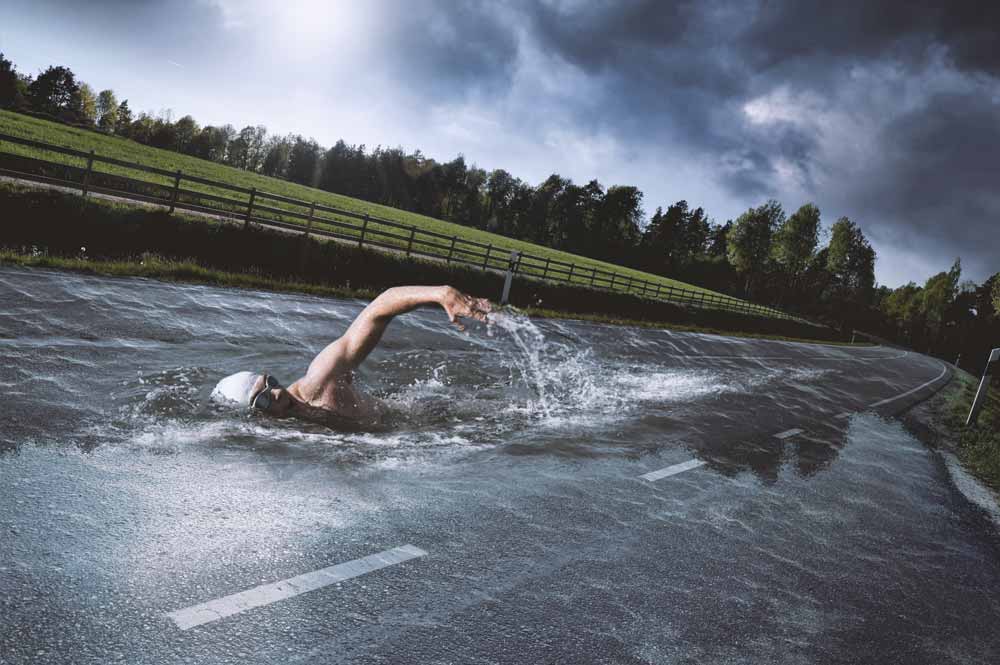
									<p style="text-align: justify;">En la red habrás visto efectos similares al que he desarrollado yo. Los resultados que he visto son fantásticos y quise hacer mi fotomontaje con photoshop intentando crear una textura que mezclara agua con asfalto. Creo que lo conseguí a pesar que el fotomontaje requiere mucha labor de pruebas y aplicación de técnicas que consigan el resultado esperado. Creo que el que hemos obtenido es genial y mantiene el espíritu de la manipulación que no es otra que simular un nadador en el asfalto. Verás como tu mente no asocia e, nadador al mar sino a la propia carretera que ha cambiado la textura.</p>								</div>
				</div>
					</div>
		</div>
					</div>
		</section>
				<section class="elementor-section elementor-top-section elementor-element elementor-element-2f8f55d elementor-section-boxed elementor-section-height-default elementor-section-height-default" data-id="2f8f55d" data-element_type="section" data-e-type="section">
						<div class="elementor-container elementor-column-gap-default">
					<div class="elementor-column elementor-col-100 elementor-top-column elementor-element elementor-element-4fe8f561" data-id="4fe8f561" data-element_type="column" data-e-type="column">
			<div class="elementor-widget-wrap elementor-element-populated">
						<div class="elementor-element elementor-element-19409cd7 elementor-widget elementor-widget-text-editor" data-id="19409cd7" data-element_type="widget" data-e-type="widget" data-widget_type="text-editor.default">
				<div class="elementor-widget-container">
									<p><img fetchpriority="high" decoding="async" class="aligncenter size-full wp-image-6389" src="https://ildefonsosegura.es/wp-content/uploads/swimmer-1.jpg" alt="" width="1000" height="665" srcset="https://ildefonsosegura.es/wp-content/uploads/swimmer-1.jpg 1000w, https://ildefonsosegura.es/wp-content/uploads/swimmer-1-300x200.jpg 300w, https://ildefonsosegura.es/wp-content/uploads/swimmer-1-768x511.jpg 768w" sizes="(max-width: 1000px) 100vw, 1000px" /></p><p style="text-align: justify;">Aquí te dejo el antes y el después del efecto conseguido</p>								</div>
				</div>
					</div>
		</div>
					</div>
		</section>
				<section class="elementor-section elementor-top-section elementor-element elementor-element-2e52303 elementor-section-boxed elementor-section-height-default elementor-section-height-default" data-id="2e52303" data-element_type="section" data-e-type="section">
						<div class="elementor-container elementor-column-gap-default">
					<div class="elementor-column elementor-col-100 elementor-top-column elementor-element elementor-element-5272861" data-id="5272861" data-element_type="column" data-e-type="column">
			<div class="elementor-widget-wrap">
							</div>
		</div>
					</div>
		</section>
				<section class="elementor-section elementor-top-section elementor-element elementor-element-3a9d68c elementor-section-boxed elementor-section-height-default elementor-section-height-default" data-id="3a9d68c" data-element_type="section" data-e-type="section">
						<div class="elementor-container elementor-column-gap-default">
					<div class="elementor-column elementor-col-100 elementor-top-column elementor-element elementor-element-5e562a7" data-id="5e562a7" data-element_type="column" data-e-type="column">
			<div class="elementor-widget-wrap elementor-element-populated">
						<div class="elementor-element elementor-element-8d14208 elementor-widget elementor-widget-heading" data-id="8d14208" data-element_type="widget" data-e-type="widget" data-widget_type="heading.default">
				<div class="elementor-widget-container">
					<h2 class="elementor-heading-title elementor-size-default"><strong><span style="color: #800000">TUTORIAL Fotomontaje nadador en la carretera</span></strong></h2>				</div>
				</div>
					</div>
		</div>
					</div>
		</section>
				<section class="elementor-section elementor-top-section elementor-element elementor-element-e4cfe0c elementor-section-boxed elementor-section-height-default elementor-section-height-default" data-id="e4cfe0c" data-element_type="section" data-e-type="section">
						<div class="elementor-container elementor-column-gap-default">
					<div class="elementor-column elementor-col-100 elementor-top-column elementor-element elementor-element-7c929fb" data-id="7c929fb" data-element_type="column" data-e-type="column">
			<div class="elementor-widget-wrap elementor-element-populated">
						<div class="elementor-element elementor-element-dc65739 elementor-widget elementor-widget-video" data-id="dc65739" data-element_type="widget" data-e-type="widget" data-settings="{&quot;youtube_url&quot;:&quot;https:\/\/youtu.be\/tvUTrt292Ro&quot;,&quot;video_type&quot;:&quot;youtube&quot;,&quot;controls&quot;:&quot;yes&quot;}" data-widget_type="video.default">
				<div class="elementor-widget-container">
							<div class="elementor-wrapper elementor-open-inline">
			<div class="elementor-video"></div>		</div>
						</div>
				</div>
					</div>
		</div>
					</div>
		</section>
				<section class="elementor-section elementor-top-section elementor-element elementor-element-00cc613 elementor-section-boxed elementor-section-height-default elementor-section-height-default" data-id="00cc613" data-element_type="section" data-e-type="section">
						<div class="elementor-container elementor-column-gap-default">
					<div class="elementor-column elementor-col-100 elementor-top-column elementor-element elementor-element-ad4a015" data-id="ad4a015" data-element_type="column" data-e-type="column">
			<div class="elementor-widget-wrap elementor-element-populated">
						<div class="elementor-element elementor-element-06b657f elementor-widget-divider--view-line elementor-widget elementor-widget-divider" data-id="06b657f" data-element_type="widget" data-e-type="widget" data-widget_type="divider.default">
				<div class="elementor-widget-container">
							<div class="elementor-divider">
			<span class="elementor-divider-separator">
						</span>
		</div>
						</div>
				</div>
					</div>
		</div>
					</div>
		</section>
				<section class="elementor-section elementor-top-section elementor-element elementor-element-42e470d6 elementor-section-full_width elementor-section-height-default elementor-section-height-default" data-id="42e470d6" data-element_type="section" data-e-type="section">
						<div class="elementor-container elementor-column-gap-default">
					<div class="elementor-column elementor-col-50 elementor-top-column elementor-element elementor-element-5a630e80" data-id="5a630e80" data-element_type="column" data-e-type="column">
			<div class="elementor-widget-wrap elementor-element-populated">
						<div class="elementor-element elementor-element-56cdcb38 elementor-align-right elementor-invisible elementor-widget elementor-widget-button" data-id="56cdcb38" data-element_type="widget" data-e-type="widget" data-settings="{&quot;_animation&quot;:&quot;shake&quot;}" data-widget_type="button.default">
				<div class="elementor-widget-container">
									<div class="elementor-button-wrapper">
					<a class="elementor-button elementor-button-link elementor-size-sm elementor-animation-grow" href="https://drive.google.com/open?id=1dc1DhWfa3Y6bqo6Yy-CuSs4omHgSAQCa" target="_blank">
						<span class="elementor-button-content-wrapper">
									<span class="elementor-button-text">DESCARGA EL MATERIAL</span>
					</span>
					</a>
				</div>
								</div>
				</div>
					</div>
		</div>
				<div class="elementor-column elementor-col-50 elementor-top-column elementor-element elementor-element-5c13b7e8" data-id="5c13b7e8" data-element_type="column" data-e-type="column">
			<div class="elementor-widget-wrap elementor-element-populated">
						<div class="elementor-element elementor-element-fe4eaa7 elementor-widget elementor-widget-html" data-id="fe4eaa7" data-element_type="widget" data-e-type="widget" data-settings="{&quot;_animation&quot;:&quot;none&quot;}" data-widget_type="html.default">
				<div class="elementor-widget-container">
					<form action="https://www.paypal.com/cgi-bin/webscr" method="post" target="_blank">
<input type="hidden" name="cmd" value="_donations">
<input type="hidden" name="business" value="ildefonsosegura@gmail.com">
<input type="hidden" name="lc" value="ES">
<input type="hidden" name="item_name" value="MANTENIMIENTO DE LA PAGINA DE ILDEFONSOSEGURA">
<input type="hidden" name="no_note" value="0">
<input type="hidden" name="currency_code" value="EUR">
<input type="hidden" name="bn" value="PP-DonationsBF:paypal1.jpg:NonHostedGuest">
<input type="image" src="http://ildefonsosegura.es/wp-content/uploads/paypal-updated-1.png" border="0" name="submit" alt="PayPal. La forma rápida y segura de pagar en Internet.">
<img decoding="async" alt="" border="0" src="https://www.paypalobjects.com/es_ES/i/scr/pixel.gif" width="1" height="1">
</form>				</div>
				</div>
					</div>
		</div>
					</div>
		</section>
				<section class="elementor-section elementor-top-section elementor-element elementor-element-bd3526c elementor-section-boxed elementor-section-height-default elementor-section-height-default" data-id="bd3526c" data-element_type="section" data-e-type="section">
						<div class="elementor-container elementor-column-gap-default">
					<div class="elementor-column elementor-col-100 elementor-top-column elementor-element elementor-element-9a2fb04" data-id="9a2fb04" data-element_type="column" data-e-type="column">
			<div class="elementor-widget-wrap elementor-element-populated">
						<div class="elementor-element elementor-element-3f77c63 elementor-widget-divider--view-line elementor-widget elementor-widget-divider" data-id="3f77c63" data-element_type="widget" data-e-type="widget" data-widget_type="divider.default">
				<div class="elementor-widget-container">
							<div class="elementor-divider">
			<span class="elementor-divider-separator">
						</span>
		</div>
						</div>
				</div>
					</div>
		</div>
					</div>
		</section>
				<section class="elementor-section elementor-top-section elementor-element elementor-element-7d4657b2 elementor-section-full_width elementor-section-height-default elementor-section-height-default" data-id="7d4657b2" data-element_type="section" data-e-type="section">
						<div class="elementor-container elementor-column-gap-default">
					<div class="elementor-column elementor-col-100 elementor-top-column elementor-element elementor-element-6ac95064" data-id="6ac95064" data-element_type="column" data-e-type="column">
			<div class="elementor-widget-wrap elementor-element-populated">
						<div class="elementor-element elementor-element-d9e940b elementor-widget elementor-widget-text-editor" data-id="d9e940b" data-element_type="widget" data-e-type="widget" data-widget_type="text-editor.default">
				<div class="elementor-widget-container">
									<div><div align="center"><center><strong style="color: #ff0000;">Suscríbete a mi canal de Youtube:</strong></center><div><div><div align="center"><p><script src="https://apis.google.com/js/platform.js"></script></p><div class="g-ytsubscribe" data-channel="ildefonsosegura" data-layout="full" data-count="default"> </div></div></div><p> </p><p style="text-align: center;">No te lo pierdas y comparte tus trabajos en mi página de facebook (<span style="color: #0000ff;"><strong><a style="color: #0000ff;" href="http://www.facebook.com/IldefonsoSeguraPage" target="_blank" rel="noopener noreferrer">IldefonsoSeguraPage</a></strong></span>)<br />Espero que te guste y compartas el vídeo. No dejes de compartir este post.</p><p style="text-align: center;">Así es como me puedes ayudar 🙂 Gracias</p></div></div></div>								</div>
				</div>
					</div>
		</div>
					</div>
		</section>
				</div>La entrada <a href="https://ildefonsosegura.es/fotomontaje-nadando-en-una-carretera-tutorial-photoshop-by-ildefonsosegura/">Fotomontaje nadando en una carretera Tutorial Photoshop by @ildefonsosegura</a> apareció primero en <a href="https://ildefonsosegura.es">Ildefonso Segura</a>.]]></content:encoded>
					
					<wfw:commentRss>https://ildefonsosegura.es/fotomontaje-nadando-en-una-carretera-tutorial-photoshop-by-ildefonsosegura/feed/</wfw:commentRss>
			<slash:comments>0</slash:comments>
		
		
			</item>
		<item>
		<title>Tutorial Photoshop // Trucos de iluminación y Crea alucinantes wallpapers de película by @ildefonsosegura</title>
		<link>https://ildefonsosegura.es/trucos-de-iluminacion-con-photoshop-crea-alucinantes-wallpapers-de-pelicula-by-ildefonsosegura/</link>
					<comments>https://ildefonsosegura.es/trucos-de-iluminacion-con-photoshop-crea-alucinantes-wallpapers-de-pelicula-by-ildefonsosegura/#respond</comments>
		
		<dc:creator><![CDATA[Ildefonso Segura]]></dc:creator>
		<pubDate>Fri, 25 Apr 2014 10:30:12 +0000</pubDate>
				<category><![CDATA[Efectos]]></category>
		<category><![CDATA[Fotocomposición]]></category>
		<category><![CDATA[Películas]]></category>
		<category><![CDATA[Photoshop]]></category>
		<category><![CDATA[Tecnicas]]></category>
		<category><![CDATA[Tutoriales]]></category>
		<category><![CDATA[Video]]></category>
		<category><![CDATA[Wallpaper]]></category>
		<category><![CDATA[adobe]]></category>
		<category><![CDATA[ajustes]]></category>
		<category><![CDATA[amazing]]></category>
		<category><![CDATA[CC]]></category>
		<category><![CDATA[creative cloud]]></category>
		<category><![CDATA[creatividad]]></category>
		<category><![CDATA[cs5]]></category>
		<category><![CDATA[cs6]]></category>
		<category><![CDATA[enseñar]]></category>
		<category><![CDATA[fotocomposición]]></category>
		<category><![CDATA[glioriasanis]]></category>
		<category><![CDATA[ildefonsosegura]]></category>
		<category><![CDATA[iluminación]]></category>
		<category><![CDATA[imagen]]></category>
		<category><![CDATA[lighting]]></category>
		<category><![CDATA[luces]]></category>
		<category><![CDATA[manipulación]]></category>
		<category><![CDATA[movie]]></category>
		<category><![CDATA[pelicula]]></category>
		<category><![CDATA[photoshop]]></category>
		<category><![CDATA[poster]]></category>
		<category><![CDATA[shadows]]></category>
		<category><![CDATA[sombras]]></category>
		<category><![CDATA[spiderman]]></category>
		<category><![CDATA[tecnicas]]></category>
		<category><![CDATA[trucos]]></category>
		<category><![CDATA[tuto]]></category>
		<category><![CDATA[tutorial]]></category>
		<category><![CDATA[video]]></category>
		<category><![CDATA[wallpaper]]></category>
		<guid isPermaLink="false">http://ildefonsosegura.es/?p=3450</guid>

					<description><![CDATA[<p>Hoy os traigo dos tutoriales con resultados fantásticos. Vereis dos wallpapers inspirados en la película The Amazing Spiderman 2 (#theamazingspiderman2) Aquí os muestro los resultados (más fotos en mi galería de ildefonsosegura en flickr) Wallpaper 1 &#8211; TUTORIAL 1 Wallpaper 2  &#8211; TUTORIAL 2 En el primer tutorial veremos como conseguir contrastar iluminaciones y sombras para conseguir [&#8230;]</p>
La entrada <a href="https://ildefonsosegura.es/trucos-de-iluminacion-con-photoshop-crea-alucinantes-wallpapers-de-pelicula-by-ildefonsosegura/">Tutorial Photoshop // Trucos de iluminación y Crea alucinantes wallpapers de película by @ildefonsosegura</a> apareció primero en <a href="https://ildefonsosegura.es">Ildefonso Segura</a>.]]></description>
										<content:encoded><![CDATA[<div data-elementor-type="wp-post" data-elementor-id="3450" class="elementor elementor-3450">
						<section class="elementor-section elementor-top-section elementor-element elementor-element-2c2aa602 elementor-section-boxed elementor-section-height-default elementor-section-height-default" data-id="2c2aa602" data-element_type="section" data-e-type="section">
						<div class="elementor-container elementor-column-gap-default">
					<div class="elementor-column elementor-col-100 elementor-top-column elementor-element elementor-element-30b16399" data-id="30b16399" data-element_type="column" data-e-type="column">
			<div class="elementor-widget-wrap elementor-element-populated">
						<div class="elementor-element elementor-element-68a0932a elementor-widget elementor-widget-text-editor" data-id="68a0932a" data-element_type="widget" data-e-type="widget" data-widget_type="text-editor.default">
				<div class="elementor-widget-container">
									<p style="text-align: left;">Hoy os traigo dos tutoriales con resultados fantásticos. Vereis dos wallpapers inspirados en la película The Amazing Spiderman 2 (#theamazingspiderman2)</p>
<p style="text-align: left;">Aquí os muestro los resultados (más fotos en mi galería de&nbsp;<a href="http://www.flickr.com/photos/ildefonsosegura/" target="_blank" rel="noopener">ildefonsosegura en flickr</a>)</p>
<p style="text-align: left;"><strong>Wallpaper 1 &#8211; TUTORIAL 1</strong></p>
<p style="text-align: center;"><a href="https://ildefonsosegura.es/trucos-de-iluminacion-con-photoshop-crea-alucinantes-wallpapers-de-pelicula-by-ildefonsosegura/the-amazing-spiderman-2-wallpaper/" rel="attachment wp-att-3451"><img decoding="async" class="alignnone size-full wp-image-3451" src="https://ildefonsosegura.es/wp-content/uploads/the-amazing-spiderman-2-wallpaper.jpg" alt="the-amazing-spiderman-2-wallpaper" width="630" height="394" srcset="https://ildefonsosegura.es/wp-content/uploads/the-amazing-spiderman-2-wallpaper.jpg 630w, https://ildefonsosegura.es/wp-content/uploads/the-amazing-spiderman-2-wallpaper-300x187.jpg 300w" sizes="(max-width: 630px) 100vw, 630px" /></a></p>
<p style="text-align: left;"><strong>Wallpaper 2 &nbsp;</strong><strong>&#8211; TUTORIAL 2</strong></p>
<p style="text-align: center;"><a href="https://ildefonsosegura.es/trucos-de-iluminacion-con-photoshop-crea-alucinantes-wallpapers-de-pelicula-by-ildefonsosegura/the-amazing-spiderman-2-wallpaper-b/" rel="attachment wp-att-3452"><img loading="lazy" decoding="async" class="alignnone size-full wp-image-3452" src="https://ildefonsosegura.es/wp-content/uploads/the-amazing-spiderman-2-wallpaper-b.jpg" alt="the-amazing-spiderman-2-wallpaper-b" width="630" height="420" srcset="https://ildefonsosegura.es/wp-content/uploads/the-amazing-spiderman-2-wallpaper-b.jpg 630w, https://ildefonsosegura.es/wp-content/uploads/the-amazing-spiderman-2-wallpaper-b-300x200.jpg 300w" sizes="(max-width: 630px) 100vw, 630px" /></a></p>
<p style="text-align: justify;">En el <strong>primer tutorial</strong> veremos como conseguir contrastar iluminaciones&nbsp;y sombras para conseguir brillos espectaculares en el wallpaper. Con capas de ajuste de tono y saturación, jugando con la luminosidad y modos de fusión de capa podemos conseguir resultados como el que ves a continuación</p>
<p><a href="https://ildefonsosegura.es/trucos-de-iluminacion-con-photoshop-crea-alucinantes-wallpapers-de-pelicula-by-ildefonsosegura/the-amazing-spiderman-2-wallpaper-c/" rel="attachment wp-att-3453"><img loading="lazy" decoding="async" class=" wp-image-3453 aligncenter" src="https://ildefonsosegura.es/wp-content/uploads/the-amazing-spiderman-2-wallpaper-c.jpg" alt="the-amazing-spiderman-2-wallpaper-c" width="624" height="279" srcset="https://ildefonsosegura.es/wp-content/uploads/the-amazing-spiderman-2-wallpaper-c.jpg 1000w, https://ildefonsosegura.es/wp-content/uploads/the-amazing-spiderman-2-wallpaper-c-300x133.jpg 300w" sizes="(max-width: 624px) 100vw, 624px" /></a></p>
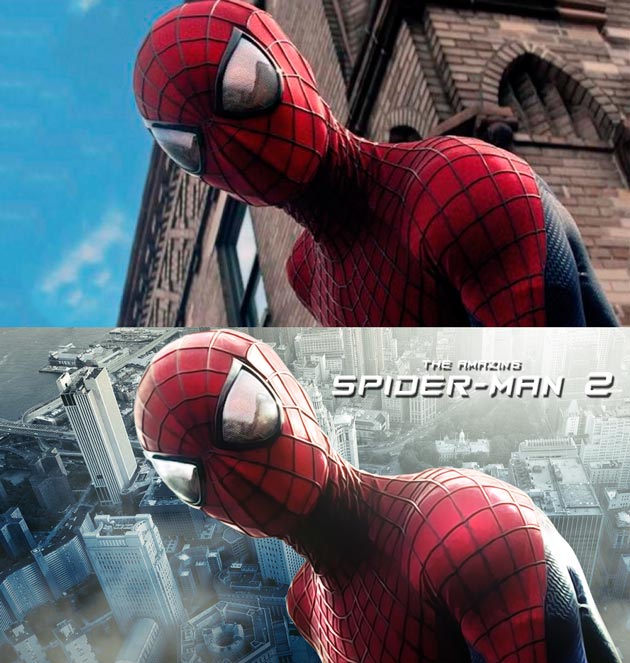
<p style="text-align: justify;">En el <strong>segundo tutorial</strong> crearemos un efecto de impresión iluminado desde un fotograma de la película cambiando el fondo y resaltando luces en las zonas más cercanas a la luz ambiental</p>
<p><a href="https://ildefonsosegura.es/trucos-de-iluminacion-con-photoshop-crea-alucinantes-wallpapers-de-pelicula-by-ildefonsosegura/the-amazing-spiderman-2-wallpaper-d/" rel="attachment wp-att-3455"><img loading="lazy" decoding="async" class="size-full wp-image-3455 aligncenter" src="https://ildefonsosegura.es/wp-content/uploads/the-amazing-spiderman-2-wallpaper-d.jpg" alt="the-amazing-spiderman-2-wallpaper-d" width="630" height="663" srcset="https://ildefonsosegura.es/wp-content/uploads/the-amazing-spiderman-2-wallpaper-d.jpg 630w, https://ildefonsosegura.es/wp-content/uploads/the-amazing-spiderman-2-wallpaper-d-285x300.jpg 285w" sizes="(max-width: 630px) 100vw, 630px" /></a></p>
<p style="text-align: justify;">No os perdáis los tutoriales porque podréis ver algunos trucos para</p>
<ul>
<li>Resaltar iluminaciones&nbsp;por zonas</li>
<li>Crear contrastes alucinantes</li>
<li>Enfatizar detalles que no se apreciaban antes de aplicar la técnica</li>
<li>Recorte de imágenes</li>
<li>Cambio de fondos</li>
<li>Aplicación de filtro TOPAZ (en el segundo tutorial). El filtro que utilizo se puede&nbsp;adquirir en&nbsp;<a href="http://www.topazlabs.com/cleanhttp" target="_blank" rel="noopener">http://www.topazlabs.com/clean</a></li>
</ul>
<p>&nbsp;</p>
<p>&nbsp;</p>
<p><strong style="color: #800000;">TUTORIAL 1 &nbsp;</strong></p>
<p></p><center><iframe src="https://www.youtube.com/embed/LZPNiX5NIa8" width="640" height="420" frameborder="0" allowfullscreen="allowfullscreen"></iframe></center>&nbsp;<p></p>
<p>&nbsp;</p>
<p><strong style="color: #800000;">TUTORIAL 2 &nbsp;</strong></p>
<p></p><center><iframe src="https://www.youtube.com/embed/yVS3m_ZKUr0" width="640" height="420" frameborder="0" allowfullscreen="allowfullscreen"></iframe></center><br /><p></p>
<p>&nbsp;</p>								</div>
				</div>
					</div>
		</div>
					</div>
		</section>
				<section class="elementor-section elementor-top-section elementor-element elementor-element-528759a5 elementor-section-boxed elementor-section-height-default elementor-section-height-default" data-id="528759a5" data-element_type="section" data-e-type="section">
						<div class="elementor-container elementor-column-gap-default">
					<div class="elementor-column elementor-col-100 elementor-top-column elementor-element elementor-element-1ce2210f" data-id="1ce2210f" data-element_type="column" data-e-type="column">
			<div class="elementor-widget-wrap elementor-element-populated">
						<div class="elementor-element elementor-element-11dbc22f elementor-widget-divider--view-line elementor-widget elementor-widget-divider" data-id="11dbc22f" data-element_type="widget" data-e-type="widget" data-widget_type="divider.default">
				<div class="elementor-widget-container">
							<div class="elementor-divider">
			<span class="elementor-divider-separator">
						</span>
		</div>
						</div>
				</div>
					</div>
		</div>
					</div>
		</section>
				<section class="elementor-section elementor-top-section elementor-element elementor-element-16326d28 elementor-section-full_width elementor-section-height-default elementor-section-height-default" data-id="16326d28" data-element_type="section" data-e-type="section">
						<div class="elementor-container elementor-column-gap-default">
					<div class="elementor-column elementor-col-50 elementor-top-column elementor-element elementor-element-7d2ee79f" data-id="7d2ee79f" data-element_type="column" data-e-type="column">
			<div class="elementor-widget-wrap elementor-element-populated">
						<div class="elementor-element elementor-element-6d62fe44 elementor-align-right elementor-invisible elementor-widget elementor-widget-button" data-id="6d62fe44" data-element_type="widget" data-e-type="widget" data-settings="{&quot;_animation&quot;:&quot;shake&quot;}" data-widget_type="button.default">
				<div class="elementor-widget-container">
									<div class="elementor-button-wrapper">
					<a class="elementor-button elementor-button-link elementor-size-sm elementor-animation-grow" href="https://drive.google.com/file/d/0B_nJkCGJubucdFNaWDAxLWd4RGc/view?resourcekey=0-ljQy8PsHWSwSIcyY7xsXkQ" target="_blank">
						<span class="elementor-button-content-wrapper">
									<span class="elementor-button-text">DESCARGA EL MATERIAL</span>
					</span>
					</a>
				</div>
								</div>
				</div>
					</div>
		</div>
				<div class="elementor-column elementor-col-50 elementor-top-column elementor-element elementor-element-59727cf9" data-id="59727cf9" data-element_type="column" data-e-type="column">
			<div class="elementor-widget-wrap elementor-element-populated">
						<div class="elementor-element elementor-element-19f95526 elementor-widget elementor-widget-html" data-id="19f95526" data-element_type="widget" data-e-type="widget" data-settings="{&quot;_animation&quot;:&quot;none&quot;}" data-widget_type="html.default">
				<div class="elementor-widget-container">
					<form action="https://www.paypal.com/cgi-bin/webscr" method="post" target="_blank">
<input type="hidden" name="cmd" value="_donations">
<input type="hidden" name="business" value="ildefonsosegura@gmail.com">
<input type="hidden" name="lc" value="ES">
<input type="hidden" name="item_name" value="MANTENIMIENTO DE LA PAGINA DE ILDEFONSOSEGURA">
<input type="hidden" name="no_note" value="0">
<input type="hidden" name="currency_code" value="EUR">
<input type="hidden" name="bn" value="PP-DonationsBF:paypal1.jpg:NonHostedGuest">
<input type="image" src="http://ildefonsosegura.es/wp-content/uploads/paypal-updated-1.png" border="0" name="submit" alt="PayPal. La forma rápida y segura de pagar en Internet.">
<img decoding="async" alt="" border="0" src="https://www.paypalobjects.com/es_ES/i/scr/pixel.gif" width="1" height="1">
</form>				</div>
				</div>
					</div>
		</div>
					</div>
		</section>
				<section class="elementor-section elementor-top-section elementor-element elementor-element-525f7e47 elementor-section-boxed elementor-section-height-default elementor-section-height-default" data-id="525f7e47" data-element_type="section" data-e-type="section">
						<div class="elementor-container elementor-column-gap-default">
					<div class="elementor-column elementor-col-100 elementor-top-column elementor-element elementor-element-52d59f2c" data-id="52d59f2c" data-element_type="column" data-e-type="column">
			<div class="elementor-widget-wrap elementor-element-populated">
						<div class="elementor-element elementor-element-7a3ee622 elementor-widget-divider--view-line elementor-widget elementor-widget-divider" data-id="7a3ee622" data-element_type="widget" data-e-type="widget" data-widget_type="divider.default">
				<div class="elementor-widget-container">
							<div class="elementor-divider">
			<span class="elementor-divider-separator">
						</span>
		</div>
						</div>
				</div>
					</div>
		</div>
					</div>
		</section>
				<section class="elementor-section elementor-top-section elementor-element elementor-element-5d433c95 elementor-section-full_width elementor-section-height-default elementor-section-height-default" data-id="5d433c95" data-element_type="section" data-e-type="section">
						<div class="elementor-container elementor-column-gap-default">
					<div class="elementor-column elementor-col-100 elementor-top-column elementor-element elementor-element-568b063" data-id="568b063" data-element_type="column" data-e-type="column">
			<div class="elementor-widget-wrap elementor-element-populated">
						<div class="elementor-element elementor-element-173897b0 elementor-widget elementor-widget-text-editor" data-id="173897b0" data-element_type="widget" data-e-type="widget" data-widget_type="text-editor.default">
				<div class="elementor-widget-container">
									<div><div align="center"><center><strong style="color: #ff0000;">Suscríbete a mi canal de Youtube:</strong></center><div><div><div align="center"><p><script src="https://apis.google.com/js/platform.js"></script></p><div class="g-ytsubscribe" data-channel="ildefonsosegura" data-layout="full" data-count="default"> </div></div></div><p> </p><p style="text-align: center;">No te lo pierdas y comparte tus trabajos en mi página de facebook (<span style="color: #0000ff;"><strong><a style="color: #0000ff;" href="http://www.facebook.com/IldefonsoSeguraPage" target="_blank" rel="noopener noreferrer">IldefonsoSeguraPage</a></strong></span>)<br />Espero que te guste y compartas el vídeo. No dejes de compartir este post.</p><p style="text-align: center;">Así es como me puedes ayudar 🙂 Gracias</p></div></div></div>								</div>
				</div>
					</div>
		</div>
					</div>
		</section>
				</div>La entrada <a href="https://ildefonsosegura.es/trucos-de-iluminacion-con-photoshop-crea-alucinantes-wallpapers-de-pelicula-by-ildefonsosegura/">Tutorial Photoshop // Trucos de iluminación y Crea alucinantes wallpapers de película by @ildefonsosegura</a> apareció primero en <a href="https://ildefonsosegura.es">Ildefonso Segura</a>.]]></content:encoded>
					
					<wfw:commentRss>https://ildefonsosegura.es/trucos-de-iluminacion-con-photoshop-crea-alucinantes-wallpapers-de-pelicula-by-ildefonsosegura/feed/</wfw:commentRss>
			<slash:comments>0</slash:comments>
		
		
			</item>
	</channel>
</rss>

<!--
Performance optimized by W3 Total Cache. Learn more: https://www.boldgrid.com/w3-total-cache/?utm_source=w3tc&utm_medium=footer_comment&utm_campaign=free_plugin

Caché de objetos 0/57 objetos usando Redis
Caché de base de datos usando Redis

Served from: ildefonsosegura.es @ 2026-05-16 11:10:31 by W3 Total Cache
--><br />
<b>Fatal error</b>:  Uncaught TypeError: mysqli_num_fields(): Argument #1 ($result) must be of type mysqli_result, true given in /var/www/vhosts/ildefonsosegura.es/httpdocs/wp-includes/class-wpdb.php:3876
Stack trace:
#0 /var/www/vhosts/ildefonsosegura.es/httpdocs/wp-includes/class-wpdb.php(3876): mysqli_num_fields()
#1 /var/www/vhosts/ildefonsosegura.es/httpdocs/wp-includes/class-wpdb.php(785): wpdb-&gt;load_col_info()
#2 /var/www/vhosts/ildefonsosegura.es/httpdocs/wp-content/plugins/w3-total-cache/DbCache_WpdbInjection_QueryCaching.php(230): wpdb-&gt;__get()
#3 /var/www/vhosts/ildefonsosegura.es/httpdocs/wp-content/plugins/w3-total-cache/DbCache_WpdbNew.php(216): W3TC\DbCache_WpdbInjection_QueryCaching-&gt;query()
#4 /var/www/vhosts/ildefonsosegura.es/httpdocs/wp-content/plugins/aaa-option-optimizer/src/class-database.php(199): W3TC\DbCache_WpdbNew-&gt;query()
#5 /var/www/vhosts/ildefonsosegura.es/httpdocs/wp-content/plugins/aaa-option-optimizer/src/class-plugin.php(182): Progress_Planner\OptionOptimizer\Database::batch_insert()
#6 /var/www/vhosts/ildefonsosegura.es/httpdocs/wp-includes/class-wp-hook.php(341): Progress_Planner\OptionOptimizer\Plugin-&gt;update_tracked_options()
#7 /var/www/vhosts/ildefonsosegura.es/httpdocs/wp-includes/class-wp-hook.php(365): WP_Hook-&gt;apply_filters()
#8 /var/www/vhosts/ildefonsosegura.es/httpdocs/wp-includes/plugin.php(522): WP_Hook-&gt;do_action()
#9 /var/www/vhosts/ildefonsosegura.es/httpdocs/wp-includes/load.php(1308): do_action()
#10 [internal function]: shutdown_action_hook()
#11 {main}
  thrown in <b>/var/www/vhosts/ildefonsosegura.es/httpdocs/wp-includes/class-wpdb.php</b> on line <b>3876</b><br />