<?xml version="1.0" encoding="UTF-8"?><rss version="2.0"
	xmlns:content="http://purl.org/rss/1.0/modules/content/"
	xmlns:wfw="http://wellformedweb.org/CommentAPI/"
	xmlns:dc="http://purl.org/dc/elements/1.1/"
	xmlns:atom="http://www.w3.org/2005/Atom"
	xmlns:sy="http://purl.org/rss/1.0/modules/syndication/"
	xmlns:slash="http://purl.org/rss/1.0/modules/slash/"
	>

<channel>
	<title>composición | Ildefonso Segura</title>
	<atom:link href="https://ildefonsosegura.es/tag/composicion/feed/" rel="self" type="application/rss+xml" />
	<link>https://ildefonsosegura.es</link>
	<description>Tutoriales de diseño y animación</description>
	<lastBuildDate>Sun, 30 Oct 2022 18:47:42 +0000</lastBuildDate>
	<language>es</language>
	<sy:updatePeriod>
	hourly	</sy:updatePeriod>
	<sy:updateFrequency>
	1	</sy:updateFrequency>
	<generator>https://wordpress.org/?v=7.1.2</generator>

<image>
	<url>https://ildefonsosegura.es/wp-content/uploads/cropped-Favicon-new-logo-website-32x32.png</url>
	<title>composición | Ildefonso Segura</title>
	<link>https://ildefonsosegura.es</link>
	<width>32</width>
	<height>32</height>
</image> 
	<item>
		<title>Matte Painting Archivo PSD (Photoshop) GRATIS</title>
		<link>https://ildefonsosegura.es/matte-painting-archivo-psd-photoshop-gratis/</link>
					<comments>https://ildefonsosegura.es/matte-painting-archivo-psd-photoshop-gratis/#respond</comments>
		
		<dc:creator><![CDATA[Ildefonso Segura]]></dc:creator>
		<pubDate>Mon, 20 Apr 2020 17:58:21 +0000</pubDate>
				<category><![CDATA[Editable]]></category>
		<category><![CDATA[Fotocomposición]]></category>
		<category><![CDATA[Photoshop]]></category>
		<category><![CDATA[Recursos]]></category>
		<category><![CDATA[Tecnicas]]></category>
		<category><![CDATA[Tutoriales]]></category>
		<category><![CDATA[Video]]></category>
		<category><![CDATA[Wallpaper]]></category>
		<category><![CDATA[composición]]></category>
		<category><![CDATA[ildefonsosegura]]></category>
		<category><![CDATA[regalo]]></category>
		<guid isPermaLink="false">http://ildefonsosegura.es/?p=61379</guid>

					<description><![CDATA[<p>¡Te voy a hacer un regalo! Estoy experimentando con el «matte painting» con Photoshop y he conseguido mi primera composición. Seguro que tiene que mejorar mucho pero eso me motiva más. Esta composición tiene muchas capas como para hacer un tutorial dinámico y didáctico. Quizás me plantee un directo para realizar un «overview» sobre la [&#8230;]</p>
La entrada <a href="https://ildefonsosegura.es/matte-painting-archivo-psd-photoshop-gratis/">Matte Painting Archivo PSD (Photoshop) GRATIS</a> apareció primero en <a href="https://ildefonsosegura.es">Ildefonso Segura</a>.]]></description>
										<content:encoded><![CDATA[<div data-elementor-type="wp-post" data-elementor-id="61379" class="elementor elementor-61379">
						<section class="elementor-section elementor-top-section elementor-element elementor-element-529c0025 elementor-section-boxed elementor-section-height-default elementor-section-height-default" data-id="529c0025" data-element_type="section" data-e-type="section">
						<div class="elementor-container elementor-column-gap-default">
					<div class="elementor-column elementor-col-100 elementor-top-column elementor-element elementor-element-453d308f" data-id="453d308f" data-element_type="column" data-e-type="column">
			<div class="elementor-widget-wrap elementor-element-populated">
						<div class="elementor-element elementor-element-41f93b0 elementor-widget elementor-widget-text-editor" data-id="41f93b0" data-element_type="widget" data-e-type="widget" data-widget_type="text-editor.default">
				<div class="elementor-widget-container">
									<h1 style="text-align: center;"><span style="color: #ff0000;">¡Te voy a hacer un regalo!</span></h1><p style="text-align: justify;">Estoy experimentando con el «<strong>matte painting</strong>» con Photoshop y he conseguido mi primera composición. Seguro que tiene que mejorar mucho pero eso me motiva más.</p><p style="text-align: justify;">Esta composición tiene muchas capas como para hacer un tutorial dinámico y didáctico. Quizás me plantee un directo para realizar un «overview» sobre la multitud de capas. Hay alguna técnica curiosa como:</p><ul><li>Añadir moho a las piedras</li><li>Crear luces en determinados lugares que destacan en la escena</li><li>Trabajar con flares para conseguir efectos de luz</li><li>Otros muchos</li></ul><p style="text-align: justify;">No se&#8230;quizás lo haga o quizás publique pequeños tutoriales para explicar alguna de las técnicas.</p><p>Si quieres ver el wallpaper final, puedes visitar mi sitio en FLICKR. Haz click en este texto <a title="MATTE PAINTING SAMURAI" href="https://www.flickr.com/photos/ildefonsosegura/49794103296/in/dateposted/" target="_blank" rel="noopener noreferrer"><strong>VISITAR LA COMPOSICIÓN</strong></a> o en la propia imágen:</p><p><a href="https://www.flickr.com/photos/ildefonsosegura/49794103296/in/dateposted/" target="_blank" rel="noopener noreferrer"><img fetchpriority="high" decoding="async" class="aligncenter wp-image-61380 size-full" src="http://ildefonsosegura.es/wp-content/uploads/samurai-mattepainting.jpg" alt="" width="1280" height="720" srcset="https://ildefonsosegura.es/wp-content/uploads/samurai-mattepainting.jpg 1280w, https://ildefonsosegura.es/wp-content/uploads/samurai-mattepainting-300x169.jpg 300w, https://ildefonsosegura.es/wp-content/uploads/samurai-mattepainting-768x432.jpg 768w, https://ildefonsosegura.es/wp-content/uploads/samurai-mattepainting-1024x576.jpg 1024w, https://ildefonsosegura.es/wp-content/uploads/samurai-mattepainting-720x406.jpg 720w" sizes="(max-width: 1280px) 100vw, 1280px" /></a></p><p style="text-align: justify;">Mira el antes y el después</p><p style="text-align: justify;">[twenty20 img1=»61380&#8243; img2=»61381&#8243; offset=»0.5&#8243;]</p><p>Créditos al <a href="https://www.deviantart.com/phelandavion/art/Samurai-STOCK-III-584527955" target="_blank" rel="noopener noreferrer">Stock del Samurai</a> Autor: <a href="https://www.deviantart.com/phelandavion" target="_blank" rel="noopener noreferrer">PhelanDavion</a></p><p> </p><p>Aquí te dejo también el «making of» de la composición que puedes chequear también en mi <a href="https://www.instagram.com/ildefonsosegura/" target="_blank" rel="noopener noreferrer">instagram ildefonsosegura</a>:</p>								</div>
				</div>
					</div>
		</div>
					</div>
		</section>
				<section class="elementor-section elementor-top-section elementor-element elementor-element-4422d86 elementor-section-boxed elementor-section-height-default elementor-section-height-default" data-id="4422d86" data-element_type="section" data-e-type="section">
						<div class="elementor-container elementor-column-gap-default">
					<div class="elementor-column elementor-col-100 elementor-top-column elementor-element elementor-element-af74398" data-id="af74398" data-element_type="column" data-e-type="column">
			<div class="elementor-widget-wrap elementor-element-populated">
						<div class="elementor-element elementor-element-e3196af elementor-widget elementor-widget-video" data-id="e3196af" data-element_type="widget" data-e-type="widget" data-settings="{&quot;youtube_url&quot;:&quot;https:\/\/youtu.be\/NwZ_T5s4_fE&quot;,&quot;video_type&quot;:&quot;youtube&quot;,&quot;controls&quot;:&quot;yes&quot;}" data-widget_type="video.default">
				<div class="elementor-widget-container">
							<div class="elementor-wrapper elementor-open-inline">
			<div class="elementor-video"></div>		</div>
						</div>
				</div>
					</div>
		</div>
					</div>
		</section>
				<section class="elementor-section elementor-top-section elementor-element elementor-element-57c1181 elementor-section-boxed elementor-section-height-default elementor-section-height-default" data-id="57c1181" data-element_type="section" data-e-type="section">
						<div class="elementor-container elementor-column-gap-default">
					<div class="elementor-column elementor-col-100 elementor-top-column elementor-element elementor-element-f76b5ac" data-id="f76b5ac" data-element_type="column" data-e-type="column">
			<div class="elementor-widget-wrap elementor-element-populated">
						<div class="elementor-element elementor-element-3fb13bf elementor-widget elementor-widget-spacer" data-id="3fb13bf" data-element_type="widget" data-e-type="widget" data-widget_type="spacer.default">
				<div class="elementor-widget-container">
							<div class="elementor-spacer">
			<div class="elementor-spacer-inner"></div>
		</div>
						</div>
				</div>
					</div>
		</div>
					</div>
		</section>
				<section class="elementor-section elementor-top-section elementor-element elementor-element-7bcdb6d elementor-section-boxed elementor-section-height-default elementor-section-height-default" data-id="7bcdb6d" data-element_type="section" data-e-type="section">
						<div class="elementor-container elementor-column-gap-default">
					<div class="elementor-column elementor-col-50 elementor-top-column elementor-element elementor-element-1ce95b3" data-id="1ce95b3" data-element_type="column" data-e-type="column">
			<div class="elementor-widget-wrap elementor-element-populated">
						<div class="elementor-element elementor-element-75d92e0 elementor-align-center elementor-widget elementor-widget-button" data-id="75d92e0" data-element_type="widget" data-e-type="widget" data-widget_type="button.default">
				<div class="elementor-widget-container">
									<div class="elementor-button-wrapper">
					<a class="elementor-button elementor-button-link elementor-size-sm elementor-animation-grow" href="https://mega.nz/file/BldkhKZR#SpGXgRR_WPAhSUM9cAG-gvnuMmQUZjuwPXyY-lJ8YuA" target="_blank">
						<span class="elementor-button-content-wrapper">
						<span class="elementor-button-icon">
				<i aria-hidden="true" class="fas fa-arrow-alt-circle-right"></i>			</span>
									<span class="elementor-button-text">BAJATE EL EDITABLE</span>
					</span>
					</a>
				</div>
								</div>
				</div>
					</div>
		</div>
				<div class="elementor-column elementor-col-50 elementor-top-column elementor-element elementor-element-f55eb32" data-id="f55eb32" data-element_type="column" data-e-type="column">
			<div class="elementor-widget-wrap elementor-element-populated">
						<div class="elementor-element elementor-element-295b9a7 elementor-invisible elementor-widget elementor-widget-html" data-id="295b9a7" data-element_type="widget" data-e-type="widget" data-settings="{&quot;_animation&quot;:&quot;bounceIn&quot;}" data-widget_type="html.default">
				<div class="elementor-widget-container">
					<form action="https://www.paypal.com/cgi-bin/webscr" method="post" target="_blank">
<input type="hidden" name="cmd" value="_donations">
<input type="hidden" name="business" value="ildefonsosegura@gmail.com">
<input type="hidden" name="lc" value="ES">
<input type="hidden" name="item_name" value="MANTENIMIENTO DE LA PAGINA DE ILDEFONSOSEGURA">
<input type="hidden" name="no_note" value="0">
<input type="hidden" name="currency_code" value="EUR">
<input type="hidden" name="bn" value="PP-DonationsBF:paypal1.jpg:NonHostedGuest">
<input type="image" src="http://ildefonsosegura.es/wp-content/uploads/paypal-updated-1.png" border="0" name="submit" alt="PayPal. La forma rápida y segura de pagar en Internet.">
<img decoding="async" alt="" border="0" src="https://www.paypalobjects.com/es_ES/i/scr/pixel.gif" width="1" height="1">
</form>				</div>
				</div>
					</div>
		</div>
					</div>
		</section>
				<section class="elementor-section elementor-top-section elementor-element elementor-element-9a21c58 elementor-section-boxed elementor-section-height-default elementor-section-height-default" data-id="9a21c58" data-element_type="section" data-e-type="section">
						<div class="elementor-container elementor-column-gap-default">
					<div class="elementor-column elementor-col-100 elementor-top-column elementor-element elementor-element-d21f3f9" data-id="d21f3f9" data-element_type="column" data-e-type="column">
			<div class="elementor-widget-wrap elementor-element-populated">
						<div class="elementor-element elementor-element-9264554 elementor-widget elementor-widget-spacer" data-id="9264554" data-element_type="widget" data-e-type="widget" data-widget_type="spacer.default">
				<div class="elementor-widget-container">
							<div class="elementor-spacer">
			<div class="elementor-spacer-inner"></div>
		</div>
						</div>
				</div>
					</div>
		</div>
					</div>
		</section>
				<section class="elementor-section elementor-top-section elementor-element elementor-element-3816d71d elementor-section-boxed elementor-section-height-default elementor-section-height-default" data-id="3816d71d" data-element_type="section" data-e-type="section">
						<div class="elementor-container elementor-column-gap-default">
					<div class="elementor-column elementor-col-100 elementor-top-column elementor-element elementor-element-25a473e" data-id="25a473e" data-element_type="column" data-e-type="column">
			<div class="elementor-widget-wrap elementor-element-populated">
						<div class="elementor-element elementor-element-25c3c36 elementor-widget elementor-widget-html" data-id="25c3c36" data-element_type="widget" data-e-type="widget" data-widget_type="html.default">
				<div class="elementor-widget-container">
					&nbsp;
<center><span style="color: #333333;"><strong>SUSCRÍBETE A MI CANAL DE YouTube</strong></span></center>&nbsp;
<div>
<div>
<div align="center">


<script src="https://apis.google.com/js/platform.js"></script>

<div class="g-ytsubscribe" data-channel="ildefonsosegura" data-layout="full" data-count="default"></div>
</div>
</div>
&nbsp;<p style="text-align: left;">No te lo pierdas y comparte tus trabajos en mi página de facebook (<span style="color: #ff0000;"><strong><a style="color: #ff0000;" href="http://www.facebook.com/IldefonsoSeguraPage" target="_blank" rel="noopener noreferrer">IldefonsoSeguraPage</a></strong></span>)</p>
Espero que te guste y compartas el vídeo. No dejes de compartir este post.
<p style="text-align: left;">Así es como me puedes ayudar 🙂 Gracias</p>

</div>				</div>
				</div>
					</div>
		</div>
					</div>
		</section>
				</div>La entrada <a href="https://ildefonsosegura.es/matte-painting-archivo-psd-photoshop-gratis/">Matte Painting Archivo PSD (Photoshop) GRATIS</a> apareció primero en <a href="https://ildefonsosegura.es">Ildefonso Segura</a>.]]></content:encoded>
					
					<wfw:commentRss>https://ildefonsosegura.es/matte-painting-archivo-psd-photoshop-gratis/feed/</wfw:commentRss>
			<slash:comments>0</slash:comments>
		
		
			</item>
		<item>
		<title>Papel roto y doblado en una felicitación Tutorial Photoshop by @ildefonsosegura</title>
		<link>https://ildefonsosegura.es/papel-roto-y-doblado-en-una-felicitacion-tutorial-photoshop-by-ildefonsosegura/</link>
					<comments>https://ildefonsosegura.es/papel-roto-y-doblado-en-una-felicitacion-tutorial-photoshop-by-ildefonsosegura/#comments</comments>
		
		<dc:creator><![CDATA[Ildefonso Segura]]></dc:creator>
		<pubDate>Fri, 04 Jan 2019 19:02:55 +0000</pubDate>
				<category><![CDATA[Editable]]></category>
		<category><![CDATA[Efectos]]></category>
		<category><![CDATA[Fotocomposición]]></category>
		<category><![CDATA[Photoshop]]></category>
		<category><![CDATA[Sin categoria]]></category>
		<category><![CDATA[Tecnicas]]></category>
		<category><![CDATA[Textos]]></category>
		<category><![CDATA[Textura]]></category>
		<category><![CDATA[Tutoriales]]></category>
		<category><![CDATA[Video]]></category>
		<category><![CDATA[Wallpaper]]></category>
		<category><![CDATA[adobe]]></category>
		<category><![CDATA[adobe photoshop]]></category>
		<category><![CDATA[cartel]]></category>
		<category><![CDATA[composición]]></category>
		<category><![CDATA[doblar]]></category>
		<category><![CDATA[editable]]></category>
		<category><![CDATA[felicitación]]></category>
		<category><![CDATA[felicitar]]></category>
		<category><![CDATA[fondo]]></category>
		<category><![CDATA[fotocomposición]]></category>
		<category><![CDATA[fotomontaje]]></category>
		<category><![CDATA[ildefonsosegura]]></category>
		<category><![CDATA[montaje]]></category>
		<category><![CDATA[papel]]></category>
		<category><![CDATA[papel doblado]]></category>
		<category><![CDATA[photomanipulation]]></category>
		<category><![CDATA[photoshop]]></category>
		<category><![CDATA[postal]]></category>
		<category><![CDATA[poster]]></category>
		<category><![CDATA[puerta papel]]></category>
		<category><![CDATA[tarjeta]]></category>
		<category><![CDATA[textura]]></category>
		<category><![CDATA[tuto]]></category>
		<category><![CDATA[tutorial]]></category>
		<category><![CDATA[VIDEOTUTORIAL]]></category>
		<category><![CDATA[wallpaper]]></category>
		<category><![CDATA[youtube]]></category>
		<guid isPermaLink="false">http://ildefonsosegura.es/?p=6426</guid>

					<description><![CDATA[<p>En este tutorial de Photoshop aprenderemos como diseñar una felicitación creando un efecto de papel roto y doblado simulando que es la puerta por donde aparece el motivo de la felicitación. Yo he considerado un bebé pero podríais incorporar las imágenes que considerarais de acuerdo con el motivo de vuestra felicitación. La clave del tutorial [&#8230;]</p>
La entrada <a href="https://ildefonsosegura.es/papel-roto-y-doblado-en-una-felicitacion-tutorial-photoshop-by-ildefonsosegura/">Papel roto y doblado en una felicitación Tutorial Photoshop by @ildefonsosegura</a> apareció primero en <a href="https://ildefonsosegura.es">Ildefonso Segura</a>.]]></description>
										<content:encoded><![CDATA[<div data-elementor-type="wp-post" data-elementor-id="6426" class="elementor elementor-6426">
						<section class="elementor-section elementor-top-section elementor-element elementor-element-1fa6dc87 elementor-section-boxed elementor-section-height-default elementor-section-height-default" data-id="1fa6dc87" data-element_type="section" data-e-type="section">
						<div class="elementor-container elementor-column-gap-default">
					<div class="elementor-column elementor-col-100 elementor-top-column elementor-element elementor-element-321a0fe3" data-id="321a0fe3" data-element_type="column" data-e-type="column">
			<div class="elementor-widget-wrap elementor-element-populated">
						<div class="elementor-element elementor-element-698f9efe elementor-widget elementor-widget-text-editor" data-id="698f9efe" data-element_type="widget" data-e-type="widget" data-widget_type="text-editor.default">
				<div class="elementor-widget-container">
									<p style="text-align: justify;">En este tutorial de Photoshop aprenderemos como diseñar una felicitación creando un efecto de papel roto y doblado simulando que es la puerta por donde aparece el motivo de la felicitación.</p><p style="text-align: justify;">Yo he considerado un bebé pero podríais incorporar las imágenes que considerarais de acuerdo con el motivo de vuestra felicitación. La clave del tutorial es aprender a realizar el efecto de papel roto y doblado con Photoshop. El resto dependerá de tu creatividad.</p><p><img decoding="async" class="aligncenter size-full wp-image-6427" src="https://ildefonsosegura.es/wp-content/uploads/PAPEL-DOBLADO-1.jpg" alt="" width="1000" height="563" srcset="https://ildefonsosegura.es/wp-content/uploads/PAPEL-DOBLADO-1.jpg 1000w, https://ildefonsosegura.es/wp-content/uploads/PAPEL-DOBLADO-1-300x169.jpg 300w, https://ildefonsosegura.es/wp-content/uploads/PAPEL-DOBLADO-1-768x432.jpg 768w, https://ildefonsosegura.es/wp-content/uploads/PAPEL-DOBLADO-1-720x406.jpg 720w" sizes="(max-width: 1000px) 100vw, 1000px" /></p><p style="text-align: justify;">Aquí te dejo el antes y el después del efecto conseguido</p><p>[twenty20 img1=»6429&#8243; img2=»6427&#8243; offset=»0.5&#8243;]</p><p><span style="color: #000000;">En instagram posteé el </span><strong><span style="color: #800000;">MAKING OF</span></strong></p><p> </p><blockquote class="instagram-media" style="background: #FFF; border: 0; border-radius: 3px; box-shadow: 0 0 1px 0 rgba(0,0,0,0.5),0 1px 10px 0 rgba(0,0,0,0.15); margin: 1px; max-width: 540px; min-width: 326px; padding: 0; width: calc(100% - 2px);" data-instgrm-captioned="" data-instgrm-permalink="https://www.instagram.com/p/BsOTEYeI3rk/?utm_source=ig_embed&amp;utm_medium=loading" data-instgrm-version="12"><div style="padding: 16px;"><p> </p><div style="display: flex; flex-direction: row; align-items: center;"><div style="background-color: #f4f4f4; border-radius: 50%; flex-grow: 0; height: 40px; margin-right: 14px; width: 40px;"> </div><div style="display: flex; flex-direction: column; flex-grow: 1; justify-content: center;"><div style="background-color: #f4f4f4; border-radius: 4px; flex-grow: 0; height: 14px; margin-bottom: 6px; width: 100px;"> </div><div style="background-color: #f4f4f4; border-radius: 4px; flex-grow: 0; height: 14px; width: 60px;"> </div></div></div><div style="padding: 19% 0;"> </div><div style="display: block; height: 50px; margin: 0 auto 12px; width: 50px;"> </div><div style="padding-top: 8px;"><div style="color: #3897f0; font-family: Arial,sans-serif; font-size: 14px; font-style: normal; font-weight: 550; line-height: 18px;">Ver esta publicación en Instagram</div></div><div style="padding: 12.5% 0;"> </div><div style="display: flex; flex-direction: row; margin-bottom: 14px; align-items: center;"><div><div style="background-color: #f4f4f4; border-radius: 50%; height: 12.5px; width: 12.5px; transform: translateX(0px) translateY(7px);"> </div><div style="background-color: #f4f4f4; height: 12.5px; transform: rotate(-45deg) translateX(3px) translateY(1px); width: 12.5px; flex-grow: 0; margin-right: 14px; margin-left: 2px;"> </div><div style="background-color: #f4f4f4; border-radius: 50%; height: 12.5px; width: 12.5px; transform: translateX(9px) translateY(-18px);"> </div></div><div style="margin-left: 8px;"><div style="background-color: #f4f4f4; border-radius: 50%; flex-grow: 0; height: 20px; width: 20px;"> </div><div style="width: 0; height: 0; border-top: 2px solid transparent; border-left: 6px solid #f4f4f4; border-bottom: 2px solid transparent; transform: translateX(16px) translateY(-4px) rotate(30deg);"> </div></div><div style="margin-left: auto;"><div style="width: 0px; border-top: 8px solid #F4F4F4; border-right: 8px solid transparent; transform: translateY(16px);"> </div><div style="background-color: #f4f4f4; flex-grow: 0; height: 12px; width: 16px; transform: translateY(-4px);"> </div><div style="width: 0; height: 0; border-top: 8px solid #F4F4F4; border-left: 8px solid transparent; transform: translateY(-4px) translateX(8px);"> </div></div></div><p> </p><p style="margin: 8px 0 0 0; padding: 0 4px;"><a style="color: #000; font-family: Arial,sans-serif; font-size: 14px; font-style: normal; font-weight: normal; line-height: 17px; text-decoration: none; word-wrap: break-word;" href="https://www.instagram.com/p/BsOTEYeI3rk/?utm_source=ig_embed&amp;utm_medium=loading" target="_blank" rel="noopener">New #photoshop tutorial. Break and Bend your paper texture and create the door where happy things. Link in my bio or web ••••••••••••••••••••••• Visit my website for more free tutorials. Check my Bio ••••••••••••••••••••••• #thegraphicspr0ject#creartmood#visual_creatorz#enter_imagination#LaunchDsigns#edit_grams#moodygrams#VisualMobs#simplycooldesign#CreativeOptic#photoshop #edit_perfection#manipulationclan#creativitychasers #edit_mania__#thecreativers#creative_ace#digitallyart#xceptionaledits#imaginativeuniverse#artist #igworldclub_edits#visualcreative#discoveredit#thehub_edit#bestvisualz#theuniversalart#photomanipulation #greetingcard</a></p><p style="color: #c9c8cd; font-family: Arial,sans-serif; font-size: 14px; line-height: 17px; margin-bottom: 0; margin-top: 8px; overflow: hidden; padding: 8px 0 7px; text-align: center; text-overflow: ellipsis; white-space: nowrap;">Una publicación compartida de <a style="color: #c9c8cd; font-family: Arial,sans-serif; font-size: 14px; font-style: normal; font-weight: normal; line-height: 17px;" href="https://www.instagram.com/ildefonsosegura/?utm_source=ig_embed&amp;utm_medium=loading" target="_blank" rel="noopener"> Ildefonso Segura</a> (@ildefonsosegura) el <time style="font-family: Arial,sans-serif; font-size: 14px; line-height: 17px;" datetime="2019-01-04T18:56:35+00:00">4 Ene, 2019 a las 10:56 PST</time></p></div></blockquote><p><script async="" src="//www.instagram.com/embed.js"></script></p><p> </p><p>Disfruta del tutorial de Photoshop. Yo me lo pasé en grande aunque hay mucho trabajo detrás. Compártelo y así me ayudas.</p><p><strong><span style="color: #800000;">TUTORIAL Fotomontaje Postal felicitación papel doblado</span></strong></p><center><iframe src="https://www.youtube.com/embed/IWWJzIMsmEA" width="640" height="420" frameborder="0" allowfullscreen="allowfullscreen"><span data-mce-type="bookmark" style="display: inline-block; width: 0px; overflow: hidden; line-height: 0;" class="mce_SELRES_start"></span></iframe></center><p style="text-align: center;"><span style="color: #ff0000;"><strong>Aquí debajo te dejo referencia al editable que regalo a cambio de compartir el vídeo en tus redes sociales. El editable tiene los materiales</strong></span></p>								</div>
				</div>
					</div>
		</div>
					</div>
		</section>
				<section class="elementor-section elementor-top-section elementor-element elementor-element-29b65ff4 elementor-section-boxed elementor-section-height-default elementor-section-height-default" data-id="29b65ff4" data-element_type="section" data-e-type="section">
						<div class="elementor-container elementor-column-gap-default">
					<div class="elementor-column elementor-col-100 elementor-top-column elementor-element elementor-element-59a2a969" data-id="59a2a969" data-element_type="column" data-e-type="column">
			<div class="elementor-widget-wrap elementor-element-populated">
						<div class="elementor-element elementor-element-1f05cc5a elementor-widget-divider--view-line elementor-widget elementor-widget-divider" data-id="1f05cc5a" data-element_type="widget" data-e-type="widget" data-widget_type="divider.default">
				<div class="elementor-widget-container">
							<div class="elementor-divider">
			<span class="elementor-divider-separator">
						</span>
		</div>
						</div>
				</div>
					</div>
		</div>
					</div>
		</section>
				<section class="elementor-section elementor-top-section elementor-element elementor-element-4f2d0ab2 elementor-section-full_width elementor-section-height-default elementor-section-height-default" data-id="4f2d0ab2" data-element_type="section" data-e-type="section">
						<div class="elementor-container elementor-column-gap-default">
					<div class="elementor-column elementor-col-50 elementor-top-column elementor-element elementor-element-5f625835" data-id="5f625835" data-element_type="column" data-e-type="column">
			<div class="elementor-widget-wrap elementor-element-populated">
						<div class="elementor-element elementor-element-1bd6517f elementor-align-right elementor-invisible elementor-widget elementor-widget-button" data-id="1bd6517f" data-element_type="widget" data-e-type="widget" data-settings="{&quot;_animation&quot;:&quot;shake&quot;}" data-widget_type="button.default">
				<div class="elementor-widget-container">
									<div class="elementor-button-wrapper">
					<a class="elementor-button elementor-button-link elementor-size-sm elementor-animation-grow" href="https://ildefonsosegura.es/regalos/">
						<span class="elementor-button-content-wrapper">
									<span class="elementor-button-text">BAJATE EL EDITABLE</span>
					</span>
					</a>
				</div>
								</div>
				</div>
					</div>
		</div>
				<div class="elementor-column elementor-col-50 elementor-top-column elementor-element elementor-element-6129366c" data-id="6129366c" data-element_type="column" data-e-type="column">
			<div class="elementor-widget-wrap elementor-element-populated">
						<div class="elementor-element elementor-element-4ef0f858 elementor-widget elementor-widget-html" data-id="4ef0f858" data-element_type="widget" data-e-type="widget" data-settings="{&quot;_animation&quot;:&quot;none&quot;}" data-widget_type="html.default">
				<div class="elementor-widget-container">
					<form action="https://www.paypal.com/cgi-bin/webscr" method="post" target="_blank">
<input type="hidden" name="cmd" value="_donations">
<input type="hidden" name="business" value="ildefonsosegura@gmail.com">
<input type="hidden" name="lc" value="ES">
<input type="hidden" name="item_name" value="MANTENIMIENTO DE LA PAGINA DE ILDEFONSOSEGURA">
<input type="hidden" name="no_note" value="0">
<input type="hidden" name="currency_code" value="EUR">
<input type="hidden" name="bn" value="PP-DonationsBF:paypal1.jpg:NonHostedGuest">
<input type="image" src="http://ildefonsosegura.es/wp-content/uploads/paypal-updated-1.png" border="0" name="submit" alt="PayPal. La forma rápida y segura de pagar en Internet.">
<img decoding="async" alt="" border="0" src="https://www.paypalobjects.com/es_ES/i/scr/pixel.gif" width="1" height="1">
</form>				</div>
				</div>
					</div>
		</div>
					</div>
		</section>
				<section class="elementor-section elementor-top-section elementor-element elementor-element-497e7240 elementor-section-boxed elementor-section-height-default elementor-section-height-default" data-id="497e7240" data-element_type="section" data-e-type="section">
						<div class="elementor-container elementor-column-gap-default">
					<div class="elementor-column elementor-col-100 elementor-top-column elementor-element elementor-element-3d487981" data-id="3d487981" data-element_type="column" data-e-type="column">
			<div class="elementor-widget-wrap elementor-element-populated">
						<div class="elementor-element elementor-element-5b2670ab elementor-widget-divider--view-line elementor-widget elementor-widget-divider" data-id="5b2670ab" data-element_type="widget" data-e-type="widget" data-widget_type="divider.default">
				<div class="elementor-widget-container">
							<div class="elementor-divider">
			<span class="elementor-divider-separator">
						</span>
		</div>
						</div>
				</div>
					</div>
		</div>
					</div>
		</section>
				<section class="elementor-section elementor-top-section elementor-element elementor-element-3c191232 elementor-section-boxed elementor-section-height-default elementor-section-height-default" data-id="3c191232" data-element_type="section" data-e-type="section">
						<div class="elementor-container elementor-column-gap-default">
					<div class="elementor-column elementor-col-100 elementor-top-column elementor-element elementor-element-138d2a87" data-id="138d2a87" data-element_type="column" data-e-type="column">
			<div class="elementor-widget-wrap elementor-element-populated">
						<div class="elementor-element elementor-element-64afc68e elementor-widget elementor-widget-spacer" data-id="64afc68e" data-element_type="widget" data-e-type="widget" data-widget_type="spacer.default">
				<div class="elementor-widget-container">
							<div class="elementor-spacer">
			<div class="elementor-spacer-inner"></div>
		</div>
						</div>
				</div>
					</div>
		</div>
					</div>
		</section>
				<section class="elementor-section elementor-top-section elementor-element elementor-element-7a8dea12 elementor-section-full_width elementor-section-height-default elementor-section-height-default" data-id="7a8dea12" data-element_type="section" data-e-type="section">
						<div class="elementor-container elementor-column-gap-default">
					<div class="elementor-column elementor-col-100 elementor-top-column elementor-element elementor-element-52a8ffc3" data-id="52a8ffc3" data-element_type="column" data-e-type="column">
			<div class="elementor-widget-wrap elementor-element-populated">
						<div class="elementor-element elementor-element-b38733f elementor-widget elementor-widget-text-editor" data-id="b38733f" data-element_type="widget" data-e-type="widget" data-widget_type="text-editor.default">
				<div class="elementor-widget-container">
									<div><div align="center"><center><strong style="color: #ff0000;">Suscríbete a mi canal de Youtube:</strong></center><div><div><div align="center"><p><script src="https://apis.google.com/js/platform.js"></script></p><div class="g-ytsubscribe" data-channel="ildefonsosegura" data-layout="full" data-count="default"> </div></div></div><p> </p><p style="text-align: center;">No te lo pierdas y comparte tus trabajos en mi página de facebook (<span style="color: #0000ff;"><strong><a style="color: #0000ff;" href="http://www.facebook.com/IldefonsoSeguraPage" target="_blank" rel="noopener noreferrer">IldefonsoSeguraPage</a></strong></span>)<br />Espero que te guste y compartas el vídeo. No dejes de compartir este post.</p><p style="text-align: center;">Así es como me puedes ayudar 🙂 Gracias</p></div></div></div>								</div>
				</div>
					</div>
		</div>
					</div>
		</section>
				</div>La entrada <a href="https://ildefonsosegura.es/papel-roto-y-doblado-en-una-felicitacion-tutorial-photoshop-by-ildefonsosegura/">Papel roto y doblado en una felicitación Tutorial Photoshop by @ildefonsosegura</a> apareció primero en <a href="https://ildefonsosegura.es">Ildefonso Segura</a>.]]></content:encoded>
					
					<wfw:commentRss>https://ildefonsosegura.es/papel-roto-y-doblado-en-una-felicitacion-tutorial-photoshop-by-ildefonsosegura/feed/</wfw:commentRss>
			<slash:comments>2</slash:comments>
		
		
			</item>
		<item>
		<title>Crea el texto de la película Animales Fantásticos con Photoshop by @ildefonsosegura (Incluye editable)</title>
		<link>https://ildefonsosegura.es/crea-el-texto-de-la-pelicula-animales-fantasticos-con-photoshop-by-ildefonsosegura/</link>
					<comments>https://ildefonsosegura.es/crea-el-texto-de-la-pelicula-animales-fantasticos-con-photoshop-by-ildefonsosegura/#respond</comments>
		
		<dc:creator><![CDATA[Ildefonso Segura]]></dc:creator>
		<pubDate>Mon, 03 Dec 2018 16:15:46 +0000</pubDate>
				<category><![CDATA[Editable]]></category>
		<category><![CDATA[Efectos]]></category>
		<category><![CDATA[Estilos]]></category>
		<category><![CDATA[Fotocomposición]]></category>
		<category><![CDATA[Películas]]></category>
		<category><![CDATA[Photoshop]]></category>
		<category><![CDATA[Tecnicas]]></category>
		<category><![CDATA[Textos]]></category>
		<category><![CDATA[Tutoriales]]></category>
		<category><![CDATA[Video]]></category>
		<category><![CDATA[Wallpaper]]></category>
		<category><![CDATA[adobe]]></category>
		<category><![CDATA[banner]]></category>
		<category><![CDATA[brillo]]></category>
		<category><![CDATA[cartel]]></category>
		<category><![CDATA[cc2015]]></category>
		<category><![CDATA[cc2017]]></category>
		<category><![CDATA[cc2018]]></category>
		<category><![CDATA[composición]]></category>
		<category><![CDATA[diseño]]></category>
		<category><![CDATA[efecto]]></category>
		<category><![CDATA[estilo texto]]></category>
		<category><![CDATA[fantastic beasts]]></category>
		<category><![CDATA[harry]]></category>
		<category><![CDATA[ildefonsosegura]]></category>
		<category><![CDATA[imagen]]></category>
		<category><![CDATA[magia]]></category>
		<category><![CDATA[movie]]></category>
		<category><![CDATA[oro]]></category>
		<category><![CDATA[pelicula]]></category>
		<category><![CDATA[photoshop]]></category>
		<category><![CDATA[poster]]></category>
		<category><![CDATA[potter]]></category>
		<category><![CDATA[text]]></category>
		<category><![CDATA[text style]]></category>
		<category><![CDATA[texto oro]]></category>
		<category><![CDATA[tuto]]></category>
		<category><![CDATA[tutorial]]></category>
		<category><![CDATA[video]]></category>
		<category><![CDATA[VIDEOTUTORIAL]]></category>
		<category><![CDATA[wallpaper]]></category>
		<category><![CDATA[youtube]]></category>
		<guid isPermaLink="false">http://ildefonsosegura.es/?p=6303</guid>

					<description><![CDATA[<p>Me ha encantado hacer este tutorial por el resultado tan agradecido que tiene. Hemos conseguido un texto con una textura y brillos muy llamativo. Intenté emular el titulo de la película «Fantastic Beasts» y conseguí la siguiente composición que está inspirada en la película de la que mi hija es fan absoluta (de toda la [&#8230;]</p>
La entrada <a href="https://ildefonsosegura.es/crea-el-texto-de-la-pelicula-animales-fantasticos-con-photoshop-by-ildefonsosegura/">Crea el texto de la película Animales Fantásticos con Photoshop by @ildefonsosegura (Incluye editable)</a> apareció primero en <a href="https://ildefonsosegura.es">Ildefonso Segura</a>.]]></description>
										<content:encoded><![CDATA[<div data-elementor-type="wp-post" data-elementor-id="6303" class="elementor elementor-6303">
						<section class="elementor-section elementor-top-section elementor-element elementor-element-3d5872ff elementor-section-boxed elementor-section-height-default elementor-section-height-default" data-id="3d5872ff" data-element_type="section" data-e-type="section">
						<div class="elementor-container elementor-column-gap-default">
					<div class="elementor-column elementor-col-100 elementor-top-column elementor-element elementor-element-3098d52a" data-id="3098d52a" data-element_type="column" data-e-type="column">
			<div class="elementor-widget-wrap elementor-element-populated">
						<div class="elementor-element elementor-element-6fa03ca0 elementor-widget elementor-widget-text-editor" data-id="6fa03ca0" data-element_type="widget" data-e-type="widget" data-widget_type="text-editor.default">
				<div class="elementor-widget-container">
									<p style="text-align: justify;">Me ha encantado hacer este tutorial por el resultado tan agradecido que tiene.</p><p style="text-align: justify;">Hemos conseguido un texto con una textura y brillos muy llamativo. Intenté emular el titulo de la película «Fantastic Beasts» y conseguí la siguiente composición que está inspirada en la película de la que mi hija es fan absoluta (de toda la saga de J.K. Rowling)</p><p><img loading="lazy" decoding="async" class="aligncenter wp-image-6304 size-full" src="https://ildefonsosegura.es/wp-content/uploads/fantastic-beasts-1.jpg" alt="" width="1000" height="1250" srcset="https://ildefonsosegura.es/wp-content/uploads/fantastic-beasts-1.jpg 1000w, https://ildefonsosegura.es/wp-content/uploads/fantastic-beasts-1-240x300.jpg 240w, https://ildefonsosegura.es/wp-content/uploads/fantastic-beasts-1-768x960.jpg 768w, https://ildefonsosegura.es/wp-content/uploads/fantastic-beasts-1-819x1024.jpg 819w" sizes="(max-width: 1000px) 100vw, 1000px" /></p><p style="text-align: justify;">La idea inicial vino de la mano de un mago que me solicitó ayuda para crear un wallpaper con este estilo <a href="https://www.facebook.com/arcanomagic" target="_blank" rel="noopener">LA MAGIA DE ARCANO</a> . Comencé a investigar como conseguir un resultado inspirado en el texto original pero que tuviera algo de mi estilo. Probando diferentes técnicas y añadiendo efectos al propio texto, llegué a determinar ciertos valores en los estilos del mismo que me sirvieron para hacer el tutorial.</p><p>Aquí te dejo el antes y el después del efecto conseguido</p><p>[twenty20 img1=»6307&#8243; img2=»6305&#8243; offset=»0.5&#8243;]</p><p>Disfruta del tutorial. Yo me lo pasé en grande aunque hay mucho trabajo detrás. Si quieres el editable, puedes seguir leyendo hacia abajo y tendrás un vídeo guía y un botón que te llevará al regalo (sección de REGALOS  de mi web)</p><p><strong><span style="color: #800000;">TUTORIAL</span> </strong></p><center><iframe src="https://www.youtube.com/embed/Yp0HGERWwzc" width="640" height="420" frameborder="0" allowfullscreen="allowfullscreen"><span data-mce-type="bookmark" style="display: inline-block; width: 0px; overflow: hidden; line-height: 0;" class="mce_SELRES_start">﻿</span></iframe></center><p style="text-align: center;"><span style="color: #ff0000;"><strong>Aquí debajo te dejo referencia a las imágenes que he usado</strong></span></p>								</div>
				</div>
					</div>
		</div>
					</div>
		</section>
				<section class="elementor-section elementor-top-section elementor-element elementor-element-330cd307 elementor-section-boxed elementor-section-height-default elementor-section-height-default" data-id="330cd307" data-element_type="section" data-e-type="section">
						<div class="elementor-container elementor-column-gap-default">
					<div class="elementor-column elementor-col-100 elementor-top-column elementor-element elementor-element-61012f7d" data-id="61012f7d" data-element_type="column" data-e-type="column">
			<div class="elementor-widget-wrap elementor-element-populated">
						<div class="elementor-element elementor-element-963efc0 elementor-widget-divider--view-line elementor-widget elementor-widget-divider" data-id="963efc0" data-element_type="widget" data-e-type="widget" data-widget_type="divider.default">
				<div class="elementor-widget-container">
							<div class="elementor-divider">
			<span class="elementor-divider-separator">
						</span>
		</div>
						</div>
				</div>
					</div>
		</div>
					</div>
		</section>
				<section class="elementor-section elementor-top-section elementor-element elementor-element-2de0c41f elementor-section-full_width elementor-section-height-default elementor-section-height-default" data-id="2de0c41f" data-element_type="section" data-e-type="section">
						<div class="elementor-container elementor-column-gap-default">
					<div class="elementor-column elementor-col-50 elementor-top-column elementor-element elementor-element-62406e6a" data-id="62406e6a" data-element_type="column" data-e-type="column">
			<div class="elementor-widget-wrap elementor-element-populated">
						<div class="elementor-element elementor-element-1bdd237c elementor-align-right elementor-invisible elementor-widget elementor-widget-button" data-id="1bdd237c" data-element_type="widget" data-e-type="widget" data-settings="{&quot;_animation&quot;:&quot;shake&quot;}" data-widget_type="button.default">
				<div class="elementor-widget-container">
									<div class="elementor-button-wrapper">
					<a class="elementor-button elementor-button-link elementor-size-sm elementor-animation-grow" href="https://drive.google.com/file/d/1SJ4l5y4qTpFr1DvBKBtce67aY7CDODd3/view?usp=sharing">
						<span class="elementor-button-content-wrapper">
									<span class="elementor-button-text">DESCARGA EL MATERIAL</span>
					</span>
					</a>
				</div>
								</div>
				</div>
					</div>
		</div>
				<div class="elementor-column elementor-col-50 elementor-top-column elementor-element elementor-element-36d8a753" data-id="36d8a753" data-element_type="column" data-e-type="column">
			<div class="elementor-widget-wrap elementor-element-populated">
						<div class="elementor-element elementor-element-2c47df50 elementor-widget elementor-widget-html" data-id="2c47df50" data-element_type="widget" data-e-type="widget" data-settings="{&quot;_animation&quot;:&quot;none&quot;}" data-widget_type="html.default">
				<div class="elementor-widget-container">
					<form action="https://www.paypal.com/cgi-bin/webscr" method="post" target="_blank">
<input type="hidden" name="cmd" value="_donations">
<input type="hidden" name="business" value="ildefonsosegura@gmail.com">
<input type="hidden" name="lc" value="ES">
<input type="hidden" name="item_name" value="MANTENIMIENTO DE LA PAGINA DE ILDEFONSOSEGURA">
<input type="hidden" name="no_note" value="0">
<input type="hidden" name="currency_code" value="EUR">
<input type="hidden" name="bn" value="PP-DonationsBF:paypal1.jpg:NonHostedGuest">
<input type="image" src="http://ildefonsosegura.es/wp-content/uploads/paypal-updated-1.png" border="0" name="submit" alt="PayPal. La forma rápida y segura de pagar en Internet.">
<img decoding="async" alt="" border="0" src="https://www.paypalobjects.com/es_ES/i/scr/pixel.gif" width="1" height="1">
</form>				</div>
				</div>
					</div>
		</div>
					</div>
		</section>
				<section class="elementor-section elementor-top-section elementor-element elementor-element-70590309 elementor-section-boxed elementor-section-height-default elementor-section-height-default" data-id="70590309" data-element_type="section" data-e-type="section">
						<div class="elementor-container elementor-column-gap-default">
					<div class="elementor-column elementor-col-100 elementor-top-column elementor-element elementor-element-1ac099f8" data-id="1ac099f8" data-element_type="column" data-e-type="column">
			<div class="elementor-widget-wrap elementor-element-populated">
						<div class="elementor-element elementor-element-66755563 elementor-widget-divider--view-line elementor-widget elementor-widget-divider" data-id="66755563" data-element_type="widget" data-e-type="widget" data-widget_type="divider.default">
				<div class="elementor-widget-container">
							<div class="elementor-divider">
			<span class="elementor-divider-separator">
						</span>
		</div>
						</div>
				</div>
					</div>
		</div>
					</div>
		</section>
				<section class="elementor-section elementor-top-section elementor-element elementor-element-b60a148 elementor-section-boxed elementor-section-height-default elementor-section-height-default" data-id="b60a148" data-element_type="section" data-e-type="section">
						<div class="elementor-container elementor-column-gap-default">
					<div class="elementor-column elementor-col-100 elementor-top-column elementor-element elementor-element-233a6f9" data-id="233a6f9" data-element_type="column" data-e-type="column">
			<div class="elementor-widget-wrap elementor-element-populated">
						<div class="elementor-element elementor-element-d514857 elementor-widget elementor-widget-heading" data-id="d514857" data-element_type="widget" data-e-type="widget" data-widget_type="heading.default">
				<div class="elementor-widget-container">
					<h2 class="elementor-heading-title elementor-size-default">EDITABLE</h2>				</div>
				</div>
					</div>
		</div>
					</div>
		</section>
				<section class="elementor-section elementor-top-section elementor-element elementor-element-911babd elementor-section-boxed elementor-section-height-default elementor-section-height-default" data-id="911babd" data-element_type="section" data-e-type="section">
						<div class="elementor-container elementor-column-gap-default">
					<div class="elementor-column elementor-col-100 elementor-top-column elementor-element elementor-element-9df6ff7" data-id="9df6ff7" data-element_type="column" data-e-type="column">
			<div class="elementor-widget-wrap elementor-element-populated">
						<div class="elementor-element elementor-element-5c382c8 elementor-widget elementor-widget-video" data-id="5c382c8" data-element_type="widget" data-e-type="widget" data-settings="{&quot;youtube_url&quot;:&quot;https:\/\/youtu.be\/vPn2DVB6c7Q&quot;,&quot;video_type&quot;:&quot;youtube&quot;,&quot;controls&quot;:&quot;yes&quot;}" data-widget_type="video.default">
				<div class="elementor-widget-container">
							<div class="elementor-wrapper elementor-open-inline">
			<div class="elementor-video"></div>		</div>
						</div>
				</div>
					</div>
		</div>
					</div>
		</section>
				<section class="elementor-section elementor-top-section elementor-element elementor-element-41f87d1e elementor-section-boxed elementor-section-height-default elementor-section-height-default" data-id="41f87d1e" data-element_type="section" data-e-type="section">
						<div class="elementor-container elementor-column-gap-default">
					<div class="elementor-column elementor-col-100 elementor-top-column elementor-element elementor-element-360af7fb" data-id="360af7fb" data-element_type="column" data-e-type="column">
			<div class="elementor-widget-wrap elementor-element-populated">
						<div class="elementor-element elementor-element-7bb358d5 elementor-widget-divider--view-line elementor-widget elementor-widget-divider" data-id="7bb358d5" data-element_type="widget" data-e-type="widget" data-widget_type="divider.default">
				<div class="elementor-widget-container">
							<div class="elementor-divider">
			<span class="elementor-divider-separator">
						</span>
		</div>
						</div>
				</div>
					</div>
		</div>
					</div>
		</section>
				<section class="elementor-section elementor-top-section elementor-element elementor-element-3bdfa71d elementor-section-full_width elementor-section-height-default elementor-section-height-default" data-id="3bdfa71d" data-element_type="section" data-e-type="section">
						<div class="elementor-container elementor-column-gap-default">
					<div class="elementor-column elementor-col-50 elementor-top-column elementor-element elementor-element-16882531" data-id="16882531" data-element_type="column" data-e-type="column">
			<div class="elementor-widget-wrap elementor-element-populated">
						<div class="elementor-element elementor-element-133637ea elementor-align-right elementor-invisible elementor-widget elementor-widget-button" data-id="133637ea" data-element_type="widget" data-e-type="widget" data-settings="{&quot;_animation&quot;:&quot;shake&quot;}" data-widget_type="button.default">
				<div class="elementor-widget-container">
									<div class="elementor-button-wrapper">
					<a class="elementor-button elementor-button-link elementor-size-sm elementor-animation-grow" href="https://ildefonsosegura.es/regalos/" target="_blank">
						<span class="elementor-button-content-wrapper">
									<span class="elementor-button-text">BAJATE EL EDITABLE</span>
					</span>
					</a>
				</div>
								</div>
				</div>
					</div>
		</div>
				<div class="elementor-column elementor-col-50 elementor-top-column elementor-element elementor-element-4fa8124f" data-id="4fa8124f" data-element_type="column" data-e-type="column">
			<div class="elementor-widget-wrap elementor-element-populated">
						<div class="elementor-element elementor-element-4eaa1349 elementor-widget elementor-widget-html" data-id="4eaa1349" data-element_type="widget" data-e-type="widget" data-settings="{&quot;_animation&quot;:&quot;none&quot;}" data-widget_type="html.default">
				<div class="elementor-widget-container">
					<form action="https://www.paypal.com/cgi-bin/webscr" method="post" target="_blank">
<input type="hidden" name="cmd" value="_donations">
<input type="hidden" name="business" value="ildefonsosegura@gmail.com">
<input type="hidden" name="lc" value="ES">
<input type="hidden" name="item_name" value="MANTENIMIENTO DE LA PAGINA DE ILDEFONSOSEGURA">
<input type="hidden" name="no_note" value="0">
<input type="hidden" name="currency_code" value="EUR">
<input type="hidden" name="bn" value="PP-DonationsBF:paypal1.jpg:NonHostedGuest">
<input type="image" src="http://ildefonsosegura.es/wp-content/uploads/paypal-updated-1.png" border="0" name="submit" alt="PayPal. La forma rápida y segura de pagar en Internet.">
<img decoding="async" alt="" border="0" src="https://www.paypalobjects.com/es_ES/i/scr/pixel.gif" width="1" height="1">
</form>				</div>
				</div>
					</div>
		</div>
					</div>
		</section>
				<section class="elementor-section elementor-top-section elementor-element elementor-element-eae42ec elementor-section-boxed elementor-section-height-default elementor-section-height-default" data-id="eae42ec" data-element_type="section" data-e-type="section">
						<div class="elementor-container elementor-column-gap-default">
					<div class="elementor-column elementor-col-100 elementor-top-column elementor-element elementor-element-165173b9" data-id="165173b9" data-element_type="column" data-e-type="column">
			<div class="elementor-widget-wrap elementor-element-populated">
						<div class="elementor-element elementor-element-6c7e2781 elementor-widget-divider--view-line elementor-widget elementor-widget-divider" data-id="6c7e2781" data-element_type="widget" data-e-type="widget" data-widget_type="divider.default">
				<div class="elementor-widget-container">
							<div class="elementor-divider">
			<span class="elementor-divider-separator">
						</span>
		</div>
						</div>
				</div>
					</div>
		</div>
					</div>
		</section>
				<section class="elementor-section elementor-top-section elementor-element elementor-element-5e9ed095 elementor-section-full_width elementor-section-height-default elementor-section-height-default" data-id="5e9ed095" data-element_type="section" data-e-type="section">
						<div class="elementor-container elementor-column-gap-default">
					<div class="elementor-column elementor-col-100 elementor-top-column elementor-element elementor-element-f5edb11" data-id="f5edb11" data-element_type="column" data-e-type="column">
			<div class="elementor-widget-wrap elementor-element-populated">
						<div class="elementor-element elementor-element-5f3acab9 elementor-widget elementor-widget-text-editor" data-id="5f3acab9" data-element_type="widget" data-e-type="widget" data-widget_type="text-editor.default">
				<div class="elementor-widget-container">
									<div><div align="center"><center><strong style="color: #ff0000;">Suscríbete a mi canal de Youtube:</strong></center><div><div><div align="center"><p><script src="https://apis.google.com/js/platform.js"></script></p><div class="g-ytsubscribe" data-channel="ildefonsosegura" data-layout="full" data-count="default"> </div></div></div><p> </p><p style="text-align: center;">No te lo pierdas y comparte tus trabajos en mi página de facebook (<span style="color: #0000ff;"><strong><a style="color: #0000ff;" href="http://www.facebook.com/IldefonsoSeguraPage" target="_blank" rel="noopener noreferrer">IldefonsoSeguraPage</a></strong></span>)<br />Espero que te guste y compartas el vídeo. No dejes de compartir este post.</p><p style="text-align: center;">Así es como me puedes ayudar 🙂 Gracias</p></div></div></div>								</div>
				</div>
					</div>
		</div>
					</div>
		</section>
				</div>La entrada <a href="https://ildefonsosegura.es/crea-el-texto-de-la-pelicula-animales-fantasticos-con-photoshop-by-ildefonsosegura/">Crea el texto de la película Animales Fantásticos con Photoshop by @ildefonsosegura (Incluye editable)</a> apareció primero en <a href="https://ildefonsosegura.es">Ildefonso Segura</a>.]]></content:encoded>
					
					<wfw:commentRss>https://ildefonsosegura.es/crea-el-texto-de-la-pelicula-animales-fantasticos-con-photoshop-by-ildefonsosegura/feed/</wfw:commentRss>
			<slash:comments>0</slash:comments>
		
		
			</item>
		<item>
		<title>Tutorial Photoshop Fotomanipulación hombre con cara de león</title>
		<link>https://ildefonsosegura.es/tutorial-photoshop-fotomanipulacion-hombre-con-cara-de-leon/</link>
					<comments>https://ildefonsosegura.es/tutorial-photoshop-fotomanipulacion-hombre-con-cara-de-leon/#respond</comments>
		
		<dc:creator><![CDATA[Ildefonso Segura]]></dc:creator>
		<pubDate>Mon, 05 Nov 2018 16:15:24 +0000</pubDate>
				<category><![CDATA[Efectos]]></category>
		<category><![CDATA[Fotocomposición]]></category>
		<category><![CDATA[Photoshop]]></category>
		<category><![CDATA[Tecnicas]]></category>
		<category><![CDATA[Tutoriales]]></category>
		<category><![CDATA[Video]]></category>
		<category><![CDATA[Wallpaper]]></category>
		<category><![CDATA[adobe]]></category>
		<category><![CDATA[CC]]></category>
		<category><![CDATA[cc2015]]></category>
		<category><![CDATA[cc2016]]></category>
		<category><![CDATA[cc2017]]></category>
		<category><![CDATA[cc2018]]></category>
		<category><![CDATA[cc2019]]></category>
		<category><![CDATA[composición]]></category>
		<category><![CDATA[cs5]]></category>
		<category><![CDATA[cs6]]></category>
		<category><![CDATA[efectos]]></category>
		<category><![CDATA[effect]]></category>
		<category><![CDATA[face effect]]></category>
		<category><![CDATA[fake]]></category>
		<category><![CDATA[fotomanipulación]]></category>
		<category><![CDATA[humano]]></category>
		<category><![CDATA[ilusión]]></category>
		<category><![CDATA[integración]]></category>
		<category><![CDATA[integration]]></category>
		<category><![CDATA[león]]></category>
		<category><![CDATA[poster]]></category>
		<category><![CDATA[tuto]]></category>
		<category><![CDATA[VIDEOTUTORIAL]]></category>
		<category><![CDATA[wallpaper]]></category>
		<category><![CDATA[youtube]]></category>
		<guid isPermaLink="false">http://ildefonsosegura.es/?p=6262</guid>

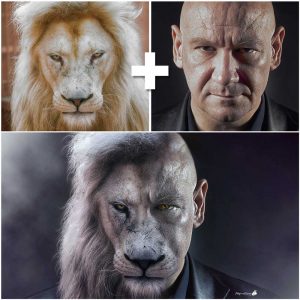
					<description><![CDATA[<p>Navegando por instagram descubrí la fotomanipulación que ves aquí. El autor se puso en contacto. Puedes visitar las páginas de Rhys Drakeford &#8211; Bennett . Quise desesperadamente aprender cómo realizar una manipulación así. Busqué tutoriales pero no encontré los adecuados para obtener un resultado aceptable desde mi punto de vista (con todos mis respetos a [&#8230;]</p>
La entrada <a href="https://ildefonsosegura.es/tutorial-photoshop-fotomanipulacion-hombre-con-cara-de-leon/">Tutorial Photoshop Fotomanipulación hombre con cara de león</a> apareció primero en <a href="https://ildefonsosegura.es">Ildefonso Segura</a>.]]></description>
										<content:encoded><![CDATA[<div data-elementor-type="wp-post" data-elementor-id="6262" class="elementor elementor-6262">
						<section class="elementor-section elementor-top-section elementor-element elementor-element-7f905ce9 elementor-section-boxed elementor-section-height-default elementor-section-height-default" data-id="7f905ce9" data-element_type="section" data-e-type="section">
						<div class="elementor-container elementor-column-gap-default">
					<div class="elementor-column elementor-col-100 elementor-top-column elementor-element elementor-element-50349214" data-id="50349214" data-element_type="column" data-e-type="column">
			<div class="elementor-widget-wrap elementor-element-populated">
						<div class="elementor-element elementor-element-6c10184e elementor-widget elementor-widget-text-editor" data-id="6c10184e" data-element_type="widget" data-e-type="widget" data-widget_type="text-editor.default">
				<div class="elementor-widget-container">
									<p><img loading="lazy" decoding="async" class="wp-image-6263 size-medium alignleft" src="http://ildefonsosegura.es/wp-content/uploads/foto-inspiración-tutorial-259x300.jpg" alt="" width="259" height="300" srcset="https://ildefonsosegura.es/wp-content/uploads/foto-inspiración-tutorial-259x300.jpg 259w, https://ildefonsosegura.es/wp-content/uploads/foto-inspiración-tutorial.jpg 500w" sizes="(max-width: 259px) 100vw, 259px" /></p><p style="text-align: justify;">Navegando por instagram descubrí la fotomanipulación que ves aquí. El autor se puso en contacto. Puedes visitar las páginas de <span style="color: #800000;"><strong><a style="color: #800000;" href="https://www.instagram.com/rhysdb03/" target="_blank" rel="noopener">Rhys Drakeford &#8211; Bennett</a> .</strong></span></p><p style="text-align: justify;">Quise desesperadamente aprender cómo realizar una manipulación así. Busqué tutoriales pero no encontré los adecuados para obtener un resultado aceptable desde mi punto de vista (con todos mis respetos a todos los que han editado y publicado tutoriales al respecto).</p><p style="text-align: left;"> </p>								</div>
				</div>
					</div>
		</div>
					</div>
		</section>
				<section class="elementor-section elementor-top-section elementor-element elementor-element-3b12e7b elementor-section-boxed elementor-section-height-default elementor-section-height-default" data-id="3b12e7b" data-element_type="section" data-e-type="section">
						<div class="elementor-container elementor-column-gap-default">
					<div class="elementor-column elementor-col-100 elementor-top-column elementor-element elementor-element-dc5ed23" data-id="dc5ed23" data-element_type="column" data-e-type="column">
			<div class="elementor-widget-wrap elementor-element-populated">
						<div class="elementor-element elementor-element-7b24633 elementor-widget elementor-widget-text-editor" data-id="7b24633" data-element_type="widget" data-e-type="widget" data-widget_type="text-editor.default">
				<div class="elementor-widget-container">
									<p style="text-align: justify;">Siendo así, decidí embarcarme en realizar un tutorial con mis propias manos aplicando cantidad de técnicas de photoshop para conseguir un resultado aceptable. Creo que lo conseguí y te puedo mostrar el antes y el después a continuación:</p><p><img loading="lazy" decoding="async" class="aligncenter wp-image-6265" src="http://ildefonsosegura.es/wp-content/uploads/Leon_Man-5to-intento-making-of-instagram-300x300.jpg" alt="" width="600" height="600" srcset="https://ildefonsosegura.es/wp-content/uploads/Leon_Man-5to-intento-making-of-instagram-300x300.jpg 300w, https://ildefonsosegura.es/wp-content/uploads/Leon_Man-5to-intento-making-of-instagram-150x150.jpg 150w, https://ildefonsosegura.es/wp-content/uploads/Leon_Man-5to-intento-making-of-instagram-768x768.jpg 768w, https://ildefonsosegura.es/wp-content/uploads/Leon_Man-5to-intento-making-of-instagram.jpg 1000w" sizes="(max-width: 600px) 100vw, 600px" /></p><p style="text-align: left;"> </p>								</div>
				</div>
					</div>
		</div>
					</div>
		</section>
				<section class="elementor-section elementor-top-section elementor-element elementor-element-b485ce1 elementor-section-boxed elementor-section-height-default elementor-section-height-default" data-id="b485ce1" data-element_type="section" data-e-type="section">
						<div class="elementor-container elementor-column-gap-default">
					<div class="elementor-column elementor-col-100 elementor-top-column elementor-element elementor-element-1a2df1a" data-id="1a2df1a" data-element_type="column" data-e-type="column">
			<div class="elementor-widget-wrap elementor-element-populated">
						<div class="elementor-element elementor-element-fc869ca elementor-widget elementor-widget-text-editor" data-id="fc869ca" data-element_type="widget" data-e-type="widget" data-widget_type="text-editor.default">
				<div class="elementor-widget-container">
									<p style="text-align: justify;">Comprueba tu mismo/a cómo he pasado de una imagen de un humano a una manipulación que consigue crear una ilusión donde brillos y sombras, colores y texturas se combinan para conseguir el resultado que me gusta. Quizás tú tengas otras preferencias y te invito a que adaptes el tutorial a tu medida.</p><p>[twenty20 img1=»6264&#8243; img2=»6267&#8243; offset=»0.5&#8243;]</p><p>Mira más ejemplos (<a title="galeria wallpapers" href="https://ildefonsosegura.es/flickr_gallery/galeria-ildefonsosegura-wallpapers/" target="_blank" rel="noopener">revisa mi galería también)</a>:</p>								</div>
				</div>
				<section class="elementor-section elementor-inner-section elementor-element elementor-element-e50ea81 elementor-section-boxed elementor-section-height-default elementor-section-height-default" data-id="e50ea81" data-element_type="section" data-e-type="section">
						<div class="elementor-container elementor-column-gap-default">
					<div class="elementor-column elementor-col-50 elementor-inner-column elementor-element elementor-element-519756a" data-id="519756a" data-element_type="column" data-e-type="column">
			<div class="elementor-widget-wrap elementor-element-populated">
						<div class="elementor-element elementor-element-8653b35 elementor-widget elementor-widget-image" data-id="8653b35" data-element_type="widget" data-e-type="widget" data-widget_type="image.default">
				<div class="elementor-widget-container">
															<img decoding="async" src="https://ildefonsosegura.es/wp-content/uploads/elementor/thumbs/Leon_Man-4to-intento-nykxnudzd98loj8x85ce893u30n60fe3yoeoqe7dn2.jpg" title="Leon_Man-4to-intento" alt="Leon_Man-4to-intento" loading="lazy" />															</div>
				</div>
					</div>
		</div>
				<div class="elementor-column elementor-col-50 elementor-inner-column elementor-element elementor-element-7e20659" data-id="7e20659" data-element_type="column" data-e-type="column">
			<div class="elementor-widget-wrap elementor-element-populated">
						<div class="elementor-element elementor-element-1782fdd elementor-widget elementor-widget-image" data-id="1782fdd" data-element_type="widget" data-e-type="widget" data-widget_type="image.default">
				<div class="elementor-widget-container">
															<img loading="lazy" decoding="async" width="667" height="667" src="https://ildefonsosegura.es/wp-content/uploads/LeonManhatacinturaWeb.jpg" class="attachment-large size-large wp-image-6266" alt="" srcset="https://ildefonsosegura.es/wp-content/uploads/LeonManhatacinturaWeb.jpg 667w, https://ildefonsosegura.es/wp-content/uploads/LeonManhatacinturaWeb-150x150.jpg 150w, https://ildefonsosegura.es/wp-content/uploads/LeonManhatacinturaWeb-300x300.jpg 300w" sizes="(max-width: 667px) 100vw, 667px" />															</div>
				</div>
					</div>
		</div>
					</div>
		</section>
					</div>
		</div>
					</div>
		</section>
				<section class="elementor-section elementor-top-section elementor-element elementor-element-d25b748 elementor-section-boxed elementor-section-height-default elementor-section-height-default" data-id="d25b748" data-element_type="section" data-e-type="section">
						<div class="elementor-container elementor-column-gap-default">
					<div class="elementor-column elementor-col-100 elementor-top-column elementor-element elementor-element-0c6fb16" data-id="0c6fb16" data-element_type="column" data-e-type="column">
			<div class="elementor-widget-wrap elementor-element-populated">
						<div class="elementor-element elementor-element-e406987 elementor-widget elementor-widget-text-editor" data-id="e406987" data-element_type="widget" data-e-type="widget" data-widget_type="text-editor.default">
				<div class="elementor-widget-container">
									<p>Disfruta del tutorial. Yo me lo pasé en grande aunque hay mucho trabajo detrás</p><p><strong><span style="color: #800000;">TUTORIAL</span> </strong></p><center><iframe src="https://www.youtube.com/embed/rgaCFkhgze4" width="640" height="420" frameborder="0" allowfullscreen="allowfullscreen"></iframe></center><p style="text-align: center;"><span style="color: #ff0000;"><strong>Aquí debajo te dejo referencia a las imágenes que he usado</strong></span></p><center></center><p style="text-align: left;"><strong>Imágenes usadas:</strong></p><ul><li style="text-align: left;">Imagen Inspiración tutorial: <a href="https://goo.gl/ycDWVT" target="_blank" rel="noopener">https://goo.gl/ycDWVT</a></li><li style="text-align: left;">Foto león: <a href="https://goo.gl/y9ZrZA" target="_blank" rel="noopener">https://goo.gl/y9ZrZA</a></li><li style="text-align: left;">Foto hombre calvo : <a href="https://mx.depositphotos.com/8511579/stock-photo-character-actor-head-shot.html" target="_blank" rel="noopener">https://mx.depositphotos.com/8511579/stock-photo-character-actor-head-shot.html</a> (esta imágen es de pago y lamento no poder compartirla por los derechos de autor)</li></ul>								</div>
				</div>
					</div>
		</div>
					</div>
		</section>
				<section class="elementor-section elementor-top-section elementor-element elementor-element-2eed9621 elementor-section-boxed elementor-section-height-default elementor-section-height-default" data-id="2eed9621" data-element_type="section" data-e-type="section">
						<div class="elementor-container elementor-column-gap-default">
					<div class="elementor-column elementor-col-100 elementor-top-column elementor-element elementor-element-453ff235" data-id="453ff235" data-element_type="column" data-e-type="column">
			<div class="elementor-widget-wrap elementor-element-populated">
						<div class="elementor-element elementor-element-2b1a9423 elementor-widget-divider--view-line elementor-widget elementor-widget-divider" data-id="2b1a9423" data-element_type="widget" data-e-type="widget" data-widget_type="divider.default">
				<div class="elementor-widget-container">
							<div class="elementor-divider">
			<span class="elementor-divider-separator">
						</span>
		</div>
						</div>
				</div>
					</div>
		</div>
					</div>
		</section>
				<section class="elementor-section elementor-top-section elementor-element elementor-element-48384626 elementor-section-full_width elementor-section-height-default elementor-section-height-default" data-id="48384626" data-element_type="section" data-e-type="section">
						<div class="elementor-container elementor-column-gap-default">
					<div class="elementor-column elementor-col-50 elementor-top-column elementor-element elementor-element-8214633" data-id="8214633" data-element_type="column" data-e-type="column">
			<div class="elementor-widget-wrap elementor-element-populated">
						<div class="elementor-element elementor-element-4abdc483 elementor-align-right elementor-invisible elementor-widget elementor-widget-button" data-id="4abdc483" data-element_type="widget" data-e-type="widget" data-settings="{&quot;_animation&quot;:&quot;shake&quot;}" data-widget_type="button.default">
				<div class="elementor-widget-container">
									<div class="elementor-button-wrapper">
					<a class="elementor-button elementor-button-link elementor-size-sm elementor-animation-grow" href="https://drive.google.com/open?id=1ZXBQt6clgucFYxxgnNlCQgN89YvrT2Vf">
						<span class="elementor-button-content-wrapper">
									<span class="elementor-button-text">PINCELES USADOS</span>
					</span>
					</a>
				</div>
								</div>
				</div>
					</div>
		</div>
				<div class="elementor-column elementor-col-50 elementor-top-column elementor-element elementor-element-3ab10fcc" data-id="3ab10fcc" data-element_type="column" data-e-type="column">
			<div class="elementor-widget-wrap elementor-element-populated">
						<div class="elementor-element elementor-element-75400e60 elementor-widget elementor-widget-html" data-id="75400e60" data-element_type="widget" data-e-type="widget" data-settings="{&quot;_animation&quot;:&quot;none&quot;}" data-widget_type="html.default">
				<div class="elementor-widget-container">
					<form action="https://www.paypal.com/cgi-bin/webscr" method="post" target="_blank">
<input type="hidden" name="cmd" value="_donations">
<input type="hidden" name="business" value="ildefonsosegura@gmail.com">
<input type="hidden" name="lc" value="ES">
<input type="hidden" name="item_name" value="MANTENIMIENTO DE LA PAGINA DE ILDEFONSOSEGURA">
<input type="hidden" name="no_note" value="0">
<input type="hidden" name="currency_code" value="EUR">
<input type="hidden" name="bn" value="PP-DonationsBF:paypal1.jpg:NonHostedGuest">
<input type="image" src="http://ildefonsosegura.es/wp-content/uploads/paypal-updated-1.png" border="0" name="submit" alt="PayPal. La forma rápida y segura de pagar en Internet.">
<img decoding="async" alt="" border="0" src="https://www.paypalobjects.com/es_ES/i/scr/pixel.gif" width="1" height="1">
</form>				</div>
				</div>
					</div>
		</div>
					</div>
		</section>
				<section class="elementor-section elementor-top-section elementor-element elementor-element-65d683ec elementor-section-boxed elementor-section-height-default elementor-section-height-default" data-id="65d683ec" data-element_type="section" data-e-type="section">
						<div class="elementor-container elementor-column-gap-default">
					<div class="elementor-column elementor-col-100 elementor-top-column elementor-element elementor-element-27a7fc31" data-id="27a7fc31" data-element_type="column" data-e-type="column">
			<div class="elementor-widget-wrap elementor-element-populated">
						<div class="elementor-element elementor-element-19783ffd elementor-widget-divider--view-line elementor-widget elementor-widget-divider" data-id="19783ffd" data-element_type="widget" data-e-type="widget" data-widget_type="divider.default">
				<div class="elementor-widget-container">
							<div class="elementor-divider">
			<span class="elementor-divider-separator">
						</span>
		</div>
						</div>
				</div>
					</div>
		</div>
					</div>
		</section>
				<section class="elementor-section elementor-top-section elementor-element elementor-element-7fad65b6 elementor-section-full_width elementor-section-height-default elementor-section-height-default" data-id="7fad65b6" data-element_type="section" data-e-type="section">
						<div class="elementor-container elementor-column-gap-default">
					<div class="elementor-column elementor-col-100 elementor-top-column elementor-element elementor-element-6d37c87d" data-id="6d37c87d" data-element_type="column" data-e-type="column">
			<div class="elementor-widget-wrap elementor-element-populated">
						<div class="elementor-element elementor-element-2ee6db4d elementor-widget elementor-widget-text-editor" data-id="2ee6db4d" data-element_type="widget" data-e-type="widget" data-widget_type="text-editor.default">
				<div class="elementor-widget-container">
									<div><div align="center"><center><strong style="color: #ff0000;">Suscríbete a mi canal de Youtube:</strong></center><div><div><div align="center"><p><script src="https://apis.google.com/js/platform.js"></script></p><div class="g-ytsubscribe" data-channel="ildefonsosegura" data-layout="full" data-count="default"> </div></div></div><p> </p><p style="text-align: center;">No te lo pierdas y comparte tus trabajos en mi página de facebook (<span style="color: #0000ff;"><strong><a style="color: #0000ff;" href="http://www.facebook.com/IldefonsoSeguraPage" target="_blank" rel="noopener noreferrer">IldefonsoSeguraPage</a></strong></span>)<br />Espero que te guste y compartas el vídeo. No dejes de compartir este post.</p><p style="text-align: center;">Así es como me puedes ayudar 🙂 Gracias</p></div></div></div>								</div>
				</div>
					</div>
		</div>
					</div>
		</section>
				</div>La entrada <a href="https://ildefonsosegura.es/tutorial-photoshop-fotomanipulacion-hombre-con-cara-de-leon/">Tutorial Photoshop Fotomanipulación hombre con cara de león</a> apareció primero en <a href="https://ildefonsosegura.es">Ildefonso Segura</a>.]]></content:encoded>
					
					<wfw:commentRss>https://ildefonsosegura.es/tutorial-photoshop-fotomanipulacion-hombre-con-cara-de-leon/feed/</wfw:commentRss>
			<slash:comments>0</slash:comments>
		
		
			</item>
		<item>
		<title>Tutorial Photoshop póster de película terrorífica by @ildefonsosegura</title>
		<link>https://ildefonsosegura.es/tutorial-photoshop-poster-de-pelicula-terrorifica-by-ildefonsosegura/</link>
					<comments>https://ildefonsosegura.es/tutorial-photoshop-poster-de-pelicula-terrorifica-by-ildefonsosegura/#respond</comments>
		
		<dc:creator><![CDATA[Ildefonso Segura]]></dc:creator>
		<pubDate>Mon, 21 Aug 2017 15:05:44 +0000</pubDate>
				<category><![CDATA[Efectos]]></category>
		<category><![CDATA[Fotocomposición]]></category>
		<category><![CDATA[Películas]]></category>
		<category><![CDATA[Photoshop]]></category>
		<category><![CDATA[Tecnicas]]></category>
		<category><![CDATA[Tutoriales]]></category>
		<category><![CDATA[Video]]></category>
		<category><![CDATA[Wallpaper]]></category>
		<category><![CDATA[cartel]]></category>
		<category><![CDATA[cartel de película]]></category>
		<category><![CDATA[cc2015]]></category>
		<category><![CDATA[cc2017]]></category>
		<category><![CDATA[charcos]]></category>
		<category><![CDATA[clown]]></category>
		<category><![CDATA[composición]]></category>
		<category><![CDATA[escena terror]]></category>
		<category><![CDATA[fotocomposición]]></category>
		<category><![CDATA[fotomanipulación]]></category>
		<category><![CDATA[iluminación]]></category>
		<category><![CDATA[it]]></category>
		<category><![CDATA[miedo]]></category>
		<category><![CDATA[movie]]></category>
		<category><![CDATA[movie poster]]></category>
		<category><![CDATA[payaso]]></category>
		<category><![CDATA[payaso de miedo]]></category>
		<category><![CDATA[pelicula]]></category>
		<category><![CDATA[photoshop]]></category>
		<category><![CDATA[poster]]></category>
		<category><![CDATA[puddles]]></category>
		<category><![CDATA[reflexiones]]></category>
		<category><![CDATA[reflexiones en charcos]]></category>
		<category><![CDATA[scary]]></category>
		<category><![CDATA[scary clown]]></category>
		<category><![CDATA[tecnicas]]></category>
		<category><![CDATA[terrifying]]></category>
		<category><![CDATA[terror]]></category>
		<category><![CDATA[tuto]]></category>
		<category><![CDATA[tutorial]]></category>
		<category><![CDATA[tutorial español]]></category>
		<category><![CDATA[youtube]]></category>
		<guid isPermaLink="false">http://ildefonsosegura.es/?p=6054</guid>

					<description><![CDATA[<p>En este tutorial de Photoshop te mostraré como hacer un póster de película de terror inspirado en la película IT del 2017. Aprenderás cosas como integrar una persona y animales en una escena crear charcos con pinceles crear reflexiones de elementos en los charcos Sombras e iluminaciones en la escena Efectos terroríficos y de color. [&#8230;]</p>
La entrada <a href="https://ildefonsosegura.es/tutorial-photoshop-poster-de-pelicula-terrorifica-by-ildefonsosegura/">Tutorial Photoshop póster de película terrorífica by @ildefonsosegura</a> apareció primero en <a href="https://ildefonsosegura.es">Ildefonso Segura</a>.]]></description>
										<content:encoded><![CDATA[<div data-elementor-type="wp-post" data-elementor-id="6054" class="elementor elementor-6054">
						<section class="elementor-section elementor-top-section elementor-element elementor-element-d385d28 elementor-section-boxed elementor-section-height-default elementor-section-height-default" data-id="d385d28" data-element_type="section" data-e-type="section">
						<div class="elementor-container elementor-column-gap-default">
					<div class="elementor-column elementor-col-100 elementor-top-column elementor-element elementor-element-ab0a483" data-id="ab0a483" data-element_type="column" data-e-type="column">
			<div class="elementor-widget-wrap elementor-element-populated">
						<div class="elementor-element elementor-element-5e06582 elementor-widget elementor-widget-text-editor" data-id="5e06582" data-element_type="widget" data-e-type="widget" data-widget_type="text-editor.default">
				<div class="elementor-widget-container">
									<p>En este tutorial de Photoshop te mostraré como hacer un póster de película de terror inspirado en la película IT del 2017.</p>								</div>
				</div>
					</div>
		</div>
					</div>
		</section>
				<section class="elementor-section elementor-top-section elementor-element elementor-element-c0e2bda elementor-section-boxed elementor-section-height-default elementor-section-height-default" data-id="c0e2bda" data-element_type="section" data-e-type="section">
						<div class="elementor-container elementor-column-gap-default">
					<div class="elementor-column elementor-col-100 elementor-top-column elementor-element elementor-element-5bbc50f" data-id="5bbc50f" data-element_type="column" data-e-type="column">
			<div class="elementor-widget-wrap elementor-element-populated">
						<div class="elementor-element elementor-element-031d2e9 elementor-widget elementor-widget-text-editor" data-id="031d2e9" data-element_type="widget" data-e-type="widget" data-widget_type="text-editor.default">
				<div class="elementor-widget-container">
									<p><div style="width: 1200px;" class="wp-video"><video class="wp-video-shortcode" id="video-6054-1" width="1200" height="1200" preload="metadata" controls="controls"><source type="video/mp4" src="https://ildefonsosegura.es/wp-content/uploads/IT-antes-y-despues.mp4?_=1" /><a href="https://ildefonsosegura.es/wp-content/uploads/IT-antes-y-despues.mp4">https://ildefonsosegura.es/wp-content/uploads/IT-antes-y-despues.mp4</a></video></div></p>								</div>
				</div>
					</div>
		</div>
					</div>
		</section>
				<section class="elementor-section elementor-top-section elementor-element elementor-element-e9669b2 elementor-section-boxed elementor-section-height-default elementor-section-height-default" data-id="e9669b2" data-element_type="section" data-e-type="section">
						<div class="elementor-container elementor-column-gap-default">
					<div class="elementor-column elementor-col-100 elementor-top-column elementor-element elementor-element-35237d9" data-id="35237d9" data-element_type="column" data-e-type="column">
			<div class="elementor-widget-wrap elementor-element-populated">
						<div class="elementor-element elementor-element-807e562 elementor-widget elementor-widget-text-editor" data-id="807e562" data-element_type="widget" data-e-type="widget" data-widget_type="text-editor.default">
				<div class="elementor-widget-container">
									<p>Aprenderás cosas como</p><ul><li>integrar una persona y animales en una escena</li><li>crear charcos con pinceles</li><li>crear reflexiones de elementos en los charcos</li><li>Sombras e iluminaciones en la escena</li><li>Efectos terroríficos y de color.</li><li>Y todo un abanico de trucos de photoshop para un resultado profesional de póster de película.</li></ul><p>Para realizar la extracción del payaso, tienes un tutorial en mi web que te ayudará usando la técnica de la pluma <a href="https://ildefonsosegura.es/tutorial-photoshop-integracion-imagenes-con-sombras-originales-by-ildefonsosegura/" target="_blank" rel="noopener noreferrer"><strong>PINCHA AQUI</strong></a></p><p>Te muestro unas imágenes para que veas desde donde hasta donde llegaremos con el tutorial&#8230;</p>								</div>
				</div>
					</div>
		</div>
					</div>
		</section>
				<section class="elementor-section elementor-top-section elementor-element elementor-element-2204dcf elementor-section-boxed elementor-section-height-default elementor-section-height-default" data-id="2204dcf" data-element_type="section" data-e-type="section">
						<div class="elementor-container elementor-column-gap-default">
					<div class="elementor-column elementor-col-100 elementor-top-column elementor-element elementor-element-db32c64" data-id="db32c64" data-element_type="column" data-e-type="column">
			<div class="elementor-widget-wrap elementor-element-populated">
						<div class="elementor-element elementor-element-267aef8 elementor-widget elementor-widget-image" data-id="267aef8" data-element_type="widget" data-e-type="widget" data-widget_type="image.default">
				<div class="elementor-widget-container">
															<img loading="lazy" decoding="async" width="768" height="768" src="https://ildefonsosegura.es/wp-content/uploads/it-3-768x768.jpg" class="attachment-medium_large size-medium_large wp-image-6056" alt="" srcset="https://ildefonsosegura.es/wp-content/uploads/it-3-768x768.jpg 768w, https://ildefonsosegura.es/wp-content/uploads/it-3-150x150.jpg 150w, https://ildefonsosegura.es/wp-content/uploads/it-3-300x300.jpg 300w, https://ildefonsosegura.es/wp-content/uploads/it-3-1024x1024.jpg 1024w, https://ildefonsosegura.es/wp-content/uploads/it-3.jpg 1280w" sizes="(max-width: 768px) 100vw, 768px" />															</div>
				</div>
					</div>
		</div>
					</div>
		</section>
				<section class="elementor-section elementor-top-section elementor-element elementor-element-756039b elementor-section-boxed elementor-section-height-default elementor-section-height-default" data-id="756039b" data-element_type="section" data-e-type="section">
						<div class="elementor-container elementor-column-gap-default">
					<div class="elementor-column elementor-col-100 elementor-top-column elementor-element elementor-element-5c024d8" data-id="5c024d8" data-element_type="column" data-e-type="column">
			<div class="elementor-widget-wrap elementor-element-populated">
						<div class="elementor-element elementor-element-ec9da77 elementor-widget elementor-widget-spacer" data-id="ec9da77" data-element_type="widget" data-e-type="widget" data-widget_type="spacer.default">
				<div class="elementor-widget-container">
							<div class="elementor-spacer">
			<div class="elementor-spacer-inner"></div>
		</div>
						</div>
				</div>
				<div class="elementor-element elementor-element-fc2ae17 elementor-widget elementor-widget-heading" data-id="fc2ae17" data-element_type="widget" data-e-type="widget" data-widget_type="heading.default">
				<div class="elementor-widget-container">
					<h2 class="elementor-heading-title elementor-size-default">TUTORIAL POSTER DE PELÍCULA TERRORÍFICA</h2>				</div>
				</div>
				<div class="elementor-element elementor-element-10458b1 elementor-widget elementor-widget-spacer" data-id="10458b1" data-element_type="widget" data-e-type="widget" data-widget_type="spacer.default">
				<div class="elementor-widget-container">
							<div class="elementor-spacer">
			<div class="elementor-spacer-inner"></div>
		</div>
						</div>
				</div>
				<div class="elementor-element elementor-element-629d17c elementor-widget elementor-widget-video" data-id="629d17c" data-element_type="widget" data-e-type="widget" data-settings="{&quot;youtube_url&quot;:&quot;https:\/\/youtu.be\/lbgNe4C9nJE&quot;,&quot;video_type&quot;:&quot;youtube&quot;,&quot;controls&quot;:&quot;yes&quot;}" data-widget_type="video.default">
				<div class="elementor-widget-container">
							<div class="elementor-wrapper elementor-open-inline">
			<div class="elementor-video"></div>		</div>
						</div>
				</div>
					</div>
		</div>
					</div>
		</section>
				<section class="elementor-section elementor-top-section elementor-element elementor-element-84f9d89 elementor-section-boxed elementor-section-height-default elementor-section-height-default" data-id="84f9d89" data-element_type="section" data-e-type="section">
						<div class="elementor-container elementor-column-gap-default">
					<div class="elementor-column elementor-col-100 elementor-top-column elementor-element elementor-element-00151cf" data-id="00151cf" data-element_type="column" data-e-type="column">
			<div class="elementor-widget-wrap elementor-element-populated">
						<div class="elementor-element elementor-element-41e5918 elementor-widget elementor-widget-spacer" data-id="41e5918" data-element_type="widget" data-e-type="widget" data-widget_type="spacer.default">
				<div class="elementor-widget-container">
							<div class="elementor-spacer">
			<div class="elementor-spacer-inner"></div>
		</div>
						</div>
				</div>
				<div class="elementor-element elementor-element-9fa8160 elementor-widget elementor-widget-text-editor" data-id="9fa8160" data-element_type="widget" data-e-type="widget" data-widget_type="text-editor.default">
				<div class="elementor-widget-container">
									<p style="text-align: center;">Gracias a <a href="https://attemptestock.deviantart.com/">https://attemptestock.deviantart.com/</a> por el stock del callejón</p>								</div>
				</div>
				<div class="elementor-element elementor-element-3ed8bd0 elementor-widget elementor-widget-spacer" data-id="3ed8bd0" data-element_type="widget" data-e-type="widget" data-widget_type="spacer.default">
				<div class="elementor-widget-container">
							<div class="elementor-spacer">
			<div class="elementor-spacer-inner"></div>
		</div>
						</div>
				</div>
				<div class="elementor-element elementor-element-bcd4b15 elementor-widget elementor-widget-text-editor" data-id="bcd4b15" data-element_type="widget" data-e-type="widget" data-widget_type="text-editor.default">
				<div class="elementor-widget-container">
									<p>Pongo a disposición tuya el resto de materiales para que puedas practicar siguiendo mi tutorial. Luego puedes compartir tu resultado en mis redes sociales etiquetándome para ver cómo te quedó.</p>								</div>
				</div>
					</div>
		</div>
					</div>
		</section>
				<section class="elementor-section elementor-top-section elementor-element elementor-element-7082b9fa elementor-section-full_width elementor-section-height-default elementor-section-height-default" data-id="7082b9fa" data-element_type="section" data-e-type="section">
						<div class="elementor-container elementor-column-gap-default">
					<div class="elementor-column elementor-col-50 elementor-top-column elementor-element elementor-element-361fc3e9" data-id="361fc3e9" data-element_type="column" data-e-type="column">
			<div class="elementor-widget-wrap elementor-element-populated">
						<div class="elementor-element elementor-element-7e2172d elementor-align-right elementor-invisible elementor-widget elementor-widget-button" data-id="7e2172d" data-element_type="widget" data-e-type="widget" data-settings="{&quot;_animation&quot;:&quot;shake&quot;}" data-widget_type="button.default">
				<div class="elementor-widget-container">
									<div class="elementor-button-wrapper">
					<a class="elementor-button elementor-button-link elementor-size-sm elementor-animation-grow" href="https://drive.google.com/file/d/0B_nJkCGJubucTlpHUXRJbTVYZTQ/view?resourcekey=0-m5WrzkLwAZ1XemmgoAZ7Hw" target="_blank">
						<span class="elementor-button-content-wrapper">
						<span class="elementor-button-icon">
				<i aria-hidden="true" class="fas fa-download"></i>			</span>
									<span class="elementor-button-text">DESCARGA EL MATERIAL</span>
					</span>
					</a>
				</div>
								</div>
				</div>
					</div>
		</div>
				<div class="elementor-column elementor-col-50 elementor-top-column elementor-element elementor-element-442ae73b" data-id="442ae73b" data-element_type="column" data-e-type="column">
			<div class="elementor-widget-wrap elementor-element-populated">
						<div class="elementor-element elementor-element-693e9b5f elementor-widget elementor-widget-html" data-id="693e9b5f" data-element_type="widget" data-e-type="widget" data-settings="{&quot;_animation&quot;:&quot;none&quot;}" data-widget_type="html.default">
				<div class="elementor-widget-container">
					<form action="https://www.paypal.com/cgi-bin/webscr" method="post" target="_blank">
<input type="hidden" name="cmd" value="_donations">
<input type="hidden" name="business" value="ildefonsosegura@gmail.com">
<input type="hidden" name="lc" value="ES">
<input type="hidden" name="item_name" value="MANTENIMIENTO DE LA PAGINA DE ILDEFONSOSEGURA">
<input type="hidden" name="no_note" value="0">
<input type="hidden" name="currency_code" value="EUR">
<input type="hidden" name="bn" value="PP-DonationsBF:paypal1.jpg:NonHostedGuest">
<input type="image" src="http://ildefonsosegura.es/wp-content/uploads/paypal-updated-1.png" border="0" name="submit" alt="PayPal. La forma rápida y segura de pagar en Internet.">
<img decoding="async" alt="" border="0" src="https://www.paypalobjects.com/es_ES/i/scr/pixel.gif" width="1" height="1">
</form>				</div>
				</div>
					</div>
		</div>
					</div>
		</section>
				<section class="elementor-section elementor-top-section elementor-element elementor-element-56f24177 elementor-section-full_width elementor-section-height-default elementor-section-height-default" data-id="56f24177" data-element_type="section" data-e-type="section">
						<div class="elementor-container elementor-column-gap-default">
					<div class="elementor-column elementor-col-100 elementor-top-column elementor-element elementor-element-662d8898" data-id="662d8898" data-element_type="column" data-e-type="column">
			<div class="elementor-widget-wrap elementor-element-populated">
						<div class="elementor-element elementor-element-2ecd0556 elementor-widget elementor-widget-text-editor" data-id="2ecd0556" data-element_type="widget" data-e-type="widget" data-widget_type="text-editor.default">
				<div class="elementor-widget-container">
									<div><div align="center"><center><strong style="color: #ff0000;">Suscríbete a mi canal de Youtube:</strong></center><div><div><div align="center"><p><script src="https://apis.google.com/js/platform.js"></script></p><div class="g-ytsubscribe" data-channel="ildefonsosegura" data-layout="full" data-count="default"> </div></div></div><p> </p><p style="text-align: center;">No te lo pierdas y comparte tus trabajos en mi página de facebook (<span style="color: #0000ff;"><strong><a style="color: #0000ff;" href="http://www.facebook.com/IldefonsoSeguraPage" target="_blank" rel="noopener noreferrer">IldefonsoSeguraPage</a></strong></span>)<br />Espero que te guste y compartas el vídeo. No dejes de compartir este post.</p><p style="text-align: center;">Así es como me puedes ayudar 🙂 Gracias</p></div></div></div>								</div>
				</div>
					</div>
		</div>
					</div>
		</section>
				</div>La entrada <a href="https://ildefonsosegura.es/tutorial-photoshop-poster-de-pelicula-terrorifica-by-ildefonsosegura/">Tutorial Photoshop póster de película terrorífica by @ildefonsosegura</a> apareció primero en <a href="https://ildefonsosegura.es">Ildefonso Segura</a>.]]></content:encoded>
					
					<wfw:commentRss>https://ildefonsosegura.es/tutorial-photoshop-poster-de-pelicula-terrorifica-by-ildefonsosegura/feed/</wfw:commentRss>
			<slash:comments>0</slash:comments>
		
		<enclosure url="https://ildefonsosegura.es/wp-content/uploads/IT-antes-y-despues.mp4" length="6973251" type="video/mp4" />

			</item>
		<item>
		<title>Convierte tus fotos en antiguas texturizando con Photoshop // Tutorial by @ildefonsosegura</title>
		<link>https://ildefonsosegura.es/convierte-tus-fotos-en-antiguas-texturizando-con-photoshop-tutorial-by-ildefonsosegura/</link>
					<comments>https://ildefonsosegura.es/convierte-tus-fotos-en-antiguas-texturizando-con-photoshop-tutorial-by-ildefonsosegura/#respond</comments>
		
		<dc:creator><![CDATA[Ildefonso Segura]]></dc:creator>
		<pubDate>Mon, 13 Mar 2017 16:02:55 +0000</pubDate>
				<category><![CDATA[Fotocomposición]]></category>
		<category><![CDATA[Photoshop]]></category>
		<category><![CDATA[Tecnicas]]></category>
		<category><![CDATA[Textura]]></category>
		<category><![CDATA[Tutoriales]]></category>
		<category><![CDATA[Video]]></category>
		<category><![CDATA[Wallpaper]]></category>
		<category><![CDATA[adobe]]></category>
		<category><![CDATA[album]]></category>
		<category><![CDATA[antigua]]></category>
		<category><![CDATA[composición]]></category>
		<category><![CDATA[convertir]]></category>
		<category><![CDATA[efecto]]></category>
		<category><![CDATA[fotocomposición]]></category>
		<category><![CDATA[fotomanipulación]]></category>
		<category><![CDATA[old]]></category>
		<category><![CDATA[papel]]></category>
		<category><![CDATA[pasado]]></category>
		<category><![CDATA[photoshop]]></category>
		<category><![CDATA[tecnicas]]></category>
		<category><![CDATA[textura]]></category>
		<category><![CDATA[texturizar]]></category>
		<category><![CDATA[transformar]]></category>
		<category><![CDATA[tuto]]></category>
		<category><![CDATA[tutorial]]></category>
		<category><![CDATA[video]]></category>
		<category><![CDATA[VIDEOTUTORIAL]]></category>
		<category><![CDATA[vieja]]></category>
		<category><![CDATA[viejo]]></category>
		<category><![CDATA[youtube]]></category>
		<guid isPermaLink="false">http://ildefonsosegura.es/?p=5582</guid>

					<description><![CDATA[<p>En este tutorial de Photoshop&#160;te ofrezco mi versión de como convertir una foto nítida en una foto con aspecto antiguo o viejo con Photoshop. Aprende técnicas de texturización para conseguir efectos simulados con aspecto real. &#160; Vamos a convertir tus fotos en antiguas o viejas texturizando con #adobe #photoshop Algún truco nuevo para ti. Una [&#8230;]</p>
La entrada <a href="https://ildefonsosegura.es/convierte-tus-fotos-en-antiguas-texturizando-con-photoshop-tutorial-by-ildefonsosegura/">Convierte tus fotos en antiguas texturizando con Photoshop // Tutorial by @ildefonsosegura</a> apareció primero en <a href="https://ildefonsosegura.es">Ildefonso Segura</a>.]]></description>
										<content:encoded><![CDATA[<div data-elementor-type="wp-post" data-elementor-id="5582" class="elementor elementor-5582">
						<section class="elementor-section elementor-top-section elementor-element elementor-element-33159398 elementor-section-boxed elementor-section-height-default elementor-section-height-default" data-id="33159398" data-element_type="section" data-e-type="section">
						<div class="elementor-container elementor-column-gap-default">
					<div class="elementor-column elementor-col-100 elementor-top-column elementor-element elementor-element-176e23e2" data-id="176e23e2" data-element_type="column" data-e-type="column">
			<div class="elementor-widget-wrap elementor-element-populated">
						<div class="elementor-element elementor-element-71baa876 elementor-widget elementor-widget-text-editor" data-id="71baa876" data-element_type="widget" data-e-type="widget" data-widget_type="text-editor.default">
				<div class="elementor-widget-container">
									<p>En este tutorial de Photoshop&nbsp;te ofrezco mi versión de como convertir una foto nítida en una foto con aspecto antiguo o viejo con Photoshop. Aprende técnicas de texturización para conseguir efectos simulados con aspecto real.</p>
<p>&nbsp;</p>
<blockquote class="instagram-media" style="background: #FFF; border: 0; border-radius: 3px; box-shadow: 0 0 1px 0 rgba(0,0,0,0.5),0 1px 10px 0 rgba(0,0,0,0.15); margin: 1px; max-width: 658px; padding: 0; width: calc(100% - 2px);" data-instgrm-captioned="" data-instgrm-version="7">
<div style="padding: 8px;">
<div style="background: #F8F8F8; line-height: 0; margin-top: 40px; padding: 28.055555555555557% 0; text-align: center; width: 100%;"></div>
<p style="margin: 8px 0 0 0; padding: 0 4px;"><a style="color: #000; font-family: Arial,sans-serif; font-size: 14px; font-style: normal; font-weight: normal; line-height: 17px; text-decoration: none; word-wrap: break-word;" href="https://www.instagram.com/p/BRjNzhRhMf-/" target="_blank" rel="noopener">Vamos a convertir tus fotos en antiguas o viejas texturizando con #adobe #photoshop Algún truco nuevo para ti.</a></p>
<p style="color: #c9c8cd; font-family: Arial,sans-serif; font-size: 14px; line-height: 17px; margin-bottom: 0; margin-top: 8px; overflow: hidden; padding: 8px 0 7px; text-align: center; text-overflow: ellipsis; white-space: nowrap;">Una publicación compartida de Ildefonso Segura (@ildefonsosegura) el <time style="font-family: Arial,sans-serif; font-size: 14px; line-height: 17px;" datetime="2017-03-12T19:44:00+00:00">12 de Mar de 2017 a la(s) 12:44 PDT</time></p>
</div>
</blockquote>
<p><script async="" defer="" src="//platform.instagram.com/en_US/embeds.js"></script><br />
Seguro que hay alguna técnica que no conoces y te puede ayudar tanto a conseguir este efecto de foto antigua como&nbsp;lograr otros efectos en tus propias composiciónes.</p>
<p>Puedes ver como queda&nbsp;en este video:</p>
<p style="text-align: left;"><strong><br /></strong></p><p style="text-align: left;"><strong>TUTORIAL CONVERTIR FOTO EN ANTIGUA</strong></p>
<p style="text-align: left;"><iframe src="https://www.youtube.com/embed/XHzRvulnquY?rel=0" width="640" height="420" frameborder="0" allowfullscreen="allowfullscreen"></iframe></p>
<p>No te lo pierdas y comparte tus trabajos en mi página de facebook (<a href="http://www.facebook.com/IldefonsoSeguraPage" target="_blank" rel="noopener">IldefonsoSeguraPage</a>)<br />
Espero que te guste y compartas el vídeo</p>
<p style="text-align: center;">
</p><p>&nbsp;</p>
<p>&nbsp;</p>								</div>
				</div>
					</div>
		</div>
					</div>
		</section>
				<section class="elementor-section elementor-top-section elementor-element elementor-element-2d7fed6b elementor-section-boxed elementor-section-height-default elementor-section-height-default" data-id="2d7fed6b" data-element_type="section" data-e-type="section">
						<div class="elementor-container elementor-column-gap-default">
					<div class="elementor-column elementor-col-100 elementor-top-column elementor-element elementor-element-7bdc75f4" data-id="7bdc75f4" data-element_type="column" data-e-type="column">
			<div class="elementor-widget-wrap elementor-element-populated">
						<div class="elementor-element elementor-element-3e09b0a6 elementor-widget elementor-widget-spacer" data-id="3e09b0a6" data-element_type="widget" data-e-type="widget" data-widget_type="spacer.default">
				<div class="elementor-widget-container">
							<div class="elementor-spacer">
			<div class="elementor-spacer-inner"></div>
		</div>
						</div>
				</div>
					</div>
		</div>
					</div>
		</section>
				<section class="elementor-section elementor-top-section elementor-element elementor-element-46d11c1e elementor-section-boxed elementor-section-height-default elementor-section-height-default" data-id="46d11c1e" data-element_type="section" data-e-type="section">
						<div class="elementor-container elementor-column-gap-default">
					<div class="elementor-column elementor-col-100 elementor-top-column elementor-element elementor-element-75b3c79d" data-id="75b3c79d" data-element_type="column" data-e-type="column">
			<div class="elementor-widget-wrap elementor-element-populated">
						<div class="elementor-element elementor-element-212a2774 elementor-widget-divider--view-line elementor-widget elementor-widget-divider" data-id="212a2774" data-element_type="widget" data-e-type="widget" data-widget_type="divider.default">
				<div class="elementor-widget-container">
							<div class="elementor-divider">
			<span class="elementor-divider-separator">
						</span>
		</div>
						</div>
				</div>
					</div>
		</div>
					</div>
		</section>
				<section class="elementor-section elementor-top-section elementor-element elementor-element-5f19c0c6 elementor-section-full_width elementor-section-height-default elementor-section-height-default" data-id="5f19c0c6" data-element_type="section" data-e-type="section">
						<div class="elementor-container elementor-column-gap-default">
					<div class="elementor-column elementor-col-50 elementor-top-column elementor-element elementor-element-35bf0526" data-id="35bf0526" data-element_type="column" data-e-type="column">
			<div class="elementor-widget-wrap elementor-element-populated">
						<div class="elementor-element elementor-element-230209da elementor-align-right elementor-invisible elementor-widget elementor-widget-button" data-id="230209da" data-element_type="widget" data-e-type="widget" data-settings="{&quot;_animation&quot;:&quot;shake&quot;}" data-widget_type="button.default">
				<div class="elementor-widget-container">
									<div class="elementor-button-wrapper">
					<a class="elementor-button elementor-button-link elementor-size-sm elementor-animation-grow" href="https://drive.google.com/file/d/0B_nJkCGJubucakxpZU8wdkRXdms/view?usp=sharing&#038;resourcekey=0-5lcXB378OypkZV1vxqghDg" target="_blank">
						<span class="elementor-button-content-wrapper">
									<span class="elementor-button-text">BAJATE EL EDITABLE</span>
					</span>
					</a>
				</div>
								</div>
				</div>
					</div>
		</div>
				<div class="elementor-column elementor-col-50 elementor-top-column elementor-element elementor-element-35ce1b59" data-id="35ce1b59" data-element_type="column" data-e-type="column">
			<div class="elementor-widget-wrap elementor-element-populated">
						<div class="elementor-element elementor-element-62038da3 elementor-widget elementor-widget-html" data-id="62038da3" data-element_type="widget" data-e-type="widget" data-settings="{&quot;_animation&quot;:&quot;none&quot;}" data-widget_type="html.default">
				<div class="elementor-widget-container">
					<form action="https://www.paypal.com/cgi-bin/webscr" method="post" target="_blank">
<input type="hidden" name="cmd" value="_donations">
<input type="hidden" name="business" value="ildefonsosegura@gmail.com">
<input type="hidden" name="lc" value="ES">
<input type="hidden" name="item_name" value="MANTENIMIENTO DE LA PAGINA DE ILDEFONSOSEGURA">
<input type="hidden" name="no_note" value="0">
<input type="hidden" name="currency_code" value="EUR">
<input type="hidden" name="bn" value="PP-DonationsBF:paypal1.jpg:NonHostedGuest">
<input type="image" src="http://ildefonsosegura.es/wp-content/uploads/paypal-updated-1.png" border="0" name="submit" alt="PayPal. La forma rápida y segura de pagar en Internet.">
<img decoding="async" alt="" border="0" src="https://www.paypalobjects.com/es_ES/i/scr/pixel.gif" width="1" height="1">
</form>				</div>
				</div>
					</div>
		</div>
					</div>
		</section>
				<section class="elementor-section elementor-top-section elementor-element elementor-element-5f21456c elementor-section-boxed elementor-section-height-default elementor-section-height-default" data-id="5f21456c" data-element_type="section" data-e-type="section">
						<div class="elementor-container elementor-column-gap-default">
					<div class="elementor-column elementor-col-100 elementor-top-column elementor-element elementor-element-223ad4b8" data-id="223ad4b8" data-element_type="column" data-e-type="column">
			<div class="elementor-widget-wrap elementor-element-populated">
						<div class="elementor-element elementor-element-5edf9b6f elementor-widget-divider--view-line elementor-widget elementor-widget-divider" data-id="5edf9b6f" data-element_type="widget" data-e-type="widget" data-widget_type="divider.default">
				<div class="elementor-widget-container">
							<div class="elementor-divider">
			<span class="elementor-divider-separator">
						</span>
		</div>
						</div>
				</div>
					</div>
		</div>
					</div>
		</section>
				<section class="elementor-section elementor-top-section elementor-element elementor-element-3484e9b1 elementor-section-boxed elementor-section-height-default elementor-section-height-default" data-id="3484e9b1" data-element_type="section" data-e-type="section">
						<div class="elementor-container elementor-column-gap-default">
					<div class="elementor-column elementor-col-100 elementor-top-column elementor-element elementor-element-323a83a2" data-id="323a83a2" data-element_type="column" data-e-type="column">
			<div class="elementor-widget-wrap elementor-element-populated">
						<div class="elementor-element elementor-element-1115d0cf elementor-widget elementor-widget-spacer" data-id="1115d0cf" data-element_type="widget" data-e-type="widget" data-widget_type="spacer.default">
				<div class="elementor-widget-container">
							<div class="elementor-spacer">
			<div class="elementor-spacer-inner"></div>
		</div>
						</div>
				</div>
					</div>
		</div>
					</div>
		</section>
				<section class="elementor-section elementor-top-section elementor-element elementor-element-3713096f elementor-section-full_width elementor-section-height-default elementor-section-height-default" data-id="3713096f" data-element_type="section" data-e-type="section">
						<div class="elementor-container elementor-column-gap-default">
					<div class="elementor-column elementor-col-100 elementor-top-column elementor-element elementor-element-3c9138f0" data-id="3c9138f0" data-element_type="column" data-e-type="column">
			<div class="elementor-widget-wrap elementor-element-populated">
						<div class="elementor-element elementor-element-327399b6 elementor-widget elementor-widget-text-editor" data-id="327399b6" data-element_type="widget" data-e-type="widget" data-widget_type="text-editor.default">
				<div class="elementor-widget-container">
									<div><div align="center"><center><strong style="color: #ff0000;">Suscríbete a mi canal de Youtube:</strong></center><div><div><div align="center"><p><script src="https://apis.google.com/js/platform.js"></script></p><div class="g-ytsubscribe" data-channel="ildefonsosegura" data-layout="full" data-count="default"> </div></div></div><p> </p><p style="text-align: center;">No te lo pierdas y comparte tus trabajos en mi página de facebook (<span style="color: #0000ff;"><strong><a style="color: #0000ff;" href="http://www.facebook.com/IldefonsoSeguraPage" target="_blank" rel="noopener noreferrer">IldefonsoSeguraPage</a></strong></span>)<br />Espero que te guste y compartas el vídeo. No dejes de compartir este post.</p><p style="text-align: center;">Así es como me puedes ayudar 🙂 Gracias</p></div></div></div>								</div>
				</div>
					</div>
		</div>
					</div>
		</section>
				</div>La entrada <a href="https://ildefonsosegura.es/convierte-tus-fotos-en-antiguas-texturizando-con-photoshop-tutorial-by-ildefonsosegura/">Convierte tus fotos en antiguas texturizando con Photoshop // Tutorial by @ildefonsosegura</a> apareció primero en <a href="https://ildefonsosegura.es">Ildefonso Segura</a>.]]></content:encoded>
					
					<wfw:commentRss>https://ildefonsosegura.es/convierte-tus-fotos-en-antiguas-texturizando-con-photoshop-tutorial-by-ildefonsosegura/feed/</wfw:commentRss>
			<slash:comments>0</slash:comments>
		
		
			</item>
		<item>
		<title>Como integrar una foto en un album de fotos con Photoshop (Tutorial by @ildefonsosegura)</title>
		<link>https://ildefonsosegura.es/como-integrar-una-foto-en-un-album-de-fotos-con-photoshop-tutorial-by-ildefonsosegura/</link>
					<comments>https://ildefonsosegura.es/como-integrar-una-foto-en-un-album-de-fotos-con-photoshop-tutorial-by-ildefonsosegura/#respond</comments>
		
		<dc:creator><![CDATA[Ildefonso Segura]]></dc:creator>
		<pubDate>Mon, 29 Aug 2016 18:35:41 +0000</pubDate>
				<category><![CDATA[Fotocomposición]]></category>
		<category><![CDATA[Photoshop]]></category>
		<category><![CDATA[Tecnicas]]></category>
		<category><![CDATA[Tutoriales]]></category>
		<category><![CDATA[Video]]></category>
		<category><![CDATA[Wallpaper]]></category>
		<category><![CDATA[2D]]></category>
		<category><![CDATA[3D]]></category>
		<category><![CDATA[adobe]]></category>
		<category><![CDATA[album]]></category>
		<category><![CDATA[brillos]]></category>
		<category><![CDATA[CC]]></category>
		<category><![CDATA[cc2014]]></category>
		<category><![CDATA[cc2015]]></category>
		<category><![CDATA[composición]]></category>
		<category><![CDATA[efecto 3D]]></category>
		<category><![CDATA[efectos]]></category>
		<category><![CDATA[efectos de brillo]]></category>
		<category><![CDATA[efectos de sombras]]></category>
		<category><![CDATA[effects]]></category>
		<category><![CDATA[fondo]]></category>
		<category><![CDATA[fotomontaje]]></category>
		<category><![CDATA[fotos]]></category>
		<category><![CDATA[integración]]></category>
		<category><![CDATA[luces]]></category>
		<category><![CDATA[photoshop]]></category>
		<category><![CDATA[simulacion]]></category>
		<category><![CDATA[sombras]]></category>
		<category><![CDATA[tuto]]></category>
		<category><![CDATA[tutorial]]></category>
		<category><![CDATA[video]]></category>
		<category><![CDATA[VIDEOTUTORIAL]]></category>
		<category><![CDATA[wallpaper]]></category>
		<category><![CDATA[youtube]]></category>
		<guid isPermaLink="false">http://ildefonsosegura.es/?p=5385</guid>

					<description><![CDATA[<p>En este tutorial de photoshop aprenderemos a realizar un efecto de integración de una foto en un libro abierto simulando un efecto 3D. Simplemente con luces y sombras, aplicaremos ciertas reglas lógicas para la integración de una imagen 2D para que tenga apariencia de 3D. Partiendo de una foto plana (2D) como ésta: Con este [&#8230;]</p>

La entrada <a href="https://ildefonsosegura.es/como-integrar-una-foto-en-un-album-de-fotos-con-photoshop-tutorial-by-ildefonsosegura/">Como integrar una foto en un album de fotos con Photoshop (Tutorial by @ildefonsosegura)</a> apareció primero en <a href="https://ildefonsosegura.es">Ildefonso Segura</a>.]]></description>
										<content:encoded><![CDATA[<p>En este tutorial de photoshop aprenderemos a realizar un efecto de integración de una foto en un libro abierto simulando un efecto 3D.<br />
Simplemente con luces y sombras, aplicaremos ciertas reglas lógicas para la integración de una imagen 2D para que tenga apariencia de 3D.</p>
<p>Partiendo de una foto plana (2D) como ésta:</p>
<p><img loading="lazy" decoding="async" class="aligncenter size-full wp-image-5387" src="https://ildefonsosegura.es/wp-content/uploads/integra-foto-3D-2.jpg" alt="integra-foto-3D-2" width="300" height="225" /></p>
<p>Con este tutorial aprenderás a hacer esto:</p>
<p><img loading="lazy" decoding="async" class="aligncenter size-full wp-image-5386" src="https://ildefonsosegura.es/wp-content/uploads/integra-foto-3D-1.jpg" alt="integra-foto-3D-1" width="1280" height="730" srcset="https://ildefonsosegura.es/wp-content/uploads/integra-foto-3D-1.jpg 1280w, https://ildefonsosegura.es/wp-content/uploads/integra-foto-3D-1-300x171.jpg 300w, https://ildefonsosegura.es/wp-content/uploads/integra-foto-3D-1-768x438.jpg 768w, https://ildefonsosegura.es/wp-content/uploads/integra-foto-3D-1-1024x584.jpg 1024w" sizes="(max-width: 1280px) 100vw, 1280px" /></p>
<p>No te lo pierdas y comparte tus trabajos en mi página de facebook (<a href="http://www.facebook.com/IldefonsoSeguraPage" target="_blank">IldefonsoSeguraPage</a>)</p>
<p>Espero que te guste y compartas el video</p>
<p style="text-align: left;"><strong>TUTORIAL INTEGRAR FOTO EN ALBUM SIMULANDO 3D</strong></p>
<p style="text-align: left;"><iframe src="https://www.youtube.com/embed/oyB5XHO8nNU?rel=0" width="640" height="420" frameborder="0" allowfullscreen="allowfullscreen"></iframe></p>
<p>&nbsp;</p>
<div>
<p style="text-align: center;">[vc_button title=»BAJATE LOS MATERIALES» target=»blank» color=»btn-danger» size=»btn-large» href=»http://goo.gl/XrBcr8&#8243;]</p>
<p style="text-align: right;">Suscríbete a mi canal de Youtube:</p>
<div align="right">
<p><script src="https://apis.google.com/js/platform.js"></script><script>// <![CDATA[ function onYtEvent(payload) { if (payload.eventType == 'subscribe') { // Add code to handle subscribe event. } else if (payload.eventType == 'unsubscribe') { // Add code to handle unsubscribe event. } if (window.console) { // for debugging only window.console.log('YT event: ', payload); } } // ]]&gt;</script></p>
<div class="g-ytsubscribe" data-channel="ildefonsosegura" data-layout="default" data-count="default" data-onytevent="onYtEvent"></div>
</div>
</div>
<p style="text-align: left;">No dejes de compartir este post.</p>
<p style="text-align: left;">Así es como me puedes ayudar 🙂 Gracias</p>
<p>&nbsp;</p>
<p>&nbsp;</p>La entrada <a href="https://ildefonsosegura.es/como-integrar-una-foto-en-un-album-de-fotos-con-photoshop-tutorial-by-ildefonsosegura/">Como integrar una foto en un album de fotos con Photoshop (Tutorial by @ildefonsosegura)</a> apareció primero en <a href="https://ildefonsosegura.es">Ildefonso Segura</a>.]]></content:encoded>
					
					<wfw:commentRss>https://ildefonsosegura.es/como-integrar-una-foto-en-un-album-de-fotos-con-photoshop-tutorial-by-ildefonsosegura/feed/</wfw:commentRss>
			<slash:comments>0</slash:comments>
		
		
			</item>
		<item>
		<title>Efecto combustión en el  escudo Capitán América con #Photoshop by @ildefonsosegura</title>
		<link>https://ildefonsosegura.es/efecto-combustion-en-el-escudo-capitan-america-con-photoshop-by-ildefonsosegura/</link>
					<comments>https://ildefonsosegura.es/efecto-combustion-en-el-escudo-capitan-america-con-photoshop-by-ildefonsosegura/#respond</comments>
		
		<dc:creator><![CDATA[Ildefonso Segura]]></dc:creator>
		<pubDate>Mon, 22 Aug 2016 14:10:37 +0000</pubDate>
				<category><![CDATA[Efectos]]></category>
		<category><![CDATA[Fotocomposición]]></category>
		<category><![CDATA[Películas]]></category>
		<category><![CDATA[Photoshop]]></category>
		<category><![CDATA[Tecnicas]]></category>
		<category><![CDATA[Textura]]></category>
		<category><![CDATA[Tutoriales]]></category>
		<category><![CDATA[Video]]></category>
		<category><![CDATA[Wallpaper]]></category>
		<category><![CDATA[adobe]]></category>
		<category><![CDATA[adobe photoshop]]></category>
		<category><![CDATA[ashes]]></category>
		<category><![CDATA[avenger]]></category>
		<category><![CDATA[burn effect]]></category>
		<category><![CDATA[burned crack]]></category>
		<category><![CDATA[burning]]></category>
		<category><![CDATA[captain america]]></category>
		<category><![CDATA[captain america shield]]></category>
		<category><![CDATA[cartel]]></category>
		<category><![CDATA[cc 2015]]></category>
		<category><![CDATA[cenizas]]></category>
		<category><![CDATA[chispas]]></category>
		<category><![CDATA[combustion]]></category>
		<category><![CDATA[composición]]></category>
		<category><![CDATA[cracks]]></category>
		<category><![CDATA[creatividad]]></category>
		<category><![CDATA[cs4]]></category>
		<category><![CDATA[cs5]]></category>
		<category><![CDATA[cs6]]></category>
		<category><![CDATA[escudo]]></category>
		<category><![CDATA[Film]]></category>
		<category><![CDATA[gloriasanis]]></category>
		<category><![CDATA[ildefonsosegura]]></category>
		<category><![CDATA[imagen]]></category>
		<category><![CDATA[incandescencia]]></category>
		<category><![CDATA[movie]]></category>
		<category><![CDATA[nick collection]]></category>
		<category><![CDATA[photoshop]]></category>
		<category><![CDATA[poster]]></category>
		<category><![CDATA[shield]]></category>
		<category><![CDATA[sparks]]></category>
		<category><![CDATA[tuto]]></category>
		<category><![CDATA[tutorial]]></category>
		<category><![CDATA[wallpaper]]></category>
		<guid isPermaLink="false">http://ildefonsosegura.es/?p=5350</guid>

					<description><![CDATA[<p>En este tutorial os muestro una serie de técnicas con photoshop para conseguir el efecto combustión aplicado al escudo del capitan américa. Este wallpaper está inspirado en el poster de la película de los X-men apocalypse. Crearemos el efecto ceniza, zona quemada, la grieta incandescente, añadiremos chispas y daremos color con el plugin  Color Efex [&#8230;]</p>
La entrada <a href="https://ildefonsosegura.es/efecto-combustion-en-el-escudo-capitan-america-con-photoshop-by-ildefonsosegura/">Efecto combustión en el  escudo Capitán América con #Photoshop by @ildefonsosegura</a> apareció primero en <a href="https://ildefonsosegura.es">Ildefonso Segura</a>.]]></description>
										<content:encoded><![CDATA[<p>En este tutorial os muestro una serie de técnicas con photoshop para conseguir el efecto combustión aplicado al escudo del capitan américa.</p>
<p>Este wallpaper está inspirado en el poster de la película de los X-men apocalypse.</p>
<p>Crearemos el efecto ceniza, zona quemada, la grieta incandescente, añadiremos chispas y daremos color con el<strong> plugin  Color Efex pro 4</strong>.</p>
<p>Puedes descargar el plugin en https://nikcollection.dxo.com/. Era G R A T I S aunque desde 2018 pasó a ser de pago</p>
<p>El wallpaper puedes verlo en mi galeria FlickR <a href="https://flic.kr/p/Kt7vRj">https://flic.kr/p/Kt7vRj</a></p>
<p>Con este tutorial aprenderás a hacer esto:</p>
<p>[twenty20 img1=»6218&#8243; img2=»6217&#8243; offset=»0.5&#8243;]</p>
<p><img loading="lazy" decoding="async" class="aligncenter size-full wp-image-5351" src="https://ildefonsosegura.es/wp-content/uploads/captain-america-shield-1.jpg" alt="captain-america-shield-1" width="1200" height="600" srcset="https://ildefonsosegura.es/wp-content/uploads/captain-america-shield-1.jpg 1200w, https://ildefonsosegura.es/wp-content/uploads/captain-america-shield-1-300x150.jpg 300w, https://ildefonsosegura.es/wp-content/uploads/captain-america-shield-1-768x384.jpg 768w, https://ildefonsosegura.es/wp-content/uploads/captain-america-shield-1-1024x512.jpg 1024w" sizes="(max-width: 1200px) 100vw, 1200px" /></p>
<p>No te lo pierdas y comparte tus trabajos en mi página de facebook (<a href="http://www.facebook.com/IldefonsoSeguraPage" target="_blank" rel="noopener">IldefonsoSeguraPage</a>)</p>
<p>Espero que te guste y compartas el video</p>
<p style="text-align: left;"><strong>TUTORIAL EFECTO COMBUSTION DEL ESCUDO DE CAPITAN AMERICA</strong></p>
<p style="text-align: left;"><iframe src="https://www.youtube.com/embed/mPi-KpoplhY?rel=0" width="640" height="420" frameborder="0" allowfullscreen="allowfullscreen"></iframe></p>
<div>
<p style="text-align: center;">[vc_button title=»BAJATE LOS MATERIALES» target=»blank» color=»btn-danger» size=»btn-large» href=»https://drive.google.com/file/d/0B_nJkCGJubucRUctZUFDc0NKMU0/view?usp=sharing»]</p>
<div>
<div>
<p style="text-align: center;"><span style="color: #ff0000;"><strong>Suscríbete a mi canal de Youtube:</strong></span></p>
<div align="center">
<p><script src="https://apis.google.com/js/platform.js"></script><br />
<script>// <![CDATA[ function onYtEvent(payload) { if (payload.eventType == 'subscribe') { // Add code to handle subscribe event. } else if (payload.eventType == 'unsubscribe') { // Add code to handle unsubscribe event. } if (window.console) { // for debugging only window.console.log('YT event: ', payload); } } // ]]&gt;</script></p>
<div class="g-ytsubscribe" data-channel="ildefonsosegura" data-layout="default" data-count="default" data-onytevent="onYtEvent"></div>
</div>
</div>
<p style="text-align: left;">No te lo pierdas y comparte tus trabajos en mi página de facebook (<a href="http://www.facebook.com/IldefonsoSeguraPage" target="_blank" rel="noopener">IldefonsoSeguraPage</a>)<br />
Espero que te guste y compartas el vídeo. No dejes de compartir este post.</p>
<p style="text-align: left;">Así es como me puedes ayudar 🙂 Gracias</p>
</div>
</div>La entrada <a href="https://ildefonsosegura.es/efecto-combustion-en-el-escudo-capitan-america-con-photoshop-by-ildefonsosegura/">Efecto combustión en el  escudo Capitán América con #Photoshop by @ildefonsosegura</a> apareció primero en <a href="https://ildefonsosegura.es">Ildefonso Segura</a>.]]></content:encoded>
					
					<wfw:commentRss>https://ildefonsosegura.es/efecto-combustion-en-el-escudo-capitan-america-con-photoshop-by-ildefonsosegura/feed/</wfw:commentRss>
			<slash:comments>0</slash:comments>
		
		
			</item>
		<item>
		<title>Tutorial: Como hacer el póster de #FantasticFour 2015 con #photoshop by @ildefonsosegura</title>
		<link>https://ildefonsosegura.es/tutorial-como-hacer-el-poster-de-fantasticfour-2015-con-photoshop-by-ildefonsosegura/</link>
					<comments>https://ildefonsosegura.es/tutorial-como-hacer-el-poster-de-fantasticfour-2015-con-photoshop-by-ildefonsosegura/#respond</comments>
		
		<dc:creator><![CDATA[Ildefonso Segura]]></dc:creator>
		<pubDate>Wed, 19 Aug 2015 19:19:19 +0000</pubDate>
				<category><![CDATA[Efectos]]></category>
		<category><![CDATA[Fotocomposición]]></category>
		<category><![CDATA[Películas]]></category>
		<category><![CDATA[Photoshop]]></category>
		<category><![CDATA[Tecnicas]]></category>
		<category><![CDATA[Textura]]></category>
		<category><![CDATA[Tutoriales]]></category>
		<category><![CDATA[Wallpaper]]></category>
		<category><![CDATA[4 fantáticos]]></category>
		<category><![CDATA[adobe]]></category>
		<category><![CDATA[cartel]]></category>
		<category><![CDATA[CC]]></category>
		<category><![CDATA[cc2014]]></category>
		<category><![CDATA[cc2015]]></category>
		<category><![CDATA[century]]></category>
		<category><![CDATA[cine]]></category>
		<category><![CDATA[composición]]></category>
		<category><![CDATA[creatividad]]></category>
		<category><![CDATA[creativity]]></category>
		<category><![CDATA[cs4]]></category>
		<category><![CDATA[cs5]]></category>
		<category><![CDATA[cs6]]></category>
		<category><![CDATA[fantastic]]></category>
		<category><![CDATA[fantastic four]]></category>
		<category><![CDATA[fotomanipulación]]></category>
		<category><![CDATA[fotomontaje]]></category>
		<category><![CDATA[four]]></category>
		<category><![CDATA[ildefonsosegura]]></category>
		<category><![CDATA[marvel]]></category>
		<category><![CDATA[pelicula]]></category>
		<category><![CDATA[photoshop]]></category>
		<category><![CDATA[poster]]></category>
		<category><![CDATA[tutorial]]></category>
		<category><![CDATA[wall]]></category>
		<category><![CDATA[wallpaepr]]></category>
		<guid isPermaLink="false">http://ildefonsosegura.es/?p=4843</guid>

					<description><![CDATA[<p>En este tutorial de #Photoshop cc vamos a realizar una integración de elementos para construir un wallpaper. Un fotomontaje donde aprenderemos cómo poder engañar a la realidad. En el tutorial  que vamos a ver ahora, construiremos este wallpaper Aprenderemos a: Crear nubes reslistsa Efectos de extrusión Detalles de brillo. Texturizar con máscaras de recorte Usar [&#8230;]</p>

La entrada <a href="https://ildefonsosegura.es/tutorial-como-hacer-el-poster-de-fantasticfour-2015-con-photoshop-by-ildefonsosegura/">Tutorial: Como hacer el póster de #FantasticFour 2015 con #photoshop by @ildefonsosegura</a> apareció primero en <a href="https://ildefonsosegura.es">Ildefonso Segura</a>.]]></description>
										<content:encoded><![CDATA[<p style="text-align: justify;">En este tutorial de #Photoshop cc vamos a realizar una integración de elementos para construir un wallpaper. Un fotomontaje donde aprenderemos cómo poder engañar a la realidad.</p>
<p style="text-align: justify;">En el tutorial  que vamos a ver ahora, construiremos este wallpaper</p>
<p style="text-align: justify;"><img loading="lazy" decoding="async" class="aligncenter wp-image-4847 size-full" src="https://ildefonsosegura.es/wp-content/uploads/fantastic4-c.jpg" alt="fantastic4-c" width="1280" height="1280" srcset="https://ildefonsosegura.es/wp-content/uploads/fantastic4-c.jpg 1280w, https://ildefonsosegura.es/wp-content/uploads/fantastic4-c-150x150.jpg 150w, https://ildefonsosegura.es/wp-content/uploads/fantastic4-c-300x300.jpg 300w, https://ildefonsosegura.es/wp-content/uploads/fantastic4-c-1024x1024.jpg 1024w, https://ildefonsosegura.es/wp-content/uploads/fantastic4-c-180x180.jpg 180w, https://ildefonsosegura.es/wp-content/uploads/fantastic4-c-600x600.jpg 600w" sizes="(max-width: 1280px) 100vw, 1280px" /></p>
<p style="text-align: justify;">Aprenderemos a:</p>
<ol>
<li>Crear nubes reslistsa</li>
<li>Efectos de extrusión</li>
<li>Detalles de brillo.</li>
<li>Texturizar con máscaras de recorte</li>
<li>Usar capas de ajuste</li>
</ol>
<p>No te lo pierdas y comparte tus trabajos en mi página de facebook (<a href="http://www.facebook.com/IldefonsoSeguraPage" target="_blank">IldefonsoSeguraPage</a>)</p>
<p>&nbsp;</p>
<p>Espero que os guste</p>
<p style="text-align: left;"><strong>TUTORIAL</strong><br />
<iframe src="https://www.youtube.com/embed/tZQBYJDh8cQ?rel=0" width="640" height="420" frameborder="0" allowfullscreen="allowfullscreen"></iframe></p>
<div>
<center>[vc_button title=»BAJATE LOS MATERIALES» target=»blank» color=»btn-danger» size=»btn-large» href=»https://drive.google.com/open?id=0B_nJkCGJubucalpDY2Z6R2VwOWc»]</center>&nbsp;</p>
<p style="text-align: right;">Suscríbete a mi canal de Youtube:</p>
<div align="right">
<p><script src="https://apis.google.com/js/platform.js" type="mce-no/type"></script><script type="mce-no/type">// <![CDATA[
function onYtEvent(payload) { if (payload.eventType == 'subscribe') { // Add code to handle subscribe event. } else if (payload.eventType == 'unsubscribe') { // Add code to handle unsubscribe event. } if (window.console) { // for debugging only window.console.log('YT event: ', payload); } }
// ]]&gt;</script></p>
<div class="g-ytsubscribe" data-channel="ildefonsosegura" data-layout="default" data-count="default" data-onytevent="onYtEvent"></div>
</div>
</div>
<p style="text-align: left;">No dejes de compartir este post.</p>
<p style="text-align: left;">Así es como me puedes ayudar 🙂 Gracias</p>
<p>&nbsp;</p>La entrada <a href="https://ildefonsosegura.es/tutorial-como-hacer-el-poster-de-fantasticfour-2015-con-photoshop-by-ildefonsosegura/">Tutorial: Como hacer el póster de #FantasticFour 2015 con #photoshop by @ildefonsosegura</a> apareció primero en <a href="https://ildefonsosegura.es">Ildefonso Segura</a>.]]></content:encoded>
					
					<wfw:commentRss>https://ildefonsosegura.es/tutorial-como-hacer-el-poster-de-fantasticfour-2015-con-photoshop-by-ildefonsosegura/feed/</wfw:commentRss>
			<slash:comments>0</slash:comments>
		
		
			</item>
		<item>
		<title>Tutorial Photoshop // Crea estilos de color #Instagram by @ildefonsosegura</title>
		<link>https://ildefonsosegura.es/crea-estilos-de-color-instagram-con-photoshop-by-ildefonsosegura/</link>
					<comments>https://ildefonsosegura.es/crea-estilos-de-color-instagram-con-photoshop-by-ildefonsosegura/#comments</comments>
		
		<dc:creator><![CDATA[Ildefonso Segura]]></dc:creator>
		<pubDate>Tue, 21 Jul 2015 20:58:22 +0000</pubDate>
				<category><![CDATA[Efectos]]></category>
		<category><![CDATA[Fotocomposición]]></category>
		<category><![CDATA[Photoshop]]></category>
		<category><![CDATA[Tecnicas]]></category>
		<category><![CDATA[Tutoriales]]></category>
		<category><![CDATA[Wallpaper]]></category>
		<category><![CDATA[blanco y negro]]></category>
		<category><![CDATA[cc 2015]]></category>
		<category><![CDATA[color]]></category>
		<category><![CDATA[composición]]></category>
		<category><![CDATA[estilo]]></category>
		<category><![CDATA[fotografia]]></category>
		<category><![CDATA[gloriasanis]]></category>
		<category><![CDATA[ildefonsosegura]]></category>
		<category><![CDATA[instagram]]></category>
		<category><![CDATA[integración]]></category>
		<category><![CDATA[manipulación]]></category>
		<category><![CDATA[montaje]]></category>
		<category><![CDATA[photoshop]]></category>
		<category><![CDATA[trucos]]></category>
		<category><![CDATA[tutorial]]></category>
		<guid isPermaLink="false">http://ildefonsosegura.es/?p=4742</guid>

					<description><![CDATA[<p>En este tutorial de #Photoshop cc2015 veremos como integrar una imagen en blanco y negro en una composición además de añadir tonalidades de color al estilo Instagram. Crea tus propios estilos fácilmente jugando con capas de ajuste No te lo pierdas y comparte tus trabajos en mi página de facebook (IldefonsoSeguraPage) Espero que os guste [&#8230;]</p>

La entrada <a href="https://ildefonsosegura.es/crea-estilos-de-color-instagram-con-photoshop-by-ildefonsosegura/">Tutorial Photoshop // Crea estilos de color #Instagram by @ildefonsosegura</a> apareció primero en <a href="https://ildefonsosegura.es">Ildefonso Segura</a>.]]></description>
										<content:encoded><![CDATA[<p style="text-align: justify;">En este tutorial de #Photoshop cc2015 veremos como integrar una imagen en blanco y negro en una composición además de añadir tonalidades de color al estilo Instagram. Crea tus propios estilos fácilmente jugando con capas de ajuste</p>
<p style="text-align: justify;"><img loading="lazy" decoding="async" class="aligncenter wp-image-4749 size-full" src="https://ildefonsosegura.es/wp-content/uploads/Treeface2.jpg" alt="Treeface2" width="800" height="691" srcset="https://ildefonsosegura.es/wp-content/uploads/Treeface2.jpg 800w, https://ildefonsosegura.es/wp-content/uploads/Treeface2-300x259.jpg 300w" sizes="(max-width: 800px) 100vw, 800px" /></p>
<p style="text-align: justify;">No te lo pierdas y comparte tus trabajos en mi página de facebook (<a href="http://www.facebook.com/IldefonsoSeguraPage" target="_blank">IldefonsoSeguraPage</a>)</p>
<p><img loading="lazy" decoding="async" class="aligncenter wp-image-4752 size-full" src="https://ildefonsosegura.es/wp-content/uploads/Treeface3.jpg" alt="Treeface3" width="1200" height="1035" srcset="https://ildefonsosegura.es/wp-content/uploads/Treeface3.jpg 1200w, https://ildefonsosegura.es/wp-content/uploads/Treeface3-300x259.jpg 300w, https://ildefonsosegura.es/wp-content/uploads/Treeface3-1024x883.jpg 1024w" sizes="(max-width: 1200px) 100vw, 1200px" /></p>
<p>Espero que os guste</p>
<p style="text-align: left;"><strong>TUTORIAL</strong><br />
<iframe src="https://www.youtube.com/embed/bErvo_-s8JE?rel=0" width="640" height="420" frameborder="0" allowfullscreen="allowfullscreen"></iframe></p>
<div>
<p style="text-align: right;">Suscríbete a mi canal de Youtube:</p>
<div align="right">
<p><script src="https://apis.google.com/js/platform.js"></script><script>// <![CDATA[
  function onYtEvent(payload) {
    if (payload.eventType == 'subscribe') {
      // Add code to handle subscribe event.
    } else if (payload.eventType == 'unsubscribe') {
      // Add code to handle unsubscribe event.
    }
    if (window.console) { // for debugging only
      window.console.log('YT event: ', payload);
    }
  }
// ]]&gt;</script></p>
<div class="g-ytsubscribe" data-channel="ildefonsosegura" data-layout="default" data-count="default" data-onytevent="onYtEvent"></div>
</div>
</div>
<p style="text-align: left;">No dejes de compartir este post.</p>
<p style="text-align: left;">Así es como me puedes ayudar 🙂 Gracias</p>
<p>&nbsp;</p>La entrada <a href="https://ildefonsosegura.es/crea-estilos-de-color-instagram-con-photoshop-by-ildefonsosegura/">Tutorial Photoshop // Crea estilos de color #Instagram by @ildefonsosegura</a> apareció primero en <a href="https://ildefonsosegura.es">Ildefonso Segura</a>.]]></content:encoded>
					
					<wfw:commentRss>https://ildefonsosegura.es/crea-estilos-de-color-instagram-con-photoshop-by-ildefonsosegura/feed/</wfw:commentRss>
			<slash:comments>1</slash:comments>
		
		
			</item>
	</channel>
</rss>
<br />
<b>Fatal error</b>:  Uncaught TypeError: mysqli_num_fields(): Argument #1 ($result) must be of type mysqli_result, bool given in /var/www/vhosts/ildefonsosegura.es/httpdocs/wp-includes/class-wpdb.php:3941
Stack trace:
#0 /var/www/vhosts/ildefonsosegura.es/httpdocs/wp-includes/class-wpdb.php(3941): mysqli_num_fields()
#1 /var/www/vhosts/ildefonsosegura.es/httpdocs/wp-includes/class-wpdb.php(785): wpdb-&gt;load_col_info()
#2 /var/www/vhosts/ildefonsosegura.es/httpdocs/wp-content/plugins/w3-total-cache/DbCache_WpdbInjection_QueryCaching.php(230): wpdb-&gt;__get()
#3 /var/www/vhosts/ildefonsosegura.es/httpdocs/wp-content/plugins/w3-total-cache/DbCache_WpdbNew.php(220): W3TC\DbCache_WpdbInjection_QueryCaching-&gt;query()
#4 /var/www/vhosts/ildefonsosegura.es/httpdocs/wp-content/plugins/aaa-option-optimizer/src/class-database.php(199): W3TC\DbCache_WpdbNew-&gt;query()
#5 /var/www/vhosts/ildefonsosegura.es/httpdocs/wp-content/plugins/aaa-option-optimizer/src/class-plugin.php(182): Progress_Planner\OptionOptimizer\Database::batch_insert()
#6 /var/www/vhosts/ildefonsosegura.es/httpdocs/wp-includes/class-wp-hook.php(353): Progress_Planner\OptionOptimizer\Plugin-&gt;update_tracked_options()
#7 /var/www/vhosts/ildefonsosegura.es/httpdocs/wp-includes/class-wp-hook.php(377): WP_Hook-&gt;apply_filters()
#8 /var/www/vhosts/ildefonsosegura.es/httpdocs/wp-includes/plugin.php(523): WP_Hook-&gt;do_action()
#9 /var/www/vhosts/ildefonsosegura.es/httpdocs/wp-includes/load.php(1308): do_action()
#10 [internal function]: shutdown_action_hook()
#11 {main}
  thrown in <b>/var/www/vhosts/ildefonsosegura.es/httpdocs/wp-includes/class-wpdb.php</b> on line <b>3941</b><br />