<?xml version="1.0" encoding="UTF-8"?><rss version="2.0"
	xmlns:content="http://purl.org/rss/1.0/modules/content/"
	xmlns:wfw="http://wellformedweb.org/CommentAPI/"
	xmlns:dc="http://purl.org/dc/elements/1.1/"
	xmlns:atom="http://www.w3.org/2005/Atom"
	xmlns:sy="http://purl.org/rss/1.0/modules/syndication/"
	xmlns:slash="http://purl.org/rss/1.0/modules/slash/"
	>

<channel>
	<title>cambio | Ildefonso Segura</title>
	<atom:link href="https://ildefonsosegura.es/tag/cambio/feed/" rel="self" type="application/rss+xml" />
	<link>https://ildefonsosegura.es</link>
	<description>Tutoriales de diseño y animación</description>
	<lastBuildDate>Sun, 11 Jun 2023 16:20:41 +0000</lastBuildDate>
	<language>es</language>
	<sy:updatePeriod>
	hourly	</sy:updatePeriod>
	<sy:updateFrequency>
	1	</sy:updateFrequency>
	<generator>https://wordpress.org/?v=7.1.2</generator>

<image>
	<url>https://ildefonsosegura.es/wp-content/uploads/cropped-Favicon-new-logo-website-32x32.png</url>
	<title>cambio | Ildefonso Segura</title>
	<link>https://ildefonsosegura.es</link>
	<width>32</width>
	<height>32</height>
</image> 
	<item>
		<title>Tutorial Photoshop fotomanipulación paisaje verano a paisaje nevado en invierno by @ildefonsosegura</title>
		<link>https://ildefonsosegura.es/tutorial-photoshop-fotomanipulacion-paisaje-verano-a-paisaje-nevado-en-invierno-by-ildefonsosegura/</link>
					<comments>https://ildefonsosegura.es/tutorial-photoshop-fotomanipulacion-paisaje-verano-a-paisaje-nevado-en-invierno-by-ildefonsosegura/#respond</comments>
		
		<dc:creator><![CDATA[Ildefonso Segura]]></dc:creator>
		<pubDate>Mon, 31 Aug 2015 17:41:54 +0000</pubDate>
				<category><![CDATA[Efectos]]></category>
		<category><![CDATA[Fotocomposición]]></category>
		<category><![CDATA[Photoshop]]></category>
		<category><![CDATA[Tecnicas]]></category>
		<category><![CDATA[Tutoriales]]></category>
		<category><![CDATA[Wallpaper]]></category>
		<category><![CDATA[adobe]]></category>
		<category><![CDATA[bosque]]></category>
		<category><![CDATA[cambio]]></category>
		<category><![CDATA[CC]]></category>
		<category><![CDATA[cc2014]]></category>
		<category><![CDATA[cc2015]]></category>
		<category><![CDATA[clima]]></category>
		<category><![CDATA[efecto]]></category>
		<category><![CDATA[fotomanipulación]]></category>
		<category><![CDATA[fotomontaje]]></category>
		<category><![CDATA[gloriasanis]]></category>
		<category><![CDATA[ildefonsosegura]]></category>
		<category><![CDATA[invierno]]></category>
		<category><![CDATA[nieve]]></category>
		<category><![CDATA[paisaje]]></category>
		<category><![CDATA[photoshop]]></category>
		<category><![CDATA[ps]]></category>
		<category><![CDATA[snow]]></category>
		<category><![CDATA[tecnicas]]></category>
		<category><![CDATA[tuto]]></category>
		<category><![CDATA[tutorial]]></category>
		<category><![CDATA[verano]]></category>
		<guid isPermaLink="false">http://ildefonsosegura.es/?p=4867</guid>

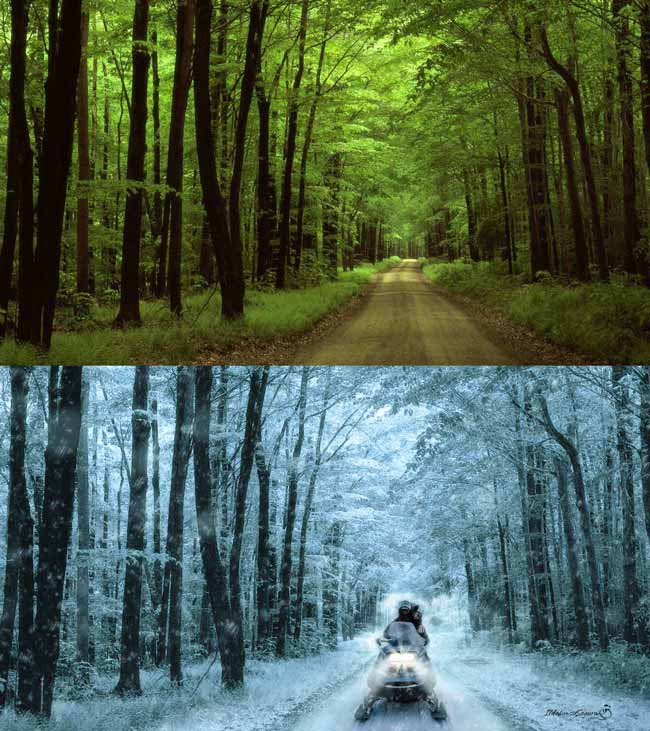
					<description><![CDATA[<p>En esta fotomanipulación veremos como cambiar el clima de verano-primavera a invierno. Todo con técnicas sencillas de photoshop. Aprenderemos a incorporar nieve y elementos en la escena que refuercen el cambio de clima que se propone en el wallpaper. Espero que te guste y que publiques en mis redes sociales el resultado de tu trabajo [&#8230;]</p>
La entrada <a href="https://ildefonsosegura.es/tutorial-photoshop-fotomanipulacion-paisaje-verano-a-paisaje-nevado-en-invierno-by-ildefonsosegura/">Tutorial Photoshop fotomanipulación paisaje verano a paisaje nevado en invierno by @ildefonsosegura</a> apareció primero en <a href="https://ildefonsosegura.es">Ildefonso Segura</a>.]]></description>
										<content:encoded><![CDATA[<p style="text-align: justify;">En esta fotomanipulación veremos como cambiar el clima de verano-primavera a invierno. Todo con técnicas sencillas de photoshop. Aprenderemos a incorporar nieve y elementos en la escena que refuercen el cambio de clima que se propone en el wallpaper. Espero que te guste y que publiques en mis redes sociales el resultado de tu trabajo al aplicar el tutorial.</p>
<p style="text-align: justify;">En el tutorial  que vamos a ver ahora, construiremos este wallpaper</p>
<p style="text-align: justify;"><img fetchpriority="high" decoding="async" class="aligncenter wp-image-4865 size-full" src="https://ildefonsosegura.es/wp-content/uploads/clima-invierno.jpg" alt="clima-invierno" width="650" height="731" srcset="https://ildefonsosegura.es/wp-content/uploads/clima-invierno.jpg 650w, https://ildefonsosegura.es/wp-content/uploads/clima-invierno-267x300.jpg 267w" sizes="(max-width: 650px) 100vw, 650px" /></p>
<p>No te lo pierdas y comparte tus trabajos en mi página de facebook (<a href="http://www.facebook.com/IldefonsoSeguraPage" target="_blank" rel="noopener">IldefonsoSeguraPage</a>)</p>
<p>&nbsp;</p>
<p>Espero que os guste</p>
<p style="text-align: left;"><strong>TUTORIAL CAMBIO DE CLIMA EN UN PAISAJE</strong><iframe src="https://www.youtube.com/embed/RLWkTmt4ANs?rel=0" width="640" height="420" frameborder="0" allowfullscreen="allowfullscreen"></iframe></p>
<div><center>[vc_button title=»BAJATE LOS MATERIALES» target=»blank» color=»btn-danger» size=»btn-large» href=»https://drive.google.com/file/d/0B_nJkCGJubucczgwLUhubnVoV0E/view?usp=sharing&amp;resourcekey=0-ISWBn90EYnK94ZPrQIb3ug»]</center></p>
<p style="text-align: center;">Suscríbete a mi canal de Youtube:</p>
<div align="right">
<p><script src="https://apis.google.com/js/platform.js" type="mce-no/type"></script><script type="mce-no/type">// <![CDATA[ function onYtEvent(payload) { if (payload.eventType == 'subscribe') { // Add code to handle subscribe event. } else if (payload.eventType == 'unsubscribe') { // Add code to handle unsubscribe event. } if (window.console) { // for debugging only window.console.log('YT event: ', payload); } } // ]]&gt;</script></p>
<div class="g-ytsubscribe" data-channel="ildefonsosegura" data-layout="default" data-count="default" data-onytevent="onYtEvent"></div>
</div>
</div>
<p style="text-align: left;">No dejes de compartir este post.</p>
<p style="text-align: left;">Así es como me puedes ayudar 🙂 Gracias</p>
<p>&nbsp;</p>La entrada <a href="https://ildefonsosegura.es/tutorial-photoshop-fotomanipulacion-paisaje-verano-a-paisaje-nevado-en-invierno-by-ildefonsosegura/">Tutorial Photoshop fotomanipulación paisaje verano a paisaje nevado en invierno by @ildefonsosegura</a> apareció primero en <a href="https://ildefonsosegura.es">Ildefonso Segura</a>.]]></content:encoded>
					
					<wfw:commentRss>https://ildefonsosegura.es/tutorial-photoshop-fotomanipulacion-paisaje-verano-a-paisaje-nevado-en-invierno-by-ildefonsosegura/feed/</wfw:commentRss>
			<slash:comments>0</slash:comments>
		
		
			</item>
		<item>
		<title>Tutorial Photoshop // Convierte una Foto en Comic al estilo @ildefonsosegura</title>
		<link>https://ildefonsosegura.es/convierte-una-foto-en-comic-con-photoshop-cs6-al-estilo-ildefonsosegura/</link>
					<comments>https://ildefonsosegura.es/convierte-una-foto-en-comic-con-photoshop-cs6-al-estilo-ildefonsosegura/#comments</comments>
		
		<dc:creator><![CDATA[Ildefonso Segura]]></dc:creator>
		<pubDate>Tue, 29 Jan 2013 13:04:06 +0000</pubDate>
				<category><![CDATA[Efectos]]></category>
		<category><![CDATA[Fotocomposición]]></category>
		<category><![CDATA[Photoshop]]></category>
		<category><![CDATA[Tecnicas]]></category>
		<category><![CDATA[Tutoriales]]></category>
		<category><![CDATA[cambio]]></category>
		<category><![CDATA[color]]></category>
		<category><![CDATA[colorear]]></category>
		<category><![CDATA[comic]]></category>
		<category><![CDATA[convertir]]></category>
		<category><![CDATA[cs4]]></category>
		<category><![CDATA[cs5]]></category>
		<category><![CDATA[cs6]]></category>
		<category><![CDATA[dibujo]]></category>
		<category><![CDATA[efecto]]></category>
		<category><![CDATA[foto]]></category>
		<category><![CDATA[fotocomposición]]></category>
		<category><![CDATA[gloriasanis]]></category>
		<category><![CDATA[ildefonsosegura]]></category>
		<category><![CDATA[ilustracion]]></category>
		<category><![CDATA[photoshop]]></category>
		<category><![CDATA[pintar]]></category>
		<category><![CDATA[tecnica]]></category>
		<category><![CDATA[tuto]]></category>
		<category><![CDATA[tutorial]]></category>
		<guid isPermaLink="false">http://ildefonsosegura.es/?p=2419</guid>

					<description><![CDATA[<p>Otro fantástico tutorial de Photoshop donde conseguimos de una forma simple y rápida un efecto comic partiendo de una fotografía. Te recomiendo que cojas una fotografía con colores vivos que ayudará a que el resultado final sea mucho más parecido al comic. Básicamente aplicamos dos filtros para conseguir el efecto casi en su totalidad. Perfeccionamos [&#8230;]</p>
La entrada <a href="https://ildefonsosegura.es/convierte-una-foto-en-comic-con-photoshop-cs6-al-estilo-ildefonsosegura/">Tutorial Photoshop // Convierte una Foto en Comic al estilo @ildefonsosegura</a> apareció primero en <a href="https://ildefonsosegura.es">Ildefonso Segura</a>.]]></description>
										<content:encoded><![CDATA[<p>Otro fantástico tutorial de Photoshop donde conseguimos de una forma simple y rápida un efecto comic partiendo de una fotografía.</p>
<p>Te recomiendo que cojas una fotografía con colores vivos que ayudará a que el resultado final sea mucho más parecido al comic. Básicamente aplicamos dos filtros para conseguir el efecto casi en su totalidad. Perfeccionamos el resultado creando un borde (trazo) a la silueta y ponemos un fondo atractivo que ayuda a emular el efecto comic.</p>
<p>En tres minutos tienes una conversión bastante profesional y a diferencia de otros tutoriales en la red, el dibujo queda mucho más irregular buscando un estilo propio de comic. Mira el antes y el después aquí:</p>
<p>[twenty20 img1=»6098&#8243; img2=»6096&#8243; offset=»0.5&#8243;]</p>
<p>Puedes usar la versión CS6 de photoshop como las anteriores que tienen los filtros artísticos de <strong>Añadir bordes</strong> y <strong>Cuarteado</strong></p>
<p>Disfrútalo</p>
<p>&nbsp;</p>
<p><span style="color: #800000;"><strong>VIDEOTUTORIAL </strong></span></p>
<p><center><iframe src="https://www.youtube.com/embed/CTIGeGgKrKY" width="640" height="420" frameborder="0" allowfullscreen="allowfullscreen"></iframe></center>&nbsp;</p>La entrada <a href="https://ildefonsosegura.es/convierte-una-foto-en-comic-con-photoshop-cs6-al-estilo-ildefonsosegura/">Tutorial Photoshop // Convierte una Foto en Comic al estilo @ildefonsosegura</a> apareció primero en <a href="https://ildefonsosegura.es">Ildefonso Segura</a>.]]></content:encoded>
					
					<wfw:commentRss>https://ildefonsosegura.es/convierte-una-foto-en-comic-con-photoshop-cs6-al-estilo-ildefonsosegura/feed/</wfw:commentRss>
			<slash:comments>1</slash:comments>
		
		
			</item>
		<item>
		<title>Tutorial Photoshop // Fotomanipulación cambiar la cabeza</title>
		<link>https://ildefonsosegura.es/fotomanipulacion-cambiar-la-cabeza-con-photoshop/</link>
					<comments>https://ildefonsosegura.es/fotomanipulacion-cambiar-la-cabeza-con-photoshop/#respond</comments>
		
		<dc:creator><![CDATA[Ildefonso Segura]]></dc:creator>
		<pubDate>Sun, 23 Dec 2012 17:57:48 +0000</pubDate>
				<category><![CDATA[Efectos]]></category>
		<category><![CDATA[Fotocomposición]]></category>
		<category><![CDATA[Photoshop]]></category>
		<category><![CDATA[Tecnicas]]></category>
		<category><![CDATA[Tutoriales]]></category>
		<category><![CDATA[Video]]></category>
		<category><![CDATA[cambio]]></category>
		<category><![CDATA[cara]]></category>
		<category><![CDATA[clonar]]></category>
		<category><![CDATA[consejos]]></category>
		<category><![CDATA[foto]]></category>
		<category><![CDATA[fotografia]]></category>
		<category><![CDATA[gloriasanis]]></category>
		<category><![CDATA[ildefonsosegura]]></category>
		<category><![CDATA[image]]></category>
		<category><![CDATA[manipulación]]></category>
		<category><![CDATA[tampon]]></category>
		<category><![CDATA[tuto]]></category>
		<category><![CDATA[video]]></category>
		<category><![CDATA[youtube]]></category>
		<guid isPermaLink="false">http://ildefonsosegura.es/?p=1136</guid>

					<description><![CDATA[<p>Con este tutorial podrás, de una forma fácil, realizar una fotomanipulación con la que cambiarás la cabeza de un cuerpo a otro. Utilizamos técnicas de clonado con reglas y consejos de manipulación para conseguir un resultado alucinante. &#160; VIDEOTUTORIAL &#160; No dejes de compartir este post. Así es como me puedes ayudar 🙂 Gracias &#160;</p>
La entrada <a href="https://ildefonsosegura.es/fotomanipulacion-cambiar-la-cabeza-con-photoshop/">Tutorial Photoshop // Fotomanipulación cambiar la cabeza</a> apareció primero en <a href="https://ildefonsosegura.es">Ildefonso Segura</a>.]]></description>
										<content:encoded><![CDATA[<p><a href="https://ildefonsosegura.es/fotomanipulacion-cambiar-la-cabeza-con-photoshop/cambio-de-cara-compara/" rel="attachment wp-att-1137"><img decoding="async" class="size-full wp-image-1137 aligncenter" alt="CAmbio-de-cara-compara" src="https://ildefonsosegura.es/wp-content/uploads/CAmbio-de-cara-compara.jpg" width="500" height="300" srcset="https://ildefonsosegura.es/wp-content/uploads/CAmbio-de-cara-compara.jpg 500w, https://ildefonsosegura.es/wp-content/uploads/CAmbio-de-cara-compara-300x180.jpg 300w" sizes="(max-width: 500px) 100vw, 500px" /></a></p>
<p>Con este tutorial podrás, de una forma fácil, realizar una fotomanipulación con la que cambiarás la cabeza de un cuerpo a otro. Utilizamos técnicas de clonado con reglas y consejos de manipulación para conseguir un resultado alucinante.</p>
<p>&nbsp;</p>
<p><span style="color: #800000;"><strong>VIDEOTUTORIAL </strong></span></p>
<p><center><iframe src="https://www.youtube.com/embed/Ejb46O99Zsw" height="360" width="640" allowfullscreen="" frameborder="0"></iframe></center></p>
<p>&nbsp;</p>
<div align="right">
<p><script src="https://apis.google.com/js/platform.js"></script><script>// <![CDATA[
function onYtEvent(payload) { if (payload.eventType == 'subscribe') { // Add code to handle subscribe event. } else if (payload.eventType == 'unsubscribe') { // Add code to handle unsubscribe event. } if (window.console) { // for debugging only window.console.log('YT event: ', payload); } }
// ]]&gt;</script></p>
<div class="g-ytsubscribe" data-channel="ildefonsosegura" data-layout="default" data-count="default" data-onytevent="onYtEvent"></div>
</div>
</div>
<p style="text-align: left;">No dejes de compartir este post.</p>
<p style="text-align: left;">Así es como me puedes ayudar 🙂 Gracias</p>
<p>&nbsp;</p>La entrada <a href="https://ildefonsosegura.es/fotomanipulacion-cambiar-la-cabeza-con-photoshop/">Tutorial Photoshop // Fotomanipulación cambiar la cabeza</a> apareció primero en <a href="https://ildefonsosegura.es">Ildefonso Segura</a>.]]></content:encoded>
					
					<wfw:commentRss>https://ildefonsosegura.es/fotomanipulacion-cambiar-la-cabeza-con-photoshop/feed/</wfw:commentRss>
			<slash:comments>0</slash:comments>
		
		
			</item>
		<item>
		<title>Efecto mograph heredar en Cinema4D</title>
		<link>https://ildefonsosegura.es/efecto-mograph-heredar-en-cinema4d/</link>
					<comments>https://ildefonsosegura.es/efecto-mograph-heredar-en-cinema4d/#respond</comments>
		
		<dc:creator><![CDATA[Ildefonso Segura]]></dc:creator>
		<pubDate>Sat, 22 Dec 2012 18:43:38 +0000</pubDate>
				<category><![CDATA[Cinema4D]]></category>
		<category><![CDATA[Efectos]]></category>
		<category><![CDATA[Tecnicas]]></category>
		<category><![CDATA[Tutoriales]]></category>
		<category><![CDATA[cambio]]></category>
		<category><![CDATA[efectt]]></category>
		<category><![CDATA[formas]]></category>
		<category><![CDATA[gloriasanis]]></category>
		<category><![CDATA[herencia]]></category>
		<category><![CDATA[ildefonsosegura]]></category>
		<category><![CDATA[mograph]]></category>
		<category><![CDATA[transformación]]></category>
		<category><![CDATA[transformar]]></category>
		<guid isPermaLink="false">http://ildefonsosegura.es/?p=908</guid>

					<description><![CDATA[<p>Transformarás formas y texto en otros objetos. Un fantástico efecto de trasnformación propio de profesionales &#160; VIDEOTUTORIAL &#160; [vc_button title=»BAJATE LOS MATERIALES» target=»blank» color=»btn-danger» size=»btn-large» href=»https://drive.google.com/open?id=0B_nJkCGJubucWThnazJRUklYWjQ»]&#160; &#160; No dejes de compartir este post. Así es como me puedes ayudar 🙂 Gracias &#160;</p>
La entrada <a href="https://ildefonsosegura.es/efecto-mograph-heredar-en-cinema4d/">Efecto mograph heredar en Cinema4D</a> apareció primero en <a href="https://ildefonsosegura.es">Ildefonso Segura</a>.]]></description>
										<content:encoded><![CDATA[<p>Transformarás formas y texto en otros objetos. Un fantástico efecto de trasnformación propio de profesionales</p>
<p>&nbsp;</p>
<p><span style="color: #800000;"><strong>VIDEOTUTORIAL </strong></span></p>
<p><center><iframe src="https://www.youtube.com/embed/b1Y0TxBxXGE" height="360" width="640" allowfullscreen="" frameborder="0"></iframe></center>&nbsp;</p>
<p><center>[vc_button title=»BAJATE LOS MATERIALES» target=»blank» color=»btn-danger» size=»btn-large» href=»https://drive.google.com/open?id=0B_nJkCGJubucWThnazJRUklYWjQ»]</center>&nbsp;</p>
<p>&nbsp;</p>
<div align="right">
<p><script src="https://apis.google.com/js/platform.js"></script><script>// <![CDATA[
function onYtEvent(payload) { if (payload.eventType == 'subscribe') { // Add code to handle subscribe event. } else if (payload.eventType == 'unsubscribe') { // Add code to handle unsubscribe event. } if (window.console) { // for debugging only window.console.log('YT event: ', payload); } }
// ]]&gt;</script></p>
<div class="g-ytsubscribe" data-channel="ildefonsosegura" data-layout="default" data-count="default" data-onytevent="onYtEvent"></div>
</div>
</div>
<p style="text-align: left;">No dejes de compartir este post.</p>
<p style="text-align: left;">Así es como me puedes ayudar 🙂 Gracias</p>
<p>&nbsp;</p>La entrada <a href="https://ildefonsosegura.es/efecto-mograph-heredar-en-cinema4d/">Efecto mograph heredar en Cinema4D</a> apareció primero en <a href="https://ildefonsosegura.es">Ildefonso Segura</a>.]]></content:encoded>
					
					<wfw:commentRss>https://ildefonsosegura.es/efecto-mograph-heredar-en-cinema4d/feed/</wfw:commentRss>
			<slash:comments>0</slash:comments>
		
		
			</item>
		<item>
		<title>Cómo seguir informados en el Facebook después del cambio de noviembre de 2012</title>
		<link>https://ildefonsosegura.es/como-seguir-informados-en-el-facebook-despues-del-cambio-de-noviembre-de-2012/</link>
					<comments>https://ildefonsosegura.es/como-seguir-informados-en-el-facebook-despues-del-cambio-de-noviembre-de-2012/#respond</comments>
		
		<dc:creator><![CDATA[Ildefonso Segura]]></dc:creator>
		<pubDate>Sat, 01 Dec 2012 13:47:07 +0000</pubDate>
				<category><![CDATA[Consejos]]></category>
		<category><![CDATA[Noticias]]></category>
		<category><![CDATA[Novedades]]></category>
		<category><![CDATA[Video]]></category>
		<category><![CDATA[actualización]]></category>
		<category><![CDATA[cambio]]></category>
		<category><![CDATA[face]]></category>
		<category><![CDATA[facebook]]></category>
		<category><![CDATA[fanpage]]></category>
		<category><![CDATA[gloriasanis]]></category>
		<category><![CDATA[ildefonsosegura]]></category>
		<category><![CDATA[información]]></category>
		<category><![CDATA[suscripcion]]></category>
		<category><![CDATA[video]]></category>
		<category><![CDATA[youtube]]></category>
		<guid isPermaLink="false">http://ildefonsosegura.es/?p=1443</guid>

					<description><![CDATA[<p>Facebook ha cambiado su política de comunicación y eso afecta a la actualización de los posts que muchos hacemos en nuestra fanpage. Sigue este video y te muestro como seguir informado de mis noticias que pueden serte interesantes. Diste a mi like por algo y quiero que sigas informado de los tips y artículos que [&#8230;]</p>
La entrada <a href="https://ildefonsosegura.es/como-seguir-informados-en-el-facebook-despues-del-cambio-de-noviembre-de-2012/">Cómo seguir informados en el Facebook después del cambio de noviembre de 2012</a> apareció primero en <a href="https://ildefonsosegura.es">Ildefonso Segura</a>.]]></description>
										<content:encoded><![CDATA[<div data-elementor-type="wp-post" data-elementor-id="1443" class="elementor elementor-1443">
						<section class="elementor-section elementor-top-section elementor-element elementor-element-7124258f elementor-section-boxed elementor-section-height-default elementor-section-height-default" data-id="7124258f" data-element_type="section" data-e-type="section">
						<div class="elementor-container elementor-column-gap-default">
					<div class="elementor-column elementor-col-100 elementor-top-column elementor-element elementor-element-50a37f8b" data-id="50a37f8b" data-element_type="column" data-e-type="column">
			<div class="elementor-widget-wrap elementor-element-populated">
						<div class="elementor-element elementor-element-5965763c elementor-widget elementor-widget-text-editor" data-id="5965763c" data-element_type="widget" data-e-type="widget" data-widget_type="text-editor.default">
				<div class="elementor-widget-container">
									<p></p><center></center><p></p>
<p>Facebook ha cambiado su política de comunicación y eso afecta a la actualización de los posts que muchos hacemos en nuestra <a href="http://www.facebook.com/IldefonsoSeguraPage" target="_blank" rel="noopener">fanpage</a>. Sigue este video y te muestro como seguir informado de mis noticias que pueden serte interesantes. Diste a mi like por algo y quiero que sigas informado de los tips y artículos que semanalmente comparto en mi <a href="http://www.facebook.com/IldefonsoSeguraPage" target="_blank" rel="noopener">fanpage</a>. Si no lo has hecho ya, ve a la <a href="http://www.facebook.com/IldefonsoSeguraPage" target="_blank" rel="noopener">Fanpage</a> y dale a like. Gracias</p>
<p><span style="color: #800000;"><strong>VIDEOTUTORIAL </strong></span></p>
<p></p><center><iframe src="https://www.youtube.com/embed/iXJPu3YwhcI" width="640" height="360" frameborder="0" allowfullscreen="allowfullscreen"></iframe></center><p></p>
<p></p>								</div>
				</div>
					</div>
		</div>
					</div>
		</section>
				<section class="elementor-section elementor-top-section elementor-element elementor-element-7836e3c6 elementor-section-full_width elementor-section-height-default elementor-section-height-default" data-id="7836e3c6" data-element_type="section" data-e-type="section">
						<div class="elementor-container elementor-column-gap-default">
					<div class="elementor-column elementor-col-100 elementor-top-column elementor-element elementor-element-2baed039" data-id="2baed039" data-element_type="column" data-e-type="column">
			<div class="elementor-widget-wrap elementor-element-populated">
						<div class="elementor-element elementor-element-795666bc elementor-widget elementor-widget-text-editor" data-id="795666bc" data-element_type="widget" data-e-type="widget" data-widget_type="text-editor.default">
				<div class="elementor-widget-container">
									<div><div align="center"><center><strong style="color: #ff0000;">Suscríbete a mi canal de Youtube:</strong></center><div><div><div align="center"><p><script src="https://apis.google.com/js/platform.js"></script></p><div class="g-ytsubscribe" data-channel="ildefonsosegura" data-layout="full" data-count="default"> </div></div></div><p> </p><p style="text-align: center;">No te lo pierdas y comparte tus trabajos en mi página de facebook (<span style="color: #0000ff;"><strong><a style="color: #0000ff;" href="http://www.facebook.com/IldefonsoSeguraPage" target="_blank" rel="noopener noreferrer">IldefonsoSeguraPage</a></strong></span>)<br />Espero que te guste y compartas el vídeo. No dejes de compartir este post.</p><p style="text-align: center;">Así es como me puedes ayudar 🙂 Gracias</p></div></div></div>								</div>
				</div>
					</div>
		</div>
					</div>
		</section>
				</div>La entrada <a href="https://ildefonsosegura.es/como-seguir-informados-en-el-facebook-despues-del-cambio-de-noviembre-de-2012/">Cómo seguir informados en el Facebook después del cambio de noviembre de 2012</a> apareció primero en <a href="https://ildefonsosegura.es">Ildefonso Segura</a>.]]></content:encoded>
					
					<wfw:commentRss>https://ildefonsosegura.es/como-seguir-informados-en-el-facebook-despues-del-cambio-de-noviembre-de-2012/feed/</wfw:commentRss>
			<slash:comments>0</slash:comments>
		
		
			</item>
		<item>
		<title>Impresionante Intro con Shader Multi de Cinema4D</title>
		<link>https://ildefonsosegura.es/impresionante-intro-con-shader-multi-de-cinema4d/</link>
					<comments>https://ildefonsosegura.es/impresionante-intro-con-shader-multi-de-cinema4d/#respond</comments>
		
		<dc:creator><![CDATA[Ildefonso Segura]]></dc:creator>
		<pubDate>Fri, 02 Mar 2012 14:15:59 +0000</pubDate>
				<category><![CDATA[3D]]></category>
		<category><![CDATA[Cinema4D]]></category>
		<category><![CDATA[Conectatutoriales]]></category>
		<category><![CDATA[Efectos]]></category>
		<category><![CDATA[Intro]]></category>
		<category><![CDATA[Tecnicas]]></category>
		<category><![CDATA[Tutoriales]]></category>
		<category><![CDATA[baile imagenes]]></category>
		<category><![CDATA[cambio]]></category>
		<category><![CDATA[cinema4D]]></category>
		<category><![CDATA[conectatutoriales]]></category>
		<category><![CDATA[effects]]></category>
		<category><![CDATA[gloriasanis]]></category>
		<category><![CDATA[ildefonsosegura]]></category>
		<category><![CDATA[imágenes]]></category>
		<category><![CDATA[intro]]></category>
		<category><![CDATA[shader]]></category>
		<category><![CDATA[shader multi]]></category>
		<category><![CDATA[tuto]]></category>
		<category><![CDATA[video]]></category>
		<category><![CDATA[youtube]]></category>
		<guid isPermaLink="false">http://ildefonsosegura.es/?p=1469</guid>

					<description><![CDATA[<p>  El 2 de marzo de 2012 publiqué en el canal de Conectatutoriales Adobe User Group un tutorial de cinema4D en el que te mostraba como utilizar la función Multi Shader de los materiales en Cinema4D. Aprovecha los plugin que relacionan tanto cinema4D como after effects para facilitar el trabajo y crear una INTRO. Visita también [&#8230;]</p>
La entrada <a href="https://ildefonsosegura.es/impresionante-intro-con-shader-multi-de-cinema4d/">Impresionante Intro con Shader Multi de Cinema4D</a> apareció primero en <a href="https://ildefonsosegura.es">Ildefonso Segura</a>.]]></description>
										<content:encoded><![CDATA[<div data-elementor-type="wp-post" data-elementor-id="1469" class="elementor elementor-1469">
						<section class="elementor-section elementor-top-section elementor-element elementor-element-5ceae2 elementor-section-boxed elementor-section-height-default elementor-section-height-default" data-id="5ceae2" data-element_type="section" data-e-type="section">
						<div class="elementor-container elementor-column-gap-default">
					<div class="elementor-column elementor-col-100 elementor-top-column elementor-element elementor-element-55867866" data-id="55867866" data-element_type="column" data-e-type="column">
			<div class="elementor-widget-wrap elementor-element-populated">
						<div class="elementor-element elementor-element-60ec5e40 elementor-widget elementor-widget-text-editor" data-id="60ec5e40" data-element_type="widget" data-e-type="widget" data-widget_type="text-editor.default">
				<div class="elementor-widget-container">
									<p> </p><center></center><center></center><p>El 2 de marzo de 2012 publiqué en el canal de <a title="canal de conectatutoriales" href="http://www.youtube.com/user/conectatutoriales" target="_blank" rel="noopener"><strong>Conectatutoriales Adobe User Group</strong></a> un tutorial de cinema4D en el que te mostraba como utilizar la función Multi Shader de los materiales en Cinema4D. Aprovecha los plugin que relacionan tanto cinema4D como after effects para facilitar el trabajo y <strong>crear una INTRO.</strong> Visita también <strong><a href="http://www.youtube.com/user/conectatutoriales" target="_blank" rel="noopener">Conectatutoriales</a></strong></p><div><p> </p><p><span style="color: #800000;"><strong>VIDEOTUTORIAL </strong></span></p><p> </p><center><iframe src="https://www.youtube.com/embed/EAMu3xW8tCk" width="640" height="420" frameborder="0" allowfullscreen="allowfullscreen"></iframe></center><p> </p></div>								</div>
				</div>
					</div>
		</div>
					</div>
		</section>
				<section class="elementor-section elementor-top-section elementor-element elementor-element-145bb597 elementor-section-full_width elementor-section-height-default elementor-section-height-default" data-id="145bb597" data-element_type="section" data-e-type="section">
						<div class="elementor-container elementor-column-gap-default">
					<div class="elementor-column elementor-col-100 elementor-top-column elementor-element elementor-element-41883480" data-id="41883480" data-element_type="column" data-e-type="column">
			<div class="elementor-widget-wrap elementor-element-populated">
						<div class="elementor-element elementor-element-6097e453 elementor-widget elementor-widget-text-editor" data-id="6097e453" data-element_type="widget" data-e-type="widget" data-widget_type="text-editor.default">
				<div class="elementor-widget-container">
									<div><div align="center"><center><strong style="color: #ff0000;">Suscríbete a mi canal de Youtube:</strong></center><div><div><div align="center"><p><script src="https://apis.google.com/js/platform.js"></script></p><div class="g-ytsubscribe" data-channel="ildefonsosegura" data-layout="full" data-count="default"> </div></div></div><p> </p><p style="text-align: center;">No te lo pierdas y comparte tus trabajos en mi página de facebook (<span style="color: #0000ff;"><strong><a style="color: #0000ff;" href="http://www.facebook.com/IldefonsoSeguraPage" target="_blank" rel="noopener noreferrer">IldefonsoSeguraPage</a></strong></span>)<br />Espero que te guste y compartas el vídeo. No dejes de compartir este post.</p><p style="text-align: center;">Así es como me puedes ayudar 🙂 Gracias</p></div></div></div>								</div>
				</div>
					</div>
		</div>
					</div>
		</section>
				</div>La entrada <a href="https://ildefonsosegura.es/impresionante-intro-con-shader-multi-de-cinema4d/">Impresionante Intro con Shader Multi de Cinema4D</a> apareció primero en <a href="https://ildefonsosegura.es">Ildefonso Segura</a>.]]></content:encoded>
					
					<wfw:commentRss>https://ildefonsosegura.es/impresionante-intro-con-shader-multi-de-cinema4d/feed/</wfw:commentRss>
			<slash:comments>0</slash:comments>
		
		
			</item>
	</channel>
</rss>
<br />
<b>Fatal error</b>:  Uncaught TypeError: mysqli_num_fields(): Argument #1 ($result) must be of type mysqli_result, bool given in /var/www/vhosts/ildefonsosegura.es/httpdocs/wp-includes/class-wpdb.php:3941
Stack trace:
#0 /var/www/vhosts/ildefonsosegura.es/httpdocs/wp-includes/class-wpdb.php(3941): mysqli_num_fields()
#1 /var/www/vhosts/ildefonsosegura.es/httpdocs/wp-includes/class-wpdb.php(785): wpdb-&gt;load_col_info()
#2 /var/www/vhosts/ildefonsosegura.es/httpdocs/wp-content/plugins/w3-total-cache/DbCache_WpdbInjection_QueryCaching.php(230): wpdb-&gt;__get()
#3 /var/www/vhosts/ildefonsosegura.es/httpdocs/wp-content/plugins/w3-total-cache/DbCache_WpdbNew.php(220): W3TC\DbCache_WpdbInjection_QueryCaching-&gt;query()
#4 /var/www/vhosts/ildefonsosegura.es/httpdocs/wp-content/plugins/aaa-option-optimizer/src/class-database.php(199): W3TC\DbCache_WpdbNew-&gt;query()
#5 /var/www/vhosts/ildefonsosegura.es/httpdocs/wp-content/plugins/aaa-option-optimizer/src/class-plugin.php(182): Progress_Planner\OptionOptimizer\Database::batch_insert()
#6 /var/www/vhosts/ildefonsosegura.es/httpdocs/wp-includes/class-wp-hook.php(353): Progress_Planner\OptionOptimizer\Plugin-&gt;update_tracked_options()
#7 /var/www/vhosts/ildefonsosegura.es/httpdocs/wp-includes/class-wp-hook.php(377): WP_Hook-&gt;apply_filters()
#8 /var/www/vhosts/ildefonsosegura.es/httpdocs/wp-includes/plugin.php(523): WP_Hook-&gt;do_action()
#9 /var/www/vhosts/ildefonsosegura.es/httpdocs/wp-includes/load.php(1308): do_action()
#10 [internal function]: shutdown_action_hook()
#11 {main}
  thrown in <b>/var/www/vhosts/ildefonsosegura.es/httpdocs/wp-includes/class-wpdb.php</b> on line <b>3941</b><br />