



<?xml version="1.0" encoding="UTF-8"?><rss version="2.0"
	xmlns:content="http://purl.org/rss/1.0/modules/content/"
	xmlns:wfw="http://wellformedweb.org/CommentAPI/"
	xmlns:dc="http://purl.org/dc/elements/1.1/"
	xmlns:atom="http://www.w3.org/2005/Atom"
	xmlns:sy="http://purl.org/rss/1.0/modules/syndication/"
	xmlns:slash="http://purl.org/rss/1.0/modules/slash/"
	>

<channel>
	<title>Textura | Ildefonso Segura</title>
	<atom:link href="https://ildefonsosegura.es/category/textura-2/feed/" rel="self" type="application/rss+xml" />
	<link>https://ildefonsosegura.es</link>
	<description>Tutoriales de diseño y animación</description>
	<lastBuildDate>Sat, 26 Nov 2022 13:19:29 +0000</lastBuildDate>
	<language>es</language>
	<sy:updatePeriod>
	hourly	</sy:updatePeriod>
	<sy:updateFrequency>
	1	</sy:updateFrequency>
	<generator>https://wordpress.org/?v=6.9.4</generator>

<image>
	<url>https://ildefonsosegura.es/wp-content/uploads/cropped-Favicon-new-logo-website-32x32.png</url>
	<title>Textura | Ildefonso Segura</title>
	<link>https://ildefonsosegura.es</link>
	<width>32</width>
	<height>32</height>
</image> 
	<item>
		<title>Regalo de editable en Photoshop // Efecto rayos de luz</title>
		<link>https://ildefonsosegura.es/regalo-de-editable-en-photoshop-efecto-rayos-de-luz/</link>
					<comments>https://ildefonsosegura.es/regalo-de-editable-en-photoshop-efecto-rayos-de-luz/#respond</comments>
		
		<dc:creator><![CDATA[Ildefonso Segura]]></dc:creator>
		<pubDate>Sat, 13 Aug 2022 11:44:37 +0000</pubDate>
				<category><![CDATA[Editable]]></category>
		<category><![CDATA[Efectos]]></category>
		<category><![CDATA[Fotocomposición]]></category>
		<category><![CDATA[Photoshop]]></category>
		<category><![CDATA[Recursos]]></category>
		<category><![CDATA[Tecnicas]]></category>
		<category><![CDATA[Textura]]></category>
		<category><![CDATA[Video]]></category>
		<category><![CDATA[Wallpaper]]></category>
		<category><![CDATA[adobe]]></category>
		<category><![CDATA[creatividad]]></category>
		<category><![CDATA[diseño]]></category>
		<category><![CDATA[editable]]></category>
		<category><![CDATA[efecto]]></category>
		<category><![CDATA[estilo]]></category>
		<category><![CDATA[ildefonsosegura]]></category>
		<category><![CDATA[lightrays]]></category>
		<category><![CDATA[photoshop]]></category>
		<category><![CDATA[plantilla]]></category>
		<category><![CDATA[ps]]></category>
		<category><![CDATA[rayos de luz]]></category>
		<category><![CDATA[regalo]]></category>
		<category><![CDATA[tecnicas]]></category>
		<category><![CDATA[wallpaper]]></category>
		<category><![CDATA[youtube]]></category>
		<guid isPermaLink="false">https://ildefonsosegura.es/?p=136313</guid>

					<description><![CDATA[<p>En este post os voy a compartir un editable para crear rayos de luz muy realistas. El editable se ha basado en el tutorial que podéis encontrar en el canal de TEXTURELABS (Ver Vídeo). En su web encontrareis también, además de muchos tutoriales de edición de imagen y animación, recursos para poder usar totalmente gratis (sobre [&#8230;]</p>
La entrada <a href="https://ildefonsosegura.es/regalo-de-editable-en-photoshop-efecto-rayos-de-luz/">Regalo de editable en Photoshop // Efecto rayos de luz</a> apareció primero en <a href="https://ildefonsosegura.es">Ildefonso Segura</a>.]]></description>
										<content:encoded><![CDATA[<div data-elementor-type="wp-post" data-elementor-id="136313" class="elementor elementor-136313">
						<section class="elementor-section elementor-top-section elementor-element elementor-element-b7471a2 elementor-section-boxed elementor-section-height-default elementor-section-height-default" data-id="b7471a2" data-element_type="section" data-e-type="section">
						<div class="elementor-container elementor-column-gap-default">
					<div class="elementor-column elementor-col-100 elementor-top-column elementor-element elementor-element-5e938f2" data-id="5e938f2" data-element_type="column" data-e-type="column">
			<div class="elementor-widget-wrap elementor-element-populated">
						<div class="elementor-element elementor-element-7cf2e12 elementor-widget elementor-widget-text-editor" data-id="7cf2e12" data-element_type="widget" data-e-type="widget" data-widget_type="text-editor.default">
				<div class="elementor-widget-container">
									<p align="justify">En este post os voy a compartir un editable para crear rayos de luz muy realistas. El editable se ha basado en el tutorial que podéis encontrar en el canal de <a href="https://texturelabs.org/" target="_blank" rel="noopener"><span style="color: #800000;"><strong>TEXTURELABS</strong></span></a> (<a title="Crear rayos de luz by TextureLabs" href="https://youtu.be/3jSWWLIDZzM" target="_blank" rel="noopener">Ver Vídeo</a>). En su web encontrareis también, además de muchos tutoriales de edición de imagen y animación, recursos para poder usar totalmente gratis (sobre todo texturas).</p>								</div>
				</div>
					</div>
		</div>
					</div>
		</section>
				<section class="elementor-section elementor-top-section elementor-element elementor-element-ed44dd8 elementor-section-boxed elementor-section-height-default elementor-section-height-default" data-id="ed44dd8" data-element_type="section" data-e-type="section">
						<div class="elementor-container elementor-column-gap-default">
					<div class="elementor-column elementor-col-100 elementor-top-column elementor-element elementor-element-34f336b" data-id="34f336b" data-element_type="column" data-e-type="column">
			<div class="elementor-widget-wrap elementor-element-populated">
						<div class="elementor-element elementor-element-61dc780 elementor-widget elementor-widget-text-editor" data-id="61dc780" data-element_type="widget" data-e-type="widget" data-widget_type="text-editor.default">
				<div class="elementor-widget-container">
									<p align="justify">Necesitarás instalar una ACCIÓN en tu Photoshop, que recoge más de 100 pasos. Esto hace más rápida la edición y así no se hace tan cansado volver a repetir los pasos en otro objeto sobre el que quieras aplicar el efecto.</p><p align="justify">La ACCIÓN está incluida en el pack de regalo que te dejo en mi sección de <a href="https://ildefonsosegura.es/regalos/" target="_blank" rel="noopener"><span style="color: #800000;"><strong>REGALOS de ILDEFONSOSEGURA</strong></span></a></p><p align="justify">Aquí puedes ver unos ejemplos de composiciones que te pueden inspirar:</p>								</div>
				</div>
					</div>
		</div>
					</div>
		</section>
				<section class="elementor-section elementor-top-section elementor-element elementor-element-835a414 elementor-section-boxed elementor-section-height-default elementor-section-height-default" data-id="835a414" data-element_type="section" data-e-type="section">
						<div class="elementor-container elementor-column-gap-default">
					<div class="elementor-column elementor-col-100 elementor-top-column elementor-element elementor-element-4e89305" data-id="4e89305" data-element_type="column" data-e-type="column">
			<div class="elementor-widget-wrap elementor-element-populated">
						<div class="elementor-element elementor-element-fc9e4be elementor-widget elementor-widget-shortcode" data-id="fc9e4be" data-element_type="widget" data-e-type="widget" data-widget_type="shortcode.default">
				<div class="elementor-widget-container">
							<div class="elementor-shortcode">[slide-anything id='136325']</div>
						</div>
				</div>
					</div>
		</div>
					</div>
		</section>
				<section class="elementor-section elementor-top-section elementor-element elementor-element-57c9851 elementor-section-boxed elementor-section-height-default elementor-section-height-default" data-id="57c9851" data-element_type="section" data-e-type="section">
						<div class="elementor-container elementor-column-gap-default">
					<div class="elementor-column elementor-col-100 elementor-top-column elementor-element elementor-element-cd7f749" data-id="cd7f749" data-element_type="column" data-e-type="column">
			<div class="elementor-widget-wrap elementor-element-populated">
						<div class="elementor-element elementor-element-1fffd78 elementor-widget-divider--view-line_icon elementor-view-default elementor-widget-divider--element-align-center elementor-widget elementor-widget-divider" data-id="1fffd78" data-element_type="widget" data-e-type="widget" data-widget_type="divider.default">
				<div class="elementor-widget-container">
							<div class="elementor-divider">
			<span class="elementor-divider-separator">
							<div class="elementor-icon elementor-divider__element">
					<i aria-hidden="true" class="fas fa-star"></i></div>
						</span>
		</div>
						</div>
				</div>
					</div>
		</div>
					</div>
		</section>
				<section class="elementor-section elementor-top-section elementor-element elementor-element-232a0e5 elementor-section-boxed elementor-section-height-default elementor-section-height-default" data-id="232a0e5" data-element_type="section" data-e-type="section">
						<div class="elementor-container elementor-column-gap-default">
					<div class="elementor-column elementor-col-100 elementor-top-column elementor-element elementor-element-ad1dfeb" data-id="ad1dfeb" data-element_type="column" data-e-type="column">
			<div class="elementor-widget-wrap elementor-element-populated">
						<div class="elementor-element elementor-element-d2af230 elementor-widget elementor-widget-text-editor" data-id="d2af230" data-element_type="widget" data-e-type="widget" data-widget_type="text-editor.default">
				<div class="elementor-widget-container">
									<p>A continuación te muestro el antes y el después del efecto sobre un texto con imágenes incluidas:</p>								</div>
				</div>
					</div>
		</div>
					</div>
		</section>
				<section class="elementor-section elementor-top-section elementor-element elementor-element-ebe95e6 elementor-section-boxed elementor-section-height-default elementor-section-height-default" data-id="ebe95e6" data-element_type="section" data-e-type="section">
						<div class="elementor-container elementor-column-gap-default">
					<div class="elementor-column elementor-col-50 elementor-top-column elementor-element elementor-element-7547dcb" data-id="7547dcb" data-element_type="column" data-e-type="column">
			<div class="elementor-widget-wrap">
							</div>
		</div>
				<div class="elementor-column elementor-col-50 elementor-top-column elementor-element elementor-element-db42ebf" data-id="db42ebf" data-element_type="column" data-e-type="column">
			<div class="elementor-widget-wrap">
							</div>
		</div>
					</div>
		</section>
				<section class="elementor-section elementor-top-section elementor-element elementor-element-0eb73bb elementor-section-boxed elementor-section-height-default elementor-section-height-default" data-id="0eb73bb" data-element_type="section" data-e-type="section">
						<div class="elementor-container elementor-column-gap-default">
					<div class="elementor-column elementor-col-100 elementor-top-column elementor-element elementor-element-74eee93" data-id="74eee93" data-element_type="column" data-e-type="column">
			<div class="elementor-widget-wrap elementor-element-populated">
						<div class="elementor-element elementor-element-0de0d8d elementor-widget-divider--view-line_icon elementor-view-default elementor-widget-divider--element-align-center elementor-widget elementor-widget-divider" data-id="0de0d8d" data-element_type="widget" data-e-type="widget" data-widget_type="divider.default">
				<div class="elementor-widget-container">
							<div class="elementor-divider">
			<span class="elementor-divider-separator">
							<div class="elementor-icon elementor-divider__element">
					<i aria-hidden="true" class="fas fa-star"></i></div>
						</span>
		</div>
						</div>
				</div>
					</div>
		</div>
					</div>
		</section>
				<section class="elementor-section elementor-top-section elementor-element elementor-element-acfc913 elementor-section-boxed elementor-section-height-default elementor-section-height-default" data-id="acfc913" data-element_type="section" data-e-type="section">
						<div class="elementor-container elementor-column-gap-default">
					<div class="elementor-column elementor-col-100 elementor-top-column elementor-element elementor-element-03b0344" data-id="03b0344" data-element_type="column" data-e-type="column">
			<div class="elementor-widget-wrap elementor-element-populated">
						<div class="elementor-element elementor-element-af4e04c elementor-widget elementor-widget-text-editor" data-id="af4e04c" data-element_type="widget" data-e-type="widget" data-widget_type="text-editor.default">
				<div class="elementor-widget-container">
									<p align="justify">Te dejo mi referencia en Instagram para que chequees este post y otros que te pueden interesar <a href="http://instagram.com/ildefonsosegura" target="_blank" rel="noopener"><span style="color: #800000;"><strong>INSTAGRAM DE @IldefonsoSegura</strong></span></a></p>								</div>
				</div>
					</div>
		</div>
					</div>
		</section>
				<section class="elementor-section elementor-top-section elementor-element elementor-element-504128b elementor-section-boxed elementor-section-height-default elementor-section-height-default" data-id="504128b" data-element_type="section" data-e-type="section">
						<div class="elementor-container elementor-column-gap-default">
					<div class="elementor-column elementor-col-100 elementor-top-column elementor-element elementor-element-8ba1edf" data-id="8ba1edf" data-element_type="column" data-e-type="column">
			<div class="elementor-widget-wrap elementor-element-populated">
						<div class="elementor-element elementor-element-74fd0c6 elementor-widget elementor-widget-heading" data-id="74fd0c6" data-element_type="widget" data-e-type="widget" data-widget_type="heading.default">
				<div class="elementor-widget-container">
					<h2 class="elementor-heading-title elementor-size-default">VIDEO DE USO DEL EDITABLE</h2>				</div>
				</div>
					</div>
		</div>
					</div>
		</section>
				<section class="elementor-section elementor-top-section elementor-element elementor-element-3640240 elementor-section-boxed elementor-section-height-default elementor-section-height-default" data-id="3640240" data-element_type="section" data-e-type="section">
						<div class="elementor-container elementor-column-gap-default">
					<div class="elementor-column elementor-col-100 elementor-top-column elementor-element elementor-element-58d5606" data-id="58d5606" data-element_type="column" data-e-type="column">
			<div class="elementor-widget-wrap elementor-element-populated">
						<div class="elementor-element elementor-element-94845a0 elementor-widget elementor-widget-video" data-id="94845a0" data-element_type="widget" data-e-type="widget" data-settings="{&quot;youtube_url&quot;:&quot;https:\/\/youtu.be\/w9pGPyUtwOc&quot;,&quot;video_type&quot;:&quot;youtube&quot;,&quot;controls&quot;:&quot;yes&quot;}" data-widget_type="video.default">
				<div class="elementor-widget-container">
							<div class="elementor-wrapper elementor-open-inline">
			<div class="elementor-video"></div>		</div>
						</div>
				</div>
					</div>
		</div>
					</div>
		</section>
				<section class="elementor-section elementor-top-section elementor-element elementor-element-aa4111f elementor-section-boxed elementor-section-height-default elementor-section-height-default" data-id="aa4111f" data-element_type="section" data-e-type="section">
						<div class="elementor-container elementor-column-gap-default">
					<div class="elementor-column elementor-col-100 elementor-top-column elementor-element elementor-element-400fe8b" data-id="400fe8b" data-element_type="column" data-e-type="column">
			<div class="elementor-widget-wrap elementor-element-populated">
						<div class="elementor-element elementor-element-2da361b elementor-widget elementor-widget-spacer" data-id="2da361b" data-element_type="widget" data-e-type="widget" data-widget_type="spacer.default">
				<div class="elementor-widget-container">
							<div class="elementor-spacer">
			<div class="elementor-spacer-inner"></div>
		</div>
						</div>
				</div>
					</div>
		</div>
					</div>
		</section>
				<section class="elementor-section elementor-top-section elementor-element elementor-element-69c9a439 elementor-section-full_width elementor-section-height-default elementor-section-height-default" data-id="69c9a439" data-element_type="section" data-e-type="section">
						<div class="elementor-container elementor-column-gap-default">
					<div class="elementor-column elementor-col-50 elementor-top-column elementor-element elementor-element-41420f61" data-id="41420f61" data-element_type="column" data-e-type="column">
			<div class="elementor-widget-wrap elementor-element-populated">
						<div class="elementor-element elementor-element-1794532d elementor-align-right elementor-invisible elementor-widget elementor-widget-button" data-id="1794532d" data-element_type="widget" data-e-type="widget" data-settings="{&quot;_animation&quot;:&quot;shake&quot;}" data-widget_type="button.default">
				<div class="elementor-widget-container">
									<div class="elementor-button-wrapper">
					<a class="elementor-button elementor-button-link elementor-size-sm elementor-animation-grow" href="https://mega.nz/file/xlVmwZSY#eSPNncD_3aupWntmqHhOomgpy-nguOzf-VYUB8ZtaBs" target="_blank">
						<span class="elementor-button-content-wrapper">
									<span class="elementor-button-text">BAJATE EL EDITABLE</span>
					</span>
					</a>
				</div>
								</div>
				</div>
					</div>
		</div>
				<div class="elementor-column elementor-col-50 elementor-top-column elementor-element elementor-element-63917f71" data-id="63917f71" data-element_type="column" data-e-type="column">
			<div class="elementor-widget-wrap elementor-element-populated">
						<div class="elementor-element elementor-element-3ae0269c elementor-widget elementor-widget-html" data-id="3ae0269c" data-element_type="widget" data-e-type="widget" data-settings="{&quot;_animation&quot;:&quot;none&quot;}" data-widget_type="html.default">
				<div class="elementor-widget-container">
					<form action="https://www.paypal.com/cgi-bin/webscr" method="post" target="_blank">
<input type="hidden" name="cmd" value="_donations">
<input type="hidden" name="business" value="ildefonsosegura@gmail.com">
<input type="hidden" name="lc" value="ES">
<input type="hidden" name="item_name" value="MANTENIMIENTO DE LA PAGINA DE ILDEFONSOSEGURA">
<input type="hidden" name="no_note" value="0">
<input type="hidden" name="currency_code" value="EUR">
<input type="hidden" name="bn" value="PP-DonationsBF:paypal1.jpg:NonHostedGuest">
<input type="image" src="http://ildefonsosegura.es/wp-content/uploads/paypal-updated-1.png" border="0" name="submit" alt="PayPal. La forma rápida y segura de pagar en Internet.">
<img decoding="async" alt="" border="0" src="https://www.paypalobjects.com/es_ES/i/scr/pixel.gif" width="1" height="1">
</form>				</div>
				</div>
					</div>
		</div>
					</div>
		</section>
				<section class="elementor-section elementor-top-section elementor-element elementor-element-fa2ff6d elementor-section-boxed elementor-section-height-default elementor-section-height-default" data-id="fa2ff6d" data-element_type="section" data-e-type="section">
						<div class="elementor-container elementor-column-gap-default">
					<div class="elementor-column elementor-col-100 elementor-top-column elementor-element elementor-element-73ea8e0" data-id="73ea8e0" data-element_type="column" data-e-type="column">
			<div class="elementor-widget-wrap elementor-element-populated">
						<div class="elementor-element elementor-element-9524e23 elementor-widget elementor-widget-text-editor" data-id="9524e23" data-element_type="widget" data-e-type="widget" data-widget_type="text-editor.default">
				<div class="elementor-widget-container">
									<p align="justify">Te aconsejo suscribirte al canal de <span style="color: #800000;"><strong>TEXTURELABS</strong></span>. Mi editable está realizado con la inspiración del tutorial en inglés cuyo link te dejo a continuación <a title="Tutorial en inglés TextuerLabs" href="https://youtu.be/3jSWWLIDZzM" target="_blank" rel="noopener"><span style="color: #0000ff;"><strong>HACIENDO CLIC AQUI</strong></span>. </a></p>								</div>
				</div>
					</div>
		</div>
					</div>
		</section>
				<section class="elementor-section elementor-top-section elementor-element elementor-element-b82598e elementor-section-boxed elementor-section-height-default elementor-section-height-default" data-id="b82598e" data-element_type="section" data-e-type="section">
						<div class="elementor-container elementor-column-gap-default">
					<div class="elementor-column elementor-col-100 elementor-top-column elementor-element elementor-element-56153d8" data-id="56153d8" data-element_type="column" data-e-type="column">
			<div class="elementor-widget-wrap elementor-element-populated">
						<div class="elementor-element elementor-element-5927092 elementor-widget elementor-widget-text-editor" data-id="5927092" data-element_type="widget" data-e-type="widget" data-widget_type="text-editor.default">
				<div class="elementor-widget-container">
									<p>Recuerda también que posteo trabajos e información en  <a href="https://www.facebook.com/IldefonsoSeguraPage" target="_blank" rel="noopener"><strong><span style="color: #800000;">Facebook</span> </strong></a></p><p>Igualmente, si quieres ver mis tutoriales de <strong><span style="color: #800000;">wallpapers</span></strong>, puedes verlos haciendo <span style="color: #800000;"><a style="color: #800000;" href="https://ildefonsosegura.es/category/wallpaper/"><strong>CLIC</strong></a></span> pero no olvides comentar este post antes de irte. Gracias</p>								</div>
				</div>
					</div>
		</div>
					</div>
		</section>
				<section class="elementor-section elementor-top-section elementor-element elementor-element-742276ff elementor-section-full_width elementor-section-height-default elementor-section-height-default" data-id="742276ff" data-element_type="section" data-e-type="section">
						<div class="elementor-container elementor-column-gap-default">
					<div class="elementor-column elementor-col-100 elementor-top-column elementor-element elementor-element-261106a3" data-id="261106a3" data-element_type="column" data-e-type="column">
			<div class="elementor-widget-wrap elementor-element-populated">
						<div class="elementor-element elementor-element-37781cfc elementor-widget elementor-widget-text-editor" data-id="37781cfc" data-element_type="widget" data-e-type="widget" data-widget_type="text-editor.default">
				<div class="elementor-widget-container">
									<div><div align="center"><center><strong style="color: #ff0000;">Suscríbete a mi canal de Youtube:</strong></center><div><div><div align="center"><p><script src="https://apis.google.com/js/platform.js"></script></p><div class="g-ytsubscribe" data-channel="ildefonsosegura" data-layout="full" data-count="default"> </div></div></div><p> </p><p style="text-align: center;">No te lo pierdas y comparte tus trabajos en mi página de facebook (<span style="color: #0000ff;"><strong><a style="color: #0000ff;" href="http://www.facebook.com/IldefonsoSeguraPage" target="_blank" rel="noopener noreferrer">IldefonsoSeguraPage</a></strong></span>)<br />Espero que te guste y compartas el vídeo. No dejes de compartir este post.</p><p style="text-align: center;">Así es como me puedes ayudar 🙂 Gracias</p></div></div></div>								</div>
				</div>
					</div>
		</div>
					</div>
		</section>
				</div>La entrada <a href="https://ildefonsosegura.es/regalo-de-editable-en-photoshop-efecto-rayos-de-luz/">Regalo de editable en Photoshop // Efecto rayos de luz</a> apareció primero en <a href="https://ildefonsosegura.es">Ildefonso Segura</a>.]]></content:encoded>
					
					<wfw:commentRss>https://ildefonsosegura.es/regalo-de-editable-en-photoshop-efecto-rayos-de-luz/feed/</wfw:commentRss>
			<slash:comments>0</slash:comments>
		
		
			</item>
		<item>
		<title>Tutorial Photoshop // Tu retrato con aspecto vectorizado retro</title>
		<link>https://ildefonsosegura.es/tutorial-photoshop-tu-retrato-con-aspecto-vectorizado-retro/</link>
					<comments>https://ildefonsosegura.es/tutorial-photoshop-tu-retrato-con-aspecto-vectorizado-retro/#respond</comments>
		
		<dc:creator><![CDATA[Ildefonso Segura]]></dc:creator>
		<pubDate>Sat, 02 Oct 2021 13:06:45 +0000</pubDate>
				<category><![CDATA[Efectos]]></category>
		<category><![CDATA[Fotocomposición]]></category>
		<category><![CDATA[Photoshop]]></category>
		<category><![CDATA[Tecnicas]]></category>
		<category><![CDATA[Textura]]></category>
		<category><![CDATA[Tutoriales]]></category>
		<category><![CDATA[Video]]></category>
		<category><![CDATA[Wallpaper]]></category>
		<category><![CDATA[adobe]]></category>
		<category><![CDATA[creatividad]]></category>
		<category><![CDATA[diseño]]></category>
		<category><![CDATA[efecto]]></category>
		<category><![CDATA[estilo]]></category>
		<category><![CDATA[ildefonsosegura]]></category>
		<category><![CDATA[ilustracion]]></category>
		<category><![CDATA[photoshop]]></category>
		<category><![CDATA[ps]]></category>
		<category><![CDATA[retro]]></category>
		<category><![CDATA[tecnicas]]></category>
		<category><![CDATA[tuto]]></category>
		<category><![CDATA[tutorial]]></category>
		<category><![CDATA[vector]]></category>
		<category><![CDATA[vectorizado]]></category>
		<category><![CDATA[VIDEOTUTORIAL]]></category>
		<category><![CDATA[vintage]]></category>
		<category><![CDATA[wallpaper]]></category>
		<category><![CDATA[youtube]]></category>
		<guid isPermaLink="false">https://ildefonsosegura.es/?p=116000</guid>

					<description><![CDATA[<p>En este tutorial de Photoshop te mostraré como conseguir un estilo de ilustración vectorizada con tu retrato. Podrás editar posteriormente los colores creando tus composiciones ajustadas a los tonos que mejor se adapten al entorno donde se verá la ilustración. Te dejo mi referencia en Instagram para que chequees este post y otros que te [&#8230;]</p>
La entrada <a href="https://ildefonsosegura.es/tutorial-photoshop-tu-retrato-con-aspecto-vectorizado-retro/">Tutorial Photoshop // Tu retrato con aspecto vectorizado retro</a> apareció primero en <a href="https://ildefonsosegura.es">Ildefonso Segura</a>.]]></description>
										<content:encoded><![CDATA[<div data-elementor-type="wp-post" data-elementor-id="116000" class="elementor elementor-116000">
						<section class="elementor-section elementor-top-section elementor-element elementor-element-b7471a2 elementor-section-boxed elementor-section-height-default elementor-section-height-default" data-id="b7471a2" data-element_type="section" data-e-type="section">
						<div class="elementor-container elementor-column-gap-default">
					<div class="elementor-column elementor-col-100 elementor-top-column elementor-element elementor-element-5e938f2" data-id="5e938f2" data-element_type="column" data-e-type="column">
			<div class="elementor-widget-wrap elementor-element-populated">
						<div class="elementor-element elementor-element-7cf2e12 elementor-widget elementor-widget-text-editor" data-id="7cf2e12" data-element_type="widget" data-e-type="widget" data-widget_type="text-editor.default">
				<div class="elementor-widget-container">
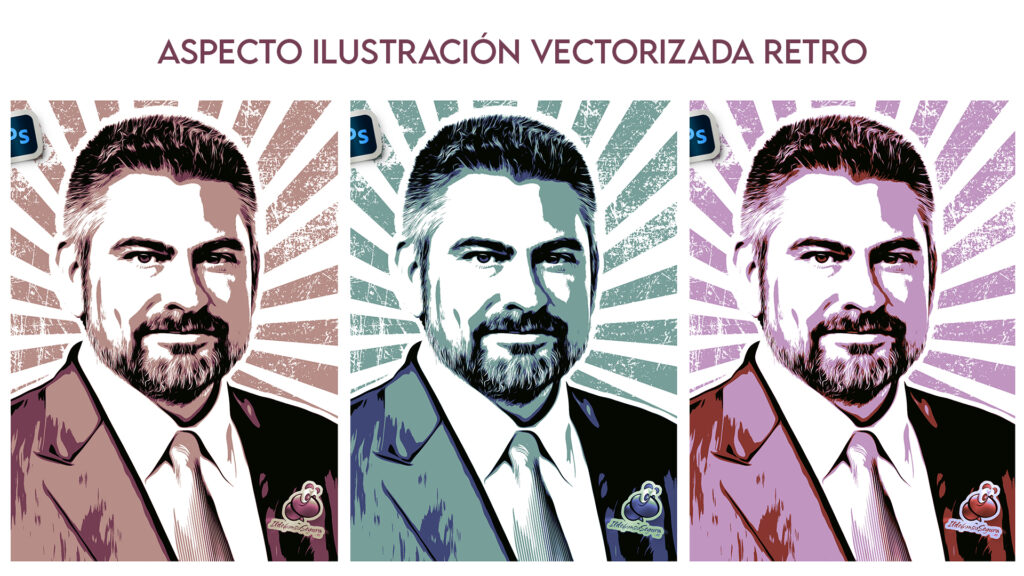
									<p align="justify">En este tutorial de Photoshop te mostraré como conseguir un estilo de ilustración vectorizada con tu retrato. Podrás editar posteriormente los colores creando tus composiciones ajustadas a los tonos que mejor se adapten al entorno donde se verá la ilustración.</p>								</div>
				</div>
					</div>
		</div>
					</div>
		</section>
				<section class="elementor-section elementor-top-section elementor-element elementor-element-acfc913 elementor-section-boxed elementor-section-height-default elementor-section-height-default" data-id="acfc913" data-element_type="section" data-e-type="section">
						<div class="elementor-container elementor-column-gap-default">
					<div class="elementor-column elementor-col-100 elementor-top-column elementor-element elementor-element-03b0344" data-id="03b0344" data-element_type="column" data-e-type="column">
			<div class="elementor-widget-wrap elementor-element-populated">
						<div class="elementor-element elementor-element-af4e04c elementor-widget elementor-widget-text-editor" data-id="af4e04c" data-element_type="widget" data-e-type="widget" data-widget_type="text-editor.default">
				<div class="elementor-widget-container">
									<p align="justify">Te dejo mi referencia en Instagram para que chequees este post y otros que te pueden interesar <a href="http://instagram.com/ildefonsosegura" target="_blank" rel="noopener"><span style="color: #800000;"><strong>INSTAGRAM DE @IldefonsoSegura</strong></span></a></p>								</div>
				</div>
					</div>
		</div>
					</div>
		</section>
				<section class="elementor-section elementor-top-section elementor-element elementor-element-8b3b319 elementor-section-boxed elementor-section-height-default elementor-section-height-default" data-id="8b3b319" data-element_type="section" data-e-type="section">
						<div class="elementor-container elementor-column-gap-default">
					<div class="elementor-column elementor-col-100 elementor-top-column elementor-element elementor-element-903e236" data-id="903e236" data-element_type="column" data-e-type="column">
			<div class="elementor-widget-wrap elementor-element-populated">
						<div class="elementor-element elementor-element-52d8d69 elementor-widget elementor-widget-text-editor" data-id="52d8d69" data-element_type="widget" data-e-type="widget" data-widget_type="text-editor.default">
				<div class="elementor-widget-container">
									<p align="justify">El resultado del póster o wallpaper es alucinante :</p>								</div>
				</div>
					</div>
		</div>
					</div>
		</section>
				<section class="elementor-section elementor-top-section elementor-element elementor-element-1f0d10c elementor-section-boxed elementor-section-height-default elementor-section-height-default" data-id="1f0d10c" data-element_type="section" data-e-type="section">
						<div class="elementor-container elementor-column-gap-default">
					<div class="elementor-column elementor-col-100 elementor-top-column elementor-element elementor-element-6007654" data-id="6007654" data-element_type="column" data-e-type="column">
			<div class="elementor-widget-wrap elementor-element-populated">
						<div class="elementor-element elementor-element-1b72fee elementor-widget elementor-widget-image" data-id="1b72fee" data-element_type="widget" data-e-type="widget" data-widget_type="image.default">
				<div class="elementor-widget-container">
															<img fetchpriority="high" decoding="async" width="768" height="960" src="https://ildefonsosegura.es/wp-content/uploads/Ilde-retrato-oleo-colores-8-10-768x960.jpg" class="attachment-medium_large size-medium_large wp-image-116001" alt="" srcset="https://ildefonsosegura.es/wp-content/uploads/Ilde-retrato-oleo-colores-8-10-768x960.jpg 768w, https://ildefonsosegura.es/wp-content/uploads/Ilde-retrato-oleo-colores-8-10-240x300.jpg 240w, https://ildefonsosegura.es/wp-content/uploads/Ilde-retrato-oleo-colores-8-10-819x1024.jpg 819w, https://ildefonsosegura.es/wp-content/uploads/Ilde-retrato-oleo-colores-8-10-1228x1536.jpg 1228w, https://ildefonsosegura.es/wp-content/uploads/Ilde-retrato-oleo-colores-8-10-1638x2048.jpg 1638w, https://ildefonsosegura.es/wp-content/uploads/Ilde-retrato-oleo-colores-8-10.jpg 1861w" sizes="(max-width: 768px) 100vw, 768px" />															</div>
				</div>
					</div>
		</div>
					</div>
		</section>
				<section class="elementor-section elementor-top-section elementor-element elementor-element-4ecb01f elementor-section-boxed elementor-section-height-default elementor-section-height-default" data-id="4ecb01f" data-element_type="section" data-e-type="section">
						<div class="elementor-container elementor-column-gap-default">
					<div class="elementor-column elementor-col-100 elementor-top-column elementor-element elementor-element-00dfe98" data-id="00dfe98" data-element_type="column" data-e-type="column">
			<div class="elementor-widget-wrap elementor-element-populated">
						<div class="elementor-element elementor-element-a2d52fd elementor-widget elementor-widget-text-editor" data-id="a2d52fd" data-element_type="widget" data-e-type="widget" data-widget_type="text-editor.default">
				<div class="elementor-widget-container">
									<p align="justify">Como te anticipé antes, puedes cambiar las tonalidades simplemente a través de la edición de una capa de ajuste de tono o de color:</p>								</div>
				</div>
					</div>
		</div>
					</div>
		</section>
				<section class="elementor-section elementor-top-section elementor-element elementor-element-2ca6aa6 elementor-section-boxed elementor-section-height-default elementor-section-height-default" data-id="2ca6aa6" data-element_type="section" data-e-type="section">
						<div class="elementor-container elementor-column-gap-default">
					<div class="elementor-column elementor-col-100 elementor-top-column elementor-element elementor-element-e61067e" data-id="e61067e" data-element_type="column" data-e-type="column">
			<div class="elementor-widget-wrap elementor-element-populated">
						<div class="elementor-element elementor-element-456da51 elementor-widget elementor-widget-image" data-id="456da51" data-element_type="widget" data-e-type="widget" data-widget_type="image.default">
				<div class="elementor-widget-container">
															<img decoding="async" width="1024" height="576" src="https://ildefonsosegura.es/wp-content/uploads/3-ilustraciones-1024x576.jpg" class="attachment-large size-large wp-image-116002" alt="" srcset="https://ildefonsosegura.es/wp-content/uploads/3-ilustraciones-1024x576.jpg 1024w, https://ildefonsosegura.es/wp-content/uploads/3-ilustraciones-300x169.jpg 300w, https://ildefonsosegura.es/wp-content/uploads/3-ilustraciones-768x432.jpg 768w, https://ildefonsosegura.es/wp-content/uploads/3-ilustraciones-1536x864.jpg 1536w, https://ildefonsosegura.es/wp-content/uploads/3-ilustraciones.jpg 1920w" sizes="(max-width: 1024px) 100vw, 1024px" />															</div>
				</div>
					</div>
		</div>
					</div>
		</section>
				<section class="elementor-section elementor-top-section elementor-element elementor-element-4aa58d5 elementor-section-boxed elementor-section-height-default elementor-section-height-default" data-id="4aa58d5" data-element_type="section" data-e-type="section">
						<div class="elementor-container elementor-column-gap-default">
					<div class="elementor-column elementor-col-100 elementor-top-column elementor-element elementor-element-dc1088e" data-id="dc1088e" data-element_type="column" data-e-type="column">
			<div class="elementor-widget-wrap elementor-element-populated">
						<div class="elementor-element elementor-element-97c6f20 elementor-widget elementor-widget-text-editor" data-id="97c6f20" data-element_type="widget" data-e-type="widget" data-widget_type="text-editor.default">
				<div class="elementor-widget-container">
									<p align="justify">Durante el tutorial aplicaremos un filtro muy potente que no usamos muchas veces. Se trata del filtro de «pintura al óleo». Su aplicación repetitiva y tratada de forma localizada, produce resultados increíbles.</p>								</div>
				</div>
					</div>
		</div>
					</div>
		</section>
				<section class="elementor-section elementor-top-section elementor-element elementor-element-fa2ff6d elementor-section-boxed elementor-section-height-default elementor-section-height-default" data-id="fa2ff6d" data-element_type="section" data-e-type="section">
						<div class="elementor-container elementor-column-gap-default">
					<div class="elementor-column elementor-col-100 elementor-top-column elementor-element elementor-element-73ea8e0" data-id="73ea8e0" data-element_type="column" data-e-type="column">
			<div class="elementor-widget-wrap elementor-element-populated">
						<div class="elementor-element elementor-element-9524e23 elementor-widget elementor-widget-text-editor" data-id="9524e23" data-element_type="widget" data-e-type="widget" data-widget_type="text-editor.default">
				<div class="elementor-widget-container">
									<p align="justify">Te aconsejo suscribirte al canal de <span style="color: #800000;"><strong>TEXTURELABS</strong></span>. Mi ilustración está realizada con la inspiración del tutorial en inglés cuyo link te dejo a continuación <a title="Tutorial en inglés TextuerLabs" href="https://youtu.be/CGdGqcAQdMU" target="_blank" rel="noopener"><span style="color: #0000ff;"><strong>HACIENDO CLIC AQUI</strong></span>. </a></p>								</div>
				</div>
					</div>
		</div>
					</div>
		</section>
				<section class="elementor-section elementor-top-section elementor-element elementor-element-65f8937 elementor-section-boxed elementor-section-height-default elementor-section-height-default" data-id="65f8937" data-element_type="section" data-e-type="section">
						<div class="elementor-container elementor-column-gap-default">
					<div class="elementor-column elementor-col-100 elementor-top-column elementor-element elementor-element-06442b8" data-id="06442b8" data-element_type="column" data-e-type="column">
			<div class="elementor-widget-wrap elementor-element-populated">
						<div class="elementor-element elementor-element-8f5fb7d elementor-widget elementor-widget-text-editor" data-id="8f5fb7d" data-element_type="widget" data-e-type="widget" data-widget_type="text-editor.default">
				<div class="elementor-widget-container">
									<p>Espero que el tutorial de Photoshop sea funcional para ti y puedas aprender algo que a la vez puedas aplicar en otras composiciones.</p><p align="justify">Después de todo esta introducción, aquí puedes ver el tutorial y no dejes de compartir el post y darle «like» / «dedo arriba» al vídeo.</p><p align="justify"> </p><p align="justify"> </p><h6 class="single-post-title entry-title">«Tutorial Photoshop // Tu retrato con aspecto vectorizado retro»</h6><p align="justify"> </p>								</div>
				</div>
					</div>
		</div>
					</div>
		</section>
				<section class="elementor-section elementor-top-section elementor-element elementor-element-4d24a2e elementor-section-boxed elementor-section-height-default elementor-section-height-default" data-id="4d24a2e" data-element_type="section" data-e-type="section">
						<div class="elementor-container elementor-column-gap-default">
					<div class="elementor-column elementor-col-100 elementor-top-column elementor-element elementor-element-1cd2633" data-id="1cd2633" data-element_type="column" data-e-type="column">
			<div class="elementor-widget-wrap elementor-element-populated">
						<div class="elementor-element elementor-element-f6de5d4 elementor-widget elementor-widget-video" data-id="f6de5d4" data-element_type="widget" data-e-type="widget" data-settings="{&quot;youtube_url&quot;:&quot;https:\/\/youtu.be\/h1oBNmQEn7g&quot;,&quot;video_type&quot;:&quot;youtube&quot;,&quot;controls&quot;:&quot;yes&quot;}" data-widget_type="video.default">
				<div class="elementor-widget-container">
							<div class="elementor-wrapper elementor-open-inline">
			<div class="elementor-video"></div>		</div>
						</div>
				</div>
					</div>
		</div>
					</div>
		</section>
				<section class="elementor-section elementor-top-section elementor-element elementor-element-b82598e elementor-section-boxed elementor-section-height-default elementor-section-height-default" data-id="b82598e" data-element_type="section" data-e-type="section">
						<div class="elementor-container elementor-column-gap-default">
					<div class="elementor-column elementor-col-100 elementor-top-column elementor-element elementor-element-56153d8" data-id="56153d8" data-element_type="column" data-e-type="column">
			<div class="elementor-widget-wrap elementor-element-populated">
						<div class="elementor-element elementor-element-5927092 elementor-widget elementor-widget-text-editor" data-id="5927092" data-element_type="widget" data-e-type="widget" data-widget_type="text-editor.default">
				<div class="elementor-widget-container">
									<p>Recuerda también que posteo trabajos e información en  <a href="https://www.facebook.com/IldefonsoSeguraPage" target="_blank" rel="noopener"><strong><span style="color: #800000;">Facebook</span> </strong></a></p><p>Igualmente, si quieres ver mis tutoriales de <strong><span style="color: #800000;">wallpapers</span></strong>, puedes verlos haciendo <span style="color: #800000;"><a style="color: #800000;" href="https://ildefonsosegura.es/category/wallpaper/"><strong>CLIC</strong></a></span> pero no olvides comentar este post antes de irte. Gracias</p>								</div>
				</div>
					</div>
		</div>
					</div>
		</section>
				<section class="elementor-section elementor-top-section elementor-element elementor-element-742276ff elementor-section-full_width elementor-section-height-default elementor-section-height-default" data-id="742276ff" data-element_type="section" data-e-type="section">
						<div class="elementor-container elementor-column-gap-default">
					<div class="elementor-column elementor-col-100 elementor-top-column elementor-element elementor-element-261106a3" data-id="261106a3" data-element_type="column" data-e-type="column">
			<div class="elementor-widget-wrap elementor-element-populated">
						<div class="elementor-element elementor-element-37781cfc elementor-widget elementor-widget-text-editor" data-id="37781cfc" data-element_type="widget" data-e-type="widget" data-widget_type="text-editor.default">
				<div class="elementor-widget-container">
									<div><div align="center"><center><strong style="color: #ff0000;">Suscríbete a mi canal de Youtube:</strong></center><div><div><div align="center"><p><script src="https://apis.google.com/js/platform.js"></script></p><div class="g-ytsubscribe" data-channel="ildefonsosegura" data-layout="full" data-count="default"> </div></div></div><p> </p><p style="text-align: center;">No te lo pierdas y comparte tus trabajos en mi página de facebook (<span style="color: #0000ff;"><strong><a style="color: #0000ff;" href="http://www.facebook.com/IldefonsoSeguraPage" target="_blank" rel="noopener noreferrer">IldefonsoSeguraPage</a></strong></span>)<br />Espero que te guste y compartas el vídeo. No dejes de compartir este post.</p><p style="text-align: center;">Así es como me puedes ayudar 🙂 Gracias</p></div></div></div>								</div>
				</div>
					</div>
		</div>
					</div>
		</section>
				</div>La entrada <a href="https://ildefonsosegura.es/tutorial-photoshop-tu-retrato-con-aspecto-vectorizado-retro/">Tutorial Photoshop // Tu retrato con aspecto vectorizado retro</a> apareció primero en <a href="https://ildefonsosegura.es">Ildefonso Segura</a>.]]></content:encoded>
					
					<wfw:commentRss>https://ildefonsosegura.es/tutorial-photoshop-tu-retrato-con-aspecto-vectorizado-retro/feed/</wfw:commentRss>
			<slash:comments>0</slash:comments>
		
		
			</item>
		<item>
		<title>Como hacer un texto estilo roca realista con Photoshop</title>
		<link>https://ildefonsosegura.es/como-hacer-un-texto-estilo-roca-realista-con-photoshop/</link>
					<comments>https://ildefonsosegura.es/como-hacer-un-texto-estilo-roca-realista-con-photoshop/#comments</comments>
		
		<dc:creator><![CDATA[Ildefonso Segura]]></dc:creator>
		<pubDate>Mon, 06 Sep 2021 15:01:55 +0000</pubDate>
				<category><![CDATA[Editable]]></category>
		<category><![CDATA[Efectos]]></category>
		<category><![CDATA[Photoshop]]></category>
		<category><![CDATA[Textos]]></category>
		<category><![CDATA[Textura]]></category>
		<category><![CDATA[Tutoriales]]></category>
		<category><![CDATA[Video]]></category>
		<category><![CDATA[Wallpaper]]></category>
		<category><![CDATA[adobe]]></category>
		<category><![CDATA[cc2021]]></category>
		<category><![CDATA[creatividad]]></category>
		<category><![CDATA[diseño]]></category>
		<category><![CDATA[efecto]]></category>
		<category><![CDATA[estilo]]></category>
		<category><![CDATA[ildefonsosegura]]></category>
		<category><![CDATA[photoshop]]></category>
		<category><![CDATA[ps]]></category>
		<category><![CDATA[stone]]></category>
		<category><![CDATA[tecnicas]]></category>
		<category><![CDATA[texto]]></category>
		<category><![CDATA[texto realista]]></category>
		<category><![CDATA[textura]]></category>
		<category><![CDATA[textura texto]]></category>
		<category><![CDATA[tuto]]></category>
		<category><![CDATA[tutorial]]></category>
		<category><![CDATA[VIDEOTUTORIAL]]></category>
		<category><![CDATA[wallpaper]]></category>
		<category><![CDATA[youtube]]></category>
		<guid isPermaLink="false">https://ildefonsosegura.es/?p=113777</guid>

					<description><![CDATA[<p>En este tutorial de Photoshop veremos como conseguir una textura de roca realista en un texto. El tutorial está inspirado en un tutorial en inglés que puedes encontrar en el canal TEXTURELABS.ORG de YouTube. En mi caso, he usado texturas diferentes y al final le he dado una aplicación interesante sumergiendo el texto y animándolo [&#8230;]</p>
La entrada <a href="https://ildefonsosegura.es/como-hacer-un-texto-estilo-roca-realista-con-photoshop/">Como hacer un texto estilo roca realista con Photoshop</a> apareció primero en <a href="https://ildefonsosegura.es">Ildefonso Segura</a>.]]></description>
										<content:encoded><![CDATA[<div data-elementor-type="wp-post" data-elementor-id="113777" class="elementor elementor-113777">
						<section class="elementor-section elementor-top-section elementor-element elementor-element-b7471a2 elementor-section-boxed elementor-section-height-default elementor-section-height-default" data-id="b7471a2" data-element_type="section" data-e-type="section">
						<div class="elementor-container elementor-column-gap-default">
					<div class="elementor-column elementor-col-100 elementor-top-column elementor-element elementor-element-5e938f2" data-id="5e938f2" data-element_type="column" data-e-type="column">
			<div class="elementor-widget-wrap elementor-element-populated">
						<div class="elementor-element elementor-element-7cf2e12 elementor-widget elementor-widget-text-editor" data-id="7cf2e12" data-element_type="widget" data-e-type="widget" data-widget_type="text-editor.default">
				<div class="elementor-widget-container">
									<p align="justify">En este tutorial de Photoshop veremos como conseguir una textura de roca realista en un texto.</p>
<p align="justify">El tutorial está inspirado en un <a href="https://texturelabs.org/tutorials/3d-stone-concrete-text-effect/" target="_blank" rel="noopener"><strong><span style="color: #800000;">tutorial en inglés</span></strong></a> que puedes encontrar en el canal <strong><a href="https://www.youtube.com/channel/UCBxd0ZwoptXc676LSaxCP5Q" target="_blank" rel="noopener">TEXTURELABS.ORG</a></strong> de YouTube.

</p><p align="justify">En mi caso, he usado texturas diferentes y al final le he dado una aplicación interesante sumergiendo el texto y animándolo una escena en el fondo del mar.  Te dejo la animación por aquí:

</p>								</div>
				</div>
					</div>
		</div>
					</div>
		</section>
				<section class="elementor-section elementor-top-section elementor-element elementor-element-52bc9d1 elementor-section-boxed elementor-section-height-default elementor-section-height-default" data-id="52bc9d1" data-element_type="section" data-e-type="section">
						<div class="elementor-container elementor-column-gap-default">
					<div class="elementor-column elementor-col-100 elementor-top-column elementor-element elementor-element-5023aa6" data-id="5023aa6" data-element_type="column" data-e-type="column">
			<div class="elementor-widget-wrap elementor-element-populated">
						<div class="elementor-element elementor-element-b3b61d6 elementor-widget elementor-widget-video" data-id="b3b61d6" data-element_type="widget" data-e-type="widget" data-settings="{&quot;youtube_url&quot;:&quot;https:\/\/youtu.be\/Oc1UXuJkm5U&quot;,&quot;video_type&quot;:&quot;youtube&quot;,&quot;controls&quot;:&quot;yes&quot;}" data-widget_type="video.default">
				<div class="elementor-widget-container">
							<div class="elementor-wrapper elementor-open-inline">
			<div class="elementor-video"></div>		</div>
						</div>
				</div>
					</div>
		</div>
					</div>
		</section>
				<section class="elementor-section elementor-top-section elementor-element elementor-element-8eec0a1 elementor-section-boxed elementor-section-height-default elementor-section-height-default" data-id="8eec0a1" data-element_type="section" data-e-type="section">
						<div class="elementor-container elementor-column-gap-default">
					<div class="elementor-column elementor-col-100 elementor-top-column elementor-element elementor-element-761f29f" data-id="761f29f" data-element_type="column" data-e-type="column">
			<div class="elementor-widget-wrap elementor-element-populated">
						<div class="elementor-element elementor-element-11a3fbd elementor-widget elementor-widget-text-editor" data-id="11a3fbd" data-element_type="widget" data-e-type="widget" data-widget_type="text-editor.default">
				<div class="elementor-widget-container">
									<p align="justify"> También puedes ver el antes y el después de la edición del texto en este comparador de imágenes.</p>
								</div>
				</div>
					</div>
		</div>
					</div>
		</section>
				<section class="elementor-section elementor-top-section elementor-element elementor-element-acfc913 elementor-section-boxed elementor-section-height-default elementor-section-height-default" data-id="acfc913" data-element_type="section" data-e-type="section">
						<div class="elementor-container elementor-column-gap-default">
					<div class="elementor-column elementor-col-100 elementor-top-column elementor-element elementor-element-03b0344" data-id="03b0344" data-element_type="column" data-e-type="column">
			<div class="elementor-widget-wrap elementor-element-populated">
						<div class="elementor-element elementor-element-e35cdaf elementor-widget-divider--view-line_icon elementor-view-default elementor-widget-divider--element-align-center elementor-widget elementor-widget-divider" data-id="e35cdaf" data-element_type="widget" data-e-type="widget" data-widget_type="divider.default">
				<div class="elementor-widget-container">
							<div class="elementor-divider">
			<span class="elementor-divider-separator">
							<div class="elementor-icon elementor-divider__element">
					<i aria-hidden="true" class="fas fa-star"></i></div>
						</span>
		</div>
						</div>
				</div>
					</div>
		</div>
					</div>
		</section>
				<section class="elementor-section elementor-top-section elementor-element elementor-element-2c7c284 elementor-section-boxed elementor-section-height-default elementor-section-height-default" data-id="2c7c284" data-element_type="section" data-e-type="section">
						<div class="elementor-container elementor-column-gap-default">
					<div class="elementor-column elementor-col-100 elementor-top-column elementor-element elementor-element-4960e8a" data-id="4960e8a" data-element_type="column" data-e-type="column">
			<div class="elementor-widget-wrap elementor-element-populated">
						<div class="elementor-element elementor-element-f9f5533 elementor-widget-divider--view-line_icon elementor-view-default elementor-widget-divider--element-align-center elementor-widget elementor-widget-divider" data-id="f9f5533" data-element_type="widget" data-e-type="widget" data-widget_type="divider.default">
				<div class="elementor-widget-container">
							<div class="elementor-divider">
			<span class="elementor-divider-separator">
							<div class="elementor-icon elementor-divider__element">
					<i aria-hidden="true" class="fas fa-star"></i></div>
						</span>
		</div>
						</div>
				</div>
					</div>
		</div>
					</div>
		</section>
				<section class="elementor-section elementor-top-section elementor-element elementor-element-2ca6aa6 elementor-section-boxed elementor-section-height-default elementor-section-height-default" data-id="2ca6aa6" data-element_type="section" data-e-type="section">
						<div class="elementor-container elementor-column-gap-default">
					<div class="elementor-column elementor-col-100 elementor-top-column elementor-element elementor-element-e61067e" data-id="e61067e" data-element_type="column" data-e-type="column">
			<div class="elementor-widget-wrap elementor-element-populated">
						<div class="elementor-element elementor-element-ce763dd elementor-widget-divider--view-line_icon elementor-view-default elementor-widget-divider--element-align-center elementor-widget elementor-widget-divider" data-id="ce763dd" data-element_type="widget" data-e-type="widget" data-widget_type="divider.default">
				<div class="elementor-widget-container">
							<div class="elementor-divider">
			<span class="elementor-divider-separator">
							<div class="elementor-icon elementor-divider__element">
					<i aria-hidden="true" class="fas fa-star"></i></div>
						</span>
		</div>
						</div>
				</div>
					</div>
		</div>
					</div>
		</section>
				<section class="elementor-section elementor-top-section elementor-element elementor-element-4ecb01f elementor-section-boxed elementor-section-height-default elementor-section-height-default" data-id="4ecb01f" data-element_type="section" data-e-type="section">
						<div class="elementor-container elementor-column-gap-default">
					<div class="elementor-column elementor-col-100 elementor-top-column elementor-element elementor-element-00dfe98" data-id="00dfe98" data-element_type="column" data-e-type="column">
			<div class="elementor-widget-wrap elementor-element-populated">
						<div class="elementor-element elementor-element-af4e04c elementor-widget elementor-widget-text-editor" data-id="af4e04c" data-element_type="widget" data-e-type="widget" data-widget_type="text-editor.default">
				<div class="elementor-widget-container">
									<p align="justify">Te dejo mi referencia en Instagram para que chequees este post y otros que te pueden interesar <a href="http://instagram.com/ildefonsosegura" target="_blank" rel="noopener"><span style="color: #800000;"><strong>INSTAGRAM DE @IldefonsoSegura</strong></span></a></p>								</div>
				</div>
				<div class="elementor-element elementor-element-a2d52fd elementor-widget elementor-widget-text-editor" data-id="a2d52fd" data-element_type="widget" data-e-type="widget" data-widget_type="text-editor.default">
				<div class="elementor-widget-container">
									<p align="justify">Lo impactante de este tutorial, o por lo menos a mí me lo parece, es el efecto de rotura que conseguirnos en la parte más frontal  del texto tan sólo aplicando un filtro de «cristalizar» y después un estilo de capa con relleno del 0%.</p><p align="justify">Luego daremos más profundidad al texto y para ello mostraremos como se hace una ACCIÓN en Photoshop para automatizar tareas que hacen más eficientes el trabajo de manipulación y composición.</p><p align="justify">Posteriormente superpondremos texturas a la extrusión creada y aplicaremos sombras e iluminaciones que conseguirán este realismo de parecido a roca en texto.</p>								</div>
				</div>
					</div>
		</div>
					</div>
		</section>
				<section class="elementor-section elementor-top-section elementor-element elementor-element-65f8937 elementor-section-boxed elementor-section-height-default elementor-section-height-default" data-id="65f8937" data-element_type="section" data-e-type="section">
						<div class="elementor-container elementor-column-gap-default">
					<div class="elementor-column elementor-col-100 elementor-top-column elementor-element elementor-element-06442b8" data-id="06442b8" data-element_type="column" data-e-type="column">
			<div class="elementor-widget-wrap elementor-element-populated">
						<div class="elementor-element elementor-element-8f5fb7d elementor-widget elementor-widget-text-editor" data-id="8f5fb7d" data-element_type="widget" data-e-type="widget" data-widget_type="text-editor.default">
				<div class="elementor-widget-container">
									<p align="justify">Espero que el tutorial texto estilo roca realista con Photoshop sea funcional para ti y puedas aprender algo que a la vez puedas aplicar en otras composiciones.</p>
<p align="justify">Muchas gracias al canal TextureLabs.org por su aporte en inglés sobre estas técnicas y por tanto no dejéis de visitarlo y suscribiros si os gusta. Gracias <a href="https://texturelabs.org/about/" target="_blank" rel="noopener">Brady</a></p>
<p align="justify">Después de todo esta introducción, aquí puedes ver el tutorial y no dejes de compartir el post y darle «like» / «dedo arriba» al vídeo.</p>

<h3 align="justify"><strong><span style="color: #800000;">TABLA DE CONTENIDOS:</span></strong></h3>
<ul>
 	<li>0:00 Presentación del tutorial</li>
 	<li>0:25 Animación del resultado</li>
 	<li>0:45 Referencia al tutorial en inglés</li>
 	<li>0:56 Textura al texto principal</li>
 	<li>3:26 Roturas en superficie</li>
 	<li>6:30 Extrusión del texto</li>
 	<li>8:21 Textura en extrusión</li>
 	<li>9:37 Técnicas para incluir contraste</li>
 	<li>12:12 Inclusión de Background</li>
 	<li>12:41 Luces y Sombras</li>
 	<li>15:45 Añadimos detalles adicionales</li>
 	<li>16:57 Despedida</li>
</ul>
<h6 class="single-post-title entry-title">«Cómo hacer texto estilo roca realista con Photoshop»</h6>
<p align="justify"></p>								</div>
				</div>
					</div>
		</div>
					</div>
		</section>
				<section class="elementor-section elementor-top-section elementor-element elementor-element-4d24a2e elementor-section-boxed elementor-section-height-default elementor-section-height-default" data-id="4d24a2e" data-element_type="section" data-e-type="section">
						<div class="elementor-container elementor-column-gap-default">
					<div class="elementor-column elementor-col-100 elementor-top-column elementor-element elementor-element-1cd2633" data-id="1cd2633" data-element_type="column" data-e-type="column">
			<div class="elementor-widget-wrap elementor-element-populated">
						<div class="elementor-element elementor-element-f6de5d4 elementor-widget elementor-widget-video" data-id="f6de5d4" data-element_type="widget" data-e-type="widget" data-settings="{&quot;youtube_url&quot;:&quot;https:\/\/youtu.be\/e78oY5EnaGs&quot;,&quot;video_type&quot;:&quot;youtube&quot;,&quot;controls&quot;:&quot;yes&quot;}" data-widget_type="video.default">
				<div class="elementor-widget-container">
							<div class="elementor-wrapper elementor-open-inline">
			<div class="elementor-video"></div>		</div>
						</div>
				</div>
					</div>
		</div>
					</div>
		</section>
				<section class="elementor-section elementor-top-section elementor-element elementor-element-d99fc3a elementor-section-boxed elementor-section-height-default elementor-section-height-default" data-id="d99fc3a" data-element_type="section" data-e-type="section">
						<div class="elementor-container elementor-column-gap-default">
					<div class="elementor-column elementor-col-50 elementor-top-column elementor-element elementor-element-806be6a" data-id="806be6a" data-element_type="column" data-e-type="column">
			<div class="elementor-widget-wrap">
							</div>
		</div>
				<div class="elementor-column elementor-col-50 elementor-top-column elementor-element elementor-element-de98a7c" data-id="de98a7c" data-element_type="column" data-e-type="column">
			<div class="elementor-widget-wrap">
							</div>
		</div>
					</div>
		</section>
				<section class="elementor-section elementor-top-section elementor-element elementor-element-fb28f3b elementor-section-boxed elementor-section-height-default elementor-section-height-default" data-id="fb28f3b" data-element_type="section" data-e-type="section">
						<div class="elementor-container elementor-column-gap-default">
					<div class="elementor-column elementor-col-50 elementor-top-column elementor-element elementor-element-324f879" data-id="324f879" data-element_type="column" data-e-type="column">
			<div class="elementor-widget-wrap elementor-element-populated">
						<div class="elementor-element elementor-element-ea3b0ee elementor-widget elementor-widget-image" data-id="ea3b0ee" data-element_type="widget" data-e-type="widget" data-widget_type="image.default">
				<div class="elementor-widget-container">
															<img loading="lazy" decoding="async" width="300" height="205" src="https://ildefonsosegura.es/wp-content/uploads/regalos-300x205.png" class="attachment-medium size-medium wp-image-4460" alt="" srcset="https://ildefonsosegura.es/wp-content/uploads/regalos-300x205.png 300w, https://ildefonsosegura.es/wp-content/uploads/regalos-e1535194274619.png 350w" sizes="(max-width: 300px) 100vw, 300px" />															</div>
				</div>
					</div>
		</div>
				<div class="elementor-column elementor-col-50 elementor-top-column elementor-element elementor-element-8132854" data-id="8132854" data-element_type="column" data-e-type="column">
			<div class="elementor-widget-wrap elementor-element-populated">
						<div class="elementor-element elementor-element-31fe259 elementor-widget elementor-widget-text-editor" data-id="31fe259" data-element_type="widget" data-e-type="widget" data-widget_type="text-editor.default">
				<div class="elementor-widget-container">
									<p align="justify">Si quieres ir a tu ritmo, puedes ir chequeando el vídeo en cámara lenta y comprobando en el editable que te regalo, los pasos seguidos</p>								</div>
				</div>
				<div class="elementor-element elementor-element-b52ca5d elementor-align-center elementor-widget elementor-widget-button" data-id="b52ca5d" data-element_type="widget" data-e-type="widget" data-widget_type="button.default">
				<div class="elementor-widget-container">
									<div class="elementor-button-wrapper">
					<a class="elementor-button elementor-button-link elementor-size-sm" href="https://ildefonsosegura.es/regalos/">
						<span class="elementor-button-content-wrapper">
						<span class="elementor-button-icon">
				<i aria-hidden="true" class="fas fa-atlas"></i>			</span>
									<span class="elementor-button-text">ARCHIVO PSD TEXTO ROCA</span>
					</span>
					</a>
				</div>
								</div>
				</div>
					</div>
		</div>
					</div>
		</section>
				<section class="elementor-section elementor-top-section elementor-element elementor-element-b82598e elementor-section-boxed elementor-section-height-default elementor-section-height-default" data-id="b82598e" data-element_type="section" data-e-type="section">
						<div class="elementor-container elementor-column-gap-default">
					<div class="elementor-column elementor-col-100 elementor-top-column elementor-element elementor-element-56153d8" data-id="56153d8" data-element_type="column" data-e-type="column">
			<div class="elementor-widget-wrap elementor-element-populated">
						<div class="elementor-element elementor-element-5927092 elementor-widget elementor-widget-text-editor" data-id="5927092" data-element_type="widget" data-e-type="widget" data-widget_type="text-editor.default">
				<div class="elementor-widget-container">
									<p>Recuerda también que posteo trabajos e información en  <a href="https://www.facebook.com/IldefonsoSeguraPage" target="_blank" rel="noopener"><strong><span style="color: #800000;">Facebook</span> </strong></a></p><p>Igualmente, si quieres ver mis tutoriales de <strong><span style="color: #800000;">wallpapers</span></strong>, puedes verlos haciendo <span style="color: #800000;"><a style="color: #800000;" href="https://ildefonsosegura.es/category/wallpaper/"><strong>CLIC</strong></a></span> pero no olvides comentar este post antes de irte. Gracias</p>								</div>
				</div>
					</div>
		</div>
					</div>
		</section>
				<section class="elementor-section elementor-top-section elementor-element elementor-element-742276ff elementor-section-full_width elementor-section-height-default elementor-section-height-default" data-id="742276ff" data-element_type="section" data-e-type="section">
						<div class="elementor-container elementor-column-gap-default">
					<div class="elementor-column elementor-col-100 elementor-top-column elementor-element elementor-element-261106a3" data-id="261106a3" data-element_type="column" data-e-type="column">
			<div class="elementor-widget-wrap elementor-element-populated">
						<div class="elementor-element elementor-element-37781cfc elementor-widget elementor-widget-text-editor" data-id="37781cfc" data-element_type="widget" data-e-type="widget" data-widget_type="text-editor.default">
				<div class="elementor-widget-container">
									<div><div align="center"><center><strong style="color: #ff0000;">Suscríbete a mi canal de Youtube:</strong></center><div><div><div align="center"><p><script src="https://apis.google.com/js/platform.js"></script></p><div class="g-ytsubscribe" data-channel="ildefonsosegura" data-layout="full" data-count="default"> </div></div></div><p> </p><p style="text-align: center;">No te lo pierdas y comparte tus trabajos en mi página de facebook (<span style="color: #0000ff;"><strong><a style="color: #0000ff;" href="http://www.facebook.com/IldefonsoSeguraPage" target="_blank" rel="noopener noreferrer">IldefonsoSeguraPage</a></strong></span>)<br />Espero que te guste y compartas el vídeo. No dejes de compartir este post.</p><p style="text-align: center;">Así es como me puedes ayudar 🙂 Gracias</p></div></div></div>								</div>
				</div>
					</div>
		</div>
					</div>
		</section>
				</div>La entrada <a href="https://ildefonsosegura.es/como-hacer-un-texto-estilo-roca-realista-con-photoshop/">Como hacer un texto estilo roca realista con Photoshop</a> apareció primero en <a href="https://ildefonsosegura.es">Ildefonso Segura</a>.]]></content:encoded>
					
					<wfw:commentRss>https://ildefonsosegura.es/como-hacer-un-texto-estilo-roca-realista-con-photoshop/feed/</wfw:commentRss>
			<slash:comments>2</slash:comments>
		
		
			</item>
		<item>
		<title>Dale un estilo de pegatina (sticker) a tus fotos e ilustraciones con Photoshop</title>
		<link>https://ildefonsosegura.es/dale-un-estilo-de-pegatina-sticker-a-tus-fotos-e-ilustraciones-con-photoshop/</link>
					<comments>https://ildefonsosegura.es/dale-un-estilo-de-pegatina-sticker-a-tus-fotos-e-ilustraciones-con-photoshop/#respond</comments>
		
		<dc:creator><![CDATA[Ildefonso Segura]]></dc:creator>
		<pubDate>Mon, 23 Aug 2021 21:10:12 +0000</pubDate>
				<category><![CDATA[Efectos]]></category>
		<category><![CDATA[Estilos]]></category>
		<category><![CDATA[Photoshop]]></category>
		<category><![CDATA[Tecnicas]]></category>
		<category><![CDATA[Textura]]></category>
		<category><![CDATA[Tutoriales]]></category>
		<category><![CDATA[Video]]></category>
		<category><![CDATA[adobe]]></category>
		<category><![CDATA[cc2021]]></category>
		<category><![CDATA[comic]]></category>
		<category><![CDATA[creatividad]]></category>
		<category><![CDATA[cromo]]></category>
		<category><![CDATA[diseño]]></category>
		<category><![CDATA[efecto]]></category>
		<category><![CDATA[estilo]]></category>
		<category><![CDATA[etiqueta]]></category>
		<category><![CDATA[ildefonsosegura]]></category>
		<category><![CDATA[ilustracion]]></category>
		<category><![CDATA[oleo]]></category>
		<category><![CDATA[pegatina]]></category>
		<category><![CDATA[photoshop]]></category>
		<category><![CDATA[pintura]]></category>
		<category><![CDATA[ps]]></category>
		<category><![CDATA[simulacion]]></category>
		<category><![CDATA[sticker]]></category>
		<category><![CDATA[tecnicas]]></category>
		<category><![CDATA[tuto]]></category>
		<category><![CDATA[tutorial]]></category>
		<category><![CDATA[VIDEOTUTORIAL]]></category>
		<category><![CDATA[youtube]]></category>
		<guid isPermaLink="false">https://ildefonsosegura.es/?p=113670</guid>

					<description><![CDATA[<p>En el tutorial que hoy te traigo verás que podemos conseguir de una forma sencilla, un estilo de pegatina de tus fotos e ilustraciones. En el caso de fotos, te recomiendo que la edites para darle un aspecto mucho más de ilustración (cómic por ejemplo). Yo tengo un tutorial para convertir una foto en cómic [&#8230;]</p>
La entrada <a href="https://ildefonsosegura.es/dale-un-estilo-de-pegatina-sticker-a-tus-fotos-e-ilustraciones-con-photoshop/">Dale un estilo de pegatina (sticker) a tus fotos e ilustraciones con Photoshop</a> apareció primero en <a href="https://ildefonsosegura.es">Ildefonso Segura</a>.]]></description>
										<content:encoded><![CDATA[<div data-elementor-type="wp-post" data-elementor-id="113670" class="elementor elementor-113670">
						<section class="elementor-section elementor-top-section elementor-element elementor-element-b7471a2 elementor-section-boxed elementor-section-height-default elementor-section-height-default" data-id="b7471a2" data-element_type="section" data-e-type="section">
						<div class="elementor-container elementor-column-gap-default">
					<div class="elementor-column elementor-col-100 elementor-top-column elementor-element elementor-element-5e938f2" data-id="5e938f2" data-element_type="column" data-e-type="column">
			<div class="elementor-widget-wrap elementor-element-populated">
						<div class="elementor-element elementor-element-7cf2e12 elementor-widget elementor-widget-text-editor" data-id="7cf2e12" data-element_type="widget" data-e-type="widget" data-widget_type="text-editor.default">
				<div class="elementor-widget-container">
									<p align="justify">En el tutorial que hoy te traigo verás que podemos conseguir de una forma sencilla, un estilo de pegatina de tus fotos e ilustraciones.</p><p align="justify">En el caso de fotos, te recomiendo que la edites para darle un aspecto mucho más de ilustración (cómic por ejemplo). Yo tengo un tutorial para convertir una foto en cómic que te puede ayudar&#8230;<a title="Tutorial Photoshop // Convierte una Foto en Comic al estilo @ildefonsosegura" href="https://ildefonsosegura.es/convierte-una-foto-en-comic-con-photoshop-cs6-al-estilo-ildefonsosegura/" target="_blank" rel="noopener"><span style="color: #800000;"><strong>TUTORIAL CONVERTIR FOTO EN COMIC</strong></span></a><span style="color: #800000;"><strong>.</strong></span></p>								</div>
				</div>
					</div>
		</div>
					</div>
		</section>
				<section class="elementor-section elementor-top-section elementor-element elementor-element-40872f2 elementor-section-boxed elementor-section-height-default elementor-section-height-default" data-id="40872f2" data-element_type="section" data-e-type="section">
						<div class="elementor-container elementor-column-gap-default">
					<div class="elementor-column elementor-col-100 elementor-top-column elementor-element elementor-element-0b48922" data-id="0b48922" data-element_type="column" data-e-type="column">
			<div class="elementor-widget-wrap elementor-element-populated">
						<div class="elementor-element elementor-element-e599d07 elementor-widget elementor-widget-video" data-id="e599d07" data-element_type="widget" data-e-type="widget" data-settings="{&quot;youtube_url&quot;:&quot;https:\/\/youtu.be\/CTIGeGgKrKY&quot;,&quot;video_type&quot;:&quot;youtube&quot;,&quot;controls&quot;:&quot;yes&quot;}" data-widget_type="video.default">
				<div class="elementor-widget-container">
							<div class="elementor-wrapper elementor-open-inline">
			<div class="elementor-video"></div>		</div>
						</div>
				</div>
					</div>
		</div>
					</div>
		</section>
				<section class="elementor-section elementor-top-section elementor-element elementor-element-2ca6aa6 elementor-section-boxed elementor-section-height-default elementor-section-height-default" data-id="2ca6aa6" data-element_type="section" data-e-type="section">
						<div class="elementor-container elementor-column-gap-default">
					<div class="elementor-column elementor-col-100 elementor-top-column elementor-element elementor-element-e61067e" data-id="e61067e" data-element_type="column" data-e-type="column">
			<div class="elementor-widget-wrap elementor-element-populated">
						<div class="elementor-element elementor-element-af4e04c elementor-widget elementor-widget-text-editor" data-id="af4e04c" data-element_type="widget" data-e-type="widget" data-widget_type="text-editor.default">
				<div class="elementor-widget-container">
									<p align="justify">En mi <span style="color: #000000;"><strong>instagram</strong> </span>podrás ver alguna composición realizada con el aspecto de pegatina.</p>
<p align="justify">Te dejo aquí la referencia a mi Instagram para que chequees este post y otros que te pueden interesar <a href="http://instagram.com/ildefonsosegura" target="_blank" rel="noopener"><span style="color: #800000;"><strong>INSTAGRAM DE @IldefonsoSegura</strong></span></a></p>

<p align="justify">En primer lugar te muestro mi foto para que veas cómo puede quedar dándole el aspecto de ilustración y luego aplicando mi tutorial.</p>								</div>
				</div>
					</div>
		</div>
					</div>
		</section>
				<section class="elementor-section elementor-top-section elementor-element elementor-element-acfc913 elementor-section-boxed elementor-section-height-default elementor-section-height-default" data-id="acfc913" data-element_type="section" data-e-type="section">
						<div class="elementor-container elementor-column-gap-default">
					<div class="elementor-column elementor-col-100 elementor-top-column elementor-element elementor-element-03b0344" data-id="03b0344" data-element_type="column" data-e-type="column">
			<div class="elementor-widget-wrap">
							</div>
		</div>
					</div>
		</section>
				<section class="elementor-section elementor-top-section elementor-element elementor-element-4ecb01f elementor-section-boxed elementor-section-height-default elementor-section-height-default" data-id="4ecb01f" data-element_type="section" data-e-type="section">
						<div class="elementor-container elementor-column-gap-default">
					<div class="elementor-column elementor-col-100 elementor-top-column elementor-element elementor-element-00dfe98" data-id="00dfe98" data-element_type="column" data-e-type="column">
			<div class="elementor-widget-wrap elementor-element-populated">
						<div class="elementor-element elementor-element-a2d52fd elementor-widget elementor-widget-text-editor" data-id="a2d52fd" data-element_type="widget" data-e-type="widget" data-widget_type="text-editor.default">
				<div class="elementor-widget-container">
									<p>Como puedes suponer, el tutorial desarrolla una secuencia de técnicas que nos son complicadas. Es por eso que el objetivo es conseguir que el resultado final se acerque al parecido con una pegatina. Por eso analizamos qué queremos conseguir:</p><ul><li>Una pegatina doblada</li><li>Cuando algo se dobla, hay un degradado natural por las sobras del doblez</li><li>El punto de atención visual está normalmente en el centro por lo que los lados se verán un poco desenfocados</li><li>La sombra es esencial. El aspecto doblado debe reforzarse con la sombra. Será más intensa y más cercana al objeto que la proyecta cuanto más cerca de la superficie esté la pegatina. Cuanto más levantada esté de la superficie, la sombra será mayor, más difuminada y con menor opacidad.</li><li>Las pegatinas tienen una pequeña extrusión que nosotros conseguimos con un bisel y relieve</li></ul>								</div>
				</div>
				<div class="elementor-element elementor-element-e35cdaf elementor-widget-divider--view-line_icon elementor-view-default elementor-widget-divider--element-align-center elementor-widget elementor-widget-divider" data-id="e35cdaf" data-element_type="widget" data-e-type="widget" data-widget_type="divider.default">
				<div class="elementor-widget-container">
							<div class="elementor-divider">
			<span class="elementor-divider-separator">
							<div class="elementor-icon elementor-divider__element">
					<i aria-hidden="true" class="fas fa-star"></i></div>
						</span>
		</div>
						</div>
				</div>
					</div>
		</div>
					</div>
		</section>
				<section class="elementor-section elementor-top-section elementor-element elementor-element-fb28f3b elementor-section-boxed elementor-section-height-default elementor-section-height-default" data-id="fb28f3b" data-element_type="section" data-e-type="section">
						<div class="elementor-container elementor-column-gap-default">
					<div class="elementor-column elementor-col-100 elementor-top-column elementor-element elementor-element-324f879" data-id="324f879" data-element_type="column" data-e-type="column">
			<div class="elementor-widget-wrap elementor-element-populated">
						<div class="elementor-element elementor-element-5927092 elementor-widget elementor-widget-text-editor" data-id="5927092" data-element_type="widget" data-e-type="widget" data-widget_type="text-editor.default">
				<div class="elementor-widget-container">
									<p>Otros resultados puedes verlos aquí. Haz clic en las imágenes para verlas más grandes. recuerda también que las tienes en Instagram y <a href="https://www.facebook.com/IldefonsoSeguraPage" target="_blank" rel="noopener"><strong><span style="color: #800000;">Facebook</span> </strong></a>:</p>								</div>
				</div>
					</div>
		</div>
					</div>
		</section>
				<section class="elementor-section elementor-top-section elementor-element elementor-element-850c13c elementor-section-boxed elementor-section-height-default elementor-section-height-default" data-id="850c13c" data-element_type="section" data-e-type="section">
						<div class="elementor-container elementor-column-gap-default">
					<div class="elementor-column elementor-col-100 elementor-top-column elementor-element elementor-element-6720d5b" data-id="6720d5b" data-element_type="column" data-e-type="column">
			<div class="elementor-widget-wrap elementor-element-populated">
						<div class="elementor-element elementor-element-af58649 elementor-arrows-position-inside elementor-pagination-position-outside elementor-widget elementor-widget-image-carousel" data-id="af58649" data-element_type="widget" data-e-type="widget" data-settings="{&quot;speed&quot;:350,&quot;slides_to_show&quot;:&quot;2&quot;,&quot;navigation&quot;:&quot;both&quot;,&quot;autoplay&quot;:&quot;yes&quot;,&quot;pause_on_hover&quot;:&quot;yes&quot;,&quot;pause_on_interaction&quot;:&quot;yes&quot;,&quot;autoplay_speed&quot;:5000,&quot;infinite&quot;:&quot;yes&quot;}" data-widget_type="image-carousel.default">
				<div class="elementor-widget-container">
							<div class="elementor-image-carousel-wrapper swiper" role="region" aria-roledescription="carousel" aria-label="Carrusel de imágenes" dir="ltr">
			<div class="elementor-image-carousel swiper-wrapper" aria-live="off">
								<div class="swiper-slide" role="group" aria-roledescription="slide" aria-label="1 de 4"><a data-elementor-open-lightbox="yes" data-elementor-lightbox-slideshow="af58649" data-elementor-lightbox-title="mario-pegatina" data-e-action-hash="#elementor-action%3Aaction%3Dlightbox%26settings%3DeyJpZCI6MTEzNjc4LCJ1cmwiOiJodHRwczpcL1wvaWxkZWZvbnNvc2VndXJhLmVzXC93cC1jb250ZW50XC91cGxvYWRzXC9tYXJpby1wZWdhdGluYS5qcGciLCJzbGlkZXNob3ciOiJhZjU4NjQ5In0%3D" href="https://ildefonsosegura.es/wp-content/uploads/mario-pegatina.jpg"><figure class="swiper-slide-inner"><img decoding="async" class="swiper-slide-image" src="https://ildefonsosegura.es/wp-content/uploads/mario-pegatina-768x432.jpg" alt="mario-pegatina" /></figure></a></div><div class="swiper-slide" role="group" aria-roledescription="slide" aria-label="2 de 4"><a data-elementor-open-lightbox="yes" data-elementor-lightbox-slideshow="af58649" data-elementor-lightbox-title="minion-pegatina" data-e-action-hash="#elementor-action%3Aaction%3Dlightbox%26settings%3DeyJpZCI6MTEzNjc5LCJ1cmwiOiJodHRwczpcL1wvaWxkZWZvbnNvc2VndXJhLmVzXC93cC1jb250ZW50XC91cGxvYWRzXC9taW5pb24tcGVnYXRpbmEuanBnIiwic2xpZGVzaG93IjoiYWY1ODY0OSJ9" href="https://ildefonsosegura.es/wp-content/uploads/minion-pegatina.jpg"><figure class="swiper-slide-inner"><img decoding="async" class="swiper-slide-image" src="https://ildefonsosegura.es/wp-content/uploads/minion-pegatina-768x432.jpg" alt="minion-pegatina" /></figure></a></div><div class="swiper-slide" role="group" aria-roledescription="slide" aria-label="3 de 4"><a data-elementor-open-lightbox="yes" data-elementor-lightbox-slideshow="af58649" data-elementor-lightbox-title="TUTORIAL-PRESENTACOIN" data-e-action-hash="#elementor-action%3Aaction%3Dlightbox%26settings%3DeyJpZCI6MTEzNjgwLCJ1cmwiOiJodHRwczpcL1wvaWxkZWZvbnNvc2VndXJhLmVzXC93cC1jb250ZW50XC91cGxvYWRzXC9UVVRPUklBTC1QUkVTRU5UQUNPSU4uanBnIiwic2xpZGVzaG93IjoiYWY1ODY0OSJ9" href="https://ildefonsosegura.es/wp-content/uploads/TUTORIAL-PRESENTACOIN.jpg"><figure class="swiper-slide-inner"><img decoding="async" class="swiper-slide-image" src="https://ildefonsosegura.es/wp-content/uploads/TUTORIAL-PRESENTACOIN-768x432.jpg" alt="TUTORIAL-PRESENTACOIN" /></figure></a></div><div class="swiper-slide" role="group" aria-roledescription="slide" aria-label="4 de 4"><a data-elementor-open-lightbox="yes" data-elementor-lightbox-slideshow="af58649" data-elementor-lightbox-title="Wallpaper ilde Pegatina" data-e-action-hash="#elementor-action%3Aaction%3Dlightbox%26settings%3DeyJpZCI6MTEzNjgxLCJ1cmwiOiJodHRwczpcL1wvaWxkZWZvbnNvc2VndXJhLmVzXC93cC1jb250ZW50XC91cGxvYWRzXC9XYWxscGFwZXItaWxkZS1QZWdhdGluYS5qcGciLCJzbGlkZXNob3ciOiJhZjU4NjQ5In0%3D" href="https://ildefonsosegura.es/wp-content/uploads/Wallpaper-ilde-Pegatina.jpg"><figure class="swiper-slide-inner"><img decoding="async" class="swiper-slide-image" src="https://ildefonsosegura.es/wp-content/uploads/Wallpaper-ilde-Pegatina-768x432.jpg" alt="Wallpaper ilde Pegatina" /></figure></a></div>			</div>
												<div class="elementor-swiper-button elementor-swiper-button-prev" role="button" tabindex="0">
						<i aria-hidden="true" class="eicon-chevron-left"></i>					</div>
					<div class="elementor-swiper-button elementor-swiper-button-next" role="button" tabindex="0">
						<i aria-hidden="true" class="eicon-chevron-right"></i>					</div>
				
									<div class="swiper-pagination"></div>
									</div>
						</div>
				</div>
				<div class="elementor-element elementor-element-22c5c13 elementor-widget-divider--view-line_icon elementor-view-default elementor-widget-divider--element-align-center elementor-widget elementor-widget-divider" data-id="22c5c13" data-element_type="widget" data-e-type="widget" data-widget_type="divider.default">
				<div class="elementor-widget-container">
							<div class="elementor-divider">
			<span class="elementor-divider-separator">
							<div class="elementor-icon elementor-divider__element">
					<i aria-hidden="true" class="fas fa-star"></i></div>
						</span>
		</div>
						</div>
				</div>
					</div>
		</div>
					</div>
		</section>
				<section class="elementor-section elementor-top-section elementor-element elementor-element-65f8937 elementor-section-boxed elementor-section-height-default elementor-section-height-default" data-id="65f8937" data-element_type="section" data-e-type="section">
						<div class="elementor-container elementor-column-gap-default">
					<div class="elementor-column elementor-col-100 elementor-top-column elementor-element elementor-element-06442b8" data-id="06442b8" data-element_type="column" data-e-type="column">
			<div class="elementor-widget-wrap elementor-element-populated">
						<div class="elementor-element elementor-element-8f5fb7d elementor-widget elementor-widget-text-editor" data-id="8f5fb7d" data-element_type="widget" data-e-type="widget" data-widget_type="text-editor.default">
				<div class="elementor-widget-container">
									<p align="justify">Espero que el tutorial para crear un aspecto de pegatina/sticker sea funcional para ti y puedas aprender algo que a la vez puedas aplicar en otras composiciones.</p><p align="justify">Después de todo esta introducción, aquí puedes ver el tutorial y no dejes de compartir el post y darle «like» / «dedo arriba» al vídeo. </p><h6 class="single-post-title entry-title">«Dale un estilo de pegatina (sticker) a tus fotos e ilustraciones con Photoshop»</h6><p align="justify"> </p>								</div>
				</div>
					</div>
		</div>
					</div>
		</section>
				<section class="elementor-section elementor-top-section elementor-element elementor-element-4d24a2e elementor-section-boxed elementor-section-height-default elementor-section-height-default" data-id="4d24a2e" data-element_type="section" data-e-type="section">
						<div class="elementor-container elementor-column-gap-default">
					<div class="elementor-column elementor-col-100 elementor-top-column elementor-element elementor-element-1cd2633" data-id="1cd2633" data-element_type="column" data-e-type="column">
			<div class="elementor-widget-wrap elementor-element-populated">
						<div class="elementor-element elementor-element-f6de5d4 elementor-widget elementor-widget-video" data-id="f6de5d4" data-element_type="widget" data-e-type="widget" data-settings="{&quot;youtube_url&quot;:&quot;https:\/\/youtu.be\/8xSGHUjug4k&quot;,&quot;video_type&quot;:&quot;youtube&quot;,&quot;controls&quot;:&quot;yes&quot;}" data-widget_type="video.default">
				<div class="elementor-widget-container">
							<div class="elementor-wrapper elementor-open-inline">
			<div class="elementor-video"></div>		</div>
						</div>
				</div>
					</div>
		</div>
					</div>
		</section>
				<section class="elementor-section elementor-top-section elementor-element elementor-element-742276ff elementor-section-full_width elementor-section-height-default elementor-section-height-default" data-id="742276ff" data-element_type="section" data-e-type="section">
						<div class="elementor-container elementor-column-gap-default">
					<div class="elementor-column elementor-col-100 elementor-top-column elementor-element elementor-element-261106a3" data-id="261106a3" data-element_type="column" data-e-type="column">
			<div class="elementor-widget-wrap elementor-element-populated">
						<div class="elementor-element elementor-element-37781cfc elementor-widget elementor-widget-text-editor" data-id="37781cfc" data-element_type="widget" data-e-type="widget" data-widget_type="text-editor.default">
				<div class="elementor-widget-container">
									<div><div align="center"><center><strong style="color: #ff0000;">Suscríbete a mi canal de Youtube:</strong></center><div><div><div align="center"><p><script src="https://apis.google.com/js/platform.js"></script></p><div class="g-ytsubscribe" data-channel="ildefonsosegura" data-layout="full" data-count="default"> </div></div></div><p> </p><p style="text-align: center;">No te lo pierdas y comparte tus trabajos en mi página de facebook (<span style="color: #0000ff;"><strong><a style="color: #0000ff;" href="http://www.facebook.com/IldefonsoSeguraPage" target="_blank" rel="noopener noreferrer">IldefonsoSeguraPage</a></strong></span>)<br />Espero que te guste y compartas el vídeo. No dejes de compartir este post.</p><p style="text-align: center;">Así es como me puedes ayudar 🙂 Gracias</p></div></div></div>								</div>
				</div>
					</div>
		</div>
					</div>
		</section>
				</div>La entrada <a href="https://ildefonsosegura.es/dale-un-estilo-de-pegatina-sticker-a-tus-fotos-e-ilustraciones-con-photoshop/">Dale un estilo de pegatina (sticker) a tus fotos e ilustraciones con Photoshop</a> apareció primero en <a href="https://ildefonsosegura.es">Ildefonso Segura</a>.]]></content:encoded>
					
					<wfw:commentRss>https://ildefonsosegura.es/dale-un-estilo-de-pegatina-sticker-a-tus-fotos-e-ilustraciones-con-photoshop/feed/</wfw:commentRss>
			<slash:comments>0</slash:comments>
		
		
			</item>
		<item>
		<title>Modelo 3D gratuito: Casco del Mandalorian</title>
		<link>https://ildefonsosegura.es/modelo-3d-grautito-casco-del-mandalorian/</link>
					<comments>https://ildefonsosegura.es/modelo-3d-grautito-casco-del-mandalorian/#comments</comments>
		
		<dc:creator><![CDATA[Ildefonso Segura]]></dc:creator>
		<pubDate>Sat, 17 Jul 2021 09:42:24 +0000</pubDate>
				<category><![CDATA[3D]]></category>
		<category><![CDATA[Cinema4D]]></category>
		<category><![CDATA[Editable]]></category>
		<category><![CDATA[Recursos]]></category>
		<category><![CDATA[Regalos]]></category>
		<category><![CDATA[Textura]]></category>
		<category><![CDATA[casco]]></category>
		<category><![CDATA[cinema4D]]></category>
		<category><![CDATA[download]]></category>
		<category><![CDATA[free]]></category>
		<category><![CDATA[gratis]]></category>
		<category><![CDATA[helmet]]></category>
		<category><![CDATA[ildefonsosegura]]></category>
		<category><![CDATA[imagen]]></category>
		<category><![CDATA[mandalorian]]></category>
		<category><![CDATA[modelado]]></category>
		<category><![CDATA[modelo 3d]]></category>
		<category><![CDATA[regalo]]></category>
		<category><![CDATA[star wars]]></category>
		<category><![CDATA[textura]]></category>
		<guid isPermaLink="false">https://ildefonsosegura.es/?p=112919</guid>

					<description><![CDATA[<p>¡Te voy a hacer un regalo&#8230;otra vez! En primer lugar, quería recordarte que recientemente publiqué una entrada en la que te regalaba un modelo de micrófono retro. Como resultado de la buena aceptación del regalo, de nuevo te traigo otro regalo con un modelo 3D del famoso personaje de la serie El Mandalorian de Disney+. [&#8230;]</p>
La entrada <a href="https://ildefonsosegura.es/modelo-3d-grautito-casco-del-mandalorian/">Modelo 3D gratuito: Casco del Mandalorian</a> apareció primero en <a href="https://ildefonsosegura.es">Ildefonso Segura</a>.]]></description>
										<content:encoded><![CDATA[<div data-elementor-type="wp-post" data-elementor-id="112919" class="elementor elementor-112919">
						<section class="elementor-section elementor-top-section elementor-element elementor-element-62f4051b elementor-section-boxed elementor-section-height-default elementor-section-height-default" data-id="62f4051b" data-element_type="section" data-e-type="section">
						<div class="elementor-container elementor-column-gap-default">
					<div class="elementor-column elementor-col-100 elementor-top-column elementor-element elementor-element-3d8d0215" data-id="3d8d0215" data-element_type="column" data-e-type="column">
			<div class="elementor-widget-wrap elementor-element-populated">
						<div class="elementor-element elementor-element-3385d01f elementor-widget elementor-widget-text-editor" data-id="3385d01f" data-element_type="widget" data-e-type="widget" data-widget_type="text-editor.default">
				<div class="elementor-widget-container">
									<h1 style="text-align: center;"><span style="color: #ff0000;">¡Te voy a hacer un regalo&#8230;otra vez!</span></h1><p align="justify">En primer lugar, quería recordarte que recientemente publiqué una entrada en la que te regalaba un <a href="https://ildefonsosegura.es/regalo-modelo-3d-microfono-retro-gratis/"><span style="color: #800000;">modelo de micrófono retro</span></a>.</p><p align="justify">Como resultado de la buena aceptación del regalo, de nuevo te traigo otro regalo con un modelo 3D del famoso personaje de la serie <span style="color: #800000;"><strong>El Mandalorian</strong></span> de<span style="color: #800000;"><strong> <a style="color: #800000;" title="Disney+" href="https://www.disneyplus.com/es-es" target="_blank" rel="noopener">Disney+</a>.</strong></span></p><p align="justify">Es por eso que he realizado este modelo con <span style="color: #800000;"><a style="color: #800000;" title="Maxon" href="https://www.maxon.net/es/cinema-4d" target="_blank" rel="noopener">Cinema4D</a></span> simplemente utilizando diferentes imágenes con diferentes perspectivas del casco.</p>								</div>
				</div>
					</div>
		</div>
					</div>
		</section>
				<section class="elementor-section elementor-top-section elementor-element elementor-element-dbbb48a elementor-section-boxed elementor-section-height-default elementor-section-height-default" data-id="dbbb48a" data-element_type="section" data-e-type="section">
						<div class="elementor-container elementor-column-gap-default">
					<div class="elementor-column elementor-col-50 elementor-top-column elementor-element elementor-element-72fc822" data-id="72fc822" data-element_type="column" data-e-type="column">
			<div class="elementor-widget-wrap elementor-element-populated">
						<div class="elementor-element elementor-element-6a76818 elementor-widget elementor-widget-image" data-id="6a76818" data-element_type="widget" data-e-type="widget" data-widget_type="image.default">
				<div class="elementor-widget-container">
															<img loading="lazy" decoding="async" width="768" height="960" src="https://ildefonsosegura.es/wp-content/uploads/mandalorian-views-lines-768x960.jpg" class="attachment-medium_large size-medium_large wp-image-112920" alt="" srcset="https://ildefonsosegura.es/wp-content/uploads/mandalorian-views-lines-768x960.jpg 768w, https://ildefonsosegura.es/wp-content/uploads/mandalorian-views-lines-240x300.jpg 240w, https://ildefonsosegura.es/wp-content/uploads/mandalorian-views-lines-819x1024.jpg 819w, https://ildefonsosegura.es/wp-content/uploads/mandalorian-views-lines.jpg 1000w" sizes="(max-width: 768px) 100vw, 768px" />															</div>
				</div>
					</div>
		</div>
				<div class="elementor-column elementor-col-50 elementor-top-column elementor-element elementor-element-9216a7f" data-id="9216a7f" data-element_type="column" data-e-type="column">
			<div class="elementor-widget-wrap elementor-element-populated">
						<div class="elementor-element elementor-element-1e6863a elementor-widget elementor-widget-image" data-id="1e6863a" data-element_type="widget" data-e-type="widget" data-widget_type="image.default">
				<div class="elementor-widget-container">
															<img loading="lazy" decoding="async" width="768" height="960" src="https://ildefonsosegura.es/wp-content/uploads/mandalorian-helmet-front.-render2-768x960.jpg" class="attachment-medium_large size-medium_large wp-image-112923" alt="" srcset="https://ildefonsosegura.es/wp-content/uploads/mandalorian-helmet-front.-render2-768x960.jpg 768w, https://ildefonsosegura.es/wp-content/uploads/mandalorian-helmet-front.-render2-240x300.jpg 240w, https://ildefonsosegura.es/wp-content/uploads/mandalorian-helmet-front.-render2-819x1024.jpg 819w, https://ildefonsosegura.es/wp-content/uploads/mandalorian-helmet-front.-render2-1229x1536.jpg 1229w, https://ildefonsosegura.es/wp-content/uploads/mandalorian-helmet-front.-render2.jpg 1536w" sizes="(max-width: 768px) 100vw, 768px" />															</div>
				</div>
					</div>
		</div>
					</div>
		</section>
				<section class="elementor-section elementor-top-section elementor-element elementor-element-a5a217b elementor-section-boxed elementor-section-height-default elementor-section-height-default" data-id="a5a217b" data-element_type="section" data-e-type="section">
						<div class="elementor-container elementor-column-gap-default">
					<div class="elementor-column elementor-col-100 elementor-top-column elementor-element elementor-element-304076b" data-id="304076b" data-element_type="column" data-e-type="column">
			<div class="elementor-widget-wrap elementor-element-populated">
						<div class="elementor-element elementor-element-bdf0f85 elementor-widget elementor-widget-text-editor" data-id="bdf0f85" data-element_type="widget" data-e-type="widget" data-widget_type="text-editor.default">
				<div class="elementor-widget-container">
									<p align="justify">Una vez realizado el modelado, dado que cinema4d trabaja con materiales, he texturizado el mismo utilizando imágenes como textura a las que les he dado reflexiones, relieve, etc&#8230;</p><p align="justify">Creo que el resultado es muy aceptable y te lo regalo después de muchas horas de trabajo.</p><p align="justify">Por eso te pido simplemente que compartas este post para que otros también se aprovechen de esta «ganga».</p><p align="justify">Mira el antes y el después:</p>								</div>
				</div>
					</div>
		</div>
					</div>
		</section>
				<section class="elementor-section elementor-top-section elementor-element elementor-element-10fff4b elementor-section-boxed elementor-section-height-default elementor-section-height-default" data-id="10fff4b" data-element_type="section" data-e-type="section">
						<div class="elementor-container elementor-column-gap-default">
					<div class="elementor-column elementor-col-50 elementor-top-column elementor-element elementor-element-3af8692" data-id="3af8692" data-element_type="column" data-e-type="column">
			<div class="elementor-widget-wrap">
							</div>
		</div>
				<div class="elementor-column elementor-col-50 elementor-top-column elementor-element elementor-element-ea0ae18" data-id="ea0ae18" data-element_type="column" data-e-type="column">
			<div class="elementor-widget-wrap">
							</div>
		</div>
					</div>
		</section>
				<section class="elementor-section elementor-top-section elementor-element elementor-element-0dcf48b elementor-section-boxed elementor-section-height-default elementor-section-height-default" data-id="0dcf48b" data-element_type="section" data-e-type="section">
						<div class="elementor-container elementor-column-gap-default">
					<div class="elementor-column elementor-col-100 elementor-top-column elementor-element elementor-element-1df52ae" data-id="1df52ae" data-element_type="column" data-e-type="column">
			<div class="elementor-widget-wrap elementor-element-populated">
						<div class="elementor-element elementor-element-6b50faf elementor-arrows-position-inside elementor-pagination-position-outside elementor-widget elementor-widget-image-carousel" data-id="6b50faf" data-element_type="widget" data-e-type="widget" data-settings="{&quot;autoplay_speed&quot;:3500,&quot;navigation&quot;:&quot;both&quot;,&quot;autoplay&quot;:&quot;yes&quot;,&quot;pause_on_hover&quot;:&quot;yes&quot;,&quot;pause_on_interaction&quot;:&quot;yes&quot;,&quot;infinite&quot;:&quot;yes&quot;,&quot;speed&quot;:500}" data-widget_type="image-carousel.default">
				<div class="elementor-widget-container">
							<div class="elementor-image-carousel-wrapper swiper" role="region" aria-roledescription="carousel" aria-label="Carrusel de imágenes" dir="ltr">
			<div class="elementor-image-carousel swiper-wrapper" aria-live="off">
								<div class="swiper-slide" role="group" aria-roledescription="slide" aria-label="1 de 5"><figure class="swiper-slide-inner"><img decoding="async" class="swiper-slide-image" src="https://ildefonsosegura.es/wp-content/uploads/10-300x169.png" alt="10" /></figure></div><div class="swiper-slide" role="group" aria-roledescription="slide" aria-label="2 de 5"><figure class="swiper-slide-inner"><img decoding="async" class="swiper-slide-image" src="https://ildefonsosegura.es/wp-content/uploads/4-300x169.png" alt="4" /></figure></div><div class="swiper-slide" role="group" aria-roledescription="slide" aria-label="3 de 5"><figure class="swiper-slide-inner"><img decoding="async" class="swiper-slide-image" src="https://ildefonsosegura.es/wp-content/uploads/2-300x169.png" alt="2" /></figure></div><div class="swiper-slide" role="group" aria-roledescription="slide" aria-label="4 de 5"><figure class="swiper-slide-inner"><img decoding="async" class="swiper-slide-image" src="https://ildefonsosegura.es/wp-content/uploads/8-300x169.png" alt="8" /></figure></div><div class="swiper-slide" role="group" aria-roledescription="slide" aria-label="5 de 5"><figure class="swiper-slide-inner"><img decoding="async" class="swiper-slide-image" src="https://ildefonsosegura.es/wp-content/uploads/6-300x169.png" alt="6" /></figure></div>			</div>
												<div class="elementor-swiper-button elementor-swiper-button-prev" role="button" tabindex="0">
						<i aria-hidden="true" class="eicon-chevron-left"></i>					</div>
					<div class="elementor-swiper-button elementor-swiper-button-next" role="button" tabindex="0">
						<i aria-hidden="true" class="eicon-chevron-right"></i>					</div>
				
									<div class="swiper-pagination"></div>
									</div>
						</div>
				</div>
					</div>
		</div>
					</div>
		</section>
				<section class="elementor-section elementor-top-section elementor-element elementor-element-38682ff elementor-section-boxed elementor-section-height-default elementor-section-height-default" data-id="38682ff" data-element_type="section" data-e-type="section">
						<div class="elementor-container elementor-column-gap-default">
					<div class="elementor-column elementor-col-100 elementor-top-column elementor-element elementor-element-75199f5" data-id="75199f5" data-element_type="column" data-e-type="column">
			<div class="elementor-widget-wrap elementor-element-populated">
						<div class="elementor-element elementor-element-5291663 elementor-widget elementor-widget-text-editor" data-id="5291663" data-element_type="widget" data-e-type="widget" data-widget_type="text-editor.default">
				<div class="elementor-widget-container">
									<p style="text-align: center;"><span style="color: #ff0000;"><strong>Si quieres el REGALO descárgatelo</strong></span></p><p style="text-align: center;"><span style="color: #ff0000;"><strong>y recuerda que puedes ayudarme </strong></span><span style="color: #ff0000;"><strong>de alguna forma</strong></span></p>								</div>
				</div>
					</div>
		</div>
					</div>
		</section>
				<section class="elementor-section elementor-top-section elementor-element elementor-element-b752aad elementor-section-full_width elementor-section-height-default elementor-section-height-default" data-id="b752aad" data-element_type="section" data-e-type="section">
						<div class="elementor-container elementor-column-gap-default">
					<div class="elementor-column elementor-col-50 elementor-top-column elementor-element elementor-element-2f9a922c" data-id="2f9a922c" data-element_type="column" data-e-type="column">
			<div class="elementor-widget-wrap elementor-element-populated">
						<div class="elementor-element elementor-element-590d8fe0 elementor-align-right elementor-invisible elementor-widget elementor-widget-button" data-id="590d8fe0" data-element_type="widget" data-e-type="widget" data-settings="{&quot;_animation&quot;:&quot;shake&quot;}" data-widget_type="button.default">
				<div class="elementor-widget-container">
									<div class="elementor-button-wrapper">
					<a class="elementor-button elementor-button-link elementor-size-sm elementor-animation-grow" href="https://mega.nz/file/B5V1Wa6K#KQoZMkb68EkwMFoSytcfCz-CL6Ml9-Feh5Gy0-hzfDY" target="_blank">
						<span class="elementor-button-content-wrapper">
									<span class="elementor-button-text">BAJATE EL EDITABLE</span>
					</span>
					</a>
				</div>
								</div>
				</div>
					</div>
		</div>
				<div class="elementor-column elementor-col-50 elementor-top-column elementor-element elementor-element-488b02d2" data-id="488b02d2" data-element_type="column" data-e-type="column">
			<div class="elementor-widget-wrap elementor-element-populated">
						<div class="elementor-element elementor-element-f4dbd07 elementor-widget elementor-widget-html" data-id="f4dbd07" data-element_type="widget" data-e-type="widget" data-settings="{&quot;_animation&quot;:&quot;none&quot;}" data-widget_type="html.default">
				<div class="elementor-widget-container">
					<form action="https://www.paypal.com/cgi-bin/webscr" method="post" target="_blank">
<input type="hidden" name="cmd" value="_donations">
<input type="hidden" name="business" value="ildefonsosegura@gmail.com">
<input type="hidden" name="lc" value="ES">
<input type="hidden" name="item_name" value="MANTENIMIENTO DE LA PAGINA DE ILDEFONSOSEGURA">
<input type="hidden" name="no_note" value="0">
<input type="hidden" name="currency_code" value="EUR">
<input type="hidden" name="bn" value="PP-DonationsBF:paypal1.jpg:NonHostedGuest">
<input type="image" src="http://ildefonsosegura.es/wp-content/uploads/paypal-updated-1.png" border="0" name="submit" alt="PayPal. La forma rápida y segura de pagar en Internet.">
<img decoding="async" alt="" border="0" src="https://www.paypalobjects.com/es_ES/i/scr/pixel.gif" width="1" height="1">
</form>				</div>
				</div>
					</div>
		</div>
					</div>
		</section>
				<section class="elementor-section elementor-top-section elementor-element elementor-element-de41f61 elementor-section-boxed elementor-section-height-default elementor-section-height-default" data-id="de41f61" data-element_type="section" data-e-type="section">
						<div class="elementor-container elementor-column-gap-default">
					<div class="elementor-column elementor-col-100 elementor-top-column elementor-element elementor-element-ea0ed72" data-id="ea0ed72" data-element_type="column" data-e-type="column">
			<div class="elementor-widget-wrap elementor-element-populated">
						<div class="elementor-element elementor-element-75ca988 elementor-widget elementor-widget-text-editor" data-id="75ca988" data-element_type="widget" data-e-type="widget" data-widget_type="text-editor.default">
				<div class="elementor-widget-container">
									<p style="text-align: center;">Recuerda que tienes más regalos en mi sección de <span style="color: #800000;">REGALOS</span></p>								</div>
				</div>
				<div class="elementor-element elementor-element-1b53902 elementor-align-center elementor-widget elementor-widget-button" data-id="1b53902" data-element_type="widget" data-e-type="widget" data-widget_type="button.default">
				<div class="elementor-widget-container">
									<div class="elementor-button-wrapper">
					<a class="elementor-button elementor-button-link elementor-size-sm" href="https://ildefonsosegura.es/regalos/">
						<span class="elementor-button-content-wrapper">
						<span class="elementor-button-icon">
				<i aria-hidden="true" class="fas fa-arrow-alt-circle-right"></i>			</span>
									<span class="elementor-button-text">VISITAR SECCIÓN DE REGALOS</span>
					</span>
					</a>
				</div>
								</div>
				</div>
					</div>
		</div>
					</div>
		</section>
				<section class="elementor-section elementor-top-section elementor-element elementor-element-8ff27d8 elementor-section-boxed elementor-section-height-default elementor-section-height-default" data-id="8ff27d8" data-element_type="section" data-e-type="section">
						<div class="elementor-container elementor-column-gap-default">
					<div class="elementor-column elementor-col-100 elementor-top-column elementor-element elementor-element-62802157" data-id="62802157" data-element_type="column" data-e-type="column">
			<div class="elementor-widget-wrap elementor-element-populated">
						<div class="elementor-element elementor-element-57add5dc elementor-widget elementor-widget-html" data-id="57add5dc" data-element_type="widget" data-e-type="widget" data-widget_type="html.default">
				<div class="elementor-widget-container">
					&nbsp;
<center><span style="color: #333333;"><strong>SUSCRÍBETE A MI CANAL DE YouTube</strong></span></center>&nbsp;
<div>
<div>
<div align="center">

<script src="https://apis.google.com/js/platform.js"></script>

<div class="g-ytsubscribe" data-channel="ildefonsosegura" data-layout="full" data-count="default"></div>
</div>
</div>
<p style="text-align: left;">No te lo pierdas y comparte tus trabajos en mi página de facebook (<span style="color: #ff0000;"><strong><a style="color: #ff0000;" href="http://www.facebook.com/IldefonsoSeguraPage" target="_blank" rel="noopener noreferrer">IldefonsoSeguraPage</a></strong></span>)</p>
Espero que te guste y compartas el vídeo. No dejes de compartir este post.
<p style="text-align: left;">Así es como también me puedes ayudar 🙂 Gracias</p>

</div>				</div>
				</div>
					</div>
		</div>
					</div>
		</section>
				</div>La entrada <a href="https://ildefonsosegura.es/modelo-3d-grautito-casco-del-mandalorian/">Modelo 3D gratuito: Casco del Mandalorian</a> apareció primero en <a href="https://ildefonsosegura.es">Ildefonso Segura</a>.]]></content:encoded>
					
					<wfw:commentRss>https://ildefonsosegura.es/modelo-3d-grautito-casco-del-mandalorian/feed/</wfw:commentRss>
			<slash:comments>2</slash:comments>
		
		
			</item>
		<item>
		<title>Fade profesional en una intro con After Effects by @ildefonsosegura</title>
		<link>https://ildefonsosegura.es/fade-profesional-en-una-intro-con-after-effects-by-ildefonsosegura/</link>
		
		<dc:creator><![CDATA[Ildefonso Segura]]></dc:creator>
		<pubDate>Fri, 16 Apr 2021 17:27:00 +0000</pubDate>
				<category><![CDATA[3D]]></category>
		<category><![CDATA[After Effects]]></category>
		<category><![CDATA[Efectos]]></category>
		<category><![CDATA[Intro]]></category>
		<category><![CDATA[Películas]]></category>
		<category><![CDATA[Tecnicas]]></category>
		<category><![CDATA[Textura]]></category>
		<category><![CDATA[Tutoriales]]></category>
		<category><![CDATA[Video]]></category>
		<category><![CDATA[adobe]]></category>
		<category><![CDATA[after effects]]></category>
		<category><![CDATA[aftereffects]]></category>
		<category><![CDATA[cabecera]]></category>
		<category><![CDATA[fade]]></category>
		<category><![CDATA[ildefonsosegura]]></category>
		<category><![CDATA[intro]]></category>
		<category><![CDATA[metal]]></category>
		<category><![CDATA[opener]]></category>
		<category><![CDATA[opening]]></category>
		<category><![CDATA[películas]]></category>
		<category><![CDATA[texture]]></category>
		<category><![CDATA[tuto]]></category>
		<category><![CDATA[tutorial]]></category>
		<category><![CDATA[vídeo]]></category>
		<category><![CDATA[warner]]></category>
		<category><![CDATA[warnerbros]]></category>
		<category><![CDATA[wp]]></category>
		<category><![CDATA[youtube]]></category>
		<guid isPermaLink="false">http://ildefonsosegura.es/?p=61367</guid>

					<description><![CDATA[<p>En este tutorial de adobe After Effects distinguiremos una intro amateur de una intro con detalles que le darán un aspecto profesional. Un «fade» profesional puede distinguir la calidad de una intro. No tiene complicaciones dado que con un solo efecto conseguimos cambiar la calidad de la animación. Indagaremos en un simple efecto para conseguir [&#8230;]</p>
La entrada <a href="https://ildefonsosegura.es/fade-profesional-en-una-intro-con-after-effects-by-ildefonsosegura/">Fade profesional en una intro con After Effects by @ildefonsosegura</a> apareció primero en <a href="https://ildefonsosegura.es">Ildefonso Segura</a>.]]></description>
										<content:encoded><![CDATA[<div data-elementor-type="wp-post" data-elementor-id="61367" class="elementor elementor-61367">
						<section class="elementor-section elementor-top-section elementor-element elementor-element-521a4024 elementor-section-boxed elementor-section-height-default elementor-section-height-default" data-id="521a4024" data-element_type="section" data-e-type="section">
						<div class="elementor-container elementor-column-gap-default">
					<div class="elementor-column elementor-col-100 elementor-top-column elementor-element elementor-element-1ac6be77" data-id="1ac6be77" data-element_type="column" data-e-type="column">
			<div class="elementor-widget-wrap elementor-element-populated">
						<div class="elementor-element elementor-element-7a96de7 elementor-widget elementor-widget-text-editor" data-id="7a96de7" data-element_type="widget" data-e-type="widget" data-widget_type="text-editor.default">
				<div class="elementor-widget-container">
									<p style="text-align: justify;">En este tutorial de adobe After Effects distinguiremos una intro amateur de una intro con detalles que le darán un aspecto profesional.</p><p style="text-align: justify;">Un «<em>fade</em>» profesional puede distinguir la calidad de una intro. No tiene complicaciones dado que con un solo efecto conseguimos cambiar la calidad de la animación. Indagaremos en un simple efecto para conseguir un desvanecimiento («<em>fade»</em>) de un logotipo de una forma más orgánica de lo que estamos acostumbrados.</p><p style="text-align: justify;">Veremos cómo hacer una intro simple y otra más compleja para compararlas y ver como con poco se pueden conseguir resultados más profesionales y con un mejor acabado. A partir de ahí podréis incorporar vuestros propios efectos adicionales para mejorar, si cabe, vuestra intro. Animo y convierte tus intros en animaciones de calidad con con fade profesional y el efecto image wipe.</p><p style="text-align: justify;">Te mostraré como texturizar un logo 3D con contrastes de color y «<em>high ligths</em>» en sus bordes (es importante que busqueis o elaboreis logotipos de ese tipo para que el efecto se aplique en su máxima funcionalidad). El resultado es evidente. Tú puedes ver el antes y el después</p><p style="text-align: justify;">[twenty20 img1=»61370&#8243; img2=»61371&#8243; offset=»0.5&#8243;]</p><p style="text-align: justify;">Te dejo el tutorial para que puedas construir tu propia intro y me la muestres en mis redes sociales. Ánimo.</p><p><strong><span style="color: #800000;">TUTORIAL INTRO CON FADE PROFESIONAL</span></strong></p>								</div>
				</div>
				<div class="elementor-element elementor-element-9dcac73 elementor-widget elementor-widget-video" data-id="9dcac73" data-element_type="widget" data-e-type="widget" data-settings="{&quot;youtube_url&quot;:&quot;https:\/\/youtu.be\/flKK2inCYZc&quot;,&quot;video_type&quot;:&quot;youtube&quot;,&quot;controls&quot;:&quot;yes&quot;}" data-widget_type="video.default">
				<div class="elementor-widget-container">
							<div class="elementor-wrapper elementor-open-inline">
			<div class="elementor-video"></div>		</div>
						</div>
				</div>
				<div class="elementor-element elementor-element-37a8c0b elementor-align-center elementor-widget elementor-widget-button" data-id="37a8c0b" data-element_type="widget" data-e-type="widget" data-widget_type="button.default">
				<div class="elementor-widget-container">
									<div class="elementor-button-wrapper">
					<a class="elementor-button elementor-button-link elementor-size-md elementor-animation-grow" href="https://mega.nz/file/xkt0VZib#iIWNaFMSiEsI_0f_EGhTbLZ9CyVTimO7NCkjIzB3z6I" target="_blank">
						<span class="elementor-button-content-wrapper">
									<span class="elementor-button-text">BAJATE EL EDITABLE</span>
					</span>
					</a>
				</div>
								</div>
				</div>
				<div class="elementor-element elementor-element-7f6cb01b elementor-widget elementor-widget-text-editor" data-id="7f6cb01b" data-element_type="widget" data-e-type="widget" data-widget_type="text-editor.default">
				<div class="elementor-widget-container">
									<p style="text-align: center;"> </p><p>Aquí te dejo también el «making of» de la composición que puedes chequear también en mi <a href="https://www.instagram.com/ildefonsosegura/" target="_blank" rel="noopener noreferrer">instagram ildefonsosegura</a>:</p><div><div align="center"><blockquote class="instagram-media" style="background: #FFF; border: 0; border-radius: 3px; box-shadow: 0 0 1px 0 rgba(0,0,0,0.5),0 1px 10px 0 rgba(0,0,0,0.15); margin: 1px; max-width: 540px; min-width: 326px; padding: 0; width: calc(100% - 2px);" data-instgrm-captioned="" data-instgrm-permalink="https://www.instagram.com/p/B-4pHWDoLE_/?utm_source=ig_embed&amp;utm_campaign=loading" data-instgrm-version="12"><div style="padding: 16px;"><div style="display: flex; flex-direction: row; align-items: center;"><div style="background-color: #f4f4f4; border-radius: 50%; flex-grow: 0; height: 40px; margin-right: 14px; width: 40px;"> </div><div style="display: flex; flex-direction: column; flex-grow: 1; justify-content: center;"><div style="background-color: #f4f4f4; border-radius: 4px; flex-grow: 0; height: 14px; margin-bottom: 6px; width: 100px;"> </div><div style="background-color: #f4f4f4; border-radius: 4px; flex-grow: 0; height: 14px; width: 60px;"> </div></div></div><div style="padding: 19% 0;"> </div><div style="display: block; height: 50px; margin: 0 auto 12px; width: 50px;"> </div><div style="padding-top: 8px;"><div style="color: #3897f0; font-family: Arial,sans-serif; font-size: 14px; font-style: normal; font-weight: 550; line-height: 18px;">Ver esta publicación en Instagram</div></div><div style="padding: 12.5% 0;"> </div><div style="display: flex; flex-direction: row; margin-bottom: 14px; align-items: center;"><div><div style="background-color: #f4f4f4; border-radius: 50%; height: 12.5px; width: 12.5px; transform: translateX(0px) translateY(7px);"> </div><div style="background-color: #f4f4f4; height: 12.5px; transform: rotate(-45deg) translateX(3px) translateY(1px); width: 12.5px; flex-grow: 0; margin-right: 14px; margin-left: 2px;"> </div><div style="background-color: #f4f4f4; border-radius: 50%; height: 12.5px; width: 12.5px; transform: translateX(9px) translateY(-18px);"> </div></div><div style="margin-left: 8px;"><div style="background-color: #f4f4f4; border-radius: 50%; flex-grow: 0; height: 20px; width: 20px;"> </div><div style="width: 0; height: 0; border-top: 2px solid transparent; border-left: 6px solid #f4f4f4; border-bottom: 2px solid transparent; transform: translateX(16px) translateY(-4px) rotate(30deg);"> </div></div><div style="margin-left: auto;"><div style="width: 0px; border-top: 8px solid #F4F4F4; border-right: 8px solid transparent; transform: translateY(16px);"> </div><div style="background-color: #f4f4f4; flex-grow: 0; height: 12px; width: 16px; transform: translateY(-4px);"> </div><div style="width: 0; height: 0; border-top: 8px solid #F4F4F4; border-left: 8px solid transparent; transform: translateY(-4px) translateX(8px);"> </div></div></div><p style="margin: 8px 0 0 0; padding: 0 4px;"><a style="color: #000; font-family: Arial,sans-serif; font-size: 14px; font-style: normal; font-weight: normal; line-height: 17px; text-decoration: none; word-wrap: break-word;" href="https://www.instagram.com/p/B-4pHWDoLE_/?utm_source=ig_embed&amp;utm_campaign=loading" target="_blank" rel="noopener noreferrer">Making of del Próximo #tutorial #aftereffects // Professional Fade en una intro. Desde un simple logo crearemos una #intro #opener con efectos especiales muy profesionales. #motiongraphics #opening #fade #logo #desvanecer #adobeaftereffects #makingof</a></p><p style="color: #c9c8cd; font-family: Arial,sans-serif; font-size: 14px; line-height: 17px; margin-bottom: 0; margin-top: 8px; overflow: hidden; padding: 8px 0 7px; text-align: center; text-overflow: ellipsis; white-space: nowrap;">Una publicación compartida de <a style="color: #c9c8cd; font-family: Arial,sans-serif; font-size: 14px; font-style: normal; font-weight: normal; line-height: 17px;" href="https://www.instagram.com/ildefonsosegura/?utm_source=ig_embed&amp;utm_campaign=loading" target="_blank" rel="noopener noreferrer"> Ildefonso Segura</a> (@ildefonsosegura) el <time style="font-family: Arial,sans-serif; font-size: 14px; line-height: 17px;" datetime="2020-04-12T15:02:30+00:00">12 Abr, 2020 a las 8:02 PDT</time></p></div></blockquote><p><script async="" src="//www.instagram.com/embed.js"></script></p><p> </p><center><strong style="color: #ff0000;">Suscríbete a mi canal de Youtube:</strong></center><p> </p><div><div><div align="center"><p><script src="https://apis.google.com/js/platform.js" gapi_processed="true"></script><br /><script>// <![CDATA[ function onYtEvent(payload) { if (payload.eventType == 'subscribe') { // Add code to handle subscribe event. } else if (payload.eventType == 'unsubscribe') { // Add code to handle unsubscribe event. } if (window.console) { // for debugging only window.console.log('YT event: ', payload); } } // ]]&gt;</script></p><div class="g-ytsubscribe" data-channel="ildefonsosegura" data-layout="default" data-count="default" data-onytevent="onYtEvent"> </div></div></div><p style="text-align: left;">No te lo pierdas y comparte tus trabajos en mi página de facebook (<a href="http://www.facebook.com/IldefonsoSeguraPage" target="_blank" rel="noopener noreferrer">IldefonsoSeguraPage</a>)<br />Espero que te guste y compartas el vídeo. No dejes de compartir este post.</p><p style="text-align: left;">Así es como me puedes ayudar 🙂 Gracias</p></div></div></div>								</div>
				</div>
					</div>
		</div>
					</div>
		</section>
				<section class="elementor-section elementor-top-section elementor-element elementor-element-54d2334c elementor-section-full_width elementor-section-height-default elementor-section-height-default" data-id="54d2334c" data-element_type="section" data-e-type="section">
						<div class="elementor-container elementor-column-gap-default">
					<div class="elementor-column elementor-col-50 elementor-top-column elementor-element elementor-element-2911e956" data-id="2911e956" data-element_type="column" data-e-type="column">
			<div class="elementor-widget-wrap elementor-element-populated">
						<div class="elementor-element elementor-element-40578df5 elementor-align-center elementor-widget elementor-widget-button" data-id="40578df5" data-element_type="widget" data-e-type="widget" data-widget_type="button.default">
				<div class="elementor-widget-container">
									<div class="elementor-button-wrapper">
					<a class="elementor-button elementor-button-link elementor-size-sm" href="#">
						<span class="elementor-button-content-wrapper">
									<span class="elementor-button-text">BAJATE EL EDITABLE</span>
					</span>
					</a>
				</div>
								</div>
				</div>
					</div>
		</div>
				<div class="elementor-column elementor-col-50 elementor-top-column elementor-element elementor-element-54a0d290" data-id="54a0d290" data-element_type="column" data-e-type="column">
			<div class="elementor-widget-wrap elementor-element-populated">
						<div class="elementor-element elementor-element-5db335a7 elementor-widget elementor-widget-html" data-id="5db335a7" data-element_type="widget" data-e-type="widget" data-settings="{&quot;_animation&quot;:&quot;none&quot;}" data-widget_type="html.default">
				<div class="elementor-widget-container">
					<form action="https://www.paypal.com/cgi-bin/webscr" method="post" target="_blank">
<input type="hidden" name="cmd" value="_donations">
<input type="hidden" name="business" value="ildefonsosegura@gmail.com">
<input type="hidden" name="lc" value="ES">
<input type="hidden" name="item_name" value="MANTENIMIENTO DE LA PAGINA DE ILDEFONSOSEGURA">
<input type="hidden" name="no_note" value="0">
<input type="hidden" name="currency_code" value="EUR">
<input type="hidden" name="bn" value="PP-DonationsBF:paypal1.jpg:NonHostedGuest">
<input type="image" src="http://ildefonsosegura.es/wp-content/uploads/paypal-updated-1.png" border="0" name="submit" alt="PayPal. La forma rápida y segura de pagar en Internet.">
<img decoding="async" alt="" border="0" src="https://www.paypalobjects.com/es_ES/i/scr/pixel.gif" width="1" height="1">
</form>				</div>
				</div>
					</div>
		</div>
					</div>
		</section>
				</div>La entrada <a href="https://ildefonsosegura.es/fade-profesional-en-una-intro-con-after-effects-by-ildefonsosegura/">Fade profesional en una intro con After Effects by @ildefonsosegura</a> apareció primero en <a href="https://ildefonsosegura.es">Ildefonso Segura</a>.]]></content:encoded>


			</item>
		<item>
		<title>Logo de Flash desde cero con Photoshop by @ildefonsosegura</title>
		<link>https://ildefonsosegura.es/logo-de-flash-desde-cero-con-photoshop-by-ildefonsosegura/</link>
		
		<dc:creator><![CDATA[Ildefonso Segura]]></dc:creator>
		<pubDate>Fri, 16 Apr 2021 17:26:00 +0000</pubDate>
				<category><![CDATA[Efectos]]></category>
		<category><![CDATA[Estilos]]></category>
		<category><![CDATA[Películas]]></category>
		<category><![CDATA[Photoshop]]></category>
		<category><![CDATA[Tecnicas]]></category>
		<category><![CDATA[Textura]]></category>
		<category><![CDATA[Tutoriales]]></category>
		<category><![CDATA[Video]]></category>
		<category><![CDATA[Wallpaper]]></category>
		<category><![CDATA[adobe]]></category>
		<category><![CDATA[cartel]]></category>
		<category><![CDATA[cc2019]]></category>
		<category><![CDATA[cc2020]]></category>
		<category><![CDATA[flash]]></category>
		<category><![CDATA[fotomontaje]]></category>
		<category><![CDATA[guias]]></category>
		<category><![CDATA[ildefonsosegura]]></category>
		<category><![CDATA[justicia]]></category>
		<category><![CDATA[liga justicia]]></category>
		<category><![CDATA[logo]]></category>
		<category><![CDATA[logo flash]]></category>
		<category><![CDATA[movie]]></category>
		<category><![CDATA[photoshop]]></category>
		<category><![CDATA[superheroe]]></category>
		<category><![CDATA[textura]]></category>
		<category><![CDATA[tuto]]></category>
		<category><![CDATA[tutorial]]></category>
		<category><![CDATA[video]]></category>
		<category><![CDATA[wallpaper]]></category>
		<category><![CDATA[youtube]]></category>
		<guid isPermaLink="false">http://ildefonsosegura.es/?p=61434</guid>

					<description><![CDATA[<p>En este tutorial de Photoshop te muestro como reconstruir el diseño del logo del fantástico superheroe Flash. En otros posts encontrarás más temática relacionada con superheroes: Avengers Wallpaper para smartphone Hulk IronMan Spiderman y otros&#8230; Nos adentraremos en el poder de las guías para poder tener referencias en la reconstrucción. Aplicaremos estilos de capa, efectos [&#8230;]</p>

La entrada <a href="https://ildefonsosegura.es/logo-de-flash-desde-cero-con-photoshop-by-ildefonsosegura/">Logo de Flash desde cero con Photoshop by @ildefonsosegura</a> apareció primero en <a href="https://ildefonsosegura.es">Ildefonso Segura</a>.]]></description>
										<content:encoded><![CDATA[<div data-elementor-type="wp-post" data-elementor-id="61434" class="elementor elementor-61434">
						<section class="elementor-section elementor-top-section elementor-element elementor-element-20d238ab elementor-section-boxed elementor-section-height-default elementor-section-height-default" data-id="20d238ab" data-element_type="section" data-e-type="section">
						<div class="elementor-container elementor-column-gap-default">
					<div class="elementor-column elementor-col-100 elementor-top-column elementor-element elementor-element-76efa643" data-id="76efa643" data-element_type="column" data-e-type="column">
			<div class="elementor-widget-wrap elementor-element-populated">
						<div class="elementor-element elementor-element-d6bbc15 elementor-widget elementor-widget-text-editor" data-id="d6bbc15" data-element_type="widget" data-e-type="widget" data-widget_type="text-editor.default">
				<div class="elementor-widget-container">
									<p style="text-align: justify;">En este tutorial de Photoshop te muestro como reconstruir el diseño del logo del fantástico superheroe Flash.</p><p style="text-align: center;"><img loading="lazy" decoding="async" class="aligncenter wp-image-61435 size-medium" src="http://ildefonsosegura.es/wp-content/uploads/flash-200x300.jpg" alt="" width="200" height="300" srcset="https://ildefonsosegura.es/wp-content/uploads/flash-200x300.jpg 200w, https://ildefonsosegura.es/wp-content/uploads/flash.jpg 400w" sizes="(max-width: 200px) 100vw, 200px" /></p><p style="text-align: justify;">En otros posts encontrarás más temática relacionada con superheroes:</p><ul><li style="text-align: justify;"><strong><a href="https://ildefonsosegura.es/intro-the-avengers-los-vengadores/"><span style="color: #800000;">Avengers</span></a></strong></li><li><strong><a href="https://ildefonsosegura.es/tutorial-photoshop-wallpaper-superheroe-para-smartphone/"><span style="color: #800000;">Wallpaper para smartphone</span></a></strong></li><li><strong><a href="https://ildefonsosegura.es/trucos-curiosos-de-iluminacion-con-photoshop-by-ildefonsosegura-wallpaper-hulk/"><span style="color: #800000;">Hulk</span></a></strong></li><li><strong><a href="https://ildefonsosegura.es/efectos-de-luz-en-el-corazon-de-iron-man-con-photoshop-by-ildefonsosegura/"><span style="color: #800000;">IronMan</span></a></strong></li><li><a href="https://ildefonsosegura.es/trucos-de-iluminacion-con-photoshop-crea-alucinantes-wallpapers-de-pelicula-by-ildefonsosegura/"><span style="color: #800000;"><strong>Spiderman</strong></span></a></li><li>y otros&#8230;</li></ul><p> </p><p style="text-align: justify;">Nos adentraremos en el poder de las guías para poder tener referencias en la reconstrucción.</p><p style="text-align: justify;">Aplicaremos estilos de capa, efectos de iluminación y recrearemos ese bisel tan particular del rayo del logo de Flash.</p><p style="text-align: justify;">Photoshop nos ayudará a crear un resultado brillante.</p><p style="text-align: justify;">El resultado es fantástico y lo mejor de todo es que puedes cambiar la iluminación y los colores para conseguir tu propio resultado. Si quieres ver el wallapaper final puedes ver al antes y después siguiente o ve a mi cuenta de <a href="https://flic.kr/p/2j5iN7f" target="_blank" rel="noopener noreferrer"><strong>FLICKr IldefonsoSegura</strong></a> haciendo click</p><p style="text-align: justify;">[twenty20 img1=»61439&#8243; img2=»61438&#8243; offset=»0.5&#8243;]</p><p><strong><span style="color: #800000;">TUTORIAL CREA EL LOGO DE FLASH DESDE CERO</span></strong></p><p><iframe title="YouTube video player" src="https://www.youtube.com/embed/RHtT5OZEV2A" width="560" height="490" frameborder="0" allowfullscreen="allowfullscreen"></iframe></p>								</div>
				</div>
				<div class="elementor-element elementor-element-6682adc elementor-align-center elementor-widget elementor-widget-button" data-id="6682adc" data-element_type="widget" data-e-type="widget" data-widget_type="button.default">
				<div class="elementor-widget-container">
									<div class="elementor-button-wrapper">
					<a class="elementor-button elementor-button-link elementor-size-md elementor-animation-grow" href="https://bit.ly/2TzdIfX" target="_blank">
						<span class="elementor-button-content-wrapper">
									<span class="elementor-button-text">DESCARGA LOS MATERIALES</span>
					</span>
					</a>
				</div>
								</div>
				</div>
					</div>
		</div>
					</div>
		</section>
				<section class="elementor-section elementor-top-section elementor-element elementor-element-2654a680 elementor-section-full_width elementor-section-height-default elementor-section-height-default" data-id="2654a680" data-element_type="section" data-e-type="section">
						<div class="elementor-container elementor-column-gap-default">
					<div class="elementor-column elementor-col-100 elementor-top-column elementor-element elementor-element-1a0a9ed8" data-id="1a0a9ed8" data-element_type="column" data-e-type="column">
			<div class="elementor-widget-wrap elementor-element-populated">
						<div class="elementor-element elementor-element-155afb46 elementor-widget elementor-widget-text-editor" data-id="155afb46" data-element_type="widget" data-e-type="widget" data-widget_type="text-editor.default">
				<div class="elementor-widget-container">
									<div><div align="center"><center><strong style="color: #ff0000;">Suscríbete a mi canal de Youtube:</strong></center><center></center><div><div><div align="center"><p><script src="https://apis.google.com/js/platform.js"></script></p><div class="g-ytsubscribe" data-channel="ildefonsosegura" data-layout="full" data-count="default"> </div></div></div><p> </p><p style="text-align: left;">No te lo pierdas y comparte tus trabajos en mi página de facebook (<span style="color: #0000ff;"><strong><a style="color: #0000ff;" href="http://www.facebook.com/IldefonsoSeguraPage" target="_blank" rel="noopener noreferrer">IldefonsoSeguraPage</a></strong></span>)<br />Espero que te guste y compartas el vídeo. No dejes de compartir este post.</p><p style="text-align: left;">Así es como me puedes ayudar 🙂 Gracias</p></div></div></div>								</div>
				</div>
					</div>
		</div>
					</div>
		</section>
				</div>La entrada <a href="https://ildefonsosegura.es/logo-de-flash-desde-cero-con-photoshop-by-ildefonsosegura/">Logo de Flash desde cero con Photoshop by @ildefonsosegura</a> apareció primero en <a href="https://ildefonsosegura.es">Ildefonso Segura</a>.]]></content:encoded>


			</item>
		<item>
		<title>Texturizar logo metálico con After Effects by @ildefonsosegura</title>
		<link>https://ildefonsosegura.es/texturizar-logo-metalico-con-after-effects-by-ildefonsosegura/</link>
					<comments>https://ildefonsosegura.es/texturizar-logo-metalico-con-after-effects-by-ildefonsosegura/#respond</comments>
		
		<dc:creator><![CDATA[Ildefonso Segura]]></dc:creator>
		<pubDate>Sat, 22 Feb 2020 16:22:37 +0000</pubDate>
				<category><![CDATA[3D]]></category>
		<category><![CDATA[After Effects]]></category>
		<category><![CDATA[Estilos]]></category>
		<category><![CDATA[Intro]]></category>
		<category><![CDATA[Tecnicas]]></category>
		<category><![CDATA[Textura]]></category>
		<category><![CDATA[Tutoriales]]></category>
		<category><![CDATA[Video]]></category>
		<guid isPermaLink="false">http://ildefonsosegura.es/?p=61285</guid>

					<description><![CDATA[<p>Antes de comenzar quiero recordarte que tienes disponible el tutorial donde, a partir de una imagen 2D puedes hacer un mapeo de la misma creando una ilusión de profundidad y efecto 3D. Te introducirás en la imagen creando la ilusión de caminar dentro de la misma. .           Ver esta publicación [&#8230;]</p>
La entrada <a href="https://ildefonsosegura.es/texturizar-logo-metalico-con-after-effects-by-ildefonsosegura/">Texturizar logo metálico con After Effects by @ildefonsosegura</a> apareció primero en <a href="https://ildefonsosegura.es">Ildefonso Segura</a>.]]></description>
										<content:encoded><![CDATA[<div data-elementor-type="wp-post" data-elementor-id="61285" class="elementor elementor-61285">
						<section class="elementor-section elementor-top-section elementor-element elementor-element-3bfb4a05 elementor-section-boxed elementor-section-height-default elementor-section-height-default" data-id="3bfb4a05" data-element_type="section" data-e-type="section">
						<div class="elementor-container elementor-column-gap-default">
					<div class="elementor-column elementor-col-100 elementor-top-column elementor-element elementor-element-2883d040" data-id="2883d040" data-element_type="column" data-e-type="column">
			<div class="elementor-widget-wrap elementor-element-populated">
						<div class="elementor-element elementor-element-76a4bf5e elementor-widget elementor-widget-text-editor" data-id="76a4bf5e" data-element_type="widget" data-e-type="widget" data-widget_type="text-editor.default">
				<div class="elementor-widget-container">
									
<p>Antes de comenzar quiero recordarte que tienes disponible el tutorial donde, a partir de una imagen 2D puedes hacer un mapeo de la misma creando una ilusión de profundidad y efecto 3D. Te introducirás en la imagen creando la ilusión de caminar dentro de la misma. .</p>
<center>
<blockquote class="instagram-media" style="background: #FFF; border: 0; border-radius: 3px; box-shadow: 0 0 1px 0 rgba(0,0,0,0.5),0 1px 10px 0 rgba(0,0,0,0.15); margin: 1px; max-width: 540px; min-width: 326px; padding: 0; width: calc(100% - 2px);" data-instgrm-captioned="" data-instgrm-permalink="https://www.instagram.com/p/B8vUgOUoDgd/?utm_source=ig_embed&amp;utm_campaign=loading" data-instgrm-version="12">
<div style="padding: 16px;">
<div style="display: flex; flex-direction: row; align-items: center;">
<div style="background-color: #f4f4f4; border-radius: 50%; flex-grow: 0; height: 40px; margin-right: 14px; width: 40px;"> </div>
<div style="display: flex; flex-direction: column; flex-grow: 1; justify-content: center;">
<div style="background-color: #f4f4f4; border-radius: 4px; flex-grow: 0; height: 14px; margin-bottom: 6px; width: 100px;"> </div>
<div style="background-color: #f4f4f4; border-radius: 4px; flex-grow: 0; height: 14px; width: 60px;"> </div>
</div>
</div>
<div style="padding: 19% 0;"> </div>
<div style="display: block; height: 50px; margin: 0 auto 12px; width: 50px;"> </div>
<div style="padding-top: 8px;">
<div style="color: #3897f0; font-family: Arial,sans-serif; font-size: 14px; font-style: normal; font-weight: 550; line-height: 18px;">Ver esta publicación en Instagram</div>
</div>
<div style="padding: 12.5% 0;"> </div>
<div style="display: flex; flex-direction: row; margin-bottom: 14px; align-items: center;">
<div>
<div style="background-color: #f4f4f4; border-radius: 50%; height: 12.5px; width: 12.5px; transform: translateX(0px) translateY(7px);"> </div>
<div style="background-color: #f4f4f4; height: 12.5px; transform: rotate(-45deg) translateX(3px) translateY(1px); width: 12.5px; flex-grow: 0; margin-right: 14px; margin-left: 2px;"> </div>
<div style="background-color: #f4f4f4; border-radius: 50%; height: 12.5px; width: 12.5px; transform: translateX(9px) translateY(-18px);"> </div>
</div>
<div style="margin-left: 8px;">
<div style="background-color: #f4f4f4; border-radius: 50%; flex-grow: 0; height: 20px; width: 20px;"> </div>
<div style="width: 0; height: 0; border-top: 2px solid transparent; border-left: 6px solid #f4f4f4; border-bottom: 2px solid transparent; transform: translateX(16px) translateY(-4px) rotate(30deg);"> </div>
</div>
<div style="margin-left: auto;">
<div style="width: 0px; border-top: 8px solid #F4F4F4; border-right: 8px solid transparent; transform: translateY(16px);"> </div>
<div style="background-color: #f4f4f4; flex-grow: 0; height: 12px; width: 16px; transform: translateY(-4px);"> </div>
<div style="width: 0; height: 0; border-top: 8px solid #F4F4F4; border-left: 8px solid transparent; transform: translateY(-4px) translateX(8px);"> </div>
</div>
</div>
<p style="margin: 8px 0 0 0; padding: 0 4px;"><a style="color: #000; font-family: Arial,sans-serif; font-size: 14px; font-style: normal; font-weight: normal; line-height: 17px; text-decoration: none; word-wrap: break-word;" href="https://www.instagram.com/p/B8vUgOUoDgd/?utm_source=ig_embed&amp;utm_campaign=loading" target="_blank" rel="noopener noreferrer">Seguimos con las reflexiones de objetos. Nuevo tutorial #aftereffects #afterfx metalizando un logo integrado en una animación.============ #intro #logometal #metaltexture #vfx #opener #reflexiones #reflejos #adobeaftereffects #vanishingpoint #movieeffectsvfx #texture</a></p>
<p style="color: #c9c8cd; font-family: Arial,sans-serif; font-size: 14px; line-height: 17px; margin-bottom: 0; margin-top: 8px; overflow: hidden; padding: 8px 0 7px; text-align: center; text-overflow: ellipsis; white-space: nowrap;">Una publicación compartida de <a style="color: #c9c8cd; font-family: Arial,sans-serif; font-size: 14px; font-style: normal; font-weight: normal; line-height: 17px;" href="https://www.instagram.com/ildefonsosegura/?utm_source=ig_embed&amp;utm_campaign=loading" target="_blank" rel="noopener noreferrer"> Ildefonso Segura</a> (@ildefonsosegura) el <time style="font-family: Arial,sans-serif; font-size: 14px; line-height: 17px;" datetime="2020-02-19T07:07:38+00:00">18 Feb, 2020 a las 11:07 PST</time></p>
</div>
</blockquote>
<script async src="//www.instagram.com/embed.js"></script></center>
<p>La realización de la animación se hace de forma procedimental creando :</p>

<ul class="wp-block-list">
<li>Reflexiones</li>
<li>Reflejo</li>
<li>Sombras</li>
<li>textura metalizada del logo</li>
</ul>

<p>Estos efectos los conseguimos siguiendo <strong>2 tutoriales</strong>. En el post anterior a éste ya publicamos el primero de los tutoriales donde se creaba la escena, se animaba y se creaba la reflexión realista. <strong><a href="https://ildefonsosegura.es/animar-un-espacio-2d-creando-profundidad-3d-con-after-effects-y-photoshop-by-ildefonsosegura/" target="_blank" rel="noreferrer noopener" aria-label="IR AL TUTORIAL (abre en una nueva pestaña)">IR AL TUTORIAL</a></strong></p>

<div class="wp-block-image">
<figure class="aligncenter is-resized"><a href="https://ildefonsosegura.es/animar-un-espacio-2d-creando-profundidad-3d-con-after-effects-y-photoshop-by-ildefonsosegura/" target="_blank" rel="noreferrer noopener"><img loading="lazy" decoding="async" class="wp-image-61290" src="https://ildefonsosegura.es/wp-content/uploads/vp-metalizado-2.jpg" alt="" width="240" height="135" srcset="https://ildefonsosegura.es/wp-content/uploads/vp-metalizado-2.jpg 960w, https://ildefonsosegura.es/wp-content/uploads/vp-metalizado-2-300x169.jpg 300w, https://ildefonsosegura.es/wp-content/uploads/vp-metalizado-2-768x432.jpg 768w, https://ildefonsosegura.es/wp-content/uploads/vp-metalizado-2-720x406.jpg 720w" sizes="(max-width: 240px) 100vw, 240px" /></a></figure>
</div>

<p>En el <strong>segundo </strong>tutorial texturizamos un logo metalizado desde cero. Aprenderás técnicas para crear una apariencia de metal en elementos planos a la vez que incorporarás detalles dinámicos que hagan más real las reflexiones en el logo.</p>

<p><strong><span style="color: #800000;">TUTORIAL TEXTURA METALIZADA CON AFTER EFFECTS</span></strong></p>
<center>
<figure><iframe src="https://www.youtube.com/embed/Y_json7XZLo" width="640" height="420" frameborder="0" allowfullscreen="allowfullscreen">&lt;span data-mce-type=»bookmark» style=»display: inline-block; width: 0px; overflow: hidden; line-height: 0;» class=»mce_SELRES_start»&gt;&lt;/span&gt;</iframe></figure>
</center>
<p>Aquí tienes el link al tutorial que publiqué sobre como crear reflexiones realistas de un logo en una imagen con Photoshop .</p>

<div class="wp-block-image">
<figure class="aligncenter is-resized"><a href="https://ildefonsosegura.es/crea-reflexiones-realistas-tutorial-photoshop-by-ildefonsosegura/" target="_blank" rel="noreferrer noopener"><img loading="lazy" decoding="async" class="wp-image-61234" src="https://ildefonsosegura.es/wp-content/uploads/reflexiones-realistas.jpg" alt="" width="240" height="135" srcset="https://ildefonsosegura.es/wp-content/uploads/reflexiones-realistas.jpg 960w, https://ildefonsosegura.es/wp-content/uploads/reflexiones-realistas-300x169.jpg 300w, https://ildefonsosegura.es/wp-content/uploads/reflexiones-realistas-768x432.jpg 768w, https://ildefonsosegura.es/wp-content/uploads/reflexiones-realistas-720x406.jpg 720w" sizes="(max-width: 240px) 100vw, 240px" /></a></figure>
</div>

<p>Me gustaría ver tu animación con las reflexiones que consigues siguiendo mis tutoriales de photoshop y after effects.</p>

<p>Disfruta de los tutoriales. Hay mucho trabajo detrás. Compártelo y así nos ayudas.</p>
								</div>
				</div>
					</div>
		</div>
					</div>
		</section>
				<section class="elementor-section elementor-top-section elementor-element elementor-element-72c1bc3f elementor-section-full_width elementor-section-height-default elementor-section-height-default" data-id="72c1bc3f" data-element_type="section" data-e-type="section">
						<div class="elementor-container elementor-column-gap-default">
					<div class="elementor-column elementor-col-100 elementor-top-column elementor-element elementor-element-227a52ad" data-id="227a52ad" data-element_type="column" data-e-type="column">
			<div class="elementor-widget-wrap elementor-element-populated">
						<div class="elementor-element elementor-element-5b44f1c3 elementor-widget elementor-widget-text-editor" data-id="5b44f1c3" data-element_type="widget" data-e-type="widget" data-widget_type="text-editor.default">
				<div class="elementor-widget-container">
									<div><div align="center"><center><strong style="color: #ff0000;">Suscríbete a mi canal de Youtube:</strong></center><div><div><div align="center"><p><script src="https://apis.google.com/js/platform.js"></script></p><div class="g-ytsubscribe" data-channel="ildefonsosegura" data-layout="full" data-count="default"> </div></div></div><p> </p><p style="text-align: center;">No te lo pierdas y comparte tus trabajos en mi página de facebook (<span style="color: #0000ff;"><strong><a style="color: #0000ff;" href="http://www.facebook.com/IldefonsoSeguraPage" target="_blank" rel="noopener noreferrer">IldefonsoSeguraPage</a></strong></span>)<br />Espero que te guste y compartas el vídeo. No dejes de compartir este post.</p><p style="text-align: center;">Así es como me puedes ayudar 🙂 Gracias</p></div></div></div>								</div>
				</div>
					</div>
		</div>
					</div>
		</section>
				</div>La entrada <a href="https://ildefonsosegura.es/texturizar-logo-metalico-con-after-effects-by-ildefonsosegura/">Texturizar logo metálico con After Effects by @ildefonsosegura</a> apareció primero en <a href="https://ildefonsosegura.es">Ildefonso Segura</a>.]]></content:encoded>
					
					<wfw:commentRss>https://ildefonsosegura.es/texturizar-logo-metalico-con-after-effects-by-ildefonsosegura/feed/</wfw:commentRss>
			<slash:comments>0</slash:comments>
		
		
			</item>
		<item>
		<title>Animar un espacio 2D creando profundidad 3D con After Effects y Photoshop by @ildefonsosegura</title>
		<link>https://ildefonsosegura.es/animar-un-espacio-2d-creando-profundidad-3d-con-after-effects-y-photoshop-by-ildefonsosegura/</link>
					<comments>https://ildefonsosegura.es/animar-un-espacio-2d-creando-profundidad-3d-con-after-effects-y-photoshop-by-ildefonsosegura/#comments</comments>
		
		<dc:creator><![CDATA[Ildefonso Segura]]></dc:creator>
		<pubDate>Sat, 22 Feb 2020 11:59:36 +0000</pubDate>
				<category><![CDATA[3D]]></category>
		<category><![CDATA[After Effects]]></category>
		<category><![CDATA[Intro]]></category>
		<category><![CDATA[Photoshop]]></category>
		<category><![CDATA[Tecnicas]]></category>
		<category><![CDATA[Textura]]></category>
		<category><![CDATA[Tutoriales]]></category>
		<category><![CDATA[Video]]></category>
		<category><![CDATA[2d a 3d]]></category>
		<category><![CDATA[adobe]]></category>
		<category><![CDATA[after effects]]></category>
		<category><![CDATA[animación]]></category>
		<category><![CDATA[cabecera]]></category>
		<category><![CDATA[camara]]></category>
		<category><![CDATA[cc2019]]></category>
		<category><![CDATA[cc2020]]></category>
		<category><![CDATA[gloriasanis]]></category>
		<category><![CDATA[ildefonsosegura]]></category>
		<category><![CDATA[intro]]></category>
		<category><![CDATA[metalico]]></category>
		<category><![CDATA[metalizado]]></category>
		<category><![CDATA[movimiento camara]]></category>
		<category><![CDATA[opener]]></category>
		<category><![CDATA[opening]]></category>
		<category><![CDATA[photoshop]]></category>
		<category><![CDATA[punto de fuga]]></category>
		<category><![CDATA[textura logo]]></category>
		<category><![CDATA[textura metal]]></category>
		<category><![CDATA[texturizar]]></category>
		<category><![CDATA[tutorial]]></category>
		<category><![CDATA[vanishing point]]></category>
		<category><![CDATA[video]]></category>
		<category><![CDATA[youtube]]></category>
		<guid isPermaLink="false">http://ildefonsosegura.es/?p=61246</guid>

					<description><![CDATA[<p>Antes de comenzar quiero recordarte que tienes disponible el tutorial de Photoshop que sirvió de inspiración para crear una animación que diera vida a una composición del estilo que veis a continuación.   &#160;   &#160;     &#160;   Ver esta publicación en Instagram   &#160;   &#160;   &#160;     &#160;   [&#8230;]</p>
La entrada <a href="https://ildefonsosegura.es/animar-un-espacio-2d-creando-profundidad-3d-con-after-effects-y-photoshop-by-ildefonsosegura/">Animar un espacio 2D creando profundidad 3D con After Effects y Photoshop by @ildefonsosegura</a> apareció primero en <a href="https://ildefonsosegura.es">Ildefonso Segura</a>.]]></description>
										<content:encoded><![CDATA[<div data-elementor-type="wp-post" data-elementor-id="61246" class="elementor elementor-61246">
						<section class="elementor-section elementor-top-section elementor-element elementor-element-1c3aba3e elementor-section-boxed elementor-section-height-default elementor-section-height-default" data-id="1c3aba3e" data-element_type="section" data-e-type="section">
						<div class="elementor-container elementor-column-gap-default">
					<div class="elementor-column elementor-col-100 elementor-top-column elementor-element elementor-element-638a4a7f" data-id="638a4a7f" data-element_type="column" data-e-type="column">
			<div class="elementor-widget-wrap elementor-element-populated">
						<div class="elementor-element elementor-element-71dbe2b4 elementor-widget elementor-widget-text-editor" data-id="71dbe2b4" data-element_type="widget" data-e-type="widget" data-widget_type="text-editor.default">
				<div class="elementor-widget-container">
									
<p>Antes de comenzar quiero recordarte que tienes disponible el tutorial de Photoshop que sirvió de inspiración para crear una animación que diera vida a una composición del estilo que veis a continuación.</p>
<center>
<blockquote class="instagram-media" style="background: #FFF; border: 0; border-radius: 3px; box-shadow: 0 0 1px 0 rgba(0,0,0,0.5),0 1px 10px 0 rgba(0,0,0,0.15); margin: 1px; max-width: 540px; min-width: 326px; padding: 0; width: calc(100% - 2px);" data-instgrm-captioned="" data-instgrm-permalink="https://www.instagram.com/p/B7UVFRXo5W3/?utm_source=ig_embed&amp;utm_campaign=loading" data-instgrm-version="12">
<div style="padding: 16px;">
<div style="display: flex; flex-direction: row; align-items: center;">
<div style="background-color: #f4f4f4; border-radius: 50%; flex-grow: 0; height: 40px; margin-right: 14px; width: 40px;"> </div>
<p> </p>
<div style="display: flex; flex-direction: column; flex-grow: 1; justify-content: center;">
<div style="background-color: #f4f4f4; border-radius: 4px; flex-grow: 0; height: 14px; margin-bottom: 6px; width: 100px;"> </div>
<p> </p>
<div style="background-color: #f4f4f4; border-radius: 4px; flex-grow: 0; height: 14px; width: 60px;"> </div>
</div>
</div>
<div style="padding: 19% 0;"> </div>
<p> </p>
<div style="display: block; height: 50px; margin: 0 auto 12px; width: 50px;"> </div>
<div style="padding-top: 8px;">
<div style="color: #3897f0; font-family: Arial,sans-serif; font-size: 14px; font-style: normal; font-weight: 550; line-height: 18px;">Ver esta publicación en Instagram</div>
</div>
<div style="padding: 12.5% 0;"> </div>
<p> </p>
<div style="display: flex; flex-direction: row; margin-bottom: 14px; align-items: center;">
<div>
<div style="background-color: #f4f4f4; border-radius: 50%; height: 12.5px; width: 12.5px; transform: translateX(0px) translateY(7px);"> </div>
<p> </p>
<div style="background-color: #f4f4f4; height: 12.5px; transform: rotate(-45deg) translateX(3px) translateY(1px); width: 12.5px; flex-grow: 0; margin-right: 14px; margin-left: 2px;"> </div>
<p> </p>
<div style="background-color: #f4f4f4; border-radius: 50%; height: 12.5px; width: 12.5px; transform: translateX(9px) translateY(-18px);"> </div>
</div>
<div style="margin-left: 8px;">
<div style="background-color: #f4f4f4; border-radius: 50%; flex-grow: 0; height: 20px; width: 20px;"> </div>
<p> </p>
<div style="width: 0; height: 0; border-top: 2px solid transparent; border-left: 6px solid #f4f4f4; border-bottom: 2px solid transparent; transform: translateX(16px) translateY(-4px) rotate(30deg);"> </div>
</div>
<div style="margin-left: auto;">
<div style="width: 0px; border-top: 8px solid #F4F4F4; border-right: 8px solid transparent; transform: translateY(16px);"> </div>
<p> </p>
<div style="background-color: #f4f4f4; flex-grow: 0; height: 12px; width: 16px; transform: translateY(-4px);"> </div>
<p> </p>
<div style="width: 0; height: 0; border-top: 8px solid #F4F4F4; border-left: 8px solid transparent; transform: translateY(-4px) translateX(8px);"> </div>
</div>
</div>
<p> </p>
<p style="margin: 8px 0 0 0; padding: 0 4px;"><a style="color: #000; font-family: Arial,sans-serif; font-size: 14px; font-style: normal; font-weight: normal; line-height: 17px; text-decoration: none; word-wrap: break-word;" href="https://www.instagram.com/p/B7UVFRXo5W3/?utm_source=ig_embed&amp;utm_campaign=loading" target="_blank" rel="noopener noreferrer">Con una imagen 2D creamos una escena 3D. Fácil con #photoshop y #aftereffects #adobeaftereffects #vfx #motiongraphics #motiongraphicsdesign #adobe #creativity</a></p>
<p> </p>
<p style="color: #c9c8cd; font-family: Arial,sans-serif; font-size: 14px; line-height: 17px; margin-bottom: 0; margin-top: 8px; overflow: hidden; padding: 8px 0 7px; text-align: center; text-overflow: ellipsis; white-space: nowrap;">Una publicación compartida de <a style="color: #c9c8cd; font-family: Arial,sans-serif; font-size: 14px; font-style: normal; font-weight: normal; line-height: 17px;" href="https://www.instagram.com/ildefonsosegura/?utm_source=ig_embed&amp;utm_campaign=loading" target="_blank" rel="noopener noreferrer"> Ildefonso Segura</a> (@ildefonsosegura) el <time style="font-family: Arial,sans-serif; font-size: 14px; line-height: 17px;" datetime="2020-01-14T22:57:32+00:00">14 Ene, 2020 a las 2:57 PST</time></p>
</div>
</blockquote>
<p><script async="" src="//www.instagram.com/embed.js"></script></p>
<p style="text-align: justify;">Esta animación ha sido el resultado de combinar Photoshop y After effects y por eso te mostraré como, a partir de una imagen 2D puedes hacer un mapeo de la misma creando una ilusión de profundidad y efecto 3D. Te introducirás en la imagen creando la ilusión de caminar dentro de la misma.</p>
</center>
<p>Aprenderás muchas técnicas de para montajes y animación en after effects.</p>

<p>En primer lugar y con Photoshop, crearemos y exportaremos un archivo con datos concretos del punto de fuga o vanishing point de la imagen. Estos datos nos permitan crear la ilusión en After Effects. Conseguimos una imagen mapeada que nos sirve para realizar una intro con tu logo.</p>

<p>Los resultados son muy profesionales con aspecto muy real.</p>

<p>Aquí te dejo el resultado final</p>
<center>
<blockquote class="instagram-media" style="background: #FFF; border: 0; border-radius: 3px; box-shadow: 0 0 1px 0 rgba(0,0,0,0.5),0 1px 10px 0 rgba(0,0,0,0.15); margin: 1px; max-width: 540px; min-width: 326px; padding: 0; width: calc(100% - 2px);" data-instgrm-captioned="" data-instgrm-permalink="https://www.instagram.com/p/B8UKeXlobna/?utm_source=ig_embed&amp;utm_campaign=loading" data-instgrm-version="12">
<div style="padding: 16px;">
<div style="display: flex; flex-direction: row; align-items: center;">
<div style="background-color: #f4f4f4; border-radius: 50%; flex-grow: 0; height: 40px; margin-right: 14px; width: 40px;"> </div>
<div style="display: flex; flex-direction: column; flex-grow: 1; justify-content: center;">
<div style="background-color: #f4f4f4; border-radius: 4px; flex-grow: 0; height: 14px; margin-bottom: 6px; width: 100px;"> </div>
<div style="background-color: #f4f4f4; border-radius: 4px; flex-grow: 0; height: 14px; width: 60px;"> </div>
</div>
</div>
<div style="padding: 19% 0;"> </div>
<div style="display: block; height: 50px; margin: 0 auto 12px; width: 50px;"> </div>
<div style="padding-top: 8px;">
<div style="color: #3897f0; font-family: Arial,sans-serif; font-size: 14px; font-style: normal; font-weight: 550; line-height: 18px;">Ver esta publicación en Instagram</div>
</div>
<div style="padding: 12.5% 0;"> </div>
<div style="display: flex; flex-direction: row; margin-bottom: 14px; align-items: center;">
<div>
<div style="background-color: #f4f4f4; border-radius: 50%; height: 12.5px; width: 12.5px; transform: translateX(0px) translateY(7px);"> </div>
<div style="background-color: #f4f4f4; height: 12.5px; transform: rotate(-45deg) translateX(3px) translateY(1px); width: 12.5px; flex-grow: 0; margin-right: 14px; margin-left: 2px;"> </div>
<div style="background-color: #f4f4f4; border-radius: 50%; height: 12.5px; width: 12.5px; transform: translateX(9px) translateY(-18px);"> </div>
</div>
<div style="margin-left: 8px;">
<div style="background-color: #f4f4f4; border-radius: 50%; flex-grow: 0; height: 20px; width: 20px;"> </div>
<div style="width: 0; height: 0; border-top: 2px solid transparent; border-left: 6px solid #f4f4f4; border-bottom: 2px solid transparent; transform: translateX(16px) translateY(-4px) rotate(30deg);"> </div>
</div>
<div style="margin-left: auto;">
<div style="width: 0px; border-top: 8px solid #F4F4F4; border-right: 8px solid transparent; transform: translateY(16px);"> </div>
<div style="background-color: #f4f4f4; flex-grow: 0; height: 12px; width: 16px; transform: translateY(-4px);"> </div>
<div style="width: 0; height: 0; border-top: 8px solid #F4F4F4; border-left: 8px solid transparent; transform: translateY(-4px) translateX(8px);"> </div>
</div>
</div>
<p style="margin: 8px 0 0 0; padding: 0 4px;"><a style="color: #000; font-family: Arial,sans-serif; font-size: 14px; font-style: normal; font-weight: normal; line-height: 17px; text-decoration: none; word-wrap: break-word;" href="https://www.instagram.com/p/B8UKeXlobna/?utm_source=ig_embed&amp;utm_campaign=loading" target="_blank" rel="noopener noreferrer">Making of // A partir de una imagen 2D podemos realizar una intro. ================= #aftereffects #fx #vfx #vfxbreakdown #vfxbreakdowns #intro #opening #opener #vanishingpoint #photoshop #metal #logometal</a></p>
<p style="color: #c9c8cd; font-family: Arial,sans-serif; font-size: 14px; line-height: 17px; margin-bottom: 0; margin-top: 8px; overflow: hidden; padding: 8px 0 7px; text-align: center; text-overflow: ellipsis; white-space: nowrap;">Una publicación compartida de <a style="color: #c9c8cd; font-family: Arial,sans-serif; font-size: 14px; font-style: normal; font-weight: normal; line-height: 17px;" href="https://www.instagram.com/ildefonsosegura/?utm_source=ig_embed&amp;utm_campaign=loading" target="_blank" rel="noopener noreferrer"> Ildefonso Segura</a> (@ildefonsosegura) el <time style="font-family: Arial,sans-serif; font-size: 14px; line-height: 17px;" datetime="2020-02-08T17:59:01+00:00">8 Feb, 2020 a las 9:59 PST</time></p>
</div>
</blockquote>
</center>
<p><script async="" src="//www.instagram.com/embed.js"></script></p>

<p>La realización de la animación se hace de forma procedimental creando :</p>

<ul class="wp-block-list">
<li>Reflexiones</li>
<li>Reflejo</li>
<li>Sombras</li>
</ul>

<p>Estos efectos los conseguimos siguiendo <strong>2 tutoriales</strong>.</p>

<p>En el <strong>primero</strong> conseguimos crear la escena, animarla y la reflexión realista que podéis ver.</p>

<p><strong><span style="color: #800000;">TUTORIAL ANIMACION CON REFLEXIONES CON AFTER EFFECTS</span></strong></p>
<center>
<figure><iframe title="YouTube video player" src="https://www.youtube.com/embed/2uYwaSopcKg" width="640" height="420" frameborder="0" allowfullscreen="allowfullscreen"></iframe></figure>
<!--<figure><iframe src="https://www.youtube.com/embed/2uYwaSopcKg" width="640" height="420" frameborder="0" allowfullscreen="allowfullscreen">&lt;span data-mce-type="bookmark" style="display: inline-block; width: 0px; overflow: hidden; line-height: 0;" class="mce_SELRES_start"</iframe></figure>--></center>
<p> </p>
								</div>
				</div>
					</div>
		</div>
					</div>
		</section>
				<section class="elementor-section elementor-top-section elementor-element elementor-element-bcf9dad elementor-section-boxed elementor-section-height-default elementor-section-height-default" data-id="bcf9dad" data-element_type="section" data-e-type="section">
						<div class="elementor-container elementor-column-gap-default">
					<div class="elementor-column elementor-col-100 elementor-top-column elementor-element elementor-element-8f21a8f" data-id="8f21a8f" data-element_type="column" data-e-type="column">
			<div class="elementor-widget-wrap elementor-element-populated">
						<div class="elementor-element elementor-element-3956641 elementor-widget elementor-widget-text-editor" data-id="3956641" data-element_type="widget" data-e-type="widget" data-widget_type="text-editor.default">
				<div class="elementor-widget-container">
									
<p>Aquí tienes el link al tutorial que publiqué sobre como crear reflexiones realistas de un logo en una imagen con Photoshop .</p>

<div class="wp-block-image">
<figure class="aligncenter is-resized"><a href="https://ildefonsosegura.es/crea-reflexiones-realistas-tutorial-photoshop-by-ildefonsosegura/" target="_blank" rel="noreferrer noopener"><img loading="lazy" decoding="async" class="wp-image-61234" src="https://ildefonsosegura.es/wp-content/uploads/reflexiones-realistas.jpg" alt="" width="240" height="135" srcset="https://ildefonsosegura.es/wp-content/uploads/reflexiones-realistas.jpg 960w, https://ildefonsosegura.es/wp-content/uploads/reflexiones-realistas-300x169.jpg 300w, https://ildefonsosegura.es/wp-content/uploads/reflexiones-realistas-768x432.jpg 768w, https://ildefonsosegura.es/wp-content/uploads/reflexiones-realistas-720x406.jpg 720w" sizes="(max-width: 240px) 100vw, 240px" /></a></figure>
</div>

<p>Me gustaría ver tu animación con las reflexiones que consigues siguiendo mis tutoriales de photoshop y after effects.</p>

<p>Disfruta de los tutoriales. Hay mucho trabajo detrás. Compártelo y así nos ayudas.</p>
								</div>
				</div>
					</div>
		</div>
					</div>
		</section>
				<section class="elementor-section elementor-top-section elementor-element elementor-element-4b209df elementor-section-boxed elementor-section-height-default elementor-section-height-default" data-id="4b209df" data-element_type="section" data-e-type="section">
						<div class="elementor-container elementor-column-gap-default">
					<div class="elementor-column elementor-col-100 elementor-top-column elementor-element elementor-element-e418672" data-id="e418672" data-element_type="column" data-e-type="column">
			<div class="elementor-widget-wrap elementor-element-populated">
						<div class="elementor-element elementor-element-d9a74dd elementor-widget elementor-widget-text-editor" data-id="d9a74dd" data-element_type="widget" data-e-type="widget" data-widget_type="text-editor.default">
				<div class="elementor-widget-container">
									<p>En el <strong>segundo </strong>tutorial texturizamos un logo metalizado desde cero. Aprenderás técnicas para crear una apariencia de metal en elementos planos a la vez que incorporarás detalles dinámicos que hagan más real las reflexiones en el logo.</p>
<p><!-- /wp:paragraph --><!-- wp:paragraph --></p>
<p><strong><span style="color: #800000;">TUTORIAL TEXTURA METALIZADA CON AFTER EFFECTS</span></strong></p>
<p><!-- /wp:paragraph --><!-- wp:html --></p>								</div>
				</div>
					</div>
		</div>
					</div>
		</section>
				<section class="elementor-section elementor-top-section elementor-element elementor-element-1917054 elementor-section-boxed elementor-section-height-default elementor-section-height-default" data-id="1917054" data-element_type="section" data-e-type="section">
						<div class="elementor-container elementor-column-gap-default">
					<div class="elementor-column elementor-col-100 elementor-top-column elementor-element elementor-element-f592c86" data-id="f592c86" data-element_type="column" data-e-type="column">
			<div class="elementor-widget-wrap elementor-element-populated">
						<div class="elementor-element elementor-element-44a9f57 elementor-widget elementor-widget-video" data-id="44a9f57" data-element_type="widget" data-e-type="widget" data-settings="{&quot;youtube_url&quot;:&quot;https:\/\/youtu.be\/Y_json7XZLo&quot;,&quot;video_type&quot;:&quot;youtube&quot;,&quot;controls&quot;:&quot;yes&quot;}" data-widget_type="video.default">
				<div class="elementor-widget-container">
							<div class="elementor-wrapper elementor-open-inline">
			<div class="elementor-video"></div>		</div>
						</div>
				</div>
					</div>
		</div>
					</div>
		</section>
				<section class="elementor-section elementor-top-section elementor-element elementor-element-6b69d34 elementor-section-boxed elementor-section-height-default elementor-section-height-default" data-id="6b69d34" data-element_type="section" data-e-type="section">
						<div class="elementor-container elementor-column-gap-default">
					<div class="elementor-column elementor-col-100 elementor-top-column elementor-element elementor-element-97d5a84" data-id="97d5a84" data-element_type="column" data-e-type="column">
			<div class="elementor-widget-wrap elementor-element-populated">
						<div class="elementor-element elementor-element-c16acd1 elementor-widget-divider--view-line elementor-widget elementor-widget-divider" data-id="c16acd1" data-element_type="widget" data-e-type="widget" data-widget_type="divider.default">
				<div class="elementor-widget-container">
							<div class="elementor-divider">
			<span class="elementor-divider-separator">
						</span>
		</div>
						</div>
				</div>
					</div>
		</div>
					</div>
		</section>
				<section class="elementor-section elementor-top-section elementor-element elementor-element-463d6774 elementor-section-full_width elementor-section-height-default elementor-section-height-default" data-id="463d6774" data-element_type="section" data-e-type="section">
						<div class="elementor-container elementor-column-gap-default">
					<div class="elementor-column elementor-col-50 elementor-top-column elementor-element elementor-element-42499c" data-id="42499c" data-element_type="column" data-e-type="column">
			<div class="elementor-widget-wrap elementor-element-populated">
						<div class="elementor-element elementor-element-6b1f5382 elementor-align-right elementor-invisible elementor-widget elementor-widget-button" data-id="6b1f5382" data-element_type="widget" data-e-type="widget" data-settings="{&quot;_animation&quot;:&quot;shake&quot;}" data-widget_type="button.default">
				<div class="elementor-widget-container">
									<div class="elementor-button-wrapper">
					<a class="elementor-button elementor-button-link elementor-size-sm elementor-animation-grow" href="https://drive.google.com/open?id=111zuVYC0PKGqILgJ2YU-jN8LgdCD5j3D" target="_blank">
						<span class="elementor-button-content-wrapper">
									<span class="elementor-button-text">DESCARGA EL MATERIAL</span>
					</span>
					</a>
				</div>
								</div>
				</div>
					</div>
		</div>
				<div class="elementor-column elementor-col-50 elementor-top-column elementor-element elementor-element-4935d3c9" data-id="4935d3c9" data-element_type="column" data-e-type="column">
			<div class="elementor-widget-wrap elementor-element-populated">
						<div class="elementor-element elementor-element-58ab27a7 elementor-widget elementor-widget-html" data-id="58ab27a7" data-element_type="widget" data-e-type="widget" data-settings="{&quot;_animation&quot;:&quot;none&quot;}" data-widget_type="html.default">
				<div class="elementor-widget-container">
					<form action="https://www.paypal.com/cgi-bin/webscr" method="post" target="_blank">
<input type="hidden" name="cmd" value="_donations">
<input type="hidden" name="business" value="ildefonsosegura@gmail.com">
<input type="hidden" name="lc" value="ES">
<input type="hidden" name="item_name" value="MANTENIMIENTO DE LA PAGINA DE ILDEFONSOSEGURA">
<input type="hidden" name="no_note" value="0">
<input type="hidden" name="currency_code" value="EUR">
<input type="hidden" name="bn" value="PP-DonationsBF:paypal1.jpg:NonHostedGuest">
<input type="image" src="http://ildefonsosegura.es/wp-content/uploads/paypal-updated-1.png" border="0" name="submit" alt="PayPal. La forma rápida y segura de pagar en Internet.">
<img decoding="async" alt="" border="0" src="https://www.paypalobjects.com/es_ES/i/scr/pixel.gif" width="1" height="1">
</form>				</div>
				</div>
					</div>
		</div>
					</div>
		</section>
				<section class="elementor-section elementor-top-section elementor-element elementor-element-cb7856e elementor-section-boxed elementor-section-height-default elementor-section-height-default" data-id="cb7856e" data-element_type="section" data-e-type="section">
						<div class="elementor-container elementor-column-gap-default">
					<div class="elementor-column elementor-col-100 elementor-top-column elementor-element elementor-element-87b4506" data-id="87b4506" data-element_type="column" data-e-type="column">
			<div class="elementor-widget-wrap elementor-element-populated">
						<div class="elementor-element elementor-element-481f400 elementor-widget-divider--view-line elementor-widget elementor-widget-divider" data-id="481f400" data-element_type="widget" data-e-type="widget" data-widget_type="divider.default">
				<div class="elementor-widget-container">
							<div class="elementor-divider">
			<span class="elementor-divider-separator">
						</span>
		</div>
						</div>
				</div>
					</div>
		</div>
					</div>
		</section>
				<section class="elementor-section elementor-top-section elementor-element elementor-element-7aeb0fc6 elementor-section-boxed elementor-section-height-default elementor-section-height-default" data-id="7aeb0fc6" data-element_type="section" data-e-type="section">
						<div class="elementor-container elementor-column-gap-default">
					<div class="elementor-column elementor-col-100 elementor-top-column elementor-element elementor-element-65599f18" data-id="65599f18" data-element_type="column" data-e-type="column">
			<div class="elementor-widget-wrap elementor-element-populated">
						<div class="elementor-element elementor-element-5c2922c1 elementor-widget elementor-widget-html" data-id="5c2922c1" data-element_type="widget" data-e-type="widget" data-widget_type="html.default">
				<div class="elementor-widget-container">
					&nbsp;
<center><span style="color: #333333;"><strong>SUSCRÍBETE A MI CANAL DE YouTube</strong></span></center>&nbsp;
<div>
<div>
<div align="center">

<script src="https://apis.google.com/js/platform.js"></script><script>// <![CDATA[ function onYtEvent(payload) { if (payload.eventType == 'subscribe') { // Add code to handle subscribe event. } else if (payload.eventType == 'unsubscribe') { // Add code to handle unsubscribe event. } if (window.console) { // for debugging only window.console.log('YT event: ', payload); } } // ]]&gt;</script>
<div class="g-ytsubscribe" data-channel="ildefonsosegura" data-layout="default" data-count="default" data-onytevent="onYtEvent"></div>
</div>
</div>
<p style="text-align: left;">No te lo pierdas y comparte tus trabajos en mi página de facebook (<span style="color: #ff0000;"><strong><a style="color: #ff0000;" href="http://www.facebook.com/IldefonsoSeguraPage" target="_blank" rel="noopener noreferrer">IldefonsoSeguraPage</a></strong></span>)</p>
Espero que te guste y compartas el vídeo. No dejes de compartir este post.
<p style="text-align: left;">Así es como me puedes ayudar 🙂 Gracias</p>

</div>				</div>
				</div>
					</div>
		</div>
					</div>
		</section>
				</div>La entrada <a href="https://ildefonsosegura.es/animar-un-espacio-2d-creando-profundidad-3d-con-after-effects-y-photoshop-by-ildefonsosegura/">Animar un espacio 2D creando profundidad 3D con After Effects y Photoshop by @ildefonsosegura</a> apareció primero en <a href="https://ildefonsosegura.es">Ildefonso Segura</a>.]]></content:encoded>
					
					<wfw:commentRss>https://ildefonsosegura.es/animar-un-espacio-2d-creando-profundidad-3d-con-after-effects-y-photoshop-by-ildefonsosegura/feed/</wfw:commentRss>
			<slash:comments>2</slash:comments>
		
		
			</item>
		<item>
		<title>Crea reflexiones realistas // Tutorial Photoshop by @ildefonsosegura</title>
		<link>https://ildefonsosegura.es/crea-reflexiones-realistas-tutorial-photoshop-by-ildefonsosegura/</link>
					<comments>https://ildefonsosegura.es/crea-reflexiones-realistas-tutorial-photoshop-by-ildefonsosegura/#comments</comments>
		
		<dc:creator><![CDATA[Ildefonso Segura]]></dc:creator>
		<pubDate>Mon, 27 Jan 2020 16:00:13 +0000</pubDate>
				<category><![CDATA[Editable]]></category>
		<category><![CDATA[Efectos]]></category>
		<category><![CDATA[Photoshop]]></category>
		<category><![CDATA[Textura]]></category>
		<category><![CDATA[Tutoriales]]></category>
		<category><![CDATA[Video]]></category>
		<category><![CDATA[Wallpaper]]></category>
		<category><![CDATA[cc2019]]></category>
		<category><![CDATA[cc2020]]></category>
		<category><![CDATA[desenfoque]]></category>
		<category><![CDATA[efecto reflexión]]></category>
		<category><![CDATA[ildefonsosegura]]></category>
		<category><![CDATA[objetos inteligentes]]></category>
		<category><![CDATA[photoshop]]></category>
		<category><![CDATA[reflection effect]]></category>
		<category><![CDATA[reflexión]]></category>
		<category><![CDATA[reflexión húmeda]]></category>
		<category><![CDATA[reflexiones]]></category>
		<category><![CDATA[suelo húmedo]]></category>
		<category><![CDATA[tutorial]]></category>
		<category><![CDATA[vídeo]]></category>
		<category><![CDATA[wallpaper]]></category>
		<category><![CDATA[wet]]></category>
		<category><![CDATA[wet reflections]]></category>
		<category><![CDATA[youtube]]></category>
		<guid isPermaLink="false">http://ildefonsosegura.es/?p=61232</guid>

					<description><![CDATA[<p>En este tutorial de photoshop te muestro como crear un wallpaper en el que planteamos un escenario sci fi futurista con un logo y unas reflexiones realistas. Se trata de un efecto que va más allá de las técnicas que veíamos para crear reflexiones en superficies húmedas. He realizado la composición siguiendo un procedimiento para [&#8230;]</p>
La entrada <a href="https://ildefonsosegura.es/crea-reflexiones-realistas-tutorial-photoshop-by-ildefonsosegura/">Crea reflexiones realistas // Tutorial Photoshop by @ildefonsosegura</a> apareció primero en <a href="https://ildefonsosegura.es">Ildefonso Segura</a>.]]></description>
										<content:encoded><![CDATA[<div data-elementor-type="wp-post" data-elementor-id="61232" class="elementor elementor-61232">
						<section class="elementor-section elementor-top-section elementor-element elementor-element-40434e16 elementor-section-boxed elementor-section-height-default elementor-section-height-default" data-id="40434e16" data-element_type="section" data-e-type="section">
						<div class="elementor-container elementor-column-gap-default">
					<div class="elementor-column elementor-col-100 elementor-top-column elementor-element elementor-element-425afc92" data-id="425afc92" data-element_type="column" data-e-type="column">
			<div class="elementor-widget-wrap elementor-element-populated">
						<div class="elementor-element elementor-element-73b5157a elementor-widget elementor-widget-text-editor" data-id="73b5157a" data-element_type="widget" data-e-type="widget" data-widget_type="text-editor.default">
				<div class="elementor-widget-container">
									<p style="text-align: justify;">En este tutorial de photoshop te muestro como crear un wallpaper en el que planteamos un escenario sci fi futurista con un logo y unas reflexiones realistas.</p><p>Se trata de un efecto que va más allá de las técnicas que veíamos para crear reflexiones en superficies húmedas.</p><p>He realizado la composición siguiendo un procedimiento para que, una vez tengamos el resultado final, el reemplazo del logo no resulte una pesadilla teniendo que repetir todos los efectos combinados. Simplemente cambiando el contenido de una capa (objeto inteligente) se aplicarán todos los efectos en el resto de capas consiguiendo ahorrar tiempo.</p><p>El tutorial incorpora la elaboración procedimental de:</p><ul><li>Reflexiones</li><li>Reflejo</li><li>Sombras</li></ul><p>El resultado es evidente. Tú puedes ver el antes y el después</p><p style="text-align: center;">[twenty20 img1=»61236&#8243; img2=»61235&#8243; offset=»0.5&#8243;]</p><p>Me gustaría ver tu wallpaper con las reflexiones que coseguís siguiendo mi tutorial de photoshop (reflexiones realistas)</p><p>Disfruta del tutorial de Photoshop. Hay mucho trabajo detrás. Compártelo y así nos ayudas.</p><p><strong><span style="color: #800000;">TUTORIAL REFLEXIONES REALISTAS</span></strong></p><center><iframe src="https://www.youtube.com/embed/UAyGFiM5RkM" width="640" height="420" frameborder="0" allowfullscreen="allowfullscreen">&lt;span data-mce-type=»bookmark» style=»display: inline-block; width: 0px; overflow: hidden; line-height: 0;» class=»mce_SELRES_start»&gt;&lt;/span&gt;</iframe></center><center></center><center></center><p> </p><p>Si quieres ver cómo hacer una intro animada en un corredor sci fi como el que hemos visto en este tutorial, puedes ir a mi post haciendo CLIC en la imagen que te dejo a continuación. Conseguirás lo que debajo de la imagen puedes ver si haces un play en la animación.</p><center><a href="https://ildefonsosegura.es/animar-un-espacio-2d-creando-profundidad-3d-con-after-effects-y-photoshop-by-ildefonsosegura/" target="_blank" rel="noopener noreferrer"><img loading="lazy" decoding="async" class="aligncenter wp-image-61266 size-medium" src="https://ildefonsosegura.es/wp-content/uploads/vp-metalizado-300x169.jpg" alt="" width="300" height="169" srcset="https://ildefonsosegura.es/wp-content/uploads/vp-metalizado-300x169.jpg 300w, https://ildefonsosegura.es/wp-content/uploads/vp-metalizado-768x432.jpg 768w, https://ildefonsosegura.es/wp-content/uploads/vp-metalizado-720x406.jpg 720w, https://ildefonsosegura.es/wp-content/uploads/vp-metalizado.jpg 960w" sizes="(max-width: 300px) 100vw, 300px" /></a></center><p> </p><blockquote class="instagram-media" style="background: #FFF; border: 0; border-radius: 3px; box-shadow: 0 0 1px 0 rgba(0,0,0,0.5),0 1px 10px 0 rgba(0,0,0,0.15); margin: 1px; max-width: 540px; min-width: 326px; padding: 0; width: calc(100% - 2px);" data-instgrm-captioned="" data-instgrm-permalink="https://www.instagram.com/p/B8vUgOUoDgd/?utm_source=ig_embed&amp;utm_campaign=loading" data-instgrm-version="12"><div style="padding: 16px;"><div style="display: flex; flex-direction: row; align-items: center;"><div style="background-color: #f4f4f4; border-radius: 50%; flex-grow: 0; height: 40px; margin-right: 14px; width: 40px;"> </div><div style="display: flex; flex-direction: column; flex-grow: 1; justify-content: center;"><div style="background-color: #f4f4f4; border-radius: 4px; flex-grow: 0; height: 14px; margin-bottom: 6px; width: 100px;"> </div><div style="background-color: #f4f4f4; border-radius: 4px; flex-grow: 0; height: 14px; width: 60px;"> </div></div></div><div style="padding: 19% 0;"> </div><div style="display: block; height: 50px; margin: 0 auto 12px; width: 50px;"> </div><div style="padding-top: 8px;"><div style="color: #3897f0; font-family: Arial,sans-serif; font-size: 14px; font-style: normal; font-weight: 550; line-height: 18px;">Ver esta publicación en Instagram</div></div><div style="padding: 12.5% 0;"> </div><div style="display: flex; flex-direction: row; margin-bottom: 14px; align-items: center;"><div><div style="background-color: #f4f4f4; border-radius: 50%; height: 12.5px; width: 12.5px; transform: translateX(0px) translateY(7px);"> </div><div style="background-color: #f4f4f4; height: 12.5px; transform: rotate(-45deg) translateX(3px) translateY(1px); width: 12.5px; flex-grow: 0; margin-right: 14px; margin-left: 2px;"> </div><div style="background-color: #f4f4f4; border-radius: 50%; height: 12.5px; width: 12.5px; transform: translateX(9px) translateY(-18px);"> </div></div><div style="margin-left: 8px;"><div style="background-color: #f4f4f4; border-radius: 50%; flex-grow: 0; height: 20px; width: 20px;"> </div><div style="width: 0; height: 0; border-top: 2px solid transparent; border-left: 6px solid #f4f4f4; border-bottom: 2px solid transparent; transform: translateX(16px) translateY(-4px) rotate(30deg);"> </div></div><div style="margin-left: auto;"><div style="width: 0px; border-top: 8px solid #F4F4F4; border-right: 8px solid transparent; transform: translateY(16px);"> </div><div style="background-color: #f4f4f4; flex-grow: 0; height: 12px; width: 16px; transform: translateY(-4px);"> </div><div style="width: 0; height: 0; border-top: 8px solid #F4F4F4; border-left: 8px solid transparent; transform: translateY(-4px) translateX(8px);"> </div></div></div><p style="margin: 8px 0 0 0; padding: 0 4px;"><a style="color: #000; font-family: Arial,sans-serif; font-size: 14px; font-style: normal; font-weight: normal; line-height: 17px; text-decoration: none; word-wrap: break-word;" href="https://www.instagram.com/p/B8vUgOUoDgd/?utm_source=ig_embed&amp;utm_campaign=loading" target="_blank" rel="noopener noreferrer">Seguimos con las reflexiones de objetos. Nuevo tutorial #aftereffects #afterfx metalizando un logo integrado en una animación.============ #intro #logometal #metaltexture #vfx #opener #reflexiones #reflejos #adobeaftereffects #vanishingpoint #movieeffectsvfx #texture</a></p><p style="color: #c9c8cd; font-family: Arial,sans-serif; font-size: 14px; line-height: 17px; margin-bottom: 0; margin-top: 8px; overflow: hidden; padding: 8px 0 7px; text-align: center; text-overflow: ellipsis; white-space: nowrap;">Una publicación compartida de <a style="color: #c9c8cd; font-family: Arial,sans-serif; font-size: 14px; font-style: normal; font-weight: normal; line-height: 17px;" href="https://www.instagram.com/ildefonsosegura/?utm_source=ig_embed&amp;utm_campaign=loading" target="_blank" rel="noopener noreferrer"> Ildefonso Segura</a> (@ildefonsosegura) el <time style="font-family: Arial,sans-serif; font-size: 14px; line-height: 17px;" datetime="2020-02-19T07:07:38+00:00">18 Feb, 2020 a las 11:07 PST</time></p></div></blockquote><p> </p><p><script async="" src="//www.instagram.com/embed.js"></script></p><p>Disfruta de los tutoriales. Hay mucho trabajo detrás. Compártelo y así nos ayudas.</p>								</div>
				</div>
					</div>
		</div>
					</div>
		</section>
				<section class="elementor-section elementor-top-section elementor-element elementor-element-786c555 elementor-section-boxed elementor-section-height-default elementor-section-height-default" data-id="786c555" data-element_type="section" data-e-type="section">
						<div class="elementor-container elementor-column-gap-default">
					<div class="elementor-column elementor-col-100 elementor-top-column elementor-element elementor-element-bb19163" data-id="bb19163" data-element_type="column" data-e-type="column">
			<div class="elementor-widget-wrap elementor-element-populated">
						<div class="elementor-element elementor-element-a917cd2 elementor-widget-divider--view-line elementor-widget elementor-widget-divider" data-id="a917cd2" data-element_type="widget" data-e-type="widget" data-widget_type="divider.default">
				<div class="elementor-widget-container">
							<div class="elementor-divider">
			<span class="elementor-divider-separator">
						</span>
		</div>
						</div>
				</div>
					</div>
		</div>
					</div>
		</section>
				<section class="elementor-section elementor-top-section elementor-element elementor-element-420dfdee elementor-section-full_width elementor-section-height-default elementor-section-height-default" data-id="420dfdee" data-element_type="section" data-e-type="section">
						<div class="elementor-container elementor-column-gap-default">
					<div class="elementor-column elementor-col-50 elementor-top-column elementor-element elementor-element-7988de04" data-id="7988de04" data-element_type="column" data-e-type="column">
			<div class="elementor-widget-wrap elementor-element-populated">
						<div class="elementor-element elementor-element-745b5e56 elementor-align-right elementor-invisible elementor-widget elementor-widget-button" data-id="745b5e56" data-element_type="widget" data-e-type="widget" data-settings="{&quot;_animation&quot;:&quot;shake&quot;}" data-widget_type="button.default">
				<div class="elementor-widget-container">
									<div class="elementor-button-wrapper">
					<a class="elementor-button elementor-button-link elementor-size-sm elementor-animation-grow" href="https://drive.google.com/open?id=111zuVYC0PKGqILgJ2YU-jN8LgdCD5j3D" target="_blank">
						<span class="elementor-button-content-wrapper">
									<span class="elementor-button-text">DESCARGA EL MATERIAL</span>
					</span>
					</a>
				</div>
								</div>
				</div>
					</div>
		</div>
				<div class="elementor-column elementor-col-50 elementor-top-column elementor-element elementor-element-34d8af2e" data-id="34d8af2e" data-element_type="column" data-e-type="column">
			<div class="elementor-widget-wrap elementor-element-populated">
						<div class="elementor-element elementor-element-19c496a3 elementor-widget elementor-widget-html" data-id="19c496a3" data-element_type="widget" data-e-type="widget" data-settings="{&quot;_animation&quot;:&quot;none&quot;}" data-widget_type="html.default">
				<div class="elementor-widget-container">
					<form action="https://www.paypal.com/cgi-bin/webscr" method="post" target="_blank">
<input type="hidden" name="cmd" value="_donations">
<input type="hidden" name="business" value="ildefonsosegura@gmail.com">
<input type="hidden" name="lc" value="ES">
<input type="hidden" name="item_name" value="MANTENIMIENTO DE LA PAGINA DE ILDEFONSOSEGURA">
<input type="hidden" name="no_note" value="0">
<input type="hidden" name="currency_code" value="EUR">
<input type="hidden" name="bn" value="PP-DonationsBF:paypal1.jpg:NonHostedGuest">
<input type="image" src="http://ildefonsosegura.es/wp-content/uploads/paypal-updated-1.png" border="0" name="submit" alt="PayPal. La forma rápida y segura de pagar en Internet.">
<img decoding="async" alt="" border="0" src="https://www.paypalobjects.com/es_ES/i/scr/pixel.gif" width="1" height="1">
</form>				</div>
				</div>
					</div>
		</div>
					</div>
		</section>
				<section class="elementor-section elementor-top-section elementor-element elementor-element-2d896e0 elementor-section-boxed elementor-section-height-default elementor-section-height-default" data-id="2d896e0" data-element_type="section" data-e-type="section">
						<div class="elementor-container elementor-column-gap-default">
					<div class="elementor-column elementor-col-100 elementor-top-column elementor-element elementor-element-9e996e6" data-id="9e996e6" data-element_type="column" data-e-type="column">
			<div class="elementor-widget-wrap elementor-element-populated">
						<div class="elementor-element elementor-element-37c0e50 elementor-widget-divider--view-line elementor-widget elementor-widget-divider" data-id="37c0e50" data-element_type="widget" data-e-type="widget" data-widget_type="divider.default">
				<div class="elementor-widget-container">
							<div class="elementor-divider">
			<span class="elementor-divider-separator">
						</span>
		</div>
						</div>
				</div>
					</div>
		</div>
					</div>
		</section>
				<section class="elementor-section elementor-top-section elementor-element elementor-element-77234535 elementor-section-boxed elementor-section-height-default elementor-section-height-default" data-id="77234535" data-element_type="section" data-e-type="section">
						<div class="elementor-container elementor-column-gap-default">
					<div class="elementor-column elementor-col-100 elementor-top-column elementor-element elementor-element-3b469f7f" data-id="3b469f7f" data-element_type="column" data-e-type="column">
			<div class="elementor-widget-wrap elementor-element-populated">
						<div class="elementor-element elementor-element-260a2a43 elementor-widget elementor-widget-html" data-id="260a2a43" data-element_type="widget" data-e-type="widget" data-widget_type="html.default">
				<div class="elementor-widget-container">
					&nbsp;
<center><span style="color: #333333;"><strong>SUSCRÍBETE A MI CANAL DE YouTube</strong></span></center>&nbsp;
<div>
<div>
<div align="center">

<script src="https://apis.google.com/js/platform.js"></script><script>// <![CDATA[ function onYtEvent(payload) { if (payload.eventType == 'subscribe') { // Add code to handle subscribe event. } else if (payload.eventType == 'unsubscribe') { // Add code to handle unsubscribe event. } if (window.console) { // for debugging only window.console.log('YT event: ', payload); } } // ]]&gt;</script>
<div class="g-ytsubscribe" data-channel="ildefonsosegura" data-layout="default" data-count="default" data-onytevent="onYtEvent"></div>
</div>
</div>
<p style="text-align: left;">No te lo pierdas y comparte tus trabajos en mi página de facebook (<span style="color: #ff0000;"><strong><a style="color: #ff0000;" href="http://www.facebook.com/IldefonsoSeguraPage" target="_blank" rel="noopener noreferrer">IldefonsoSeguraPage</a></strong></span>)</p>
Espero que te guste y compartas el vídeo. No dejes de compartir este post.
<p style="text-align: left;">Así es como me puedes ayudar 🙂 Gracias</p>

</div>				</div>
				</div>
					</div>
		</div>
					</div>
		</section>
				</div>La entrada <a href="https://ildefonsosegura.es/crea-reflexiones-realistas-tutorial-photoshop-by-ildefonsosegura/">Crea reflexiones realistas // Tutorial Photoshop by @ildefonsosegura</a> apareció primero en <a href="https://ildefonsosegura.es">Ildefonso Segura</a>.]]></content:encoded>
					
					<wfw:commentRss>https://ildefonsosegura.es/crea-reflexiones-realistas-tutorial-photoshop-by-ildefonsosegura/feed/</wfw:commentRss>
			<slash:comments>2</slash:comments>
		
		
			</item>
	</channel>
</rss>

<!--
Performance optimized by W3 Total Cache. Learn more: https://www.boldgrid.com/w3-total-cache/?utm_source=w3tc&utm_medium=footer_comment&utm_campaign=free_plugin

Caché de objetos 0/54 objetos usando Redis
Caché de base de datos usando Redis

Served from: ildefonsosegura.es @ 2026-04-14 11:56:23 by W3 Total Cache
--><br />
<b>Fatal error</b>:  Uncaught TypeError: mysqli_num_fields(): Argument #1 ($result) must be of type mysqli_result, true given in /var/www/vhosts/ildefonsosegura.es/httpdocs/wp-includes/class-wpdb.php:3876
Stack trace:
#0 /var/www/vhosts/ildefonsosegura.es/httpdocs/wp-includes/class-wpdb.php(3876): mysqli_num_fields()
#1 /var/www/vhosts/ildefonsosegura.es/httpdocs/wp-includes/class-wpdb.php(785): wpdb-&gt;load_col_info()
#2 /var/www/vhosts/ildefonsosegura.es/httpdocs/wp-content/plugins/w3-total-cache/DbCache_WpdbInjection_QueryCaching.php(230): wpdb-&gt;__get()
#3 /var/www/vhosts/ildefonsosegura.es/httpdocs/wp-content/plugins/w3-total-cache/DbCache_WpdbNew.php(216): W3TC\DbCache_WpdbInjection_QueryCaching-&gt;query()
#4 /var/www/vhosts/ildefonsosegura.es/httpdocs/wp-content/plugins/aaa-option-optimizer/src/class-database.php(199): W3TC\DbCache_WpdbNew-&gt;query()
#5 /var/www/vhosts/ildefonsosegura.es/httpdocs/wp-content/plugins/aaa-option-optimizer/src/class-plugin.php(182): Progress_Planner\OptionOptimizer\Database::batch_insert()
#6 /var/www/vhosts/ildefonsosegura.es/httpdocs/wp-includes/class-wp-hook.php(341): Progress_Planner\OptionOptimizer\Plugin-&gt;update_tracked_options()
#7 /var/www/vhosts/ildefonsosegura.es/httpdocs/wp-includes/class-wp-hook.php(365): WP_Hook-&gt;apply_filters()
#8 /var/www/vhosts/ildefonsosegura.es/httpdocs/wp-includes/plugin.php(522): WP_Hook-&gt;do_action()
#9 /var/www/vhosts/ildefonsosegura.es/httpdocs/wp-includes/load.php(1308): do_action()
#10 [internal function]: shutdown_action_hook()
#11 {main}
  thrown in <b>/var/www/vhosts/ildefonsosegura.es/httpdocs/wp-includes/class-wpdb.php</b> on line <b>3876</b><br />